Hybrid Computer Use

A Unified Programmatic, Semantic, and Visual Interface for General Agents

Haoqing Wang1*Xiaoyi Zhang1†Sicheng Fan2Zhexin Zhang3Xinjie Zhang1Jiahao Li1Bin Li1Yan Lu1

1Microsoft Research2Fudan University3Tsinghua University

* Work done during an internship at Microsoft Research. † Project lead.

An agent reaches the computer through three channels: semantic AX, visual GUI, and programmatic code or CLI.

Gains are over CUA Driver with the same model, harness, and tasks.

Abstract

Computer-use agents now run tasks from everyday desktop work to long professional workflows. Most agent interfaces use screenshots with mouse and keyboard input. Because of this design, the model must interpret pixels at every step, while the semantic and programmatic interfaces of the computer stay hidden.

We introduce Hybrid Computer Use (HCU). HCU combines three channels in one interface: code and command-line tools, accessibility (AX), and the GUI. HCU is a two-tool MCP server (AX and GUI) that runs beside the agent's own shell and file tools. It returns compact AX working trees with short refs (aN → wN → rN), runs batches of actions with in-call waits, reports post-action AX diffs, and checks live state before it sends any desktop input.

On OSWorld 2.0, OSWorld 1.0 (five frontier models, four harnesses), WeaveBench, MacAgentBench, and Windows Agent Arena, HCU raises task scores and lowers cost.

Computer use belongs inside a general agent

Benchmark agents usually run a separate screenshot loop. Production agents such as Codex and Claude Code already have code tools, caching, and skills. HCU adds the computer to that agent instead of building a new loop.

Keep the context stable

A screenshot loop sends a 1080p image (about 2.4K tokens) at every step and drops old images. Each drop changes the prompt prefix, so the prompt cache stops working. Inside an append-only agent harness, earlier model turns stay cached.

Act on semantics, not only pixels

AT-SPI, AXUIElement, and UI Automation describe each window as a tree of controls with roles, values, states, and actions. Products already act through this tree, but OS benchmark baselines mostly used it only to observe.

Give the agent its own computer

Drivers built for a shared human desktop must act in the background. Background execution rejects many actions and allows only one action per call. A dedicated computer lets the interface favor speed and reliability.

How agents use accessibility today

Desktop products, web agents, and OS baselines already read the accessibility tree. HCU adds ref-bound actions and batches that report a diff.

SystemObserve through AXAct through AXBatches with diff
Desktop products (Codex Computer Use, CUA Driver)YesYes, in the backgroundOne action per call
Web agents (WebArena, Playwright MCP)YesYes, by refOne action per call
OS baselines (OSWorld a11y tree, Set-of-Marks)YesMapped back to pixelsNo
Hybrid Computer UseCompact working treeRef-bound (rN, wN)Up to 64 actions with diff

Three channels, one desktop

HCU adds two MCP tools, AX and GUI, next to the agent's own code tools. All three channels change the same desktop, so HCU checks live state before every input.

Programmatic

Code

Edit files, query databases, and run CLI tools directly. This channel is the agent's native shell; HCU does not wrap it.

bashpythonfile edit

Shared state. Code changes are visible to the next AX or GUI call.

Semantic

AX

Read a compact control tree, find elements, and run a batch of up to 64 actions on short refs, with in-call waits. Each batch reports a diff.

appsobservefindact

Target guard. HCU resolves every ref again against the live tree and its window before input.

Visual

GUI

See the full desktop at 1366 × 768, zoom into small text, and click, drag, scroll, and type in one batch. Use GUI for canvases, images, and controls that AX cannot read.

screenshotzoomactions[]

Layout guard. Coordinates belong to the last screenshot. If the window under a point moved, closed, or was covered, HCU sends no input and returns a fresh screenshot.

One AX call, from tree to diff

In a typical AX action call, the model sends one batch. HCU resolves the refs, dispatches the actions, waits, and reports the change in the same round trip.

1Project the tree

HCU reads the accessibility tree (169 nodes for Chrome settings) and shows the model a 73-line view that keeps every control the model can act on.

window: "Settings - Site settings" [ref=w1]
 - textbox "Search settings" [ref=r15]
 - link "Location" [ref=r37]
 - link "Camera" [ref=r38]

2Send one batch

The model sends a batch with an in-call wait instead of one action per model turn.

AX(mode="act", actions=[
  {"type":"click","ref":"r15"},
  {"type":"type","ref":"r15",
   "text":"camera"},
  {"type":"keypress","keys":["ENTER"]},
  {"type":"wait","settle":true}])

3Guard and dispatch

Before each step, HCU resolves the ref against the live tree and its window, sends the native action, and waits until the page stops changing.

r15 textbox in w1      ok
click · type · keypress  sent
settle: changed, then quiet
4 / 4 steps in 1 call

4Return a diff

HCU returns one status line, the effect on each target, and a diff against the tree before the batch.

{"ok":true,"input_emitted":true,
 "completed":4,"requested":4}
effect: r15 textbox "Search settings"
  value=""→"camera"
ax_diff:
 - <removed> link "Location"
 - <changed> link "Camera" [ref=r38]
 absent_refs: [r37]

How the layout guard stops a misclick

A schematic case. An AX action changes the window after the screenshot, so a click planned on the old picture would land on another button.

What the model reads

Real AX captures from 9 applications. Hover a box on the screenshot or a line in the tree. Both point to the same control and the same ref.

Chrome site settings
Hover a control

Same task, three interfaces, one clock

Screenshot clicks, single AX actions, and HCU make the same changes from the same start.

    0 s
    Show the callsIllustrative replay on real AX captures, timed at about 7 s per model turn and 2.4K tokens per 1080p screenshot.
    Selected turn
    
                  
    Calls


    Higher scores at lower cost, on every platform

    Each comparison keeps the model, harness, tasks, and step budget fixed and changes only the computer-use interface.

    Where the gains come from

    Every model scores higher with HCU, and each divides work across the channels differently. Nearly all of the gain comes from tasks where HCU makes at least one AX or GUI request.

    How each model uses HCU

    Share of desktop requests, OSWorld 1.0
    AX observeAX actGUI screenshotGUI act

    GPT-5.4 sends 80% of desktop requests to AX. Claude Opus 5.5 sends 94% to GUI, and 58% of its acting requests contain two or more actions. On 29% to 31% of the tasks where GPT-5.4, Gemini 3.8 Flash, or Grok 4.7 used GUI, every GUI request was a screenshot and every action went through AX.

    Where the score gain comes from

    Gain from tasks that used AX or GUI

    Shell-only tasks change by less than one point in either direction.

    Tasks that use desktop tools

    CUA Driver HCU

    With HCU, every model uses AX or GUI in more tasks.

    One Go core, three native providers

    computer-use implements the contract once in Go. Each OS gets its own provider process for accessibility, capture, and input. Agents, scripts, and Python code get the same results from the same core.

    Callers
    Coding agentsCodex, Claude Code, Gemini CLI, Grok Build
    Shell scriptsAny program that runs a command
    Python codeLoops over live state
    Entry points
    MCP serverstdio, in process
    CLIShorthands and gui
    Python SDKSync, async, PTC
    A per-desktop daemon gives the CLI and SDK shared refs and one input lock. MCP joins with --attach.
    CoreOne Go binary
    ContractSchemas, typed errors
    StateRefs and GUI frame
    GuardsTarget and layout checks
    AX engineBatches, waits, effects
    GUI engineCapture, zoom, input
    ProvidersOne per OS build
    LinuxAT-SPI2, X11, XTest · Python
    macOSAXUIElement, CoreGraphics, ScreenCaptureKit · Swift
    WindowsUIA3, Win32 · C#
    Desktop
    Apps and windows on the agent's own computer

    Follow one call

    Click Save, then wait until the dialog closes.

      One computer, several displays

      A general agent can start subagents on one host. Each subagent gets its own virtual display and HCU instance. The subagents share results through the file system.

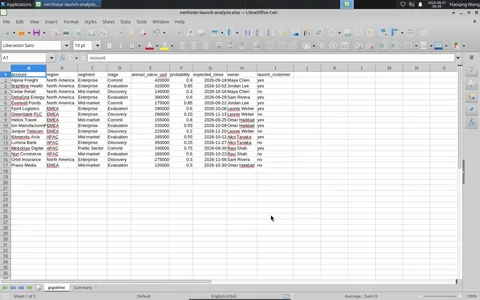
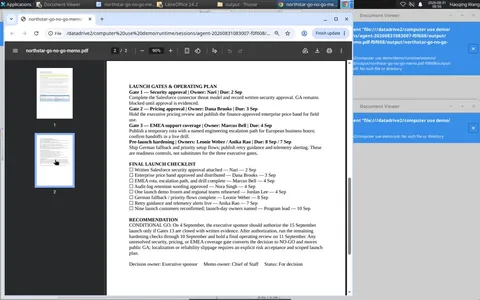
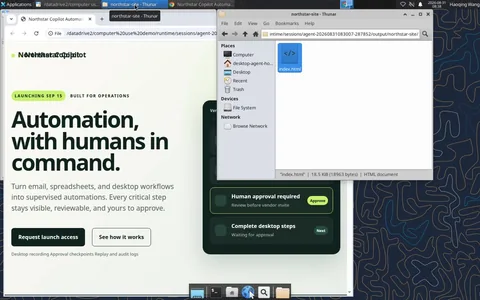
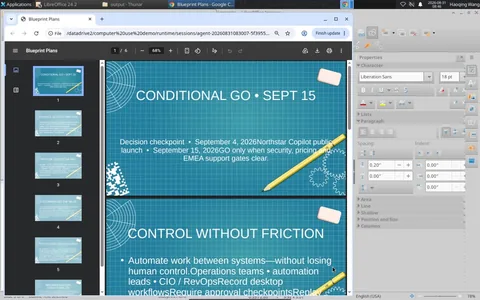
      The screenshots come from a recorded product-launch review in which four subagents work at the same time on one Linux host.

      Subagent reviewing slides in LibreOffice Impress
      Marketing deckImpress
      Subagent analyzing a revenue sheet in LibreOffice Calc
      Revenue modelCalc
      Subagent drafting a memo in LibreOffice Writer
      Go / no-go memoWriter
      Subagent inspecting a launch microsite in Chrome
      Launch micrositeChrome

      From single actions to code execution

      GUI and AX control both moved from one action per model turn to batches. The next step joins the two lines in one program.

      1Single action
      2Batched actionsHCU today
      3Code executionOutlook
      GUI

      One click per model turn. A new screenshot goes back to the model after each click.

      click(812, 455)
      # new screenshot
      Screenshot agents

      Pointer and key actions in one call, one screenshot at the end.

      GUI(actions=[
        click, type, keypress])
      # one screenshot at the end
      OpenAI and Anthropic computer tools, HCU GUI tool

      GUI, AX, and ordinary code in one program. AX state becomes variables to loop and branch on. Screenshots from pyautogui stay in the program; only the result returns to the model.

      import pyautogui as gui
      from pytesseract import image_to_string as ocr
      
      def receipt_total(row):         # reused per row
          # GUI: the pixels stay in the program
          gui.doubleClick(row.thumb.center)
          img = gui.screenshot(region=ax.bounds("w2"))
          gui.press("esc")
          return money(ocr(img))
      
      for row in ax.rows("w1", status="Pending"):
          claimed = money(row.text)   # AX: text
          match = receipt_total(row) == claimed
          name = "Approve" if match else "Flag"
          ax.click(row.button(name))  # AX: by ref
      
      assert not ax.rows("w1", status="Pending")
      print(ax.diff("w1"))  # 11 approved, 3 flagged
      OpenAI recommends it for GPT-6 Astra; next for the HCU Python SDK
      AX

      One AX action per call, then the agent reads the window again.

      press("#12")
      # read the window again
      CUA Driver, Codex Computer Use

      Short refs, ordered batches with waits, and a diff instead of a new tree.

      AX(mode="act", actions=[
        {"type":"click","ref":"r19"},
        {"type":"wait","window":"Save",
         "gone":true}])
      # only a diff comes back
      HCU AX tool
      Cost
      One expense review. Time counts only model waiting, at about 7 s per turn.

      ~50 model turns

      ~50 full screenshots · ~6 min

      ~16 model turns

      14 receipt crops · ~2 min

      1 model turn

      0 images, one printed line · ~7 s

      BibTeX

      @article{wang2026hcu,
        title   = {Hybrid Computer Use: A Unified Programmatic, Semantic, and Visual Interface for General Agents},
        author  = {Haoqing Wang and Xiaoyi Zhang and Sicheng Fan and Zhexin Zhang and Xinjie Zhang and Jiahao Li and Bin Li and Yan Lu},
        journal = {arXiv preprint},
        year    = {2026}
      }