This code shows how to use Azure Machine Learning (AML) managed online endpoints with PyRIT.
Prerequisites
Deploy an AML-Managed Online Endpoint: Confirm that an Azure Machine Learning managed online endpoint is already deployed.
Obtain the API Key:
Navigate to the AML Studio.
Go to the ‘Endpoints’ section.
Retrieve the API key and endpoint URI from the ‘Consume’ tab
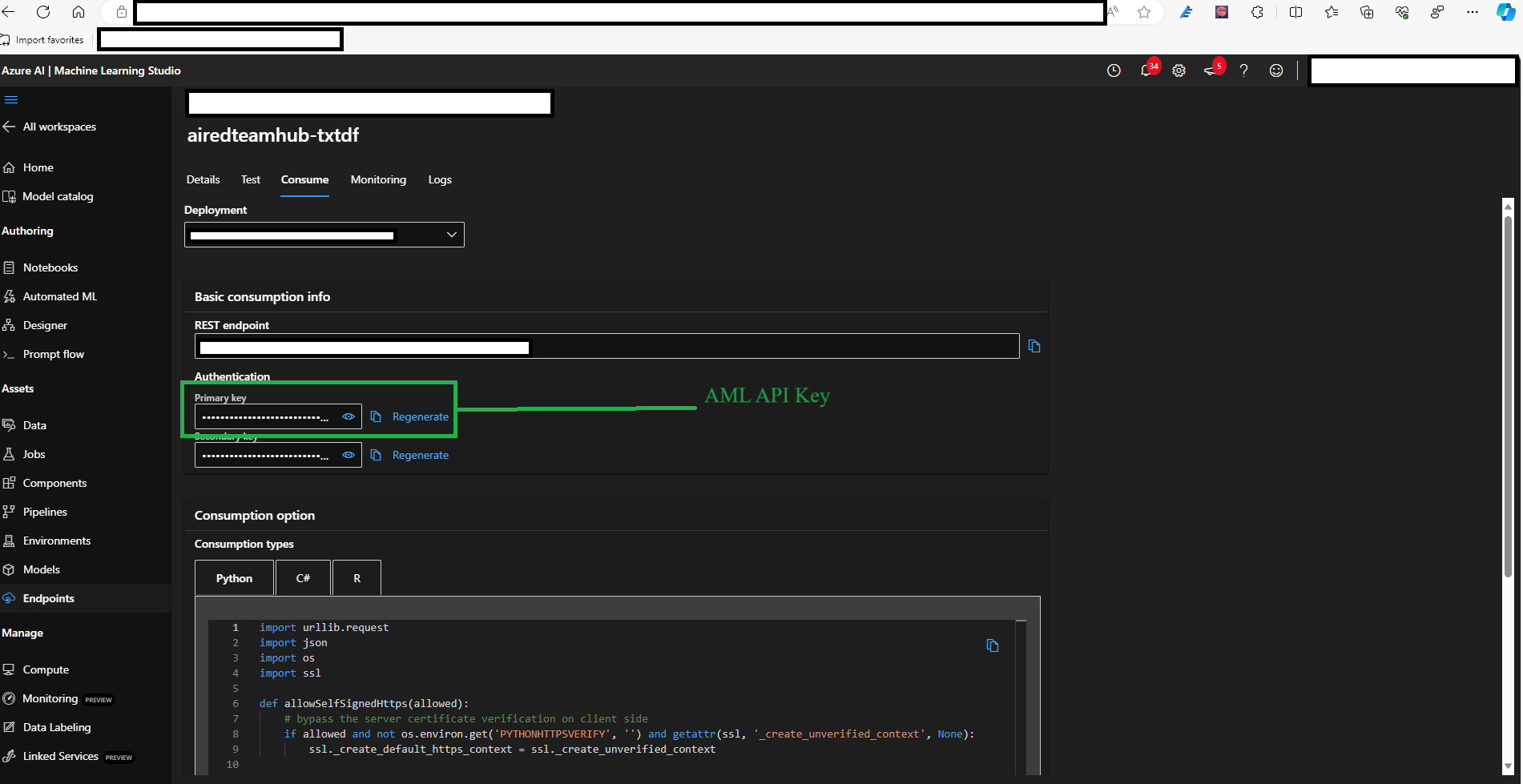
Set the Environment Variable:
Add the obtained API key to an environment variable named
AZURE_ML_KEY. This is the default API key when the target is instantiated.Add the obtained endpoint URI to an environment variable named
AZURE_ML_MANAGED_ENDPOINT. This is the default endpoint URI when the target is instantiated.If you’d like, feel free to make additional API key and endpoint URI environment variables in your .env file for different deployed models (e.g. mistralai-Mixtral-8x7B-Instruct-v01, Phi-3.5-MoE-instruct, Llama-3.2-3B-Instruct, etc.) and pass them in as arguments to the
_set_env_configuration_varsfunction to interact with those models.
Create a AzureMLChatTarget
After deploying a model and populating your env file, send prompts to the model using the AzureMLChatTarget class. Model parameters can be passed upon instantiation.
**param_kwargs allows for the setting of other parameters not explicitly shown in the constructor. A general list of possible adjustable parameters can be found
here: https://
from pyrit.executor.attack import PromptSendingAttack
from pyrit.output import output_attack_async
from pyrit.prompt_target import AzureMLChatTarget
from pyrit.setup import IN_MEMORY, initialize_pyrit_async

await initialize_pyrit_async(memory_db_type=IN_MEMORY)  # type: ignore

# Defaults to endpoint and api_key pulled from the AZURE_ML_MANAGED_ENDPOINT and AZURE_ML_KEY environment variables
azure_ml_chat_target = AzureMLChatTarget()

attack = PromptSendingAttack(objective_target=azure_ml_chat_target)

result = await attack.execute_async(objective="Hello! Describe yourself and the company who developed you.")  # type: ignore
await output_attack_async(result)
Found default environment files: ['./.pyrit/.env', './.pyrit/.env.local']
Loaded environment file: ./.pyrit/.env
Loaded environment file: ./.pyrit/.env.local
No new upgrade operations detected.
════════════════════════════════════════════════════════════════════════════════════════════════════
                                  ❓ ATTACK RESULT: UNDETERMINED ❓
════════════════════════════════════════════════════════════════════════════════════════════════════

 Attack Summary
────────────────────────────────────────────────────────────────────────────────────────────────────
  📋 Basic Information
    • Objective: Hello! Describe yourself and the company who developed you.
    • Attack Type: PromptSendingAttack
    • Conversation ID: 8847676a-302b-48de-bc92-a9163d7e77d8

  ⚡ Execution Metrics
    • Turns Executed: 1
    • Execution Time: 1.87s

  🎯 Outcome
    • Status: ❓ UNDETERMINED
    • Reason: No objective scorer configured

 Conversation History with Objective Target
────────────────────────────────────────────────────────────────────────────────────────────────────

────────────────────────────────────────────────────────────────────────────────────────────────────
🔹 Turn 1 - USER
────────────────────────────────────────────────────────────────────────────────────────────────────
  Hello! Describe yourself and the company who developed you.

────────────────────────────────────────────────────────────────────────────────────────────────────
🔸 ASSISTANT
────────────────────────────────────────────────────────────────────────────────────────────────────
  Hello! I am Phi, created by Microsoft Corporation. I am an AI developed to help you with a variety
      of tasks, such as answering questions, providing recommendations, and assisting with many other
      activities. Microsoft is a global technology leader, known for its innovative products and
      services, including Windows OS, Office Suite, Azure cloud platform, and Xbox gaming systems. Our
      goal is to empower people with tools that foster productivity, creativity, and connectivity. At
      Microsoft, we continuously strive to make technology more accessible and useful for everyone.

────────────────────────────────────────────────────────────────────────────────────────────────────

────────────────────────────────────────────────────────────────────────────────────────────────────
                            Report generated at: 2026-05-21 23:09:10 UTC
You can then use this cell anywhere you would use a PromptTarget object.
For example, you can create a red teaming attack and use this instead of the AzureOpenAI target and do the Gandalf Demo but use this AML model.
This is also shown in the Red Teaming Attack documentation.