Hybrid Control Detection
Hybrid control detection combines both UIA and OmniParser to provide comprehensive UI coverage. It merges standard Windows controls detected via UIA with visual elements detected through OmniParser, removing duplicates based on Intersection over Union (IoU) overlap.
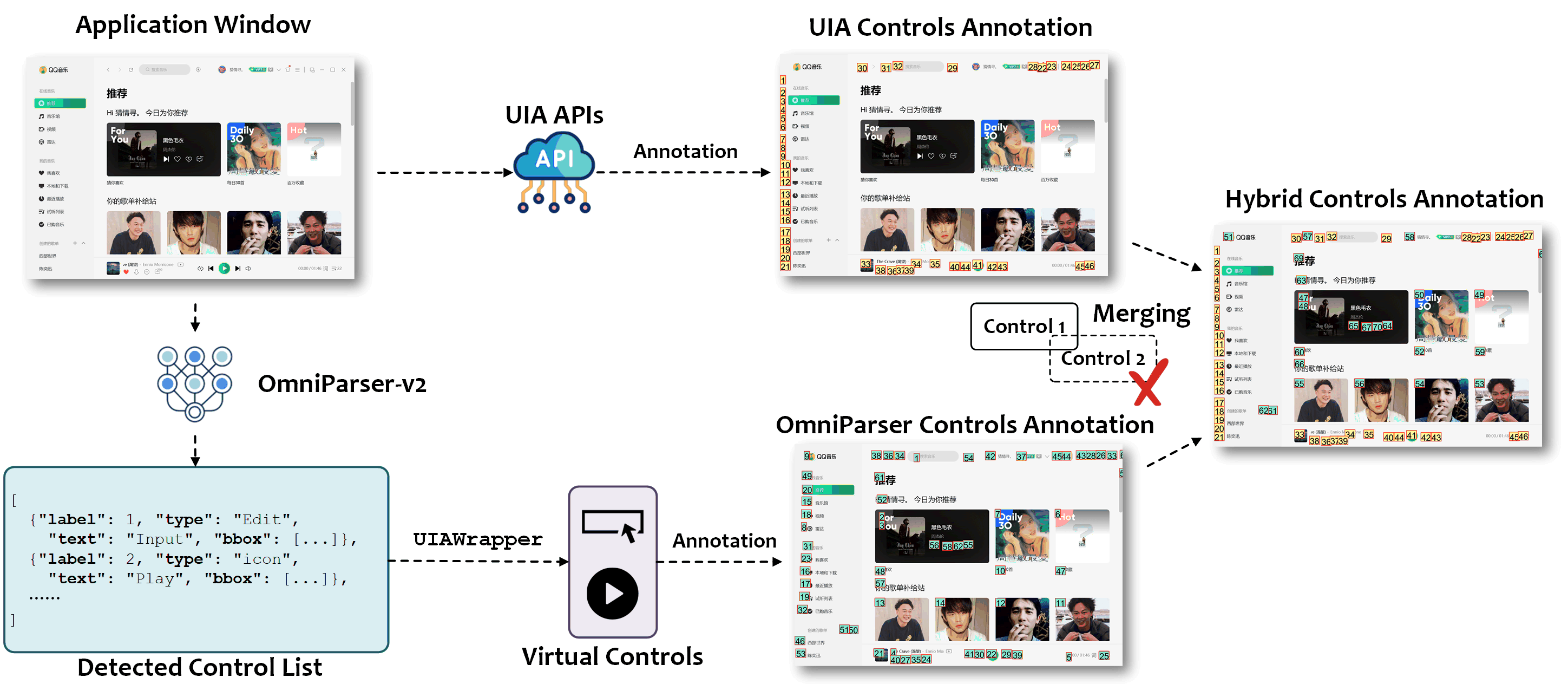
How It Works
The hybrid detection process follows these steps:
Deduplication Algorithm:
- Keep all UIA-detected controls (main list)
- For each OmniParser-detected control (additional list):
- Calculate IoU with all UIA controls
- If IoU > threshold (default 0.1), discard as duplicate
- Otherwise, add to merged list
- Result: Maximum coverage with minimal duplicates
Benefits
- Maximum Coverage: Detects both standard and custom UI elements
- No Gaps: Visual detection fills in UIA blind spots
- Efficiency: Deduplication prevents redundant annotations
- Flexibility: Works across diverse application types
Configuration
Prerequisites
Before enabling hybrid detection, you must deploy and configure OmniParser. See Visual Detection - Deployment for instructions.
Enable Hybrid Mode
Configure both backends in config/ufo/system.yaml:
# Enable hybrid detection
CONTROL_BACKEND: ["uia", "omniparser"]

# IoU threshold for merging (controls with IoU > threshold are considered duplicates)
IOU_THRESHOLD_FOR_MERGE: 0.1  # Default: 0.1

# OmniParser configuration
OMNIPARSER:
  ENDPOINT: "<YOUR_END_POINT>"
  BOX_THRESHOLD: 0.05
  IOU_THRESHOLD: 0.1
  USE_PADDLEOCR: True
  IMGSZ: 640
Configuration Options
| Parameter | Type | Default | Description |
|---|---|---|---|
CONTROL_BACKEND |
List[str] | ["uia"] |
List of detection backends to use |
IOU_THRESHOLD_FOR_MERGE |
float | 0.1 |
IoU threshold for duplicate detection (0.0-1.0) |
Tuning Guidelines:
- Lower threshold (< 0.1): More aggressive deduplication, may miss some controls
- Higher threshold (> 0.1): Keep more overlapping controls, may have duplicates
- Recommended: Keep default 0.1 for optimal balance
See System Configuration for complete configuration details.
Implementation
The hybrid detection is implemented through:
AppControlInfoStrategy: Orchestrates control collection from multiple backendsPhotographerFacade.merge_target_info_list(): Performs IoU-based deduplicationOmniparserGrounding: Handles visual detection and parsing
Reference
Bases: BasicGrounding
The OmniparserGrounding class is a subclass of BasicGrounding, which is used to represent the Omniparser grounding model.
parse_results(results, application_window=None)
Parse the grounding results string into a list of control elements infomation dictionaries.
| Parameters: |
|
|---|
| Returns: |
|
|---|
Source code in automator/ui_control/grounding/omniparser.py
87 88 89 90 91 92 93 94 95 96 97 98 99 100 101 102 103 104 105 106 107 108 109 110 111 112 113 114 115 116 117 118 119 120 | |
predict(image_path, box_threshold=0.05, iou_threshold=0.1, use_paddleocr=True, imgsz=640, api_name='/process')
Predict the grounding for the given image.
| Parameters: |
|
|---|
| Returns: |
|
|---|
Source code in automator/ui_control/grounding/omniparser.py
32 33 34 35 36 37 38 39 40 41 42 43 44 45 46 47 48 49 50 51 52 53 54 55 56 57 58 59 60 61 62 63 64 65 66 67 68 69 70 71 72 73 74 75 76 77 78 79 80 81 82 83 84 85 | |
screen_parsing(screenshot_path, application_window_info=None, box_threshold=0.05, iou_threshold=0.1, use_paddleocr=True, imgsz=640)
Parse the grounding results using TargetInfo for application window information.
| Parameters: |
|
|---|
| Returns: |
|
|---|
Source code in automator/ui_control/grounding/omniparser.py
197 198 199 200 201 202 203 204 205 206 207 208 209 210 211 212 213 214 215 216 217 218 219 220 221 222 223 224 225 226 227 228 229 230 231 232 233 234 235 236 237 238 239 240 241 242 243 244 245 246 247 248 249 | |