ai-agents-for-beginners
Exploring Microsoft Agent Framework
Introduction
This lesson will cover:
- Understanding Microsoft Agent Framework: Key Features and Value
- Exploring the Key Concepts of Microsoft Agent Framework
- Advanced MAF Patterns: Workflows, Middleware, and Memory
Learning Goals
After completing this lesson, you will know how to:
- Build Production Ready AI Agents using Microsoft Agent Framework
- Apply the core features of Microsoft Agent Framework to your Agentic Use Cases
- Use advanced patterns including workflows, middleware, and observability
Code Samples
Code samples for Microsoft Agent Framework (MAF) can be found in this repository under xx-python-agent-framework and xx-dotnet-agent-framework files.
Understanding Microsoft Agent Framework
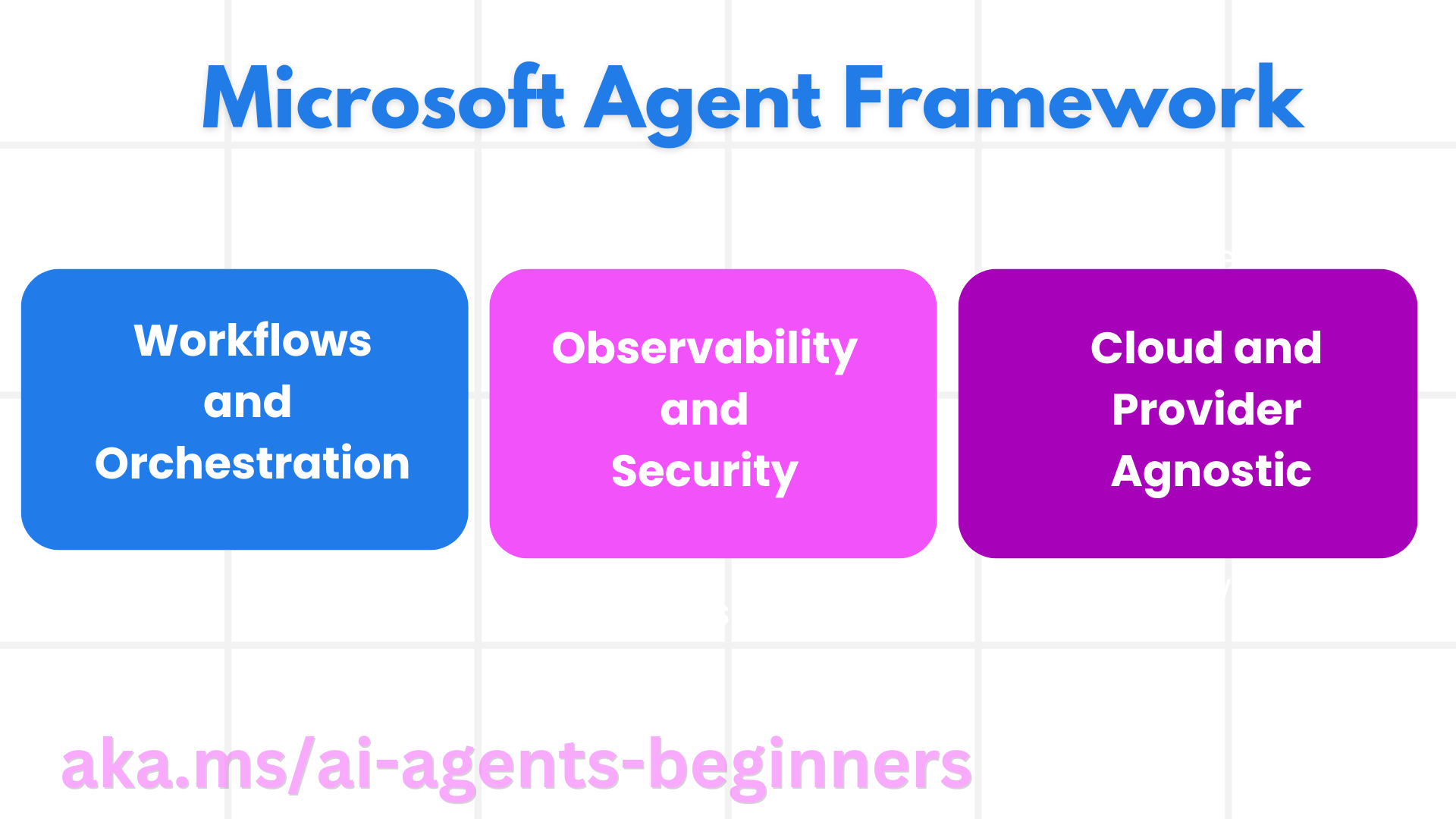
Microsoft Agent Framework (MAF) is Microsoft’s unified framework for building AI agents. It offers the flexibility to address the wide variety of agentic use cases seen in both production and research environments including:
- Sequential Agent orchestration in scenarios where step-by-step workflows are needed.
- Concurrent orchestration in scenarios where agents need to complete tasks at the same time.
- Group chat orchestration in scenarios where agents can collaborate together on one task.
- Handoff Orchestration in scenarios where agents hand off the task to one another as the subtasks are completed.
- Magnetic Orchestration in scenarios where a manager agent creates and modifies a task list and handles the coordination of subagents to complete the task.
To deliver AI Agents in Production, MAF also has included features for:
- Observability through the use of OpenTelemetry where every action of the AI Agent including tool invocation, orchestration steps, reasoning flows and performance monitoring through Microsoft Foundry dashboards.
- Security by hosting agents natively on Microsoft Foundry which includes security controls such as role-based access, private data handling and built-in content safety.
- Durability as Agent threads and workflows can pause, resume and recover from errors which enables longer running process.
- Control as human in the loop workflows are supported where tasks are marked as requiring human approval.
Microsoft Agent Framework is also focused on being interoperable by:
- Being Cloud-agnostic - Agents can run in containers, on-prem and across multiple different clouds.
- Being Provider-agnostic - Agents can be created through your preferred SDK including Azure OpenAI and OpenAI
- Integrating Open Standards - Agents can utilize protocols such as Agent-to-Agent(A2A) and Model Context Protocol (MCP) to discover and use other agents and tools.
- Plugins and Connectors - Connections can be made to data and memory services such as Microsoft Fabric, SharePoint, Pinecone and Qdrant.
Let’s look at how these features are applied to some of the core concepts of Microsoft Agent Framework.
Key Concepts of Microsoft Agent Framework
Agents
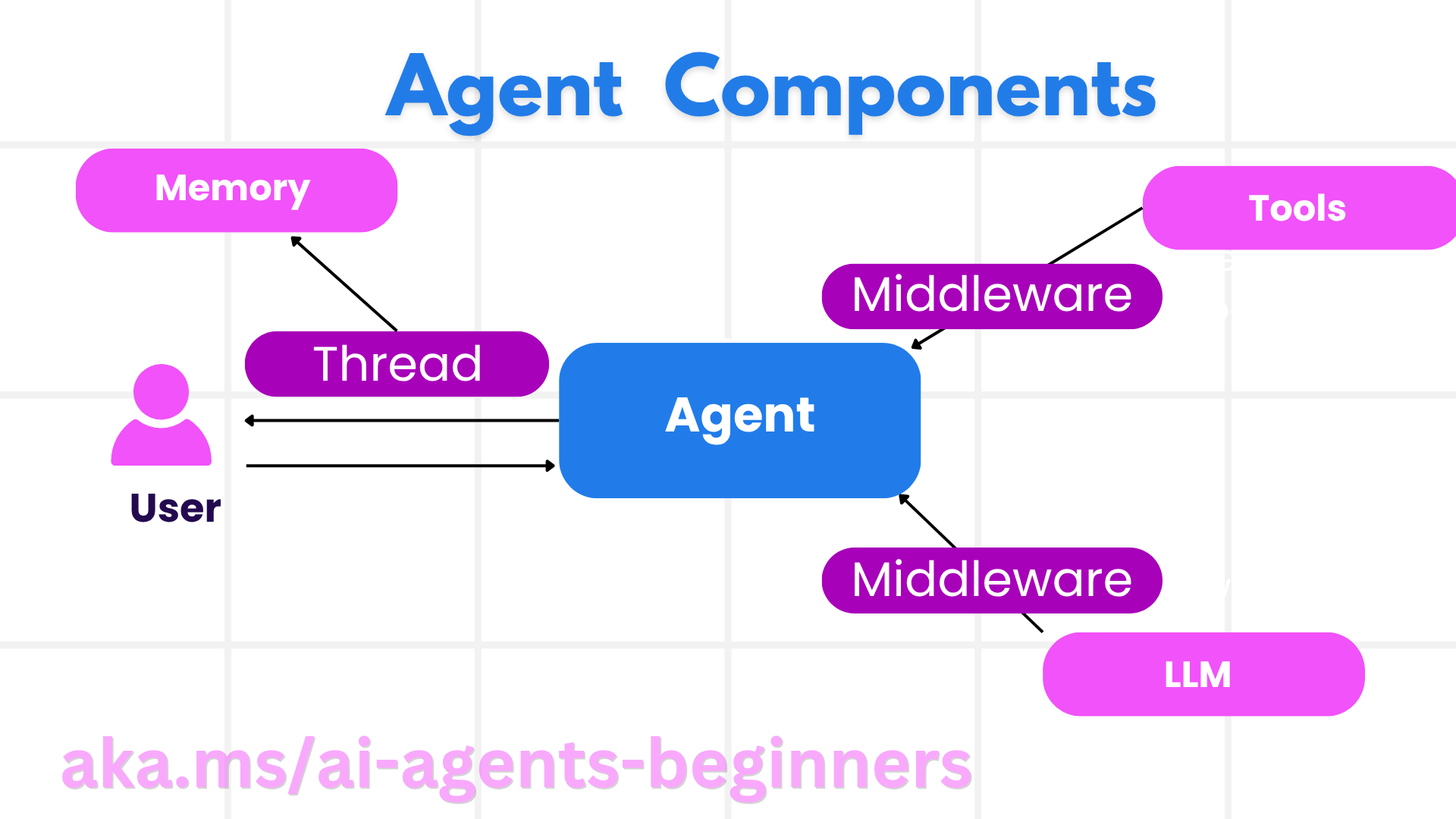
Creating Agents
Agent creation is done by defining the inference service (LLM Provider), a
set of instructions for the AI Agent to follow, and an assigned name:
agent = AzureOpenAIChatClient(credential=AzureCliCredential()).create_agent( instructions="You are good at recommending trips to customers based on their preferences.", name="TripRecommender" )
The above is using Azure OpenAI but agents can be created using a variety of services including Microsoft Foundry Agent Service:
AzureAIAgentClient(async_credential=credential).create_agent( name="HelperAgent", instructions="You are a helpful assistant." ) as agent
OpenAI Responses, ChatCompletion APIs
agent = OpenAIResponsesClient().create_agent( name="WeatherBot", instructions="You are a helpful weather assistant.", )
agent = OpenAIChatClient().create_agent( name="HelpfulAssistant", instructions="You are a helpful assistant.", )
or MiniMax, which provides an OpenAI-compatible API with large context windows (up to 204K tokens):
agent = OpenAIChatClient(base_url="https://api.minimax.io/v1", api_key=os.environ["MINIMAX_API_KEY"], model_id="MiniMax-M3").create_agent( name="HelpfulAssistant", instructions="You are a helpful assistant.", )
or remote agents using the A2A protocol:
agent = A2AAgent( name=agent_card.name, description=agent_card.description, agent_card=agent_card, url="https://your-a2a-agent-host" )
Running Agents
Agents are run using the .run or .run_stream methods for either non-streaming or streaming responses.
result = await agent.run("What are good places to visit in Amsterdam?")
print(result.text)
async for update in agent.run_stream("What are the good places to visit in Amsterdam?"):
    if update.text:
        print(update.text, end="", flush=True)
Each agent run can also have options to customize parameters such as max_tokens used by the agent, tools that agent is able to call, and even the model itself used for the agent.
This is useful in cases where specific models or tools are required for completing a user’s task.
Tools
Tools can be defined both when defining the agent:
def get_attractions( location: Annotated[str, Field(description="The location to get the top tourist attractions for")], ) -> str: """Get the top tourist attractions for a given location.""" return f"The top attractions for {location} are."


# When creating a ChatAgent directly

agent = ChatAgent( chat_client=OpenAIChatClient(), instructions="You are a helpful assistant", tools=[get_attractions]
and also when running the agent:
result1 = await agent.run( "What's the best place to visit in Seattle?", tools=[get_attractions] # Tool provided for this run only )
Agent Threads
Agent Threads are used to handle multi-turn conversations. Threads can be created by either by:
- Using
get_new_thread()which enables the thread to be saved over time - Creating a thread automatically when running an agent and only having the thread last during the current run.
To create a thread, the code looks like this:
# Create a new thread.
thread = agent.get_new_thread() # Run the agent with the thread.
response = await agent.run("Hello, I am here to help you book travel. Where would you like to go?", thread=thread)
You can then serialize the thread to be stored for later use:
# Create a new thread.
thread = agent.get_new_thread()

# Run the agent with the thread.

response = await agent.run("Hello, how are you?", thread=thread)

# Serialize the thread for storage.

serialized_thread = await thread.serialize()

# Deserialize the thread state after loading from storage.

resumed_thread = await agent.deserialize_thread(serialized_thread)
Agent Middleware
Agents interact with tools and LLMs to complete user’s tasks. In certain scenarios, we want to execute or track in between these it interactions. Agent middleware enables us to do this through:
Function Middleware
This middleware allows us to execute an action between the agent and a function/tool that it will be calling. An example of when this would be used is when you might want to do some logging on the function call.
In the code below next defines if the next middleware or the actual function should be called.
async def logging_function_middleware(
    context: FunctionInvocationContext,
    next: Callable[[FunctionInvocationContext], Awaitable[None]],
) -> None:
    """Function middleware that logs function execution."""
    # Pre-processing: Log before function execution
    print(f"[Function] Calling {context.function.name}")

    # Continue to next middleware or function execution
    await next(context)

    # Post-processing: Log after function execution
    print(f"[Function] {context.function.name} completed")
Chat Middleware
This middleware allows us to execute or log an action between the agent and the requests between the LLM .
This contains important information such as the messages that are being sent to the AI service.
async def logging_chat_middleware(
    context: ChatContext,
    next: Callable[[ChatContext], Awaitable[None]],
) -> None:
    """Chat middleware that logs AI interactions."""
    # Pre-processing: Log before AI call
    print(f"[Chat] Sending {len(context.messages)} messages to AI")

    # Continue to next middleware or AI service
    await next(context)

    # Post-processing: Log after AI response
    print("[Chat] AI response received")
Agent Memory
As covered in the Agentic Memory lesson, memory is an important element to enabling the agent to operate over different contexts. MAF has offers several different types of memories:
In-Memory Storage
This is the memory stored in threads during the application runtime.
# Create a new thread.
thread = agent.get_new_thread() # Run the agent with the thread.
response = await agent.run("Hello, I am here to help you book travel. Where would you like to go?", thread=thread)
Persistent Messages
This memory is used when storing conversation history across different sessions. It is defined using the chat_message_store_factory :
from agent_framework import ChatMessageStore

# Create a custom message store
def create_message_store():
    return ChatMessageStore()

agent = ChatAgent(
    chat_client=OpenAIChatClient(),
    instructions="You are a Travel assistant.",
    chat_message_store_factory=create_message_store
)
Dynamic Memory
This memory is added to the context before agents are run. These memories can be stored in external services such as mem0:
from agent_framework.mem0 import Mem0Provider

# Using Mem0 for advanced memory capabilities
memory_provider = Mem0Provider(
    api_key="your-mem0-api-key",
    user_id="user_123",
    application_id="my_app"
)

agent = ChatAgent(
    chat_client=OpenAIChatClient(),
    instructions="You are a helpful assistant with memory.",
    context_providers=memory_provider
)
Agent Observability
Observability is important to building reliable and maintainable agentic systems. MAF integrates with OpenTelemetry to provide tracing and meters for better observability.
from agent_framework.observability import get_tracer, get_meter

tracer = get_tracer()
meter = get_meter()
with tracer.start_as_current_span("my_custom_span"):
    # do something
    pass
counter = meter.create_counter("my_custom_counter")
counter.add(1, {"key": "value"})
Workflows
MAF offers workflows that are pre-defined steps to complete a task and include AI agents as components in those steps.
Workflows are made up of different components that allow better control flow. Workflows also enable multi-agent orchestration and checkpointing to save workflow states.
The core components of a workflow are:
Executors
Executors receive input messages, perform their assigned tasks, and then produce an output message. This moves the workflow forward toward the completing the larger task. Executors can be either AI agent or custom logic.
Edges
Edges are used to define the flow of messages in a workflow. These can be:
Direct Edges - Simple one-to-one connections between executors:
from agent_framework import WorkflowBuilder

builder = WorkflowBuilder()
builder.add_edge(source_executor, target_executor)
builder.set_start_executor(source_executor)
workflow = builder.build()
Conditional Edges - Activated after certain condition is met. For example, when hotels rooms are unavailable, an executor can suggest other options.
Switch-case Edges - Route messages to different executors based on defined conditions. For example. if travel customer has priority access and their tasks will be handled through another workflow.
Fan-out Edges - Send one message to multiple targets.
Fan-in Edges - Collect multiple messages from different executors and send to one target.
Events
To provide better observability into workflows, MAF offers built-in events for execution including:
WorkflowStartedEvent- Workflow execution beginsWorkflowOutputEvent- Workflow produces an outputWorkflowErrorEvent- Workflow encounters an errorExecutorInvokeEvent- Executor starts processingExecutorCompleteEvent- Executor finishes processingRequestInfoEvent- A request is issued
Advanced MAF Patterns
The sections above cover the key concepts of Microsoft Agent Framework. As you build more complex agents, here are some advanced patterns to consider:
- Middleware Composition: Chain multiple middleware handlers (logging, auth, rate-limiting) using function and chat middleware for fine-grained control over agent behavior.
- Workflow Checkpointing: Use workflow events and serialization to save and resume long-running agent processes.
- Dynamic Tool Selection: Combine RAG over tool descriptions with MAF’s tool registration to present only relevant tools per query.
- Multi-Agent Handoff: Use workflow edges and conditional routing to orchestrate handoffs between specialized agents.
Hosting LangChain / LangGraph Agents on Microsoft Foundry
Microsoft Agent Framework is framework-interoperable — you’re not limited to agents written with MAF. If you already have an agent built with LangChain or LangGraph, you can run it as a Microsoft Foundry hosted agent so that Foundry manages the runtime, sessions, scaling, identity, and protocol endpoints for you, while your agent logic stays in LangGraph.
This is done with the langchain_azure_ai.agents.hosting package, which exposes a compiled LangGraph graph over the same protocols Foundry hosted agents use.
1. Install the hosting extra:
pip install -U "langchain-azure-ai[hosting]>=1.2.4" azure-identity
The hosting extra installs the Foundry protocol libraries: azure-ai-agentserver-responses (the OpenAI-compatible /responses endpoint) and azure-ai-agentserver-invocations (the generic /invocations endpoint).
2. Choose a hosting protocol:
| Protocol | Host class | Endpoint | Use when |
|---|---|---|---|
| Responses | ResponsesHostServer |
/responses |
You want OpenAI-compatible chat, streaming, response history, and conversation threading — the recommended default for conversational agents. |
| Invocations | InvocationsHostServer |
/invocations |
You need a custom JSON shape, a webhook-style endpoint, or non-conversational processing. |
Because the Responses API is the primary API for agent-style development in Foundry, start with ResponsesHostServer for most agents.
3. Configure environment variables (az login first so DefaultAzureCredential can authenticate):
export FOUNDRY_PROJECT_ENDPOINT="https://<resource>.services.ai.azure.com/api/projects/<project>"
export FOUNDRY_MODEL_NAME="gpt-5-mini"
When the agent later runs as a hosted agent in Foundry, the platform injects FOUNDRY_PROJECT_ENDPOINT automatically.
4. Expose a LangGraph agent over the Responses protocol:
import os

from azure.ai.projects import AIProjectClient
from azure.identity import DefaultAzureCredential, get_bearer_token_provider
from langchain.agents import create_agent
from langchain_openai import ChatOpenAI
from langchain_azure_ai.agents.hosting import ResponsesHostServer

_AZURE_AI_SCOPE = "https://ai.azure.com/.default"


def build_chat_model() -> ChatOpenAI:
    project_endpoint = os.environ["FOUNDRY_PROJECT_ENDPOINT"].rstrip("/")
    deployment = os.environ.get("FOUNDRY_MODEL_NAME", "gpt-5-mini")
    credential = DefaultAzureCredential()
    project = AIProjectClient(endpoint=project_endpoint, credential=credential)
    openai_client = project.get_openai_client()
    token_provider = get_bearer_token_provider(credential, _AZURE_AI_SCOPE)

    # ChatOpenAI here targets the Foundry project's OpenAI-compatible (Responses) endpoint.
    return ChatOpenAI(
        model=deployment,
        base_url=str(openai_client.base_url),
        api_key=token_provider,
    )


def main() -> None:
    graph = create_agent(build_chat_model(), tools=[])
    port = int(os.environ.get("PORT", "8088"))
    ResponsesHostServer(graph).run(port=port)


if __name__ == "__main__":
    main()
Run it locally with python main.py, then send a Responses request to http://localhost:8088/responses.
Key behaviors:
- Conversations: Clients continue a conversation by passing
previous_response_idor aconversationID. If your graph is compiled with a LangGraph checkpointer, Foundry keys conversation state to the checkpoint (use a durable checkpointer in production;MemorySaveris fine for local testing). - Human-in-the-loop: If your graph uses LangGraph
interrupt(),ResponsesHostServersurfaces the pending interrupt as a Responsesfunction_call/mcp_approval_requestitem, and clients resume with a matchingfunction_call_output/mcp_approval_response. - Deploy to Foundry: Use the Azure Developer CLI —
azd ext install azure.ai.agents,azd ai agent init -m <manifest>,azd ai agent run(local, requires Docker), thenazd provisionandazd deploy. Hosted-agent deployment requires the Foundry Project Manager role.
A runnable version of this example lives in code-samples/14-langchain-hosted-agent.py. For the full walkthrough (Invocations protocol, custom request schemas, and troubleshooting), see Host LangGraph agents as Foundry hosted agents.
Code Samples
Code samples for Microsoft Agent Framework can be found in this repository under xx-python-agent-framework and xx-dotnet-agent-framework files.
Got More Questions About Microsoft Agent Framework?
Join the Microsoft Foundry Discord to meet with other learners, attend office hours and get your AI Agents questions answered.