ai-agents-for-beginners

(ចុចលើរូបភាពខាងលើដើម្បីមើលវីដេអូសម្រាប់មេរៀននេះ)
រចនាប័ទ្មផែនការ
ការណែនាំ
មេរៀននេះនឹងគ្របដណ្ដប់
- ការបញ្ជាក់គោលបំណងរួមយ៉ាងច្បាស់ និងបំបែកភារកិច្ចស្មុគស្មាញជាប្រតិបត្តិការជាផ្នែកតូចៗដែលគ្រប់គ្រងបាន។
- ការប្រើប្រាស់លទ្ធផលដែលមានរចនាសម្ព័ន្ធសម្រាប់ការឆ្លើយតបដែលទុកចិត្តបាន និងអាចចាប់យកដោយម៉ាស៊ីនបានល្អប្រសើរជាងមុន។
- ការអនុវត្តរបៀបផ្អែកលើព្រឹត្តិការណ៍ដើម្បីដោះស្រាយភារកិច្ចដែលផ្លាស់ប្តូរបាន និងការបញ្ចូលព័ត៌មានមិនចាំបាច់ដែលមិនរំពឹងទុក។
គោលបំណងសិក្សា
បន្ទាប់ពីបញ្ចប់មេរៀននេះ អ្នកនឹងមានការយល់ដឹងអំពី៖
- កំណត់ និងកំណត់គោលបំណងរួមសម្រាប់ភ្នាក់ងារប្រៃសណីយ៍ AI ដើម្បីធានាថាវាដឹងច្បាស់ថាត្រូវសម្រេចអ្វី។
- បំបែកភារកិច្ចស្មុគស្មាញជា ផ្នែកតូចៗដែលគ្រប់គ្រងបាន និងរៀបចំពួកវាទៅជាចំណងជើងតាមលំដាប់មានហេតុផល។
- ឧបករណ៍ដែលផ្តល់ឱ្យភ្នាក់ងារ (ឧ. ឧបករណ៍ស្វែងរកឬឧបករណ៍វិភាគទិន្នន័យ) ការសម្រេចចិត្តពេលណា និងរបៀបដែលពួកវាត្រូវបានប្រើប្រាស់ និងដោះស្រាយស្ថានភាពមិនរំពឹងទុកដែលកើតឡើង។
- វាយតម្លៃលទ្ធផលកិច្ចការចុះ តម្លាភាពការអនុវត្តន៍ និងអនុវត្តចំពោះសកម្មភាពដើម្បីធ្វើឱ្យលទ្ធផលចុងក្រោយកាន់តែប្រសើរ។
ការកំណត់គោលបំណងរួម និងការបំបែកភារកិច្ច
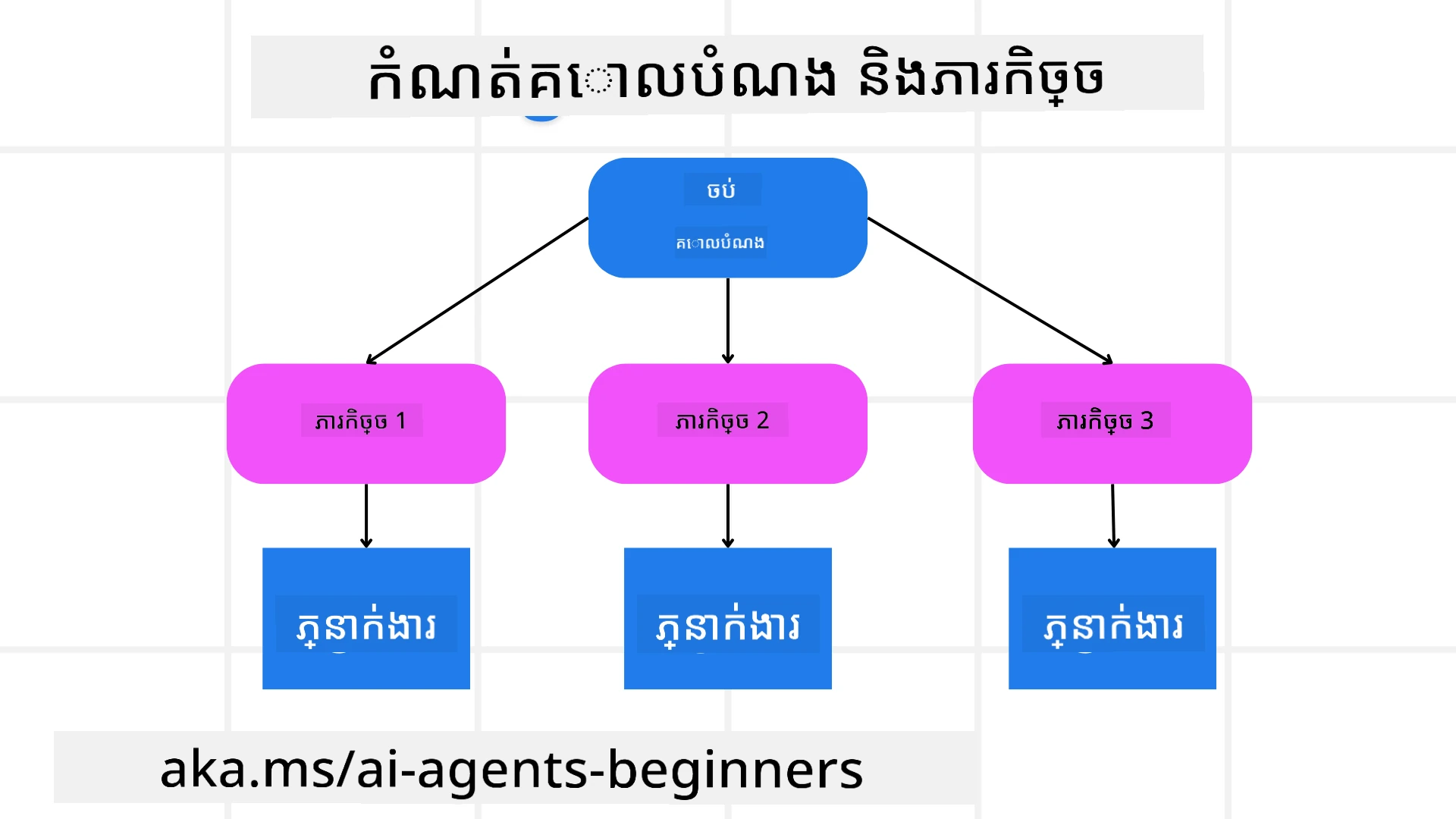
ភារកិច្ចភាគច្រើននៅក្នុងពិភពព thật ភាសាស្មុគស្មាញពេកដើម្បីដោះស្រាយក្នុងជំហាន់តែមួយ។ ភ្នាក់ងារ AI ត្រូវការគោលបំណងសង្ខេបដើម្បីដឹកនាំការធ្វើផែនការ និងសកម្មភាពរបស់វា។ ឧទាហរណ៍ សូមគិតពីគោលបំណង៖
"បង្កើតផែនការធ្វើដំណើរបីថ្ងៃ។"
ទោះបីវាងាយស្រួលក្នុងការបដិសេធ ក៏វាក៏នៅត្រូវការការបន្តបន្តរដែលច្បាស់លាស់ជាង។ គោលបំណង越ច្បាស់ មានន័យថាភ្នាក់ងារនិងអ្នករួមការងារណាដែលពាក់ព័ន្ធ អាចផ្តោតលើការសម្រេចបានលទ្ធផលត្រឹមត្រូវបានល្អប្រសើរជាងមុន ដូចជាការបង្កើតផែនការជាមួយជម្រើសជិះយន្តហោះ ការផ្ដល់អនុសាសន៍សណ្ឋាគារ និងការស្នើសុំសកម្មភាព។
ការបំបែកភារកិច្ច
ភារកិច្ចធំនិងស្មុគស្មាញ ក្លាយជាអាចគ្រប់គ្រងបានកាន់តែល្អនៅពេលបំបែកជាភារកិច្ចតូចៗដែលមានគោលបំណងច្បាស់។ សម្រាប់ឧទាហរណ៍ផែនការធ្វើដំណើរ អ្នកអាចបំបែកគោលបំណងជាប្រភេទដូចខាងក្រោម៖
- ការកក់សំបុត្រយន្តហោះ
- ការកក់សណ្ឋាគារ
- ការជួលឡាន
- ការបំណងផ្ទាល់ខ្លួន
វិធីសាស្រ្តលំដាប់នេះអាចឱ្យភ្នាក់ងារឬដំណើរការជាដាច់ដោយឡែកដោះស្រាយភារកិច្ចនីមួយៗ។ ភ្នាក់ងារមួយអាចមានជំនាញស្វែងរកជម្រើសជិះយន្តហោះល្អបំផុត ភ្នាក់ងារផ្សេងទៀតផ្តោតលើការកក់សណ្ឋាគារ ល។ ហើយភ្នាក់ងារតំណាងដំណើរការមួយអាចបញ្ចូលលទ្ធផលទាំងនេះទៅក្នុងផែនការដែលសម្រួលសម្រាប់អ្នកប្រើចុងក្រោយ។
វិធីសាស្រ្តនេះក៏អនុញ្ញាតឱ្យមានការកែលម្អផ្សេងៗដំណាក់កាលដោយឡែក។ ឧទាហរណ៍ អ្នកអាចបន្ថែមភ្នាក់ងារជំនាញចំពោះការផ្ដល់អនុសាសន៍អាហារ ឬសកម្មភាពក្នុងតំបន់និងលើកកម្ពស់ផែនការជាថ្មីនៅពេលក្រោយ។
លទ្ធផលដែលមានរចនាសម្ព័ន្ធ
ម៉ូដែលភាសាធំៗ (LLMs) អាចបង្កើតលទ្ធផលដែលមានរចនាសម្ព័ន្ធ (ឧ. JSON) ដែលងាយស្រួលសម្រាប់ភ្នាក់ងារឬសេវាកម្មក្រោយក្នុងការបំបែកនិងដំណើរការ។ នេះមានប្រយោជន៍ពិសេសនៅក្នុងបរិបទភាពភ្នាក់ងារច្រើនដែលយើងអាចអនុវត្តអំពើទាំងនេះបន្ទាប់ពីទទួលបានលទ្ធផលផែនការ។
ឧទាហរណ៍ Python ខាងក្រោមបង្ហាញភ្នាក់ងារការធ្វើផែនការជាមួយការបំបែកគោលបំណងទៅថ្នាក់តូចៗ និងបង្កើតផែនការដែលមានរចនាសម្ព័ន្ធ៖
from pydantic import BaseModel
from enum import Enum
from typing import List, Optional, Union
import json
import os
from typing import Optional
from pprint import pprint
from agent_framework.foundry import FoundryChatClient
from azure.identity import AzureCliCredential
class AgentEnum(str, Enum):
FlightBooking = "flight_booking"
HotelBooking = "hotel_booking"
CarRental = "car_rental"
ActivitiesBooking = "activities_booking"
DestinationInfo = "destination_info"
DefaultAgent = "default_agent"
GroupChatManager = "group_chat_manager"
# ម៉ូឌែលការងារតូចដំណើរកំសាន្ត
class TravelSubTask(BaseModel):
task_details: str
assigned_agent: AgentEnum # យើងចង់ផ្ដល់ការងារឲ្យភ្នាក់ងារ
class TravelPlan(BaseModel):
main_task: str
subtasks: List[TravelSubTask]
is_greeting: bool
provider = FoundryChatClient(
project_endpoint=os.environ["AZURE_AI_PROJECT_ENDPOINT"],
model=os.environ["AZURE_AI_MODEL_DEPLOYMENT_NAME"],
credential=AzureCliCredential(),
)
# កំណត់សារអ្នកប្រើប្រាស់
system_prompt = """You are a planner agent.
Your job is to decide which agents to run based on the user's request.
Provide your response in JSON format with the following structure:
{'main_task': 'Plan a family trip from Singapore to Melbourne.',
'subtasks': [{'assigned_agent': 'flight_booking',
'task_details': 'Book round-trip flights from Singapore to '
'Melbourne.'}
Below are the available agents specialised in different tasks:
- FlightBooking: For booking flights and providing flight information
- HotelBooking: For booking hotels and providing hotel information
- CarRental: For booking cars and providing car rental information
- ActivitiesBooking: For booking activities and providing activity information
- DestinationInfo: For providing information about destinations
- DefaultAgent: For handling general requests"""
user_message = "Create a travel plan for a family of 2 kids from Singapore to Melbourne"
response = client.create_response(input=user_message, instructions=system_prompt)
response_content = response.output_text
pprint(json.loads(response_content))
ភ្នាក់ងារការធ្វើផែនការជាមួយការសម្របសម្រួលភាពភ្នាក់ងារច្រើន
ក្នុងឧទាហរណ៍នេះ ភ្នាក់ងារផ្លូវការប្រែសម្រួលប្រព័ន្ធសិមែនទិកទទួលសំណើររបស់អ្នកប្រើ (ឧ. “ខ្ញុំត្រូវការផែនការសណ្ឋាគារសម្រាប់ដំណើរធ្វើដំណើររបស់ខ្ញុំ។”)។
ភ្នាក់ងារក្នុងផែនការនោះបន្ទាប់:
- ទទួលបានផែនការសណ្ឋាគារ៖ ភ្នាក់ងារការធ្វើផែនការយកសាររបស់អ្នកប្រើ និងផ្អែកលើប្រធានបទប្រព័ន្ធ (រួមបញ្ចូលទិន្នន័យភ្នាក់ងារដែលមាន) បង្កើតផែនការធ្វើដំណើរដែលមានរចនាសម្ព័ន្ធ។
- រាយបញ្ជីភ្នាក់ងារនិងឧបករណ៍របស់ពួកវា៖ បញ្ជីភ្នាក់ងារមានបញ្ជីភ្នាក់ងារច្រើន (ឧ. សម្រាប់ជិះយន្តហោះ សណ្ឋាគារ ជួលឡាន និងសកម្មភាព) ជាមួយមុខងារ ឬឧបករណ៍ដែលពួកគេផ្តល់ជូន។
- បញ្ជូនផែនការទៅភ្នាក់ងារដែលពាក់ព័ន្ធ៖ អាស្រ័យលើចំនួនខ្នាតតូចៗ នេះភ្នាក់ងារការធ្វើផែនការយកសារផ្ញើទៅភ្នាក់ងារដែលមានចំណង់ចំណូលផ្ទាល់ (សម្រាប់ហេតុការណ៍ភារកិច្ចតែមួយ) ឬ phốiបញ្ជាក់តាមអ្នកគ្រប់គ្រងក្រុមជជែកសម្រាប់ការសហការភ្នាក់ងារច្រើន។
- សង្ខេបលទ្ធផល៖ ចុងក្រោយអ្នកធ្វើផែនការសង្ខេបផែនការបានបង្កើតឡើងសម្រាប់ភាពច្បាស់លាស់។ ឧទាហរណ៍កូដ Python ខាងក្រោមបង្ហាញជំហានទាំងនេះ៖
from pydantic import BaseModel
from enum import Enum
from typing import List, Optional, Union
class AgentEnum(str, Enum):
FlightBooking = "flight_booking"
HotelBooking = "hotel_booking"
CarRental = "car_rental"
ActivitiesBooking = "activities_booking"
DestinationInfo = "destination_info"
DefaultAgent = "default_agent"
GroupChatManager = "group_chat_manager"
# ម៉ូឌែលការងារតូចការធ្វើដំណើរ
class TravelSubTask(BaseModel):
task_details: str
assigned_agent: AgentEnum # យើងចង់ផ្ដល់ភារកិច្ចទៅភ្នាក់ងារ
class TravelPlan(BaseModel):
main_task: str
subtasks: List[TravelSubTask]
is_greeting: bool
import json
import os
from typing import Optional
from agent_framework.foundry import FoundryChatClient
from azure.identity import AzureCliCredential
# បង្កើតអតិថិជន
provider = FoundryChatClient(
project_endpoint=os.environ["AZURE_AI_PROJECT_ENDPOINT"],
model=os.environ["AZURE_AI_MODEL_DEPLOYMENT_NAME"],
credential=AzureCliCredential(),
)
from pprint import pprint
# កំណត់សារអ្នកប្រើ
system_prompt = """You are a planner agent.
Your job is to decide which agents to run based on the user's request.
Below are the available agents specialized in different tasks:
- FlightBooking: For booking flights and providing flight information
- HotelBooking: For booking hotels and providing hotel information
- CarRental: For booking cars and providing car rental information
- ActivitiesBooking: For booking activities and providing activity information
- DestinationInfo: For providing information about destinations
- DefaultAgent: For handling general requests"""
user_message = "Create a travel plan for a family of 2 kids from Singapore to Melbourne"
response = client.create_response(input=user_message, instructions=system_prompt)
response_content = response.output_text
# បោះពុម្ពមាតិកាចម្លើយបន្ទាប់ពីផ្ទុកវាជា JSON
pprint(json.loads(response_content))
អ្វីដែលតាមមកគឺជាលទ្ធផលពីកូដមុន ហើយអ្នកអាចប្រើលទ្ធផលដែលមានរចនាសម្ព័ន្ធនេះដើម្បីបញ្ជូនទៅ assigned_agent និងសង្ខេបផែនការធ្វើដំណើរសម្រាប់អ្នកប្រើចុងក្រោយ។
{
    "is_greeting": "False",
    "main_task": "Plan a family trip from Singapore to Melbourne.",
    "subtasks": [
        {
            "assigned_agent": "flight_booking",
            "task_details": "Book round-trip flights from Singapore to Melbourne."
        },
        {
            "assigned_agent": "hotel_booking",
            "task_details": "Find family-friendly hotels in Melbourne."
        },
        {
            "assigned_agent": "car_rental",
            "task_details": "Arrange a car rental suitable for a family of four in Melbourne."
        },
        {
            "assigned_agent": "activities_booking",
            "task_details": "List family-friendly activities in Melbourne."
        },
        {
            "assigned_agent": "destination_info",
            "task_details": "Provide information about Melbourne as a travel destination."
        }
    ]
}
ឯកសារ notebook ឧទាហរណ៍ជាមួយកូដខាងលើ មានផ្តល់ជូន ទីនេះ។
ការធ្វើផែនការដោយម្តងពីម្តង
ភារកិច្ចខ្លះត្រូវការតភ្ជាប់មកវិញ ឬធ្វើផែនការឡើងវិញ ដែលលទ្ធផលនៃភារកិច្ចតូចមួយមានឥទ្ធិពលទៅភារកិច្ចបន្ទាប់។ ឧទាហរណ៍ ប្រសិនបើភ្នាក់ងាររកឃើញទ្រង់ទ្រាយទិន្នន័យមិនរំពឹងទុកខណៈកំពុងកក់សំបុត្រយន្តហោះ វាអាចត្រូវចាំបាច់សំរបសំរួលយុទ្ធសាស្រ្តរបស់វាចំពោះការកក់សណ្ឋាគារបន្ទាប់។
លើសពីនេះមក ការឆ្លើយតបពីអ្នកប្រើ (ឧ. មនុស្សម្នាក់សម្រេចចិត្តថាពួកគេទ្រលងច្រាស់ជិះយន្តហោះមុន) អាចបាញ់ការធ្វើផែនការផ្នែកខ្លះឡើងវិញ។ វិធីសាស្រ្តល្អប្រសើរនេះធានាថាដំណោះស្រាយចុងក្រោយសម្របសម្រួលជាមួយកម្រិតការពិតនានា និងចំណូលចិត្តប្រែប្រួលរបស់អ្នកប្រើ។
ឧទាហរណ៍កូដ
import os
from agent_framework.foundry import FoundryChatClient
from azure.identity import AzureCliCredential
#.. ដូចគូដមុន និងផ្ដល់បន្តទៅប្រវត្តិអ្នកប្រើ កម្មវិធីបច្ចុប្បន្ន

system_prompt = """You are a planner agent to optimize the
    Your job is to decide which agents to run based on the user's request.
    Below are the available agents specialized in different tasks:
    - FlightBooking: For booking flights and providing flight information
    - HotelBooking: For booking hotels and providing hotel information
    - CarRental: For booking cars and providing car rental information
    - ActivitiesBooking: For booking activities and providing activity information
    - DestinationInfo: For providing information about destinations
    - DefaultAgent: For handling general requests"""

user_message = "Create a travel plan for a family of 2 kids from Singapore to Melbourne"

response = client.create_response(
    input=user_message,
    instructions=system_prompt,
    context=f"Previous travel plan - {TravelPlan}",
)
# .. ធ្វើការរៀបចំថ្មី និងផ្ញើភារកិច្ចទៅភ្នាក់ងារដែលសមស្រប
សម្រាប់ការធ្វើផែនការយ៉ាងពេញលេញ សូមពិនិត្យ Magnetic One ប្រកាសប្លុក សម្រាប់ដោះស្រាយភារកិច្ចស្មុគស្មាញ។
សេចក្ដីសង្ខេប
នៅក្នុងអត្ថបទនេះ យើងបានពិនិត្យមើលឧទាហរណ៍ពីរបៀបដែលយើងអាចបង្កើតភ្នាក់ងារខ្សែផែនការដែលអាចជ្រើសរើសភ្នាក់ងារដែលមានស្រាប់បានយ៉ាងឌីណាមិច។ លទ្ធផលការការពារផែនការបំបែកភារកិច្ច និងចែងតំណាងភ្នាក់ងារដើម្បីអនុវត្តន៍។ គេកំណត់ថាភ្នាក់ងារមានការចូលប្រើមុខងារ/ឧបករណ៍ដែលចាំបាច់សម្រាប់អនុវត្តភារកិច្ច។ លើសពីភ្នាក់ងារ អ្នកអាចបញ្ចូលលំនាំផ្សេងទៀតដូចជាការឆ្លុះបញ្ចាំង អ្នកសង្ខេប និងការជជែកវេចខ្ចប់មូលដ្ឋានវង់ ដើម្បីប្តូរតាមបំណងបន្ថែម។
ធនធានបន្ថែម
Magnetic One - ប្រព័ន្ធភ្នាក់ងារច្រើនប្រភេទសម្រាប់ដោះស្រាយភារកិច្ចស្មុគស្មាញ និងបានសម្រេចលទ្ធផលអស្ចារ្យលើការប្រកួតភ្នាក់ងារជាច្រើនស្ថាប័ន។ ឯកសារ៖ Magnetic One។ នៅក្នុងការអនុវត្តន៍នេះ អ្នកសម្របសម្រួលបង្កើតផែនការជាក់លាក់សម្រាប់ភារកិច្ចនិងផ្ញើភារកិច្ចទាំងនេះទៅភ្នាក់ងារ។ លើសពីការធ្វើផែនការ អ្នកសម្របសម្រួលក៏ប្រើកញ្ចប់តាមដានដើម្បីតាមដានអន្តរកម្មនៃភារកិច្ច និងធ្វើផែនការឡើងវិញពេលចាំបាច់។
តើអ្នកមានសំណួរបន្ថែមអំពីរចនាប័ទ្មផែនការទេ?
ចូលរួមជាមួយ Microsoft Foundry Discord ដើម្បីជួបជាមួយអ្នករៀនផ្សេងទៀត អញ្ជើញចូលរួមម៉ោងក្រោយការងារ និងទទួលបានចម្លើយសំណួរអំពីភ្នាក់ងារ AI របស់អ្នក។
មេរៀនមុន
ការបង្កើតភ្នាក់ងារប្រៃសណីយ៍ AI ដែលទុកចិត្តបាន
មេរៀនបន្ទាប់
ការបដិសេធ: ឯកសារនេះត្រូវបានបម្លែងភាសា ដោយប្រើសេវាបម្លែងភាសា AI Co-op Translator។ ទោះយើងខ្ញុំមានក្តីប្រាថ្នាឱ្យបានច្បាស់លាស់ តែសូមយល់ដឹងថាការបម្លែងដោយស្វ័យប្រវត្តិក៏អាចមានកំហុសឬភាពមិនត្រឹមត្រូវ។ ឯកសារដើមជាភាសាទីតាំងគួរត្រូវបានគេប្រើជាប្រភពច្បាស់លាស់។ សម្រាប់ព័ត៌មានសំខាន់ៗ សូមណែនាំឱ្យប្រើប្រាស់ការប្រែដោយមនុស្សជំនាញ។ យើងខ្ញុំមិនទទួលខុសត្រូវចំពោះការយល់ច្រឡំ ឬការបកស្រាយខុសបន្ទាប់ពីការប្រើប្រាស់ការបម្លែងនេះនោះទេ។