ai-agents-for-beginners
(위 이미지를 클릭하여 이 수업의 비디오를 시청하세요)
계획 설계
소개
이 수업에서는 다음을 다룹니다
- 전체 목표를 명확히 정의하고 복잡한 작업을 관리 가능한 작업으로 분해하기.
- 더 신뢰할 수 있고 기계가 읽을 수 있는 응답을 위해 구조화된 출력을 활용하기.
- 동적 작업과 예기치 않은 입력을 처리하기 위한 이벤트 기반 접근 방식 적용하기.
학습 목표
이 수업을 완료하면 다음을 이해하게 됩니다:
- AI 에이전트의 전체 목표를 식별하고 설정하여 무엇을 달성해야 하는지 명확히 알도록 하기.
- 복잡한 작업을 관리 가능한 하위 작업으로 분해하고 이를 논리적 순서로 구성하기.
- 에이전트에게 적절한 도구(예: 검색 도구 또는 데이터 분석 도구)를 제공하고, 언제 어떻게 사용될지 결정하며 발생하는 예기치 않은 상황을 처리하기.
- 하위 작업의 결과를 평가하고 성능을 측정하며 최종 출력을 개선하기 위해 작업을 반복하기.
전체 목표 정의 및 작업 분해
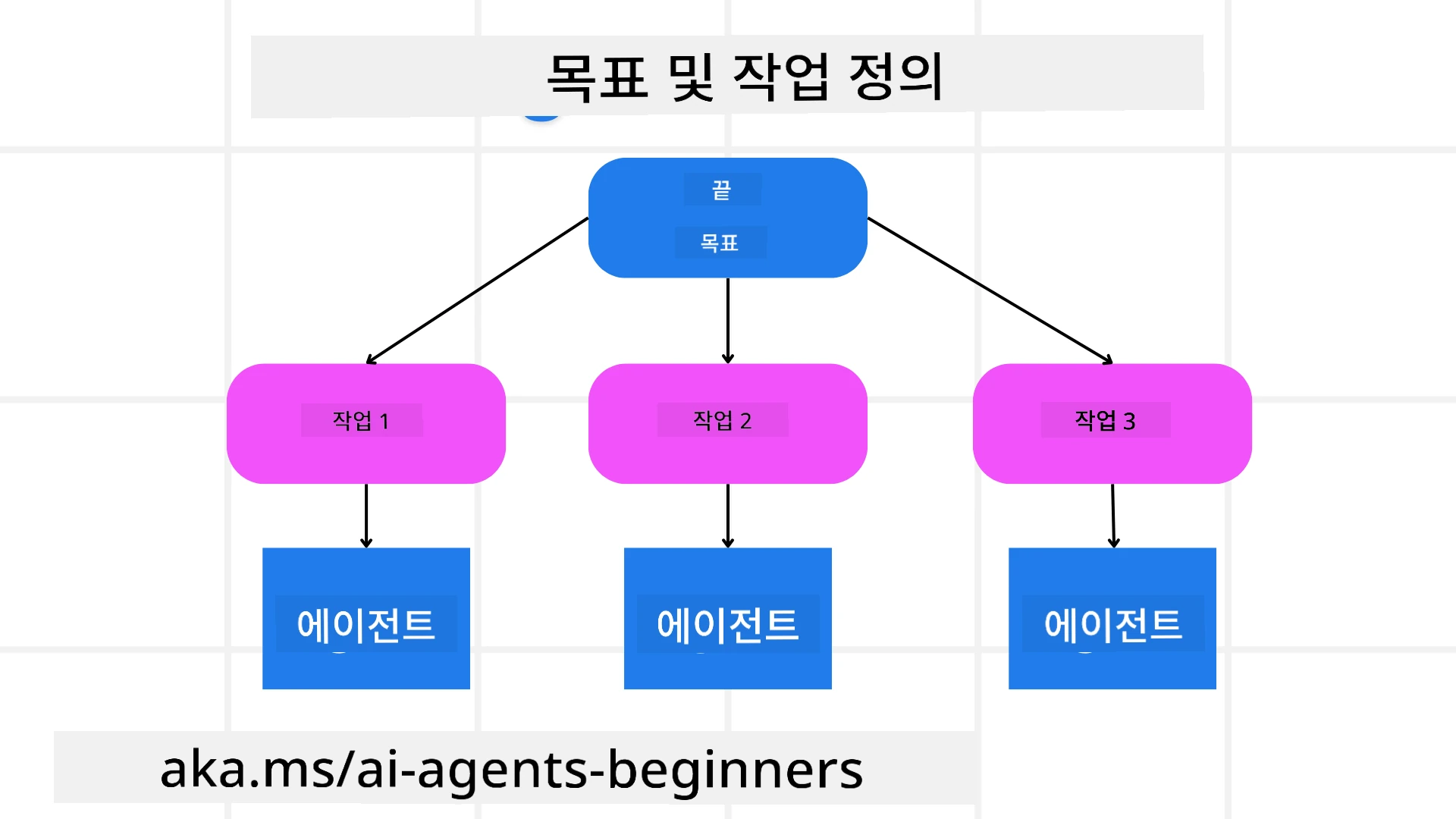
대부분의 실제 작업은 한 번에 해결하기에는 너무 복잡합니다. AI 에이전트는 계획과 행동을 안내할 간결한 목표가 필요합니다. 예를 들어, 다음과 같은 목표를 고려해 보세요:
"3일 여행 일정을 생성합니다."
간단하게 표현할 수 있지만 여전히 다듬어야 합니다. 목표가 명확할수록 에이전트(및 인간 협력자)가 항공편 옵션, 호텔 추천 및 활동 제안과 같은 포괄적인 일정을 만드는 올바른 결과에 집중하기가 더 쉽습니다.
작업 분해
큰 작업이나 복잡한 작업은 더 작고 목표 지향적인 하위 작업으로 나누면 관리하기 쉬워집니다. 여행 일정 예시의 경우, 목표를 다음과 같이 분해할 수 있습니다:
- 항공권 예약
- 호텔 예약
- 렌터카 예약
- 개인화
각 하위 작업은 전담 에이전트 또는 프로세스가 처리할 수 있습니다. 한 에이전트는 최적의 항공 요금을 검색하는 데 특화될 수 있고, 다른 에이전트는 호텔 예약에 집중하는 식입니다. 조정 역할을 하는 또는 “다운스트림” 에이전트가 이러한 결과를 하나의 일관된 일정으로 최종 사용자에게 통합할 수 있습니다.
이 모듈식 접근 방식은 점진적인 개선도 허용합니다. 예를 들어, 음식 추천이나 지역 활동 제안을 위한 전문 에이전트를 추가하고 시간이 지남에 따라 일정을 다듬을 수 있습니다.
구조화된 출력
대형 언어 모델(LLM)은 다운스트림 에이전트나 서비스가 파싱하고 처리하기 쉬운 구조화된 출력(예: JSON)을 생성할 수 있습니다. 이는 계획 출력이 수신된 후에 이러한 작업을 실행할 수 있는 다중 에이전트 환경에서 특히 유용합니다.
다음 Python 스니펫은 계획 에이전트가 목표를 하위 작업으로 분해하고 구조화된 계획을 생성하는 간단한 예를 보여줍니다:
from pydantic import BaseModel
from enum import Enum
from typing import List, Optional, Union
import json
import os
from typing import Optional
from pprint import pprint
from agent_framework.azure import AzureAIProjectAgentProvider
from azure.identity import AzureCliCredential

class AgentEnum(str, Enum):
    FlightBooking = "flight_booking"
    HotelBooking = "hotel_booking"
    CarRental = "car_rental"
    ActivitiesBooking = "activities_booking"
    DestinationInfo = "destination_info"
    DefaultAgent = "default_agent"
    GroupChatManager = "group_chat_manager"

# 여행 하위 작업 모델
class TravelSubTask(BaseModel):
    task_details: str
    assigned_agent: AgentEnum  # 작업을 에이전트에게 할당하려고 합니다

class TravelPlan(BaseModel):
    main_task: str
    subtasks: List[TravelSubTask]
    is_greeting: bool

provider = AzureAIProjectAgentProvider(credential=AzureCliCredential())

# 사용자 메시지를 정의합니다
system_prompt = """You are a planner agent.
    Your job is to decide which agents to run based on the user's request.
    Provide your response in JSON format with the following structure:
{'main_task': 'Plan a family trip from Singapore to Melbourne.',
 'subtasks': [{'assigned_agent': 'flight_booking',
               'task_details': 'Book round-trip flights from Singapore to '
                               'Melbourne.'}
    Below are the available agents specialised in different tasks:
    - FlightBooking: For booking flights and providing flight information
    - HotelBooking: For booking hotels and providing hotel information
    - CarRental: For booking cars and providing car rental information
    - ActivitiesBooking: For booking activities and providing activity information
    - DestinationInfo: For providing information about destinations
    - DefaultAgent: For handling general requests"""

user_message = "Create a travel plan for a family of 2 kids from Singapore to Melbourne"

response = client.create_response(input=user_message, instructions=system_prompt)

response_content = response.output_text
pprint(json.loads(response_content))
다중 에이전트 오케스트레이션을 사용하는 계획 에이전트
이 예에서 시맨틱 라우터 에이전트는 사용자 요청(예: “여행을 위한 호텔 계획이 필요합니다.”)을 수신합니다.
플래너는 다음을 수행합니다:
- 호텔 계획 수신: 플래너는 사용자의 메시지를 받고 시스템 프롬프트(사용 가능한 에이전트 세부 정보 포함)를 기반으로 구조화된 여행 계획을 생성합니다.
- 에이전트 및 그 도구 나열: 에이전트 레지스트리는 항공, 호텔, 렌터카 및 활동 등과 같은 에이전트 목록과 그들이 제공하는 함수 또는 도구를 보유합니다.
- 계획을 해당 에이전트로 라우팅: 하위 작업 수에 따라 플래너는 메시지를 전담 에이전트에게 직접 전송(단일 작업 시나리오의 경우)하거나 다중 에이전트 협업을 위해 그룹 채팅 매니저를 통해 조정합니다.
- 결과 요약: 마지막으로 플래너는 생성된 계획을 명확하게 요약합니다. 다음 Python 코드 샘플은 이러한 단계를 설명합니다:
from pydantic import BaseModel

from enum import Enum
from typing import List, Optional, Union

class AgentEnum(str, Enum):
    FlightBooking = "flight_booking"
    HotelBooking = "hotel_booking"
    CarRental = "car_rental"
    ActivitiesBooking = "activities_booking"
    DestinationInfo = "destination_info"
    DefaultAgent = "default_agent"
    GroupChatManager = "group_chat_manager"

# 여행 하위 작업 모델

class TravelSubTask(BaseModel):
    task_details: str
    assigned_agent: AgentEnum # 작업을 에이전트에게 할당하려고 합니다

class TravelPlan(BaseModel):
    main_task: str
    subtasks: List[TravelSubTask]
    is_greeting: bool
import json
import os
from typing import Optional

from agent_framework.azure import AzureAIProjectAgentProvider
from azure.identity import AzureCliCredential

# 클라이언트를 생성합니다

provider = AzureAIProjectAgentProvider(credential=AzureCliCredential())

from pprint import pprint

# 사용자 메시지를 정의합니다

system_prompt = """You are a planner agent.
    Your job is to decide which agents to run based on the user's request.
    Below are the available agents specialized in different tasks:
    - FlightBooking: For booking flights and providing flight information
    - HotelBooking: For booking hotels and providing hotel information
    - CarRental: For booking cars and providing car rental information
    - ActivitiesBooking: For booking activities and providing activity information
    - DestinationInfo: For providing information about destinations
    - DefaultAgent: For handling general requests"""

user_message = "Create a travel plan for a family of 2 kids from Singapore to Melbourne"

response = client.create_response(input=user_message, instructions=system_prompt)

response_content = response.output_text

# 응답 내용을 JSON으로 로드한 후 출력합니다

pprint(json.loads(response_content))
다음은 이전 코드의 출력이며 이 구조화된 출력을 assigned_agent로 라우팅하고 여행 계획을 최종 사용자에게 요약하는 데 사용할 수 있습니다.
{
    "is_greeting": "False",
    "main_task": "Plan a family trip from Singapore to Melbourne.",
    "subtasks": [
        {
            "assigned_agent": "flight_booking",
            "task_details": "Book round-trip flights from Singapore to Melbourne."
        },
        {
            "assigned_agent": "hotel_booking",
            "task_details": "Find family-friendly hotels in Melbourne."
        },
        {
            "assigned_agent": "car_rental",
            "task_details": "Arrange a car rental suitable for a family of four in Melbourne."
        },
        {
            "assigned_agent": "activities_booking",
            "task_details": "List family-friendly activities in Melbourne."
        },
        {
            "assigned_agent": "destination_info",
            "task_details": "Provide information about Melbourne as a travel destination."
        }
    ]
}
이전 코드 샘플이 포함된 예제 노트북은 여기에서 확인할 수 있습니다.
반복적 계획
일부 작업은 한 작업의 결과가 다음 작업에 영향을 미치는 왕복 또는 재계획이 필요합니다. 예를 들어, 에이전트가 항공권 예약 중 예상치 못한 데이터 형식을 발견하면 호텔 예약으로 넘어가기 전에 전략을 조정해야 할 수 있습니다.
또한 사용자 피드백(예: 사용자가 더 이른 항공편을 선호한다고 결정하는 경우)은 부분적인 재계획을 촉발할 수 있습니다. 이러한 동적이고 반복적인 접근 방식은 최종 솔루션이 실제 제약 조건과 진화하는 사용자 선호도에 부합하도록 보장합니다.
예: 샘플 코드
from agent_framework.azure import AzureAIProjectAgentProvider
from azure.identity import AzureCliCredential
#.. 이전 코드와 동일하며 사용자 기록과 현재 계획을 전달합니다

system_prompt = """You are a planner agent to optimize the
    Your job is to decide which agents to run based on the user's request.
    Below are the available agents specialized in different tasks:
    - FlightBooking: For booking flights and providing flight information
    - HotelBooking: For booking hotels and providing hotel information
    - CarRental: For booking cars and providing car rental information
    - ActivitiesBooking: For booking activities and providing activity information
    - DestinationInfo: For providing information about destinations
    - DefaultAgent: For handling general requests"""

user_message = "Create a travel plan for a family of 2 kids from Singapore to Melbourne"

response = client.create_response(
    input=user_message,
    instructions=system_prompt,
    context=f"Previous travel plan - {TravelPlan}",
)
# .. 다시 계획을 세우고 각 에이전트에 작업을 보냅니다
더 포괄적인 계획에 대해서는 복잡한 작업을 해결하기 위한 Magnetic One 블로그 게시물을 확인하세요.
요약
이 문서에서는 정의된 사용 가능한 에이전트를 동적으로 선택할 수 있는 플래너를 만드는 방법의 예를 살펴보았습니다. 플래너의 출력은 작업을 분해하고 에이전트에 할당하여 실행할 수 있도록 합니다. 에이전트가 작업 수행에 필요한 함수/도구에 접근할 수 있다고 가정합니다. 에이전트 외에도 리플렉션, 요약기 및 라운드 로빈 채팅과 같은 다른 패턴을 포함하여 추가로 사용자화할 수 있습니다.
추가 자료
Magentic One - 복잡한 작업을 해결하기 위한 제너럴리스트 다중 에이전트 시스템으로 여러 도전적인 에이전트 벤치마크에서 인상적인 결과를 달성했습니다. 참조: Magentic One. 이 구현에서 오케스트레이터는 작업별 계획을 생성하고 이러한 작업을 사용 가능한 에이전트에게 위임합니다. 또한 오케스트레이터는 작업 진행을 모니터링하고 필요에 따라 재계획하는 추적 메커니즘을 사용합니다.
계획 설계 패턴에 대해 더 궁금한 점이 있으신가요?
다른 학습자들과 교류하고 오피스 아워에 참석하며 AI 에이전트 관련 질문에 답을 얻으려면 Microsoft Foundry Discord에 참여하세요.
이전 수업
다음 수업
면책 사항: 이 문서는 AI 번역 서비스 Co-op Translator를 사용하여 번역되었습니다. 정확성을 위해 노력하고 있으나 자동 번역에는 오류나 부정확성이 있을 수 있음을 유의해 주십시오. 원문(원어) 문서를 권위 있는 출처로 간주하시기 바랍니다. 중요한 정보의 경우 전문 번역가의 번역을 권장합니다. 이 번역의 사용으로 인해 발생하는 오해나 잘못된 해석에 대해 당사는 책임을 지지 않습니다.