ai-agents-for-beginners
(위 이미지를 클릭하면 이 강의의 동영상을 볼 수 있습니다)
계획 설계
소개
이 강의에서는 다음 내용을 다룹니다
- 명확한 전체 목표 정의 및 복잡한 작업을 관리 가능한 작업으로 분해하기.
- 더 신뢰할 수 있고 기계가 읽을 수 있는 응답을 위한 구조화된 출력 활용하기.
- 동적 작업 및 예상치 못한 입력 처리를 위한 이벤트 기반 접근법 적용하기.
학습 목표
이 강의를 완료하면 다음에 대해 이해하게 됩니다:
- AI 에이전트의 전체 목표를 식별하고 설정하여 달성해야 할 바를 명확히 알게 하는 방법.
- 복잡한 작업을 관리 가능한 하위 작업으로 분해하여 논리적 순서로 조직하는 방법.
- 에이전트에 적합한 도구(예: 검색 도구나 데이터 분석 도구)를 제공하고, 언제 어떻게 사용하는지 결정하며 예기치 못한 상황을 처리하는 방법.
- 하위 작업 결과 평가, 성능 측정 그리고 최종 출력 향상을 위한 행동 반복.
전체 목표 정의 및 작업 분해
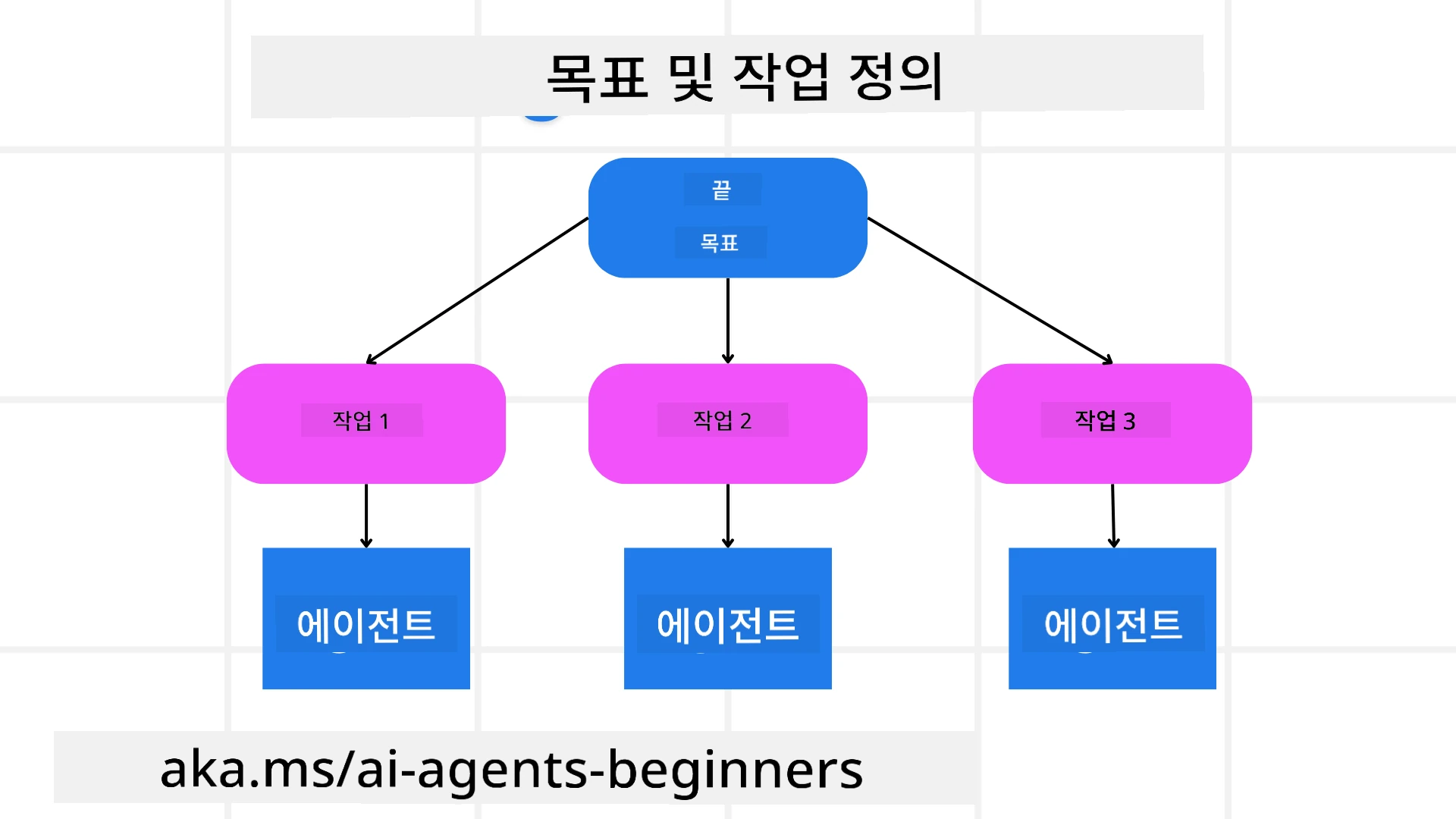
대부분의 실제 작업은 한 번에 처리하기에는 너무 복잡합니다. AI 에이전트는 계획 및 행동을 안내할 간결한 목표가 필요합니다. 예를 들어, 다음과 같은 목표를 생각해보세요:
"3일 여행 일정을 생성하라."
간단히 말할 수 있지만 여전히 구체화가 필요합니다. 목표가 명확할수록 에이전트(및 협력하는 사람들)는 항공편 옵션, 호텔 추천, 활동 제안을 포함하는 포괄적인 일정을 작성하는 등 올바른 결과에 집중할 수 있습니다.
작업 분해
크거나 복잡한 작업은 더 작고 목표 지향적인 하위 작업으로 나누면 관리하기 쉬워집니다. 여행 일정 예시에서는 다음과 같이 목표를 분해할 수 있습니다:
- 항공편 예약
- 호텔 예약
- 자동차 렌트
- 개인 맞춤화
각 하위 작업은 전용 에이전트나 프로세스가 처리할 수 있습니다. 하나의 에이전트는 최적 항공편 검색을, 다른 에이전트는 호텔 예약에 집중할 수 있습니다. 그리고 조정 역할을 하는 ‘하류’ 에이전트가 이 결과들을 하나의 일관된 일정으로 사용자에게 제공합니다.
이 모듈식 접근법은 점진적 개선도 가능하게 합니다. 예를 들어, 음식 추천이나 현지 활동 제안 전용 에이전트를 추가하고, 시간이 지남에 따라 일정을 수정할 수 있습니다.
구조화된 출력
대형 언어 모델(LLM)은 하류 에이전트나 서비스가 쉽게 파싱하고 처리할 수 있는 구조화된 출력(e.g. JSON)을 생성할 수 있습니다. 이는 계획 출력이 수신된 후 작업을 수행할 수 있는 다중 에이전트 환경에서 특히 유용합니다.
다음 파이썬 코드 예시는 목표를 하위 작업으로 분해하고 구조화된 계획을 생성하는 간단한 계획 에이전트를 보여줍니다:
from pydantic import BaseModel
from enum import Enum
from typing import List, Optional, Union
import json
import os
from typing import Optional
from pprint import pprint
from agent_framework.foundry import FoundryChatClient
from azure.identity import AzureCliCredential

class AgentEnum(str, Enum):
    FlightBooking = "flight_booking"
    HotelBooking = "hotel_booking"
    CarRental = "car_rental"
    ActivitiesBooking = "activities_booking"
    DestinationInfo = "destination_info"
    DefaultAgent = "default_agent"
    GroupChatManager = "group_chat_manager"

# 여행 하위 작업 모델
class TravelSubTask(BaseModel):
    task_details: str
    assigned_agent: AgentEnum  # 작업을 에이전트에게 할당하려고 합니다

class TravelPlan(BaseModel):
    main_task: str
    subtasks: List[TravelSubTask]
    is_greeting: bool

provider = FoundryChatClient(
    project_endpoint=os.environ["AZURE_AI_PROJECT_ENDPOINT"],
    model=os.environ["AZURE_AI_MODEL_DEPLOYMENT_NAME"],
    credential=AzureCliCredential(),
)

# 사용자 메시지 정의
system_prompt = """You are a planner agent.
    Your job is to decide which agents to run based on the user's request.
    Provide your response in JSON format with the following structure:
{'main_task': 'Plan a family trip from Singapore to Melbourne.',
 'subtasks': [{'assigned_agent': 'flight_booking',
               'task_details': 'Book round-trip flights from Singapore to '
                               'Melbourne.'}
    Below are the available agents specialised in different tasks:
    - FlightBooking: For booking flights and providing flight information
    - HotelBooking: For booking hotels and providing hotel information
    - CarRental: For booking cars and providing car rental information
    - ActivitiesBooking: For booking activities and providing activity information
    - DestinationInfo: For providing information about destinations
    - DefaultAgent: For handling general requests"""

user_message = "Create a travel plan for a family of 2 kids from Singapore to Melbourne"

response = client.create_response(input=user_message, instructions=system_prompt)

response_content = response.output_text
pprint(json.loads(response_content))
다중 에이전트 조율이 포함된 계획 에이전트
이 예제에서 의미 라우터 에이전트는 사용자 요청(예: “여행을 위한 호텔 계획이 필요해요.”)을 받습니다.
계획자는 다음을 수행합니다:
- 호텔 계획 수신: 사용자의 메시지를 받고 시스템 프롬프트(사용 가능한 에이전트 세부정보 포함)에 기반해 구조화된 여행 계획을 생성합니다.
- 에이전트 및 도구 목록 작성: 에이전트 레지스트리는 항공편, 호텔, 자동차 렌탈, 활동 등 각 기능 또는 도구를 제공하는 에이전트 목록을 보유합니다.
- 각 에이전트에 계획 전송: 하위 작업 수에 따라, 단일 작업 시나리오에서는 전용 에이전트에게 직접 메시지를 보내고, 다중 에이전트 협력 시에는 그룹 채팅 매니저를 통해 조율합니다.
- 결과 요약: 마지막으로 생성된 계획을 명확히 요약합니다. 다음 파이썬 코드 샘플은 이 단계를 보여줍니다:
from pydantic import BaseModel

from enum import Enum
from typing import List, Optional, Union

class AgentEnum(str, Enum):
    FlightBooking = "flight_booking"
    HotelBooking = "hotel_booking"
    CarRental = "car_rental"
    ActivitiesBooking = "activities_booking"
    DestinationInfo = "destination_info"
    DefaultAgent = "default_agent"
    GroupChatManager = "group_chat_manager"

# 여행 하위 작업 모델

class TravelSubTask(BaseModel):
    task_details: str
    assigned_agent: AgentEnum # 작업을 에이전트에게 할당하려고 합니다

class TravelPlan(BaseModel):
    main_task: str
    subtasks: List[TravelSubTask]
    is_greeting: bool
import json
import os
from typing import Optional

from agent_framework.foundry import FoundryChatClient
from azure.identity import AzureCliCredential

# 클라이언트 생성

provider = FoundryChatClient(
    project_endpoint=os.environ["AZURE_AI_PROJECT_ENDPOINT"],
    model=os.environ["AZURE_AI_MODEL_DEPLOYMENT_NAME"],
    credential=AzureCliCredential(),
)

from pprint import pprint

# 사용자 메시지 정의

system_prompt = """You are a planner agent.
    Your job is to decide which agents to run based on the user's request.
    Below are the available agents specialized in different tasks:
    - FlightBooking: For booking flights and providing flight information
    - HotelBooking: For booking hotels and providing hotel information
    - CarRental: For booking cars and providing car rental information
    - ActivitiesBooking: For booking activities and providing activity information
    - DestinationInfo: For providing information about destinations
    - DefaultAgent: For handling general requests"""

user_message = "Create a travel plan for a family of 2 kids from Singapore to Melbourne"

response = client.create_response(input=user_message, instructions=system_prompt)

response_content = response.output_text

# 응답 내용을 JSON으로 로드한 후 출력하기

pprint(json.loads(response_content))
앞선 코드 출력 예시이며, 이를 assigned_agent로 라우팅하고 여행 계획을 최종 사용자에게 요약하는 데 사용할 수 있습니다.
{
    "is_greeting": "False",
    "main_task": "Plan a family trip from Singapore to Melbourne.",
    "subtasks": [
        {
            "assigned_agent": "flight_booking",
            "task_details": "Book round-trip flights from Singapore to Melbourne."
        },
        {
            "assigned_agent": "hotel_booking",
            "task_details": "Find family-friendly hotels in Melbourne."
        },
        {
            "assigned_agent": "car_rental",
            "task_details": "Arrange a car rental suitable for a family of four in Melbourne."
        },
        {
            "assigned_agent": "activities_booking",
            "task_details": "List family-friendly activities in Melbourne."
        },
        {
            "assigned_agent": "destination_info",
            "task_details": "Provide information about Melbourne as a travel destination."
        }
    ]
}
이전 코드 샘플을 포함한 예제 노트북은 여기에서 확인할 수 있습니다.
반복 계획
일부 작업은 결과가 다음 작업에 영향을 주므로 상호작용이나 재계획이 필요합니다. 예를 들어, 에이전트가 항공편 예약 중 예상치 못한 데이터 형식을 발견하면 호텔 예약으로 넘어가기 전에 전략을 변경해야 할 수 있습니다.
또한 사용자의 피드백(예: 인간이 더 이른 비행기를 선호한다고 결정)도 부분적 재계획을 유도할 수 있습니다. 이러한 동적이고 반복적인 접근법은 최종 솔루션이 현실 제약과 변화하는 사용자 선호도에 부합하도록 합니다.
예시 코드
import os
from agent_framework.foundry import FoundryChatClient
from azure.identity import AzureCliCredential
#.. 이전 코드와 동일하며 사용자 기록, 현재 계획을 전달합니다

system_prompt = """You are a planner agent to optimize the
    Your job is to decide which agents to run based on the user's request.
    Below are the available agents specialized in different tasks:
    - FlightBooking: For booking flights and providing flight information
    - HotelBooking: For booking hotels and providing hotel information
    - CarRental: For booking cars and providing car rental information
    - ActivitiesBooking: For booking activities and providing activity information
    - DestinationInfo: For providing information about destinations
    - DefaultAgent: For handling general requests"""

user_message = "Create a travel plan for a family of 2 kids from Singapore to Melbourne"

response = client.create_response(
    input=user_message,
    instructions=system_prompt,
    context=f"Previous travel plan - {TravelPlan}",
)
# .. 재계획을 세우고 작업을 해당 에이전트에게 전송합니다
복잡한 작업 해결을 위한 Magnetic One 블로그 포스트도 참고해 보세요.
요약
이 글에서는 정의된 가용 에이전트를 동적으로 선택할 수 있는 계획자를 만드는 예를 살펴보았습니다. 계획자의 출력은 작업을 분해하고 에이전트에 할당하여 실행할 수 있게 합니다. 에이전트는 작업 수행에 필요한 함수/도구에 접근할 수 있다고 가정합니다. 에이전트 외에도 반성(reflection), 요약자(summarizer), 라운드 로빈 채팅과 같은 다른 패턴을 포함해 맞춤 설정할 수 있습니다.
추가 자료
Magnetic One - 복잡한 작업 해결을 위한 일반 다중 에이전트 시스템으로, 여러 어려운 에이전트 벤치마크에서 인상적인 결과를 달성했습니다. 참고: Magnetic One. 이 구현에서 조율자는 작업별 계획을 수립하고 이를 가용 에이전트에 위임합니다. 조율자는 계획 외에도 작업 진행 상황을 모니터링하고 필요 시 재계획하는 추적 메커니즘을 사용합니다.
계획 설계 패턴에 대해 더 궁금한 점이 있으신가요?
Microsoft Foundry Discord에 참여하여 다른 학습자들과 만나고, 오피스아워에 참석하며 AI 에이전트 관련 질문에 답변을 받아보세요.
이전 강의
다음 강의
면책 조항: 이 문서는 AI 번역 서비스 Co-op Translator를 사용하여 번역되었습니다. 정확성을 기하기 위해 노력하고 있으나, 자동 번역은 오류나 부정확한 부분이 있을 수 있음을 유의하시기 바랍니다. 원본 문서의 원어본이 권위 있는 자료로 간주되어야 합니다. 중요한 정보의 경우, 전문가의 인간 번역을 권장합니다. 이 번역 사용으로 인해 발생하는 오해나 잘못된 해석에 대해 당사는 책임을 지지 않습니다.