ai-agents-for-beginners
마이크로소프트 에이전트 프레임워크 탐구
소개
이 수업에서는 다음을 다룹니다:
- 마이크로소프트 에이전트 프레임워크 이해: 주요 기능 및 가치
- 마이크로소프트 에이전트 프레임워크의 주요 개념 탐구
- 고급 MAF 패턴: 워크플로우, 미들웨어, 메모리
학습 목표
이 수업을 완료한 후에, 여러분은 다음을 알게 됩니다:
- 마이크로소프트 에이전트 프레임워크를 사용하여 프로덕션 준비 AI 에이전트 구축하기
- 에이전틱 사용 사례에 마이크로소프트 에이전트 프레임워크의 핵심 기능 적용하기
- 워크플로우, 미들웨어, 관측성 등 고급 패턴 사용하기
코드 샘플
Microsoft Agent Framework (MAF) 의 코드 샘플은 이 저장소의 xx-python-agent-framework 및 xx-dotnet-agent-framework 파일에 있습니다.
마이크로소프트 에이전트 프레임워크 이해하기
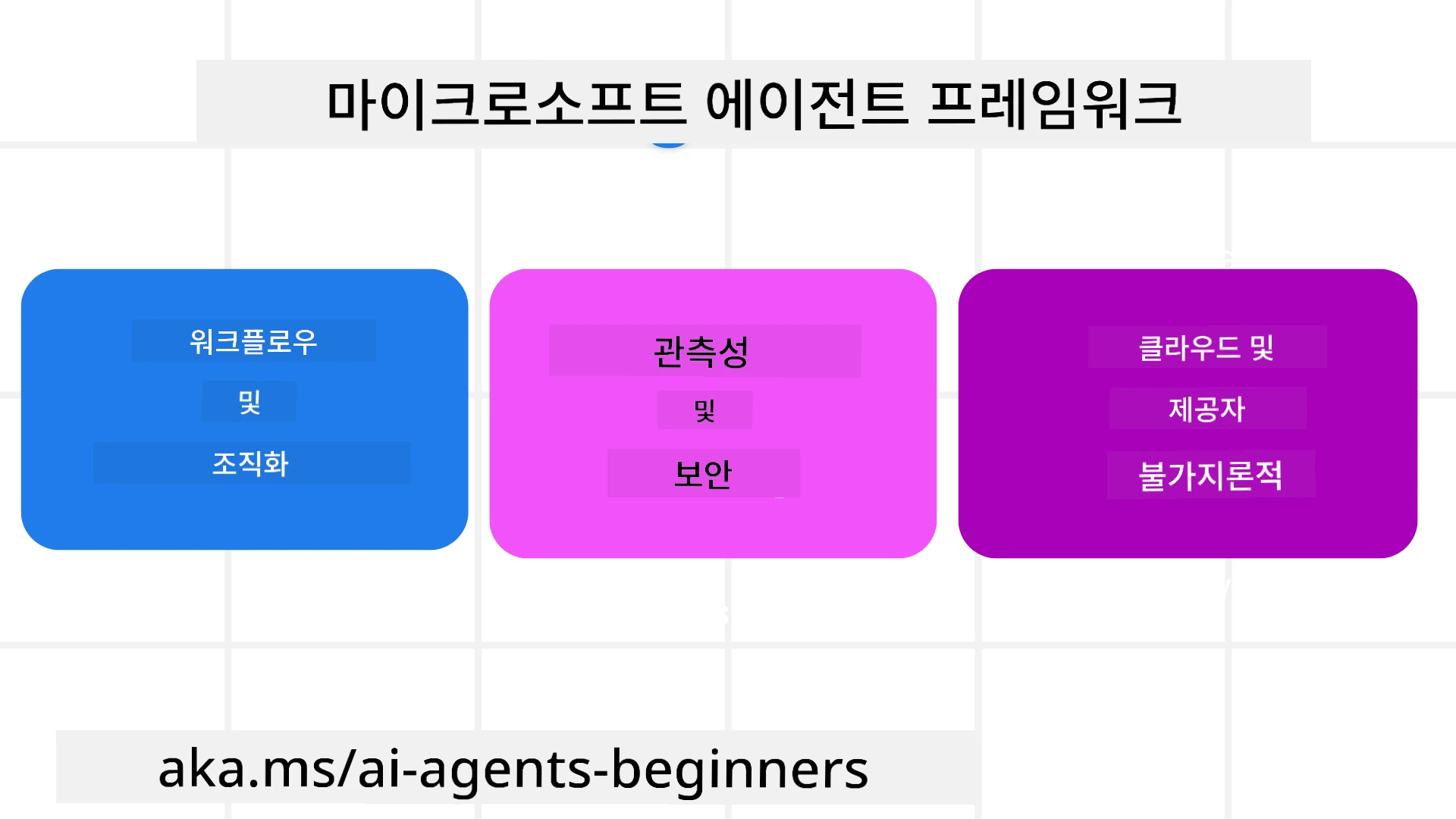
Microsoft Agent Framework (MAF)는 AI 에이전트를 구축하기 위한 마이크로소프트의 통합 프레임워크입니다. 이 프레임워크는 프로덕션 및 연구 환경에서 볼 수 있는 다양한 에이전틱 사용 사례를 해결할 수 있는 유연성을 제공합니다:
- 단계별 워크플로우가 필요한 시나리오에서의 순차적 에이전트 오케스트레이션.
- 에이전트가 동시에 작업을 완료해야 하는 시나리오에서의 동시 오케스트레이션.
- 에이전트들이 하나의 작업에 함께 협력할 수 있는 시나리오에서의 그룹 채팅 오케스트레이션.
- 작업의 하위 작업들이 완료될 때 에이전트가 작업을 서로 넘기는 시나리오에서의 핸드오프 오케스트레이션.
- 관리자 에이전트가 작업 목록을 만들고 수정하며 하위 에이전트의 조정을 처리하는 시나리오에서의 마그네틱 오케스트레이션.
프로덕션에서 AI 에이전트를 제공하기 위해, MAF는 다음과 같은 기능도 포함하고 있습니다:
- OpenTelemetry를 이용한 관측성으로, AI 에이전트의 모든 행동(도구 호출, 오케스트레이션 단계, 추론 흐름, Microsoft Foundry 대시보드를 통한 성능 모니터링 등)을 추적합니다.
- Microsoft Foundry에서 에이전트를 네이티브로 호스팅하여 역할 기반 접근, 개인정보 처리 및 내장된 콘텐츠 안전성 같은 보안 제어를 제공합니다.
- 에이전트 스레드와 워크플로우가 일시 중지, 재개 및 오류 복구가 가능해 장시간 실행 프로세스를 지원하는 내구성.
- 작업이 인간 승인 필요로 표시될 수 있도록 하는 제어 지원인 인간 참여 워크플로우.
마이크로소프트 에이전트 프레임워크는 또한 상호 운용성에 중점을 두고 있습니다:
- 클라우드 독립성 - 에이전트가 컨테이너, 온프레미스, 다양한 클라우드 환경에서 실행 가능.
- 공급자 독립성 - Azure OpenAI 및 OpenAI 등 선호하는 SDK를 통해 에이전트 생성 가능.
- 오픈 표준 통합 - Agent-to-Agent(A2A), Model Context Protocol (MCP) 같은 프로토콜로 다른 에이전트 및 도구를 발견하고 활용할 수 있음.
- 플러그인 및 커넥터 - Microsoft Fabric, SharePoint, Pinecone, Qdrant 등의 데이터 및 메모리 서비스와 연결 가능.
이제 이러한 기능들이 마이크로소프트 에이전트 프레임워크의 핵심 개념들에 어떻게 적용되는지 살펴보겠습니다.
마이크로소프트 에이전트 프레임워크의 주요 개념
에이전트
에이전트 생성하기
에이전트 생성은 추론 서비스(LLM 공급자), AI 에이전트가 따를 지침 집합, 그리고 할당된 name을 정의하여 수행됩니다:
agent = AzureOpenAIChatClient(credential=AzureCliCredential()).create_agent( instructions="You are good at recommending trips to customers based on their preferences.", name="TripRecommender" )
위는 Azure OpenAI를 사용하고 있지만, 에이전트는 Microsoft Foundry Agent Service를 포함한 다양한 서비스를 사용하여 생성할 수 있습니다:
AzureAIAgentClient(async_credential=credential).create_agent( name="HelperAgent", instructions="You are a helpful assistant." ) as agent
OpenAI Responses, ChatCompletion API
agent = OpenAIResponsesClient().create_agent( name="WeatherBot", instructions="You are a helpful weather assistant.", )
agent = OpenAIChatClient().create_agent( name="HelpfulAssistant", instructions="You are a helpful assistant.", )
또는 큰 컨텍스트 창(최대 204K 토큰)을 제공하는 OpenAI 호환 API인 MiniMax를 사용할 수도 있습니다:
agent = OpenAIChatClient(base_url="https://api.minimax.io/v1", api_key=os.environ["MINIMAX_API_KEY"], model_id="MiniMax-M3").create_agent( name="HelpfulAssistant", instructions="You are a helpful assistant.", )
또는 A2A 프로토콜을 사용하는 원격 에이전트도 가능합니다:
agent = A2AAgent( name=agent_card.name, description=agent_card.description, agent_card=agent_card, url="https://your-a2a-agent-host" )
에이전트 실행하기
에이전트는 비스트리밍 응답 또는 스트리밍 응답을 위해 .run 또는 .run_stream 메서드를 사용하여 실행됩니다.
result = await agent.run("What are good places to visit in Amsterdam?")
print(result.text)
async for update in agent.run_stream("What are the good places to visit in Amsterdam?"):
    if update.text:
        print(update.text, end="", flush=True)
각 에이전트 실행은 에이전트가 사용하는 max_tokens, 에이전트가 호출할 수 있는 tools, 심지어 에이전트에 사용되는 model 자체와 같은 매개변수를 사용자 정의하는 옵션도 가질 수 있습니다.
이는 사용자의 작업 완료에 특정 모델이나 도구가 필요한 경우에 유용합니다.
도구
도구는 에이전트 정의 시점에도 정의할 수 있습니다:
def get_attractions( location: Annotated[str, Field(description="The location to get the top tourist attractions for")], ) -> str: """Get the top tourist attractions for a given location.""" return f"The top attractions for {location} are."


# ChatAgent를 직접 생성할 때

agent = ChatAgent( chat_client=OpenAIChatClient(), instructions="You are a helpful assistant", tools=[get_attractions]
그리고 에이전트 실행 시점에도 정의할 수 있습니다:
result1 = await agent.run( "What's the best place to visit in Seattle?", tools=[get_attractions] # 이번 실행에서만 제공되는 도구 )
에이전트 스레드
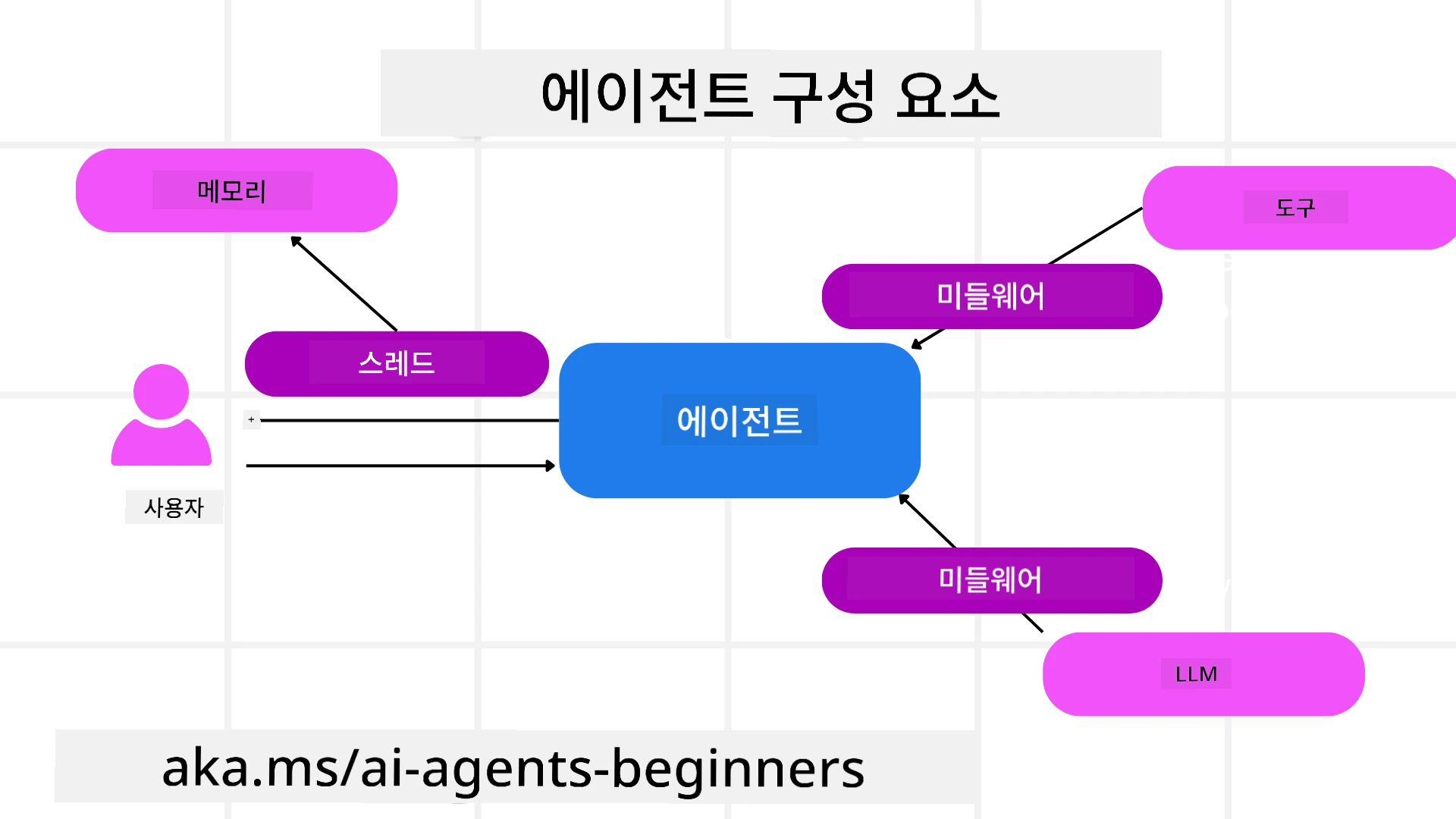
에이전트 스레드는 다중 턴 대화를 처리하는 데 사용됩니다. 스레드는 다음 방법으로 생성할 수 있습니다:
get_new_thread()을 사용하여 시간이 지나도 스레드가 저장되도록 함- 에이전트를 실행할 때 자동으로 스레드를 생성하며, 스레드는 현재 실행 중에만 지속됨
스레드를 생성하는 코드는 다음과 같습니다:
# 새 스레드를 생성합니다.
thread = agent.get_new_thread() # 스레드로 에이전트를 실행합니다.
response = await agent.run("Hello, I am here to help you book travel. Where would you like to go?", thread=thread)
이후 스레드를 직렬화하여 나중에 사용할 수 있도록 저장할 수 있습니다:
# 새 스레드를 생성합니다.
thread = agent.get_new_thread()

# 스레드로 에이전트를 실행합니다.

response = await agent.run("Hello, how are you?", thread=thread)

# 저장을 위해 스레드를 직렬화합니다.

serialized_thread = await thread.serialize()

# 저장소에서 로드한 후 스레드 상태를 역직렬화합니다.

resumed_thread = await agent.deserialize_thread(serialized_thread)
에이전트 미들웨어
에이전트는 사용자의 작업을 완료하기 위해 도구 및 LLM과 상호작용합니다. 특정 시나리오에서는 이 상호작용 사이에 실행하거나 추적을 수행하고자 할 때가 있습니다. 에이전트 미들웨어를 통해 이를 수행할 수 있습니다:
함수 미들웨어
이 미들웨어는 에이전트와 호출할 함수/도구 사이에서 동작을 실행할 수 있게 합니다. 예를 들어 함수 호출에 대해 로깅을 수행하고 싶을 때 사용됩니다.
아래 코드에서 next는 다음 미들웨어 또는 실제 함수를 호출할지 정의합니다.
async def logging_function_middleware(
    context: FunctionInvocationContext,
    next: Callable[[FunctionInvocationContext], Awaitable[None]],
) -> None:
    """Function middleware that logs function execution."""
    # 전처리: 함수 실행 전 로그
    print(f"[Function] Calling {context.function.name}")

    # 다음 미들웨어나 함수 실행으로 계속 진행
    await next(context)

    # 후처리: 함수 실행 후 로그
    print(f"[Function] {context.function.name} completed")
채팅 미들웨어
이 미들웨어는 에이전트와 LLM 간의 요청 사이에서 동작을 실행하거나 로깅할 수 있습니다.
여기에는 AI 서비스로 전송되는 messages와 같은 중요한 정보가 포함됩니다.
async def logging_chat_middleware(
    context: ChatContext,
    next: Callable[[ChatContext], Awaitable[None]],
) -> None:
    """Chat middleware that logs AI interactions."""
    # 전처리: AI 호출 전 로그 기록
    print(f"[Chat] Sending {len(context.messages)} messages to AI")

    # 다음 미들웨어 또는 AI 서비스로 계속 진행
    await next(context)

    # 후처리: AI 응답 후 로그 기록
    print("[Chat] AI response received")
에이전트 메모리
Agentic Memory 강의에서 다루었듯이, 메모리는 에이전트가 다양한 컨텍스트에서 작동하도록 하는 중요한 요소입니다. MAF는 여러 종류의 메모리를 제공합니다:
인-메모리 저장소
애플리케이션 실행 시간 동안 스레드에 저장되는 메모리입니다.
# 새 스레드를 만듭니다.
thread = agent.get_new_thread() # 스레드와 함께 에이전트를 실행합니다.
response = await agent.run("Hello, I am here to help you book travel. Where would you like to go?", thread=thread)
영구 메시지
여러 세션에 걸친 대화 기록을 저장할 때 사용되는 메모리입니다. chat_message_store_factory를 사용하여 정의합니다:
from agent_framework import ChatMessageStore

# 사용자 지정 메시지 저장소 생성
def create_message_store():
    return ChatMessageStore()

agent = ChatAgent(
    chat_client=OpenAIChatClient(),
    instructions="You are a Travel assistant.",
    chat_message_store_factory=create_message_store
)
동적 메모리
이 메모리는 에이전트가 실행되기 전에 컨텍스트에 추가됩니다. 이러한 메모리는 mem0와 같은 외부 서비스에 저장할 수 있습니다:
from agent_framework.mem0 import Mem0Provider

# 향상된 메모리 기능을 위해 Mem0 사용하기
memory_provider = Mem0Provider(
    api_key="your-mem0-api-key",
    user_id="user_123",
    application_id="my_app"
)

agent = ChatAgent(
    chat_client=OpenAIChatClient(),
    instructions="You are a helpful assistant with memory.",
    context_providers=memory_provider
)
에이전트 관측성
관측성은 신뢰할 수 있고 유지 관리 가능한 에이전트 시스템을 구축하는 데 중요합니다. MAF는 추적 및 미터링을 제공하기 위해 OpenTelemetry와 통합되어 관측성을 향상시킵니다.
from agent_framework.observability import get_tracer, get_meter

tracer = get_tracer()
meter = get_meter()
with tracer.start_as_current_span("my_custom_span"):
    # 무언가를 하다
    pass
counter = meter.create_counter("my_custom_counter")
counter.add(1, {"key": "value"})
워크플로우
MAF는 작업을 완료하기 위한 미리 정의된 단계인 워크플로우를 제공하며, 이 단계들에 AI 에이전트를 구성 요소로 포함합니다.
워크플로우는 더 나은 제어 흐름을 가능하게 하는 다양한 구성 요소로 이루어져 있습니다. 워크플로우는 또한 다중 에이전트 오케스트레이션 및 워크플로우 상태를 저장하는 체크포인트를 지원합니다.
워크플로우의 핵심 구성 요소는 다음과 같습니다:
실행자(Executors)
실행자는 입력 메시지를 받아 할당된 작업을 수행한 다음 출력 메시지를 생성합니다. 이것이 워크플로우를 더 큰 작업 완료 방향으로 나아가게 합니다. 실행자는 AI 에이전트 또는 사용자 지정 로직일 수 있습니다.
엣지(Edges)
엣지는 워크플로우 내 메시지 흐름을 정의하는 데 사용됩니다. 이들은 다음과 같을 수 있습니다:
직접 엣지 - 실행자들 간의 단순한 일대일 연결:
from agent_framework import WorkflowBuilder

builder = WorkflowBuilder()
builder.add_edge(source_executor, target_executor)
builder.set_start_executor(source_executor)
workflow = builder.build()
조건부 엣지 - 특정 조건이 충족된 후 활성화됩니다. 예를 들어, 호텔 객실이 없을 경우 실행자가 다른 옵션을 제안할 수 있습니다.
스위치 케이스 엣지 - 정의된 조건에 따라 메시지를 다른 실행자에게 라우팅합니다. 예를 들어, 여행 고객이 우선 접근권을 가진 경우 작업이 다른 워크플로우를 통해 처리됩니다.
팬아웃 엣지 - 한 메시지를 여러 대상에게 전송합니다.
팬인 엣지 - 여러 실행자로부터 메시지를 수집하여 한 대상에게 보냅니다.
이벤트(Events)
워크플로우에 대한 더 나은 관측성을 제공하기 위해 MAF는 실행 시 내장 이벤트를 제공합니다:
WorkflowStartedEvent- 워크플로우 실행 시작WorkflowOutputEvent- 워크플로우 결과 생성WorkflowErrorEvent- 워크플로우 오류 발생ExecutorInvokeEvent- 실행자 작업 시작ExecutorCompleteEvent- 실행자 작업 완료RequestInfoEvent- 요청 발생
고급 MAF 패턴
위 섹션들은 Microsoft Agent Framework의 주요 개념을 다루었습니다. 더 복잡한 에이전트를 구축할 때 고려할 수 있는 몇 가지 고급 패턴은 다음과 같습니다:
- 미들웨어 구성: 함수 및 채팅 미들웨어를 사용하여 여러 미들웨어 핸들러(로깅, 인증, 속도 제한)를 연쇄하여 에이전트 동작을 세밀하게 제어합니다.
- 워크플로우 체크포인팅: 워크플로우 이벤트와 직렬화를 사용하여 장기 실행 에이전트 프로세스를 저장 및 재개합니다.
- 동적 도구 선택: 도구 설명에 대한 RAG와 MAF 도구 등록을 결합하여 쿼리별로 관련 도구만 제공합니다.
- 다중 에이전트 핸드오프: 워크플로우 엣지와 조건부 라우팅을 사용하여 전문화된 에이전트 간 핸드오프를 오케스트레이션합니다.
Microsoft Foundry에서 LangChain / LangGraph 에이전트 호스팅
Microsoft Agent Framework는 프레임워크 간 상호운용 가능합니다 — MAF로 작성된 에이전트에만 국한되지 않습니다. 이미 LangChain 또는 LangGraph로 작성된 에이전트가 있다면, 이를 Microsoft Foundry 호스티드 에이전트로 실행할 수 있으며, Foundry가 런타임, 세션, 확장, 신원 및 프로토콜 엔드포인트를 관리하는 동안 에이전트 로직은 LangGraph에 유지됩니다.
이는 langchain_azure_ai.agents.hosting 패키지를 통해 이루어지며, Foundry 호스티드 에이전트가 사용하는 동일한 프로토콜로 컴파일된 LangGraph 그래프를 노출합니다.
1. 호스팅 추가 기능 설치:
pip install -U "langchain-azure-ai[hosting]>=1.2.4" azure-identity
hosting 추가 기능은 Foundry 프로토콜 라이브러리인 azure-ai-agentserver-responses (OpenAI 호환 /responses 엔드포인트)와 azure-ai-agentserver-invocations (일반 /invocations 엔드포인트)를 설치합니다.
2. 호스팅 프로토콜 선택:
| 프로토콜 | 호스트 클래스 | 엔드포인트 | 사용 시기 |
|---|---|---|---|
| Responses | ResponsesHostServer |
/responses |
OpenAI 호환 채팅, 스트리밍, 응답 기록, 대화 스레딩이 필요할 때 — 대화형 에이전트에 권장되는 기본값입니다. |
| Invocations | InvocationsHostServer |
/invocations |
사용자 지정 JSON 형식, 웹훅 스타일 엔드포인트, 비대화형 처리가 필요할 때 사용합니다. |
Responses API는 Foundry에서 에이전트 스타일 개발을 위한 주요 API이므로, 대부분의 에이전트에서는 ResponsesHostServer부터 시작하세요.
3. 환경 변수 구성 (az login 후 DefaultAzureCredential 인증 가능하도록):
export FOUNDRY_PROJECT_ENDPOINT="https://<resource>.services.ai.azure.com/api/projects/<project>"
export FOUNDRY_MODEL_NAME="gpt-5-mini"
에이전트가 나중에 Foundry에서 호스티드 에이전트로 실행될 때 플랫폼이 자동으로 FOUNDRY_PROJECT_ENDPOINT를 주입합니다.
4. Responses 프로토콜을 통해 LangGraph 에이전트 노출:
import os

from azure.ai.projects import AIProjectClient
from azure.identity import DefaultAzureCredential, get_bearer_token_provider
from langchain.agents import create_agent
from langchain_openai import ChatOpenAI
from langchain_azure_ai.agents.hosting import ResponsesHostServer

_AZURE_AI_SCOPE = "https://ai.azure.com/.default"


def build_chat_model() -> ChatOpenAI:
    project_endpoint = os.environ["FOUNDRY_PROJECT_ENDPOINT"].rstrip("/")
    deployment = os.environ.get("FOUNDRY_MODEL_NAME", "gpt-5-mini")
    credential = DefaultAzureCredential()
    project = AIProjectClient(endpoint=project_endpoint, credential=credential)
    openai_client = project.get_openai_client()
    token_provider = get_bearer_token_provider(credential, _AZURE_AI_SCOPE)

    # ChatOpenAI 여기서는 Foundry 프로젝트의 OpenAI 호환 (응답) 엔드포인트를 대상으로 합니다.
    return ChatOpenAI(
        model=deployment,
        base_url=str(openai_client.base_url),
        api_key=token_provider,
    )


def main() -> None:
    graph = create_agent(build_chat_model(), tools=[])
    port = int(os.environ.get("PORT", "8088"))
    ResponsesHostServer(graph).run(port=port)


if __name__ == "__main__":
    main()
로컬에서 python main.py로 실행한 후 http://localhost:8088/responses에 Responses 요청을 보냅니다.
주요 동작:
- 대화: 클라이언트는
previous_response_id또는conversationID를 전달하여 대화를 계속합니다. 그래프가 LangGraph 체크포인터로 컴파일되었다면, Foundry는 대화 상태를 체크포인트에 키로 저장합니다(실제 서비스에는 내구성 있는 체크포인터를 사용하세요; 로컬 테스트에는MemorySaver가 충분합니다). - 휴먼 인 더 루프: 그래프가 LangGraph
interrupt()를 사용하면,ResponsesHostServer는 대기 중인 인터럽트를 Responsesfunction_call/mcp_approval_request아이템으로 노출하며, 클라이언트는 일치하는function_call_output/mcp_approval_response로 다시 시작합니다. - Foundry에 배포: Azure Developer CLI를 사용하여 —
azd ext install azure.ai.agents,azd ai agent init -m <manifest>,azd ai agent run(로컬, Docker 필요), 이후azd provision및azd deploy를 실행합니다. 호스티드 에이전트 배포에는 Foundry 프로젝트 관리자 역할이 필요합니다.
이 예제의 실행 가능한 버전은 code-samples/14-langchain-hosted-agent.py에 있습니다. 전체 워크스루(Invocations 프로토콜, 사용자 지정 요청 스키마 및 문제 해결)는 Foundry 호스티드 에이전트로 LangGraph 에이전트 호스팅하기를 참고하세요.
코드 샘플
Microsoft Agent Framework 코드 샘플은 이 저장소의 xx-python-agent-framework 및 xx-dotnet-agent-framework 파일에서 확인할 수 있습니다.
Microsoft Agent Framework에 대해 더 궁금한 점이 있나요?
Microsoft Foundry Discord에 참여하여 다른 학습자들을 만나고 오피스 아워에 참석하며 AI 에이전트 관련 질문에 대한 답변을 받아보세요.
이전 강의
다음 강의
면책 조항: 이 문서는 AI 번역 서비스 Co-op Translator를 사용하여 번역되었습니다. 정확성을 기하기 위해 노력하고 있으나, 자동 번역은 오류나 부정확한 부분이 있을 수 있음을 유의하시기 바랍니다. 원본 문서의 원어본이 권위 있는 자료로 간주되어야 합니다. 중요한 정보의 경우, 전문가의 인간 번역을 권장합니다. 이 번역 사용으로 인해 발생하는 오해나 잘못된 해석에 대해 당사는 책임을 지지 않습니다.