ai-agents-for-beginners
(Klik di pikshọ wey dey up fen see video of dis lesson)
Planning Design
Introduction
Dis lesson go cover
- How to define clear overall goal and how to burst big complex work into beta beta small work wey person fit handle.
- How to use structured output to get reliable and machine-readable answers.
- How to use event-driven way to handle changing work and things wey person no expect.
Learning Goals
After you finish dis lesson, you go sabi:
- How to identify and set one clear overall goal for AI agent, make sure e sabi wetin e suppose achieve.
- How to break big complex work into small small parts and put dem for correct order.
- How to give agents correct tools (like search tools or data analysis tools), decide when and how dem go use dem, and handle unexpected wahala.
- How to check subtask results, measure how e perform, and improve actions to make final output better.
Defining the Overall Goal and Breaking Down a Task
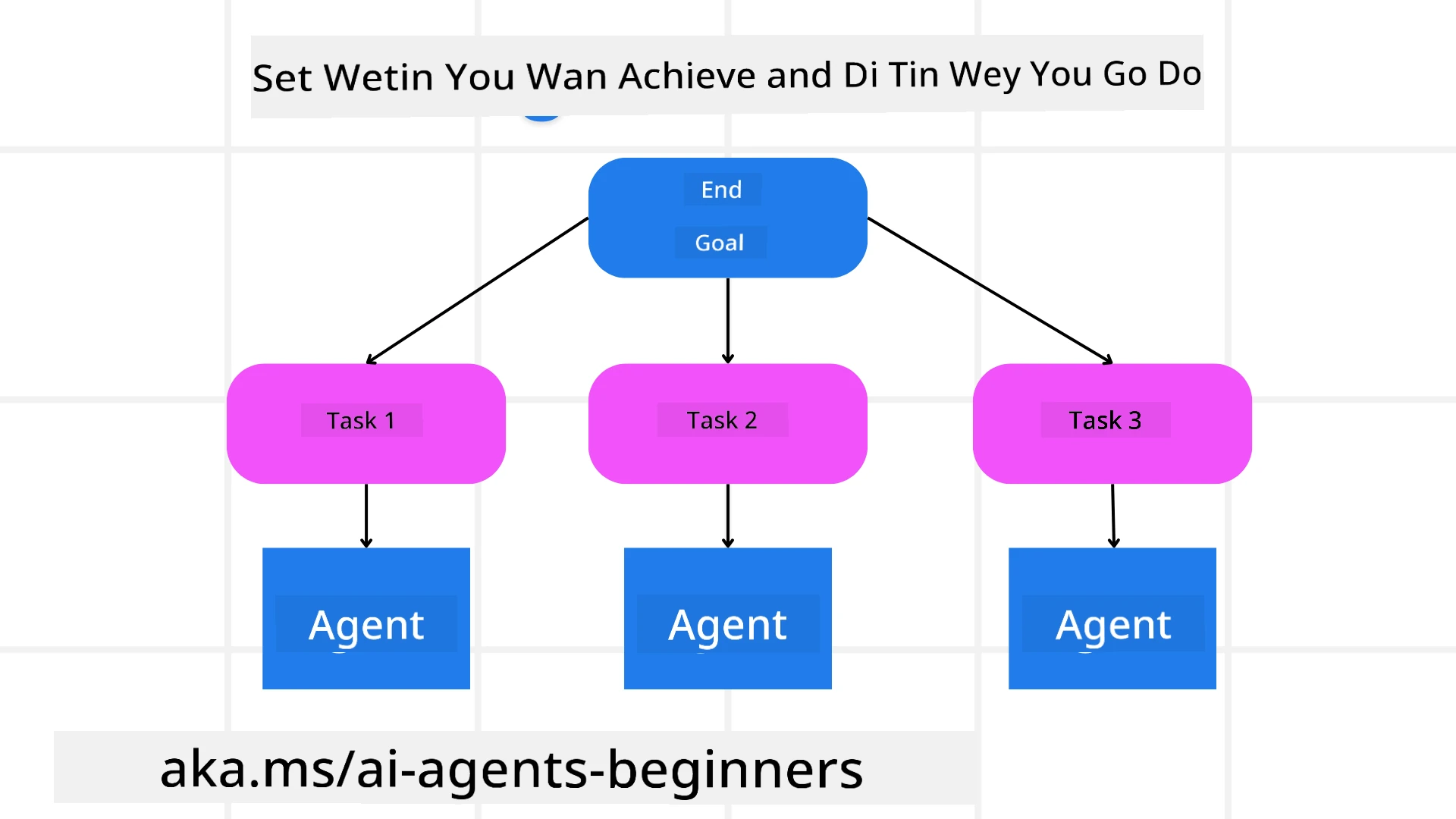
Most work for real life too complex to do with one step. AI agent need one sharp objective to guide how im go plan and work. For example, check this goal:
"Generate a 3-day travel itinerary."
E simple to talk am, but e still need to get more detail. When goal clear, agent and even human wey dey work together fit focus well to make the correct thing, like to create full itinerary including flight options, hotel options, and activity ideas.
Task Decomposition
Big or complicated work become easy to handle when you break am into small small goal-focused parts. For the travel itinerary example, you fit break the goal into:
- Flight Booking
- Hotel Booking
- Car Rental
- Personalization
Each subtask fit be handled by special agents or processes. One agent fit sabi search best flight deals, another fit handle hotel bookings, and so on. One coordinating or “downstream” agent fit then gather all these results join am as one full itinerary for the user.
Dis modular way still make e possible to add small improvements small small. For example, you fit add special agents for Food Recommendations or Local Activity Suggestions and make itinerary better over time.
Structured output
Large Language Models (LLMs) fit produce structured output (like JSON) wey easy for downstream agents or services to understand and use. This one good for multi-agent wahala, where we fit do the work after the planning output show.
The Python code wey follow show how one simple planning agent go break goal into subtasks and produce structured plan:
from pydantic import BaseModel
from enum import Enum
from typing import List, Optional, Union
import json
import os
from typing import Optional
from pprint import pprint
from agent_framework.foundry import FoundryChatClient
from azure.identity import AzureCliCredential

class AgentEnum(str, Enum):
    FlightBooking = "flight_booking"
    HotelBooking = "hotel_booking"
    CarRental = "car_rental"
    ActivitiesBooking = "activities_booking"
    DestinationInfo = "destination_info"
    DefaultAgent = "default_agent"
    GroupChatManager = "group_chat_manager"

# Model for Travel SubTask
class TravelSubTask(BaseModel):
    task_details: str
    assigned_agent: AgentEnum  # we wan assign the task give the agent

class TravelPlan(BaseModel):
    main_task: str
    subtasks: List[TravelSubTask]
    is_greeting: bool

provider = FoundryChatClient(
    project_endpoint=os.environ["AZURE_AI_PROJECT_ENDPOINT"],
    model=os.environ["AZURE_AI_MODEL_DEPLOYMENT_NAME"],
    credential=AzureCliCredential(),
)

# Make we define the user message
system_prompt = """You are a planner agent.
    Your job is to decide which agents to run based on the user's request.
    Provide your response in JSON format with the following structure:
{'main_task': 'Plan a family trip from Singapore to Melbourne.',
 'subtasks': [{'assigned_agent': 'flight_booking',
               'task_details': 'Book round-trip flights from Singapore to '
                               'Melbourne.'}
    Below are the available agents specialised in different tasks:
    - FlightBooking: For booking flights and providing flight information
    - HotelBooking: For booking hotels and providing hotel information
    - CarRental: For booking cars and providing car rental information
    - ActivitiesBooking: For booking activities and providing activity information
    - DestinationInfo: For providing information about destinations
    - DefaultAgent: For handling general requests"""

user_message = "Create a travel plan for a family of 2 kids from Singapore to Melbourne"

response = client.create_response(input=user_message, instructions=system_prompt)

response_content = response.output_text
pprint(json.loads(response_content))
Planning Agent with Multi-Agent Orchestration
For this example, one Semantic Router Agent dey receive user request (like, “I need a hotel plan for my trip.”).
The planner then:
- Receives the Hotel Plan: Planner go carry user message and, based on system prompt (wey get agent details), go create structured travel plan.
- Lists Agents and Their Tools: The agent registry get list of agents (for flight, hotel, car rental, and activities) plus the functions or tools wey dem get.
- Routes the Plan to the Respective Agents: Depending on how many subtasks dey, planner fit send message straight to one dedicated agent (if na one task) or coordinate through group chat manager for multi-agent work together.
- Summarizes the Outcome: At last, planner go summarize di plan to make am clear. The Python code example wey follow show all these steps:
from pydantic import BaseModel

from enum import Enum
from typing import List, Optional, Union

class AgentEnum(str, Enum):
    FlightBooking = "flight_booking"
    HotelBooking = "hotel_booking"
    CarRental = "car_rental"
    ActivitiesBooking = "activities_booking"
    DestinationInfo = "destination_info"
    DefaultAgent = "default_agent"
    GroupChatManager = "group_chat_manager"

# Travel SubTask Model

class TravelSubTask(BaseModel):
    task_details: str
    assigned_agent: AgentEnum # we want to assign the task to the agent

class TravelPlan(BaseModel):
    main_task: str
    subtasks: List[TravelSubTask]
    is_greeting: bool
import json
import os
from typing import Optional

from agent_framework.foundry import FoundryChatClient
from azure.identity import AzureCliCredential

# Make di client

provider = FoundryChatClient(
    project_endpoint=os.environ["AZURE_AI_PROJECT_ENDPOINT"],
    model=os.environ["AZURE_AI_MODEL_DEPLOYMENT_NAME"],
    credential=AzureCliCredential(),
)

from pprint import pprint

# Talk di user message

system_prompt = """You are a planner agent.
    Your job is to decide which agents to run based on the user's request.
    Below are the available agents specialized in different tasks:
    - FlightBooking: For booking flights and providing flight information
    - HotelBooking: For booking hotels and providing hotel information
    - CarRental: For booking cars and providing car rental information
    - ActivitiesBooking: For booking activities and providing activity information
    - DestinationInfo: For providing information about destinations
    - DefaultAgent: For handling general requests"""

user_message = "Create a travel plan for a family of 2 kids from Singapore to Melbourne"

response = client.create_response(input=user_message, instructions=system_prompt)

response_content = response.output_text

# Show di response content after load am as JSON

pprint(json.loads(response_content))
Wetin go come out from di code before go be dis one, and you fit use dis structured output to send to assigned_agent and summarize travel plan for user.
{
    "is_greeting": "False",
    "main_task": "Plan a family trip from Singapore to Melbourne.",
    "subtasks": [
        {
            "assigned_agent": "flight_booking",
            "task_details": "Book round-trip flights from Singapore to Melbourne."
        },
        {
            "assigned_agent": "hotel_booking",
            "task_details": "Find family-friendly hotels in Melbourne."
        },
        {
            "assigned_agent": "car_rental",
            "task_details": "Arrange a car rental suitable for a family of four in Melbourne."
        },
        {
            "assigned_agent": "activities_booking",
            "task_details": "List family-friendly activities in Melbourne."
        },
        {
            "assigned_agent": "destination_info",
            "task_details": "Provide information about Melbourne as a travel destination."
        }
    ]
}
An example notebook with di code before dey available here.
Iterative Planning
Some work need go back and forth or re-planning, where the result of one subtask dey affect the next one. For example, if agent find one unexpected data format when e dey book flights, e need change im strategy before e begin book hotel.
Plus, user feedback (for example, if human talk say dem want earlier flight) fit make some part of the plan change. Dis way wey go keep things flexible, make sure final solution fit real life conditions and user likes.
e.g sample code
import os
from agent_framework.foundry import FoundryChatClient
from azure.identity import AzureCliCredential
#.. sem like di one we bin do before and carry di user history, current plan go

system_prompt = """You are a planner agent to optimize the
    Your job is to decide which agents to run based on the user's request.
    Below are the available agents specialized in different tasks:
    - FlightBooking: For booking flights and providing flight information
    - HotelBooking: For booking hotels and providing hotel information
    - CarRental: For booking cars and providing car rental information
    - ActivitiesBooking: For booking activities and providing activity information
    - DestinationInfo: For providing information about destinations
    - DefaultAgent: For handling general requests"""

user_message = "Create a travel plan for a family of 2 kids from Singapore to Melbourne"

response = client.create_response(
    input=user_message,
    instructions=system_prompt,
    context=f"Previous travel plan - {TravelPlan}",
)
# .. plan again and send di tasks go di correct agents
For better planning, check Magnetic One Blogpost wey dey talk how to solve complex tasks.
Summary
For dis article, we don look example of how to make planner wey fit dynamically choose available agents wey dem define. The planner output dey break task and give agents so dem fit run am. E dey assume agents get access to functions/tools wey dem need to do the work. Besides agents, you fit still add other patterns like reflection, summarizer, and round robin chat to customize better.
Additional Resources
Magnetic One - Generalist multi-agent system wey fit solve complex task and don get beta results for many difficult agentic benchmarks. Reference: Magnetic One. For dis setup, the orchestrator go create task-specific plans and pass to available agents. Apart from planning, the orchestrator get tracking system to watch how task de waka and re-plan if e need.
You Get More Questions about the Planning Design Pattern?
Join Microsoft Foundry Discord make you meet other learners, attend office hours and clear your AI Agents questions.
Previous Lesson
Building Trustworthy AI Agents
Next Lesson
Disclaimer: Dis document don translate wit AI translation service Co-op Translator. Even tho we dey try make am correct, abeg make you know say automated translation fit get errors or mistakes. Di original document for dia own language na im be di correct source. For important info, make person wey sabi human translation do am. We no go responsible for any misunderstanding or wrong understanding wey fit happen because of dis translation.