ai-agents-for-beginners
(Click the image above to view video of this lesson)
Metacognition for AI Agents
Introduction
Welcome to dis lesson about metacognition for AI agents! Dis chapter na for beginners wey curious how AI agents fit think about wetin dem think. By di time we finish dis lesson, you go sabi important tings and fit use simple examples to apply metacognition for AI agent design.
Wetin You Go Learn
After you finish dis lesson, you go fit:
- Understand wetin reasoning loops mean for agent definitions.
- Use planning and evaluation techniques to help agents correct demself.
- Create your own agents wey fit handle code to do task dem.
Wetin Metacognition Mean
Metacognition mean wetin you dey think about how you dey think. For AI agents, e mean say dem fit check and change wetin dem dey do based on how dem sabi their own mind and past tori. Metacognition, or “thinking about thinking,” na important idea for how dem dey build agentic AI systems. E mean AI systems sabi wetin dey happen inside dem mind and fit watch, control, and change their behavior well well. Just like how we check environment or sabi problem well. Dis self-awareness fit help AI systems make better decisions, see errors, and perform better as time dey go - e even connect back to Turing test and debate if AI go control everything.
For agentic AI systems, metacognition fit help solve some kain wahala like:
- Transparency: Make sure say AI systems fit explain how dem reason and make decision.
- Reasoning: Make AI systems better to connect tori and make correct decision.
- Adaptation: Make AI systems fit change according to new environment and condition dem.
- Perception: Make AI systems sabi correct info from their environment.
Wetin be Metacognition?
Metacognition, or “thinking about thinking,” na higher level thinking wey get self-awareness and self-control over how person or system dey reason. For AI, metacognition make agents fit check and change how dem dey plan and do tings, better solve problem and make better decisions. If you understand metacognition, you go fit design AI agents wey sabi plenty, fit change anytime, and dey very efficient. For real metacognition, you go fit see AI dey reason about how e dey reason itself.
Example: “I choose cheaper flight because… but maybe I dey miss direct flight, so make I check again.” E dey track how and why e pick one route.
- E dey notice say e make mistake because e rely too much on user taste wey e see last time, so e change how e reason, no be only the final advice.
- E dey see pattern like “Anytime I see user talk ‘too crowded,’ I no go just remove some attractions, but I go sef check if my way to pick ‘top attractions’ dey correct if I always rank by popularity.”
Why Metacognition Important for AI Agents
Metacognition dey very important for AI agent design because:
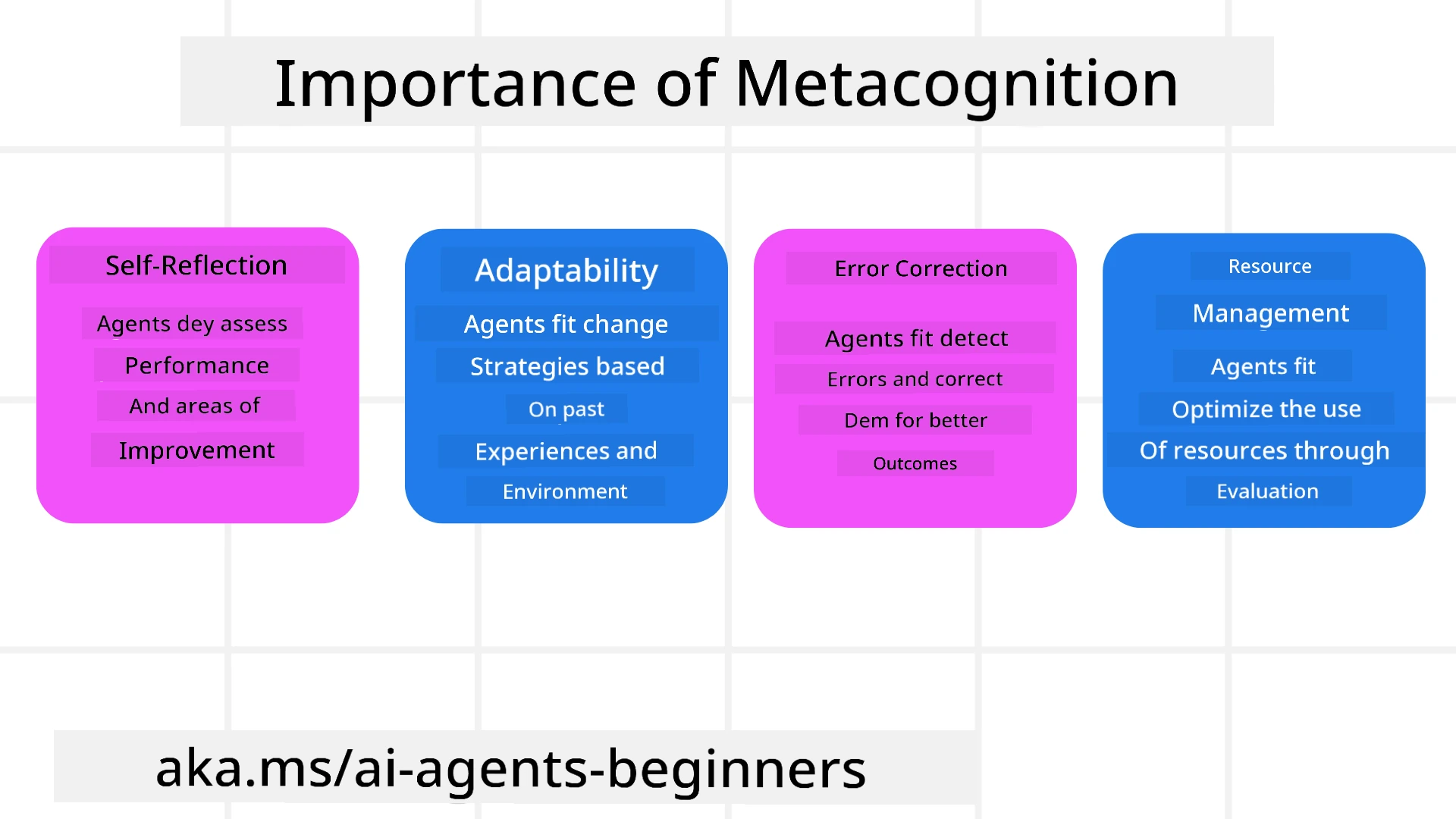
- Self-Reflection: Agents fit check how dem perform and find where dem need improve.
- Adaptability: Agents fit change their plans based on past experience and new environment.
- Error Correction: Agents fit find and fix error by themselves to get better result.
- Resource Management: Agents fit use resources well, like time and computing power, by planning and checking their actions.
Parts For Inside AI Agent
Before you start metacognitive things, you need sabi basic parts wey make AI agent. AI agent get:
- Persona: Na how agent own character be, how e go take relate with users.
- Tools: Wetin agent fit do.
- Skills: Wetin agent sabi and how e sabi am well.
All dis parts join hand to make one “expertise unit” wey fit do specific task.
Example: Think about travel agent, agent service wey no just plan your holiday but fit still change plan based on data wey e dey see live and past customer journey.
Example: Metacognition inside Travel Agent Service
Imagine say you dey design travel agent service wey powered by AI. Dis agent, “Travel Agent,” dey help users plan vacation. To put metacognition for am, Travel Agent need dey check and adjust based on how e sabi itself and past tori. Dis na how metacognition fit work:
The Task We E Dey Do Now
The work now na to help user plan trip go Paris.
Steps To Complete Di Work
- Gather User Preferences: Ask user about travel date, budget, wetin e like (museums, food, shopping), and any special need.
- Retrieve Information: Find flights, hotels, attractions, restaurants wey match user taste.
- Generate Recommendations: Give personalized plan with flight, hotel booking plus activity.
- Adjust Based on Feedback: Ask user say “how you see am?” then change plan if need.
Things We E Need
- Access flight and hotel booking database dem.
- Information about Paris attractions and restaurants.
- User feedback data from before.
Experience and Self-Reflection
Travel Agent dey use metacognition to check e own work and learn from past experience. Example:
- Analyze User Feedback: Travel Agent go check user comments to know which recommendation good and which no good. E go use am improve future advice.
- Adaptability: If user talk say e no like crowded places, Travel Agent no go recommend popular spot for peak time after.
- Error Correction: If Travel Agent ever make mistake before, like suggest hotel wey full, e go learn check hotel availability well before advice.
Real Developer Example
Here na simple example code for Travel Agent wey dey use metacognition:
class Travel_Agent:
    def __init__(self):
        self.user_preferences = {}
        self.experience_data = []

    def gather_preferences(self, preferences):
        self.user_preferences = preferences

    def retrieve_information(self):
        # Find flights, hotels, and attractions based on wetin you like
        flights = search_flights(self.user_preferences)
        hotels = search_hotels(self.user_preferences)
        attractions = search_attractions(self.user_preferences)
        return flights, hotels, attractions

    def generate_recommendations(self):
        flights, hotels, attractions = self.retrieve_information()
        itinerary = create_itinerary(flights, hotels, attractions)
        return itinerary

    def adjust_based_on_feedback(self, feedback):
        self.experience_data.append(feedback)
        # Check feedback and change future suggestions
        self.user_preferences = adjust_preferences(self.user_preferences, feedback)

# How to use am example
travel_agent = Travel_Agent()
preferences = {
    "destination": "Paris",
    "dates": "2025-04-01 to 2025-04-10",
    "budget": "moderate",
    "interests": ["museums", "cuisine"]
}
travel_agent.gather_preferences(preferences)
itinerary = travel_agent.generate_recommendations()
print("Suggested Itinerary:", itinerary)
feedback = {"liked": ["Louvre Museum"], "disliked": ["Eiffel Tower (too crowded)"]}
travel_agent.adjust_based_on_feedback(feedback)
Why Metacognition Matter
- Self-Reflection: Agents fit check how dem perform and find where better improve.
- Adaptability: Agents fit change plan based on feedback and new condition.
- Error Correction: Agents fit find and fix mistake by themselves.
- Resource Management: Agents fit use resources like time and computer power well.
With metacognition, Travel Agent fit give personalized and correct travel advice, make overall user experience better.
2. Planning for Agents
Planning na important part of AI agent behavior. Na to design steps wey go help reach goal, looking the current state, resources, and possible wahala dem.
Elements of Planning
- Current Task: Clear define the work wey e get.
- Steps to Complete the Task: Break down the work to small steps wey easy handle.
- Required Resources: Find all the resource wey e need.
- Experience: Use past experience to help plan well.
Example: This na the step Travel Agent need to take to help user plan trip well:
Steps for Travel Agent
- Gather User Preferences
- Ask user for travel date, budget, wetin e like and special needs.
- Example: “When you want travel?” “How much you fit spend?” “Which kind activities you enjoy for holiday?”
- Retrieve Information
- Find travel options wey match user taste.
- Flights: Search for flights wey fit user budget and travel date.
- Accommodations: Find hotels or place wey fit user location, price, and amenities taste.
- Attractions and Restaurants: Find popular attractions, activity and food spot wey fit user interests.
- Generate Recommendations
- Put tori dem together to make personalized plan.
- Talk flight details, hotel bookings, and suggest activities wey match user.
- Present Itinerary to User
- Show the plan to user make e see.
- Example: “Dis na how your Paris trip fit be. Flight, hotel, and activities dey inside. Tell me wetin you think!”
- Collect Feedback
- Ask user to talk wetin e think about the plan.
- Example: “You like flight choice?” “Hotel fit your need?” “You want add or remove any activity?”
- Adjust Based on Feedback
- Change plan based on wetin user talk.
- Fix flight, hotel, and activity advice to match user want.
- Final Confirmation
- Show updated plan to user to confirm.
- Example: “I change am based on your talk. Dis na the final plan. Everything good?”
- Book and Confirm Reservations
- Once user agree, book flight, hotel and activities.
- Send confirmation to user.
- Provide Ongoing Support
- Always dey available if user want change or add anything before or during trip.
- Example: “If you need help anytime for your trip, just holla me!”
Example of Interaction
class Travel_Agent:
    def __init__(self):
        self.user_preferences = {}
        self.experience_data = []

    def gather_preferences(self, preferences):
        self.user_preferences = preferences

    def retrieve_information(self):
        flights = search_flights(self.user_preferences)
        hotels = search_hotels(self.user_preferences)
        attractions = search_attractions(self.user_preferences)
        return flights, hotels, attractions

    def generate_recommendations(self):
        flights, hotels, attractions = self.retrieve_information()
        itinerary = create_itinerary(flights, hotels, attractions)
        return itinerary

    def adjust_based_on_feedback(self, feedback):
        self.experience_data.append(feedback)
        self.user_preferences = adjust_preferences(self.user_preferences, feedback)

# Example wey you fit use for one booing request
travel_agent = Travel_Agent()
preferences = {
    "destination": "Paris",
    "dates": "2025-04-01 to 2025-04-10",
    "budget": "moderate",
    "interests": ["museums", "cuisine"]
}
travel_agent.gather_preferences(preferences)
itinerary = travel_agent.generate_recommendations()
print("Suggested Itinerary:", itinerary)
feedback = {"liked": ["Louvre Museum"], "disliked": ["Eiffel Tower (too crowded)"]}
travel_agent.adjust_based_on_feedback(feedback)
3. Corrective RAG System
Make we start by understanding difference between RAG Tool and Pre-emptive Context Load
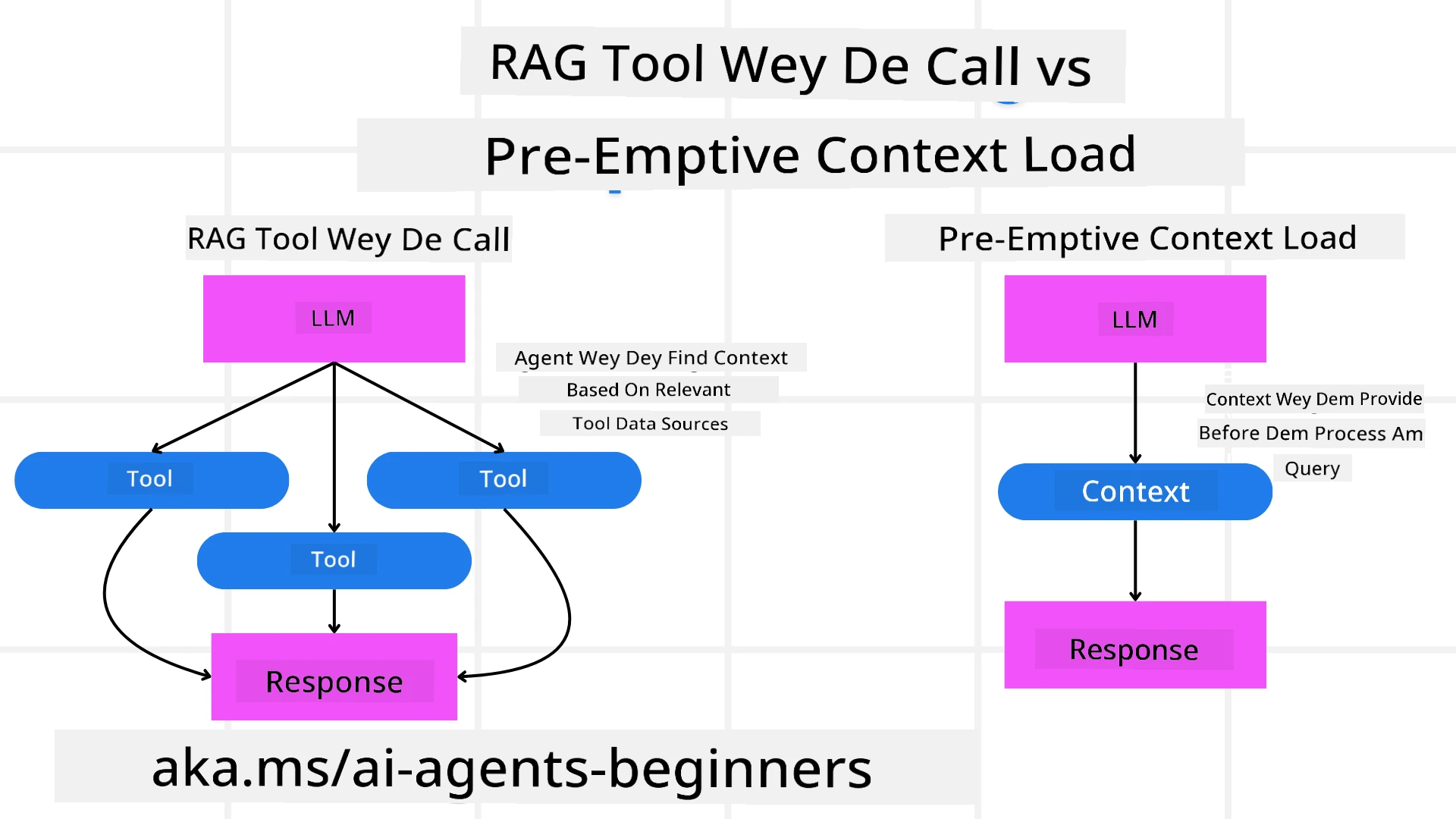
Retrieval-Augmented Generation (RAG)
RAG combine retrieval system with generative model. When you ask question, retrieval system go find relevant documents or data from outside source, then dem use am add to input for generative model. Dis dey help model give correct and relevant answer.
For RAG system, agent go fetch correct info from knowledge base then use am to generate better answer or action.
Corrective RAG Approach
Corrective RAG approach focus on using RAG to fix errors and make AI agents more correct. Dis involve:
- Prompting Technique: Use special prompts to guide agent fetch correct info.
- Tool: Use algorithms to help agent check if info relevant and make correct answer.
- Evaluation: Always check agent work and adjust to improve accuracy and performance.
Example: Corrective RAG for Search Agent
Think about search agent wey fetch info from web to answer user question. Corrective RAG approach fit be:
- Prompting Technique: Make search query based on user input.
- Tool: Use natural language processing and machine learning to rank and filter search result.
- Evaluation: Check user feedback to find mistake and fix info wey dem fetch.
Corrective RAG for Travel Agent
Corrective RAG (Retrieval-Augmented Generation) make AI fit find and generate info well and correct any mistake. Make we see how Travel Agent fit use Corrective RAG approach to give more correct and relevant travel advice.
Dis include:
- Prompting Technique: Use special prompts to guide agent fetch right info.
- Tool: Use algorithms wey help agent check relevance of info dem get and make correct answers.
- Evaluation: Always check agent work and adjust for better accuracy and efficiency.
Steps to Use Corrective RAG for Travel Agent
- Initial User Interaction
- Travel Agent gather first user preferences like destination, travel date, budget and interests.
-
Example:
preferences = {
    "destination": "Paris",
    "dates": "2025-04-01 to 2025-04-10",
    "budget": "moderate",
    "interests": ["museums", "cuisine"]
}
- Retrieve Information
- Travel Agent fetch info about flights, hotels, attractions and restaurants wey match user taste.
-
Example:
flights = search_flights(preferences)
hotels = search_hotels(preferences)
attractions = search_attractions(preferences)
- Generate Initial Recommendations
- Travel Agent use info to generate personal plan.
-
Example:
itinerary = create_itinerary(flights, hotels, attractions)
print("Suggested Itinerary:", itinerary)
- Collect User Feedback
- Travel Agent ask user for feedback on first recommendations.
-
Example:
feedback = {
    "liked": ["Louvre Museum"],
    "disliked": ["Eiffel Tower (too crowded)"]
}
- Corrective RAG Process
- Prompting Technique: Travel Agent make new search query based on user feedback.
-
Example:
if "disliked" in feedback:
    preferences["avoid"] = feedback["disliked"]
-
- Tool: Travel Agent use algorithms to rank and filter new search results, focusing on relevance based on feedback.
-
Example:
new_attractions = search_attractions(preferences)
new_itinerary = create_itinerary(flights, hotels, new_attractions)
print("Updated Itinerary:", new_itinerary)
-
- Evaluation: Travel Agent always dey check how good recommendations dey by analyzing user feedback and adjust if needed.
-
Example:
def adjust_preferences(preferences, feedback):
    if "liked" in feedback:
        preferences["favorites"] = feedback["liked"]
    if "disliked" in feedback:
        preferences["avoid"] = feedback["disliked"]
    return preferences

preferences = adjust_preferences(preferences, feedback)
-
- Prompting Technique: Travel Agent make new search query based on user feedback.
Real Example
Here na simple Python code example for how Travel Agent fit use Corrective RAG:
class Travel_Agent:
    def __init__(self):
        self.user_preferences = {}
        self.experience_data = []

    def gather_preferences(self, preferences):
        self.user_preferences = preferences

    def retrieve_information(self):
        flights = search_flights(self.user_preferences)
        hotels = search_hotels(self.user_preferences)
        attractions = search_attractions(self.user_preferences)
        return flights, hotels, attractions

    def generate_recommendations(self):
        flights, hotels, attractions = self.retrieve_information()
        itinerary = create_itinerary(flights, hotels, attractions)
        return itinerary

    def adjust_based_on_feedback(self, feedback):
        self.experience_data.append(feedback)
        self.user_preferences = adjust_preferences(self.user_preferences, feedback)
        new_itinerary = self.generate_recommendations()
        return new_itinerary

# Na example wey you fit use am
travel_agent = Travel_Agent()
preferences = {
    "destination": "Paris",
    "dates": "2025-04-01 to 2025-04-10",
    "budget": "moderate",
    "interests": ["museums", "cuisine"]
}
travel_agent.gather_preferences(preferences)
itinerary = travel_agent.generate_recommendations()
print("Suggested Itinerary:", itinerary)
feedback = {"liked": ["Louvre Museum"], "disliked": ["Eiffel Tower (too crowded)"]}
new_itinerary = travel_agent.adjust_based_on_feedback(feedback)
print("Updated Itinerary:", new_itinerary)
Pre-emptive Context Load
Pre-emptive Context Load mean say you go load correct background information or context into di model before e begin process di query. Dis one mean say di model get access to di info from di start, we fit help am make better informed response without need to find more data during di process.
Dis na simple example wey show how pre-emptive context load fit look like for travel agent application for Python:
class TravelAgent:
    def __init__(self):
        # Pre-load popular destinations dem and dia information
        self.context = {
            "Paris": {"country": "France", "currency": "Euro", "language": "French", "attractions": ["Eiffel Tower", "Louvre Museum"]},
            "Tokyo": {"country": "Japan", "currency": "Yen", "language": "Japanese", "attractions": ["Tokyo Tower", "Shibuya Crossing"]},
            "New York": {"country": "USA", "currency": "Dollar", "language": "English", "attractions": ["Statue of Liberty", "Times Square"]},
            "Sydney": {"country": "Australia", "currency": "Dollar", "language": "English", "attractions": ["Sydney Opera House", "Bondi Beach"]}
        }

    def get_destination_info(self, destination):
        # Fetch destination information from pre-loaded context
        info = self.context.get(destination)
        if info:
            return f"{destination}:\nCountry: {info['country']}\nCurrency: {info['currency']}\nLanguage: {info['language']}\nAttractions: {', '.join(info['attractions'])}"
        else:
            return f"Sorry, we don't have information on {destination}."

# Example use
travel_agent = TravelAgent()
print(travel_agent.get_destination_info("Paris"))
print(travel_agent.get_destination_info("Tokyo"))
Explanation
-
Initialization (
__init__method): DiTravelAgentclass dey pre-load dictionary wey get info about popular destinations like Paris, Tokyo, New York, and Sydney. Dis dictionary get details like country, currency, language, and main attractions for each destination. -
Retrieving Information (
get_destination_infomethod): When user ask about one destination, diget_destination_infomethod go find di correct info from di pre-loaded context dictionary.
By pre-loading di context, di travel agent application fit quickly respond to user questions without need to find dis info from outside source for real-time. Dis one make di application efficient and responsive.
Bootstrapping di Plan with Goal Before You Start Iterate
Bootstrapping plan with goal mean say you start wit clear target or objective inside your mind. If you define dis goal upfront, di model go use am as guide for di whole iterative process. Dis one help make sure say each iteration dey waka closer to di goal, make di process efficient and focused.
Dis na example how you fit bootstrap travel plan with goal before you start iterate for travel agent for Python:
Scenario
One travel agent wan plan custom vacation for client. Di goal na to create travel itinerary wey go maximize di client satisfaction based on their preferences and budget.
Steps
- Define client preferences and budget.
- Bootstrap di initial plan based on di preferences.
- Iterate to refine di plan, make di plan better for client satisfaction.
Python Code
class TravelAgent:
    def __init__(self, destinations):
        self.destinations = destinations

    def bootstrap_plan(self, preferences, budget):
        plan = []
        total_cost = 0

        for destination in self.destinations:
            if total_cost + destination['cost'] <= budget and self.match_preferences(destination, preferences):
                plan.append(destination)
                total_cost += destination['cost']

        return plan

    def match_preferences(self, destination, preferences):
        for key, value in preferences.items():
            if destination.get(key) != value:
                return False
        return True

    def iterate_plan(self, plan, preferences, budget):
        for i in range(len(plan)):
            for destination in self.destinations:
                if destination not in plan and self.match_preferences(destination, preferences) and self.calculate_cost(plan, destination) <= budget:
                    plan[i] = destination
                    break
        return plan

    def calculate_cost(self, plan, new_destination):
        return sum(destination['cost'] for destination in plan) + new_destination['cost']

# Na example how you go take use am
destinations = [
    {"name": "Paris", "cost": 1000, "activity": "sightseeing"},
    {"name": "Tokyo", "cost": 1200, "activity": "shopping"},
    {"name": "New York", "cost": 900, "activity": "sightseeing"},
    {"name": "Sydney", "cost": 1100, "activity": "beach"},
]

preferences = {"activity": "sightseeing"}
budget = 2000

travel_agent = TravelAgent(destinations)
initial_plan = travel_agent.bootstrap_plan(preferences, budget)
print("Initial Plan:", initial_plan)

refined_plan = travel_agent.iterate_plan(initial_plan, preferences, budget)
print("Refined Plan:", refined_plan)
Code Explanation
-
Initialization (
__init__method): DiTravelAgentclass dey initialized with list of potential destinations, each get attributes like name, cost, and activity type. -
Bootstrapping di Plan (
bootstrap_planmethod): Dis method go create initial travel plan based on client preferences and budget. E go check through di list of destinations and add dem to di plan if dem match client preferences and fit inside di budget. -
Matching Preferences (
match_preferencesmethod): Dis method go check if destination match client preferences. -
Iterating di Plan (
iterate_planmethod): Dis method go refine di initial plan by trying to change each destination inside di plan with better match, based on client preferences and budget limits. -
Calculating Cost (
calculate_costmethod): Dis method go calculate total cost of current plan including any potential new destination.
Example Usage
- Initial Plan: Di travel agent create initial plan based on client preferences for sightseeing and budget of $2000.
- Refined Plan: Di travel agent iterate di plan, optimize for client preferences and budget.
By bootstrapping di plan with clear goal (like maximizing client satisfaction) and iterating to make di plan better, di travel agent fit create customized and optimized travel itinerary for client. Dis method make sure say di plan align with client preferences and budget since di start and improve with each iteration.
Using LLM for Re-ranking and Scoring
Large Language Models (LLMs) fit use for re-ranking and scoring by checking how relevant and good di retrieved documents or generated responses be. How e dey work na dis:
Retrieval: Di first step na to find candidate documents or responses based on di query.
Re-ranking: Di LLM go check dis candidates and re-rank dem based on relevance and quality. Dis step go make sure say di most relevant and better info go come first.
Scoring: Di LLM go give scores to each candidate, based on how relevant and good dem be. Dis dey help to choose di best response or document for di user.
By using LLMs for re-ranking and scoring, di system fit give more correct and context relevant info, wey dey improve di overall user experience.
Dis na example how travel agent fit take Large Language Model (LLM) do re-ranking and scoring travel destinations based on user preferences for Python:
Scenario - Travel based on Preferences
Travel agent wan recommend best travel destinations to client based on their preferences. Di LLM go help re-rank and score di destinations to make sure di best options show.
Steps:
- Gather user preferences.
- Retrieve list of possible travel destinations.
- Use LLM to re-rank and score di destinations based on user preferences.
Na so you fit update di previous example to use Azure OpenAI Services:
Requirements
- You go need Azure subscription.
- Create Azure OpenAI resource and collect your API key.
Example Python Code
import requests
import json

class TravelAgent:
    def __init__(self, destinations):
        self.destinations = destinations

    def get_recommendations(self, preferences, api_key, endpoint):
        # Make one prompt for Azure OpenAI
        prompt = self.generate_prompt(preferences)

        # Set headers an payload for di request
        headers = {
            'Content-Type': 'application/json',
            'Authorization': f'Bearer {api_key}'
        }
        payload = {
            "prompt": prompt,
            "max_tokens": 150,
            "temperature": 0.7
        }

        # Call di Azure OpenAI API to collect di re-ranked an scored destinations
        response = requests.post(endpoint, headers=headers, json=payload)
        response_data = response.json()

        # Comot an return di recommendations
        recommendations = response_data['choices'][0]['text'].strip().split('\n')
        return recommendations

    def generate_prompt(self, preferences):
        prompt = "Here are the travel destinations ranked and scored based on the following user preferences:\n"
        for key, value in preferences.items():
            prompt += f"{key}: {value}\n"
        prompt += "\nDestinations:\n"
        for destination in self.destinations:
            prompt += f"- {destination['name']}: {destination['description']}\n"
        return prompt

# Example how to use am
destinations = [
    {"name": "Paris", "description": "City of lights, known for its art, fashion, and culture."},
    {"name": "Tokyo", "description": "Vibrant city, famous for its modernity and traditional temples."},
    {"name": "New York", "description": "The city that never sleeps, with iconic landmarks and diverse culture."},
    {"name": "Sydney", "description": "Beautiful harbour city, known for its opera house and stunning beaches."},
]

preferences = {"activity": "sightseeing", "culture": "diverse"}
api_key = 'your_azure_openai_api_key'
endpoint = 'https://your-endpoint.com/openai/deployments/your-deployment-name/completions?api-version=2022-12-01'

travel_agent = TravelAgent(destinations)
recommendations = travel_agent.get_recommendations(preferences, api_key, endpoint)
print("Recommended Destinations:")
for rec in recommendations:
    print(rec)
Code Explanation - Preference Booker
-
Initialization: Di
TravelAgentclass dey initialized with list of potential travel destinations, each get attributes like name and description. -
Getting Recommendations (
get_recommendationsmethod): Dis method go generate prompt for Azure OpenAI service based on user preferences and do HTTP POST request to Azure OpenAI API to get re-ranked and scored destinations. -
Generating Prompt (
generate_promptmethod): Dis method build prompt for Azure OpenAI, e include user preferences and list of destinations. Di prompt go guide di model to re-rank and score di destinations based on di preferences given. -
API Call: Di
requestslibrary dey used to do HTTP POST request to Azure OpenAI API endpoint. Di response get di re-ranked and scored destinations. -
Example Usage: Di travel agent gather user preferences (like interest in sightseeing and diverse culture) and use Azure OpenAI service to get re-ranked and scored recommendations for travel destinations.
Make sure say you change your_azure_openai_api_key to your real Azure OpenAI API key and https://your-endpoint.com/... to di real endpoint URL of your Azure OpenAI deployment.
By using LLM for re-ranking and scoring, di travel agent fit give more personalized and relevant travel recommendations to clients, wey go improve their overall experience.
RAG: Prompting Technique vs Tool
Retrieval-Augmented Generation (RAG) fit be both prompting technique and tool for AI agents development. To understand difference between dem fit help you use RAG better for your projects.
RAG as a Prompting Technique
Wetin be e?
- As prompting technique, RAG involve saying specific queries or prompts to guide how to find relevant info from large corpus or database. Di info dey then used to generate responses or actions.
How e dey work:
- Formulate Prompts: Create well-structured prompts or queries based on di task or user input.
- Retrieve Information: Use di prompts to search for relevant data from pre-existing knowledge base or dataset.
- Generate Response: Combine di retrieved info with generative AI models to make comprehensive and correct response.
Example for Travel Agent:
- User Input: “I want to visit museums in Paris.”
- Prompt: “Find top museums in Paris.”
- Retrieved Information: Details about Louvre Museum, Musée d’Orsay, etc.
- Generated Response: “Here are some top museums in Paris: Louvre Museum, Musée d’Orsay, and Centre Pompidou.”
RAG as a Tool
Wetin be e?
- As tool, RAG na integrated system wey dey automate di retrieval and generation process, e make am easy for developers to put complex AI functionalities without to manual create prompts for each query.
How e dey work:
- Integration: Embed RAG inside AI agent architecture, e go handle retrieval and generation tasks automatically.
- Automation: Di tool dey manage whole process, from receiving user input reach generating final response, without need to prompt each step.
- Efficiency: E improve agent performance by making retrieval and generation process faster and more accurate.
Example for Travel Agent:
- User Input: “I want to visit museums in Paris.”
- RAG Tool: E automatically dey find info about museums and generate response.
- Generated Response: “Here are some top museums in Paris: Louvre Museum, Musée d’Orsay, and Centre Pompidou.”
Comparison
| Aspect | Prompting Technique | Tool |
|---|---|---|
| Manual vs Automatic | Manual to create prompts for each query. | Automated process for retrieval and generation. |
| Control | Give more control over retrieval process. | Streamline and automate retrieval and generation. |
| Flexibility | Allow customized prompts based on specific needs. | More efficient for big scale use. |
| Complexity | Need crafting and adjusting prompts. | Easier to put inside AI agent structure. |
Practical Examples
Prompting Technique Example:
def search_museums_in_paris():
    prompt = "Find top museums in Paris"
    search_results = search_web(prompt)
    return search_results

museums = search_museums_in_paris()
print("Top Museums in Paris:", museums)
Tool Example:
class Travel_Agent:
    def __init__(self):
        self.rag_tool = RAGTool()

    def get_museums_in_paris(self):
        user_input = "I want to visit museums in Paris."
        response = self.rag_tool.retrieve_and_generate(user_input)
        return response

travel_agent = Travel_Agent()
museums = travel_agent.get_museums_in_paris()
print("Top Museums in Paris:", museums)
Evaluating Relevancy
Evaluating relevancy na important part of AI agent performance. E dey make sure say di info wey di agent find and generate dey correct, appropriate, and useful to di user. Make we look how to evaluate relevancy in AI agents, with practical examples and techniques.
Key Concepts in Evaluating Relevancy
- Context Awareness:
- Di agent must understand di context of user query to find and generate relevant info.
- Example: If user ask for “best restaurants in Paris,” di agent suppose consider user preferences, like type of food and budget.
- Accuracy:
- Di info wey di agent give must be correct correct and up-to-date.
- Example: Recommend restaurants wey still dey open and get good reviews instead of ones wey don close or outdated.
- User Intent:
- Di agent suppose understand wetin di user really want to provide di most relevant info.
- Example: If user ask for “budget-friendly hotels,” di agent suppose give more importance to affordable options.
- Feedback Loop:
- Always dey collect and analyze user feedback to help agent refine how e dey evaluate relevancy.
- Example: Use user ratings and feedback on previous recommendations to make future responses better.
Practical Techniques for Evaluating Relevancy
- Relevance Scoring:
- Give relevance score to each retrieved item based on how well e match user query and preferences.
-
Example:
def relevance_score(item, query):
    score = 0
    if item['category'] in query['interests']:
        score += 1
    if item['price'] <= query['budget']:
        score += 1
    if item['location'] == query['destination']:
        score += 1
    return score
- Filtering and Ranking:
- Filter out irrelevant items and rank di remaining ones based on their relevance scores.
-
Example:
def filter_and_rank(items, query):
    ranked_items = sorted(items, key=lambda item: relevance_score(item, query), reverse=True)
    return ranked_items[:10]  # Return di top 10 tins wey make sense
- Natural Language Processing (NLP):
- Use NLP techniques to understand user query and find relevant info.
-
Example:
def process_query(query):
    # Use NLP to comot main tori from wetin di user tok
    processed_query = nlp(query)
    return processed_query
- User Feedback Integration:
- Collect user feedback for di recommended items and use am to adjust future relevance evaluations.
-
Example:
def adjust_based_on_feedback(feedback, items):
    for item in items:
        if item['name'] in feedback['liked']:
            item['relevance'] += 1
        if item['name'] in feedback['disliked']:
            item['relevance'] -= 1
    return items
Example: Evaluating Relevancy in Travel Agent
Dis na practical example how Travel Agent fit evaluate relevancy of travel recommendations:
class Travel_Agent:
    def __init__(self):
        self.user_preferences = {}
        self.experience_data = []

    def gather_preferences(self, preferences):
        self.user_preferences = preferences

    def retrieve_information(self):
        flights = search_flights(self.user_preferences)
        hotels = search_hotels(self.user_preferences)
        attractions = search_attractions(self.user_preferences)
        return flights, hotels, attractions

    def generate_recommendations(self):
        flights, hotels, attractions = self.retrieve_information()
        ranked_hotels = self.filter_and_rank(hotels, self.user_preferences)
        itinerary = create_itinerary(flights, ranked_hotels, attractions)
        return itinerary

    def filter_and_rank(self, items, query):
        ranked_items = sorted(items, key=lambda item: self.relevance_score(item, query), reverse=True)
        return ranked_items[:10]  # Return top 10 betta tins wey relate

    def relevance_score(self, item, query):
        score = 0
        if item['category'] in query['interests']:
            score += 1
        if item['price'] <= query['budget']:
            score += 1
        if item['location'] == query['destination']:
            score += 1
        return score

    def adjust_based_on_feedback(self, feedback, items):
        for item in items:
            if item['name'] in feedback['liked']:
                item['relevance'] += 1
            if item['name'] in feedback['disliked']:
                item['relevance'] -= 1
        return items

# Example tins we fit take use am
travel_agent = Travel_Agent()
preferences = {
    "destination": "Paris",
    "dates": "2025-04-01 to 2025-04-10",
    "budget": "moderate",
    "interests": ["museums", "cuisine"]
}
travel_agent.gather_preferences(preferences)
itinerary = travel_agent.generate_recommendations()
print("Suggested Itinerary:", itinerary)
feedback = {"liked": ["Louvre Museum"], "disliked": ["Eiffel Tower (too crowded)"]}
updated_items = travel_agent.adjust_based_on_feedback(feedback, itinerary['hotels'])
print("Updated Itinerary with Feedback:", updated_items)
Search with Intent
Searching with intent mean say you go understand and interpret wetin user really want or di goal behind di query to find and generate di most relevant and useful info. Dis approach no dey only match keywords but dey try to understand wetin user really need and di context.
Key Concepts in Searching with Intent
- Understanding User Intent:
- User intent fit be three main types: informational, navigational, and transactional.
- Informational Intent: User dey find info about one topic (e.g., “Wetin be best museums for Paris?”).
- Navigational Intent: User want go specific website or page (e.g., “Louvre Museum official website”).
- Transactional Intent: User want perform transaction, like book flight or buy something (e.g., “Book flight go Paris”).
- User intent fit be three main types: informational, navigational, and transactional.
- Context Awareness:
- To analyze context of user query dey help make sure say you identify their intent well. Dis include considering previous interactions, user preferences, and details of current query.
- Natural Language Processing (NLP):
- NLP techniques dey used to understand and interpret natural language queries wey users give. Dis involve tasks like entity recognition, sentiment analysis, and query parsing.
- Personalization:
- Make search results personalized based on user history, preferences, and feedback to improve relevancy of info found.
Practical Example: Searching with Intent in Travel Agent
Make we take Travel Agent example check how searching with intent fit work.
-
Gathering User Preferences
class Travel_Agent: def __init__(self): self.user_preferences = {} def gather_preferences(self, preferences): self.user_preferences = preferences -
Understanding User Intent
def identify_intent(query): if "book" in query or "purchase" in query: return "transactional" elif "website" in query or "official" in query: return "navigational" else: return "informational" -
Context Awareness
def analyze_context(query, user_history): # Join di current query wit user history to sabi wetin dey go on context = { "current_query": query, "user_history": user_history } return context -
Find and Personalisé Results
def search_with_intent(query, preferences, user_history): intent = identify_intent(query) context = analyze_context(query, user_history) if intent == "informational": search_results = search_information(query, preferences) elif intent == "navigational": search_results = search_navigation(query) elif intent == "transactional": search_results = search_transaction(query, preferences) personalized_results = personalize_results(search_results, user_history) return personalized_results def search_information(query, preferences): # Example search logic for information wey person want find results = search_web(f"best {preferences['interests']} in {preferences['destination']}") return results def search_navigation(query): # Example search logic for if person dey find how to reach place results = search_web(query) return results def search_transaction(query, preferences): # Example search logic for if person wan buy or do transaction results = search_web(f"book {query} to {preferences['destination']}") return results def personalize_results(results, user_history): # Example how to personalize tins personalized = [result for result in results if result not in user_history] return personalized[:10] # Bring back top 10 personalized results -
Example Usage
travel_agent = Travel_Agent()
preferences = {
    "destination": "Paris",
    "interests": ["museums", "cuisine"]
}
travel_agent.gather_preferences(preferences)
user_history = ["Louvre Museum website", "Book flight to Paris"]
query = "best museums in Paris"
results = search_with_intent(query, preferences, user_history)
print("Search Results:", results)
4. Generating Code as Tool
Code wey dey generate agents use AI models to write and run code, solve complex problem dem and dey automate task dem.
Code Generating Agents
Code generating agents dey use generative AI models to write and run code. Dem agents fit solve complex problem, automate task dem, and provide beta insights by generating and running code for different programming language dem.
Practical Applications
- Automated Code Generation: Generate code snippets for specific work dem, like data analysis, web scraping, or machine learning.
- SQL as a RAG: Use SQL queries to find and change data from databases.
- Problem Solving: Create and run code to solve specific problem dem, like making algorithms beta or analyzing data.
Example: Code Generating Agent for Data Analysis
Imagine say you dey design code generating agent. Na how e fit waka e go be:
- Task: Analyze dataset to find trends and pattern dem.
- Steps:
- Load dataset into data analysis tool.
- Generate SQL queries to filter and combine di data.
- Run those queries and collect di results.
- Use di results to generate visualizations and insights.
- Required Resources: Access to dataset, data analysis tools, and SQL capabilities.
- Experience: Use past analysis results to make future analyses better and correct.
Example: Code Generating Agent for Travel Agent
For this example, we go design code generating agent, Travel Agent, wey go help users plan their travel by generating and running code. This agent fit handle tasks like find travel options, filter results, and build itinerary using generative AI.
Overview of the Code Generating Agent
- Gathering User Preferences: Collect user input like destination, travel dates, budget, and interests.
- Generating Code to Fetch Data: Generate code snippets to get data about flights, hotels, and attractions.
- Executing Generated Code: Run di generated code to find real-time information.
- Generating Itinerary: Put di collected data together to make personalized travel plan.
- Adjusting Based on Feedback: Get user feedback and regenerate code if e necessary to improve di results.
Step-by-Step Implementation
-
Gathering User Preferences
class Travel_Agent: def __init__(self): self.user_preferences = {} def gather_preferences(self, preferences): self.user_preferences = preferences -
Generating Code to Fetch Data
def generate_code_to_fetch_data(preferences): # Example: Make code wey go find flight based on wetin di user like code = f""" def search_flights(): import requests response = requests.get('https://api.example.com/flights', params={preferences}) return response.json() """ return code def generate_code_to_fetch_hotels(preferences): # Example: Make code wey go find hotel dem code = f""" def search_hotels(): import requests response = requests.get('https://api.example.com/hotels', params={preferences}) return response.json() """ return code -
Executing Generated Code
def execute_code(code): # Run di code wey dem generate wit exec exec(code) result = locals() return result travel_agent = Travel_Agent() preferences = { "destination": "Paris", "dates": "2025-04-01 to 2025-04-10", "budget": "moderate", "interests": ["museums", "cuisine"] } travel_agent.gather_preferences(preferences) flight_code = generate_code_to_fetch_data(preferences) hotel_code = generate_code_to_fetch_hotels(preferences) flights = execute_code(flight_code) hotels = execute_code(hotel_code) print("Flight Options:", flights) print("Hotel Options:", hotels) -
Generating Itinerary
def generate_itinerary(flights, hotels, attractions): itinerary = { "flights": flights, "hotels": hotels, "attractions": attractions } return itinerary attractions = search_attractions(preferences) itinerary = generate_itinerary(flights, hotels, attractions) print("Suggested Itinerary:", itinerary) -
Adjusting Based on Feedback
def adjust_based_on_feedback(feedback, preferences):
    # Change settings based on how user yan
    if "liked" in feedback:
        preferences["favorites"] = feedback["liked"]
    if "disliked" in feedback:
        preferences["avoid"] = feedback["disliked"]
    return preferences

feedback = {"liked": ["Louvre Museum"], "disliked": ["Eiffel Tower (too crowded)"]}
updated_preferences = adjust_based_on_feedback(feedback, preferences)

# Dey create and run code again with new settings
updated_flight_code = generate_code_to_fetch_data(updated_preferences)
updated_hotel_code = generate_code_to_fetch_hotels(updated_preferences)

updated_flights = execute_code(updated_flight_code)
updated_hotels = execute_code(updated_hotel_code)

updated_itinerary = generate_itinerary(updated_flights, updated_hotels, attractions)
print("Updated Itinerary:", updated_itinerary)
Using environmental awareness and reasoning
Based on di table schema fit really improve di query generation process by using environmental awareness and reasoning.
This na example how you fit do am:
- Understanding the Schema: System go understand di table schema and use dis info to guide di query generation.
- Adjusting Based on Feedback: System go adjust user preferences based on feedback and reason which fields for di schema need update.
- Generating and Executing Queries: System go generate and run queries to fetch updated flight and hotel data based on di new preferences.
Here na updated Python code example wey include these ideas:
def adjust_based_on_feedback(feedback, preferences, schema):
    # Change di preferences based on how di user talk
    if "liked" in feedback:
        preferences["favorites"] = feedback["liked"]
    if "disliked" in feedback:
        preferences["avoid"] = feedback["disliked"]
    # Reasoning wey get for schema to change oda related preferences
    for field in schema:
        if field in preferences:
            preferences[field] = adjust_based_on_environment(feedback, field, schema)
    return preferences

def adjust_based_on_environment(feedback, field, schema):
    # Custom way wey we take change preferences based on schema and feedback
    if field in feedback["liked"]:
        return schema[field]["positive_adjustment"]
    elif field in feedback["disliked"]:
        return schema[field]["negative_adjustment"]
    return schema[field]["default"]

def generate_code_to_fetch_data(preferences):
    # Create code wey go fetch flight data based on updated preferences
    return f"fetch_flights(preferences={preferences})"

def generate_code_to_fetch_hotels(preferences):
    # Create code wey go fetch hotel data based on updated preferences
    return f"fetch_hotels(preferences={preferences})"

def execute_code(code):
    # Pretend to run code and return mock data
    return {"data": f"Executed: {code}"}

def generate_itinerary(flights, hotels, attractions):
    # Create itinerary based on flights, hotels, and attractions
    return {"flights": flights, "hotels": hotels, "attractions": attractions}

# Example schema
schema = {
    "favorites": {"positive_adjustment": "increase", "negative_adjustment": "decrease", "default": "neutral"},
    "avoid": {"positive_adjustment": "decrease", "negative_adjustment": "increase", "default": "neutral"}
}

# Example how to take use am
preferences = {"favorites": "sightseeing", "avoid": "crowded places"}
feedback = {"liked": ["Louvre Museum"], "disliked": ["Eiffel Tower (too crowded)"]}
updated_preferences = adjust_based_on_feedback(feedback, preferences, schema)

# Make code again and run am with updated preferences
updated_flight_code = generate_code_to_fetch_data(updated_preferences)
updated_hotel_code = generate_code_to_fetch_hotels(updated_preferences)

updated_flights = execute_code(updated_flight_code)
updated_hotels = execute_code(updated_hotel_code)

updated_itinerary = generate_itinerary(updated_flights, updated_hotels, feedback["liked"])
print("Updated Itinerary:", updated_itinerary)
Explanation - Booking Based on Feedback
- Schema Awareness: Di
schemadictionary dey define how preferences go dey adjust based on feedback. E get fields likefavoritesandavoid, with corresponding adjustments. - Adjusting Preferences (
adjust_based_on_feedbackmethod): Dis method dey adjust preferences based on user feedback and di schema. - Environment-Based Adjustments (
adjust_based_on_environmentmethod): Dis method dey customize di adjustments based on di schema and feedback. - Generating and Executing Queries: System go generate code to fetch updated flight and hotel data based on di adjusted preferences and simulate how e go run those queries.
- Generating Itinerary: System go create updated itinerary based on di new flight, hotel, and attraction data.
By making di system environment-aware and reasoning based on di schema, e fit generate more correct and relevant queries, wey fit give beta travel recommendations and more personalized user experience.
Using SQL as Retrieval-Augmented Generation (RAG) Technique
SQL (Structured Query Language) na powerful tool for interacting with databases. When you use am as part of Retrieval-Augmented Generation (RAG) approach, SQL fit fetch important data from databases to help generate responses or actions for AI agents. Make we look how SQL fit take work as RAG technique inside Travel Agent.
Key Concepts
- Database Interaction:
- SQL dey use to query databases, find important information, and change data.
- Example: Fetch flight details, hotel info, and attractions from travel database.
- Integration with RAG:
- SQL queries dey generate based on user input and preferences.
- Data wey dem find dey use to generate personalized recommendations or actions.
- Dynamic Query Generation:
- AI agent dey generate dynamic SQL queries based on context and user needs.
- Example: Customize SQL queries to filter results by budget, dates, and interests.
Applications
- Automated Code Generation: Generate code snippets for specific works.
- SQL as a RAG: Use SQL queries to change data.
- Problem Solving: Create and run code to solve problems.
Example: Data analysis agent:
- Task: Analyze dataset to find trends.
- Steps:
- Load dataset.
- Generate SQL queries to filter data.
- Run queries and collect results.
- Generate visualizations and insights.
- Resources: Dataset access, SQL capabilities.
- Experience: Use past results to make future analyses better.
Practical Example: Using SQL in Travel Agent
-
Gathering User Preferences
class Travel_Agent: def __init__(self): self.user_preferences = {} def gather_preferences(self, preferences): self.user_preferences = preferences -
Generating SQL Queries
def generate_sql_query(table, preferences): query = f"SELECT * FROM {table} WHERE " conditions = [] for key, value in preferences.items(): conditions.append(f"{key}='{value}'") query += " AND ".join(conditions) return query -
Executing SQL Queries
import sqlite3 def execute_sql_query(query, database="travel.db"): connection = sqlite3.connect(database) cursor = connection.cursor() cursor.execute(query) results = cursor.fetchall() connection.close() return results -
Generating Recommendations
def generate_recommendations(preferences):
    flight_query = generate_sql_query("flights", preferences)
    hotel_query = generate_sql_query("hotels", preferences)
    attraction_query = generate_sql_query("attractions", preferences)

    flights = execute_sql_query(flight_query)
    hotels = execute_sql_query(hotel_query)
    attractions = execute_sql_query(attraction_query)

    itinerary = {
        "flights": flights,
        "hotels": hotels,
        "attractions": attractions
    }
    return itinerary

travel_agent = Travel_Agent()
preferences = {
    "destination": "Paris",
    "dates": "2025-04-01 to 2025-04-10",
    "budget": "moderate",
    "interests": ["museums", "cuisine"]
}
travel_agent.gather_preferences(preferences)
itinerary = generate_recommendations(preferences)
print("Suggested Itinerary:", itinerary)
Example SQL Queries
-
Flight Query
SELECT * FROM flights WHERE destination='Paris' AND dates='2025-04-01 to 2025-04-10' AND budget='moderate'; -
Hotel Query
SELECT * FROM hotels WHERE destination='Paris' AND budget='moderate'; -
Attraction Query
SELECT * FROM attractions WHERE destination='Paris' AND interests='museums, cuisine';
By using SQL as part of Retrieval-Augmented Generation (RAG) technique, AI agents like Travel Agent fit dynamically fetch and use important data to give correct and personalized recommendations.
Example of Metacognition
To show how metacognition fit work, make we create simple agent wey reflect on how e dey make decisions while e dey solve problem. For this example, we go build system where agent dey try optimize hotel choice, but then e go check back on e own reasoning and adjust strategy if e make mistake or choose bad option.
We go simulate dis with simple example where agent dey select hotels based on price and quality, but e go “reflect” on decisions and adjust as e suppose.
How dis dey show metacognition:
- Initial Decision: Agent go pick cheapest hotel first without understanding how quality fit affect am.
- Reflection and Evaluation: After first choice, agent go check if hotel na “bad” choice based on user feedback. If e find say hotel quality low too much, e go reflect on e own reasoning.
- Adjusting Strategy: Agent go change e strategy based on reflection, from “cheapest” to “highest_quality”, to make e decision better for next time.
Na example:
class HotelRecommendationAgent:
    def __init__(self):
        self.previous_choices = []  # Dey keep di hotels wey we don choose before
        self.corrected_choices = []  # Dey keep di correct choices
        self.recommendation_strategies = ['cheapest', 'highest_quality']  # Strategies wey dey available

    def recommend_hotel(self, hotels, strategy):
        """
        Recommend a hotel based on the chosen strategy.
        The strategy can either be 'cheapest' or 'highest_quality'.
        """
        if strategy == 'cheapest':
            recommended = min(hotels, key=lambda x: x['price'])
        elif strategy == 'highest_quality':
            recommended = max(hotels, key=lambda x: x['quality'])
        else:
            recommended = None
        self.previous_choices.append((strategy, recommended))
        return recommended

    def reflect_on_choice(self):
        """
        Reflect on the last choice made and decide if the agent should adjust its strategy.
        The agent considers if the previous choice led to a poor outcome.
        """
        if not self.previous_choices:
            return "No choices made yet."

        last_choice_strategy, last_choice = self.previous_choices[-1]
        # Make we assume say we get some user feedback wey talk whether di last choice beta or no be so
        user_feedback = self.get_user_feedback(last_choice)

        if user_feedback == "bad":
            # Change strategy if di previous choice no satisfy
            new_strategy = 'highest_quality' if last_choice_strategy == 'cheapest' else 'cheapest'
            self.corrected_choices.append((new_strategy, last_choice))
            return f"Reflecting on choice. Adjusting strategy to {new_strategy}."
        else:
            return "The choice was good. No need to adjust."

    def get_user_feedback(self, hotel):
        """
        Simulate user feedback based on hotel attributes.
        For simplicity, assume if the hotel is too cheap, the feedback is "bad".
        If the hotel has quality less than 7, feedback is "bad".
        """
        if hotel['price'] < 100 or hotel['quality'] < 7:
            return "bad"
        return "good"

# Make list of hotels (price and quality) like simulation
hotels = [
    {'name': 'Budget Inn', 'price': 80, 'quality': 6},
    {'name': 'Comfort Suites', 'price': 120, 'quality': 8},
    {'name': 'Luxury Stay', 'price': 200, 'quality': 9}
]

# Create one agent
agent = HotelRecommendationAgent()

# Step 1: Di agent go recommend one hotel wit di "cheapest" strategy
recommended_hotel = agent.recommend_hotel(hotels, 'cheapest')
print(f"Recommended hotel (cheapest): {recommended_hotel['name']}")

# Step 2: Di agent go think about di choice and change strategy if e need
reflection_result = agent.reflect_on_choice()
print(reflection_result)

# Step 3: Di agent go recommend again, dis time wit di new strategy wey e fix
adjusted_recommendation = agent.recommend_hotel(hotels, 'highest_quality')
print(f"Adjusted hotel recommendation (highest_quality): {adjusted_recommendation['name']}")
Agents Metacognition Abilities
Key thing here na the agent fit:
- Check how e make choices before and how e take reason.
- Change e strategy based on reflection, dat na metacognition for action.
This na simple type metacognition where system fit adjust e reasoning based on internal feedback.
Conclusion
Metacognition na strong tool wey fit improve AI agents well-well. If you put metacognitive processes inside, you fit build agents wey dey more intelligent, adaptable, and efficient. Use the additional materials to learn more about di interesting world of metacognition for AI agents.
Get More Questions about Metacognition Design Pattern?
Join Microsoft Foundry Discord to meet other learners, attend office hours and get your AI Agents questions answer.
Previous Lesson
Next Lesson
Disclaimer: Dis document don translate wit AI translation service Co-op Translator. Even tho we dey try make am correct, abeg make you know say automated translation fit get errors or mistakes. Di original document for dia own language na im be di correct source. For important info, make person wey sabi human translation do am. We no go responsible for any misunderstanding or wrong understanding wey fit happen because of dis translation.