ai-agents-for-beginners
(ఈ పాఠం యొక్క వీడియోను చూడడానికి పై చిత్రాన్ని క్లిక్ చేయండి)
ప్లానింగ్ డిజైన్
పరిచయం
ఈ పాఠం కవర్ చేస్తుంది
- స్పష్టమైన మొత్తం లక్ష్యాన్ని నిర్వచించడం మరియు క్లిష్టమైన పనిని నిర్వహించదగిన పనులుగా విభజించడం.
- మరింత నమ్మదగిన మరియు యంత్రం పఠనీయమైన ప్రతిస్పందనలకు నిర్మాణాత్మక అవుట్పుట్ లను ఉపయోగించడం.
- డైనమిక్ పనులను మరియు అనుకోని ఇన్పుట్లను నిర్వహించడానికి ఈవెంట్-ఆధారిత దృష్టికోణాన్ని వర్తించడం.
నేర్పుకునే లక్ష్యాలు
ఈ పాఠాన్ని పూర్తి చేసిన తరువాత, మీరు ఈ విషయాలను అర్థం చేసుకుంటారు:
- AI ఏజెంట్ కోసం ఒకందైన లక్ష్యాన్ని గుర్తించి, అర్థం చేసుకోవడం, అది ఏమి సాధించాలనుకుంటుంది అనేది స్పష్టంగా తెలుసుకోవడం.
- క్లిష్టమైన పనిని నిర్వహించదగిన ఉపపనులకు విభజించి, వాటిని తార్కిక క్రమంలో సజావుగా ఏర్పాటు చేయడం.
- ఏజెంట్లను సరైన ఉపకరణాలతో (ఉదా: శోధన ఉపకరణాలు లేదా డేటా విశ్లేషణ ఉపకరణాలు) సజ్జం చేయడం, ఎప్పుడు మరియు ఎలా ఉపయోగించాలో నిర్ణయించడం, మరియు అనుకోని పరిస్థితులను నిర్వహించడం.
- ఉపపనుల ఫలితాలను మూల్యాంకనం చేయడం, పనితీరును కొలవడం మరియు తుది అవుట్పుట్ మెరుగుపరచడానికి చర్యలను పునరావృతం చేయడం.
మొత్తం లక్ష్యాన్ని నిర్వచించడం మరియు పనిని విభజించడం
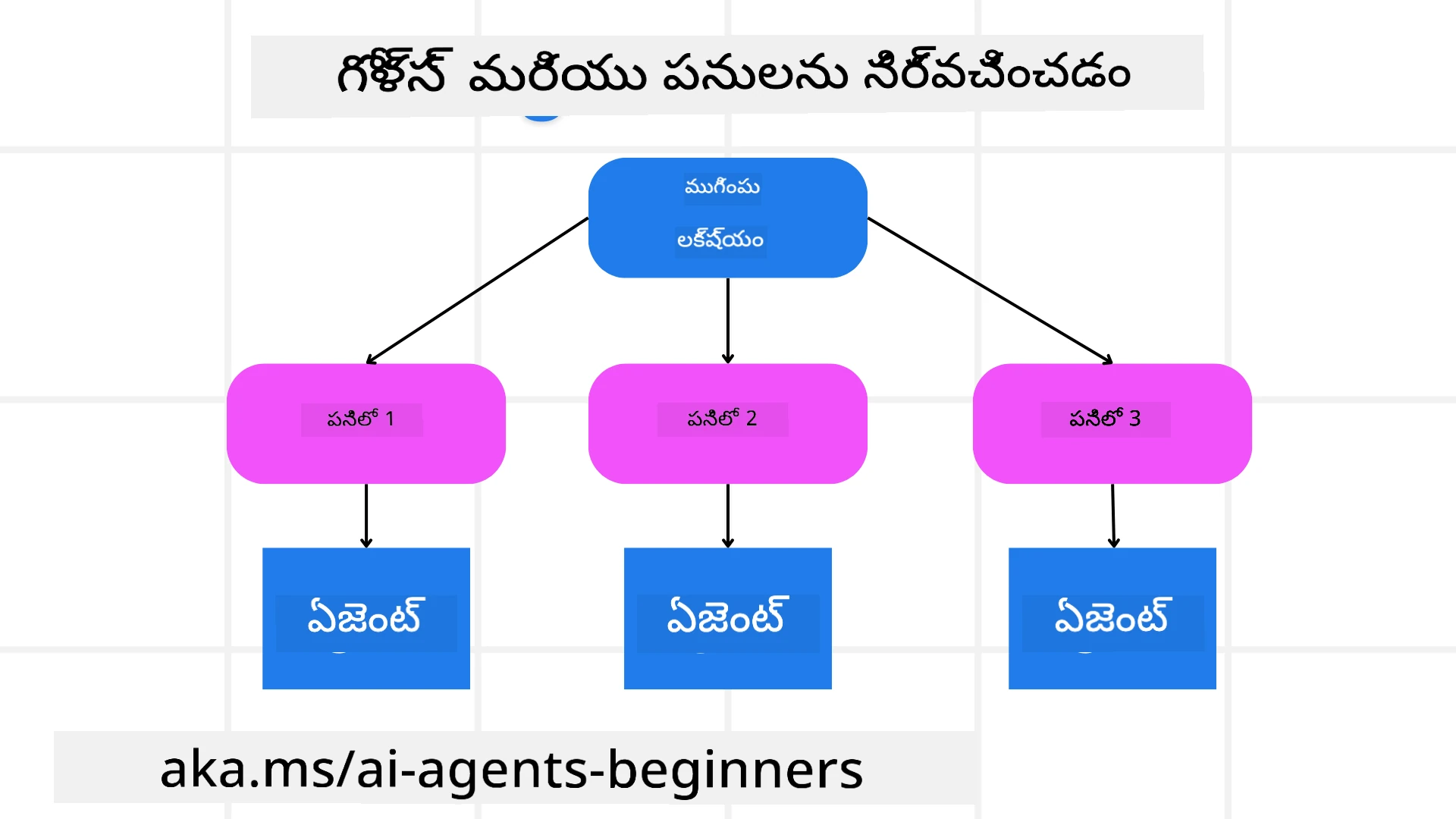
చాలావిధంగా వాస్తవ ప్రపంచ పనులు ఒకే దశలో నిర్వహించడానికి చాలా క్లిష్టవుంటాయి. AI ఏజెంటుకు ఒక సంక్షిప్త లక్ష్యం అవసరం, అది ప్లానింగ్ మరియు చర్యలను మార్గదర్శనం చేస్తుంది. ఉదాహరణగా, లక్ష్యం:
"మూడు రోజుల ప్రయాణ పథకం తయారుచేయండి."
ఇది మార్కుపంగా చెప్పడం సులభమైనప్పటికీ, దీనిని ఇంకా సవరించాల్సి ఉంటుంది. లక్ష్యం ఎంత స్పష్టంగా ఉంటే, ఏజెంట్ (మరియు ఏ మానవ సహకారులతోనైనా) సరైన ఫలితాన్ని సాధించడంపై మరింత కేంద్రీకరించవచ్చు, ఉదా: విమాన ప్రయాణ ఎంపికలు, హోటల్ సిఫార్సులు మరియు కార్యక్రమ సూచనలతో పూర్తి పథకం సృష్టించడం.
పనుల విభజన
పెద్ద లేదా సంక్లిష్టమైన పనులు చిన్న, లక్ష్యానికి సంభందించిన ఉపపనులుగా విభజిస్తే నిర్వహించడానికి సులభమవుతాయి. ప్రయాణ పథకం ఉదాహరణలో, మీరు లక్ష్యాన్ని ఇలా విభజించవచ్చు:
- విమాన బుకింగ్
- హోటల్ బుకింగ్
- కారు అద్దెకుం
- వ్యక్తిగతీకరణ
ప్రతి ఉపపని ప్రత్యేక ఏజెంట్లు లేదా ప్రక్రియల ద్వారా నిర్వహించవచ్చు. ఒక ఏజెంట్ ఉత్తమ విమాన డీల్స్ కోసం శోధిస్తే, మరొకటి హోటల్ బుకింగ్లపై దృష్టిపెడుతుంది, అలాగే కొనసాగుతుంది. ఒక సమన్వయకర్త లేదా “డౌన్స్ట్రీమ్” ఏజెంట్ ఈ ఫలితాలను ఒక సమగ్ర పథకంగా చివరింటి వినియోగదారునికి సమకూర్చవచ్చు.
ఈ మాడ్యూలర్ దృష్టికోణం కూడా పెరుగుదలకు అనుకూలంగా ఉంటుంది. ఉదాహరణకి, మీరు ఆహార సిఫారసులు లేదా స్థానిక కార్యాచరణ సూచనల కోసం ప్రత్యేక ఏజెంట్లను చేర్చవచ్చు మరియు పథకాన్ని కాలక్రమేణ మెరుగుపరచవచ్చు.
నిర్మాణాత్మక అవుట్పుట్
లోయంగ్వేజ్ మోడల్స్ (LLMs) నిర్మాణాత్మక అవుట్పుట్ (ఉదా: JSON) తయారుచేయగలవు, ఇది డౌన్స్ట్రీమ్ ఏజెంట్లు లేదా సేవలు విశ్లేషించడానికి మరియు ప్రాసెస్ చేయడానికి సులభం. ఇది బహుళ ఏజెంట్ పరిసరంలో చాలా ఉపయోగకరం, ఇక్కడ ప్లానింగ్ అవుట్పుట్ అందుకున్న తర్వాత ఈ పనులను అమలు చేయవచ్చు.
క్రింది Python కోడ్ స్నిపెట్ సింపుల్ ప్లానింగ్ ఏజెంట్ ఒక లక్ష్యాన్ని ఉపపనులుగా విభజించి నిర్మాణాత్మక పథకాన్ని తయారుచేస్తున్నది చూపిస్తుంది:
from pydantic import BaseModel
from enum import Enum
from typing import List, Optional, Union
import json
import os
from typing import Optional
from pprint import pprint
from agent_framework.azure import AzureAIProjectAgentProvider
from azure.identity import AzureCliCredential

class AgentEnum(str, Enum):
    FlightBooking = "flight_booking"
    HotelBooking = "hotel_booking"
    CarRental = "car_rental"
    ActivitiesBooking = "activities_booking"
    DestinationInfo = "destination_info"
    DefaultAgent = "default_agent"
    GroupChatManager = "group_chat_manager"

# ప్రయాణ ఉపకార్యం నమూనా
class TravelSubTask(BaseModel):
    task_details: str
    assigned_agent: AgentEnum  # మేము ఉద్యోగిని ఈ పని అప్పగించాలనుకుంటున్నాము

class TravelPlan(BaseModel):
    main_task: str
    subtasks: List[TravelSubTask]
    is_greeting: bool

provider = AzureAIProjectAgentProvider(credential=AzureCliCredential())

# వాడుకరి సందేశాన్ని నిర్వచించండి
system_prompt = """You are a planner agent.
    Your job is to decide which agents to run based on the user's request.
    Provide your response in JSON format with the following structure:
{'main_task': 'Plan a family trip from Singapore to Melbourne.',
 'subtasks': [{'assigned_agent': 'flight_booking',
               'task_details': 'Book round-trip flights from Singapore to '
                               'Melbourne.'}
    Below are the available agents specialised in different tasks:
    - FlightBooking: For booking flights and providing flight information
    - HotelBooking: For booking hotels and providing hotel information
    - CarRental: For booking cars and providing car rental information
    - ActivitiesBooking: For booking activities and providing activity information
    - DestinationInfo: For providing information about destinations
    - DefaultAgent: For handling general requests"""

user_message = "Create a travel plan for a family of 2 kids from Singapore to Melbourne"

response = client.create_response(input=user_message, instructions=system_prompt)

response_content = response.output_text
pprint(json.loads(response_content))
బహుళ ఏజెంట్ సమన్వయం తో ప్లానింగ్ ఏజెంట్
ఈ ఉదాహరణలో, సీమాంటిక్ రూటర్ ఏజెంట్ ఒక వాడుకరి అభ్యర్థన (ఉదా: “నా ప్రయాణానికి ఒక హోటల్ పథకం కావాలి.”) అందుకుంటుంది.
ప్లానర్ తరువాత:
- హోటల్ ప్లాన్ ను అందుకోవడం: ప్లానర్ వాడుకరి సందేశాన్ని తీసుకుని, సిస్టమ్ ప్రాంప్ట్ ఆధారంగా (అందుబాటులో ఉన్న ఏజెంట్ వివరాలతో సహా), నిర్మాణాత్మక ప్రయాణ పథకాన్ని సృష్టిస్తుంది.
- ఏజెంట్లు మరియు అవి అందించే సాధనాలు/ఫంక్షన్ల జాబితాను ఇవ్వడం: ఏజెంట్ రిజిస్ట్రి విమాన, హోటల్, కారు అద్దెకుం మరియు కార్యకలాపాల కోసం సంబంధించిన ఏజెంట్లను మరియు వారి పనిముట్టాలను కలిగి ఉంటుంది.
- పథకాన్ని సంబంధిత ఏజెంట్లకు పంపడం: ఉపపనుల సంఖ్యను బట్టి, ప్లానర్ సందేశాన్ని నేరుగా ఒక ప్రత్యేక ఏజెంట్ కు (ఒకటి పనికి) పంపవచ్చు లేదా బహుళ ఏజెంట్ సహకారానికి గ్రూప్ చాట్ మేనేజర్ ద్వారా సమన్వయం చేస్తుంది.
- ఫలితాన్ని సారాంశం చేయడం: చివరగా, ప్లానర్ రూపొందించిన పథకాన్ని స్పష్టత కోసం సారాంశం చేస్తుంది. క్రింది Python కోడ్ ఉదాహరణ ఈ దశలను వివరంగా చూపిస్తుంది:
from pydantic import BaseModel
from enum import Enum
from typing import List, Optional, Union
class AgentEnum(str, Enum):
FlightBooking = "flight_booking"
HotelBooking = "hotel_booking"
CarRental = "car_rental"
ActivitiesBooking = "activities_booking"
DestinationInfo = "destination_info"
DefaultAgent = "default_agent"
GroupChatManager = "group_chat_manager"
# ప్రయాణ ఉపకార్యం మోడల్
class TravelSubTask(BaseModel):
task_details: str
assigned_agent: AgentEnum # పనిని ఏజెంట్కు కేటాయించాలనుకుంటున్నాము
class TravelPlan(BaseModel):
main_task: str
subtasks: List[TravelSubTask]
is_greeting: bool
import json
import os
from typing import Optional
from agent_framework.azure import AzureAIProjectAgentProvider
from azure.identity import AzureCliCredential
# క్లయింట్ను సృష్టించండి
provider = AzureAIProjectAgentProvider(credential=AzureCliCredential())
from pprint import pprint
# వాడుకరి సందేశాన్ని నిర్వచించండి
system_prompt = """You are a planner agent.
Your job is to decide which agents to run based on the user's request.
Below are the available agents specialized in different tasks:
- FlightBooking: For booking flights and providing flight information
- HotelBooking: For booking hotels and providing hotel information
- CarRental: For booking cars and providing car rental information
- ActivitiesBooking: For booking activities and providing activity information
- DestinationInfo: For providing information about destinations
- DefaultAgent: For handling general requests"""
user_message = "Create a travel plan for a family of 2 kids from Singapore to Melbourne"
response = client.create_response(input=user_message, instructions=system_prompt)
response_content = response.output_text
# JSON గా లోడ్ చేసిన తర్వాత స్పందన కంటెంట్ను ముద్రించండి
pprint(json.loads(response_content))
క్రింది కోడ్ అవుట్పుట్ ను మీరు “assigned_agent” కు రూట్ చేసి, ప్రయాణ పథకాన్ని చివరి వినియోగదారునికి సారాంశం చేయవచ్చు.
{
    "is_greeting": "False",
    "main_task": "Plan a family trip from Singapore to Melbourne.",
    "subtasks": [
        {
            "assigned_agent": "flight_booking",
            "task_details": "Book round-trip flights from Singapore to Melbourne."
        },
        {
            "assigned_agent": "hotel_booking",
            "task_details": "Find family-friendly hotels in Melbourne."
        },
        {
            "assigned_agent": "car_rental",
            "task_details": "Arrange a car rental suitable for a family of four in Melbourne."
        },
        {
            "assigned_agent": "activities_booking",
            "task_details": "List family-friendly activities in Melbourne."
        },
        {
            "assigned_agent": "destination_info",
            "task_details": "Provide information about Melbourne as a travel destination."
        }
    ]
}
ముందటి కోడ్ నమూనాతో కూడిన ఒక ఉదాహరణ నోట్బుక్ ఇక్కడ అందుబాటులో ఉంది.
పునరావృత ప్లానింగ్
కొన్ని పనులు వెనుకకు బయట పెట్టే లేదా పున: ప్లానింగ్ అవసరం, ఒక ఉపపని ఫలితం తరువాతి దశను ప్రభావితం చేస్తుంది. ఉదాహరణకి, ఏజెంట్ ఒక అనుకోని డేటా ఫార్మాట్ కనుగొనినప్పుడు విమాన బుకింగ్లో, హోటల్ బుకింగ్కు వెళ్లే ముందు పథకాన్ని మార్చుకోవాల్సి రావచ్చు.
అంతేకాదు, వాడుకరుల అభిప్రాయం (ఉదా: ఒక మనిషి ముందుగా విమానం ఎంచుకునేందుకు నిర్ణయించుకోవడం) ఒక తాత్కాలిక పునరాయోజనాన్ని ప్రారంభించవచ్చు. ఈ డైనమిక్, పునరావృత దృష్టికోణం తుది పరిష్కారం వాస్తవ ప్రపంచ నిబంధనలు మరియు మార్పిడీయగల వినియోగదారు అభిరుచులతో సరిపోతుంది.
ఉదా: కోడ్
from agent_framework.azure import AzureAIProjectAgentProvider
from azure.identity import AzureCliCredential
#.. మునుపటి కోడ్లాగే మరియు యూజర్ చరిత్ర, ప్రస్తుత ప్రణాళికను పంపండి
system_prompt = """You are a planner agent to optimize the
Your job is to decide which agents to run based on the user's request.
Below are the available agents specialized in different tasks:
- FlightBooking: For booking flights and providing flight information
- HotelBooking: For booking hotels and providing hotel information
- CarRental: For booking cars and providing car rental information
- ActivitiesBooking: For booking activities and providing activity information
- DestinationInfo: For providing information about destinations
- DefaultAgent: For handling general requests"""
user_message = "Create a travel plan for a family of 2 kids from Singapore to Melbourne"
response = client.create_response(
input=user_message,
instructions=system_prompt,
context=f"Previous travel plan - {TravelPlan}",
)
# .. మళ్లీ ప్రణాళిక సిద్ధం చేసి సంబంధిత ఏజెంట్లకు పనులని పంపండి
విస్తృతమైన ప్లానింగ్ కోసం Magnetic One బ్లాగ్ పోస్ట్ చూడండి, ఇది క్లిష్టమైన పనులను పరిష్కరించడానికి.
సారాంశం
ఈ వ్యాసంలో, మేము ఎలానో ప్లానర్ రూపొందించవచ్చో చూశాము, ఇది డైనమిక్గా అందుబాటులో ఉన్న ఏజెంట్లను ఎంచుకుంటుంది. ప్లానర్ ప్లానింగ్ అవుట్పుట్ పనులను విభజించి, ఏజెంట్లకు కేటాయిస్తుంది, తద్వారా అవి అమలు చేయబడతాయి. ఏజెంట్లకు ఆ పనిని చేయడానికి అవసరమైన ఫంక్షన్లు/సాధనాలు లభ్యమవుతాయని అనుకుంటారు. ఏజెంట్లతో పాటు మీరు రిఫ్లెక్షన్, సమారాంతరం, రౌండ్ రాబిన్ చాట్ వంటి ఇతర నమూనాలను కూడా చేర్చవచ్చు మరింత అనుకరణ కోసం.
అదనపు వనరులు
Magentic One - క్లిష్టమైన పనులను పరిష్కరించడానికి సాధారణ బహుళ ఏజెంట్ వ్యవస్థ, ఇది అనేక క్లిష్ట ఏజెంటిక్ బెంచ్మార్క్లలో అద్భుత ఫలితాలు సాధించింది. సూచన: Magentic One. ఈ అమలు లో ఆర్కెస్ట్రేటర్ పనికి సంబంధించిన ప్రత్యేక పథకాలను సృష్టించి అందుబాటులో ఉన్న ఏజెంట్లకు ఆ కాజీత్యాలు కేటాయిస్తుంది. ప్లానింగ్ తో పాటు ఆర్కెస్ట్రేటర్ ఒక ట్రాకింగ్ విధానాన్ని కూడా ఉపయోగించి పనితీరు పర్యవేక్షణ చేస్తుంది మరియు అవసరమైతే పున: ప్లాన్ చేస్తుంది.
ప్లానింగ్ డిజైన్ ప్యాటర్న్ గురించి మీకు ఇంకా سوالలు ఉన్నాయా?
మరొకులు నేర్చుకుంటున్నారు, ఆఫీస్ అవర్స్ హాజరుకావచ్చు మరియు మీ AI ఏజెంట్ల ప్రశ్నలకు సమాధానం పొందటానికి Microsoft Foundry Discord లో చేరండి.
గత పాఠం
విశ్వసనీయ AI ఏజెంట్లను నిర్మించడం
తర్వాత పాఠం
సేప్ట్ నోట్:
ఈ పత్రాన్ని AI అనువాద సేవ Co-op Translator ఉపయోగించి అనువదించాం. మేము ఖచ్చితత్వానికి ప్రయత్నిస్తామనుకుంటేనూ, ఆటోమేటెడ్ అనువాదాలలో తప్పులు లేదా అసమాధానతలు ఉండవచ్చు. తప్పనిసరి సమాచారం కోసం, అసలు భాషలోని దస్త్రాన్నే అధికారిక మూలం గా పరిగణించాలి. ముఖ్యమైన సమాచారానికి, ప్రొఫెషనల్ మానవ అనువాదాన్ని ఉపయోగించడం మంచిది. ఈ అనువాదం వాడుక వల్ల ఏర్పడే ఏదైనా అపవాదాలు లేదా తప్పుదారితీస్తే మేము బాధ్యులు కాదు.