ai-agents-for-beginners
(ఈ పాఠం వీడియోను వీక్షించడానికి పైచూపిన చిత్రాన్ని క్లిక్ చేయండి)
ప్లానింగ్ డిజైన్
పరిచయం
ఈ పాఠం కింద తెలిపిన విషయాలను కవర్ చేస్తుంది
- స్పష్టమైన మొత్తం లక్ష్యాన్ని నిర్వచించడం మరియు ఒక క్లిష్టమైన పని ను నిర్వహించదగిన ఉపపనులుగా విభజించడం.
- మరింత విశ్వసనీయమైన మరియు యంత్రం పఠించగల ప్రతిస్పందనలు పొందేందుకు నిర్మిత అవుట్పుట్ ఉపయోగించడం.
- డైనమిక్ పనులను మరియు అనుకోని ఇన్పుట్లను నిర్వహించడానికి ఈవెంట్ ఆధారిత దృష్టికోణాన్ని వర్తించడం.
అభ్యాస లక్ష్యాలు
ఈ పాఠం పూర్తయిన తర్వాత, మీరు ఈ క్రింది విషయాలపై అవగాహన కలిగి ఉంటారు:
- AI ఏజెంట్ కోసం మొత్తం లక్ష్యాన్ని గుర్తించడం మరియు నిర్ధారించడం, సాధించవలసినది ఏమిటి అని స్పష్టంగా తెలియజేయడం.
- క్లిష్టమైన పనిని నిర్వహించదగిన ఉపపనులుగా విభజించి, వాటిని తర్కపూర్వక క్రమంలో ఏర్పాటు చేయడం.
- ఏజెంట్లకు సరైన సాధనాలు (ఉదాహరణకు, శోధన సాధనాలు లేదా డేటా విశ్లేషణ సాధనాలు) చేర్చడం, అవి ఎప్పుడు మరియు ఎలా ఉపయోగించబడాలి అనేది నిర్ణయించడం, మరియు అనుకోని పరిస్థితులను నిర్వహించడం.
- ఉపపనుల ఫలితాలను మూల్యాంకనం చేయడం, పనితీరు కొలిచేడం, మరియు తుది అవుట్పుట్ మెరుగుపర్చేందుకు చర్యలను పునరావృతం చేయడం.
మొత్తం లక్ష్యాన్ని నిర్వచించడం మరియు పనిని విభజించడం
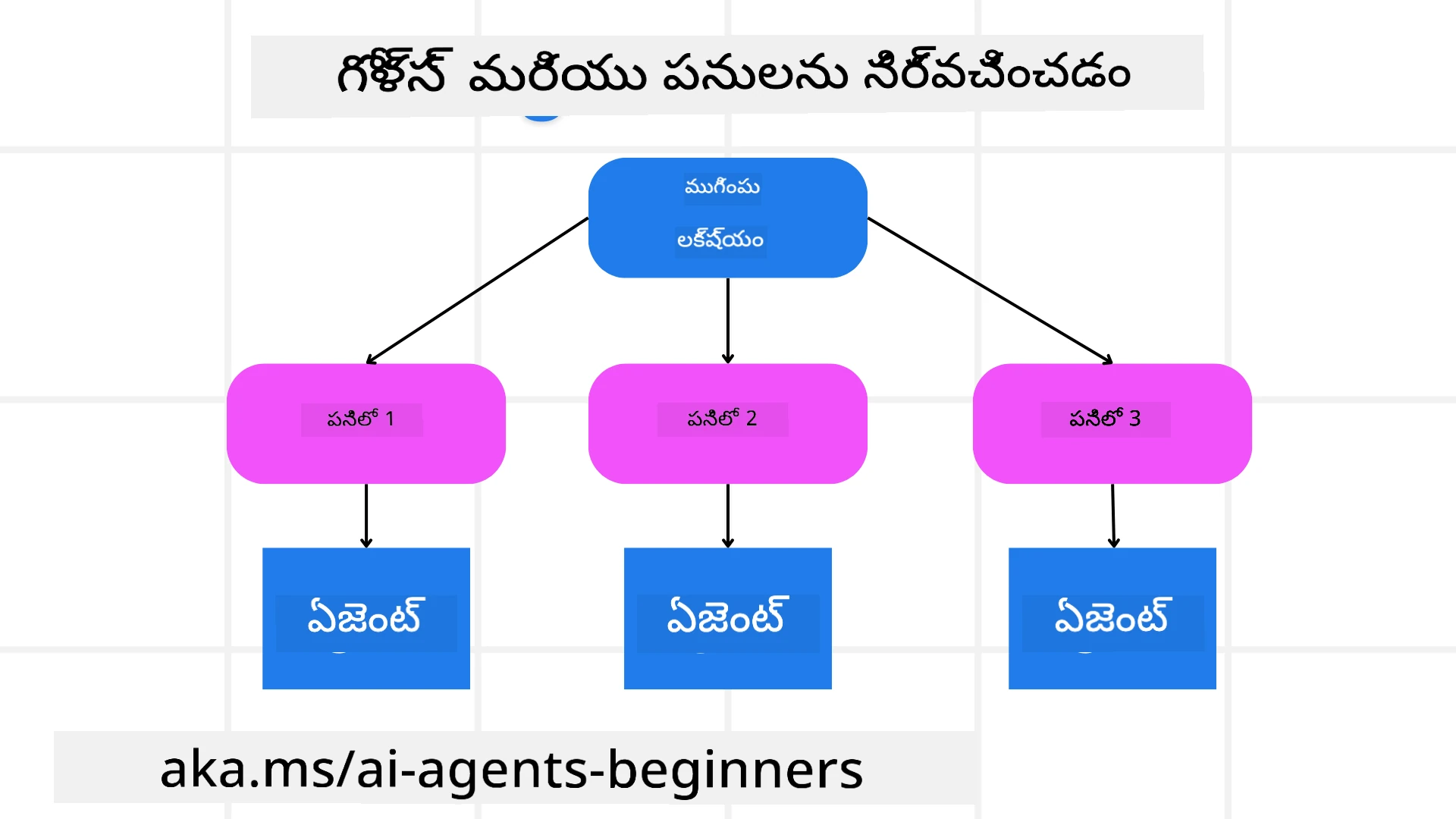
ఎక్కువగా నిజ ప్రపంచ పనులు ఒకదాని మీద ఒకటే దశలో పరిష్కరించడం చాలా క్లిష్టంగా ఉంటాయి. AI ఏజెంట్ తన ప్లానింగ్ మరియు చర్యల కోసం స్పష్టమైన లక్ష్యం అవసరం. ఉదాహరణకు, ఈ లక్ష్యాన్ని పరిగణించండి:
"3-రోజుల ప్రయాణ ఇష్టతనాన్ని రూపొందించండి."
ఇది సులభంగా చెప్పబడినప్పటికీ, ఇంకా మెరుగుపరచాల్సిన అవసరం ఉంది. లక్ష్యం ఎంత స్పష్టంగా ఉండితే, ఏజెంట్ (మరియు సంబంధిత మానవ సహకారులు) సరైన ఫలితాన్ని సాధించేందుకు (ఉదా: విమానం ఎంపికలు, హోటల్ సిఫారసులు, గదుల సూచనలు కలిగిన సమగ్ర ప్రయాణ ప్రణాళిక) మరింత దృష్టి పెట్టగలరు.
పనిని విభజించడం
పెద్ద లేదా సంక్లిష్ట పనులు చిన్న, లక్ష్యం పైన దృష్టి పెట్టిన ఉపపనులుగా విభజించినప్పుడు నిర్వహించదగినవిగా మారతాయి. ప్రయాణ ఇష్టతన ఉదాహరణ కోసం, మీరు లక్ష్యాన్ని ఈ విధంగా విభజించవచ్చు:
- విమాన బుకింగ్
- హోటల్ బుకింగ్
- కారు అద్దె
- వ్యక్తిగత పదును
ప్రతి ఉపపని ప్రత్యేక ఏజెంట్లు లేదా ప్రాసెస్ల ద్వారా నిర్వహించబడవచ్చు. ఒక ఏజెంట్ ఉత్తమ విమాన డీల్స్ కోసం శోధన లో ప్రత్యేకత కలిగి ఉండవచ్చు, మరొకటి హోటల్ బుకింగ్లపైకే దృష్టి పెట్టవచ్చు. ఒక సమన్వయకారి లేదా “డౌన్స్ట్రీమ్” ఏజెంట్ ఈ ఫలితాలను సన్నిహితంగా సంగ్రహించి, వినియోగదారికి ఒక్క నిజమైన ఇష్టతనంగా అందిస్తుంది.
ఈ మాడ్యూలర్ విధానంతో అంచనె పెంపులూ సులభం అవుతాయి. ఉదా: ఫుడ్ సిఫారసులు లేదా స్థానిక కార్యకలాప సూచనల కోసం ప్రత్యేక ఏజెంట్లను చేర్చి, సమయానుకోసం ఇష్టతనాన్ని మెరుగుపరుస్తారు.
నిర్మిత అవుట్పుట్
పెద్ద భాషా నమూనాలు (LLMs) నిర్మిత అవుట్పుట్ (ఉదా: JSON) ని సృష్టించగలవు, ఇది డౌన్స్ట్రీమ్ ఏజెంట్లు లేదా సర్వీసులు ఇష్టపడి దాన్ని పరిశీలించటం మరియు ప్రాసెస్ చేయడం సులభం చేస్తుంది. ఇది ముఖ్యంగా బహుళ ఏజెంట్ సందర్భంలో ఉపయోగకరం, ఇక్కడ ప్లానింగ్ అవుట్పుట్ వచ్చిన తరువాత ఈ పనులను కార్యాచరణ చేయవచ్చు.
కింద ఇచ్చిన Python ఉదాహరణ ఒక సరళమైన ప్లానింగ్ ఏజెంట్ లక్ష్యాన్ని ఉపపనులుగా విడగొట్టి, నిర్మిత ప్రణాళికను సృష్టించడం చూపిస్తుంది:
from pydantic import BaseModel
from enum import Enum
from typing import List, Optional, Union
import json
import os
from typing import Optional
from pprint import pprint
from agent_framework.foundry import FoundryChatClient
from azure.identity import AzureCliCredential
class AgentEnum(str, Enum):
FlightBooking = "flight_booking"
HotelBooking = "hotel_booking"
CarRental = "car_rental"
ActivitiesBooking = "activities_booking"
DestinationInfo = "destination_info"
DefaultAgent = "default_agent"
GroupChatManager = "group_chat_manager"
# ప్రయాణ ఉపకార్య నమూనా
class TravelSubTask(BaseModel):
task_details: str
assigned_agent: AgentEnum # మేము ఆ ఏజెంట్కు టాస్క్ ఇవ్వాలనుకుంటున్నాము
class TravelPlan(BaseModel):
main_task: str
subtasks: List[TravelSubTask]
is_greeting: bool
provider = FoundryChatClient(
project_endpoint=os.environ["AZURE_AI_PROJECT_ENDPOINT"],
model=os.environ["AZURE_AI_MODEL_DEPLOYMENT_NAME"],
credential=AzureCliCredential(),
)
# వినియోగదారు సందేశం నిర్వచించండి
system_prompt = """You are a planner agent.
Your job is to decide which agents to run based on the user's request.
Provide your response in JSON format with the following structure:
{'main_task': 'Plan a family trip from Singapore to Melbourne.',
'subtasks': [{'assigned_agent': 'flight_booking',
'task_details': 'Book round-trip flights from Singapore to '
'Melbourne.'}
Below are the available agents specialised in different tasks:
- FlightBooking: For booking flights and providing flight information
- HotelBooking: For booking hotels and providing hotel information
- CarRental: For booking cars and providing car rental information
- ActivitiesBooking: For booking activities and providing activity information
- DestinationInfo: For providing information about destinations
- DefaultAgent: For handling general requests"""
user_message = "Create a travel plan for a family of 2 kids from Singapore to Melbourne"
response = client.create_response(input=user_message, instructions=system_prompt)
response_content = response.output_text
pprint(json.loads(response_content))
బహుళ ఏజెంట్ సమన్వయంతో కూడిన ప్లానింగ్ ఏజెంట్
ఈ ఉదాహరణలో, ఒక సైన్ట్యాక్టిక్ రౌటర్ ఏజెంట్ వినియోగదారు అభ్యర్థన (ఉదా: “నా ప్రయాణానికి హోటల్ ప్రణాళిక కావాలి.”) స్వీకరిస్తుంది.
తరువాత ప్లానర్:
- హోటల్ ప్రణాళికను స్వీకరిస్తుంది: ప్లానర్ వినియోగదారుని సందేశాన్ని, లభ్యమయ్యే ఏజెంట్ వివరాలు ఉన్న సిస్టమ్ ప్రాంప్ట్ ఆధారంగా నిర్మిత ప్రయాణ ప్రణాళికను సృష్టిస్తుంది.
- ఏజెంట్లను, వాటి సాధనాలను జాబితా చేస్తుంది: ఏజెంట్ రిజిస్ట్రీ, ఏజెంట్ల జాబితాను (ఉదా: విమానం, హోటల్, కారు అద్దె, క్రియాకలాపాలు) అలాగే వారు అందించే ఫంక్షన్లు లేదా సాధనాలు కలిగి ఉంటుంది.
- ప్రణాళికను సంబంధిత ఏజెంట్లకు పంపుతుంది: ఉపపనుల సంఖ్య ఆధారంగా, ప్లానర్ సందేశాన్ని నేరుగా ఒక ప్రత్యేక ఏజెంట్ (ఒకటి-పని పరిస్థితులకు) పంపించవచ్చు లేదా బహుళ ఏజెంట్ల సహకారానికి గ్రూప్ చాట్ నిర్వాహకుడి ద్వారా సమన్వయం చేస్తుంది.
- ఫలితాన్ని సారాంశం చేస్తుంది: చివరికి, ప్లానర్ సృష్టించిన ప్రణాళికను స్పష్టంగా సారాంశం చేస్తుంది. ఈ క్రింది Python కోడ్ నమూనా ఈ దశలను చూపిస్తుంది:
from pydantic import BaseModel
from enum import Enum
from typing import List, Optional, Union
class AgentEnum(str, Enum):
FlightBooking = "flight_booking"
HotelBooking = "hotel_booking"
CarRental = "car_rental"
ActivitiesBooking = "activities_booking"
DestinationInfo = "destination_info"
DefaultAgent = "default_agent"
GroupChatManager = "group_chat_manager"
# ప్రయాణ ఉపకార్య నమూనా
class TravelSubTask(BaseModel):
task_details: str
assigned_agent: AgentEnum # మేము కార్యాన్ని ఏజెంట్కి అప్పగించాలనుకుంటున్నాము
class TravelPlan(BaseModel):
main_task: str
subtasks: List[TravelSubTask]
is_greeting: bool
import json
import os
from typing import Optional
from agent_framework.foundry import FoundryChatClient
from azure.identity import AzureCliCredential
# క్లయింట్ని సృష్టించండి
provider = FoundryChatClient(
project_endpoint=os.environ["AZURE_AI_PROJECT_ENDPOINT"],
model=os.environ["AZURE_AI_MODEL_DEPLOYMENT_NAME"],
credential=AzureCliCredential(),
)
from pprint import pprint
# వినియోగదారుల సందేశాన్ని నిర్వచించండి
system_prompt = """You are a planner agent.
Your job is to decide which agents to run based on the user's request.
Below are the available agents specialized in different tasks:
- FlightBooking: For booking flights and providing flight information
- HotelBooking: For booking hotels and providing hotel information
- CarRental: For booking cars and providing car rental information
- ActivitiesBooking: For booking activities and providing activity information
- DestinationInfo: For providing information about destinations
- DefaultAgent: For handling general requests"""
user_message = "Create a travel plan for a family of 2 kids from Singapore to Melbourne"
response = client.create_response(input=user_message, instructions=system_prompt)
response_content = response.output_text
# JSON గా లోడ్ చేసిన తర్వాత ప్రతిస్పందన విషయాన్ని ప్రింట్ చేయండి
pprint(json.loads(response_content))
ముందు ఇచ్చిన కోడ్ అవుట్పుట్ నుండి వచ్చినది, ఇక్కడ మీరు ఈ నిర్మిత అవుట్పుట్ ను ‘assigned_agent’ కు పంపి, ప్రయాణ ప్రణాళికను చివరి వినియోగదారికి సారాంశం చేయవచ్చు.
{
    "is_greeting": "False",
    "main_task": "Plan a family trip from Singapore to Melbourne.",
    "subtasks": [
        {
            "assigned_agent": "flight_booking",
            "task_details": "Book round-trip flights from Singapore to Melbourne."
        },
        {
            "assigned_agent": "hotel_booking",
            "task_details": "Find family-friendly hotels in Melbourne."
        },
        {
            "assigned_agent": "car_rental",
            "task_details": "Arrange a car rental suitable for a family of four in Melbourne."
        },
        {
            "assigned_agent": "activities_booking",
            "task_details": "List family-friendly activities in Melbourne."
        },
        {
            "assigned_agent": "destination_info",
            "task_details": "Provide information about Melbourne as a travel destination."
        }
    ]
}
క్రింద ఇచ్చిన కోడ్ నమూనాతో కూడిన ఉదాహరణ నోట్బుక్ ఇక్కడ అందుబాటులో ఉంది.
పునఃప్లానింగ్
కొన్ని పనులు తిరిగి మరియు పునఃప్లానింగ్ అవసరం, ఒక ఉపపని ఫలితం తదుపరి పనిని ప్రభావితం చేస్తుంది. ఉదాహరణకు, ఏజెంట్ విమాన బుకింగ్ సమయంలో అనుకోని డేటా ఫార్మాట్ కనిపెడితే, హోటల్ బుకింగ్ కు వెళ్లేముందు తన వ్యూహాన్ని మార్చుకోవచ్చు.
అదనంగా, వినియోగదారు ఫీడ్బ్యాక్ (ఉదా: ఒక మానవుడు ముందస్తు విమానం కోరుకుంటే) ఒక భాగం పునఃప్లాన్ ను ట్రిగ్గర్ చేస్తుంది. ఈ డైనమిక్, పునరావృత దృక్పథం తుది పరిష్కారం నిజ ప్రపంచ పరిమితులు మరియు అభివృద్ధి చెందుతున్న వినియోగదారు ఇష్టాలకు సరిపడనట్టు చేస్తుంది.
ఉదాహరణ కోడ్
import os
from agent_framework.foundry import FoundryChatClient
from azure.identity import AzureCliCredential
#.. మునుపటి కోడ్ లాగానే మరియు వినియోగదారు చరిత్ర, ప్రస్తుత పథకం ను కొనసాగించండి

system_prompt = """You are a planner agent to optimize the
    Your job is to decide which agents to run based on the user's request.
    Below are the available agents specialized in different tasks:
    - FlightBooking: For booking flights and providing flight information
    - HotelBooking: For booking hotels and providing hotel information
    - CarRental: For booking cars and providing car rental information
    - ActivitiesBooking: For booking activities and providing activity information
    - DestinationInfo: For providing information about destinations
    - DefaultAgent: For handling general requests"""

user_message = "Create a travel plan for a family of 2 kids from Singapore to Melbourne"

response = client.create_response(
    input=user_message,
    instructions=system_prompt,
    context=f"Previous travel plan - {TravelPlan}",
)
# .. మళ్లీ ప్రణాళిక రూపొందించి, పనులను సంబంధిత ఏజెంట్లకు పంపండి
క్లిష్టమైన పనులు పరిష్కరించేందుకు Magnetic One బ్లాగ్ పోస్ట్ ను చూసి తెలుసుకోండి.
సారాంశం
ఈ వ్యాసంలో, మేము అందుబాటులోని ఏజెంట్లను డైనమిక్గా ఎంచుకునే ప్లానర్ ను ఎలా సృష్టించవచ్చునో చూశాం. ప్లానర్ అవుట్పుట్ పనులను విభజించి, వాటిని అమలు చేసే ఏజెంట్లకు కేటాయిస్తుంది. ఏజెంట్లకు అవసరమైన ఫంక్షన్లు/సాధనాల యాక్సెస్ ఉందని భావిస్తారు. ఏజెంట్లతో పాటు మీరు ఇతర నమూనాలు (రిఫ్లెక్షన్, సమ్మరీ, రౌండ్ రాబిన్ చాట్) ను చేర్చి మరింత అనుకూలీకరించవచ్చు.
అదనపు వనరులు
Magnetic One - క్లిష్టమైన పనులను పరిష్కరించడానికి సాధారణ బహుళ ఏజెంట్ వ్యవస్థ మరియు ఎన్నో క్లిష్టమైన ఏజెంటిక్ బెంచ్మార్క్లలో అద్భుత ఫలితాలు సాధించింది. సూచన: Magnetic One. ఈ అమలు లో ఆర్కెస్ట్రేటర్ ప్రత్యేక పనుల ప్రణాళికలను సృష్టించి, ఆ పనులను అందుబాటులో ఉన్న ఏజెంట్లకు నియమిస్తుంది. ప్లానింగ్ తో పాటు ఆర్కెస్ట్రేటర్ టాస్క్ పురోగతిని గమనించడానికి ట్రాకింగ్ మెకానిజాన్ని కూడా ఉపయోగించి అవసరమైతే పునఃప్లానింగ్ చేస్తుంది.
ప్లానింగ్ డిజైన్ నమూనా గురించి మరిన్ని ప్రశ్నలు ఉన్నాయా?
మరిన్ని విద్యార్థులతో కలవడానికి, ఆఫీస్ అవర్స్కి హాజరకావడానికి మరియు మీ AI ఏజెంట్ల ప్రశ్నలకు సమాధానాలు పొందడానికి Microsoft Foundry Discord లో చేరండి.
గత పాఠం
నమ్మదగిన AI ఏజెంట్లను నిర్మించడం
తదుపరి పాఠం
అస్వీకరణ: ఈ పత్రం AI అనువాద సేవ Co-op Translator ఉపయోగించి అనువదించబడింది. మేము ఖచ్చితత్వానికి ప్రయత్నిస్తున్నప్పటికీ, ఆటోమేటెడ్ అనువాదాలు తప్పులు లేదా అసమగ్రతలను కలిగి ఉండవచ్చు. దాని స్వదేశ భాషలో ఉన్న అసలు పత్రాన్ని అధికారం కలిగిన మూలంగా పరిగణించాలి. కీలకమైన సమాచారం కోసం, ప్రొఫెషనల్ మానవ అనువాదాన్ని సిఫారసు చేస్తాము. ఈ అనువాదం ఉపయోగం వల్ల కలిగే ఏవైనా అపార్థాలు లేదా తప్పుదారులు కోసం మేము బాధ్యత వహించము.