ai-agents-for-beginners
(คลิกที่ภาพด้านบนเพื่อดูวิดีโอของบทเรียนนี้)
การออกแบบการวางแผน
บทนำ
บทเรียนนี้จะครอบคลุม
- การกำหนดเป้าหมายโดยรวมที่ชัดเจนและแยกงานที่ซับซ้อนออกเป็นงานที่จัดการได้
- การใช้ผลลัพธ์ที่มีโครงสร้างเพื่อให้ได้การตอบสนองที่เชื่อถือได้และอ่านได้ด้วยเครื่อง
- การนำแนวทางขับเคลื่อนด้วยเหตุการณ์มาใช้ในการจัดการงานที่เปลี่ยนแปลงได้และข้อมูลที่ไม่คาดคิด
เป้าหมายการเรียนรู้
หลังจากทำบทเรียนนี้เสร็จ คุณจะเข้าใจเกี่ยวกับ:
- การระบุและตั้งเป้าหมายโดยรวมสำหรับตัวแทน AI เพื่อให้มั่นใจว่ารู้ชัดเจนว่าต้องบรรลุอะไร
- การแยกงานซับซ้อนเป็นงานย่อยที่จัดการได้และจัดระเบียบเป็นลำดับที่มีเหตุผล
- การเตรียมตัวแทนด้วยเครื่องมือที่เหมาะสม (เช่น เครื่องมือค้นหาหรือเครื่องมือวิเคราะห์ข้อมูล) กำหนดว่าควรใช้เมื่อใดและอย่างไร และจัดการกับสถานการณ์ที่ไม่คาดคิดที่เกิดขึ้น
- การประเมินผลลัพธ์ของงานย่อย วัดประสิทธิภาพ และปรับปรุงการดำเนินการเพื่อพัฒนาผลลัพธ์สุดท้าย
การกำหนดเป้าหมายโดยรวมและการแบ่งงาน
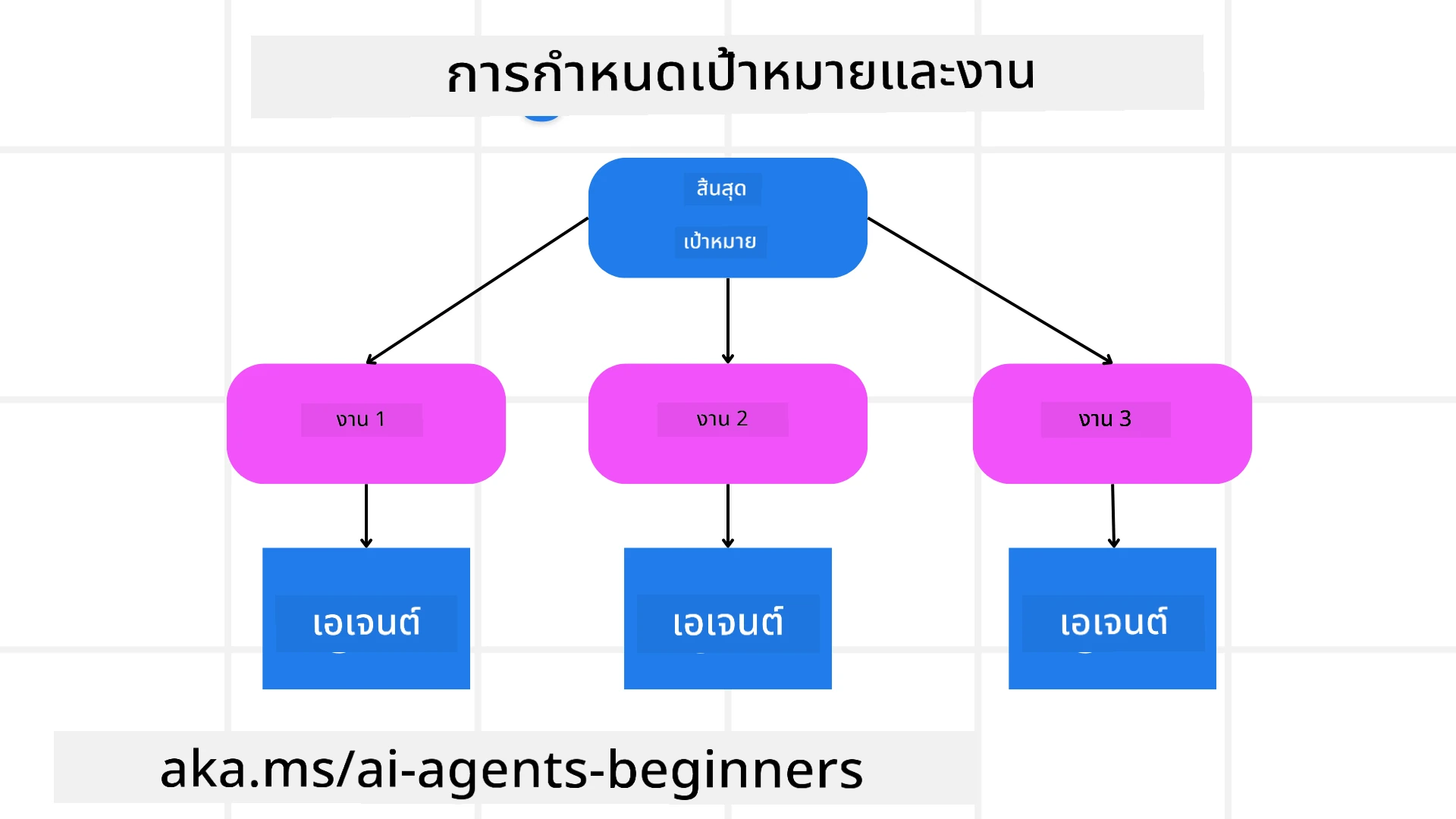
งานจริงส่วนใหญ่ซับซ้อนเกินกว่าจะทำทีเดียวได้ทั้งหมด ตัวแทน AI ต้องมีวัตถุประสงค์ที่กระชับเพื่อชี้นำการวางแผนและการดำเนินการของมัน เช่น พิจารณาเป้าหมายนี้:
"สร้างแผนการเดินทาง 3 วัน"
แม้ว่าจะดูง่าย แต่ก็ยังต้องปรับปรุงให้ชัดเจนยิ่งขึ้น เป้าหมายที่ชัดเจนช่วยให้ตัวแทน (และผู้ร่วมงานมนุษย์) มุ่งเน้นไปที่การบรรลุผลลัพธ์ที่ถูกต้อง เช่น การสร้างแผนการเดินทางที่ครบถ้วนพร้อมตัวเลือกเที่ยวบิน แนะนำโรงแรม และข้อเสนอแนะกิจกรรม
การแยกงาน
งานใหญ่หรือซับซ้อนจะจัดการได้ง่ายขึ้นเมื่อแยกเป็นงานย่อยที่มุ่งเน้นเป้าหมาย สำหรับตัวอย่างแผนการเดินทางนี้ คุณสามารถแยกเป้าหมายออกเป็น:
- จองเที่ยวบิน
- จองโรงแรม
- เช่ารถ
- ปรับแต่งตามความต้องการส่วนบุคคล
จากนั้นงานย่อยแต่ละงานสามารถได้รับการจัดการโดยตัวแทนหรือกระบวนการเฉพาะ ตัวแทนอาจเชี่ยวชาญในการค้นหาข้อเสนอเที่ยวบินที่ดีที่สุด อีกตัวหนึ่งดูแลเรื่องจองโรงแรม และอื่น ๆ ตัวแทนที่ประสานงานหรือ “ผู้ดำเนินการปลายทาง” สามารถรวบรวมผลลัพธ์เหล่านี้เป็นแผนการเดินทางที่สมบูรณ์สำหรับผู้ใช้ปลายทาง
วิธีการแบบโมดูลาร์นี้ยังช่วยให้สามารถปรับปรุงทีละขั้นได้ เช่น คุณอาจเพิ่มตัวแทนเฉพาะสำหรับคำแนะนำเรื่องอาหารหรือคำแนะนำกิจกรรมท้องถิ่น และค่อย ๆ ปรับปรุงแผนการเดินทางตามเวลา
ผลลัพธ์ที่มีโครงสร้าง
โมเดลภาษาใหญ่ (LLMs) สามารถสร้างผลลัพธ์ที่มีโครงสร้าง (เช่น JSON) ซึ่งง่ายต่อการแยกวิเคราะห์และประมวลผลโดยตัวแทนหรือบริการปลายทาง วิธีนี้มีประโยชน์มากโดยเฉพาะในบริบทที่มีหลายตัวแทน ซึ่งเราสามารถดำเนินการงานเหล่านี้หลังจากได้รับผลลัพธ์การวางแผน
โค้ด Python ตัวอย่างด้านล่างแสดงตัวแทนวางแผนที่แยกเป้าหมายออกเป็นงานย่อยและสร้างแผนที่มีโครงสร้าง:
from pydantic import BaseModel
from enum import Enum
from typing import List, Optional, Union
import json
import os
from typing import Optional
from pprint import pprint
from agent_framework.foundry import FoundryChatClient
from azure.identity import AzureCliCredential

class AgentEnum(str, Enum):
    FlightBooking = "flight_booking"
    HotelBooking = "hotel_booking"
    CarRental = "car_rental"
    ActivitiesBooking = "activities_booking"
    DestinationInfo = "destination_info"
    DefaultAgent = "default_agent"
    GroupChatManager = "group_chat_manager"

# แบบจำลองภารกิจย่อยการเดินทาง
class TravelSubTask(BaseModel):
    task_details: str
    assigned_agent: AgentEnum  # เราต้องการมอบหมายภารกิจให้กับเจ้าหน้าที่

class TravelPlan(BaseModel):
    main_task: str
    subtasks: List[TravelSubTask]
    is_greeting: bool

provider = FoundryChatClient(
    project_endpoint=os.environ["AZURE_AI_PROJECT_ENDPOINT"],
    model=os.environ["AZURE_AI_MODEL_DEPLOYMENT_NAME"],
    credential=AzureCliCredential(),
)

# กำหนดข้อความของผู้ใช้
system_prompt = """You are a planner agent.
    Your job is to decide which agents to run based on the user's request.
    Provide your response in JSON format with the following structure:
{'main_task': 'Plan a family trip from Singapore to Melbourne.',
 'subtasks': [{'assigned_agent': 'flight_booking',
               'task_details': 'Book round-trip flights from Singapore to '
                               'Melbourne.'}
    Below are the available agents specialised in different tasks:
    - FlightBooking: For booking flights and providing flight information
    - HotelBooking: For booking hotels and providing hotel information
    - CarRental: For booking cars and providing car rental information
    - ActivitiesBooking: For booking activities and providing activity information
    - DestinationInfo: For providing information about destinations
    - DefaultAgent: For handling general requests"""

user_message = "Create a travel plan for a family of 2 kids from Singapore to Melbourne"

response = client.create_response(input=user_message, instructions=system_prompt)

response_content = response.output_text
pprint(json.loads(response_content))
ตัวแทนวางแผนพร้อมการประสานงานหลายตัวแทน
ในตัวอย่างนี้ ตัวแทน Semantic Router รับคำขอจากผู้ใช้ (เช่น “ฉันต้องการแผนโรงแรมสำหรับทริปของฉัน”)
ตัววางแผนจะ:
- รับแผนโรงแรม: ตัววางแผนรับข้อความจากผู้ใช้และตามคำสั่งระบบ (รวมข้อมูลตัวแทนที่มีอยู่) สร้างแผนการเดินทางที่มีโครงสร้าง
- แสดงรายการตัวแทนและเครื่องมือของพวกเขา: รายชื่อตัวแทนเก็บรายชื่อตัวแทน (เช่น สำหรับเที่ยวบิน โรงแรม เช่ารถ และกิจกรรม) พร้อมฟังก์ชันหรือเครื่องมือที่ตัวแทนมี
- ส่งต่อแผนไปยังตัวแทนที่เกี่ยวข้อง: ขึ้นอยู่กับจำนวนงานย่อย ตัววางแผนอาจส่งข้อความโดยตรงไปยังตัวแทนเฉพาะ (สำหรับกรณีงานเดียว) หรือประสานผ่านผู้จัดการแชทกลุ่มสำหรับความร่วมมือหลายตัวแทน
- สรุปผลลัพธ์: สุดท้าย ตัววางแผนสรุปแผนที่สร้างขึ้นเพื่อความชัดเจน โค้ด Python ด้านล่างแสดงขั้นตอนเหล่านี้:
from pydantic import BaseModel

from enum import Enum
from typing import List, Optional, Union

class AgentEnum(str, Enum):
    FlightBooking = "flight_booking"
    HotelBooking = "hotel_booking"
    CarRental = "car_rental"
    ActivitiesBooking = "activities_booking"
    DestinationInfo = "destination_info"
    DefaultAgent = "default_agent"
    GroupChatManager = "group_chat_manager"

# แบบจำลองงานย่อยการเดินทาง

class TravelSubTask(BaseModel):
    task_details: str
    assigned_agent: AgentEnum # เราต้องการมอบหมายงานให้กับตัวแทน

class TravelPlan(BaseModel):
    main_task: str
    subtasks: List[TravelSubTask]
    is_greeting: bool
import json
import os
from typing import Optional

from agent_framework.foundry import FoundryChatClient
from azure.identity import AzureCliCredential

# สร้างไคลเอนต์

provider = FoundryChatClient(
    project_endpoint=os.environ["AZURE_AI_PROJECT_ENDPOINT"],
    model=os.environ["AZURE_AI_MODEL_DEPLOYMENT_NAME"],
    credential=AzureCliCredential(),
)

from pprint import pprint

# กำหนดข้อความผู้ใช้

system_prompt = """You are a planner agent.
    Your job is to decide which agents to run based on the user's request.
    Below are the available agents specialized in different tasks:
    - FlightBooking: For booking flights and providing flight information
    - HotelBooking: For booking hotels and providing hotel information
    - CarRental: For booking cars and providing car rental information
    - ActivitiesBooking: For booking activities and providing activity information
    - DestinationInfo: For providing information about destinations
    - DefaultAgent: For handling general requests"""

user_message = "Create a travel plan for a family of 2 kids from Singapore to Melbourne"

response = client.create_response(input=user_message, instructions=system_prompt)

response_content = response.output_text

# พิมพ์เนื้อหาการตอบกลับหลังจากโหลดเป็น JSON แล้ว

pprint(json.loads(response_content))
ผลลัพธ์ต่อไปนี้มาจากโค้ดก่อนหน้านี้ และคุณสามารถใช้ผลลัพธ์ที่มีโครงสร้างนี้เพื่อส่งต่อไปยัง assigned_agent และสรุปแผนการเดินทางแก่ผู้ใช้ปลายทาง
{
    "is_greeting": "False",
    "main_task": "Plan a family trip from Singapore to Melbourne.",
    "subtasks": [
        {
            "assigned_agent": "flight_booking",
            "task_details": "Book round-trip flights from Singapore to Melbourne."
        },
        {
            "assigned_agent": "hotel_booking",
            "task_details": "Find family-friendly hotels in Melbourne."
        },
        {
            "assigned_agent": "car_rental",
            "task_details": "Arrange a car rental suitable for a family of four in Melbourne."
        },
        {
            "assigned_agent": "activities_booking",
            "task_details": "List family-friendly activities in Melbourne."
        },
        {
            "assigned_agent": "destination_info",
            "task_details": "Provide information about Melbourne as a travel destination."
        }
    ]
}
ตัวอย่างโน้ตบุ๊กที่มีโค้ดตัวอย่างก่อนหน้ามีให้ ที่นี่
การวางแผนแบบทำซ้ำ
งานบางอย่างต้องการการสื่อสารสองทางหรือนำไปสู่การวางแผนซ้ำ ผลลัพธ์ของงานย่อยหนึ่งส่งผลต่อต่อไป เช่น หากตัวแทนพบรูปแบบข้อมูลที่ไม่คาดคิดขณะจองเที่ยวบิน อาจต้องปรับกลยุทธ์ก่อนดำเนินการจองโรงแรม
นอกจากนี้ คำติชมจากผู้ใช้ (เช่น มนุษย์ตัดสินใจว่าต้องการเที่ยวบินที่เร็วกว่า) อาจกระตุ้นให้เกิดการวางแผนซ้ำบางส่วน วิธีการไดนามิกและทำซ้ำนี้ช่วยให้แน่ใจว่าโซลูชันสุดท้ายสอดคล้องกับข้อจำกัดในโลกจริงและความชอบของผู้ใช้ที่เปลี่ยนแปลงไป
เช่น โค้ดตัวอย่าง
import os
from agent_framework.foundry import FoundryChatClient
from azure.identity import AzureCliCredential
#.. เหมือนกับโค้ดก่อนหน้าและส่งต่อประวัติผู้ใช้ แผนปัจจุบัน

system_prompt = """You are a planner agent to optimize the
    Your job is to decide which agents to run based on the user's request.
    Below are the available agents specialized in different tasks:
    - FlightBooking: For booking flights and providing flight information
    - HotelBooking: For booking hotels and providing hotel information
    - CarRental: For booking cars and providing car rental information
    - ActivitiesBooking: For booking activities and providing activity information
    - DestinationInfo: For providing information about destinations
    - DefaultAgent: For handling general requests"""

user_message = "Create a travel plan for a family of 2 kids from Singapore to Melbourne"

response = client.create_response(
    input=user_message,
    instructions=system_prompt,
    context=f"Previous travel plan - {TravelPlan}",
)
# .. วางแผนใหม่และส่งงานให้ตัวแทนที่เกี่ยวข้อง
สำหรับการวางแผนที่ครอบคลุมมากขึ้น กรุณาชม บทความ Magnetic One สำหรับการแก้ไขงานซับซ้อน
สรุป
ในบทความนี้เราได้ดูตัวอย่างวิธีการสร้างตัววางแผนที่สามารถเลือกตัวแทนที่มีอยู่ได้อย่างไดนามิก ผลลัพธ์ของตัววางแผนจะแยกงานและมอบหมายตัวแทนเพื่อดำเนินการ สมมติว่าตัวแทนเหล่านี้มีการเข้าถึงฟังก์ชัน/เครื่องมือที่จำเป็นสำหรับงาน นอกจากตัวแทนแล้ว คุณยังสามารถรวมรูปแบบอื่น ๆ เช่น การสะท้อนผล การสรุป และบทสนทนาแบบหมุนเวียนเพื่อปรับแต่งเพิ่มเติม
แหล่งข้อมูลเพิ่มเติม
Magnetic One – ระบบตัวแทนหลายคนแบบอเนกประสงค์สำหรับแก้ไขงานซับซ้อนและได้รับผลลัพธ์ที่น่าประทับใจในหลายเกณฑ์การทดสอบตัวแทนที่ท้าทาย อ้างอิง: Magnetic One ในการใช้งานนี้ ผู้ประสานงานสร้างแผนงานเฉพาะและมอบหมายงานเหล่านี้ให้กับตัวแทนที่มีอยู่ นอกจากการวางแผนแล้ว ผู้ประสานงานยังใช้กลไกติดตามความคืบหน้าและวางแผนใหม่ตามต้องการ
มีคำถามเพิ่มเติมเกี่ยวกับรูปแบบการออกแบบวางแผนไหม?
เข้าร่วม Microsoft Foundry Discord เพื่อพบปะผู้เรียนคนอื่น ๆ เข้าร่วมชั่วโมงทำงานและรับคำตอบสำหรับคำถามเกี่ยวกับ AI Agents ของคุณ
บทเรียนก่อนหน้า
การสร้างตัวแทน AI ที่น่าเชื่อถือ
บทเรียนถัดไป
ปฏิเสธความรับผิดชอบ: เอกสารนี้ได้รับการแปลโดยใช้บริการแปลภาษา AI Co-op Translator ขณะที่เราพยายามให้ความถูกต้อง โปรดทราบว่าการแปลโดยอัตโนมัติอาจมีข้อผิดพลาดหรือความไม่ถูกต้อง เอกสารต้นฉบับในภาษาต้นทางควรถูกพิจารณาเป็นแหล่งข้อมูลที่เชื่อถือได้ สำหรับข้อมูลที่สำคัญ แนะนำให้ใช้การแปลโดยมนุษย์มืออาชีพ เราไม่รับผิดชอบต่อความเข้าใจผิดหรือการตีความที่ผิดพลาดที่เกิดขึ้นจากการใช้การแปลนี้