ai-agents-for-beginners
สำรวจ Microsoft Agent Framework
บทนำ
บทเรียนนี้จะครอบคลุม:
- การทำความเข้าใจ Microsoft Agent Framework: คุณสมบัติหลักและคุณค่า
- การสำรวจแนวคิดสำคัญของ Microsoft Agent Framework
- รูปแบบขั้นสูงของ MAF: เวิร์กโฟลว์, มิดเดิลแวร์ และหน่วยความจำ
เป้าหมายการเรียนรู้
หลังจากเรียนจบบทเรียนนี้ คุณจะรู้วิธี:
- สร้าง AI Agents ที่พร้อมใช้งานในสภาพแวดล้อมการผลิตโดยใช้ Microsoft Agent Framework
- นำคุณสมบัติหลักของ Microsoft Agent Framework ไปใช้กับกรณีใช้งาน Agentic ของคุณ
- ใช้รูปแบบขั้นสูงรวมถึงเวิร์กโฟลว์ มิดเดิลแวร์ และการสังเกตการณ์
ตัวอย่างโค้ด
ตัวอย่างโค้ดสำหรับ Microsoft Agent Framework (MAF) สามารถดูได้ในรีโพซิทอรีนี้ในไฟล์ xx-python-agent-framework และ xx-dotnet-agent-framework
การทำความเข้าใจ Microsoft Agent Framework
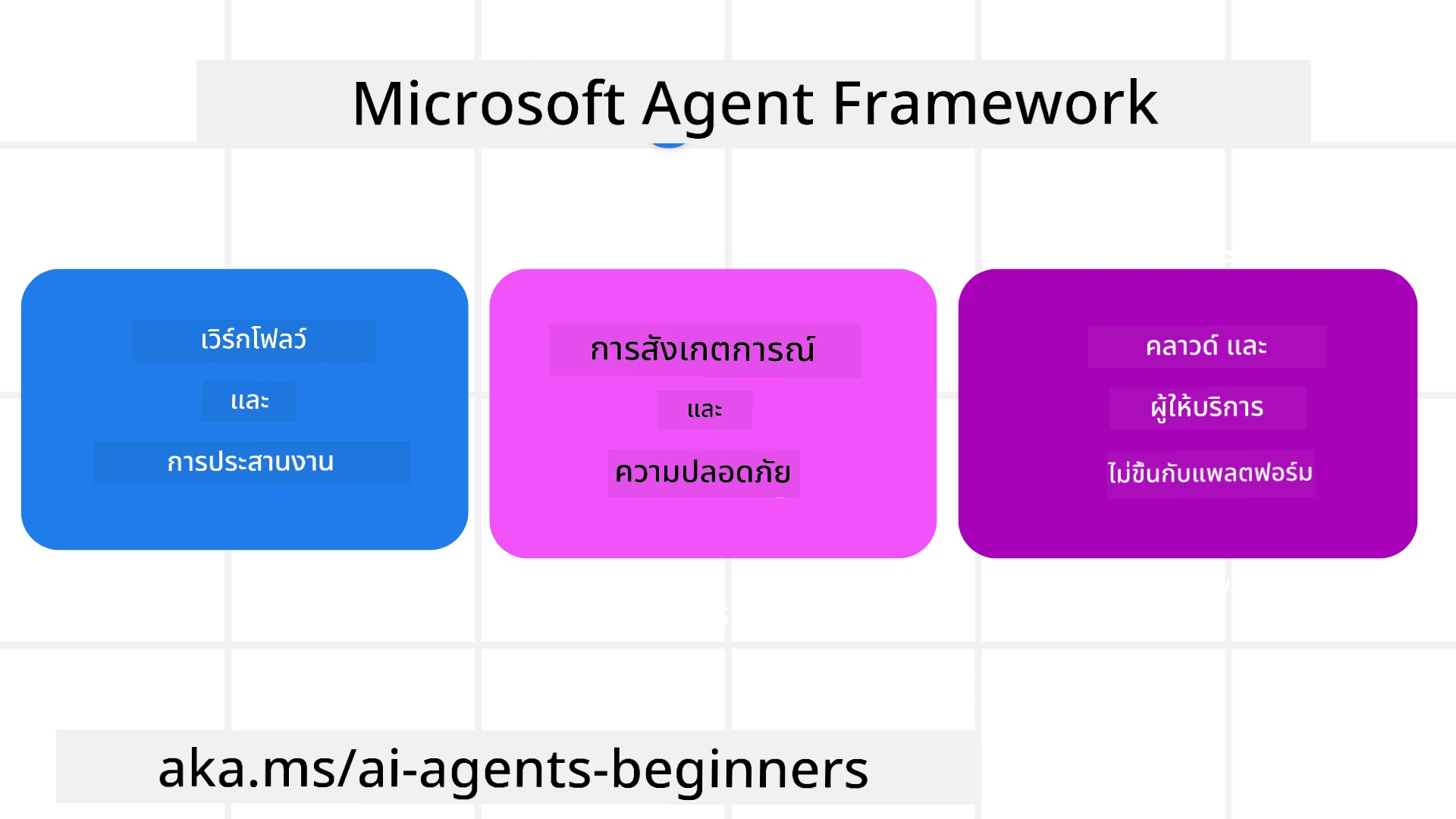
Microsoft Agent Framework (MAF) คือเฟรมเวิร์กแบบรวมของ Microsoft สำหรับการสร้าง AI agents ที่มอบความยืดหยุ่นในการรองรับกรณีใช้งาน Agentic ที่หลากหลายทั้งในสภาพแวดล้อมการผลิตและการวิจัย ซึ่งรวมถึง:
- การประสานงานตัวแทนแบบลำดับขั้น ในสถานการณ์ที่ต้องการเวิร์กโฟลว์ทีละขั้นตอน
- การประสานงานแบบพร้อมกัน ในสถานการณ์ที่ตัวแทนต้องทำงานให้เสร็จพร้อมกัน
- การประสานงานแชทกลุ่ม ในสถานการณ์ที่ตัวแทนสามารถทำงานร่วมกันในหนึ่งงาน
- การประสานงานการส่งงานต่อ ในสถานการณ์ที่ตัวแทนส่งงานต่อกันเมื่อขั้นย่อยเสร็จสมบูรณ์
- การประสานงานแม่เหล็ก ในสถานการณ์ที่ตัวแทนผู้จัดการสร้างและแก้ไขรายการงานและจัดการการประสานงานของตัวแทนย่อยเพื่อให้งานเสร็จสมบูรณ์
เพื่อมอบ AI Agents ในการผลิต MAF ยังมีคุณสมบัติต่าง ๆ สำหรับ:
- การสังเกตการณ์ ผ่านการใช้ OpenTelemetry ที่เก็บทุกการกระทำของ AI Agent รวมถึงการเรียกใช้งานเครื่องมือ ขั้นตอนประสานงาน กระแสตรรกะ และการติดตามประสิทธิภาพผ่านแดชบอร์ด Microsoft Foundry
- ความปลอดภัย โดยการโฮสต์ตัวแทนแบบเนทีฟบน Microsoft Foundry ซึ่งรวมถึงการควบคุมความปลอดภัย เช่น การเข้าถึงแบบอิงบทบาท การจัดการข้อมูลส่วนตัว และความปลอดภัยของเนื้อหาที่สร้างมาแล้ว
- ความทนทาน เนื่องจากเธรดและเวิร์กโฟลว์ของตัวแทนสามารถหยุดชั่วคราว กลับมา และกู้คืนจากข้อผิดพลาดได้ ทำให้กระบวนการทำงานระยะยาวทำได้
- การควบคุม โดยรองรับเวิร์กโฟลว์ที่มีคนควบคุมตรงกลางที่งานถูกระบุว่าต้องการการอนุมัติจากมนุษย์
Microsoft Agent Framework ยังเน้นการทำงานร่วมกันได้โดย:
- เป็นอิสระจากคลาวด์ - ตัวแทนสามารถรันในคอนเทนเนอร์ บนระบบภายในองค์กร และบนคลาวด์ต่าง ๆ ได้
- เป็นอิสระจากผู้ให้บริการ - ตัวแทนสามารถสร้างผ่าน SDK ที่คุณเลือกใช้ เช่น Azure OpenAI และ OpenAI
- การบูรณาการมาตรฐานเปิด - ตัวแทนสามารถใช้โปรโตคอล เช่น Agent-to-Agent (A2A) และ Model Context Protocol (MCP) เพื่อค้นหาและใช้ตัวแทนและเครื่องมืออื่น ๆ
- ปลั๊กอินและคอนเนคเตอร์ - สามารถเชื่อมต่อกับบริการข้อมูลและหน่วยความจำ เช่น Microsoft Fabric, SharePoint, Pinecone และ Qdrant
มาดูวิธีการที่คุณสมบัติเหล่านี้ถูกนำไปใช้กับแนวคิดหลักของ Microsoft Agent Framework
แนวคิดหลักของ Microsoft Agent Framework
ตัวแทน (Agents)
การสร้างตัวแทน
การสร้างตัวแทนทำได้โดยการกำหนดบริการการอนุมาน (LLM Provider),
ชุดคำสั่งให้งานที่ตัวแทน AI ต้องทำตาม และกำหนด name:
agent = AzureOpenAIChatClient(credential=AzureCliCredential()).create_agent( instructions="You are good at recommending trips to customers based on their preferences.", name="TripRecommender" )
ตัวอย่างข้างต้นใช้ Azure OpenAI แต่ตัวแทนสามารถสร้างได้โดยใช้หลากหลายบริการรวมถึง Microsoft Foundry Agent Service:
AzureAIAgentClient(async_credential=credential).create_agent( name="HelperAgent", instructions="You are a helpful assistant." ) as agent
OpenAI Responses, ChatCompletion APIs
agent = OpenAIResponsesClient().create_agent( name="WeatherBot", instructions="You are a helpful weather assistant.", )
agent = OpenAIChatClient().create_agent( name="HelpfulAssistant", instructions="You are a helpful assistant.", )
หรือ MiniMax ที่ให้ API เข้ากันกับ OpenAI โดยมีหน้าต่างบริบทขนาดใหญ่ (สูงสุด 204K tokens):
agent = OpenAIChatClient(base_url="https://api.minimax.io/v1", api_key=os.environ["MINIMAX_API_KEY"], model_id="MiniMax-M3").create_agent( name="HelpfulAssistant", instructions="You are a helpful assistant.", )
หรือตัวแทนระยะไกลโดยใช้โปรโตคอล A2A:
agent = A2AAgent( name=agent_card.name, description=agent_card.description, agent_card=agent_card, url="https://your-a2a-agent-host" )
การรันตัวแทน
ตัวแทนจะรันโดยใช้เมธอด .run หรือ .run_stream สำหรับคำตอบแบบไม่มีการสตรีมหรือแบบสตรีมมิ่ง
result = await agent.run("What are good places to visit in Amsterdam?")
print(result.text)
async for update in agent.run_stream("What are the good places to visit in Amsterdam?"):
    if update.text:
        print(update.text, end="", flush=True)
การรันแต่ละครั้งของตัวแทนยังสามารถตั้งค่าตัวเลือกเพื่อกำหนดพารามิเตอร์ เช่น max_tokens ที่ตัวแทนใช้, tools ที่ตัวแทนสามารถเรียกใช้ และแม้แต่ model ที่ตัวแทนใช้
สิ่งนี้มีประโยชน์ในกรณีที่ต้องการโมเดลหรือเครื่องมือเฉพาะสำหรับทำงานให้สำเร็จตามคำขอของผู้ใช้
เครื่องมือ
เครื่องมือสามารถกำหนดได้ทั้งตอนสร้างตัวแทน:
def get_attractions( location: Annotated[str, Field(description="The location to get the top tourist attractions for")], ) -> str: """Get the top tourist attractions for a given location.""" return f"The top attractions for {location} are."


# เมื่อสร้าง ChatAgent โดยตรง

agent = ChatAgent( chat_client=OpenAIChatClient(), instructions="You are a helpful assistant", tools=[get_attractions]
และยังสามารถกำหนดได้ตอนรันตัวแทน:
result1 = await agent.run( "What's the best place to visit in Seattle?", tools=[get_attractions] # เครื่องมือที่จัดเตรียมไว้สำหรับการรันนี้เท่านั้น )
เธรดของตัวแทน
เธรดของตัวแทนถูกใช้เพื่อจัดการบทสนทนาหลายรอบ เธรดสามารถสร้างได้โดย:
- ใช้
get_new_thread()ที่ช่วยให้เธรดสามารถบันทึกและเก็บรักษาไว้ได้ตามเวลา - สร้างเธรดอัตโนมัติเมื่อรันตัวแทน โดยที่เธรดนั้นจะคงอยู่เฉพาะในระหว่างการรันครั้งนั้นเท่านั้น
โค้ดการสร้างเธรดมีลักษณะดังนี้:
# สร้างเธรดใหม่
thread = agent.get_new_thread() # รันเอเย่นต์ด้วยเธรดนั้น
response = await agent.run("Hello, I am here to help you book travel. Where would you like to go?", thread=thread)
จากนั้นคุณสามารถแปลงเธรดเป็นข้อมูลซีเรียลไลซ์เพื่อเก็บไว้ใช้ในภายหลัง:
# สร้างเธรดใหม่
thread = agent.get_new_thread()

# รันเอเจนต์พร้อมกับเธรด

response = await agent.run("Hello, how are you?", thread=thread)

# แปลงเธรดเป็นสตริงสำหรับการจัดเก็บ

serialized_thread = await thread.serialize()

# แปลงสถานะเธรดกลับหลังจากโหลดจากการจัดเก็บ

resumed_thread = await agent.deserialize_thread(serialized_thread)
มิดเดิลแวร์ของตัวแทน
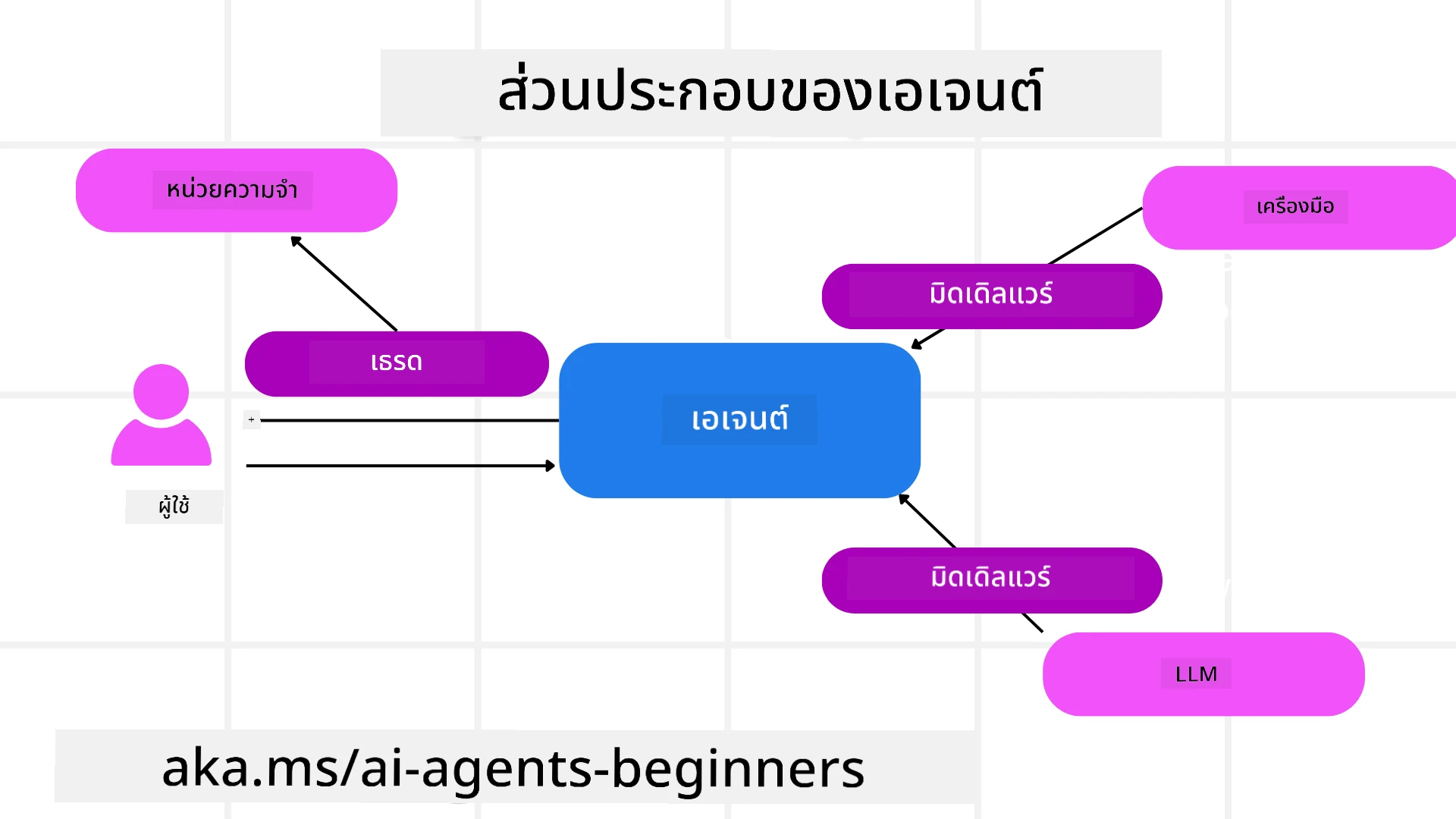
ตัวแทนโต้ตอบกับเครื่องมือและ LLM เพื่อทำงานของผู้ใช้ ในบางสถานการณ์ เราต้องการดำเนินการหรือติดตามการโต้ตอบระหว่างพวกเขา มิดเดิลแวร์ของตัวแทนช่วยให้เราทำเช่นนั้นได้ผ่าน:
ฟังก์ชันมิดเดิลแวร์
มิดเดิลแวร์นี้อนุญาตให้เราดำเนินการระหว่างตัวแทนกับฟังก์ชัน/เครื่องมือที่กำลังเรียก ตัวอย่างเมื่อใช้คือการบันทึกการเรียกฟังก์ชัน
ในโค้ดด้านล่าง next กำหนดว่าจะเรียกมิดเดิลแวร์ถัดไปหรือตัวฟังก์ชันหลัก
async def logging_function_middleware(
    context: FunctionInvocationContext,
    next: Callable[[FunctionInvocationContext], Awaitable[None]],
) -> None:
    """Function middleware that logs function execution."""
    # การประมวลผลล่วงหน้า: บันทึกก่อนการทำงานของฟังก์ชัน
    print(f"[Function] Calling {context.function.name}")

    # ดำเนินการต่อไปยังมิดเดิลแวร์หรือการทำงานของฟังก์ชันถัดไป
    await next(context)

    # การประมวลผลหลัง: บันทึกหลังการทำงานของฟังก์ชัน
    print(f"[Function] {context.function.name} completed")
แชทมิดเดิลแวร์
มิดเดิลแวร์นี้ช่วยให้เราดำเนินการหรือล็อกคำสั่งระหว่างตัวแทนกับการร้องขอระหว่าง LLM
ซึ่งรวมข้อมูลสำคัญเช่น messages ที่ส่งไปยังบริการ AI
async def logging_chat_middleware(
    context: ChatContext,
    next: Callable[[ChatContext], Awaitable[None]],
) -> None:
    """Chat middleware that logs AI interactions."""
    # การประมวลผลล่วงหน้า: บันทึกก่อนเรียกใช้ AI
    print(f"[Chat] Sending {len(context.messages)} messages to AI")

    # ดำเนินการต่อไปยังมิดเดิลแวร์หรือบริการ AI ถัดไป
    await next(context)

    # การประมวลผลหลัง: บันทึกหลังได้รับคำตอบจาก AI
    print("[Chat] AI response received")
หน่วยความจำตัวแทน
ตามที่ครอบคลุมในบทเรียน Agentic Memory หน่วยความจำเป็นองค์ประกอบสำคัญที่ช่วยให้ตัวแทนทำงานได้ผ่านบริบทที่แตกต่างกัน MAF มีหน่วยความจำหลายประเภท:
หน่วยความจำในแอป
หน่วยความจำนี้เก็บไว้ในเธรดในขณะรันแอปพลิเคชัน
# สร้างเธรดใหม่
thread = agent.get_new_thread() # เรียกใช้งานตัวแทนพร้อมกับเธรดนั้น
response = await agent.run("Hello, I am here to help you book travel. Where would you like to go?", thread=thread)
ข้อความที่เก็บถาวร
หน่วยความจำนี้ใช้เก็บประวัติการสนทนาข้ามเซสชันต่าง ๆ โดยกำหนดโดยใช้ chat_message_store_factory:
from agent_framework import ChatMessageStore

# สร้างที่เก็บข้อความแบบกำหนดเอง
def create_message_store():
    return ChatMessageStore()

agent = ChatAgent(
    chat_client=OpenAIChatClient(),
    instructions="You are a Travel assistant.",
    chat_message_store_factory=create_message_store
)
หน่วยความจำแบบไดนามิก
หน่วยความจำนี้เพิ่มเข้ากับบริบทก่อนที่ตัวแทนจะรัน หน่วยความจำเหล่านี้สามารถเก็บไว้ในบริการภายนอก เช่น mem0:
from agent_framework.mem0 import Mem0Provider

# ใช้ Mem0 สำหรับความสามารถหน่วยความจำขั้นสูง
memory_provider = Mem0Provider(
    api_key="your-mem0-api-key",
    user_id="user_123",
    application_id="my_app"
)

agent = ChatAgent(
    chat_client=OpenAIChatClient(),
    instructions="You are a helpful assistant with memory.",
    context_providers=memory_provider
)
การสังเกตการณ์ตัวแทน
การสังเกตการณ์มีความสำคัญต่อการสร้างระบบตัวแทนที่เชื่อถือได้และดูแลรักษาง่าย MAF ผนวกกับ OpenTelemetry เพื่อให้การติดตามและเครื่องมือในการวัดเพื่อการสังเกตการณ์ที่ดียิ่งขึ้น
from agent_framework.observability import get_tracer, get_meter

tracer = get_tracer()
meter = get_meter()
with tracer.start_as_current_span("my_custom_span"):
    # ทำบางอย่าง
    pass
counter = meter.create_counter("my_custom_counter")
counter.add(1, {"key": "value"})
เวิร์กโฟลว์
MAF มีเวิร์กโฟลว์ ซึ่งคือขั้นตอนที่กำหนดล่วงหน้าเพื่อให้เสร็จสิ้นงาน และรวม AI agents เป็นส่วนประกอบในขั้นตอนเหล่านั้น
เวิร์กโฟลว์ประกอบด้วยส่วนประกอบต่าง ๆ ที่ช่วยควบคุมการไหลของงานได้ดีขึ้น รวมถึงรองรับ การประสานงานตัวแทนหลายตัว และ การบันทึกสถานะเวิร์กโฟลว์ เพื่อบันทึกสถานะปัจจุบัน
ส่วนประกอบหลักของเวิร์กโฟลว์ได้แก่:
ผู้ประมวลผล (Executors)
ผู้ประมวลผลรับข้อความนำเข้า ทำงานที่ได้รับมอบหมาย แล้วส่งข้อความผลลัพธ์เพื่อเดินหน้าเวิร์กโฟลว์ไปสู่การสำเร็จงานใหญ่ ผู้ประมวลผลสามารถเป็นตัวแทน AI หรือโค้ดที่กำหนดเอง
ขอบ (Edges)
ขอบใช้กำหนดการไหลของข้อความในเวิร์กโฟลว์ ขอบเหล่านี้เป็นได้ทั้ง:
ขอบตรง (Direct Edges) - การเชื่อมต่อหนึ่งต่อหนึ่งระหว่างผู้ประมวลผล:
from agent_framework import WorkflowBuilder

builder = WorkflowBuilder()
builder.add_edge(source_executor, target_executor)
builder.set_start_executor(source_executor)
workflow = builder.build()
ขอบมีเงื่อนไข (Conditional Edges) - เริ่มทำงานเมื่อเงื่อนไขบางอย่างเป็นจริง เช่น เมื่อห้องพักโรงแรมไม่มีว่าง ผู้ประมวลผลสามารถแนะนำทางเลือกอื่นได้
ขอบสวิตช์เคส (Switch-case Edges) - นำทางข้อความไปยังผู้ประมวลผลต่าง ๆ ตามเงื่อนไขที่กำหนด เช่น หากลูกค้าการเดินทางมีสิทธิ์เข้าถึงแบบพิเศษ งานจะถูกจัดการผ่านเวิร์กโฟลว์อื่น
ขอบส่งออกหลายทาง (Fan-out Edges) - ส่งข้อความเดียวไปยังเป้าหมายหลายตัว
ขอบรับเข้าหลายทาง (Fan-in Edges) - รวบรวมข้อความหลายข้อความจากผู้ประมวลผลหลายตัวแล้วส่งไปยังเป้าหมายเพียงตัวเดียว
เหตุการณ์ (Events)
เพื่อให้เห็นภาพชัดเจนขึ้นเกี่ยวกับเวิร์กโฟลว์ MAF มีเหตุการณ์ในตัวสำหรับการดำเนินการ เช่น:
WorkflowStartedEvent- เริ่มเวิร์กโฟลว์WorkflowOutputEvent- เวิร์กโฟลว์ให้ผลลัพธ์WorkflowErrorEvent- เวิร์กโฟลว์เกิดข้อผิดพลาดExecutorInvokeEvent- ผู้ประมวลผลเริ่มทำงานExecutorCompleteEvent- ผู้ประมวลผลเสร็จสิ้นงานRequestInfoEvent- มีคำขอถูกส่งไป
รูปแบบขั้นสูงของ MAF
ส่วนข้างบนนี้ครอบคลุมแนวคิดหลักของ Microsoft Agent Framework เมื่อคุณสร้างตัวแทนที่ซับซ้อนมากขึ้น นี่คือลวดลายขั้นสูงที่ควรพิจารณา:
- การประสานมิดเดิลแวร์: ต่อมิดเดิลแวร์หลายตัว (ล็อก, การยืนยันตัวตน, จำกัดอัตรา) โดยใช้ฟังก์ชันและแชทมิดเดิลแวร์เพื่อควบคุมพฤติกรรมตัวแทนอย่างละเอียด
- การบันทึกสถานะเวิร์กโฟลว์: ใช้เหตุการณ์เวิร์กโฟลว์และการซีเรียลไลซ์เพื่อบันทึกและต่อกระบวนการตัวแทนที่ทำงานระยะยาว
- การเลือกเครื่องมือแบบไดนามิก: ร่วมรวม RAG บนคำอธิบายเครื่องมือกับการลงทะเบียนเครื่องมือของ MAF เพื่อแสดงเครื่องมือที่เกี่ยวข้องต่อคำค้นหาเท่านั้น
- การส่งต่อหลายตัวแทน: ใช้ขอบเวิร์กโฟลว์และการเปลี่ยนเส้นทางแบบมีเงื่อนไขเพื่อประสานงานการส่งต่อระหว่างตัวแทนผู้เชี่ยวชาญ
โฮสต์ LangChain / LangGraph Agents บน Microsoft Foundry
Microsoft Agent Framework เป็น เฟรมเวิร์กที่ทำงานร่วมกับเฟรมเวิร์กอื่นได้ — คุณไม่จำกัดเพียงตัวแทนที่เขียนด้วย MAF เท่านั้น ถ้าคุณมีตัวแทนที่สร้างด้วย LangChain หรือ LangGraph อยู่แล้ว คุณสามารถรันเป็น ตัวแทนโฮสต์บน Microsoft Foundry เพื่อให้ Foundry จัดการช่วงเวลาการรัน เซสชัน การสเกล การระบุตัวตน และจุดปลายโปรโตคอล ในขณะที่ตรรกะตัวแทนของคุณยังคงอยู่ใน LangGraph
สิ่งนี้ทำได้ด้วยแพ็กเกจ langchain_azure_ai.agents.hosting ที่เผยแพร่กราฟ LangGraph ที่คอมไพล์แล้วผ่านโปรโตคอลเดียวกันกับที่ตัวแทนโฮสต์บน Foundry ใช้
1. ติดตั้งโฮสติ้งเสริม:
pip install -U "langchain-azure-ai[hosting]>=1.2.4" azure-identity
โครงสร้างเสริม hosting จะติดตั้งไลบรารีโปรโตคอล Foundry ได้แก่ azure-ai-agentserver-responses (จุดปลายเปิดที่เข้ากันได้กับ OpenAI /responses) และ azure-ai-agentserver-invocations (จุดปลายทั่วไป /invocations)
2. เลือกโปรโตคอลการโฮสต์:
| โปรโตคอล | คลาสโฮสต์ | จุดปลาย | ใช้เมื่อ |
|---|---|---|---|
| Responses | ResponsesHostServer |
/responses |
ต้องการแชทที่เข้ากันได้กับ OpenAI, สตรีมมิ่ง, ประวัติการตอบกลับ และการสร้างเธรดการสนทนา — เป็นค่าเริ่มต้นที่แนะนำสำหรับตัวแทนสนทนา |
| Invocations | InvocationsHostServer |
/invocations |
ต้องการรูปแบบ JSON ที่กำหนดเอง, จุดปลายแบบ webhook หรือการประมวลผลที่ไม่ใช่สนทนา |
เพราะ Responses API คือ API หลักสำหรับการพัฒนาตัวแทนสไตล์ Foundry ให้เริ่มใช้งาน ResponsesHostServer สำหรับตัวแทนส่วนใหญ่
3. กำหนดค่าตัวแปรสภาพแวดล้อม (az login ก่อนเพื่อให้ DefaultAzureCredential สามารถยืนยันตัวตน):
export FOUNDRY_PROJECT_ENDPOINT="https://<resource>.services.ai.azure.com/api/projects/<project>"
export FOUNDRY_MODEL_NAME="gpt-5-mini"
เมื่อโค้ดตัวแทนรันเป็นตัวแทนโฮสต์บน Foundry แพลตฟอร์มจะฉีดค่า FOUNDRY_PROJECT_ENDPOINT ให้อัตโนมัติ
4. เปิดเผยตัวแทน LangGraph ผ่านโปรโตคอล Responses:
import os

from azure.ai.projects import AIProjectClient
from azure.identity import DefaultAzureCredential, get_bearer_token_provider
from langchain.agents import create_agent
from langchain_openai import ChatOpenAI
from langchain_azure_ai.agents.hosting import ResponsesHostServer

_AZURE_AI_SCOPE = "https://ai.azure.com/.default"


def build_chat_model() -> ChatOpenAI:
    project_endpoint = os.environ["FOUNDRY_PROJECT_ENDPOINT"].rstrip("/")
    deployment = os.environ.get("FOUNDRY_MODEL_NAME", "gpt-5-mini")
    credential = DefaultAzureCredential()
    project = AIProjectClient(endpoint=project_endpoint, credential=credential)
    openai_client = project.get_openai_client()
    token_provider = get_bearer_token_provider(credential, _AZURE_AI_SCOPE)

    # ChatOpenAI ที่นี่กำหนดเป้าหมายไปยังจุดสิ้นสุด OpenAI-compatible (Responses) ของโครงการ Foundry.
    return ChatOpenAI(
        model=deployment,
        base_url=str(openai_client.base_url),
        api_key=token_provider,
    )


def main() -> None:
    graph = create_agent(build_chat_model(), tools=[])
    port = int(os.environ.get("PORT", "8088"))
    ResponsesHostServer(graph).run(port=port)


if __name__ == "__main__":
    main()
รันแบบโลคัลด้วย python main.py จากนั้นส่งคำขอ Responses ไปยัง http://localhost:8088/responses
พฤติกรรมหลัก:
- สนทนา: ลูกค้าต่อบทสนทนาโดยส่ง
previous_response_idหรือไอดีconversationหากกราฟของคุณคอมไพล์ด้วย LangGraph checkpointer, Foundry จะจับสถานะการสนทนาไว้ที่จุดบันทึก (ใช้ durable checkpointer ในการผลิต;MemorySaverพอสำหรับการทดสอบโลคัล) - มนุษย์ควบคุมกระบวนการ: หากกราฟของคุณใช้ LangGraph
interrupt(),ResponsesHostServerจะอนุญาตให้เห็นการหยุดชั่วคราวเป็นไอเท็มfunction_call/mcp_approval_requestใน Responses และลูกค้าจะดำเนินการต่อด้วยfunction_call_output/mcp_approval_responseที่ตรงกัน - ปรับใช้บน Foundry: ใช้ Azure Developer CLI —
azd ext install azure.ai.agents,azd ai agent init -m <manifest>,azd ai agent run(รันโลคัล ต้องการ Docker), ตามด้วยazd provisionและazd deployการปรับใช้ตัวแทนโฮสต์ต้องใช้บทบาท Foundry Project Manager
ตัวอย่างโค้ดที่สามารถรันได้เต็มรูปแบบดูได้ใน code-samples/14-langchain-hosted-agent.py สำหรับวิธีการเต็มรูปแบบ (โปรโตคอล Invocations, สคีมาคำขอที่กำหนดเอง และวิธีแก้ปัญหา) ดูที่ Host LangGraph agents as Foundry hosted agents
ตัวอย่างโค้ด
ตัวอย่างโค้ดสำหรับ Microsoft Agent Framework สามารถดูได้ในรีโพซิทอรีนี้ในไฟล์ xx-python-agent-framework และ xx-dotnet-agent-framework
มีคำถามเพิ่มเติมเกี่ยวกับ Microsoft Agent Framework หรือไม่?
เข้าร่วม Microsoft Foundry Discord เพื่อพบปะกับผู้เรียนคนอื่น ๆ เข้าร่วมชั่วโมงทำงานและรับคำตอบเกี่ยวกับ AI Agents ของคุณ
บทเรียนก่อนหน้า
บทเรียนถัดไป
การสร้างตัวแทนใช้งานคอมพิวเตอร์ (CUA)
ปฏิเสธความรับผิดชอบ: เอกสารนี้ได้รับการแปลโดยใช้บริการแปลภาษา AI Co-op Translator ขณะที่เราพยายามให้ความถูกต้อง โปรดทราบว่าการแปลโดยอัตโนมัติอาจมีข้อผิดพลาดหรือความไม่ถูกต้อง เอกสารต้นฉบับในภาษาต้นทางควรถูกพิจารณาเป็นแหล่งข้อมูลที่เชื่อถือได้ สำหรับข้อมูลที่สำคัญ แนะนำให้ใช้การแปลโดยมนุษย์มืออาชีพ เราไม่รับผิดชอบต่อความเข้าใจผิดหรือการตีความที่ผิดพลาดที่เกิดขึ้นจากการใช้การแปลนี้