ai-agents-for-beginners

(Nhấp vào hình ảnh trên để xem video bài học này)
Siêu nhận thức trong các Tác Nhân AI
Giới thiệu
Chào mừng bạn đến với bài học về siêu nhận thức trong các tác nhân AI! Chương này được thiết kế dành cho người mới bắt đầu tò mò về cách các tác nhân AI có thể suy nghĩ về chính quá trình suy nghĩ của họ. Khi kết thúc bài học này, bạn sẽ hiểu các khái niệm chính và được trang bị các ví dụ thực tiễn để áp dụng siêu nhận thức trong thiết kế tác nhân AI.
Mục tiêu học tập
Sau khi hoàn thành bài học này, bạn sẽ có khả năng:
- Hiểu các hệ quả của các vòng lặp lập luận trong định nghĩa tác nhân.
- Sử dụng các kỹ thuật lập kế hoạch và đánh giá để giúp các tác nhân tự điều chỉnh.
- Tạo ra tác nhân của riêng bạn có khả năng thao tác mã để hoàn thành nhiệm vụ.
Giới thiệu về Siêu nhận thức
Siêu nhận thức đề cập đến các quá trình nhận thức bậc cao liên quan đến việc suy nghĩ về chính suy nghĩ của bản thân. Đối với các tác nhân AI, điều này có nghĩa là có khả năng đánh giá và điều chỉnh hành động dựa trên sự tự nhận thức và kinh nghiệm trong quá khứ. Siêu nhận thức, hay “suy nghĩ về việc suy nghĩ,” là một khái niệm quan trọng trong phát triển các hệ thống AI có tính tác nhân. Nó liên quan đến việc các hệ thống AI nhận thức được các quá trình nội tại của chính mình và có khả năng giám sát, điều chỉnh, và thích nghi hành vi của mình cho phù hợp. Giống như khi chúng ta đọc tình hình hoặc nhìn nhận một vấn đề. Sự tự nhận thức này có thể giúp các hệ thống AI đưa ra quyết định tốt hơn, nhận diện lỗi, và cải thiện hiệu suất theo thời gian — liên kết trở lại với kiểm tra Turing và cuộc tranh luận liệu AI có sẽ chiếm ưu thế.
Trong bối cảnh các hệ thống AI có tính tác nhân, siêu nhận thức có thể giúp giải quyết một số thách thức, chẳng hạn như:
- Minh bạch: Đảm bảo rằng các hệ thống AI có thể giải thích được lập luận và quyết định của mình.
- Lập luận: Nâng cao khả năng tổng hợp thông tin và đưa ra các quyết định chính xác của hệ thống AI.
- Thích nghi: Cho phép hệ thống AI điều chỉnh theo môi trường mới và điều kiện thay đổi.
- Nhận thức: Cải thiện độ chính xác trong việc nhận diện và giải thích dữ liệu từ môi trường.
Siêu nhận thức là gì?
Siêu nhận thức, hay “suy nghĩ về việc suy nghĩ,” là một quá trình nhận thức bậc cao bao gồm sự tự nhận thức và tự điều chỉnh các quá trình nhận thức của chính mình. Trong lĩnh vực AI, siêu nhận thức giúp các tác nhân đánh giá và điều chỉnh chiến lược và hành động, dẫn đến khả năng giải quyết vấn đề và ra quyết định được cải thiện. Bằng việc hiểu siêu nhận thức, bạn có thể thiết kế các tác nhân AI không chỉ thông minh hơn mà còn linh hoạt và hiệu quả hơn. Trong siêu nhận thức thật sự, bạn sẽ thấy AI lý luận rõ ràng về chính lập luận của nó.
Ví dụ: “Tôi ưu tiên các chuyến bay rẻ hơn vì… Có thể tôi đang bỏ lỡ các chuyến bay thẳng, vậy nên tôi sẽ kiểm tra lại.” Theo dõi cách hoặc lý do tại sao nó chọn một tuyến đường nhất định.
- Ghi chú rằng nó đã phạm sai lầm vì quá phụ thuộc vào sở thích của người dùng lần trước, nên nó chỉnh sửa chiến lược ra quyết định chứ không chỉ là đề xuất cuối cùng.
- Chẩn đoán các mẫu như, “Khi tôi thấy người dùng đề cập đến ‘quá đông,’ tôi không chỉ loại bỏ một số điểm tham quan mà còn nhận ra rằng phương pháp chọn ‘điểm tham quan hàng đầu’ của tôi có vấn đề nếu tôi luôn xếp hạng theo độ phổ biến.”
Tầm quan trọng của siêu nhận thức trong các tác nhân AI
Siêu nhận thức đóng vai trò then chốt trong thiết kế tác nhân AI vì nhiều lý do:
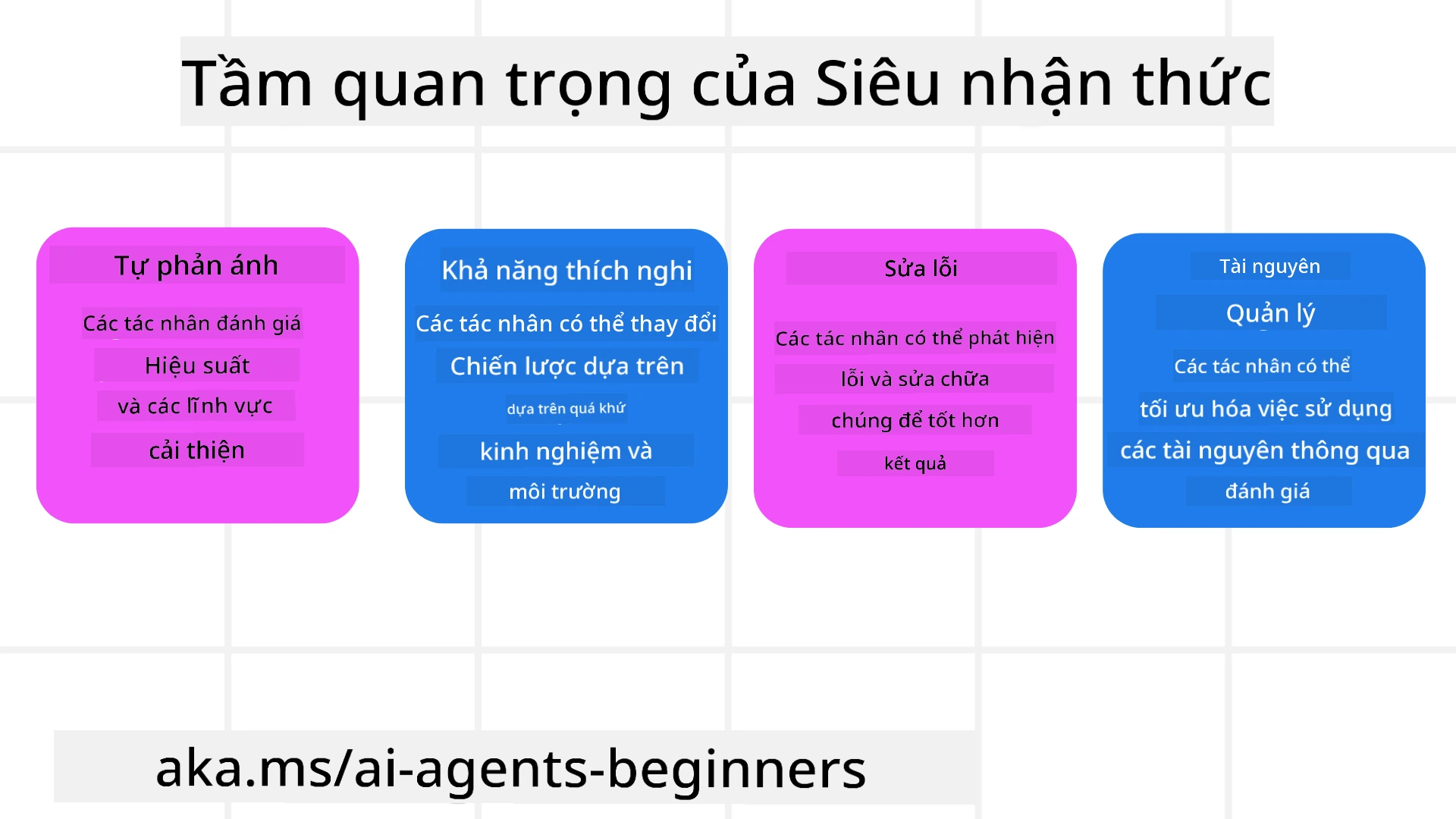
- Tự phản ánh: Các tác nhân có thể đánh giá hiệu suất của chính mình và xác định điểm cần cải thiện.
- Khả năng thích nghi: Các tác nhân có thể điều chỉnh chiến lược dựa trên kinh nghiệm trước và môi trường thay đổi.
- Sửa lỗi: Các tác nhân có thể phát hiện và tự sửa lỗi, dẫn đến kết quả chính xác hơn.
- Quản lý tài nguyên: Các tác nhân có thể tối ưu hóa việc sử dụng tài nguyên như thời gian và sức mạnh tính toán thông qua lập kế hoạch và đánh giá hành động.
Các thành phần của một tác nhân AI
Trước khi đi vào các quá trình siêu nhận thức, điều cần thiết là hiểu các thành phần cơ bản của một tác nhân AI. Một tác nhân AI điển hình bao gồm:
- Persona: Tính cách và đặc điểm của tác nhân, xác định cách tác nhân tương tác với người dùng.
- Công cụ: Các năng lực và chức năng mà tác nhân có thể thực hiện.
- Kỹ năng: Kiến thức và chuyên môn mà tác nhân sở hữu.
Các thành phần này hoạt động cùng nhau để tạo thành một “đơn vị chuyên môn” có thể thực hiện các nhiệm vụ cụ thể.
Ví dụ: Hãy xem xét một đại lý du lịch, một dịch vụ tác nhân không chỉ lập kế hoạch kỳ nghỉ mà còn điều chỉnh hành trình dựa trên dữ liệu thời gian thực và kinh nghiệm hành trình khách hàng trước.
Ví dụ: Siêu nhận thức trong dịch vụ Đại lý Du lịch
Hãy tưởng tượng bạn đang thiết kế một dịch vụ đại lý du lịch được hỗ trợ bởi AI. Tác nhân này, “Đại lý Du lịch,” hỗ trợ người dùng lên kế hoạch kỳ nghỉ. Để tích hợp siêu nhận thức, Đại lý Du lịch cần đánh giá và điều chỉnh hành động dựa trên tự nhận thức và kinh nghiệm trong quá khứ. Dưới đây là cách siêu nhận thức có thể đóng vai trò:
Nhiệm vụ hiện tại
Nhiệm vụ hiện tại là giúp người dùng lên kế hoạch chuyến đi đến Paris.
Các bước để hoàn thành nhiệm vụ
- Thu thập sở thích người dùng: Hỏi người dùng về ngày đi, ngân sách, sở thích (ví dụ: bảo tàng, ẩm thực, mua sắm) và các yêu cầu cụ thể.
- Tìm kiếm thông tin: Tìm các lựa chọn chuyến bay, chỗ ở, điểm tham quan và nhà hàng phù hợp với sở thích của người dùng.
- Tạo đề xuất: Cung cấp kế hoạch cá nhân hóa với chi tiết chuyến bay, đặt phòng khách sạn và hoạt động gợi ý.
- Điều chỉnh dựa trên phản hồi: Hỏi người dùng về phản hồi các đề xuất và thực hiện chỉnh sửa cần thiết.
Tài nguyên cần thiết
- Truy cập cơ sở dữ liệu đặt vé máy bay và khách sạn.
- Thông tin về điểm tham quan và nhà hàng ở Paris.
- Dữ liệu phản hồi người dùng từ các tương tác trước.
Kinh nghiệm và tự phản ánh
Đại lý Du lịch sử dụng siêu nhận thức để đánh giá hiệu suất và rút kinh nghiệm từ quá khứ. Ví dụ:
- Phân tích phản hồi người dùng: Đại lý Du lịch xem lại phản hồi để xác định đề xuất nào được đánh giá cao và đề xuất nào chưa được. Nó điều chỉnh đề xuất trong tương lai cho phù hợp.
- Khả năng thích nghi: Nếu người dùng từng nói không thích nơi đông người, Đại lý Du lịch sẽ tránh giới thiệu điểm du lịch nổi tiếng vào giờ cao điểm trong tương lai.
- Sửa lỗi: Nếu Đại lý Du lịch đã sai sót trong việc đặt phòng trước, ví dụ như giới thiệu khách sạn đã hết phòng, nó học để kiểm tra tính khả dụng kỹ hơn trước khi đưa ra đề xuất.
Ví dụ thực tiễn cho nhà phát triển
Dưới đây là ví dụ đơn giản về mã của Đại lý Du lịch khi tích hợp siêu nhận thức:
class Travel_Agent:
    def __init__(self):
        self.user_preferences = {}
        self.experience_data = []

    def gather_preferences(self, preferences):
        self.user_preferences = preferences

    def retrieve_information(self):
        # Tìm kiếm chuyến bay, khách sạn và điểm tham quan dựa trên sở thích
        flights = search_flights(self.user_preferences)
        hotels = search_hotels(self.user_preferences)
        attractions = search_attractions(self.user_preferences)
        return flights, hotels, attractions

    def generate_recommendations(self):
        flights, hotels, attractions = self.retrieve_information()
        itinerary = create_itinerary(flights, hotels, attractions)
        return itinerary

    def adjust_based_on_feedback(self, feedback):
        self.experience_data.append(feedback)
        # Phân tích phản hồi và điều chỉnh các đề xuất trong tương lai
        self.user_preferences = adjust_preferences(self.user_preferences, feedback)

# Ví dụ sử dụng
travel_agent = Travel_Agent()
preferences = {
    "destination": "Paris",
    "dates": "2025-04-01 to 2025-04-10",
    "budget": "moderate",
    "interests": ["museums", "cuisine"]
}
travel_agent.gather_preferences(preferences)
itinerary = travel_agent.generate_recommendations()
print("Suggested Itinerary:", itinerary)
feedback = {"liked": ["Louvre Museum"], "disliked": ["Eiffel Tower (too crowded)"]}
travel_agent.adjust_based_on_feedback(feedback)
Vì sao Siêu nhận thức quan trọng
- Tự phản ánh: Các tác nhân có thể phân tích hiệu suất và xác định điểm cần cải thiện.
- Khả năng thích nghi: Các tác nhân có thể điều chỉnh chiến lược dựa trên phản hồi và điều kiện thay đổi.
- Sửa lỗi: Các tác nhân có thể tự động phát hiện và sửa các sai sót.
- Quản lý tài nguyên: Các tác nhân có thể tối ưu hóa việc sử dụng tài nguyên như thời gian và sức mạnh tính toán.
Bằng việc áp dụng siêu nhận thức, Đại lý Du lịch có thể cung cấp các khuyến nghị du lịch cá nhân hóa và chính xác hơn, nâng cao trải nghiệm tổng thể của người dùng.
2. Lập kế hoạch trong các tác nhân
Lập kế hoạch là thành phần quan trọng trong hành vi của tác nhân AI. Nó liên quan đến việc phác thảo các bước cần thiết để đạt được mục tiêu, cân nhắc trạng thái hiện tại, tài nguyên và các chướng ngại có thể gặp.
Các yếu tố của lập kế hoạch
- Nhiệm vụ hiện tại: Xác định rõ nhiệm vụ.
- Các bước để hoàn thành nhiệm vụ: Phân chia nhiệm vụ thành các bước có thể quản lý được.
- Tài nguyên cần thiết: Xác định tài nguyên cần thiết.
- Kinh nghiệm: Tận dụng kinh nghiệm trước để định hướng lập kế hoạch.
Ví dụ: Dưới đây là các bước Đại lý Du lịch cần thực hiện để hỗ trợ người dùng lập kế hoạch chuyến đi hiệu quả:
Các bước cho Đại lý Du lịch
- Thu thập sở thích người dùng
- Hỏi người dùng chi tiết về ngày đi, ngân sách, sở thích và các yêu cầu cụ thể.
- Ví dụ: “Khi nào bạn dự định đi du lịch?” “Ngân sách của bạn là bao nhiêu?” “Bạn thích các hoạt động gì khi nghỉ?”
- Tìm kiếm thông tin
- Tìm các lựa chọn du lịch phù hợp dựa trên sở thích người dùng.
- Chuyến bay: Tìm các chuyến bay có sẵn trong ngân sách và ngày đi ưu tiên của người dùng.
- Chỗ ở: Tìm khách sạn hoặc bất động sản cho thuê phù hợp với vị trí, giá cả và tiện nghi người dùng mong muốn.
- Điểm tham quan và Nhà hàng: Xác định các điểm đến, hoạt động và nhà hàng phổ biến phù hợp với sở thích của người dùng.
- Tạo đề xuất
- Biên soạn thông tin thu thập thành một kế hoạch cá nhân hóa.
- Cung cấp chi tiết như các lựa chọn chuyến bay, đặt phòng khách sạn, và hoạt động đề xuất, đảm bảo tùy chỉnh theo sở thích người dùng.
- Trình bày kế hoạch cho người dùng
- Chia sẻ kế hoạch đề xuất với người dùng để họ xem xét.
- Ví dụ: “Đây là lịch trình gợi ý cho chuyến đi Paris của bạn. Bao gồm chi tiết chuyến bay, đặt phòng khách sạn và danh sách hoạt động cùng nhà hàng được đề xuất. Bạn thấy sao?”
- Thu thập phản hồi
- Hỏi người dùng về phản hồi đối với lịch trình đề xuất.
- Ví dụ: “Bạn có thích các lựa chọn chuyến bay không?” “Khách sạn có phù hợp nhu cầu không?” “Có hoạt động nào bạn muốn thêm hoặc bỏ không?”
- Điều chỉnh dựa trên phản hồi
- Chỉnh sửa kế hoạch dựa trên phản hồi của người dùng.
- Thực hiện thay đổi cần thiết về chuyến bay, chỗ ở, và hoạt động cho phù hợp hơn với sở thích người dùng.
- Xác nhận cuối cùng
- Trình bày kế hoạch cập nhật cho người dùng để xác nhận cuối cùng.
- Ví dụ: “Tôi đã điều chỉnh kế hoạch dựa trên phản hồi của bạn. Đây là lịch trình cập nhật. Mọi thứ ổn chứ?”
- Đặt và xác nhận đặt chỗ
- Sau khi người dùng đồng ý, tiến hành đặt vé máy bay, chỗ ở và các hoạt động đã lên kế hoạch trước.
- Gửi thông tin xác nhận cho người dùng.
- Hỗ trợ liên tục
- Luôn sẵn sàng hỗ trợ người dùng với bất kỳ thay đổi hoặc yêu cầu bổ sung trước và trong chuyến đi.
- Ví dụ: “Nếu bạn cần bất kỳ sự hỗ trợ nào trong chuyến đi, cứ liên hệ với tôi bất cứ lúc nào nhé!”
Ví dụ tương tác
class Travel_Agent:
    def __init__(self):
        self.user_preferences = {}
        self.experience_data = []

    def gather_preferences(self, preferences):
        self.user_preferences = preferences

    def retrieve_information(self):
        flights = search_flights(self.user_preferences)
        hotels = search_hotels(self.user_preferences)
        attractions = search_attractions(self.user_preferences)
        return flights, hotels, attractions

    def generate_recommendations(self):
        flights, hotels, attractions = self.retrieve_information()
        itinerary = create_itinerary(flights, hotels, attractions)
        return itinerary

    def adjust_based_on_feedback(self, feedback):
        self.experience_data.append(feedback)
        self.user_preferences = adjust_preferences(self.user_preferences, feedback)

# Ví dụ sử dụng trong một yêu cầu booing
travel_agent = Travel_Agent()
preferences = {
    "destination": "Paris",
    "dates": "2025-04-01 to 2025-04-10",
    "budget": "moderate",
    "interests": ["museums", "cuisine"]
}
travel_agent.gather_preferences(preferences)
itinerary = travel_agent.generate_recommendations()
print("Suggested Itinerary:", itinerary)
feedback = {"liked": ["Louvre Museum"], "disliked": ["Eiffel Tower (too crowded)"]}
travel_agent.adjust_based_on_feedback(feedback)
3. Hệ thống RAG Sửa lỗi
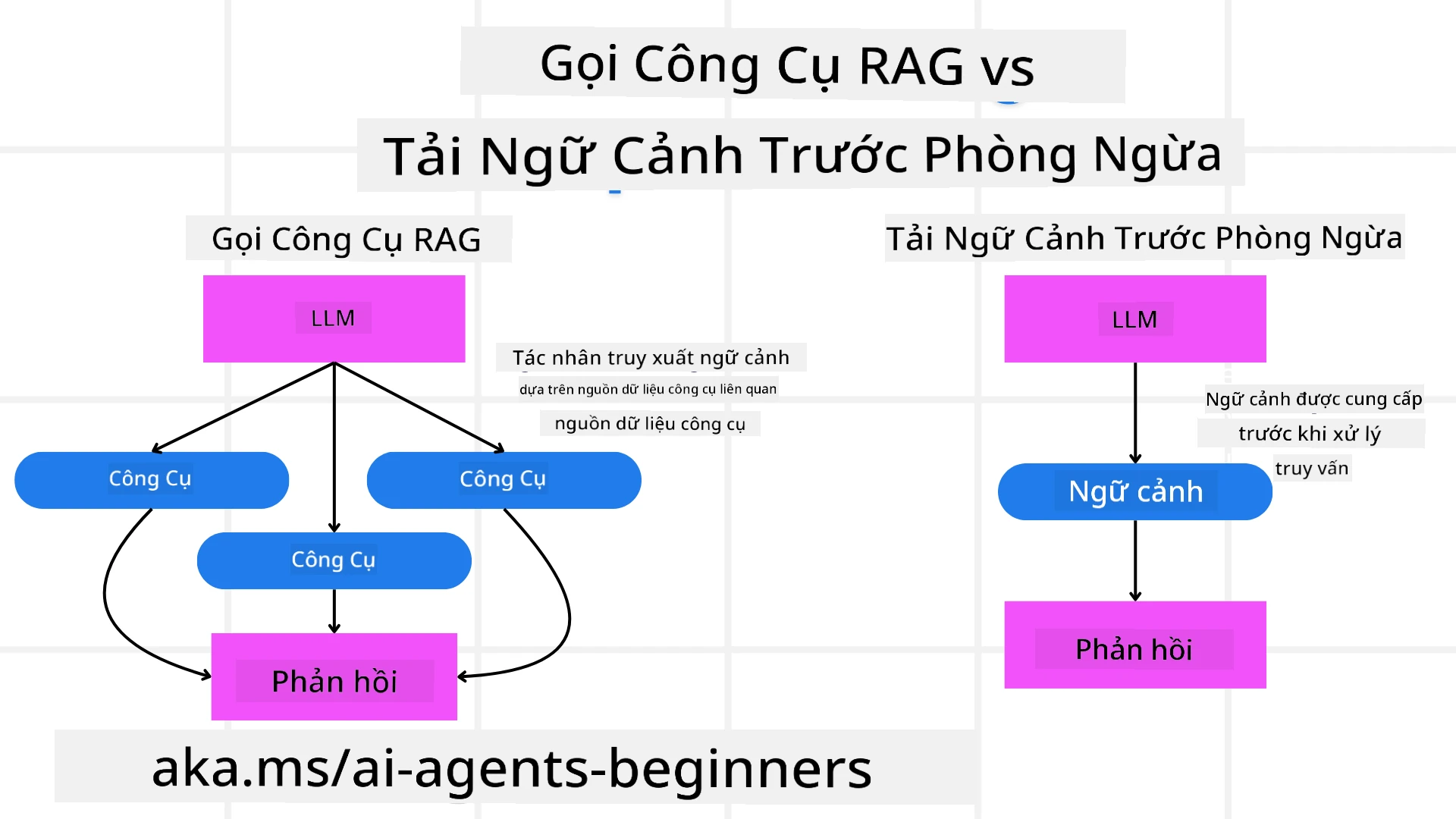
Trước tiên, hãy bắt đầu bằng việc hiểu sự khác biệt giữa Công cụ RAG và Tải ngữ cảnh dự phòng
Retrieval-Augmented Generation (RAG)
RAG kết hợp hệ thống truy xuất với mô hình sinh. Khi có truy vấn, hệ thống truy xuất lấy các tài liệu hoặc dữ liệu liên quan từ nguồn bên ngoài, và thông tin này được dùng để bổ sung đầu vào cho mô hình sinh. Điều này giúp mô hình tạo ra các phản hồi chính xác và phù hợp với ngữ cảnh hơn.
Trong hệ thống RAG, tác nhân truy xuất thông tin liên quan từ cơ sở tri thức và sử dụng nó để tạo phản hồi hoặc hành động thích hợp.
Cách tiếp cận RAG Sửa lỗi
Cách tiếp cận RAG Sửa lỗi tập trung vào việc sử dụng kỹ thuật RAG để sửa các lỗi và nâng cao độ chính xác của các tác nhân AI. Điều này bao gồm:
- Kỹ thuật kích thích (Prompting): Sử dụng các kích thích cụ thể để hướng dẫn tác nhân truy xuất thông tin liên quan.
- Công cụ: Triển khai các thuật toán và cơ chế cho phép tác nhân đánh giá tính phù hợp của thông tin truy xuất và tạo ra phản hồi chính xác.
- Đánh giá: Liên tục đánh giá hiệu suất của tác nhân và điều chỉnh để cải thiện độ chính xác và hiệu quả.
Ví dụ: RAG Sửa lỗi trong tác nhân tìm kiếm
Hãy xem xét một tác nhân tìm kiếm lấy thông tin từ web để trả lời truy vấn người dùng. Cách tiếp cận RAG Sửa lỗi có thể bao gồm:
- Kỹ thuật kích thích: Xây dựng truy vấn tìm kiếm dựa trên đầu vào của người dùng.
- Công cụ: Sử dụng xử lý ngôn ngữ tự nhiên và thuật toán máy học để xếp hạng và lọc kết quả tìm kiếm.
- Đánh giá: Phân tích phản hồi người dùng để nhận diện và sửa các sai sót trong thông tin truy xuất.
RAG Sửa lỗi trong Đại lý Du lịch
RAG Sửa lỗi (Retrieval-Augmented Generation) tăng cường khả năng truy xuất và tạo thông tin của AI trong khi sửa các sai lệch. Hãy xem Đại lý Du lịch có thể dùng cách tiếp cận RAG Sửa lỗi để cung cấp các đề xuất du lịch chính xác và phù hợp hơn như thế nào.
Việc này bao gồm:
- Kỹ thuật kích thích: Dùng các câu lệnh cụ thể để hướng dẫn tác nhân truy xuất thông tin liên quan.
- Công cụ: Triển khai thuật toán và cơ chế giúp tác nhân đánh giá mức độ phù hợp của thông tin truy xuất và tạo phản hồi chính xác.
- Đánh giá: Liên tục đánh giá hiệu suất của tác nhân và điều chỉnh để nâng cao độ chính xác và hiệu quả.
Các bước triển khai RAG Sửa lỗi trong Đại lý Du lịch
- Tương tác người dùng ban đầu
- Đại lý Du lịch thu thập sở thích ban đầu từ người dùng như điểm đến, ngày đi, ngân sách, và sở thích.
-
Ví dụ:
preferences = {
    "destination": "Paris",
    "dates": "2025-04-01 to 2025-04-10",
    "budget": "moderate",
    "interests": ["museums", "cuisine"]
}
- Truy xuất thông tin
- Đại lý Du lịch truy xuất thông tin về chuyến bay, chỗ ở, điểm tham quan, và nhà hàng dựa trên sở thích người dùng.
-
Ví dụ:
flights = search_flights(preferences)
hotels = search_hotels(preferences)
attractions = search_attractions(preferences)
- Tạo đề xuất ban đầu
- Đại lý Du lịch sử dụng thông tin thu thập để tạo kế hoạch cá nhân hóa.
-
Ví dụ:
itinerary = create_itinerary(flights, hotels, attractions)
print("Suggested Itinerary:", itinerary)
- Thu thập phản hồi người dùng
- Đại lý Du lịch hỏi người dùng về phản hồi các đề xuất ban đầu.
-
Ví dụ:
feedback = {
    "liked": ["Louvre Museum"],
    "disliked": ["Eiffel Tower (too crowded)"]
}
- Quy trình RAG Sửa lỗi
- Kỹ thuật kích thích: Đại lý Du lịch tạo ra các truy vấn tìm kiếm mới dựa trên phản hồi người dùng.
-
Ví dụ:
if "disliked" in feedback:
    preferences["avoid"] = feedback["disliked"]
-
- Công cụ: Đại lý Du lịch sử dụng thuật toán để xếp hạng và lọc kết quả tìm kiếm mới, tập trung vào sự phù hợp dựa trên phản hồi người dùng.
-
Ví dụ:
new_attractions = search_attractions(preferences)
new_itinerary = create_itinerary(flights, hotels, new_attractions)
print("Updated Itinerary:", new_itinerary)
-
- Đánh giá: Đại lý Du lịch liên tục đánh giá tính phù hợp và độ chính xác của đề xuất bằng cách phân tích phản hồi người dùng và thực hiện điều chỉnh cần thiết.
-
Ví dụ:
def adjust_preferences(preferences, feedback):
    if "liked" in feedback:
        preferences["favorites"] = feedback["liked"]
    if "disliked" in feedback:
        preferences["avoid"] = feedback["disliked"]
    return preferences

preferences = adjust_preferences(preferences, feedback)
-
- Kỹ thuật kích thích: Đại lý Du lịch tạo ra các truy vấn tìm kiếm mới dựa trên phản hồi người dùng.
Ví dụ thực hành
Dưới đây là ví dụ mã Python đơn giản tích hợp cách tiếp cận RAG Sửa lỗi trong Đại lý Du lịch:
class Travel_Agent:
    def __init__(self):
        self.user_preferences = {}
        self.experience_data = []

    def gather_preferences(self, preferences):
        self.user_preferences = preferences

    def retrieve_information(self):
        flights = search_flights(self.user_preferences)
        hotels = search_hotels(self.user_preferences)
        attractions = search_attractions(self.user_preferences)
        return flights, hotels, attractions

    def generate_recommendations(self):
        flights, hotels, attractions = self.retrieve_information()
        itinerary = create_itinerary(flights, hotels, attractions)
        return itinerary

    def adjust_based_on_feedback(self, feedback):
        self.experience_data.append(feedback)
        self.user_preferences = adjust_preferences(self.user_preferences, feedback)
        new_itinerary = self.generate_recommendations()
        return new_itinerary

# Ví dụ sử dụng
travel_agent = Travel_Agent()
preferences = {
    "destination": "Paris",
    "dates": "2025-04-01 to 2025-04-10",
    "budget": "moderate",
    "interests": ["museums", "cuisine"]
}
travel_agent.gather_preferences(preferences)
itinerary = travel_agent.generate_recommendations()
print("Suggested Itinerary:", itinerary)
feedback = {"liked": ["Louvre Museum"], "disliked": ["Eiffel Tower (too crowded)"]}
new_itinerary = travel_agent.adjust_based_on_feedback(feedback)
print("Updated Itinerary:", new_itinerary)
Tải ngữ cảnh dự phòng
Tải Trước Ngữ Cảnh liên quan đến việc tải thông tin ngữ cảnh hoặc thông tin nền liên quan vào mô hình trước khi xử lý một truy vấn. Điều này có nghĩa là mô hình có quyền truy cập vào thông tin này ngay từ đầu, giúp nó tạo ra các phản hồi có cơ sở hơn mà không cần phải truy xuất thêm dữ liệu trong quá trình xử lý.
Dưới đây là ví dụ đơn giản về cách tải trước ngữ cảnh có thể trông như thế nào cho ứng dụng đại lý du lịch viết bằng Python:
class TravelAgent:
    def __init__(self):
        # Tải trước các điểm đến phổ biến và thông tin của chúng
        self.context = {
            "Paris": {"country": "France", "currency": "Euro", "language": "French", "attractions": ["Eiffel Tower", "Louvre Museum"]},
            "Tokyo": {"country": "Japan", "currency": "Yen", "language": "Japanese", "attractions": ["Tokyo Tower", "Shibuya Crossing"]},
            "New York": {"country": "USA", "currency": "Dollar", "language": "English", "attractions": ["Statue of Liberty", "Times Square"]},
            "Sydney": {"country": "Australia", "currency": "Dollar", "language": "English", "attractions": ["Sydney Opera House", "Bondi Beach"]}
        }

    def get_destination_info(self, destination):
        # Lấy thông tin điểm đến từ ngữ cảnh đã tải trước
        info = self.context.get(destination)
        if info:
            return f"{destination}:\nCountry: {info['country']}\nCurrency: {info['currency']}\nLanguage: {info['language']}\nAttractions: {', '.join(info['attractions'])}"
        else:
            return f"Sorry, we don't have information on {destination}."

# Ví dụ sử dụng
travel_agent = TravelAgent()
print(travel_agent.get_destination_info("Paris"))
print(travel_agent.get_destination_info("Tokyo"))
Giải thích
-
Khởi tạo (phương thức
__init__): LớpTravelAgenttải trước một từ điển chứa thông tin về các điểm đến phổ biến như Paris, Tokyo, New York và Sydney. Từ điển này bao gồm các chi tiết như quốc gia, tiền tệ, ngôn ngữ và các điểm thu hút chính của mỗi điểm đến. -
Lấy Thông Tin (phương thức
get_destination_info): Khi người dùng truy vấn về một điểm đến cụ thể, phương thứcget_destination_infosẽ truy xuất thông tin liên quan từ từ điển ngữ cảnh đã tải trước.
Bằng cách tải trước ngữ cảnh, ứng dụng đại lý du lịch có thể phản hồi nhanh các truy vấn của người dùng mà không cần phải truy xuất thông tin này từ nguồn bên ngoài trong thời gian thực. Điều này giúp ứng dụng trở nên hiệu quả và phản hồi nhanh hơn.
Khởi tạo Kế hoạch với Mục tiêu Trước Khi Lặp lại
Khởi tạo một kế hoạch với một mục tiêu liên quan đến việc bắt đầu với một mục tiêu rõ ràng hoặc kết quả dự kiến trong tâm trí. Bằng cách xác định mục tiêu này ngay từ đầu, mô hình có thể sử dụng nó như một nguyên tắc hướng dẫn trong suốt quá trình lặp lại. Điều này giúp đảm bảo mỗi vòng lặp tiến gần hơn đến việc đạt được kết quả mong muốn, làm cho quá trình hiệu quả và tập trung hơn.
Dưới đây là ví dụ về cách bạn có thể khởi tạo một kế hoạch du lịch với một mục tiêu trước khi lặp lại cho một đại lý du lịch viết bằng Python:
Kịch bản
Một đại lý du lịch muốn lên kế hoạch kỳ nghỉ tùy chỉnh cho khách hàng. Mục tiêu là tạo ra một lịch trình du lịch tối đa hóa sự hài lòng của khách hàng dựa trên sở thích và ngân sách của họ.
Các bước
- Xác định sở thích và ngân sách của khách hàng.
- Khởi tạo kế hoạch ban đầu dựa trên những sở thích này.
- Lặp lại để tinh chỉnh kế hoạch, tối ưu hóa sự hài lòng của khách hàng.
Mã Python
class TravelAgent:
    def __init__(self, destinations):
        self.destinations = destinations

    def bootstrap_plan(self, preferences, budget):
        plan = []
        total_cost = 0

        for destination in self.destinations:
            if total_cost + destination['cost'] <= budget and self.match_preferences(destination, preferences):
                plan.append(destination)
                total_cost += destination['cost']

        return plan

    def match_preferences(self, destination, preferences):
        for key, value in preferences.items():
            if destination.get(key) != value:
                return False
        return True

    def iterate_plan(self, plan, preferences, budget):
        for i in range(len(plan)):
            for destination in self.destinations:
                if destination not in plan and self.match_preferences(destination, preferences) and self.calculate_cost(plan, destination) <= budget:
                    plan[i] = destination
                    break
        return plan

    def calculate_cost(self, plan, new_destination):
        return sum(destination['cost'] for destination in plan) + new_destination['cost']

# Ví dụ sử dụng
destinations = [
    {"name": "Paris", "cost": 1000, "activity": "sightseeing"},
    {"name": "Tokyo", "cost": 1200, "activity": "shopping"},
    {"name": "New York", "cost": 900, "activity": "sightseeing"},
    {"name": "Sydney", "cost": 1100, "activity": "beach"},
]

preferences = {"activity": "sightseeing"}
budget = 2000

travel_agent = TravelAgent(destinations)
initial_plan = travel_agent.bootstrap_plan(preferences, budget)
print("Initial Plan:", initial_plan)

refined_plan = travel_agent.iterate_plan(initial_plan, preferences, budget)
print("Refined Plan:", refined_plan)
Giải thích Mã
-
Khởi tạo (phương thức
__init__): LớpTravelAgentđược khởi tạo với một danh sách các điểm đến tiềm năng, mỗi điểm có các thuộc tính như tên, chi phí và loại hoạt động. -
Khởi Tạo Kế Hoạch (phương thức
bootstrap_plan): Phương thức này tạo một kế hoạch du lịch ban đầu dựa trên sở thích và ngân sách của khách hàng. Nó lặp qua danh sách điểm đến và thêm chúng vào kế hoạch nếu chúng phù hợp với sở thích của khách hàng và phù hợp trong ngân sách. -
So khớp Sở Thích (phương thức
match_preferences): Phương thức này kiểm tra xem điểm đến có phù hợp với sở thích của khách hàng hay không. -
Lặp lại Kế Hoạch (phương thức
iterate_plan): Phương thức này tinh chỉnh kế hoạch ban đầu bằng cách cố gắng thay thế từng điểm đến trong kế hoạch bằng một lựa chọn phù hợp hơn, xem xét sở thích và giới hạn ngân sách của khách hàng. -
Tính Toán Chi Phí (phương thức
calculate_cost): Phương thức này tính tổng chi phí của kế hoạch hiện tại, bao gồm cả điểm đến mới tiềm năng.
Ví dụ Sử Dụng
- Kế Hoạch Ban Đầu: Đại lý du lịch tạo kế hoạch ban đầu dựa trên sở thích tham quan và ngân sách 2000 đô la của khách hàng.
- Kế Hoạch Tinh Chỉnh: Đại lý du lịch lặp kế hoạch, tối ưu hóa theo sở thích và ngân sách của khách hàng.
Bằng cách khởi tạo kế hoạch với mục tiêu rõ ràng (ví dụ: tối đa hóa sự hài lòng của khách hàng) và lặp lại để tinh chỉnh kế hoạch, đại lý du lịch có thể tạo ra lịch trình du lịch tùy chỉnh và tối ưu cho khách hàng. Phương pháp này đảm bảo kế hoạch du lịch phù hợp với sở thích và ngân sách của khách hàng ngay từ đầu và cải thiện qua mỗi vòng lặp.
Tận dụng LLM cho Việc Xếp Hạng Lại và Chấm Điểm
Các Mô Hình Ngôn Ngữ Lớn (LLMs) có thể được sử dụng để xếp hạng lại và chấm điểm bằng cách đánh giá sự liên quan và chất lượng của các tài liệu được truy xuất hoặc các phản hồi được tạo ra. Dưới đây là cách nó hoạt động:
Truy xuất: Bước truy xuất ban đầu lấy một tập hợp các tài liệu hoặc phản hồi ứng viên dựa trên truy vấn.
Xếp hạng lại: LLM đánh giá các ứng viên này và sắp xếp lại chúng dựa trên mức độ liên quan và chất lượng. Bước này đảm bảo thông tin liên quan và chất lượng nhất được hiển thị đầu tiên.
Chấm điểm: LLM gán điểm cho từng ứng viên, phản ánh mức độ liên quan và chất lượng của chúng. Điều này giúp chọn ra phản hồi hoặc tài liệu tốt nhất cho người dùng.
Nhờ sử dụng LLM để xếp hạng lại và chấm điểm, hệ thống có thể cung cấp thông tin chính xác hơn và liên quan hơn theo ngữ cảnh, cải thiện trải nghiệm người dùng tổng thể.
Dưới đây là ví dụ về cách một đại lý du lịch có thể sử dụng Mô Hình Ngôn Ngữ Lớn (LLM) để xếp hạng lại và chấm điểm các điểm đến du lịch dựa trên sở thích của người dùng bằng Python:
Kịch bản - Du lịch dựa trên Sở thích
Một đại lý du lịch muốn giới thiệu các điểm đến du lịch tốt nhất cho khách hàng dựa trên sở thích của họ. LLM sẽ giúp xếp hạng lại và chấm điểm các điểm đến để đảm bảo các lựa chọn phù hợp nhất được trình bày.
Các bước:
- Thu thập sở thích của người dùng.
- Truy xuất danh sách các điểm đến du lịch tiềm năng.
- Sử dụng LLM để xếp hạng lại và chấm điểm các điểm đến dựa trên sở thích của người dùng.
Dưới đây là cách bạn có thể cập nhật ví dụ trước để sử dụng Dịch vụ Azure OpenAI:
Yêu cầu
- Bạn cần có một tài khoản Azure.
- Tạo một tài nguyên Azure OpenAI và lấy khóa API của bạn.
Ví dụ mã Python
import requests
import json

class TravelAgent:
    def __init__(self, destinations):
        self.destinations = destinations

    def get_recommendations(self, preferences, api_key, endpoint):
        # Tạo một prompt cho Azure OpenAI
        prompt = self.generate_prompt(preferences)

        # Định nghĩa header và payload cho yêu cầu
        headers = {
            'Content-Type': 'application/json',
            'Authorization': f'Bearer {api_key}'
        }
        payload = {
            "prompt": prompt,
            "max_tokens": 150,
            "temperature": 0.7
        }

        # Gọi API Azure OpenAI để lấy danh sách điểm đến được xếp hạng lại và chấm điểm
        response = requests.post(endpoint, headers=headers, json=payload)
        response_data = response.json()

        # Trích xuất và trả về các đề xuất
        recommendations = response_data['choices'][0]['text'].strip().split('\n')
        return recommendations

    def generate_prompt(self, preferences):
        prompt = "Here are the travel destinations ranked and scored based on the following user preferences:\n"
        for key, value in preferences.items():
            prompt += f"{key}: {value}\n"
        prompt += "\nDestinations:\n"
        for destination in self.destinations:
            prompt += f"- {destination['name']}: {destination['description']}\n"
        return prompt

# Ví dụ sử dụng
destinations = [
    {"name": "Paris", "description": "City of lights, known for its art, fashion, and culture."},
    {"name": "Tokyo", "description": "Vibrant city, famous for its modernity and traditional temples."},
    {"name": "New York", "description": "The city that never sleeps, with iconic landmarks and diverse culture."},
    {"name": "Sydney", "description": "Beautiful harbour city, known for its opera house and stunning beaches."},
]

preferences = {"activity": "sightseeing", "culture": "diverse"}
api_key = 'your_azure_openai_api_key'
endpoint = 'https://your-endpoint.com/openai/deployments/your-deployment-name/completions?api-version=2022-12-01'

travel_agent = TravelAgent(destinations)
recommendations = travel_agent.get_recommendations(preferences, api_key, endpoint)
print("Recommended Destinations:")
for rec in recommendations:
    print(rec)
Giải thích Mã - Người Đặt Chỗ Theo Sở Thích
-
Khởi tạo: Lớp
TravelAgentđược khởi tạo với danh sách các điểm đến du lịch tiềm năng, mỗi điểm có các thuộc tính như tên và mô tả. -
Lấy Gợi Ý (
get_recommendationsmethod): Phương thức này tạo một prompt cho dịch vụ Azure OpenAI dựa trên sở thích của người dùng và thực hiện yêu cầu HTTP POST tới API Azure OpenAI để nhận các điểm đến đã được xếp hạng lại và chấm điểm. -
Tạo Prompt (
generate_promptmethod): Phương thức này xây dựng một prompt cho Azure OpenAI, bao gồm sở thích của người dùng và danh sách điểm đến. Prompt này hướng dẫn mô hình xếp hạng lại và chấm điểm các điểm đến dựa trên các sở thích được cung cấp. -
Gọi API: Thư viện
requestsđược sử dụng để thực hiện yêu cầu HTTP POST tới điểm cuối API của Azure OpenAI. Phản hồi chứa các điểm đến đã được xếp hạng lại và chấm điểm. -
Ví dụ Sử Dụng: Đại lý du lịch thu thập sở thích người dùng (ví dụ: quan tâm đến tham quan và văn hóa đa dạng) và sử dụng dịch vụ Azure OpenAI để lấy các gợi ý đã được xếp hạng lại và chấm điểm cho các điểm đến du lịch.
Hãy chắc chắn thay thế your_azure_openai_api_key bằng khóa API Azure OpenAI thực tế của bạn và https://your-endpoint.com/... bằng URL điểm cuối thực của triển khai Azure OpenAI của bạn.
Bằng cách sử dụng LLM để xếp hạng lại và chấm điểm, đại lý du lịch có thể cung cấp các đề xuất du lịch cá nhân hóa và liên quan hơn cho khách hàng, nâng cao trải nghiệm tổng thể của họ.
RAG: Kỹ thuật Đề xuất so với Công cụ
Retrieval-Augmented Generation (RAG) có thể vừa là một kỹ thuật đề xuất vừa là một công cụ trong phát triển các đại lý AI. Hiểu rõ sự khác biệt giữa hai cái này sẽ giúp bạn tận dụng RAG hiệu quả hơn trong dự án của mình.
RAG như một Kỹ thuật Đề xuất
Nó là gì?
- Là kỹ thuật đề xuất, RAG bao gồm việc tạo các truy vấn hoặc prompt cụ thể để hướng dẫn truy xuất thông tin liên quan từ một kho dữ liệu lớn hoặc cơ sở dữ liệu. Thông tin này sau đó được sử dụng để tạo ra phản hồi hoặc hành động.
Cách nó hoạt động:
- Tạo Prompt: Tạo các prompt hoặc truy vấn cấu trúc tốt dựa trên nhiệm vụ hoặc đầu vào của người dùng.
- Truy Xuất Thông Tin: Sử dụng prompt để tìm kiếm dữ liệu liên quan từ cơ sở kiến thức hoặc bộ dữ liệu tồn tại.
- Tạo Phản Hồi: Kết hợp thông tin truy xuất được với các mô hình AI sinh ngôn ngữ để tạo ra phản hồi toàn diện và mạch lạc.
Ví dụ trong Đại lý Du lịch:
- Đầu vào người dùng: “Tôi muốn thăm các bảo tàng ở Paris.”
- Prompt: “Tìm các bảo tàng hàng đầu ở Paris.”
- Thông tin truy xuất: Chi tiết về Bảo tàng Louvre, Musée d’Orsay, v.v.
- Phản hồi tạo ra: “Dưới đây là một số bảo tàng hàng đầu ở Paris: Bảo tàng Louvre, Musée d’Orsay và Centre Pompidou.”
RAG như một Công cụ
Nó là gì?
- Là công cụ, RAG là một hệ thống tích hợp tự động hóa quá trình truy xuất và tạo ra, giúp nhà phát triển dễ dàng triển khai các chức năng AI phức tạp mà không cần phải tạo prompt thủ công cho mỗi truy vấn.
Cách nó hoạt động:
- Tích hợp: Nhúng RAG trong kiến trúc đại lý AI, cho phép nó tự động xử lý các tác vụ truy xuất và tạo ra.
- Tự động hóa: Công cụ quản lý toàn bộ quá trình, từ nhận đầu vào người dùng đến tạo phản hồi cuối cùng, không cần prompt rõ ràng cho từng bước.
- Hiệu quả: Tăng cường hiệu suất đại lý bằng cách đơn giản hóa quy trình truy xuất và tạo ra, cho phép phản hồi nhanh hơn và chính xác hơn.
Ví dụ trong Đại lý Du lịch:
- Đầu vào người dùng: “Tôi muốn thăm các bảo tàng ở Paris.”
- Công cụ RAG: Tự động truy xuất thông tin về các bảo tàng và tạo phản hồi.
- Phản hồi tạo ra: “Dưới đây là một số bảo tàng hàng đầu ở Paris: Bảo tàng Louvre, Musée d’Orsay và Centre Pompidou.”
So sánh
| Khía cạnh | Kỹ thuật Đề xuất | Công cụ |
|---|---|---|
| Thủ công vs Tự động | Tạo prompt thủ công cho mỗi truy vấn. | Quá trình tự động cho truy xuất và tạo ra. |
| Kiểm soát | Cung cấp nhiều kiểm soát hơn đối với quá trình truy xuất. | Đơn giản hóa và tự động hóa truy xuất và tạo ra. |
| Linh hoạt | Cho phép tùy chỉnh prompt dựa trên nhu cầu cụ thể. | Hiệu quả hơn cho các triển khai quy mô lớn. |
| Phức tạp | Yêu cầu tạo và điều chỉnh prompt. | Dễ tích hợp trong kiến trúc đại lý AI. |
Ví dụ Thực tế
Ví dụ về Kỹ thuật Đề xuất:
def search_museums_in_paris():
    prompt = "Find top museums in Paris"
    search_results = search_web(prompt)
    return search_results

museums = search_museums_in_paris()
print("Top Museums in Paris:", museums)
Ví dụ về Công cụ:
class Travel_Agent:
    def __init__(self):
        self.rag_tool = RAGTool()

    def get_museums_in_paris(self):
        user_input = "I want to visit museums in Paris."
        response = self.rag_tool.retrieve_and_generate(user_input)
        return response

travel_agent = Travel_Agent()
museums = travel_agent.get_museums_in_paris()
print("Top Museums in Paris:", museums)
Đánh giá Mức độ Liên quan
Đánh giá mức độ liên quan là một khía cạnh then chốt trong hiệu suất của đại lý AI. Nó đảm bảo rằng thông tin được truy xuất và tạo ra bởi đại lý là phù hợp, chính xác và hữu ích cho người dùng. Hãy cùng khám phá cách đánh giá mức độ liên quan trong đại lý AI, bao gồm các ví dụ và kỹ thuật thực tế.
Các Khái Niệm Chính trong Đánh Giá Mức độ Liên quan
- Nhận thức Ngữ cảnh:
- Đại lý phải hiểu ngữ cảnh của truy vấn người dùng để truy xuất và tạo thông tin phù hợp.
- Ví dụ: Nếu người dùng hỏi về “nhà hàng tốt nhất ở Paris,” đại lý nên xem xét sở thích của người dùng, chẳng hạn loại ẩm thực và ngân sách.
- Độ Chính xác:
- Thông tin do đại lý cung cấp phải chính xác về mặt thực tế và cập nhật.
- Ví dụ: Đề xuất các nhà hàng hiện còn mở và có đánh giá tốt thay vì các lựa chọn đã cũ hoặc đóng cửa.
- Ý định Người dùng:
- Đại lý nên suy luận ý định người dùng đằng sau truy vấn để cung cấp thông tin phù hợp nhất.
- Ví dụ: Nếu người dùng hỏi về “khách sạn giá rẻ,” đại lý nên ưu tiên các lựa chọn hợp túi tiền.
- Vòng Phản hồi:
- Thu thập và phân tích liên tục phản hồi của người dùng giúp đại lý tinh chỉnh quy trình đánh giá mức độ liên quan.
- Ví dụ: Kết hợp đánh giá và phản hồi của người dùng về các đề xuất trước để cải thiện phản hồi trong tương lai.
Kỹ Thuật Thực Tế để Đánh Giá Mức độ Liên quan
- Chấm điểm Liên quan:
- Gán điểm liên quan cho từng mục được truy xuất dựa trên mức độ phù hợp với truy vấn và sở thích của người dùng.
-
Ví dụ:
def relevance_score(item, query):
    score = 0
    if item['category'] in query['interests']:
        score += 1
    if item['price'] <= query['budget']:
        score += 1
    if item['location'] == query['destination']:
        score += 1
    return score
- Lọc và Xếp hạng:
- Lọc bỏ các mục không liên quan và xếp hạng các mục còn lại dựa trên điểm liên quan.
-
Ví dụ:
def filter_and_rank(items, query):
    ranked_items = sorted(items, key=lambda item: relevance_score(item, query), reverse=True)
    return ranked_items[:10]  # Trả về 10 mục phù hợp hàng đầu
- Xử lý Ngôn ngữ Tự nhiên (NLP):
- Sử dụng kỹ thuật NLP để hiểu truy vấn của người dùng và truy xuất thông tin phù hợp.
-
Ví dụ:
def process_query(query):
    # Sử dụng NLP để trích xuất thông tin chính từ truy vấn của người dùng
    processed_query = nlp(query)
    return processed_query
- Tích hợp Phản hồi Người dùng:
- Thu thập phản hồi người dùng về các đề xuất được cung cấp và sử dụng nó để điều chỉnh đánh giá mức độ liên quan trong tương lai.
-
Ví dụ:
def adjust_based_on_feedback(feedback, items):
    for item in items:
        if item['name'] in feedback['liked']:
            item['relevance'] += 1
        if item['name'] in feedback['disliked']:
            item['relevance'] -= 1
    return items
Ví dụ: Đánh giá Mức độ Liên quan trong Đại lý Du lịch
Dưới đây là ví dụ thực tế về cách Đại lý Du lịch có thể đánh giá mức độ liên quan của các đề xuất du lịch:
class Travel_Agent:
    def __init__(self):
        self.user_preferences = {}
        self.experience_data = []

    def gather_preferences(self, preferences):
        self.user_preferences = preferences

    def retrieve_information(self):
        flights = search_flights(self.user_preferences)
        hotels = search_hotels(self.user_preferences)
        attractions = search_attractions(self.user_preferences)
        return flights, hotels, attractions

    def generate_recommendations(self):
        flights, hotels, attractions = self.retrieve_information()
        ranked_hotels = self.filter_and_rank(hotels, self.user_preferences)
        itinerary = create_itinerary(flights, ranked_hotels, attractions)
        return itinerary

    def filter_and_rank(self, items, query):
        ranked_items = sorted(items, key=lambda item: self.relevance_score(item, query), reverse=True)
        return ranked_items[:10]  # Trả về 10 mục liên quan hàng đầu

    def relevance_score(self, item, query):
        score = 0
        if item['category'] in query['interests']:
            score += 1
        if item['price'] <= query['budget']:
            score += 1
        if item['location'] == query['destination']:
            score += 1
        return score

    def adjust_based_on_feedback(self, feedback, items):
        for item in items:
            if item['name'] in feedback['liked']:
                item['relevance'] += 1
            if item['name'] in feedback['disliked']:
                item['relevance'] -= 1
        return items

# Ví dụ sử dụng
travel_agent = Travel_Agent()
preferences = {
    "destination": "Paris",
    "dates": "2025-04-01 to 2025-04-10",
    "budget": "moderate",
    "interests": ["museums", "cuisine"]
}
travel_agent.gather_preferences(preferences)
itinerary = travel_agent.generate_recommendations()
print("Suggested Itinerary:", itinerary)
feedback = {"liked": ["Louvre Museum"], "disliked": ["Eiffel Tower (too crowded)"]}
updated_items = travel_agent.adjust_based_on_feedback(feedback, itinerary['hotels'])
print("Updated Itinerary with Feedback:", updated_items)
Tìm kiếm Có Mục đích
Tìm kiếm có mục đích liên quan đến việc hiểu và diễn giải mục đích hoặc mục tiêu đằng sau truy vấn của người dùng để truy xuất và tạo ra thông tin phù hợp và hữu ích nhất. Cách tiếp cận này vượt ra ngoài việc chỉ khớp từ khóa và tập trung vào việc nắm bắt nhu cầu thực tế và ngữ cảnh của người dùng.
Các Khái Niệm Chính trong Tìm kiếm Có Mục đích
- Hiểu Ý định Người dùng:
- Ý định người dùng có thể được phân loại thành ba loại chính: thông tin, dẫn đường và giao dịch.
- Ý định Thông tin: Người dùng tìm kiếm thông tin về một chủ đề (ví dụ: “Những bảo tàng tốt nhất ở Paris là gì?”).
- Ý định Dẫn đường: Người dùng muốn điều hướng tới một trang web hoặc trang cụ thể (ví dụ: “Trang web chính thức của Bảo tàng Louvre”).
- Ý định Giao dịch: Người dùng muốn thực hiện giao dịch, như đặt vé máy bay hoặc mua hàng (ví dụ: “Đặt vé máy bay đến Paris”).
- Ý định người dùng có thể được phân loại thành ba loại chính: thông tin, dẫn đường và giao dịch.
- Nhận thức Ngữ cảnh:
- Phân tích ngữ cảnh của truy vấn người dùng giúp xác định chính xác ý định của họ. Điều này bao gồm xem xét các tương tác trước đó, sở thích người dùng và các chi tiết cụ thể của truy vấn hiện tại.
- Xử lý Ngôn ngữ Tự nhiên (NLP):
- Kỹ thuật NLP được sử dụng để hiểu và diễn giải các truy vấn ngôn ngữ tự nhiên do người dùng cung cấp. Điều này bao gồm các nhiệm vụ như nhận diện thực thể, phân tích cảm xúc và phân tích truy vấn.
- Cá nhân hóa:
- Cá nhân hóa kết quả tìm kiếm dựa trên lịch sử, sở thích và phản hồi của người dùng nâng cao mức độ liên quan của thông tin được truy xuất.
Ví dụ Thực tế: Tìm kiếm Có Mục đích trong Đại lý Du lịch
Hãy lấy Đại lý Du lịch làm ví dụ để xem cách tìm kiếm có mục đích có thể được triển khai.
-
Thu thập Sở thích Người dùng
class Travel_Agent: def __init__(self): self.user_preferences = {} def gather_preferences(self, preferences): self.user_preferences = preferences -
Hiểu Ý định Người dùng
def identify_intent(query): if "book" in query or "purchase" in query: return "transactional" elif "website" in query or "official" in query: return "navigational" else: return "informational" -
Nhận thức Ngữ cảnh
def analyze_context(query, user_history): # Kết hợp truy vấn hiện tại với lịch sử người dùng để hiểu ngữ cảnh context = { "current_query": query, "user_history": user_history } return context -
Tìm kiếm và Cá nhân hóa Kết quả
def search_with_intent(query, preferences, user_history): intent = identify_intent(query) context = analyze_context(query, user_history) if intent == "informational": search_results = search_information(query, preferences) elif intent == "navigational": search_results = search_navigation(query) elif intent == "transactional": search_results = search_transaction(query, preferences) personalized_results = personalize_results(search_results, user_history) return personalized_results def search_information(query, preferences): # Ví dụ về logic tìm kiếm cho ý định thông tin results = search_web(f"best {preferences['interests']} in {preferences['destination']}") return results def search_navigation(query): # Ví dụ về logic tìm kiếm cho ý định điều hướng results = search_web(query) return results def search_transaction(query, preferences): # Ví dụ về logic tìm kiếm cho ý định giao dịch results = search_web(f"book {query} to {preferences['destination']}") return results def personalize_results(results, user_history): # Ví dụ về logic cá nhân hóa personalized = [result for result in results if result not in user_history] return personalized[:10] # Trả về 10 kết quả cá nhân hóa hàng đầu -
Ví dụ Sử dụng
travel_agent = Travel_Agent()
preferences = {
    "destination": "Paris",
    "interests": ["museums", "cuisine"]
}
travel_agent.gather_preferences(preferences)
user_history = ["Louvre Museum website", "Book flight to Paris"]
query = "best museums in Paris"
results = search_with_intent(query, preferences, user_history)
print("Search Results:", results)
4. Tạo Mã Code như một Công cụ
Các tác nhân tạo mã code sử dụng mô hình trí tuệ nhân tạo để viết và thực thi mã, giải quyết các vấn đề phức tạp và tự động hóa các tác vụ.
Các tác nhân tạo mã code
Các tác nhân tạo mã code sử dụng các mô hình AI sinh để viết và chạy mã. Những tác nhân này có thể giải quyết các vấn đề phức tạp, tự động hóa công việc và cung cấp những thông tin giá trị bằng cách tạo ra và thực thi mã trong nhiều ngôn ngữ lập trình khác nhau.
Ứng dụng Thực tiễn
- Tạo Mã Tự động: Tạo các đoạn mã cho các tác vụ cụ thể như phân tích dữ liệu, thu thập dữ liệu web, hoặc học máy.
- SQL như một RAG: Sử dụng các truy vấn SQL để truy xuất và xử lý dữ liệu từ cơ sở dữ liệu.
- Giải quyết Vấn đề: Tạo và thực thi mã để giải quyết các vấn đề cụ thể như tối ưu thuật toán hoặc phân tích dữ liệu.
Ví dụ: Tác nhân tạo mã code cho Phân tích Dữ liệu
Hãy tưởng tượng bạn đang thiết kế một tác nhân tạo mã code. Dưới đây là cách nó có thể hoạt động:
- Nhiệm vụ: Phân tích một bộ dữ liệu để xác định xu hướng và mẫu.
- Các bước:
- Tải bộ dữ liệu vào công cụ phân tích dữ liệu.
- Tạo các truy vấn SQL để lọc và tổng hợp dữ liệu.
- Thực thi các truy vấn và lấy kết quả.
- Sử dụng kết quả để tạo trực quan hóa và thông tin chi tiết.
- Nguồn lực cần thiết: Truy cập bộ dữ liệu, công cụ phân tích dữ liệu, và khả năng SQL.
- Kinh nghiệm: Sử dụng kết quả phân tích trước đây để cải thiện độ chính xác và tính liên quan của các phân tích trong tương lai.
Ví dụ: Tác nhân tạo mã code cho Đại lý Du lịch
Trong ví dụ này, chúng ta sẽ thiết kế một tác nhân tạo mã code, Đại lý Du lịch, để hỗ trợ người dùng lập kế hoạch du lịch bằng cách tạo và thực thi mã. Tác nhân này có thể xử lý các tác vụ như lấy các tùy chọn du lịch, lọc kết quả, và biên soạn hành trình sử dụng AI sinh.
Tổng quan về Tác nhân tạo mã code
- Thu thập Tùy chọn của Người dùng: Thu thập đầu vào từ người dùng như điểm đến, ngày đi, ngân sách, và sở thích.
- Tạo Mã để Lấy Dữ liệu: Tạo các đoạn mã để truy xuất dữ liệu về chuyến bay, khách sạn và điểm tham quan.
- Thực thi Mã được Tạo: Chạy mã được tạo để lấy thông tin theo thời gian thực.
- Tạo Hành trình: Biên soạn dữ liệu lấy được thành kế hoạch du lịch cá nhân hóa.
- Điều chỉnh Dựa trên Phản hồi: Nhận phản hồi từ người dùng và tạo lại mã nếu cần để cải thiện kết quả.
Triển khai Từng bước
-
Thu thập Tùy chọn của Người dùng
class Travel_Agent: def __init__(self): self.user_preferences = {} def gather_preferences(self, preferences): self.user_preferences = preferences -
Tạo Mã để Lấy Dữ liệu
def generate_code_to_fetch_data(preferences): # Ví dụ: Tạo mã để tìm kiếm chuyến bay dựa trên sở thích của người dùng code = f""" def search_flights(): import requests response = requests.get('https://api.example.com/flights', params={preferences}) return response.json() """ return code def generate_code_to_fetch_hotels(preferences): # Ví dụ: Tạo mã để tìm kiếm khách sạn code = f""" def search_hotels(): import requests response = requests.get('https://api.example.com/hotels', params={preferences}) return response.json() """ return code -
Thực thi Mã được Tạo
def execute_code(code): # Thực thi mã đã tạo bằng exec exec(code) result = locals() return result travel_agent = Travel_Agent() preferences = { "destination": "Paris", "dates": "2025-04-01 to 2025-04-10", "budget": "moderate", "interests": ["museums", "cuisine"] } travel_agent.gather_preferences(preferences) flight_code = generate_code_to_fetch_data(preferences) hotel_code = generate_code_to_fetch_hotels(preferences) flights = execute_code(flight_code) hotels = execute_code(hotel_code) print("Flight Options:", flights) print("Hotel Options:", hotels) -
Tạo Hành trình
def generate_itinerary(flights, hotels, attractions): itinerary = { "flights": flights, "hotels": hotels, "attractions": attractions } return itinerary attractions = search_attractions(preferences) itinerary = generate_itinerary(flights, hotels, attractions) print("Suggested Itinerary:", itinerary) -
Điều chỉnh Dựa trên Phản hồi
def adjust_based_on_feedback(feedback, preferences):
    # Điều chỉnh tùy chọn dựa trên phản hồi của người dùng
    if "liked" in feedback:
        preferences["favorites"] = feedback["liked"]
    if "disliked" in feedback:
        preferences["avoid"] = feedback["disliked"]
    return preferences

feedback = {"liked": ["Louvre Museum"], "disliked": ["Eiffel Tower (too crowded)"]}
updated_preferences = adjust_based_on_feedback(feedback, preferences)

# Tạo lại và thực thi mã với tùy chọn đã cập nhật
updated_flight_code = generate_code_to_fetch_data(updated_preferences)
updated_hotel_code = generate_code_to_fetch_hotels(updated_preferences)

updated_flights = execute_code(updated_flight_code)
updated_hotels = execute_code(updated_hotel_code)

updated_itinerary = generate_itinerary(updated_flights, updated_hotels, attractions)
print("Updated Itinerary:", updated_itinerary)
Tận dụng nhận thức môi trường và lập luận
Dựa trên cấu trúc bảng có thể nâng cao quá trình tạo truy vấn bằng cách tận dụng nhận thức môi trường và khả năng lập luận.
Đây là một ví dụ về cách làm điều này:
- Hiểu cấu trúc: Hệ thống sẽ hiểu cấu trúc của bảng và sử dụng thông tin này để làm cơ sở cho việc tạo truy vấn.
- Điều chỉnh Dựa trên Phản hồi: Hệ thống sẽ điều chỉnh tùy chọn người dùng dựa trên phản hồi và lập luận về các trường trong cấu trúc cần được cập nhật.
- Tạo và Thực thi Truy vấn: Hệ thống sẽ tạo và thực thi các truy vấn để lấy dữ liệu chuyến bay và khách sạn được cập nhật theo tùy chọn mới.
Dưới đây là ví dụ mã Python cập nhật kết hợp các khái niệm này:
def adjust_based_on_feedback(feedback, preferences, schema):
    # Điều chỉnh sở thích dựa trên phản hồi của người dùng
    if "liked" in feedback:
        preferences["favorites"] = feedback["liked"]
    if "disliked" in feedback:
        preferences["avoid"] = feedback["disliked"]
    # Lý luận dựa trên sơ đồ để điều chỉnh các sở thích liên quan khác
    for field in schema:
        if field in preferences:
            preferences[field] = adjust_based_on_environment(feedback, field, schema)
    return preferences

def adjust_based_on_environment(feedback, field, schema):
    # Logic tùy chỉnh để điều chỉnh sở thích dựa trên sơ đồ và phản hồi
    if field in feedback["liked"]:
        return schema[field]["positive_adjustment"]
    elif field in feedback["disliked"]:
        return schema[field]["negative_adjustment"]
    return schema[field]["default"]

def generate_code_to_fetch_data(preferences):
    # Tạo mã để lấy dữ liệu chuyến bay dựa trên sở thích đã cập nhật
    return f"fetch_flights(preferences={preferences})"

def generate_code_to_fetch_hotels(preferences):
    # Tạo mã để lấy dữ liệu khách sạn dựa trên sở thích đã cập nhật
    return f"fetch_hotels(preferences={preferences})"

def execute_code(code):
    # Mô phỏng việc thực thi mã và trả về dữ liệu giả
    return {"data": f"Executed: {code}"}

def generate_itinerary(flights, hotels, attractions):
    # Tạo lịch trình dựa trên chuyến bay, khách sạn và điểm tham quan
    return {"flights": flights, "hotels": hotels, "attractions": attractions}

# Ví dụ về sơ đồ
schema = {
    "favorites": {"positive_adjustment": "increase", "negative_adjustment": "decrease", "default": "neutral"},
    "avoid": {"positive_adjustment": "decrease", "negative_adjustment": "increase", "default": "neutral"}
}

# Ví dụ về cách sử dụng
preferences = {"favorites": "sightseeing", "avoid": "crowded places"}
feedback = {"liked": ["Louvre Museum"], "disliked": ["Eiffel Tower (too crowded)"]}
updated_preferences = adjust_based_on_feedback(feedback, preferences, schema)

# Tạo lại và thực thi mã với sở thích đã cập nhật
updated_flight_code = generate_code_to_fetch_data(updated_preferences)
updated_hotel_code = generate_code_to_fetch_hotels(updated_preferences)

updated_flights = execute_code(updated_flight_code)
updated_hotels = execute_code(updated_hotel_code)

updated_itinerary = generate_itinerary(updated_flights, updated_hotels, feedback["liked"])
print("Updated Itinerary:", updated_itinerary)
Giải thích - Đặt chỗ dựa trên Phản hồi
- Nhận thức về Cấu trúc: Từ điển
schemađịnh nghĩa cách tùy chọn được điều chỉnh dựa trên phản hồi. Nó bao gồm các trường nhưfavoritesvàavoid, với các điều chỉnh tương ứng. - Điều chỉnh Tùy chọn (phương thức
adjust_based_on_feedback): Phương thức này điều chỉnh tùy chọn dựa trên phản hồi và cấu trúc. - Điều chỉnh Dựa trên Môi trường (phương thức
adjust_based_on_environment): Phương thức này tùy chỉnh các điều chỉnh dựa trên cấu trúc và phản hồi. - Tạo và Thực thi Truy vấn: Hệ thống tạo mã để lấy dữ liệu chuyến bay và khách sạn được cập nhật dựa trên tùy chọn đã điều chỉnh và mô phỏng việc thực thi các truy vấn này.
- Tạo Hành trình: Hệ thống tạo hành trình cập nhật dựa trên dữ liệu chuyến bay, khách sạn và điểm tham quan mới.
Bằng cách làm cho hệ thống nhận thức về môi trường và lập luận dựa trên cấu trúc, nó có thể tạo các truy vấn chính xác và phù hợp hơn, dẫn đến các đề xuất du lịch tốt hơn và trải nghiệm người dùng cá nhân hóa hơn.
Sử dụng SQL như một Kỹ thuật Retrieval-Augmented Generation (RAG)
SQL (Ngôn ngữ Truy vấn Có cấu trúc) là công cụ mạnh mẽ để tương tác với cơ sở dữ liệu. Khi được sử dụng như một phần trong phương pháp Retrieval-Augmented Generation (RAG), SQL có thể truy xuất dữ liệu phù hợp từ cơ sở dữ liệu để thông báo và tạo các phản hồi hoặc hành động trong các tác nhân AI. Hãy khám phá cách SQL có thể được dùng như kỹ thuật RAG trong bối cảnh Đại lý Du lịch.
Khái niệm chính
- Tương tác với Cơ sở Dữ liệu:
- SQL được dùng để truy vấn cơ sở dữ liệu, lấy thông tin phù hợp và thao tác dữ liệu.
- Ví dụ: Lấy chi tiết chuyến bay, thông tin khách sạn và điểm tham quan từ cơ sở dữ liệu du lịch.
- Tích hợp với RAG:
- Các truy vấn SQL được tạo ra dựa trên đầu vào và tùy chọn của người dùng.
- Dữ liệu được lấy sau đó được dùng để tạo các đề xuất cá nhân hóa hoặc hành động.
- Tạo Truy vấn Động:
- Tác nhân AI tạo các truy vấn SQL động dựa trên bối cảnh và nhu cầu người dùng.
- Ví dụ: Tùy chỉnh truy vấn SQL để lọc kết quả dựa trên ngân sách, ngày tháng và sở thích.
Ứng dụng
- Tạo Mã Tự động: Tạo các đoạn mã cho các tác vụ cụ thể.
- SQL như một RAG: Sử dụng các truy vấn SQL để thao tác dữ liệu.
- Giải quyết Vấn đề: Tạo và thực thi mã để giải quyết các vấn đề.
Ví dụ: Một tác nhân phân tích dữ liệu:
- Nhiệm vụ: Phân tích một bộ dữ liệu để tìm xu hướng.
- Các bước:
- Tải bộ dữ liệu.
- Tạo các truy vấn SQL để lọc dữ liệu.
- Thực thi các truy vấn và lấy kết quả.
- Tạo trực quan hóa và thông tin chi tiết.
- Nguồn lực: Truy cập bộ dữ liệu, khả năng SQL.
- Kinh nghiệm: Sử dụng kết quả trước để cải thiện các phân tích tương lai.
Ví dụ Thực tiễn: Sử dụng SQL trong Đại lý Du lịch
-
Thu thập Tùy chọn Người dùng
class Travel_Agent: def __init__(self): self.user_preferences = {} def gather_preferences(self, preferences): self.user_preferences = preferences -
Tạo Truy vấn SQL
def generate_sql_query(table, preferences): query = f"SELECT * FROM {table} WHERE " conditions = [] for key, value in preferences.items(): conditions.append(f"{key}='{value}'") query += " AND ".join(conditions) return query -
Thực thi Truy vấn SQL
import sqlite3 def execute_sql_query(query, database="travel.db"): connection = sqlite3.connect(database) cursor = connection.cursor() cursor.execute(query) results = cursor.fetchall() connection.close() return results -
Tạo Đề xuất
def generate_recommendations(preferences):
    flight_query = generate_sql_query("flights", preferences)
    hotel_query = generate_sql_query("hotels", preferences)
    attraction_query = generate_sql_query("attractions", preferences)

    flights = execute_sql_query(flight_query)
    hotels = execute_sql_query(hotel_query)
    attractions = execute_sql_query(attraction_query)

    itinerary = {
        "flights": flights,
        "hotels": hotels,
        "attractions": attractions
    }
    return itinerary

travel_agent = Travel_Agent()
preferences = {
    "destination": "Paris",
    "dates": "2025-04-01 to 2025-04-10",
    "budget": "moderate",
    "interests": ["museums", "cuisine"]
}
travel_agent.gather_preferences(preferences)
itinerary = generate_recommendations(preferences)
print("Suggested Itinerary:", itinerary)
Ví dụ Truy vấn SQL
-
Truy vấn chuyến bay
SELECT * FROM flights WHERE destination='Paris' AND dates='2025-04-01 to 2025-04-10' AND budget='moderate'; -
Truy vấn khách sạn
SELECT * FROM hotels WHERE destination='Paris' AND budget='moderate'; -
Truy vấn điểm tham quan
SELECT * FROM attractions WHERE destination='Paris' AND interests='museums, cuisine';
Bằng cách tận dụng SQL như một phần của kỹ thuật Retrieval-Augmented Generation (RAG), các tác nhân AI như Đại lý Du lịch có thể truy xuất và sử dụng dữ liệu phù hợp một cách động để cung cấp các đề xuất chính xác và cá nhân hóa.
Ví dụ về Metacognition
Để minh họa một triển khai của metacognition, hãy tạo một tác nhân đơn giản phản ánh quá trình ra quyết định của mình trong khi giải quyết một vấn đề. Trong ví dụ này, chúng ta sẽ xây dựng một hệ thống mà tác nhân cố gắng tối ưu hóa lựa chọn khách sạn, nhưng sau đó đánh giá lý luận riêng và điều chỉnh chiến lược khi mắc lỗi hoặc lựa chọn chưa tối ưu.
Chúng ta sẽ mô phỏng điều này bằng ví dụ cơ bản, nơi tác nhân chọn khách sạn dựa trên sự kết hợp giữa giá và chất lượng, nhưng sẽ “phản ánh” các quyết định và điều chỉnh cho phù hợp.
Cách điều này minh họa metacognition:
- Quyết định ban đầu: Tác nhân sẽ chọn khách sạn rẻ nhất, mà không hiểu tác động của chất lượng.
- Phản ánh và Đánh giá: Sau lựa chọn ban đầu, tác nhân kiểm tra xem khách sạn có phải là lựa chọn “kém” dựa trên phản hồi người dùng. Nếu phát hiện chất lượng khách sạn quá thấp, nó sẽ phản ánh lý luận của mình.
- Điều chỉnh Chiến lược: Tác nhân điều chỉnh chiến lược dựa trên sự phản ánh, chuyển từ “rẻ nhất” sang “chất lượng cao nhất”, do đó cải thiện quá trình ra quyết định trong các bước tiếp theo.
Đây là một ví dụ:
class HotelRecommendationAgent:
    def __init__(self):
        self.previous_choices = []  # Lưu trữ các khách sạn đã chọn trước đó
        self.corrected_choices = []  # Lưu trữ các lựa chọn đã được chỉnh sửa
        self.recommendation_strategies = ['cheapest', 'highest_quality']  # Các chiến lược có sẵn

    def recommend_hotel(self, hotels, strategy):
        """
        Recommend a hotel based on the chosen strategy.
        The strategy can either be 'cheapest' or 'highest_quality'.
        """
        if strategy == 'cheapest':
            recommended = min(hotels, key=lambda x: x['price'])
        elif strategy == 'highest_quality':
            recommended = max(hotels, key=lambda x: x['quality'])
        else:
            recommended = None
        self.previous_choices.append((strategy, recommended))
        return recommended

    def reflect_on_choice(self):
        """
        Reflect on the last choice made and decide if the agent should adjust its strategy.
        The agent considers if the previous choice led to a poor outcome.
        """
        if not self.previous_choices:
            return "No choices made yet."

        last_choice_strategy, last_choice = self.previous_choices[-1]
        # Giả sử chúng ta có một số phản hồi từ người dùng cho biết liệu lựa chọn cuối cùng có tốt hay không
        user_feedback = self.get_user_feedback(last_choice)

        if user_feedback == "bad":
            # Điều chỉnh chiến lược nếu lựa chọn trước đó không thoả đáng
            new_strategy = 'highest_quality' if last_choice_strategy == 'cheapest' else 'cheapest'
            self.corrected_choices.append((new_strategy, last_choice))
            return f"Reflecting on choice. Adjusting strategy to {new_strategy}."
        else:
            return "The choice was good. No need to adjust."

    def get_user_feedback(self, hotel):
        """
        Simulate user feedback based on hotel attributes.
        For simplicity, assume if the hotel is too cheap, the feedback is "bad".
        If the hotel has quality less than 7, feedback is "bad".
        """
        if hotel['price'] < 100 or hotel['quality'] < 7:
            return "bad"
        return "good"

# Mô phỏng một danh sách các khách sạn (giá cả và chất lượng)
hotels = [
    {'name': 'Budget Inn', 'price': 80, 'quality': 6},
    {'name': 'Comfort Suites', 'price': 120, 'quality': 8},
    {'name': 'Luxury Stay', 'price': 200, 'quality': 9}
]

# Tạo một đại lý
agent = HotelRecommendationAgent()

# Bước 1: Đại lý gợi ý một khách sạn sử dụng chiến lược "rẻ nhất"
recommended_hotel = agent.recommend_hotel(hotels, 'cheapest')
print(f"Recommended hotel (cheapest): {recommended_hotel['name']}")

# Bước 2: Đại lý suy ngẫm về lựa chọn và điều chỉnh chiến lược nếu cần thiết
reflection_result = agent.reflect_on_choice()
print(reflection_result)

# Bước 3: Đại lý gợi ý lại, lần này sử dụng chiến lược đã được điều chỉnh
adjusted_recommendation = agent.recommend_hotel(hotels, 'highest_quality')
print(f"Adjusted hotel recommendation (highest_quality): {adjusted_recommendation['name']}")
Khả năng Metacognition của Tác nhân
Điểm mấu chốt ở đây là khả năng của tác nhân để:
- Đánh giá các lựa chọn và quá trình ra quyết định trước.
- Điều chỉnh chiến lược dựa trên sự phản ánh đó, tức là metacognition trong hành động.
Đây là dạng đơn giản của metacognition khi hệ thống có khả năng điều chỉnh quy trình lý luận dựa trên phản hồi nội bộ.
Kết luận
Metacognition là công cụ mạnh mẽ có thể tăng đáng kể khả năng của các tác nhân AI. Bằng cách tích hợp các quy trình metacognitive, bạn có thể thiết kế các tác nhân thông minh hơn, thích nghi tốt hơn, và hiệu quả hơn. Hãy sử dụng các tài nguyên bổ sung để khám phá sâu hơn thế giới thú vị của metacognition trong các tác nhân AI.
Có thêm câu hỏi về Mẫu thiết kế Metacognition?
Tham gia Microsoft Foundry Discord để gặp gỡ các học viên khác, tham dự giờ làm việc và được giải đáp các câu hỏi về Tác nhân AI.
Bài học Trước
Bài học Kế tiếp
Tuyên bố miễn trừ trách nhiệm: Tài liệu này đã được dịch bằng dịch vụ dịch thuật AI Co-op Translator. Mặc dù chúng tôi cố gắng đảm bảo độ chính xác, xin lưu ý rằng bản dịch tự động có thể chứa lỗi hoặc sai sót. Tài liệu gốc bằng ngôn ngữ gốc nên được coi là nguồn tin chính thức. Đối với thông tin quan trọng, nên sử dụng dịch vụ dịch thuật chuyên nghiệp bởi con người. Chúng tôi không chịu trách nhiệm về bất kỳ hiểu lầm hoặc giải thích sai nào phát sinh từ việc sử dụng bản dịch này.