ai-agents-for-beginners
(點擊上方圖片觀看本課程影片)
工具使用設計模式
工具的有趣之處在於它讓 AI 代理擁有更廣泛的能力。代理不再只能執行有限的動作,透過加入工具,代理現在能執行各種不同的動作。在本章中,我們將探討工具使用設計模式,說明 AI 代理如何利用特定工具達成目標。
介紹
在本課程中,我們希望回答以下問題:
- 什麼是工具使用設計模式?
- 它適用於哪些使用案例?
- 實作此設計模式需要哪些元素/建構積木?
- 使用工具使用設計模式建立值得信賴的 AI 代理時有哪些特別考量?
學習目標
完成本課程後,您將能夠:
- 定義工具使用設計模式及其目的。
- 辨識適用工具使用設計模式的使用案例。
- 了解實作此設計模式所需的主要元素。
- 了解運用此設計模式確保 AI 代理可信賴性的考量。
什麼是工具使用設計模式?
工具使用設計模式著重於讓大型語言模型(LLM)能夠與外部工具互動以達成特定目標。工具是可以由代理執行以完成動作的程式碼。工具可以是簡單的函式,例如計算機,或者是第三方服務的 API 呼叫,如股票價格查詢或天氣預報。在 AI 代理的語境中,工具被設計為因應模型產生的函式呼叫而執行。
它適用於哪些使用案例?
AI 代理能利用工具完成複雜任務、檢索資訊或做出決策。工具使用設計模式常用於需動態與外部系統互動的場景,例如資料庫、網路服務或程式碼解釋器。這項能力適用於多種使用案例,包括:
- 動態資訊檢索:代理可以查詢外部 API 或資料庫,取得即時資料(例如查詢 SQLite 資料庫進行資料分析、抓取股票價格或天氣資訊)。
- 程式碼執行與解釋:代理可以執行程式碼或腳本,解決數學問題、產生報告或進行模擬。
- 工作流程自動化:透過整合排程器、電子郵件服務或資料管線等工具,自動化重複或多步驟的工作流程。
- 客戶支援:代理可與 CRM 系統、問題追蹤平台或知識庫互動,解決用戶問題。
- 內容產生與編輯:代理可以使用文法檢查、文字摘要或內容安全評估工具協助內容創作。
實作工具使用設計模式需要哪些元素/建構積木?
這些元素使 AI 代理能執行廣泛任務。以下是實作工具使用設計模式的關鍵元素:
-
函式/工具結構(Schemas):提供可用工具的詳細定義,包括函式名稱、用途、參數需求與預期輸出。這些結構協助 LLM 理解有哪些工具及如何構造有效請求。
-
函式執行邏輯:控管根據用戶意圖與對話情境如何、何時調用工具。可能包含規劃模組、路由機制或條件流程,動態決定工具使用。
-
訊息處理系統:管理用戶輸入、LLM 回應、工具呼叫及工具輸出間的對話流程元件。
-
工具整合框架:連接代理與各類工具的基礎架構,無論是簡單函式還是複雜外部服務。
-
錯誤處理與驗證:處理工具執行失敗、參數驗證與預料外回應的機制。
-
狀態管理:追蹤對話上下文、先前工具互動與持久資料,確保多回合互動一致性。
接下來,我們將更詳細說明函式/工具呼叫。
函式/工具呼叫
函式呼叫是讓大型語言模型(LLM)與工具互動的主要方式。您常會看到「函式」與「工具」兩詞交替使用,因為「函式」(可重複使用的程式碼區塊)就是代理用來執行任務的「工具」。要呼叫函式的程式碼,LLM 需將用戶請求與函式描述做比對。為此,會將所有可用函式的描述資料構成結構,並傳送給 LLM。LLM 選擇最合適的函式並回傳其名稱與參數。選定函式被呼叫後,回應資料送回 LLM,LLM 再根據該資訊回應用戶請求。
開發者要為代理實作函式呼叫,需要:
- 支援函式呼叫的 LLM 模型
- 含函式描述的結構
- 各函式的程式碼
以下用取得城市當前時間的例子說明:
-
初始化支援函式呼叫的 LLM:
並非所有模型皆支援函式呼叫,請確認所用 LLM 支援此功能。 Azure OpenAI 支援函式呼叫。我們可以先啟動 Azure OpenAI 用戶端。
# 初始化 Azure OpenAI 用戶端 client = AzureOpenAI( azure_endpoint = os.getenv("AZURE_AI_PROJECT_ENDPOINT"), api_key=os.getenv("AZURE_OPENAI_API_KEY"), api_version="2024-05-01-preview" ) -
建立函式結構:
接著定義一個 JSON 結構,包含函式名稱、功能描述,及函式參數名稱與描述。 然後將其傳給先前建立的用戶端,與用戶查詢取得舊金山時間的請求一起。重要的是要留意,回傳的是工具呼叫,而非問題的最終答案。如前述,LLM 回傳選定函式名稱與其參數。
 # 模型閱讀用的功能說明
 tools = [
     {
         "type": "function",
         "function": {
             "name": "get_current_time",
             "description": "Get the current time in a given location",
             "parameters": {
                 "type": "object",
                 "properties": {
                     "location": {
                         "type": "string",
                         "description": "The city name, e.g. San Francisco",
                     },
                 },
                 "required": ["location"],
             },
         }
     }
 ]
# 初始用戶訊息 messages = [{"role": "user", "content": "What's the current time in San Francisco"}] # 第一次 API 呼叫:要求模型使用該函數 response = client.chat.completions.create( model=deployment_name, messages=messages, tools=tools, tool_choice="auto", ) # 處理模型的回應 response_message = response.choices[0].message messages.append(response_message) print("Model's response:") print(response_message)Model's response: ChatCompletionMessage(content=None, role='assistant', function_call=None, tool_calls=[ChatCompletionMessageToolCall(id='call_pOsKdUlqvdyttYB67MOj434b', function=Function(arguments='{"location":"San Francisco"}', name='get_current_time'), type='function')]) -
執行任務所需函式程式碼:
當 LLM 選擇要呼叫的函式後,即由對應程式碼實作與執行此任務。 我們可以用 Python 實作取得當前時間的程式碼。也需撰寫程式碼從 response_message 擷取函式名稱與參數,取得最終結果。
   def get_current_time(location):
     """Get the current time for a given location"""
     print(f"get_current_time called with location: {location}")
     location_lower = location.lower()

     for key, timezone in TIMEZONE_DATA.items():
         if key in location_lower:
             print(f"Timezone found for {key}")
             current_time = datetime.now(ZoneInfo(timezone)).strftime("%I:%M %p")
             return json.dumps({
                 "location": location,
                 "current_time": current_time
             })

     print(f"No timezone data found for {location_lower}")
     return json.dumps({"location": location, "current_time": "unknown"})
# 處理函數調用 if response_message.tool_calls: for tool_call in response_message.tool_calls: if tool_call.function.name == "get_current_time": function_args = json.loads(tool_call.function.arguments) time_response = get_current_time( location=function_args.get("location") ) messages.append({ "tool_call_id": tool_call.id, "role": "tool", "name": "get_current_time", "content": time_response, }) else: print("No tool calls were made by the model.") # 第二次 API 調用:從模型獲取最終回應 final_response = client.chat.completions.create( model=deployment_name, messages=messages, ) return final_response.choices[0].message.contentget_current_time called with location: San Francisco Timezone found for san francisco The current time in San Francisco is 09:24 AM.
函式呼叫為大多數,若非所有代理工具使用設計的核心,然而自行從頭實作有時會較為困難。 如我們在 Lesson 2 學到的,代理框架提供現成建構積木來實作工具使用。
使用代理框架的工具使用範例
以下為如何使用不同代理框架實作工具使用設計模式的範例:
Microsoft 代理框架
Microsoft 代理框架 是開放原始碼 AI 框架,用於建立 AI 代理。它簡化函式呼叫流程,允許您使用 @tool 裝飾器定義工具為 Python 函式。框架會處理模型與程式碼之間的來回通訊,也提供使用預建工具如檔案搜尋及程式碼解釋器的管道,透過 AzureAIProjectAgentProvider。
以下圖示說明 Microsoft 代理框架中函式呼叫的流程:
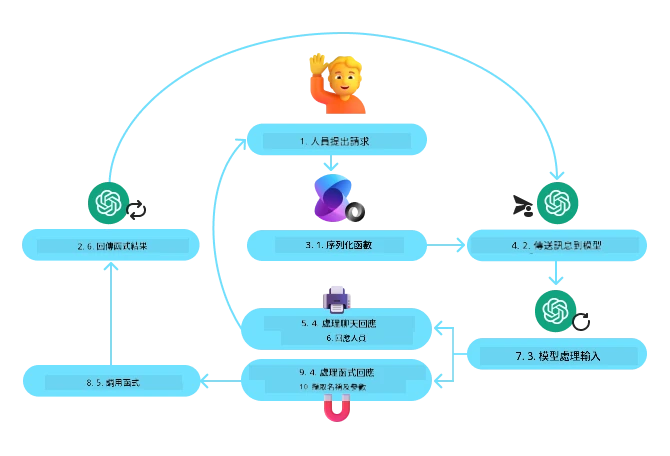
在 Microsoft 代理框架中,工具定義為被裝飾的函式。我們可以將之前看到的 get_current_time 函式轉為工具,使用 @tool 裝飾器。框架會自動序列化函式與參數,產生送給 LLM 的結構。
from agent_framework import tool
from agent_framework.azure import AzureAIProjectAgentProvider
from azure.identity import AzureCliCredential

@tool
def get_current_time(location: str) -> str:
    """Get the current time for a given location"""
    ...

# 建立客戶端
provider = AzureAIProjectAgentProvider(credential=AzureCliCredential())

# 建立代理並使用工具運行
agent = await provider.create_agent(name="TimeAgent", instructions="Use available tools to answer questions.", tools=get_current_time)
response = await agent.run("What time is it?")
Azure AI 代理服務
Azure AI 代理服務 是較新的代理框架,旨在讓開發者安全建置、部署並擴展高品質且可擴充的 AI 代理,無需管理底層運算與儲存資源。此服務特別適用於企業應用,因為它是具備企業級安全的全託管服務。
相較直接使用 LLM API,Azure AI 代理服務提供以下優勢:
- 自動工具呼叫 — 無需解析工具呼叫、執行工具及處理回應;所有這些均在伺服器端完成
- 安全管理資料 — 無需自行管理對話狀態,可依賴執行緒儲存所有所需資訊
- 開箱即用工具 — 提供可與資料來源互動的工具,如 Bing、Azure AI Search 與 Azure Functions
Azure AI 代理服務中的工具可分為兩類:
- 知識工具:
- 行動工具:
該代理服務允許我們將這些工具組合成一個「工具集(toolset)」。同時利用「執行緒(threads)」追蹤特定對話的歷史訊息。
假設您是名為 Contoso 公司的銷售代理,您想開發一個會話代理來回答關於銷售資料的問題。
以下圖片示範如何使用 Azure AI 代理服務分析您的銷售數據:
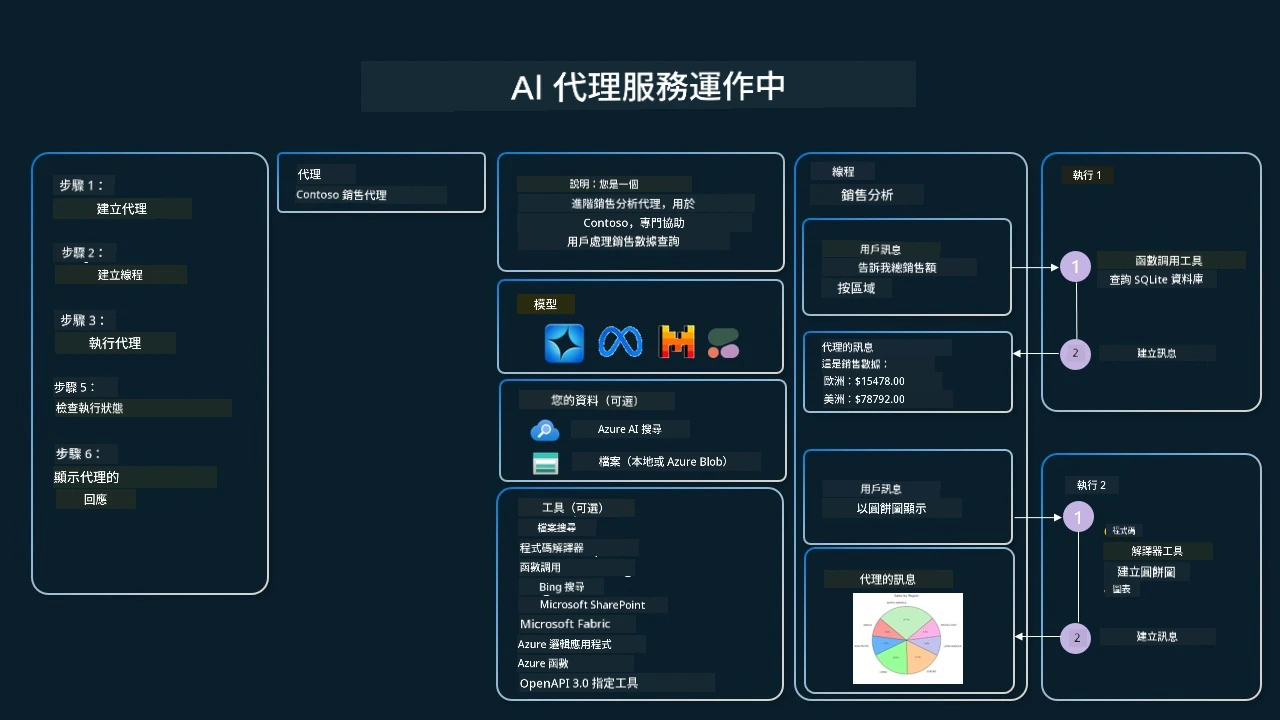
要使用服務提供的任一工具,我們可以建立客戶端並定義工具或工具集。透過以下 Python 程式碼實作,LLM 將根據使用者請求,決定使用自訂的函式 fetch_sales_data_using_sqlite_query,或使用內建的程式碼解釋器。
import os
from azure.ai.projects import AIProjectClient
from azure.identity import DefaultAzureCredential
from fetch_sales_data_functions import fetch_sales_data_using_sqlite_query # fetch_sales_data_using_sqlite_query 函數,可在 fetch_sales_data_functions.py 文件中找到。
from azure.ai.projects.models import ToolSet, FunctionTool, CodeInterpreterTool

project_client = AIProjectClient.from_connection_string(
    credential=DefaultAzureCredential(),
    conn_str=os.environ["PROJECT_CONNECTION_STRING"],
)

# 初始化工具套件
toolset = ToolSet()

# 使用 fetch_sales_data_using_sqlite_query 函數初始化函數調用代理,並將其加入工具套件
fetch_data_function = FunctionTool(fetch_sales_data_using_sqlite_query)
toolset.add(fetch_data_function)

# 初始化程式碼解譯器工具,並將其加入工具套件。
code_interpreter = code_interpreter = CodeInterpreterTool()
toolset.add(code_interpreter)

agent = project_client.agents.create_agent(
    model="gpt-4o-mini", name="my-agent", instructions="You are helpful agent",
    toolset=toolset
)
使用工具使用設計模式建立值得信賴的 AI 代理有何特別考量?
LLM 動態產生的 SQL 常見疑慮為安全性,特別是 SQL 注入或惡意行為風險,例如刪除或竄改資料庫。雖然此類疑慮合理,但可透過妥善設定資料庫存取權限有效降低風險。對大多數資料庫而言,設定為唯讀是解決之道。對 PostgreSQL 或 Azure SQL 服務,應賦予應用程式唯讀(SELECT)角色。
在安全環境中執行應用程式更有助於防護。在企業情境中,通常會將資料從作業系統擷取並轉換至唯讀資料庫或資料倉儲,並設計清晰的資料結構。此方式確保資料安全,優化效能及可存取性,同時限制應用程式擁有唯讀存取權。
範例程式碼
對工具使用設計模式有更多疑問?
加入 Microsoft Foundry Discord 與其他學習者交流,參加問答時間並解決你的 AI 代理問題。
其他資源
前一課
下一課
免責聲明:
本文件使用 AI 翻譯服務 Co-op Translator 進行翻譯。雖然我們致力於確保準確性,但請注意自動翻譯可能包含錯誤或不準確之處。原始文件以其母語版本為權威資料。對於重要資訊,建議採用專業人工翻譯。我們不對因使用本翻譯版本所引致的任何誤解或誤釋負責。