| |
|
Agent Patterns for Copilot Chat
|
|
^ ^ v v < > < > B A START
|
|
ISSUE #005 • APRIL 20, 2026 • WEEKLY
|
|
|
Your customer loves the AI demo. They see the value. Then someone asks: "But who checks what the AI produces before it goes out?" And the conversation stalls.
This issue's pattern: How to design approval gates that let humans validate AI-generated content before it enters any system others depend on. This is the trust mechanism that makes AI deployable in enterprise.
|
🧩 Pattern Breakdown
|
Human-in-the-Loop Approval Gates
The trust layer between AI generation and enterprise consumption
|
|
Why this matters: AI can generate meeting summaries, reports, emails, and documentation faster than any human. But "fast" doesn't mean "trusted." In every enterprise deployment, there's a moment where AI-generated content crosses a boundary — from draft to published, from suggestion to action, from one person's workspace to something others rely on. That boundary is where trust breaks down if there's no checkpoint.
The pattern has three components:
|
1. Generate → Stage → Approve → Publish
AI output never goes directly to its final destination. It lands in a staging area where an authorized human reviews, edits if needed, and explicitly approves before it moves downstream. The approval is logged and auditable.
|
|
2. Immutable source of truth alongside the AI output
Always preserve the original input the AI worked from — the raw transcript, the source document, the original data. If the AI summary is ever questioned, the original is available for comparison. This is non-negotiable for regulated industries and audit-conscious customers.
|
|
3. Downstream systems only consume approved content
Search indexes, knowledge bases, dashboards, and other agents should only ingest content that has passed through the gate. This prevents AI hallucinations or inaccuracies from propagating through the organization's information layer.
|
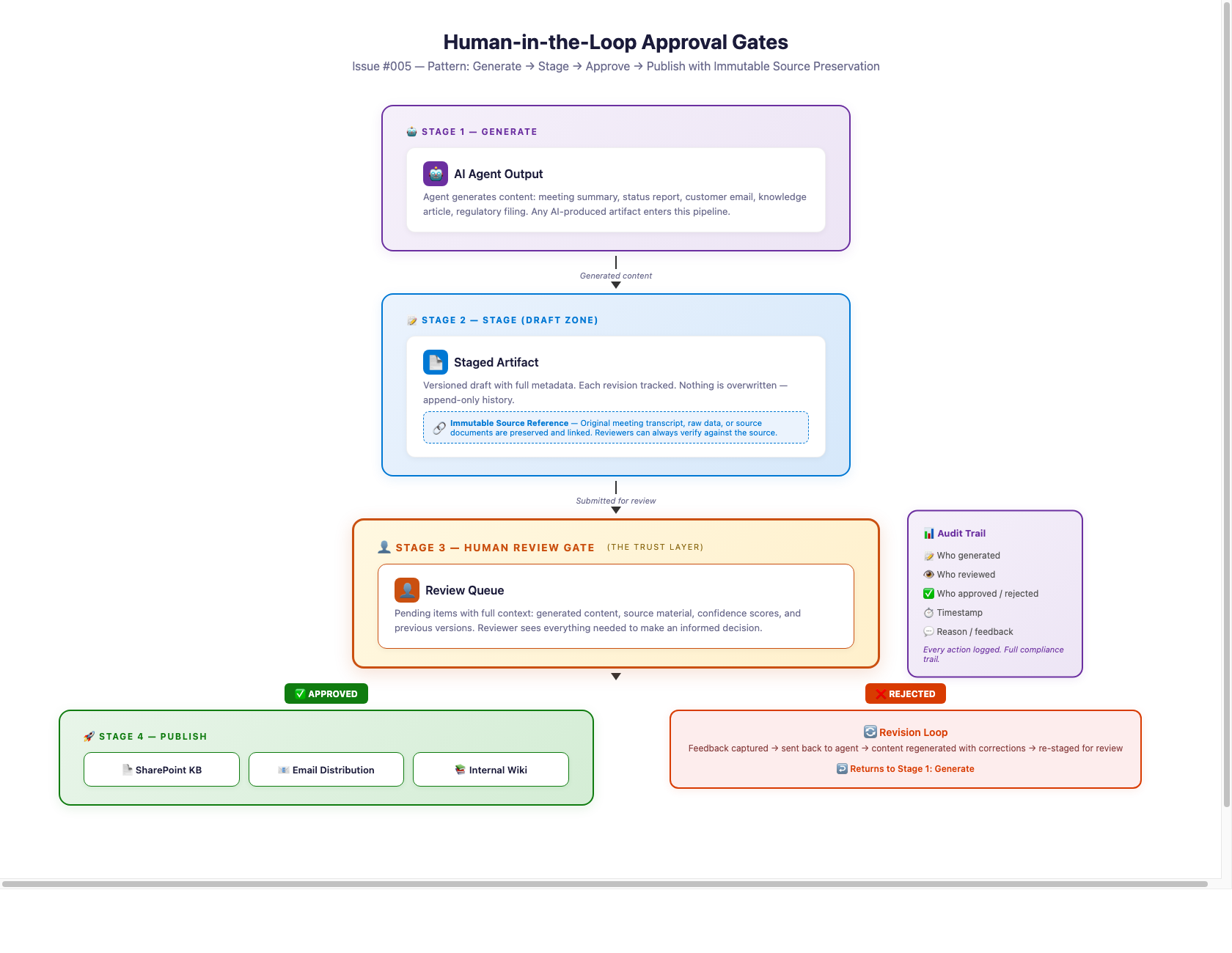
Approval Gates — the trust layer between AI generation and enterprise consumption
|
|
In practice: Pete Puustinen built this pattern for a pharma customer (Eggis Pharma) at a Budapest hackathon. Their meeting scribe agent generates meeting summaries automatically — but the summary doesn't enter the searchable knowledge base until a project owner reviews and approves it. The raw transcript is saved separately as an immutable backup. Once approved, the summary flows to Azure AI Search where leadership can query it. Full agent walkthrough coming in Issue #006.
|
Where else this pattern applies (beyond meetings):
|
• Document generation — AI drafts a proposal, contract, or report → human reviews → approved version goes to client or archive
|
|
• Customer communications — AI drafts a response to a support ticket or client email → agent reviews tone and accuracy → approved version is sent
|
|
• Knowledge base curation — AI extracts and structures content from unstructured sources → SME validates → approved content enters the knowledge graph
|
|
• Code and configuration changes — AI suggests a fix or config update → engineer reviews diff → approved change is deployed
|
|
• Work item triage — AI classifies and routes an item (see Issues #002–#004) → triage lead confirms → approved routing takes effect
|
|
⚠ Design pitfall: Don't make the approval gate so heavy that it becomes a bottleneck. The point is a quick validation checkpoint — not a multi-level review committee. If approval takes longer than the task the AI automated, you've lost the value. Design for one approver, one action (approve / edit-then-approve / reject), and auto-escalation if it sits too long.
|
|
|
🛠 Try This Now
|
Add an Approval Gate to Any Agent You're Building
|
| 1 |
Identify the trust boundary. In whatever agent you're building or pitching, find the moment where AI output transitions from "draft" to "something others will rely on." That's where the gate goes. |
| 2 |
Use what's already there. Power Automate Approvals, SharePoint content approval, Teams Approval app — you don't need to build a custom approval system. Wire the AI output into an existing approval flow. Keep it lightweight: one approver, one click. |
| 3 |
Always save the source. Whatever input the AI worked from, save a copy alongside the output. This creates the audit trail your customer's compliance team will ask about. Separate storage locations — don't co-mingle originals with generated content. |
| 4 |
Position it proactively. Don't wait for the customer to ask "but who checks this?" Introduce the approval gate as part of your architecture from the start. It preempts the trust objection and shows you've thought about enterprise readiness. |
|
💡 The line that opens doors: "The AI does the work in seconds. A human confirms it in one click. Nothing goes live without that confirmation. That's how you get speed and trust."
|
|
|
🏆 Where This Pattern Lands
|
|
This one is simple: every single agent you build or pitch should have an approval gate. The question isn't "where does this land?" — it's "where are you not using it?"
|
• Highest impact: Anywhere AI output becomes a record of truth — meeting minutes, compliance docs, customer-facing communications
|
|
• Quick wins: Anywhere you can replace a manual "copy-paste-review" process with "AI generates → one-click approve"
|
|
• Objection killer: Anywhere the customer's legal, compliance, or risk team has flagged AI adoption as a concern
|
|
Next issue: We'll walk through the full Meeting Scribe & Library Agent that Pete Puustinen built for Eggis Pharma — the complete two-agent architecture, custom connector for transcript retrieval, and how to land this as a hackathon build with a customer.
|
|
|
|
Got an agent or pattern to share?
Reply to this email and you might be featured in a future issue.
|
|
|
|
|