This tutorial shows how to use tools in an agent.
What is tool
Tools are pre-defined functions in user's project that agent can invoke. Agent can use tools to perform actions like search web, perform calculations, etc. With tools, it can greatly extend the capabilities of an agent.
Note
To use tools with agent, the backend LLM model used by the agent needs to support tool calling. Here are some of the LLM models that support tool calling as of 06/21/2024
- GPT-3.5-turbo with version >= 0613
- GPT-4 series
- Gemini series
- OPEN_MISTRAL_7B
- ...
This tutorial uses the latest GPT-3.5-turbo as example.
Note
The complete code example can be found in Use_Tools_With_Agent.cs
Key Concepts
- FunctionContract: The contract of a function that agent can invoke. It contains the function name, description, parameters schema, and return type.
- ToolCallMessage: A message type that represents a tool call request in AutoGen.Net.
- ToolCallResultMessage: A message type that represents a tool call result in AutoGen.Net.
- ToolCallAggregateMessage: An aggregate message type that represents a tool call request and its result in a single message in AutoGen.Net.
- FunctionCallMiddleware: A middleware that pass the FunctionContract to the agent when generating response, and process the tool call response when receiving a ToolCallMessage.
Tip
You can Use AutoGen.SourceGenerator to automatically generate type-safe FunctionContract instead of manually defining them. For more information, please check out Create type-safe function.
Install AutoGen and AutoGen.SourceGenerator
First, install the AutoGen and AutoGen.SourceGenerator package using the following command:
dotnet add package AutoGen
dotnet add package AutoGen.SourceGenerator
Also, you might need to enable structural xml document support by setting GenerateDocumentationFile property to true in your project file. This allows source generator to leverage the documentation of the function when generating the function definition.
<PropertyGroup>
    <!-- This enables structural xml document support -->
    <GenerateDocumentationFile>true</GenerateDocumentationFile>
</PropertyGroup>
Add Using Statements
using AutoGen.Core;
using AutoGen.OpenAI;
using AutoGen.OpenAI.Extension;
Create agent
Create an OpenAIChatAgent with GPT-3.5-turbo as the backend LLM model.
var apiKey = Environment.GetEnvironmentVariable("OPENAI_API_KEY") ?? throw new Exception("Please set OPENAI_API_KEY environment variable.");
var model = "gpt-4o-mini";
var openaiClient = new OpenAIClient(apiKey);
var agent = new OpenAIChatAgent(
    chatClient: openaiClient.GetChatClient(model),
    name: "agent",
    systemMessage: "You are a helpful AI assistant")
    .RegisterMessageConnector(); // convert OpenAI message to AutoGen message
Define Tool class and create tools
Create a public partial class to host the tools you want to use in AutoGen agents. The method has to be a public instance method and its return type must be Task<string>. After the methods is defined, mark them with FunctionAttribute attribute.
In the following example, we define a GetWeather tool that returns the weather information of a city.
public partial class Tools
{
    /// <summary>
    /// Get the weather of the city.
    /// </summary>
    /// <param name="city"></param>
    [Function]
    public async Task<string> GetWeather(string city)
    {
        return $"The weather in {city} is sunny.";
    }
}
var tools = new Tools();
Tool call without auto-invoke
In this case, when receiving a ToolCallMessage, the agent will not automatically invoke the tool. Instead, the agent will return the original message back to the user. The user can then decide whether to invoke the tool or not.
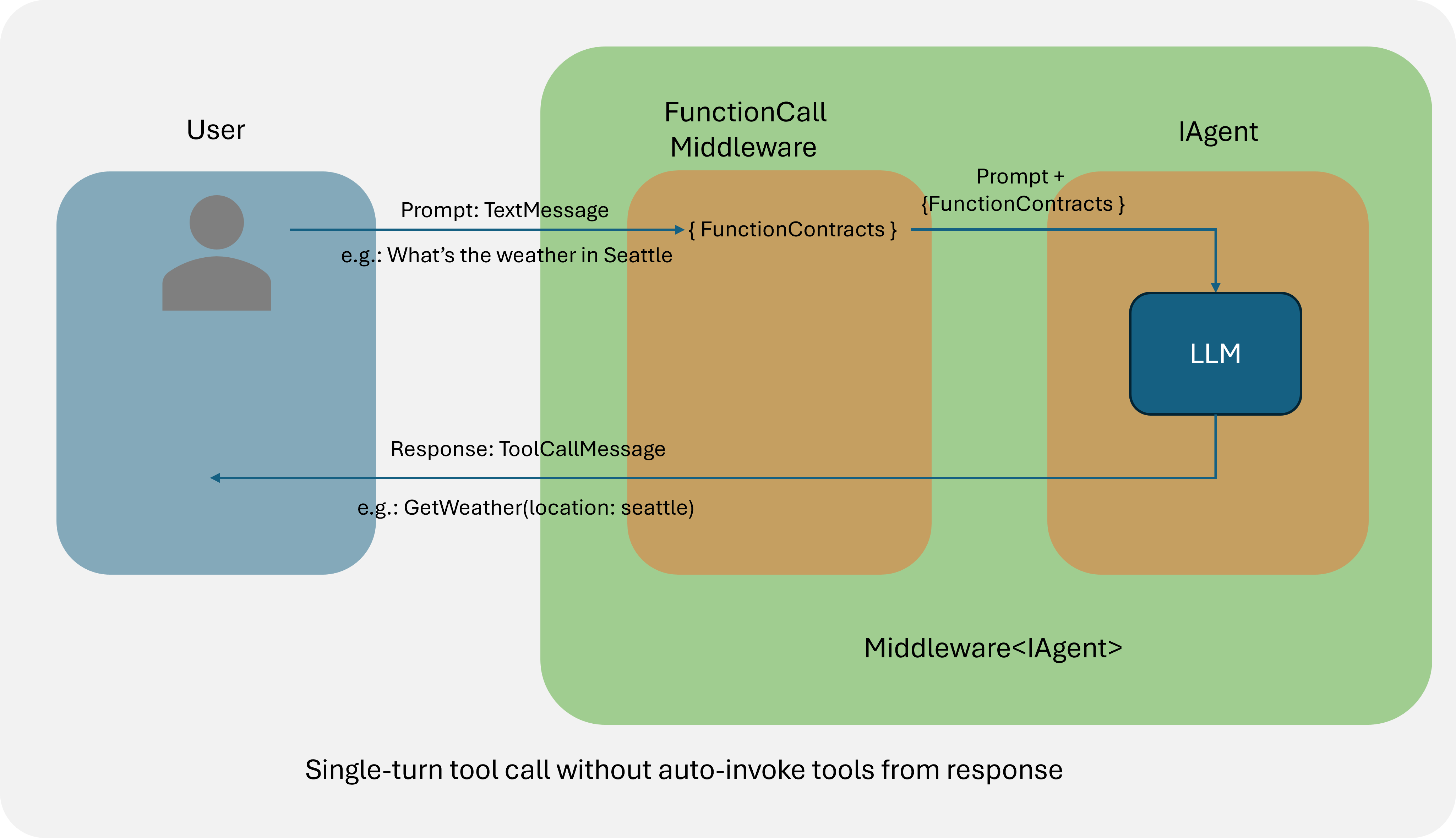
To implement this, you can create the FunctionCallMiddleware without passing the functionMap parameter to the constructor so that the middleware will not automatically invoke the tool once it receives a ToolCallMessage from its inner agent.
var noInvokeMiddleware = new FunctionCallMiddleware(
    functions: [tools.GetWeatherFunctionContract]);
After creating the function call middleware, you can register it to the agent using RegisterMiddleware method, which will return a new agent which can use the methods defined in the Tool class.
var noInvokeAgent = agent
    .RegisterMiddleware(noInvokeMiddleware) // pass function definition to agent.
    .RegisterPrintMessage(); // print the message content

question = new TextMessage(Role.User, "What is the weather in Seattle?");
reply = await noInvokeAgent.SendAsync(question);
reply.Should().BeOfType<ToolCallMessage>();
Tool call with auto-invoke
In this case, the agent will automatically invoke the tool when receiving a ToolCallMessage and return the ToolCallAggregateMessage which contains both the tool call request and the tool call result.
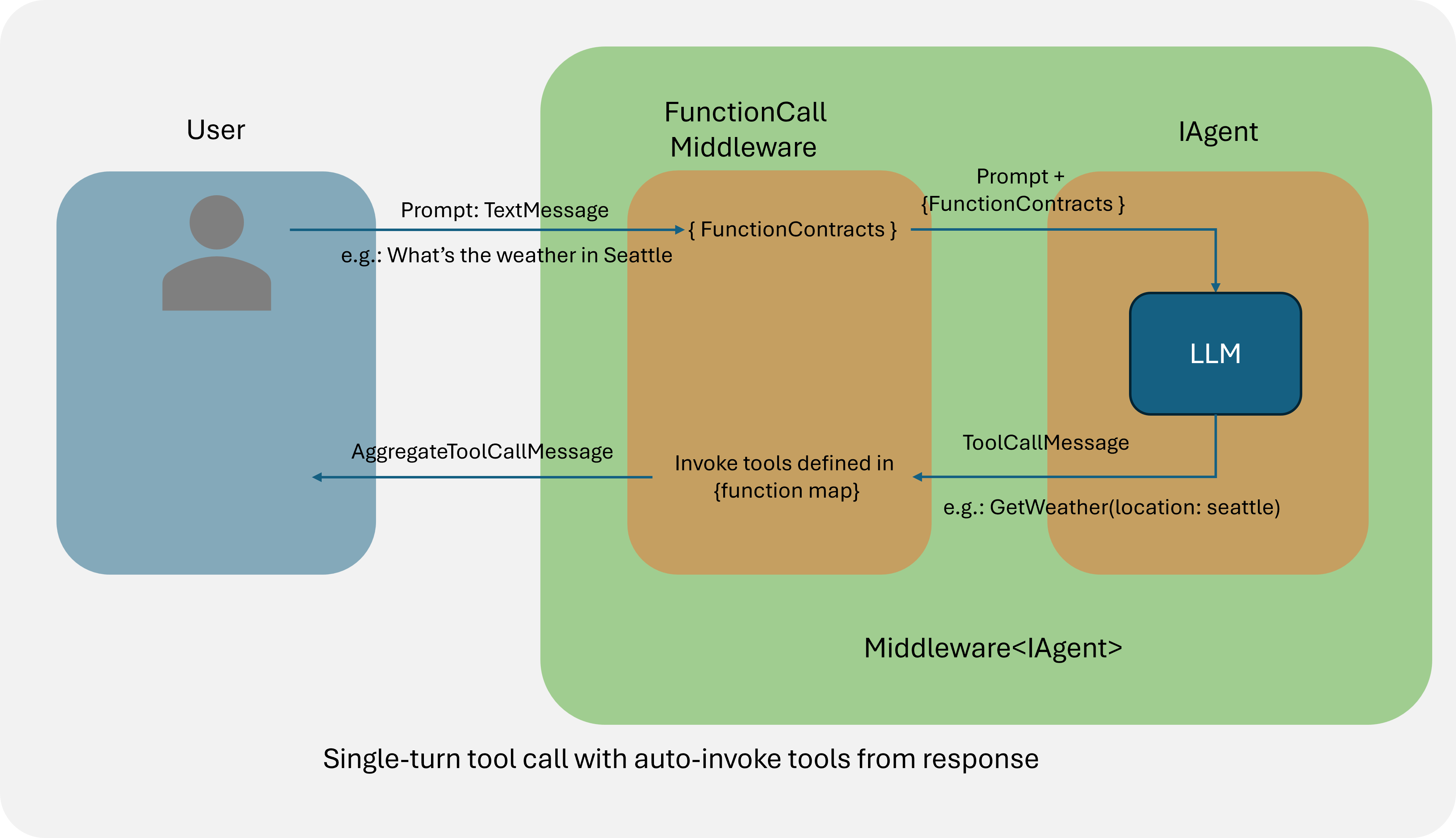
To implement this, you can create the FunctionCallMiddleware with the functionMap parameter so that the middleware will automatically invoke the tool once it receives a ToolCallMessage from its inner agent.
var autoInvokeMiddleware = new FunctionCallMiddleware(
    functions: [tools.GetWeatherFunctionContract],
    functionMap: new Dictionary<string, Func<string, Task<string>>>()
    {
        { tools.GetWeatherFunctionContract.Name!, tools.GetWeatherWrapper },
    });
After creating the function call middleware, you can register it to the agent using RegisterMiddleware method, which will return a new agent which can use the methods defined in the Tool class.
var autoInvokeAgent = agent
    .RegisterMiddleware(autoInvokeMiddleware) // pass function definition to agent.
    .RegisterPrintMessage(); // print the message content
var question = new TextMessage(Role.User, "What is the weather in Seattle?");
var reply = await autoInvokeAgent.SendAsync(question);
reply.Should().BeOfType<ToolCallAggregateMessage>();
Send the tool call result back to LLM to generate further response
In some cases, you may want to send the tool call result back to the LLM to generate further response. To do this, you can send the tool call response from agent back to the LLM by calling the SendAsync method of the agent.
var finalReply = await agent.SendAsync(chatHistory: [question, reply]);
Parallel tool call
Some LLM models support parallel tool call, which returns multiple tool calls in one single message. Note that FunctionCallMiddleware has already handled the parallel tool call for you. When it receives a ToolCallMessage that contains multiple tool calls, it will automatically invoke all the tools in the sequantial order and return the ToolCallAggregateMessage which contains all the tool call requests and results.
question = new TextMessage(Role.User, "What is the weather in Seattle, New York and Vancouver");
reply = await agent.SendAsync(question);