

A calm, responsive workspace for turning small suggestions into meaningful team improvements. Capture ideas, search and filter by priority, switch between board and list views, and move ideas through New → Exploring → Planned.
This is a clean MIT-licensed starter using the public first-party Vite/React Managed Apps scaffold conventions. It contains no training app source, tenant addresses, connections, deployment identity, or private records.
Screenshot
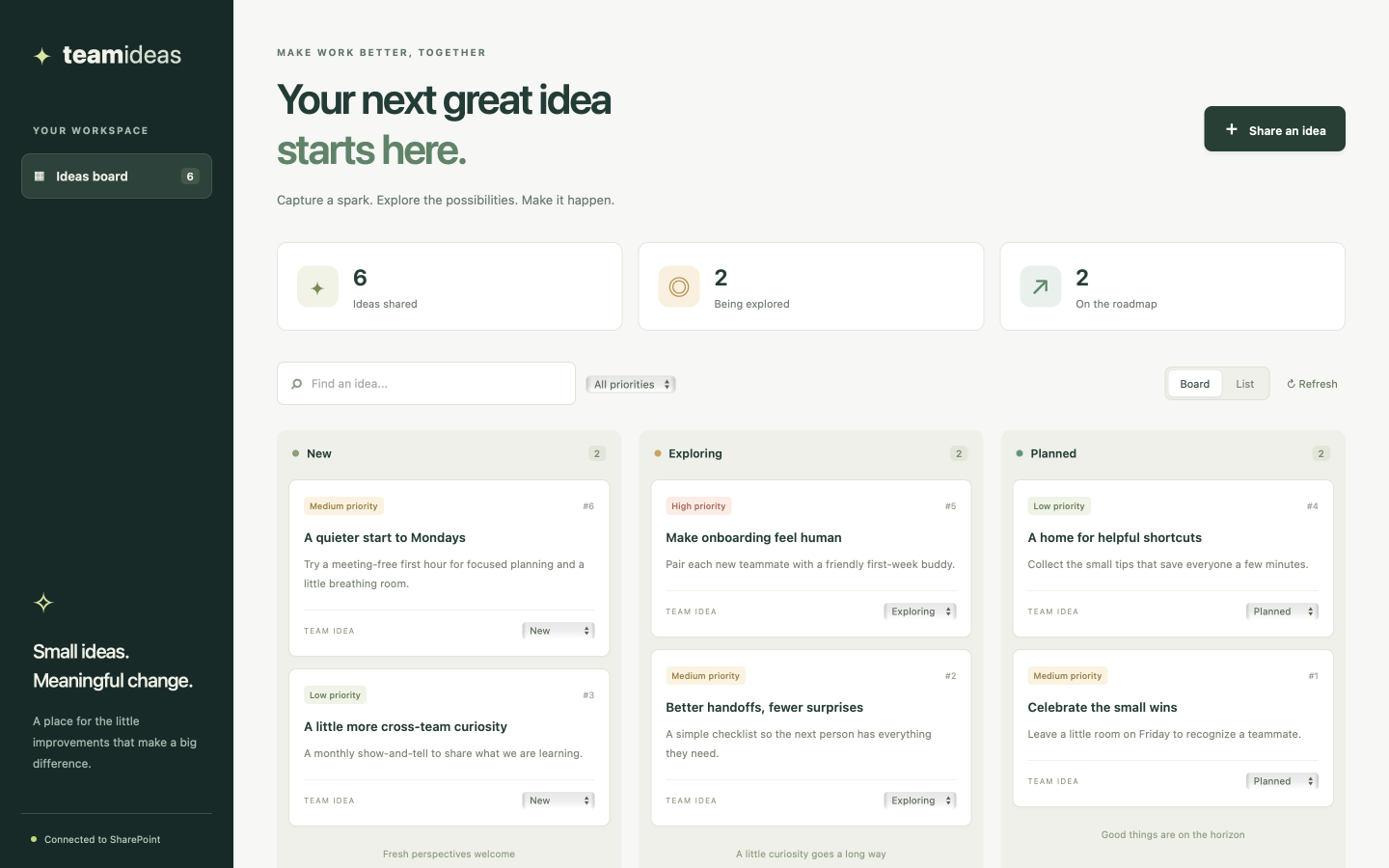
The image is illustrative and uses synthetic ideas, not a live SharePoint connection.
Create your SharePoint list
In the SharePoint site you want to use, choose New → List → Blank list. Name it Team Ideas (or team-ideas). Keep the built-in Title column. Use Add column to create these columns with exactly these initial names:
| Column name | SharePoint column type | Settings |
|---|---|---|
| Title | Single line of text | Required |
| Details | Multiple lines of text | Plain text, optional |
| Status | Single line of text | Default New; required. Values: New, Exploring, Planned |
| Priority | Single line of text | Default Medium; required. Values: Low, Medium, High |
Keep these display names so the app can identify the columns. Do not use rich text for Details. Status and Priority deliberately use text columns to keep the generated client contract simple; the app offers only the listed values. You need permission to read, add, and edit items.
Create from CSV instead
Microsoft Lists also supports New list → From CSV. Choose a file below and name the list Team Ideas or team-ideas:
- Blank data template (CSV): column headers only, with no sample ideas.
- Synthetic sample ideas (CSV): the same headers plus six fictional ideas.
Use the populated file if the import wizard requires data rows. You can remove those six sample items afterward for an empty board.
CSV files contain data, not SharePoint column settings. Review and change the column types manually during import or afterward; no app registration or provisioning script is needed.
On the column-type preview, keep Title as Title, and Status and Priority as Single line of text. Change Details to Multiple lines of text (highlighted below). The preview should match the screenshot.
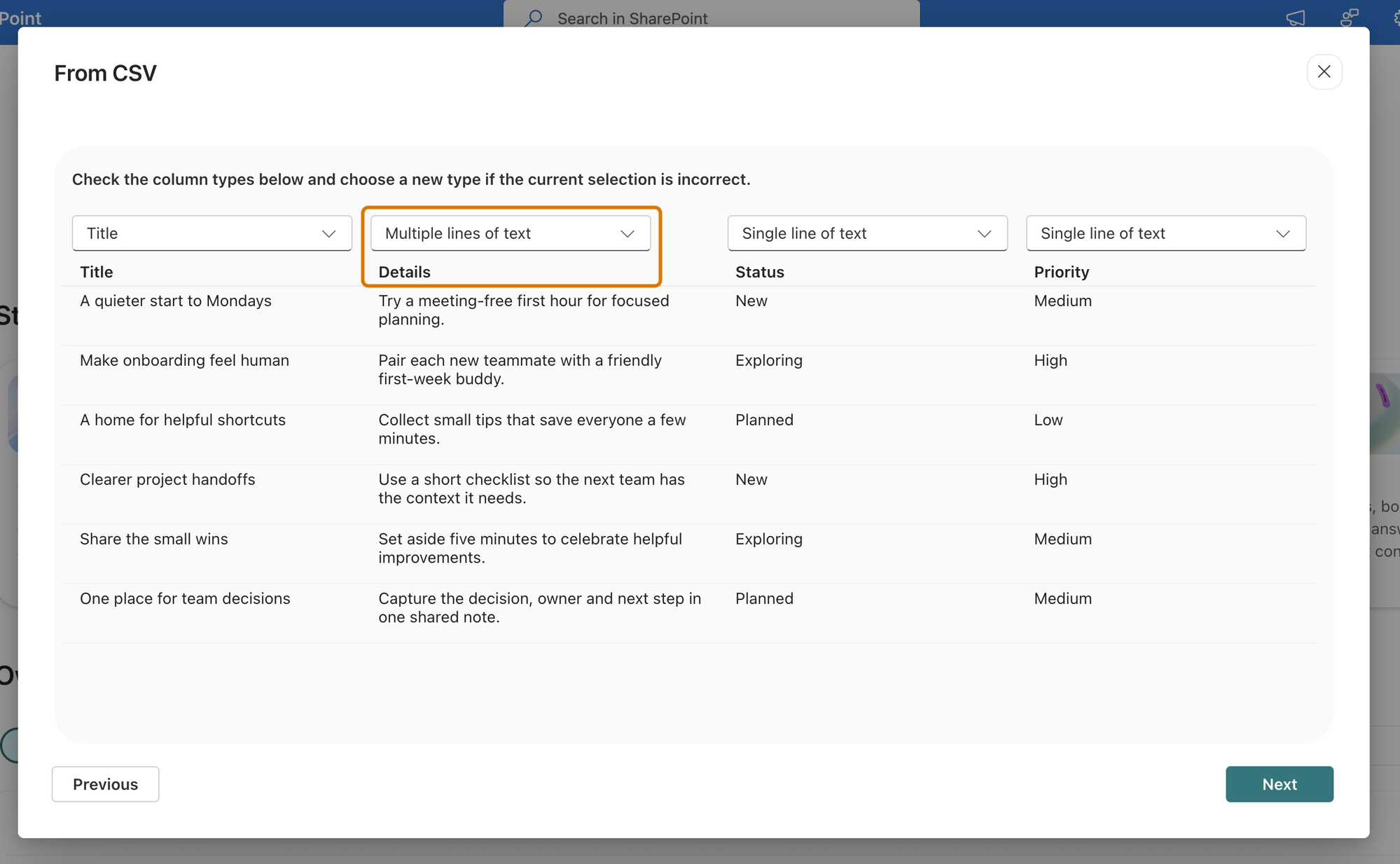
Choose Next and finish creating the list. In List settings → Columns, make Title, Status, and Priority required, set Status’s default to New and Priority’s to Medium, and keep Details optional and plain text.
Save the list to the SharePoint site you intend to connect, not My lists. Personal lists belong to a different site and will not appear when you select your team site in the CLI.
CSV imports can assign internal names such as field_1 instead of Details.
The app reads the native CLI’s generated schema during its local build and maps
the five display names above to their actual internal names. Only that small
field map is saved in src/ideaFields.json for hosted builds; the native schema
and generated clients are not rewritten. If you change columns later, refresh
the binding with the native CLI and rebuild before saving the source.
Scope and limitations
The board loads at most 200 ideas per refresh, newest first within that returned set. Search and priority filters operate on loaded ideas, not the entire list. Each status update is a normal SharePoint update, not a transaction or conflict resolution system. This starter is not intended for large backlogs or concurrent workflow processing. Errors are visible; failed writes are not presented as successful and are never automatically retried.
The UI renders connector text as text, never raw HTML. Fonts use local/system fallbacks without external font requests. App data access remains subject to your tenant’s licensing, permissions, and connector policies.
The starter pins Vite to a patched release and overrides transitive Zod to patched 4.x releases because the first-party runtime packages currently pin an older version. Revisit the override when those packages update their dependency.
Make it your own
- Change the heading or colors in
app/src/App.tsxandapp/src/style.css. - Adapt the board’s statuses and priorities for your team’s workflow.
- Keep any additional SharePoint columns aligned with the app’s types, form,
and selected fields in
app/src/ideas.ts.
Architecture
React UI → native generated TeamIdeasService (or Team_ideasService) → Managed Apps connector runtime
→ your SharePoint Team Ideas list. Data stays in your list.