
Capture conversation context at runtime and pass it to the next step in a business process. This sample demonstrates a reusable pattern for Copilot Studio agents powered by the Microsoft Copilot harness: a Pre tool use hook retrieves available conversation messages from Azure Application Insights and supplies them to a selected tool before it executes.
The included IT support scenario illustrates this pattern by attaching the conversation snapshot to a simulated support ticket. The same approach can be adapted to other use cases where an agent needs to pass conversation context into a request, record, or handoff while the conversation is still in progress.
Example Scenarios
- Customer service escalation: Include the discussion with an escalation so a human representative has context without asking the customer to repeat everything.
- Sales handoff: Attach the conversation to a CRM lead or opportunity, preserving requirements, questions, and preferences.
- Employee service requests: Include relevant discussion when submitting an HR, facilities, or procurement request.
- Bug reports and product feedback: Attach the conversation describing the problem, reproduction steps, and troubleshooting already attempted.
- Approval requests: Provide the discussion supporting a purchase, exception, or access request for the approver’s review.
- Service bookings: Pass the conversation alongside a booking or work order so the service team understands the customer’s requirements.
Supported channel: Microsoft 365 Copilot only. The Microsoft Teams channel is not supported.
Included Assets
| Asset | Purpose |
|---|---|
| IT Support Transcript Demo agent | Provides IT troubleshooting and invokes log-support-ticket when the user explicitly requests a ticket or another submission attempt. |
| log-support-ticket skill | Instructs the agent to prepare ticket details from the conversation, call Log ticket once without further intake questions, and report the returned result. |
| Log ticket tool | Exposes IT Support - Log ticket to the agent, accepting a title, description, and optional transcript and conversation ID. |
| Attach available transcript hook | Runs only before Log ticket. Invokes Capture transcript before ticket with the proposed tool inputs and platform-provided conversation metadata. |
| Capture transcript before ticket workflow | Queries available user and assistant messages in Application Insights for the conversation. Returns updated tool inputs that preserve the ticket details and add the available transcript and conversation ID. |
| IT Support - Log ticket workflow | Returns the ticket ID, status, and whether a conversation transcript was included. Ticket creation is simulated in this sample. |
| Azure Monitor Logs connection reference | Links the capture workflow to an Azure Monitor Logs connection authorized to query the configured Application Insights resource. |
How It Works
An explicit ticket request routes to the log-support-ticket skill, which uses existing details without further intake or confirmation questions. Before Log ticket runs, its hook queries the current conversation’s available user/assistant text and injects a transcript JSON string and conversation ID into the tool arguments. The tool returns a DEMO-... receipt with Simulated status.
Missing metadata, empty results, capture failures, or oversized results must not block the demo ticket. Snapshots are limited to 500 rows and 100,000 serialized characters. transcriptAttached: true means data was supplied, not that every turn was captured. Transcript text is treated as untrusted data.
Example Result
The capture action returns available text rows with Timestamp, Role, Content, ConversationId, and TraceId:
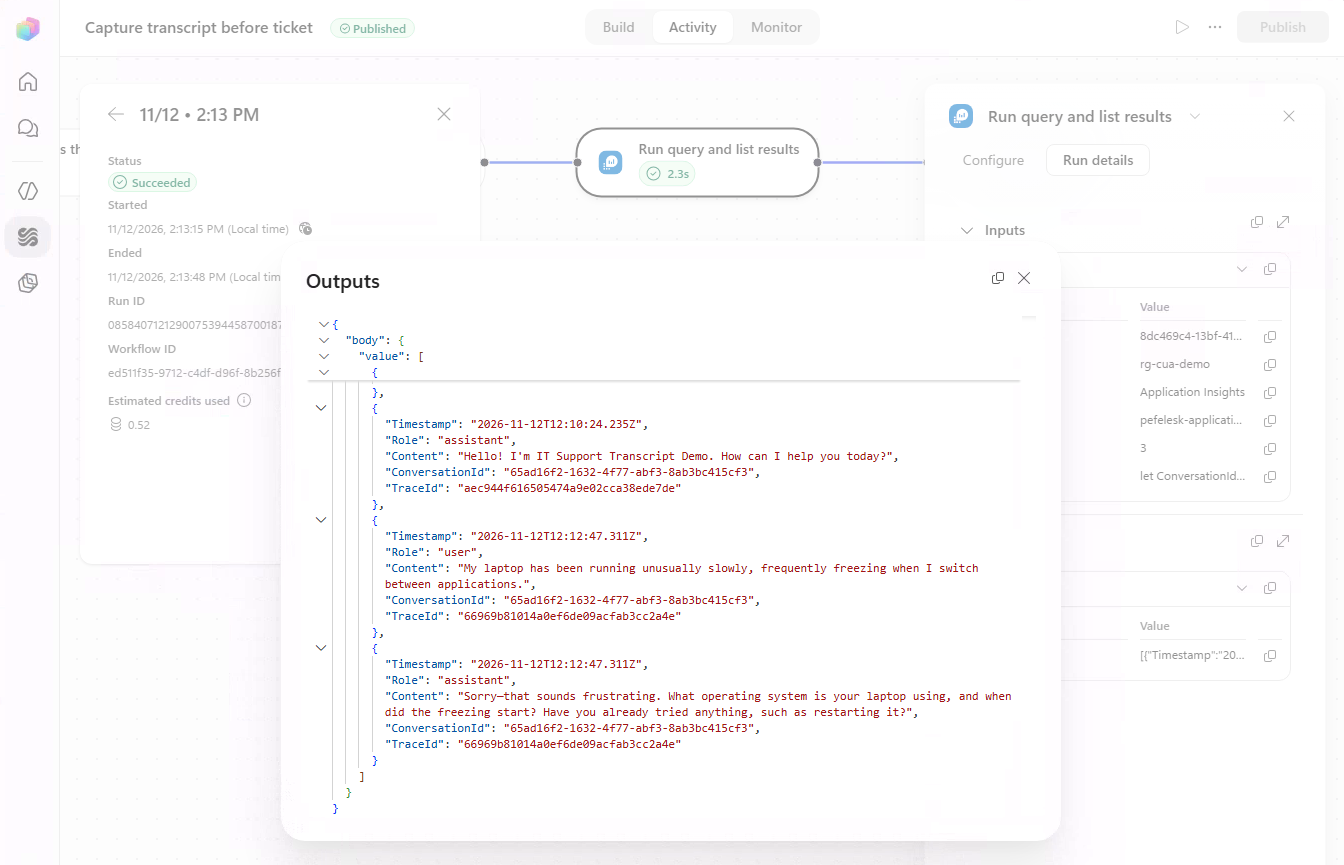
Full screenshot from a real demo run, showing the capture workflow and query outputs.
Prerequisites
- A target Copilot Studio environment that supports Microsoft Copilot-harness agents, agent skills, modern workflows, and Pre tool use hooks. These capabilities are subject to preview availability and licensing.
- Environment-level Application Insights export configured for the target environment. Export configuration is external to this solution; importing the solution does not provision Azure resources or enable telemetry.
- An Application Insights resource receiving the target environment’s
dependenciestelemetry and an Azure Monitor Logs connection with least-privilege permission to query that resource. - Permission to import unmanaged solutions and configure/publish the imported agent and workflows.
See environment-level telemetry setup and limitations and hooks documentation.
Set Up the Solution
Configure before publishing. Both workflows are imported as drafts, automatic agent publication is off, and the Azure resource and query-scope values are nonfunctional placeholders. The ticket tool is a simulation: it never writes to a real ticketing system. Review the solution and its data access before importing it.
Import Transcript Capture at Runtime into your target environment and bind the Azure Monitor Logs connection reference to an approved connection. After importing:
- Publish IT Support - Log ticket.
- Open Capture transcript before ticket and update Run query and list results:
- Select your Azure subscription, resource group, and Application Insights resource; keep resource type Application Insights.
- Replace
REPLACE_WITH_ENVIRONMENT_IDin the query with your Power Platform environment ID. The agent ID comes from the hook automatically. - Set Time range type to 3, using Enter custom value if needed.
- Save and publish the flow.
- Open
https://make.powerautomate.com/environments/[EnvID]/flows/[FlowID]/details, then Run-only user > Edit > Connections Used > Azure Monitor Logs > Use this connection…. Choose the approved connection and save. Use the capture flow’s id for[FlowID]. - After any changes to this flow, update the run-only connection setting again. Chat users should not have to supply their own Azure Monitor connection.
- Publish IT Support Transcript Demo to Microsoft 365 Copilot, granting access only to the intended users. Chat with the agent, discuss an issue, and ask it to log a ticket. Open Capture transcript before ticket > Activity, select the run, and inspect Run query and list results > Outputs > body > value.
Before publishing, verify that Attach available transcript is a Pre tool use hook scoped to Log ticket and invokes Capture transcript before ticket. Leave the tool’s optional transcript and conversationId inputs empty for the hook.
Placeholder Reference
| Packaged value | Replace with |
|---|---|
00000000-0000-0000-0000-000000000000 | Azure subscription ID |
REPLACE_WITH_RESOURCE_GROUP | Azure resource group |
REPLACE_WITH_APPLICATION_INSIGHTS_RESOURCE | Application Insights resource name |
REPLACE_WITH_ENVIRONMENT_ID | Target Power Platform environment ID used by env.id |
Limitations and Safety
- Best-effort transcript. The source is asynchronous Application Insights telemetry, not a live-transcript API. Messages may be delayed, missing, truncated, or out of chat order. Do not treat the snapshot as a complete audit record.
- Demo only. No real ticket backend or durable archive is included. Missing transcript data does not block the simulated ticket.
- Privacy and access. Captured messages may contain personal or confidential information. Limit access to Application Insights and workflow run history to authorized users, and apply your organization’s retention policies.