{Brace Yourself} - or Let Copilot Do It! Zero-100 with Adaptive Cards
Stop hand cranking Adaptive Card JSON - put your effort into avoiding it!

I’ve been on a bit of a journey with Adaptive Cards recently. Apart from creating a few basic forms, and a few tweaks to existing cards here and there, I’ve not really had a need to get too deep into them. They do seem to be quite a hit with users though; anyone who’s attended one of our bootcamp events will have seen the signup form we use to provision environments on the first day, and there’s generally a lot of positive comments about the experience.
Having taken the plunge though, I quickly went from:
- building cards with the WYSIWYG editor, to
- hand-writing JSON, to
- getting JSON written for me, to
- getting JSON written on the fly and presented to users automatically, to
- getting JSON written on the fly and presented to users automatically with responses interpreted in a meaningful way without writing so much as a curly brace
Interested? Let’s have a look at doing some amazing things with(out writing) JSON!
Huh? Aren’t We All About Conversational Experiences Now?
Conversational interfaces are great, but sometimes you just can’t beat an old fashioned form. If you need to collect and validate multiple pieces of information at the same time, there’s a lot to be said for putting an Adaptive Card in front of a user.
But if you’re anything like me, a lot of what’s said at that point can’t be repeated; constructing the JSON required for an Adaptive Card by hand is fiddly and often frustrating. I love Copilot Studio’s Adaptive Card Designer for its low-code WYSIWYG approach, but I’ve also found it fairly unwieldy for more complex forms. Surely there’s an alternative?
A Better Way
The answer to my JSON woes has literally been there right in front of me the whole time; the Test Pane. Perhaps I’m a little late to the party with this, but I’ve recently realised how good Copilot Studio itself is at providing a starting point.
As an example, let’s see what the Test Pane makes of the following:
1
2
3
4
5
6
7
8
9
10
11
12
13

Write JSON for an Adaptive Card which prompts the user to enter dietary preferences.

Place each section in containers.

In the first section, introduce the card with a header and introductory message stating why this information is being collected (which is to ensure a good selection of food and drink is provided at an event).

In the second section, ask for a single selection of popular dietary types (e.g. vegan, vegetarian, etc - provide a comprehensive set of options for this in an expanded list), as well as similar questions for favourite food and favourite beverage, with popular options for both (both in compact lists).

In the last section, include a hyperlink to a privacy policy document with a placeholder URL, and a submission button.

Ensure all fields on the form are mandatory, all have an appropriate label and an appropriate error message. Use a food related white repeating image for the background in each of the sections.

Heavily decorate the text throughout the card with food related emojis.
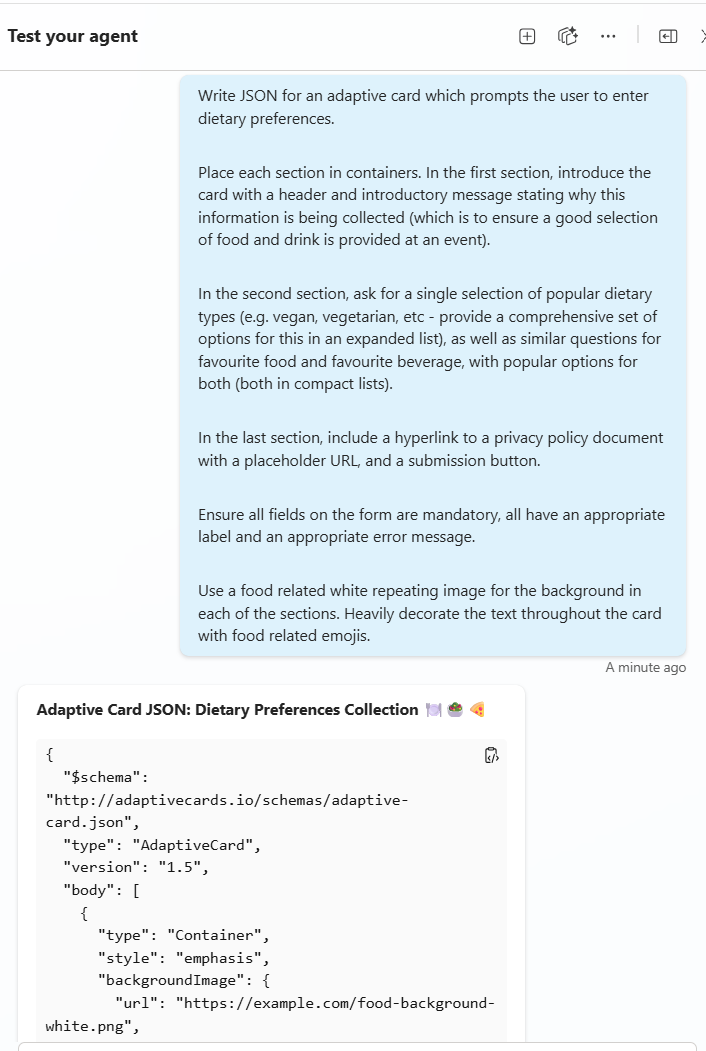
Well that looks promising!
A quick copy/paste later, and it’s rendered in the Adaptive Card Designer:
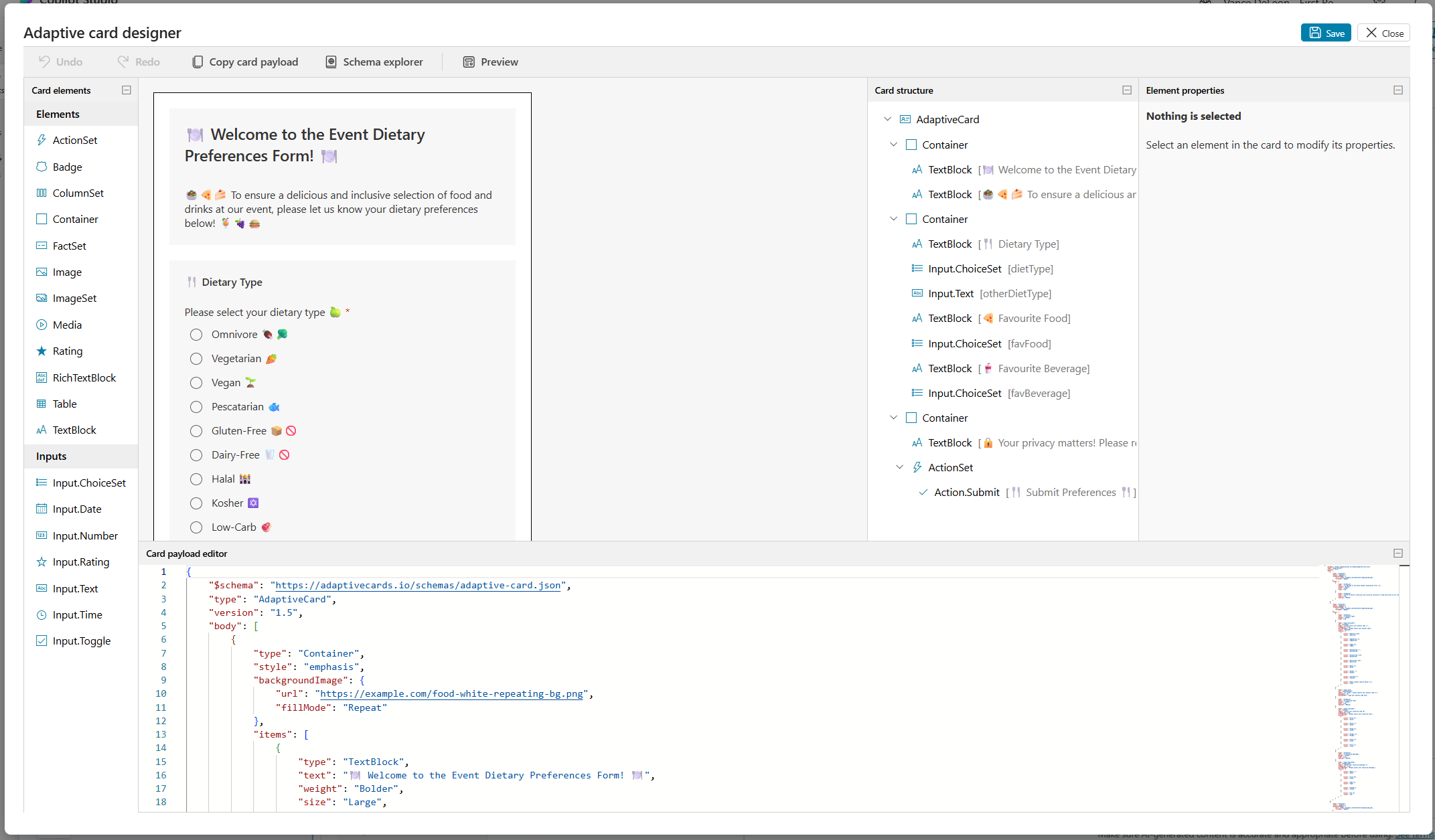
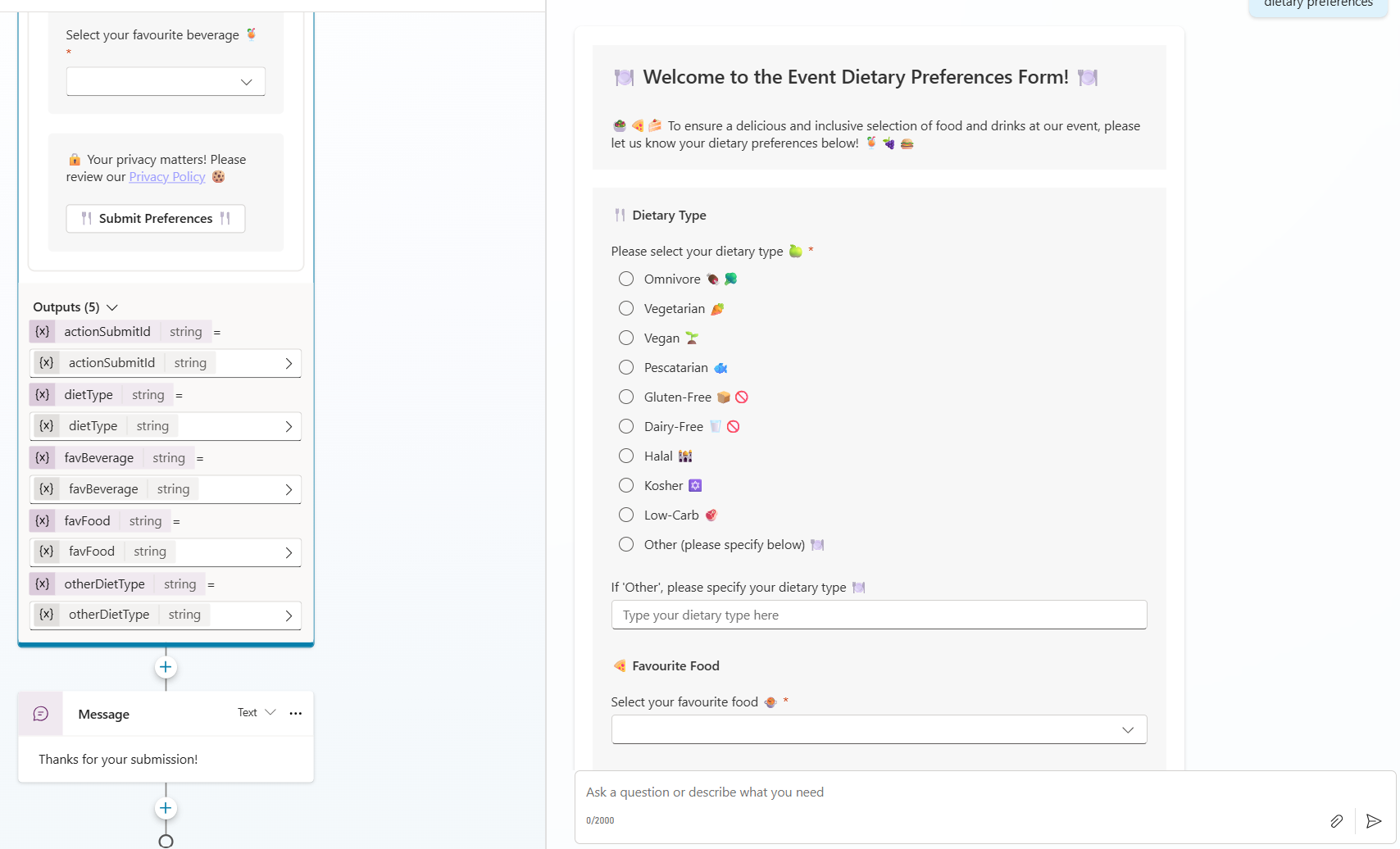
Even the output variables are configured for me for use within a topic, and it looks great in conversation:
Did You Really Say Copy/Paste?!
There’s probably a good portion of you who are already doing this. In this new and emerging world, it’s sometimes tough to know what’s mind-blowing and what’s common knowledge. With that in mind, I was pretty sure I could do better. I mean, the JSON generated by the LLM is just a string right? And we can pass strings around, so surely this can happen on the fly? But would that just be a cool flex, or is there a real need? Let’s go with cool flex for now.
Make It Look Pretty
Let’s think about presenting information retrieved from tools. Copilot Studio offers up the ability to present tool results as an Adaptive Card, but what about if we want to combine information from multiple tools? Maybe even entirely different forms depending on the output of those tools?
For example, say I have an agent who helps me plan journeys. The agent has a tool to find route information, which may vary wildly depending on the mode of transport:
- For long car journeys, I’d like to know about service stations along the way
- For rail journeys, I need to know where to change trains, how long each leg will take, and where each train stops
- For plane journeys, I want to know what flight times are available
The agent also has a tool to retrieve weather information at a particular location, and I’d like to combine that with the information above in a nice looking snapshot:
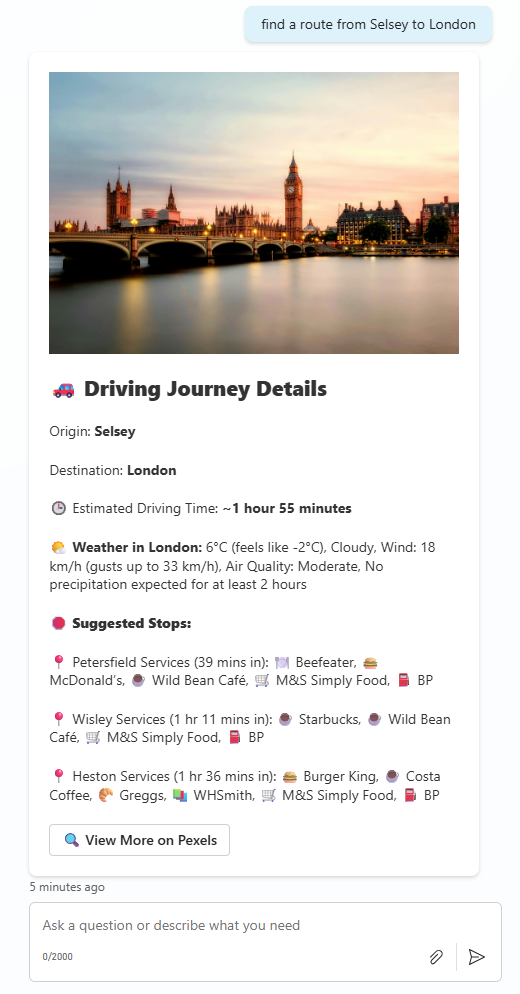
Notice the journey info and the weather info have all been combined into a single digestible card which looks attractive and displays all of the pertinent information.
However, if I ask for a different route, I get different information. This time the route information tool has decided a train journey is more appropriate, and as such, the agent has displayed multiple legs of a complete train journey, including changes and stops.
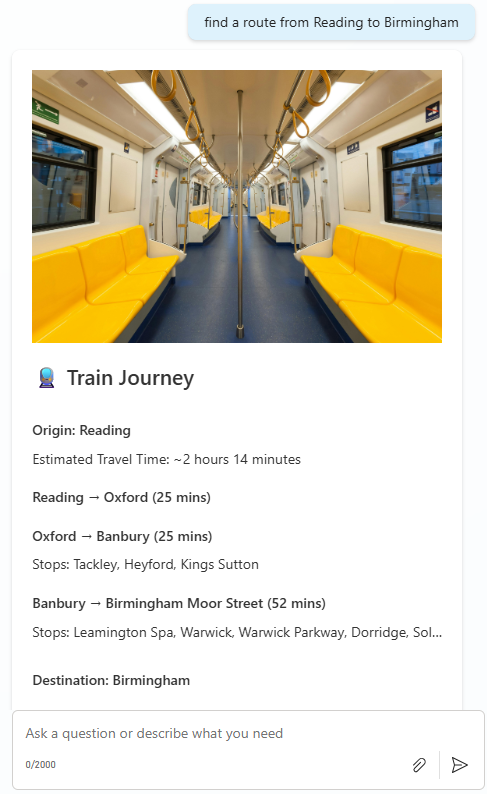
So how does it work? For this example, I wanted to rely solely on generative orchestration as much as possible to do the heavy lifting in terms of calling tools and generating a response. I decided to implement a single topic to intercept and (if appropriate) manipulate responses sent to the user. This topic fires on OnGeneratedResponse, gives me access to System.Response.FormattedText (the message about to be sent to the user), and allows me to decide whether I want to intercept and change the message.
The heart of what’s going on is a Custom Prompt within that topic, which takes a couple of inputs:
- The message about to be sent to the user
- An object representing a collection of scenario/form description pairs (I initialized this as a global variable in Conversation Start). For example:
1
2
3
4
5
6
7
8
9
10
11
12
13
14

  [
    {
      "scenario":"best suited for long journeys by car",
      "formdescription":"Search https://www.pexels.com/search/{insert destination here} for a picture related to the destination (if one can't be found, don't output a picture). Open the form with the picture. Display the origin and destination as text fields, a summary of the weather at the destination, estimated driving time and a list of suggested stops.  Within each stop, display a list of shops along side an an appropriate emoji related to the business. Decorate heavily with other appropriate emojis"
    },
    {
      "scenario":"best suited for planning a journey by plane",
      "formdescription":"Open the form with a picture of a plane. Display the origin and destination, the estimated journey time and a list of landmarks"
    },
    {
      "scenario":"best suited for train travel",
      "formdescription":"Open the form with a picture of a busy train platform. Display the origin at the start of the form, each separate train journey as a section, including stops, and then close the form with the name of the destination, a picture of the destination, and weather information about the destination"
    }
  ]
The prompt looks like this. Essentially it just says “figure out whether any of the JSON scenarios fit the message about to be sent, and if one does, use it to generate the JSON”:
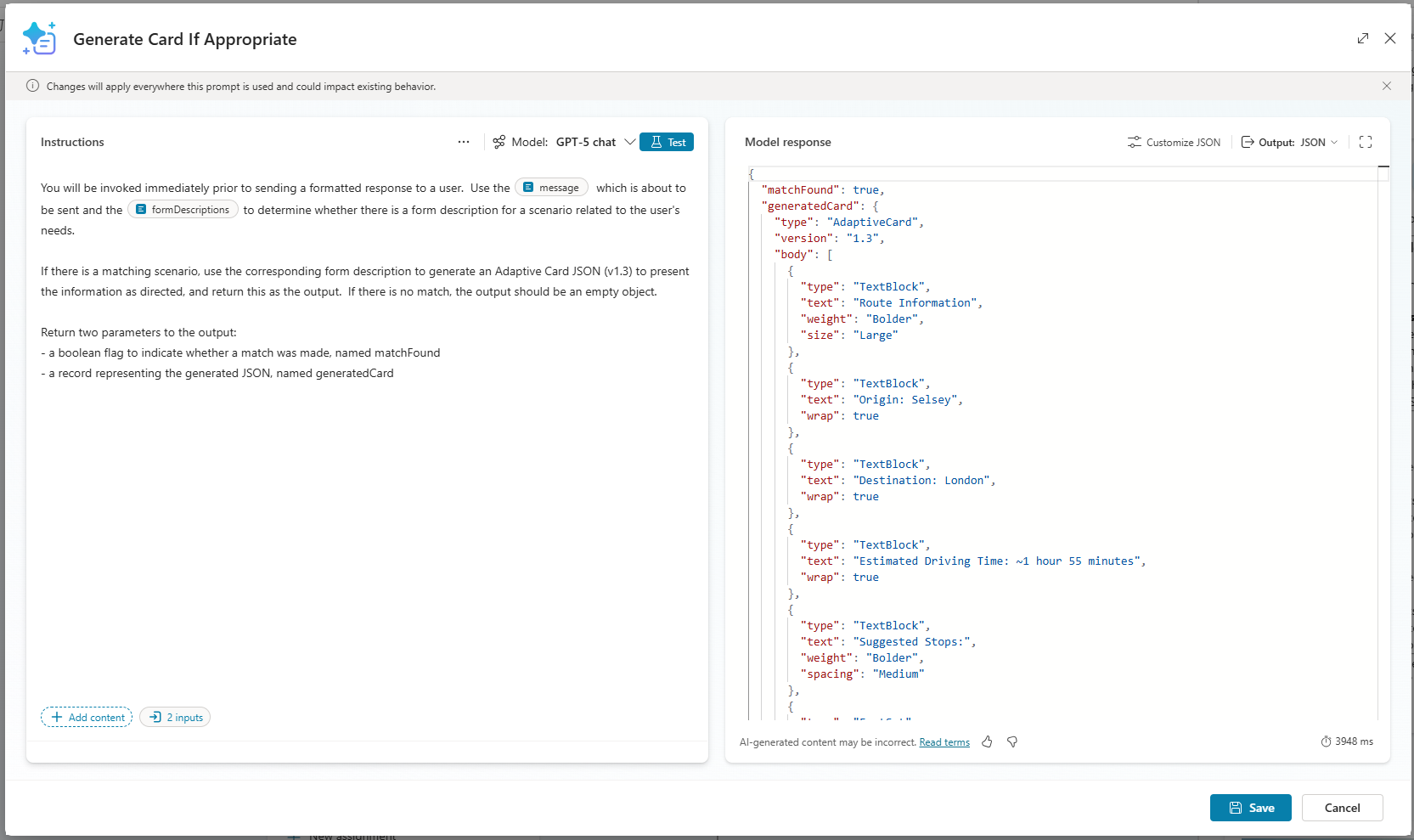
When the user asks the agent to find a route between two places, the following steps occur:
- The orchestrator recognises it needs to call the tools for finding route information and weather information and executes both
- As the original response is formed, the OnGeneratedResponse event fires and triggers my topic
- My topic passes that original response and scenario/formdescription object into the custom prompt
- The custom prompt figures out whether it has a scenario that matches the response, and if so, generates appropriate Adaptive Card JSON
- The output is passed back to the topic, which checks if a card was generated, and if so, pushes the JSON into an Adaptive Card node:
Below, I’m branching the topic, dependent on whether a form was generated by the prompt or not…
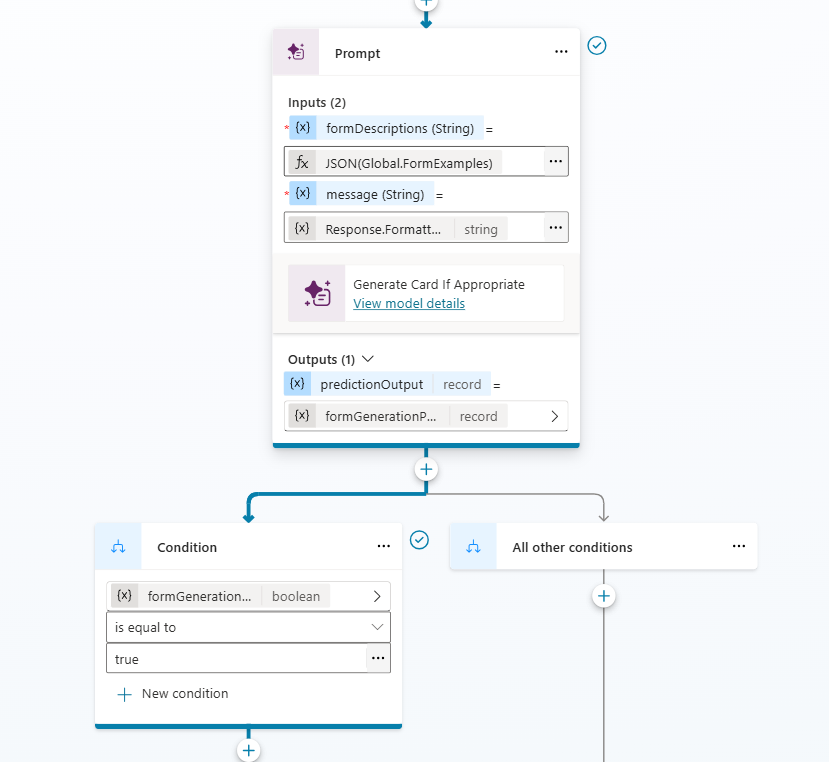
…and then pushing the output JSON into a Message node which displays an Adaptive Card (message rather than “Ask with Adaptive Card”, since I’m not asking for a response and don’t want to block topic execution).
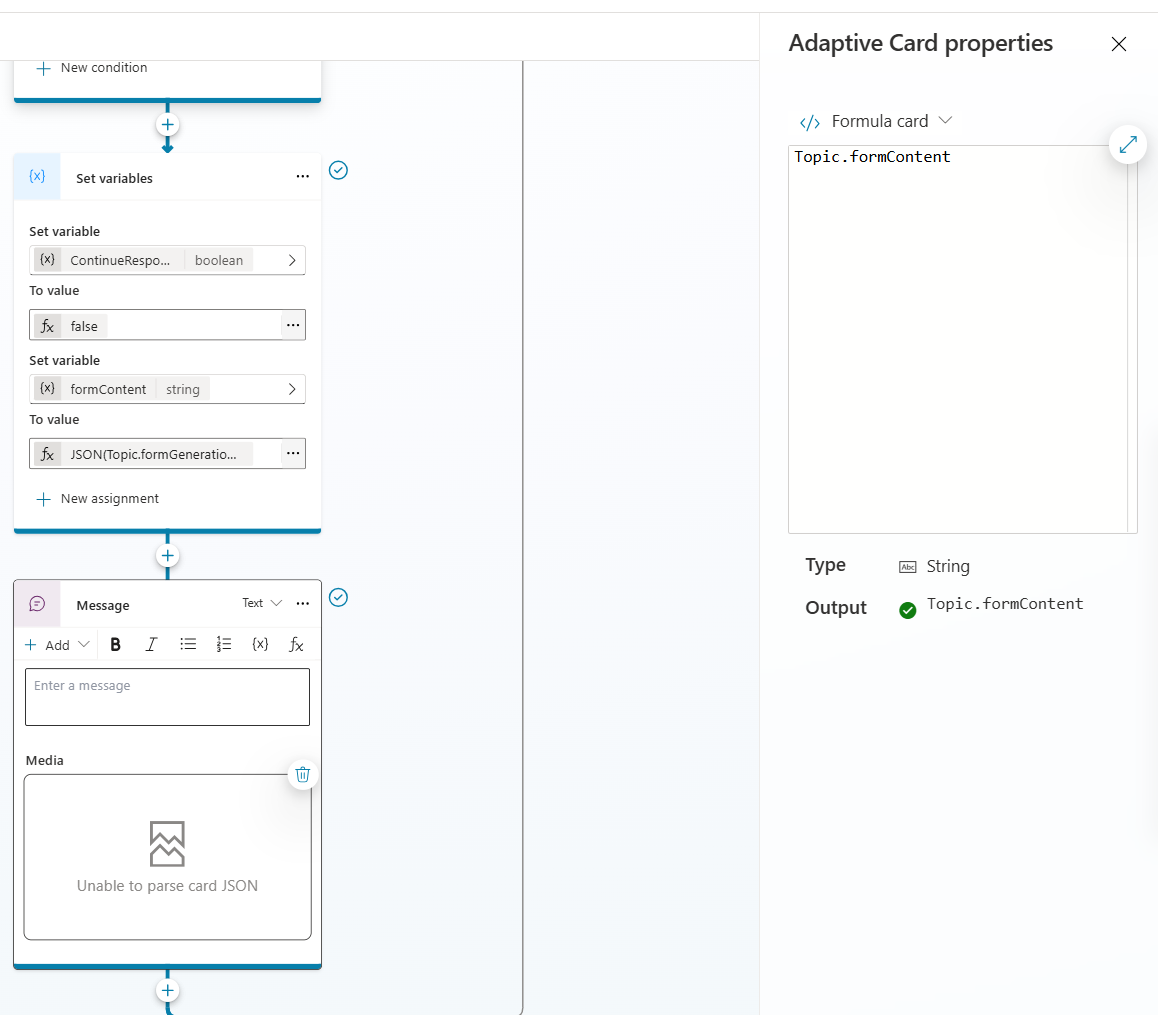
Now I have to make a pretty big disclaimer here; this approach works well as screenshots, but in reality, depending on how the agent is consumed, the user experience is less than ideal. In situations where response streaming is supported (like the Test Pane), the original formatted response is partially sent to the user before the topic kicks in to reformat. This could be avoided by implementing a more controlled flow; i.e. if the topic initiated the calls to the tools and didn’t rely on the orchestrator quite as much. I’ll demonstrate that in the next example.
What About Adaptive Card Submission?
So we’ve got to a point where Adaptive Card JSON is generated on the fly, and dynamically; fundamentally different form content is displayed determined by natural language descriptions of forms I defined in a global variable. That’s pretty useful, and certainly beats figuring out where I missed a comma or curly brace in handwritten JSON
I still feel like there’s more to be done though. How about trying to understand a user’s response to an Adaptive Card on the fly? How about wrapping a great looking interactive process around multiple intelligent steps for some real-world value?
Making decisions about displaying data is one thing, but designing a form optimized for completion by a human requires further thinking. Would it not be safer to ask the developers to write a static, controlled form so we know exactly what’s going to be displayed? Perhaps…
Don’t Make Me Think…
Anyone that’s worked with digital forms knows dynamic forms are almost always a requirement. Many digital transformation projects start with digitizing existing paper forms, and realise they can be smarter:
- “Why do I have to fill in both my billing address and shipping address when they’re the same”
- “Why do I need to fill out the female health section when I’ve already told you I’m male”
- “Why are there so many county/region options when I’ve told you which country I’m in”
The reality is users want expect smart solutions which are targeted towards their needs, and if you’re putting a form in front of a user to collect information, you need to do so in an intelligent way.
So what’s that got to do with Adaptive Cards? Well in a situation where you’re collecting and validating multiple pieces of information from a user, it needs to be targeted. It needs to make sense to the user, and needs to be friction free, and this means it needs to be intelligently tailored. The card needs to capture all of the necessary information, without becoming arduous to complete. Sure, a level of dynamic control can be achieved using variables to hide/show fields or populate choices, but as the number of variables increases, the complexity does so exponentially.
Let’s generate some forms that make sense to users based on their intent, and use their input to generate meaningful responses, in a situation where the variables are endless.
Context Specific Adaptive Cards
For the next section, I’ll consider a specific example; a digital travel agent whose purpose is to help user design a travel itinerary for a trip to a specific country.
What does the user want from this experience? They want suggestions related to the things they enjoy doing as a tourist. They want the agent to understand their intent, and provide an itinerary that’s more than just a search engine result of “cool things to do in this country”. They want ideas that’ll work within the scope of their intended trip dates, suggestions that are meaningful based upon the country they’re going to, and most importantly, things they’ll enjoy based on their individual interests.
Whilst this could be achieved conversationally, the back-and-forth conversation to ensure the agent knows what’s needed could easily become arduous. A form with a few targeted suggestions, designed to obtain user intent, could be just the ticket to help us generate a tailored tourism profile, which in turn could be used to generate a meaningful and specific itinerary.
Let’s have a look at my Travel Agent’s response to a request from a user looking to plan a trip to Spain:
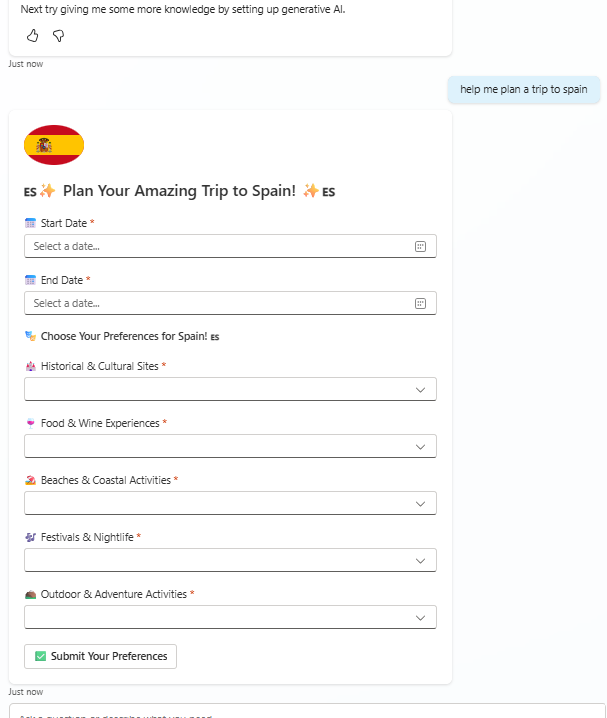
Looks like a fairly generic form until you compare it to one for a similar request for San Marino:
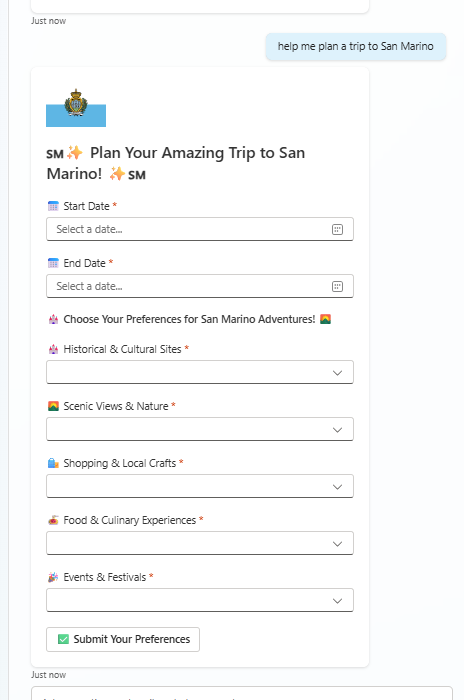
Note - San Marino has no beaches (whereas Spain does), and the form content is tailored appropriately.
More than that though, the options available to each question are country tailored:
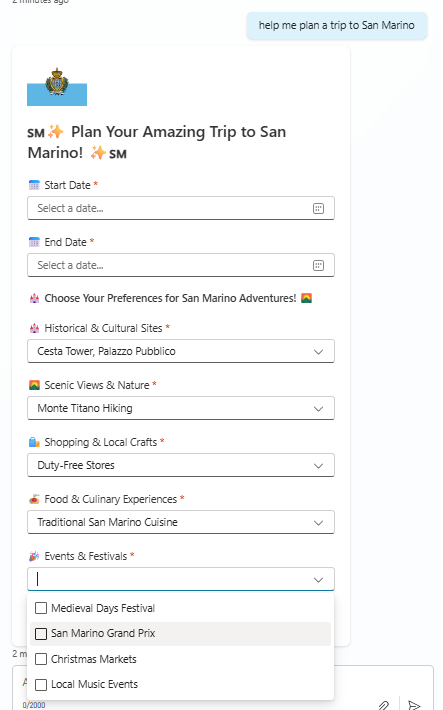
There are also fields for trip start and end date, and with all of this information we have everything we need to determine what type of traveller the user is, and with that we can make tailored recommendations.
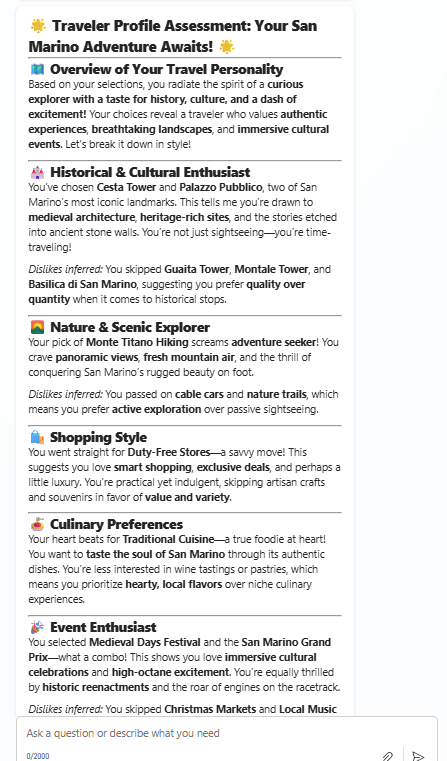
That information can be used to generate a tailored itinerary based on the user’s preferences:
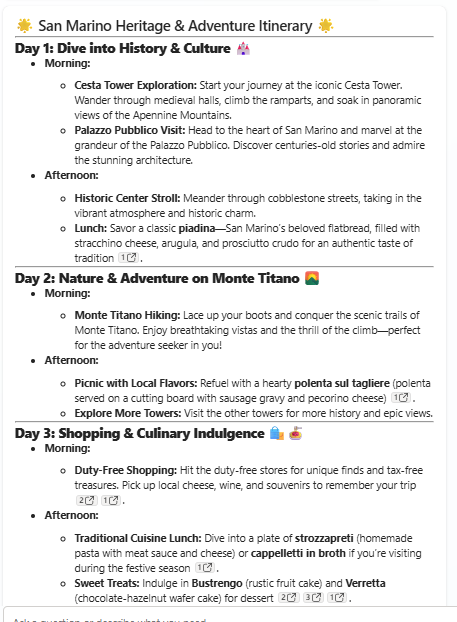
Cool huh?! But most importantly…

Everything here was done on the fly; both the form generation and the interpretation of the user’s response.
Bringing It All Together
This time I put more comprehensive instructions into a custom prompt, given the responsibility of creating the Adaptive Card JSON, which just takes the country as an input:
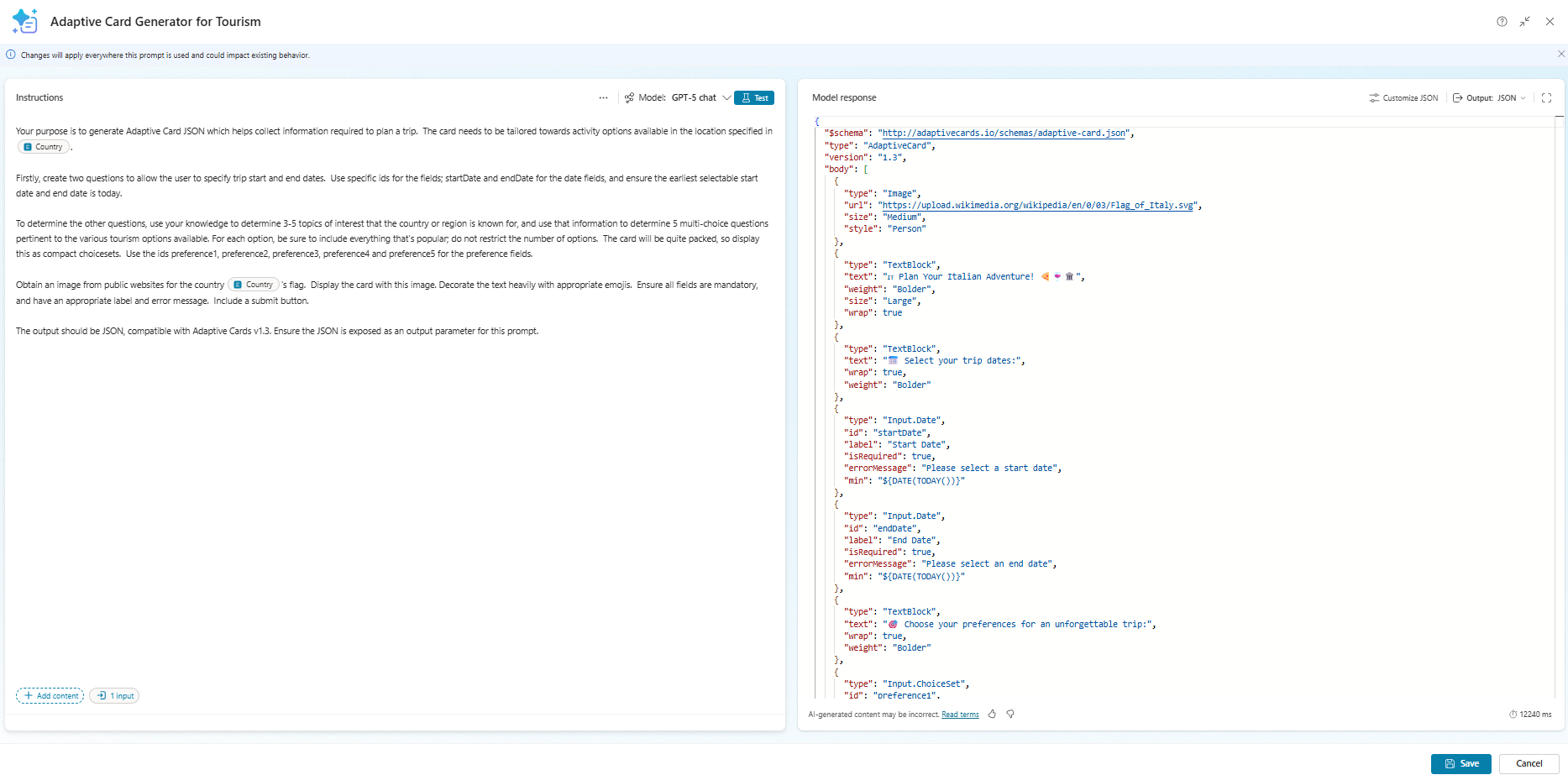
Then I created another prompt to create the tourist profile. This one takes inputs for the country, the original Adaptive Card, and the user’s response to the submission. I passed the original card JSON in as I wanted to ensure the prompt could infer dislikes as well as likes, and the country to ensure the prompt had as much information available as possible to make decisions about the user’s needs.
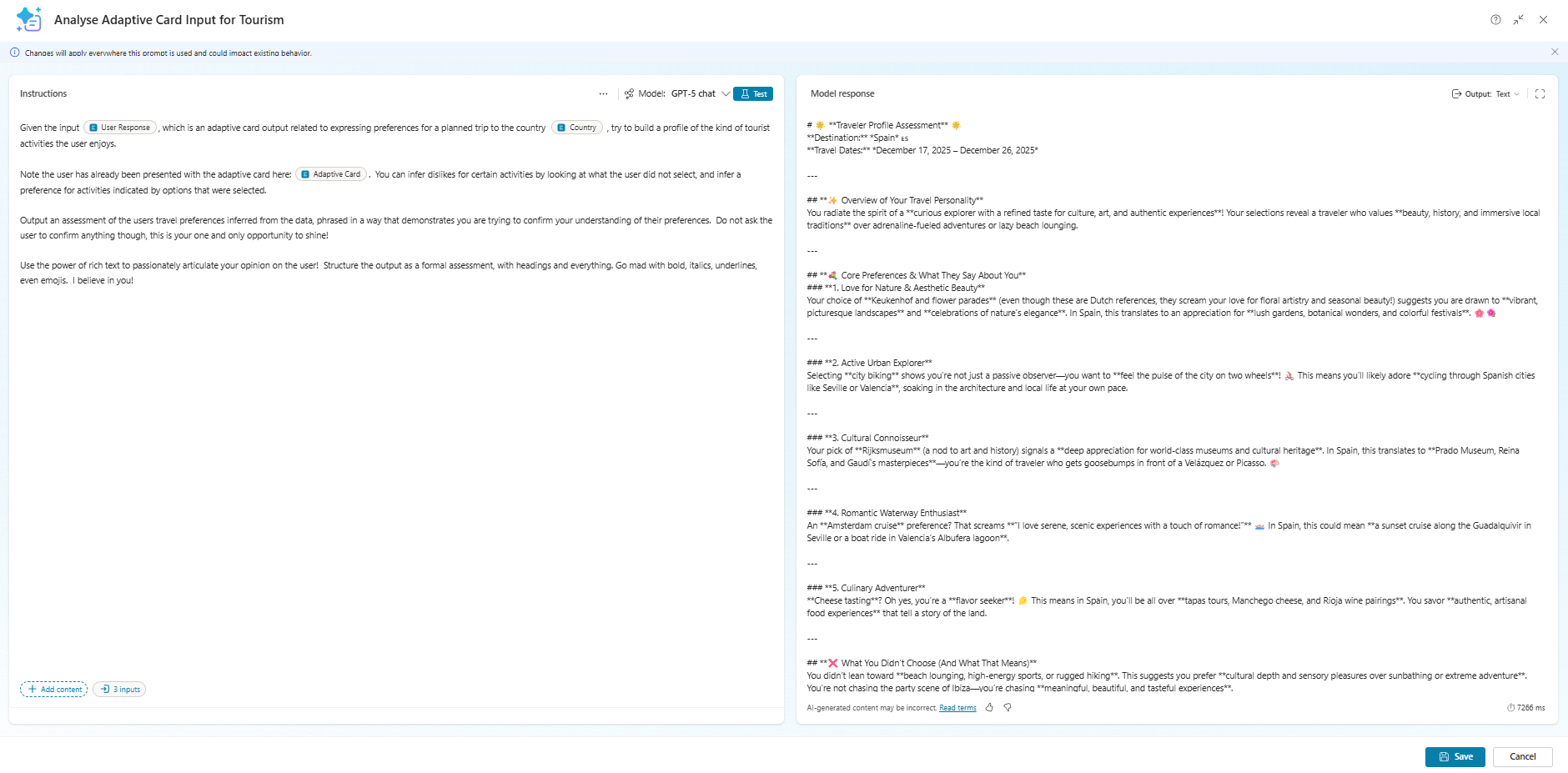
I put the whole journey inside a topic, triggered when the user wants to arrange a trip to a country.
The topic required a little manipulation. Essentially the flow was:
- Call the card generation flow
- Push the output of that into an Adaptive Card node
- Take the output of the Adaptive Card node and push it into the profile generation flow
- Output the profile to the user
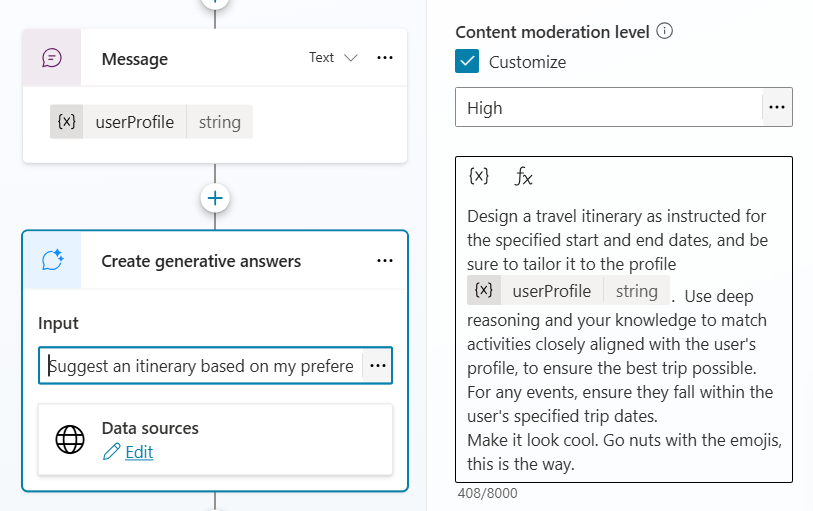
- Use a Generative Answers node to generate and output an itinerary
This is all fairly straight forward except for the dynamic nature of the Adaptive Card. I cheated a little and made sure I had a fixed number of questions (look back at the card generation prompt), which meant I could rely on a fixed number of outputs from the card. Manipulating the topic YAML a little…
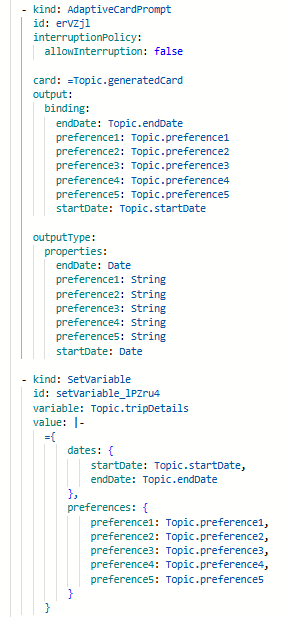
…I was able to then set a single variable representing the entire response, passed into the prompt to generate a tourist profile (I simply passed the output of the prompt directly back to the user as a message)…
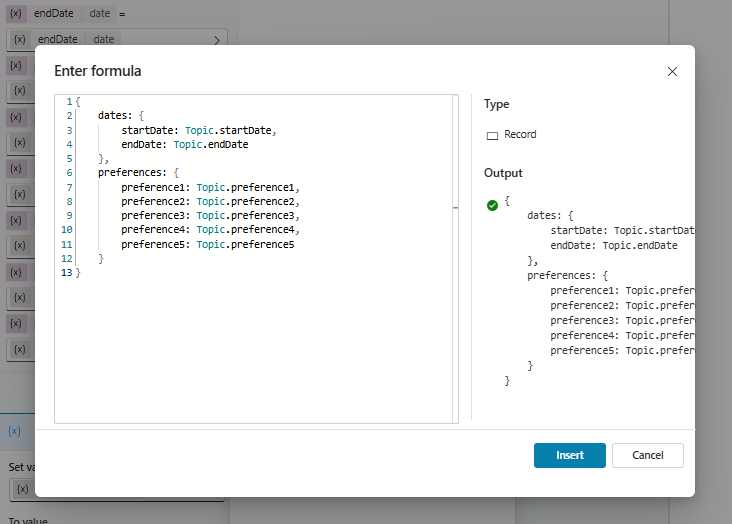
…and after that, it was simply a case of passing the profile into a generative answers node (grounded in public websites) to generate the final itinerary:
Summary
So there we go, dynamic forms driving conversational intelligence without a single line of JSON. Adaptive Cards are great in certain situations, and creating them can be very straightforward with Copilot doing the heavy lifting!
What are you doing with Adaptive Cards? What could you be doing with Adaptive Cards? Let us know below!