MCP Servers or Connectors in Copilot Studio? A Maker's Guide
A practical guide for Copilot Studio makers choosing between MCP servers and Power Platform connectors, covering both built-in options and custom builds.
You’re building an agent in Copilot Studio. It needs to send emails, query Dataverse, or call your company’s internal API. You open the Tools panel, click Add a tool, and you see it: MCP servers and connectors, side by side. Which one do you pick?
If you’ve been asking yourself this question, you’re not alone. With MCP now generally available in Copilot Studio, makers have a genuine choice for the first time, and the answer isn’t always obvious.
Here’s the thing most comparison articles get wrong: this isn’t one decision. It’s two, and they have different answers.
Two decisions, not one
When you’re wiring up tools in Copilot Studio, you’re really facing one of two scenarios:
- Built-in vs built-in: A service like SharePoint, Outlook, or Dataverse has both a built-in MCP server and a built-in connector. Which do you enable?
- Custom MCP server vs custom connector: Your enterprise has an internal API with no built-in option. Do you build an MCP server or a custom connector to expose it?
These are different decisions with different trade-offs. Let’s break them down. If you’re short on time, jump straight to the comparison tables: built-in or custom.
Decision 1: Built-in MCP server vs built-in connector
Several Microsoft services now have both a built-in MCP server and a built-in connector available in Copilot Studio, including Dataverse, SharePoint, Outlook, Teams, and Dynamics 365. When both options exist for the same service, here’s what’s different.
Dynamic tools vs static actions
With an MCP server, your agent always has the latest tools at its disposal. Copilot Studio discovers tools dynamically from the server, so if the server owner adds or updates a tool, your agent picks it up automatically without you having to reconfigure anything.
With a connector, you explicitly add each action as a tool, configure its description, and set up its inputs. Nothing changes unless you change it. If you don’t want surprises in what your agent can do, this predictability is a feature, not a limitation.
Maker control over tool behavior
This is a big one. Tool names and descriptions largely determine orchestration behavior in Copilot Studio. They’re essentially instructions without instructions: the orchestrator reads them to decide when and how to call each tool. Being able to edit them is a powerful way to influence your agent’s behavior.
With connector-based tools, you can edit descriptions, configure input values and defaults, and tailor how each tool is presented to the LLM. This gives you direct control over orchestration accuracy without touching agent instructions.
With MCP server tools, you can’t override descriptions or input configurations in Copilot Studio today. The server owner defines those, and you get what you get. You can toggle individual tools on or off (by disabling “Allow all”), but you can’t tweak how they’re described to the orchestrator.
If you need to fine-tune how a tool is described to the LLM to improve orchestration accuracy, connectors give you that control. MCP servers don’t, at least not yet.
MCP servers and connectors aren’t always equivalent
Even when a service has both an MCP server and a connector, the tools they expose aren’t necessarily the same.
Agent 365 MCP servers (SharePoint, Outlook, Teams, Word, Calendar, Copilot Search) offer capabilities that aren’t available as connectors. These require your tenant to be enrolled in the Microsoft Frontier program and a full Microsoft 365 Copilot license for users of the agent. For a deep dive, see Bringing Microsoft 365 Copilot into Copilot Studio with Agent 365 MCP Servers.
The Dataverse MCP server includes tools for schema exploration (list_tables, describe_table), DDL operations (Create Table, Update Table, Delete Table), and arbitrary query execution (read_query) that have no equivalent in the Dataverse connector’s tool catalog.
But even where capabilities do overlap, the MCP server bundles related tools into a coherent package that the agent can chain together. For example, the agent can explore a schema, query data, and create records in a single conversation, without you having to configure each step as a separate tool. That saves not just configuration time, but also the planning and discovery work you’d otherwise do yourself as a maker.
Governance granularity
Both MCP servers and connectors are governed by DLP (Data Policies) and Advanced Connector Policies (ACP). But the granularity isn’t the same (pay close attention here!).
For connector-based tools, admins can block individual tools (called “actions” in DLP). They can also set a default behavior for new tools (allow or block), so when a connector publisher adds a new one, it doesn’t automatically become available. For MCP server tools, this level of platform-enforced per-tool control isn’t available. As of today, if an MCP server is allowed, its full tool surface is allowed, and that surface is dynamically discovered from the server at conversation time. If per-tool governance matters to you, share your feedback in the comments.
Here’s what admins can do:
Block individual connector-based tools in DLP (and ACP). For example, blocking the “Delete a row” tool on the Dataverse connector:
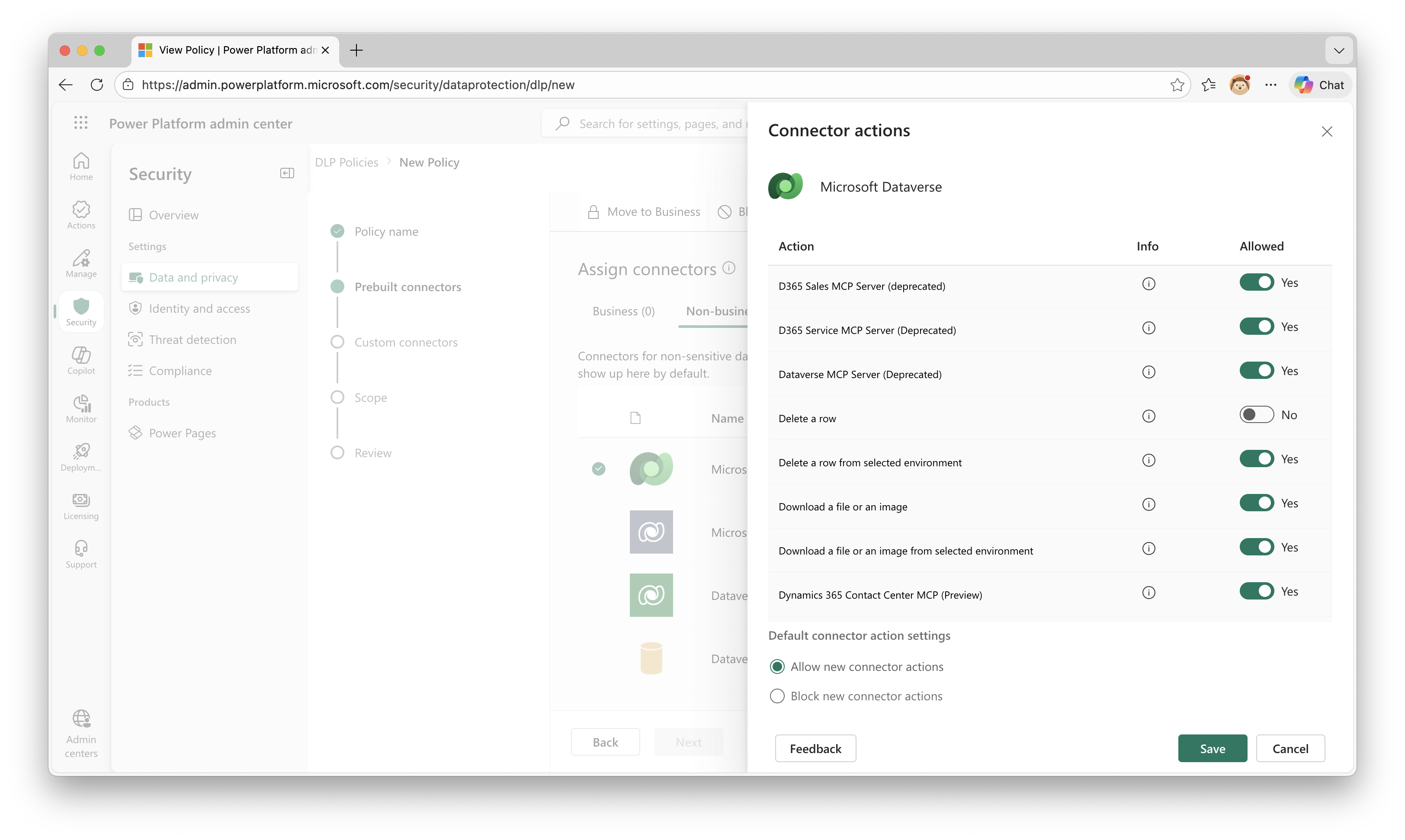 Blocking an individual connector action (“Delete a row”) in DLP connector action control
Block an MCP server on a connector. Built-in MCP servers that sit on existing connectors may appear as actions in the connector’s DLP action control. For example, you can toggle “Microsoft Dataverse MCP Server” on or off on the Dataverse connector, but this is up to the specific connector:
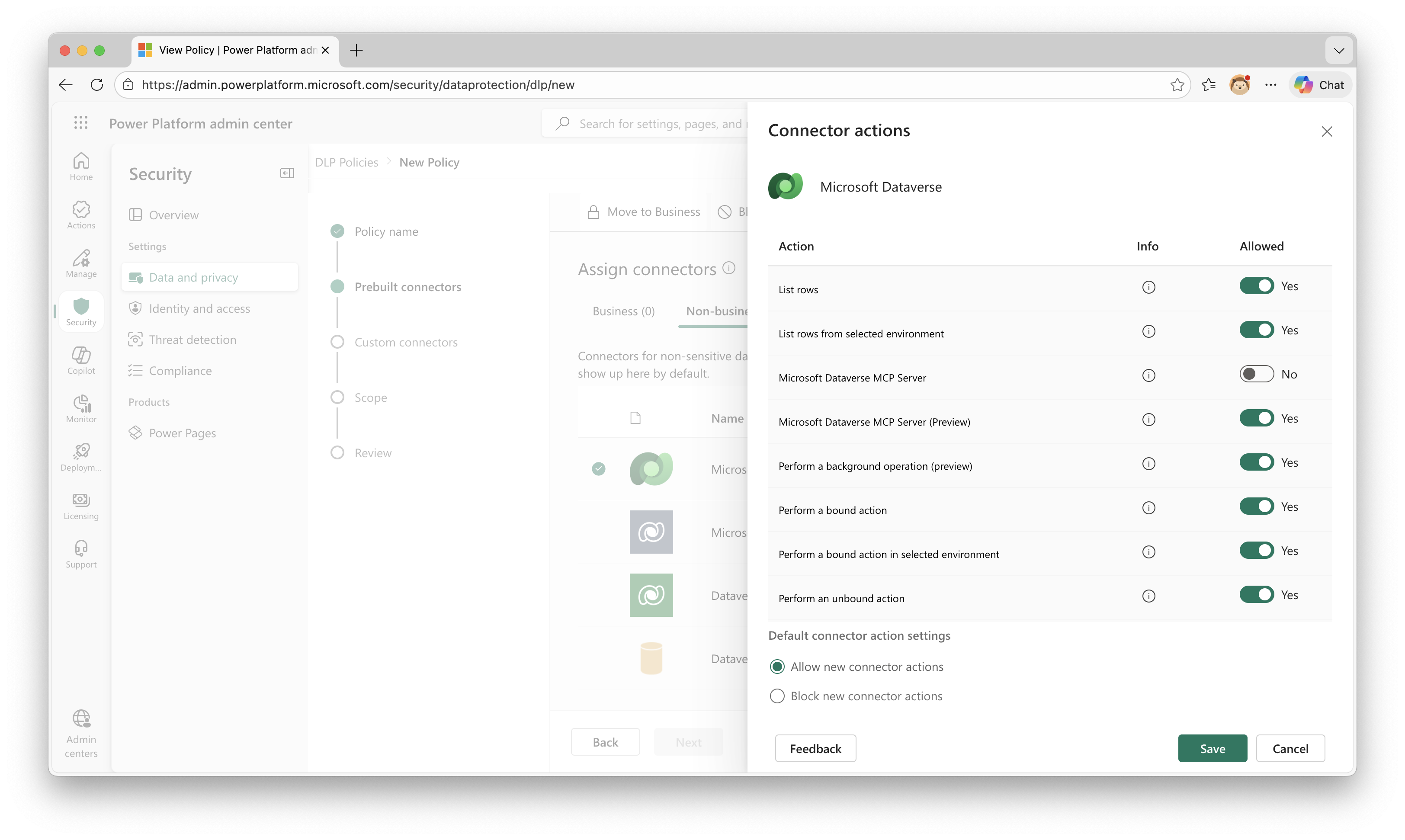 Blocking the Dataverse MCP server as a connector action in DLP
Block an entire MCP server as a connector in ACP and DLP:
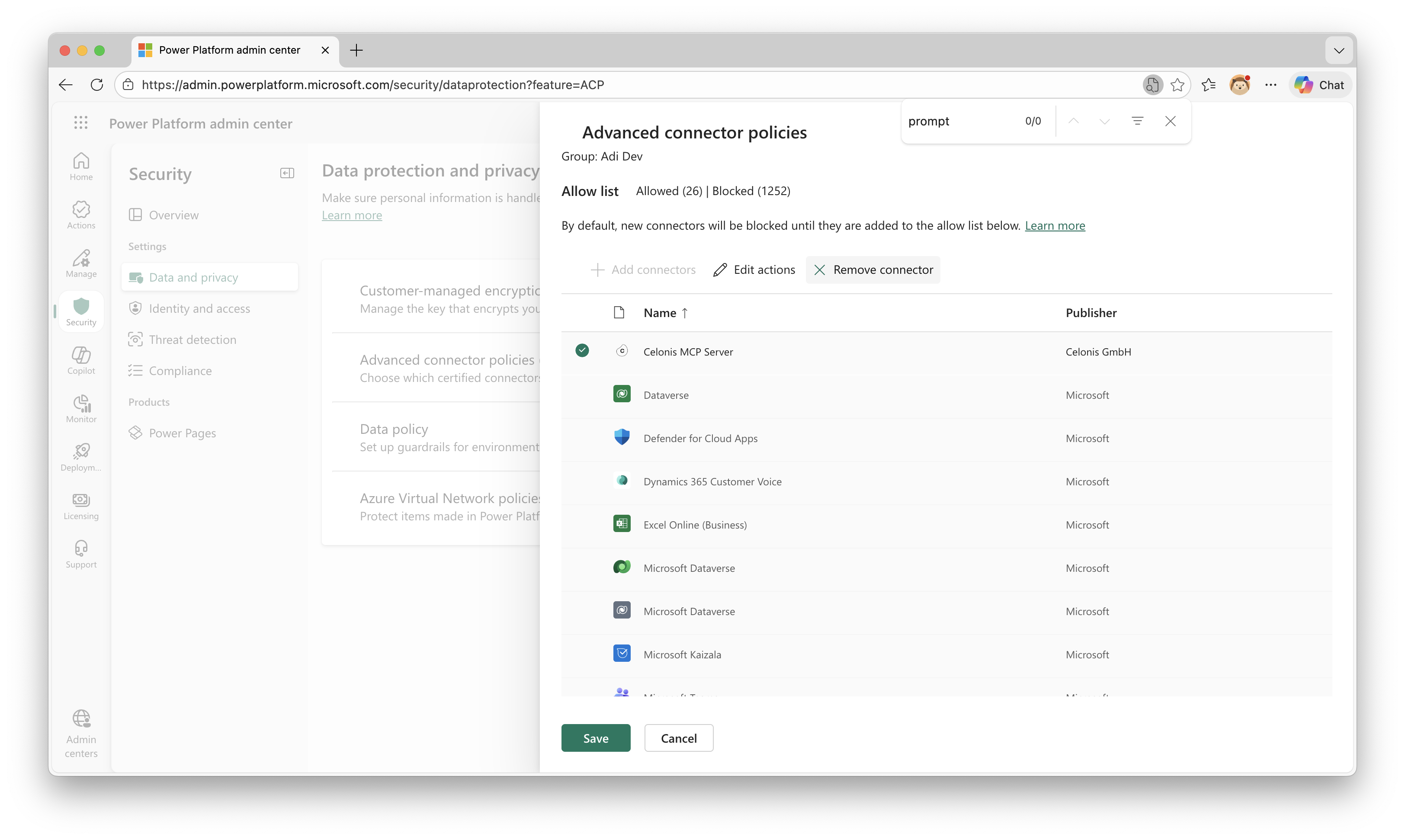 MCP servers listed alongside connectors in the ACP allow list
Some MCP servers (e.g., Outlook Mail) do respect per-tool controls from DLP, but this is handled by the server itself, not enforced by the platform, so it can’t be relied on universally.
So which do you pick?
First, check whether you actually have a choice. Not every service has both options:
- MCP only: Some capabilities are only available as MCP servers. The standout is Microsoft 365 Copilot Search, which gives your agent multi-turn conversational reasoning with M365 Copilot, including file grounding, and has no connector equivalent.
- Connector only: Hundreds of connectors in the catalog (Salesforce, SQL Server, Adobe, ServiceNow, etc.) have no MCP server. If you need these, the connector is your only option.
- Both exist: Many Microsoft services (Dataverse, SharePoint, Outlook, Teams) have both an MCP server and a connector, though the tools and actions they expose aren’t always identical. Check what each offers for your specific scenario.
The overlap between MCP servers and connectors is evolving fast. Before assuming a service is “MCP only” or “connector only,” check the built-in MCP servers catalog and the connector reference for the latest.
When both exist, use this table to decide:
| Criteria | Built-in MCP Server | Built-in Connector |
|---|---|---|
| Capability is MCP-only (e.g., Copilot Search) | ✅ | |
| You want automatic tool updates without reconfiguration | ✅ | |
| The MCP server supports additional protocol features like resources | ✅ | |
| You need to control tool descriptions and inputs | ✅ | |
| Admin needs per-tool governance control (DLP/ACP) | ✅ |
Can you use both? Yes. Nothing stops you from enabling an MCP server and a connector for the same service in the same agent. This can be useful when you need specific connector-based tools with custom descriptions alongside broader MCP capabilities. Just be mindful of potential overlap confusing the orchestrator.
Decision 2: Custom MCP server vs custom connector
Your enterprise has an internal API, maybe a proprietary CRM (sigh), a legacy inventory system, or a specialized compliance tool. No built-in option exists. You need to build something. Do you build an MCP server or a custom connector?
For this decision, let’s assume you’re the one building it. You’re the agent maker, and you’re also the person writing the integration code. The criteria flow from that.
Cross-platform reuse
The first question is whether this integration needs to serve more than just your Copilot Studio agent.
An MCP server is portable across agenting platforms. The same server you build for Copilot Studio works with VS Code GitHub Copilot, Claude, and any other MCP-compatible client. If your organization is building agents on multiple platforms, or expects to in the future, MCP means you build the integration once.
A custom connector lives within Power Platform. It works across Copilot Studio, Power Automate, and Power Apps, but not outside that ecosystem. Power Automate is likely to gain MCP support (there’s currently a private preview, let’s hope it goes public soon), and you can always call a Copilot Studio agent that uses an MCP server via a connector, so the gap is narrowing. But if cross-platform portability matters today, MCP is the clearer choice.
Complexity and tool design
Not all MCP servers are created equal. There’s a spectrum:
Thin MCP server — essentially a swagger-for-agents. It wraps an API with tool definitions and descriptions, adding minimal logic. At this end, a custom connector does much the same job and may be simpler to set up.
Thick MCP server — aggregates multiple APIs, runs complex business logic, and can even include its own LLM calls or RAG pipelines. The Microsoft 365 Copilot Search MCP server is a first-party example: it runs multi-turn reasoning over your organization’s content, not just a simple API call. Microsoft’s own open-source examples show the same pattern: the Microsoft Learn MCP server uses Azure AI Search with OpenAI embeddings for semantic documentation retrieval, and the Retail Sales MCP sample includes vector search, row-level security, and dynamic schema introspection, all running inside the server, invisible to the consuming agent.
Can’t we manage complex logic in Power Platform?
Yes. You can chain multiple connector-based tools in a topic, a Power Automate flow, or through agent instructions. For “call A then B” sequences, any approach works.
But the complexity ceiling is different. When your logic involves conditional branching, error handling, data transformations, non-REST protocols, or full RAG implementations like the examples above, full code in an MCP server is easier to write and maintain. Custom connectors support C# scripting, but the constraints are tight. Topics and flows work for moderate logic but get unwieldy for sophisticated orchestration.
The question to ask yourself
Does the integration need to be a thin API wrapper, or does it need to carry real logic? If it’s thin, a custom connector is probably simpler. If it’s thick, an MCP server gives you full code, and if that logic needs to be reused across agents or platforms (the cross-platform point from above), you get it once, in code, everywhere.
ALM
An MCP server lives in your source control, gets deployed through your CI/CD pipeline, and follows standard software development lifecycle practices. A custom connector’s lifecycle is managed through Power Platform solutions, which is a different ALM model. If your team is already managing Power Platform ALM through source control integration (pro-code style), this difference shrinks. But if your connector lives in the solutions-based world and your MCP server lives in a git repo, you’re maintaining two different deployment and versioning workflows for the same agent.
Beyond tools: what the MCP protocol gives you
The MCP protocol supports more than just tools (which are the rough equivalents of API endpoints). The full specification defines several server-side primitives: resources (contextual data for the model to reason over), prompts (templated messages and workflows), and tools (functions for the model to execute). On the client side, servers can request sampling (asking the host LLM to generate text), roots (inquiring about filesystem or URI boundaries), and elicitation (requesting additional input from the user). Copilot Studio supports only tools and resources today, but if you build an MCP server, you’re positioned to take advantage of additional capabilities as Copilot Studio adds support for them.
Resources are already useful: an MCP tool can return documents, images, and structured data alongside its response. For example, an order management MCP server could return a scanned invoice image as a resource when the agent calls a get_order_details tool. The agent can then decide to read that resource and reason over it. Connector actions return data in the response payload, but there’s no equivalent mechanism for the agent to selectively retrieve and reason over rich content like images or documents. See Using MCP Resources in Copilot Studio for how this works in practice.
When the builder and the consumer aren’t the same person
This is where it gets interesting. If you’re building the MCP server and the agent, the control question is moot: you control both sides. But in many organizations, the person building the MCP server and the person building the agent are different people.
When you’re consuming someone else’s MCP server:
- You get whatever tools and descriptions the server owner defined
- You can toggle tools on or off, but you can’t edit how they’re described to the orchestrator
- New tools appear automatically when the server owner adds them (which may or may not be what you want)
When you’re consuming a custom connector someone else built:
- You see individual actions and can edit their descriptions and inputs per agent
- You choose exactly which actions to add as tools
- New actions don’t appear until you explicitly add them
This is the same maker-control trade-off from Decision 1, but it matters more with custom integrations because the server owner might be a different team with different priorities.
When to pick which (custom)
| Criteria | Custom MCP Server | Custom Connector |
|---|---|---|
| Integration serves agents on multiple platforms (VS Code, Claude, etc.) | ✅ | |
| API requires complex logic (aggregation, RAG, conditional orchestration) | ✅ | |
| You need MCP protocol features (resources, prompts, sampling) | ✅ | |
| Thin API wrapper with no cross-platform need | ✅ | |
| You’d rather not host and manage server infrastructure | ✅ | |
| Agent builder needs control over tool descriptions and inputs | ✅ | |
| Agent builder and integration builder are different people | ✳️ |
✳️ Different people? In enterprise environments, the decision about where logic should reside (MCP server, custom connector, or Copilot Studio topics) is often made by architects, not individual makers. Either way, complex orchestration logic belongs in the server or connector, not in agent topics.
The infrastructure you share either way
Regardless of which path you choose, MCP servers and connectors used in Copilot Studio share the same Power Platform infrastructure:
- Authentication: Token acquisition, storage, and refresh handled by the PP connector framework
- DLP and ACP: Both are governed by Data Loss Prevention policies and Advanced Connector Policies, though per-tool control is available for connector-based tools but not yet for MCP tools (see Governance granularity above)
- Telemetry: Tool executions for both MCP and connector-based tools are logged in Application Insights
- VNet integration: Available for select connectors and custom connectors, which means custom MCP servers (backed by custom connectors) also benefit from VNet support
- Generative orchestration: Both MCP tools and connector-based tools participate in Copilot Studio’s generative orchestrator the same way; the LLM decides when to call them based on tool descriptions
A note on MCP servers outside Copilot Studio
Everything in this article is about the choice within Copilot Studio. Outside of Copilot Studio, like when using MCP servers with VS Code, Claude, or custom AI applications, Power Platform connectors aren’t an option, and MCP becomes the natural integration protocol.
If you’re building agents on other platforms and want to learn more about MCP fundamentals, check out the MCP specification and Microsoft’s documentation on extending agents with MCP.
Key takeaways
- Two decisions, not one. Choosing between a built-in MCP server and a built-in connector is different from choosing between building a custom MCP server or a custom connector.
- Built-in MCP servers are the right pick when you want automatic tool updates, access to unique capabilities like Copilot Search, or you want the server owner to manage complexity. But they limit maker control over tool descriptions.
- Built-in connectors are the better fit when you need fine-grained control over tool behavior or per-tool admin governance (DLP/ACP).
- Custom MCP servers make sense when your API needs complex orchestration, your dev team prefers code, and you want portability across agenting platforms.
- Custom connectors are the simpler path when the integration is straightforward and makers need control over tool descriptions.
- Governance granularity differs. Per-tool control is available for connector-based tools but only whole-server blocking for MCP.
- You can use both in the same agent. It’s not either/or.
Further reading
- Bringing Microsoft 365 Copilot into Copilot Studio with Agent 365 MCP Servers - Deep dive on the Agent 365 MCP servers
- Using MCP Resources in Copilot Studio - How MCP resources work with tool-based discovery
- Adding Custom Headers to MCP Connections - Passing custom headers through MCP connectors
- Custom APIs and MCP in Declarative Agents - Video tutorial for wiring MCP into declarative agents
What’s your experience been? Are you using MCP servers, connectors, or both in your Copilot Studio agents? I’d love to hear what’s working (and what isn’t) in the comments.