Copilot Studio Kit: Beyond Test Automation
A deep look at Copilot Studio Kit's full feature set, from test automation and rubric refinement to agent inventory, compliance governance, and webchat customization.

If you’ve been building or managing Copilot Studio agents, you’ve probably already come across Copilot Studio Kit. Most people discover it for test automation (#guilty), but there’s a good chance you’re only scratching the surface. The kit also addresses governance, monitoring, development acceleration, and organization-wide visibility.
A Quick Refresher
Copilot Studio Kit is a free, open-source Power Platform solution built by Microsoft’s Copilot Acceleration Team (CAT). Our engineering team within CAT focuses on building tools that complement Copilot Studio, filling the gaps that emerge when organizations move from building their first agent to running dozens in production.
Testing across multiple agents, enforcing governance policies tenant-wide, tracking long-term conversation trends: these are operational needs that go beyond what any single product can address out of the box. Because the kit is open source, we can ship at a pace that keeps up with those needs. When we spot a gap working with customers, we can prototype, validate, and deliver a solution in weeks rather than months.
The kit complements Copilot Studio by helping organizations:
- Accelerate agent development
- Improve testing and reliability
- Provide visibility across environments
- Enable governance and compliance automation
Whether you’re a maker building agents or an admin responsible for governance, Copilot Studio Kit has tools designed for you. Let’s walk through what’s available.
Makers and Admins: Two Personas, One Toolkit
Here’s the most common misconception about Copilot Studio Kit: it’s only for administrators.
Wrong.
The toolkit was designed to support both makers and admins, each with their own capabilities. For makers, it accelerates development and improves agent quality. For admins, it provides cross-environment visibility, monitoring, and governance automation.
But here’s the thing, many features actually benefit both personas.
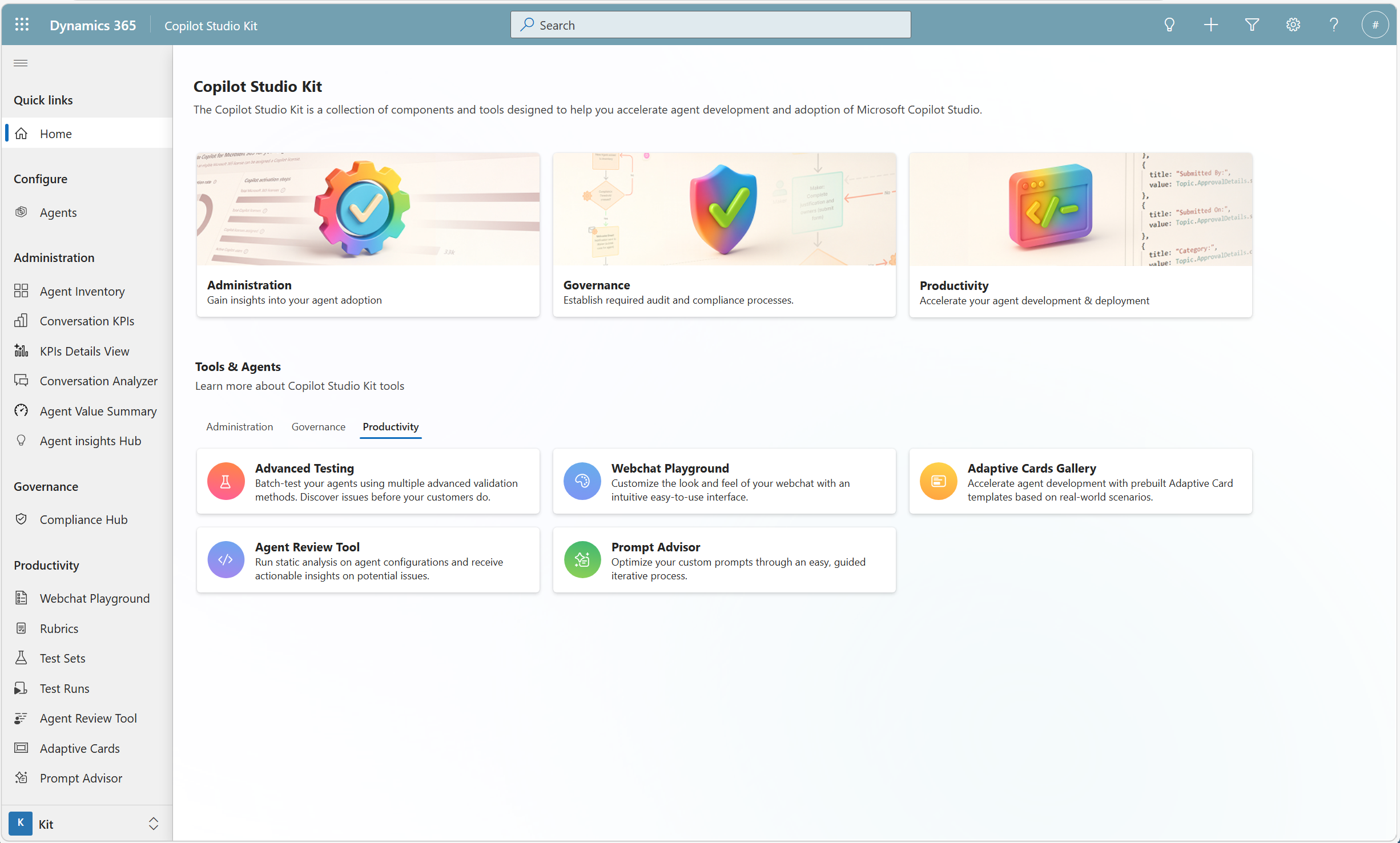 The Copilot Studio Kit landing page, organized by Administration, Governance, and Productivity
Tools for Makers
Webchat Playground
If you’ve ever spent an hour tweaking CSS values only to realize your webchat still doesn’t match your brand guidelines, you know the pain. (And if you’ve been following our webchat embedding and middleware posts, you know there’s a lot you can customize.)
The Webchat Playground solves this with a graphical interface where makers can:
- Modify webchat styling
- Preview changes instantly
- Validate accessibility
- Export configuration for production use
Instead of guessing how a change might look in production, makers can iterate visually with live previews.
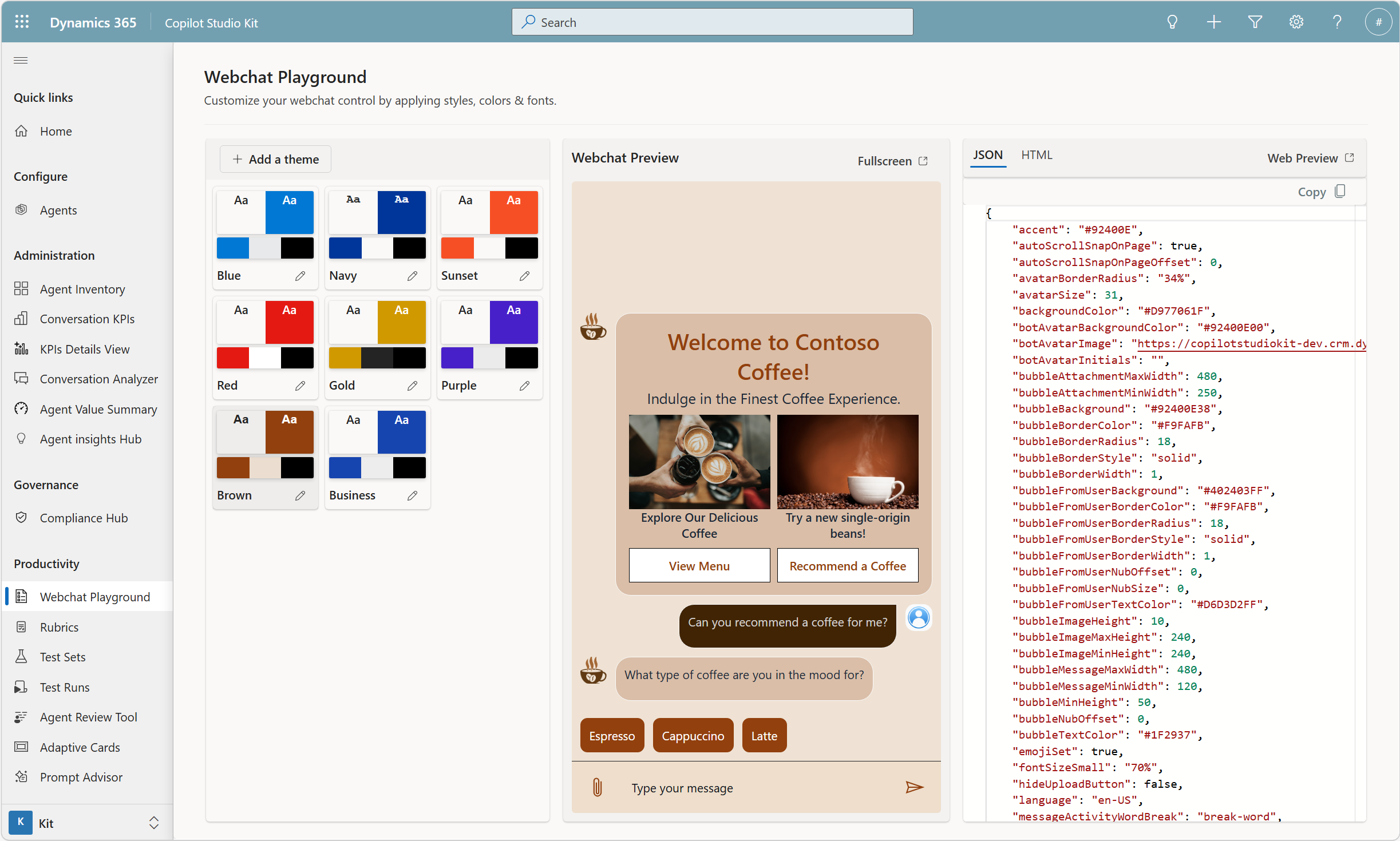 Live preview of webchat theme customization with color palettes and JSON configuration
For organizations with strict branding requirements, admins can even maintain a library of pre-approved styles, allowing makers to reuse designs that have already been reviewed by marketing or legal teams.
Adaptive Card Gallery
Adaptive cards are powerful. They’re also a pain to build from scratch every single time.
The Adaptive Card Gallery ships with production-ready card templates tailored for actual scenarios you’ll encounter (not just “Hello World” examples).
These templates allow makers to:
- Quickly bootstrap common interaction patterns
- Modify existing cards rather than starting from scratch
- Maintain consistency across agents
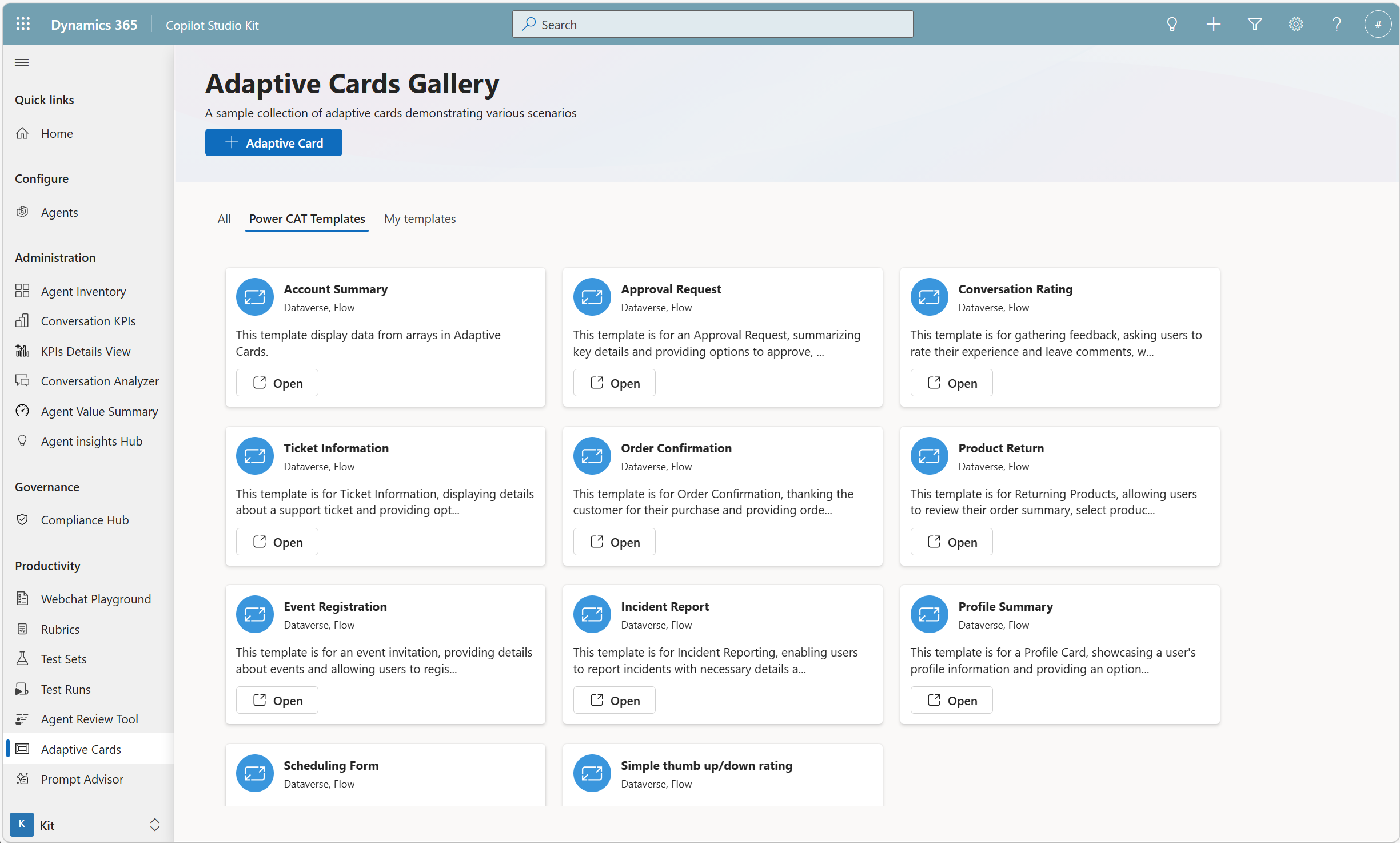 A collection of ready-to-use adaptive card templates for common scenarios
Just like webchat styles, organizations can maintain their own curated card libraries, allowing makers to confidently reuse approved components.
Agent Review (Static Configuration Analysis)
Deploying an agent to production and then discovering a configuration issue? Not ideal.
The Agent Review tool performs static analysis of agent configurations to catch potential issues before deployment:
- Missing configuration elements
- Inconsistent settings
- Potential operational risks
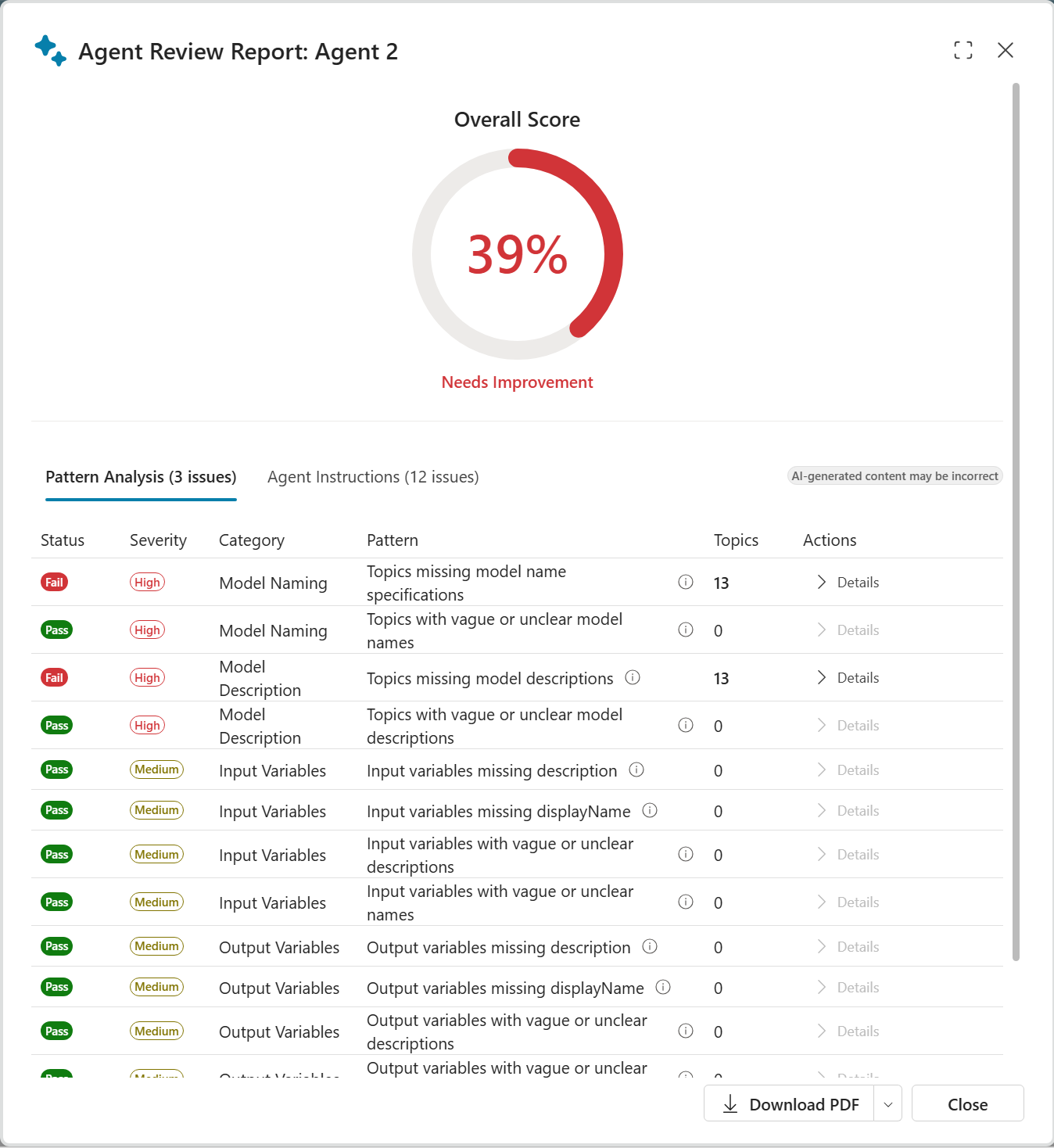 An agent review report showing pattern analysis results and severity ratings
Think of it as a linting tool for agents, helping makers catch issues before deployment.
Test Automation
The most mature and widely used feature of Copilot Studio Kit is Test Automation.
While Copilot Studio provides evaluation capabilities, Test Automation extends those capabilities by enabling:
- Multi-turn testing
- Adversarial testing
- Regression testing
- End-to-end validation
This allows makers to validate that:
- New changes behave as expected
- Existing functionality isn’t broken
- Generative responses meet expected quality levels
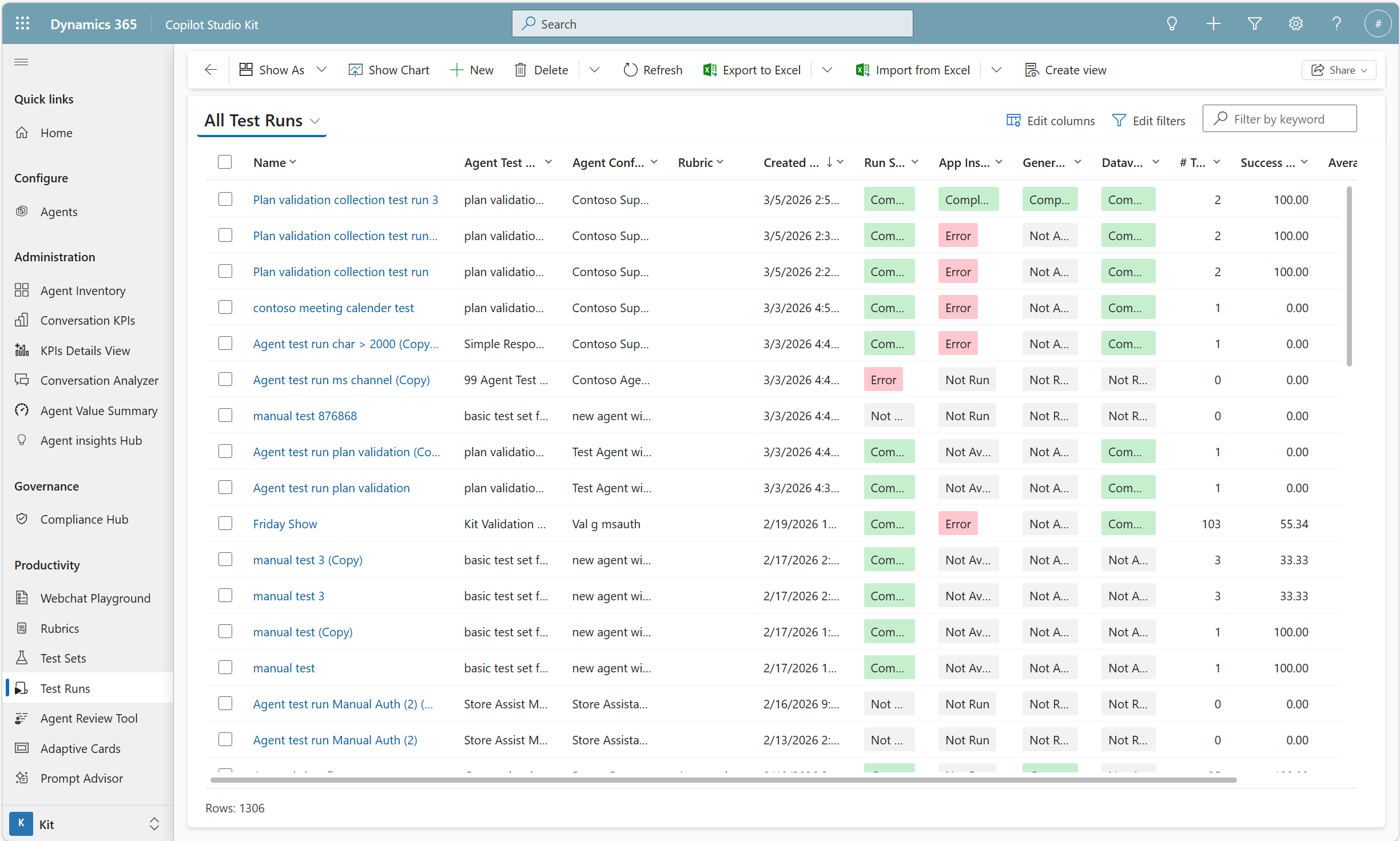 Test run results showing pass/fail status, success rates, and run history
Instead of manually testing agents after every change, makers can run automated test suites and quickly identify issues.
AI-Assisted Rubric Refinement
One of the newer additions to Copilot Studio Kit is AI-assisted rubric refinement, which tackles a frustrating problem in AI testing.
Rubrics define how generative responses should be evaluated. The challenge? What you expect and what the AI judge thinks are often two different things.
Rubric refinement addresses this by providing:
- Rubric management, with guided creation and management of evaluation rubrics
- AI-assisted rubric refinement to help align AI judge results with human expectations
- Flexible rubric usage, letting you use a single rubric across tests or mix rubrics depending on the scenario
This allows both makers and admins to build more reliable evaluation frameworks for generative responses.
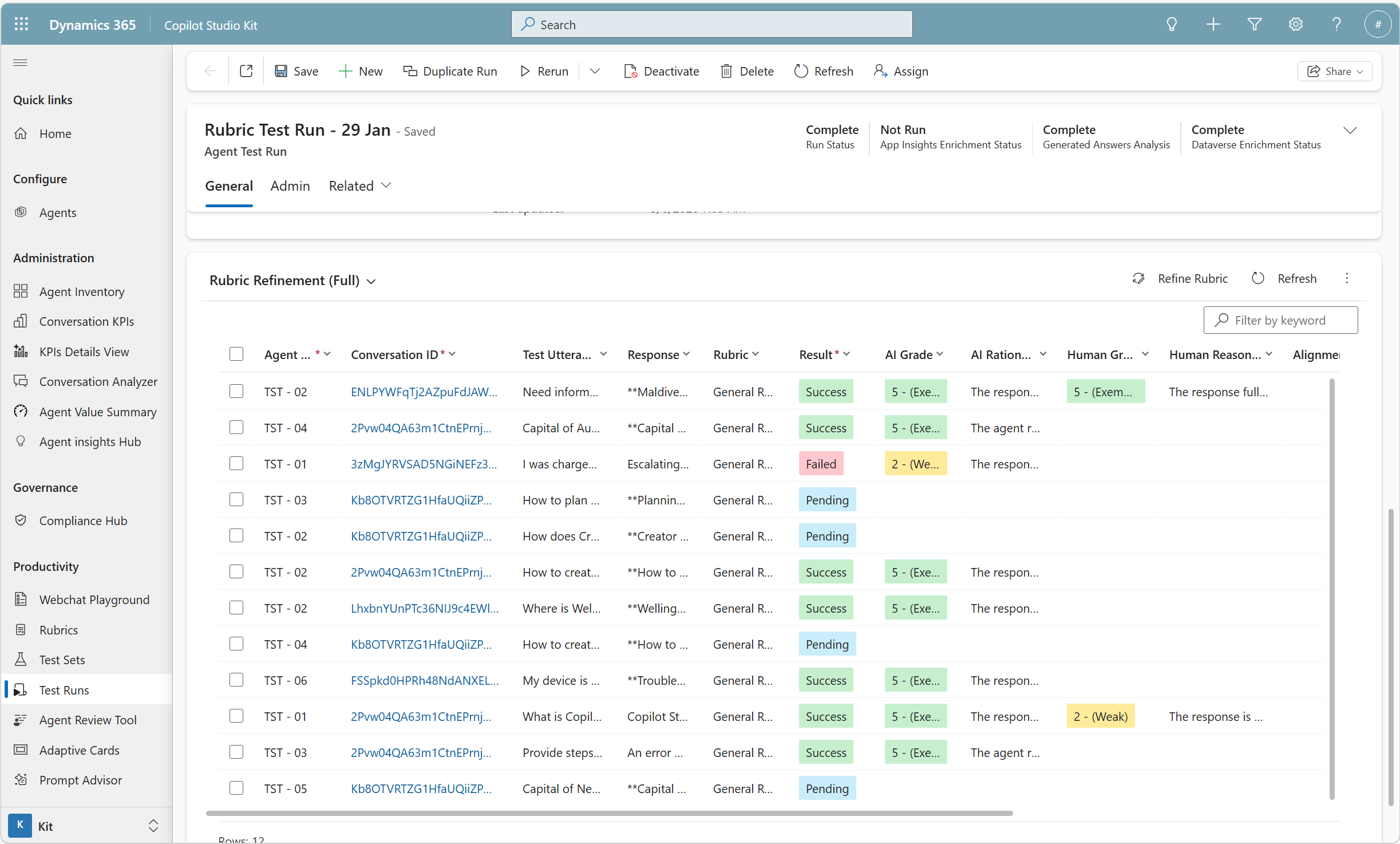 Rubric test run showing AI grades, human grades, and alignment between the two
Tools for Admins
Agent Inventory
Ask any admin what keeps them up at night, and you’ll hear some version of this question:
How many agents exist across the organization, and what are they actually doing?
The Agent Inventory feature answers this with a tenant-wide view of agents across all environments.
It extends the basic visibility provided by Power Platform Admin Center by offering:
- Detailed agent configuration insights
- Feature-level information about agents
- Licensing and credit consumption insights
- Cross-environment visibility
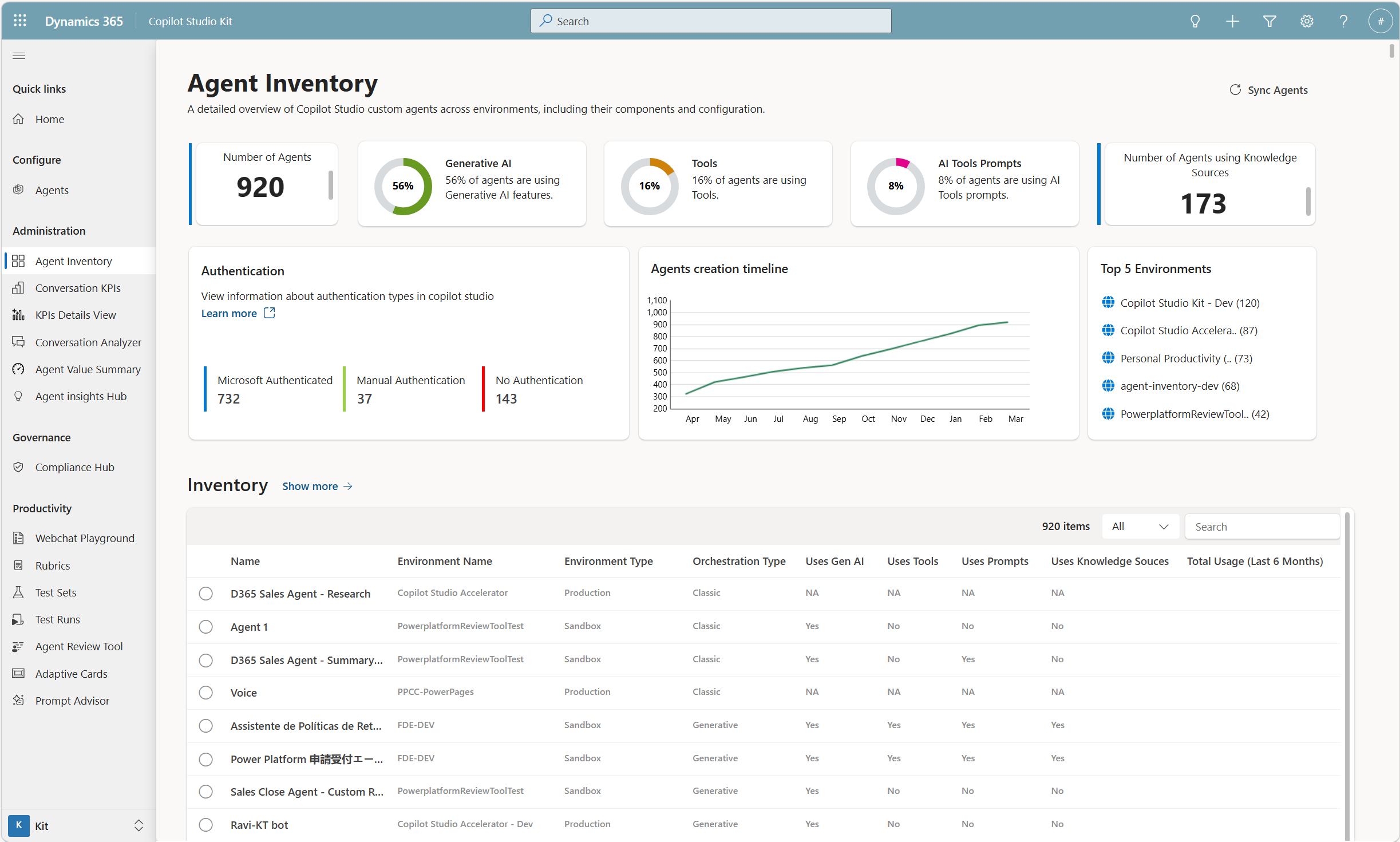 Tenant-wide agent inventory showing 920 agents across environments with feature usage breakdown
This allows admins to answer questions like:
- Which agents are actively used?
- Which features are being used across the organization?
- Where are credits being consumed?
Agent Value Summary
An optional extension of Agent Inventory is Agent Value Summary.
Using the data gathered from Agent Inventory, this feature attempts to categorize agents and help admins understand their organizational value.
It provides visual dashboards showing:
- Types of agents in the organization
- Adoption patterns
- Distribution of agent capabilities
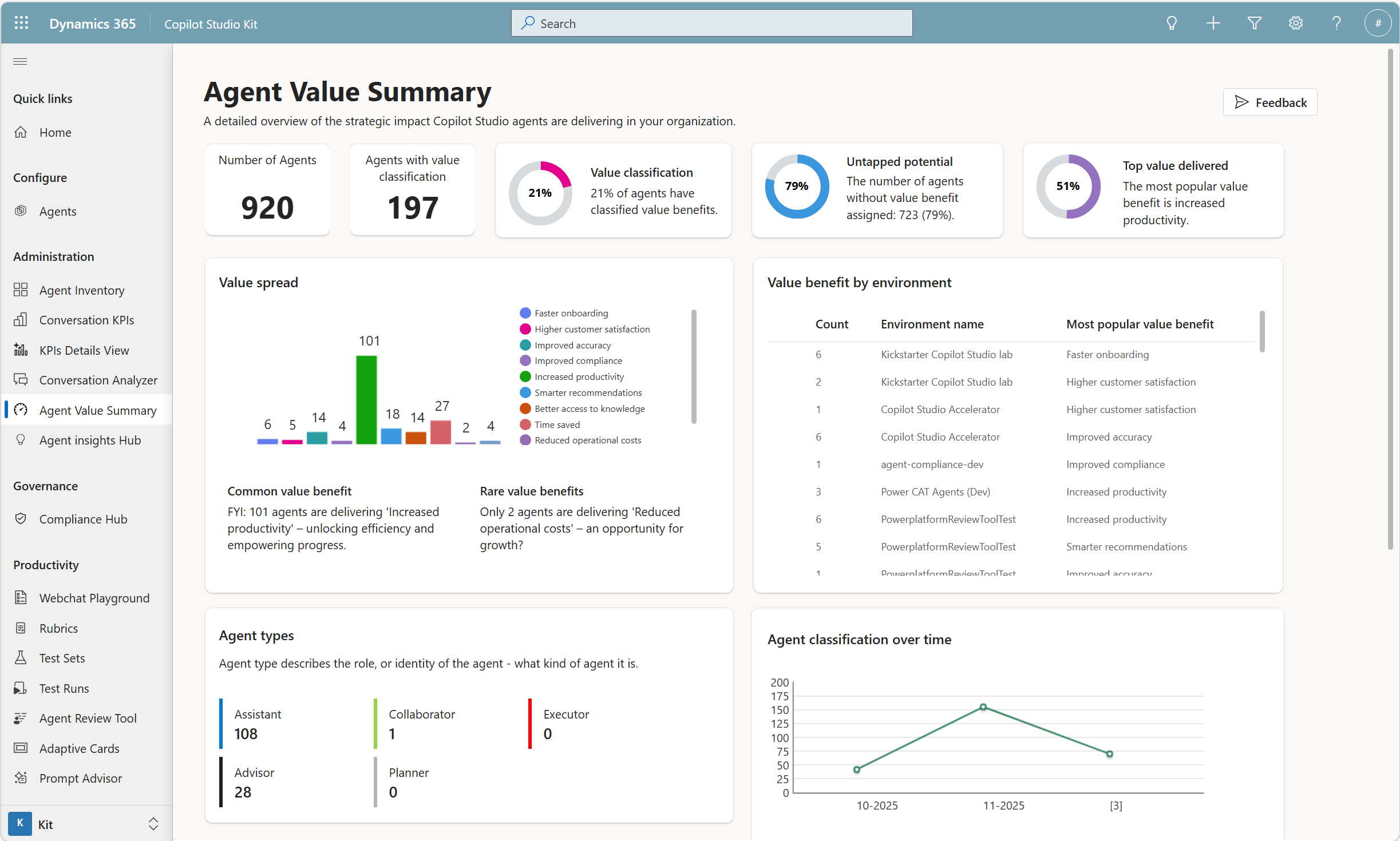 Value classification dashboard showing agent types, benefit distribution, and trends over time
Conversation KPIs
Copilot Studio’s built-in analytics are great for short-term insights. But what if you need long-term trends and metrics beyond what the product provides?
Conversation KPIs analyze conversation transcripts and extract additional metrics that complement (not replace) existing analytics.
This enables:
- Long-term trend analysis
- Deeper insights into agent behavior
- Additional KPIs beyond standard product metrics
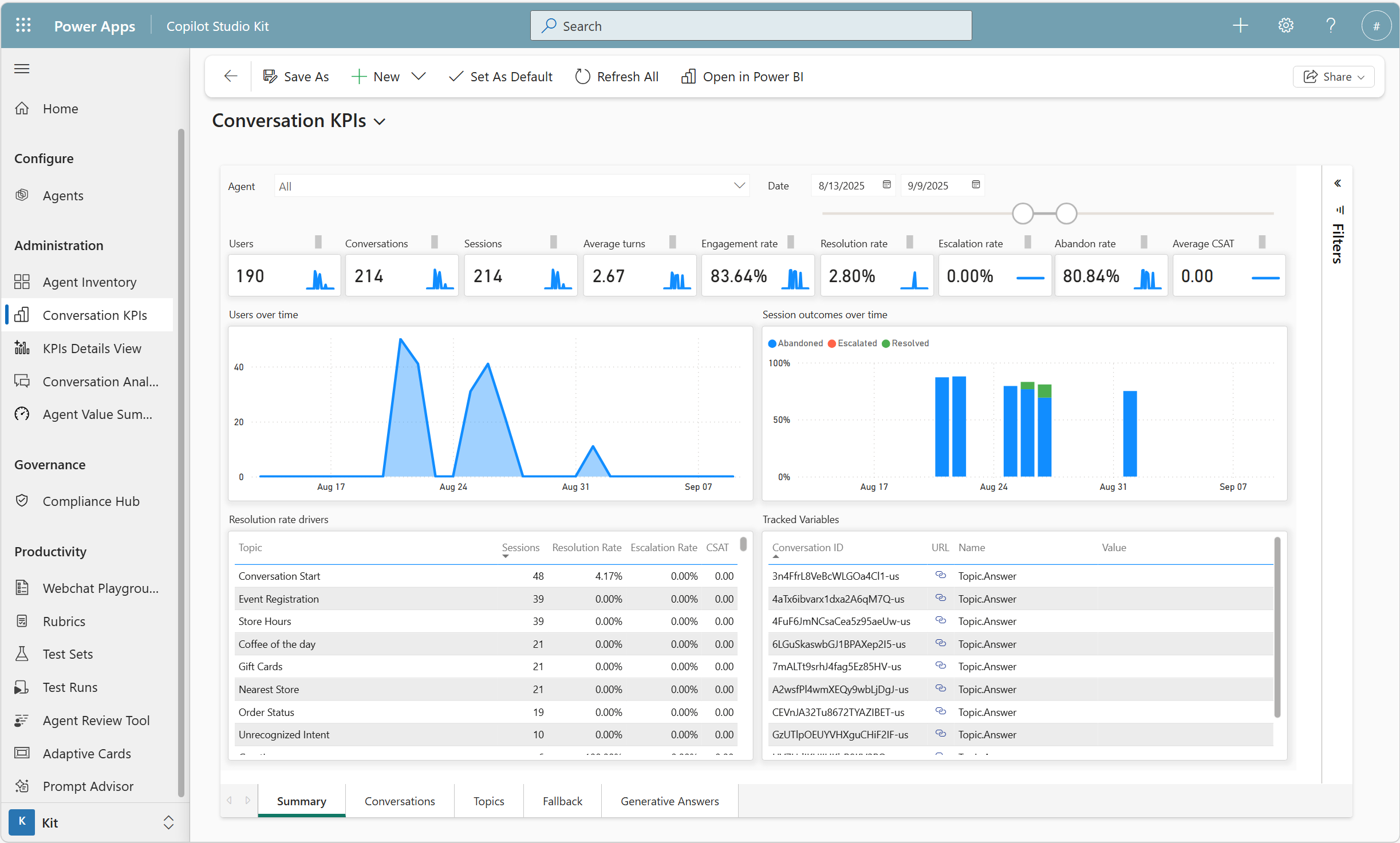 KPI dashboard showing resolution rates, escalation tracking, and session outcome trends
Conversation Analyzer
Sometimes organizations want to answer questions that traditional analytics cannot.
For example:
- Are customers expressing frustration?
- Are agents resolving issues efficiently?
- Are certain responses creating confusion?
Conversation Analyzer allows admins to run custom prompts against conversation transcripts to extract these insights.
This makes it possible to discover patterns that might otherwise remain hidden.
Compliance Hub: Governance at Scale (Without the Manual Overhead)
Here’s the problem: as you deploy more agents, governance becomes critical. But manually checking every agent against your organization’s standards? That doesn’t scale.
The Compliance Hub solves this by building on Agent Inventory data and letting you define governance policies that enforce themselves.
Admins configure policies with specific thresholds and requirements. Examples include:
- Ensuring certain configurations are enabled
- Verifying that agents pass required tests
- Validating compliance with organizational standards
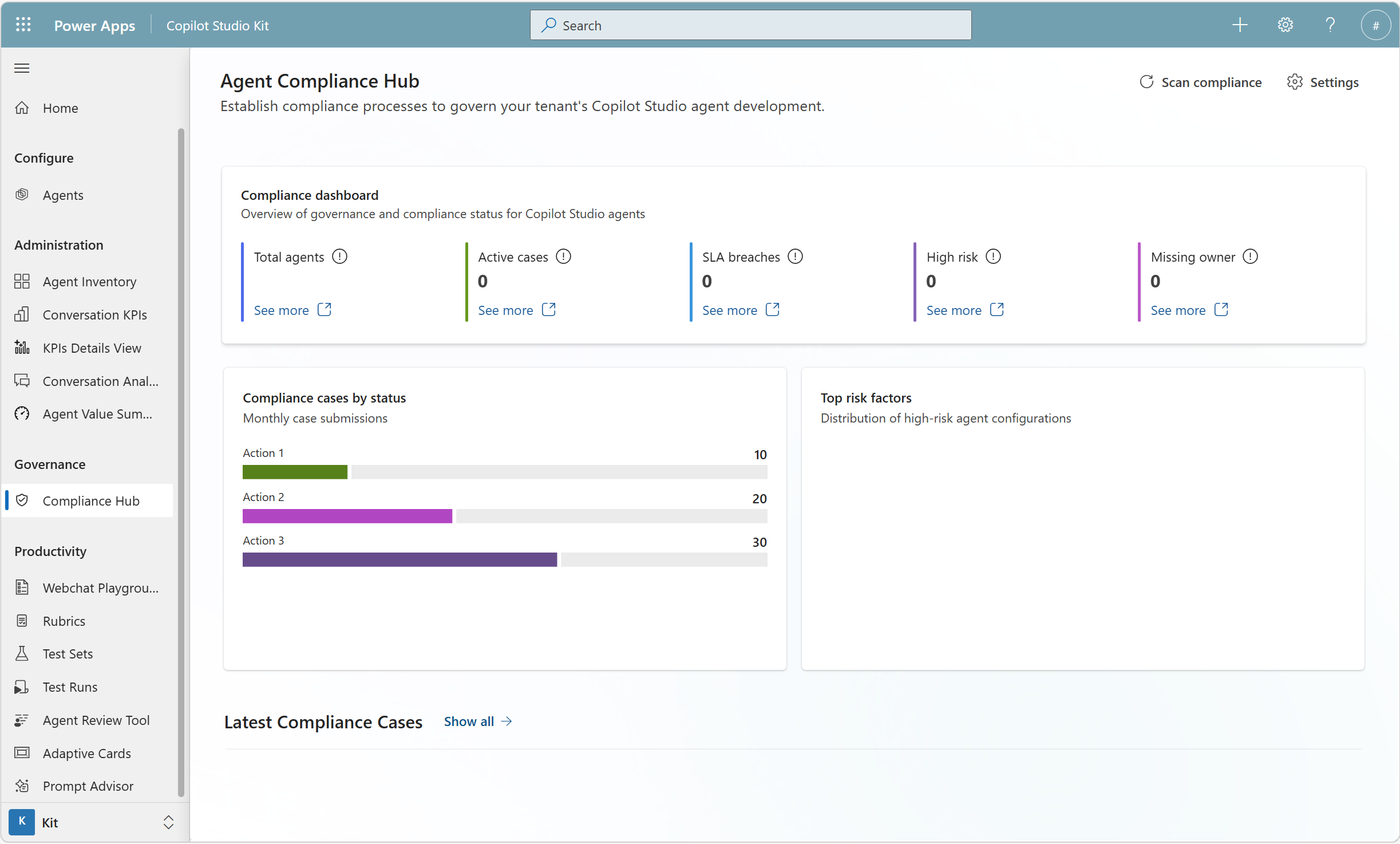 Compliance dashboard showing active cases, SLA breaches, and risk factor distribution
If an agent doesn’t meet the defined thresholds:
- Makers are automatically notified
- Remediation workflows can be triggered
- Enforcement actions can be applied if issues aren’t resolved
This allows organizations to maintain governance at scale with minimum oversight.
Testing at Scale for Admins
While Test Automation is commonly used by makers, admins can also benefit from it.
Instead of opening each agent individually to run evaluations, admins can:
- Launch test runs across multiple agents from the same location
- View results in a centralized location
- Quickly identify agents that require attention
This makes large-scale validation much more manageable.
Why Copilot Studio Kit Matters
Copilot Studio Kit complements native platform capabilities with features that help organizations operate agents more efficiently and responsibly.
Key differentiators include:
- Advanced testing at scale through Test Automation
- Feature-level visibility across environments through Agent Inventory
- Long-term monitoring and additional analytics through Conversation KPIs
- Automated governance workflows through Compliance Hub
- Improved evaluation quality through AI-assisted rubric refinement
Together, these capabilities help organizations move from simply building agents to operating them at scale.
Getting Started
Copilot Studio Kit is open source and free to use. Get it from:
GitHub repository https://aka.ms/copilotstudiokit
Microsoft Marketplace (AppSource) https://aka.ms/copilotstudiokitappsource
Whether you’re a maker trying to ship better agents faster or an admin responsible for governance across environments, Copilot Studio Kit can help.
Have you tried Copilot Studio Kit yet? Which feature are you most interested in, or what challenges are you facing that you’d like us to address? Let us know in the comments!