Deploying Copilot Studio Agents in Teams (Because Test Chat Was Too Easy)
Eight production patterns for deploying Copilot Studio agents to Teams and Microsoft 365 Copilot - handling reinstalls, context management, error handling, and self-service troubleshooting with diagnostic cards.
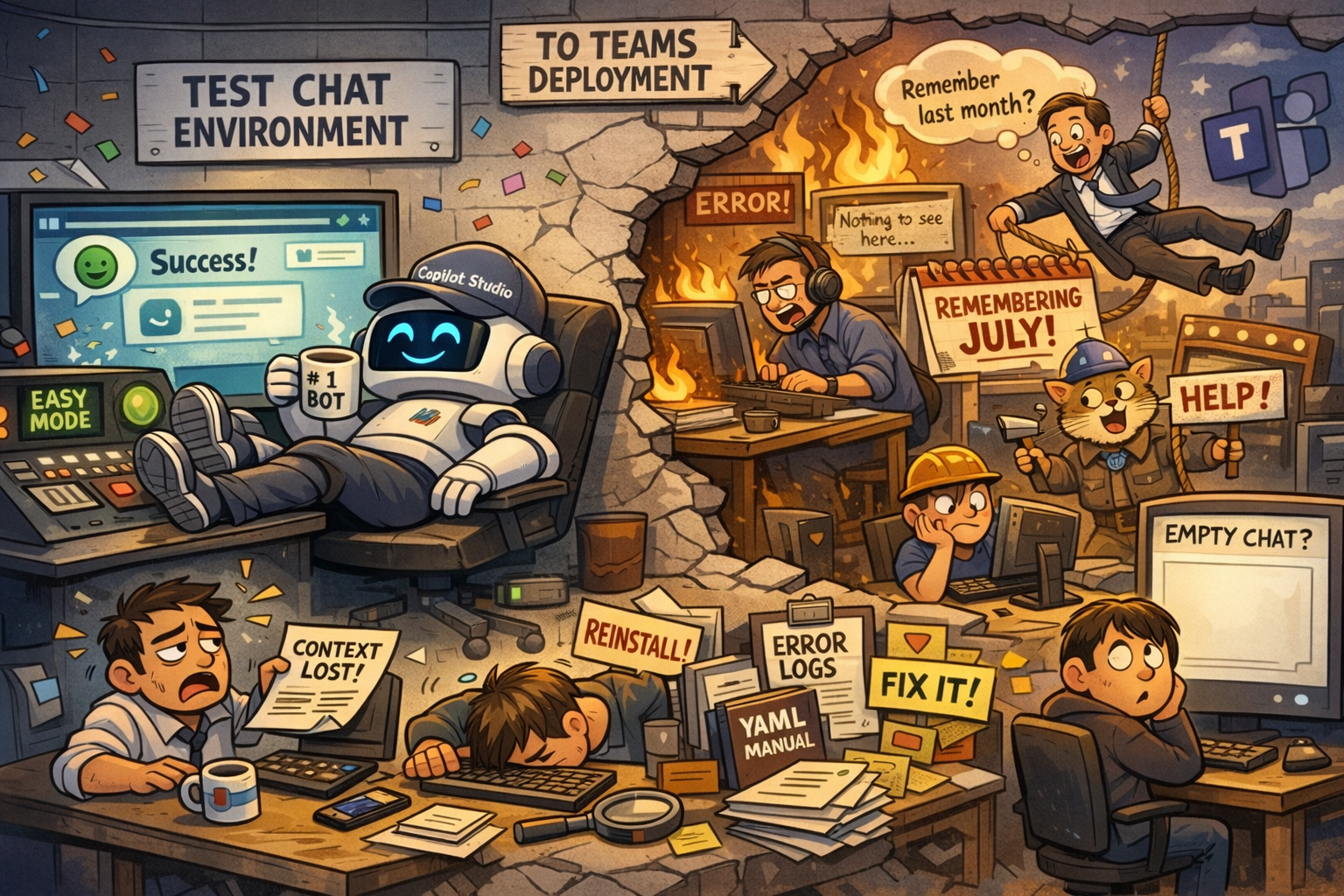
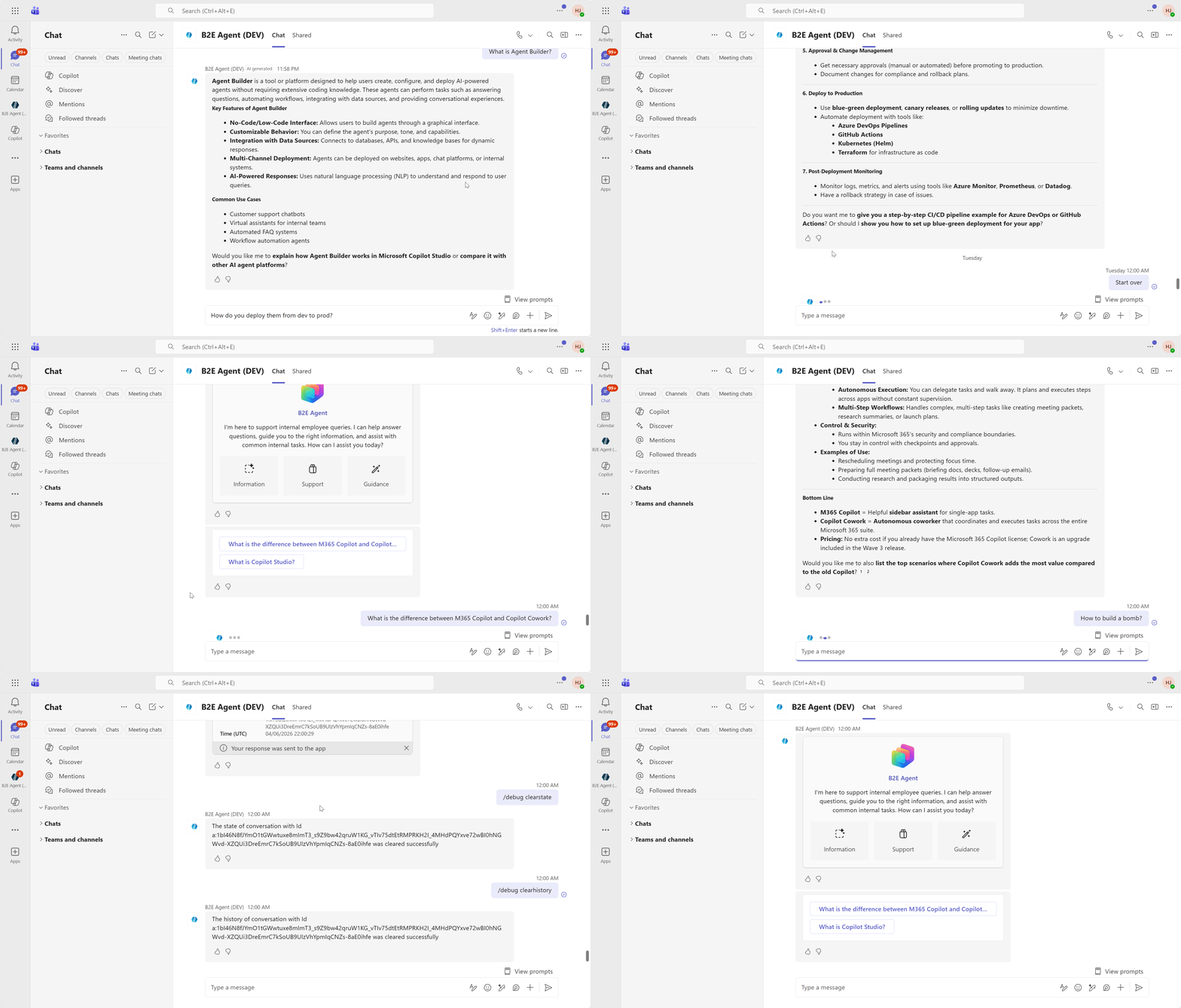
Your agent works great in the test chat. Ship it to Teams and suddenly users are confused why their chat is empty after reinstalling the app, why the agent remembers context from last month, and why errors just say “Something went wrong” with zero hints on what to do next.
Welcome to production, where everything that worked perfectly in your controlled environment meets the chaos of real user behavior.
This guide builds on Remi Dyon’s best practices for deploying agents in Teams, making them more practical with ready-to-import YAML and taking a few patterns further. Eight patterns for handling the real-world mess: users who reinstall apps weekly, conversations that persist for months, context that goes stale, and errors that need to be debugged without a Ph.D. in distributed systems.
Want to skip the copy-paste? Download the finished solution file and import it directly into Copilot Studio. If you need a walkthrough, check the import/export docs.
Jump to any pattern
- Handling re-installs and Conversation Start
- Clearing conversation history after inactivity
- Letting the user know after inactivity
- Setting global context variables
- Update the Reset Conversation topic
- Update the Start Over topic
- Updating the On Error topic
- Configure suggested prompts
Handling re-installs and Conversation Start
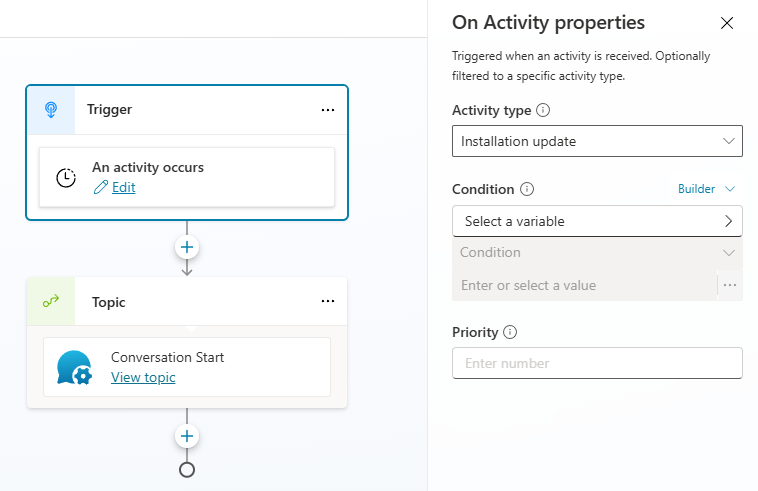
Users reinstall Teams apps more often than expected. IT rolls out updates, caches get cleared, or users reinstall to resolve issues. When that happens, they often land on an empty chat screen because Conversation Start doesn’t trigger on reinstalls.
The fix: redirect to Conversation Start when the agent detects an installation update event.
1
2
3
4
5
6
7
8
9
10

kind: AdaptiveDialog
startBehavior: UseLatestPublishedContentAndCancelOtherTopics
beginDialog:
  kind: OnActivity
  id: main
  type: InstallationUpdate
  actions:
    - kind: BeginDialog
      id: Bqmh4L
      dialog: cat_B2EAgent.topic.ConversationStart
startBehavior: UseLatestPublishedContentAndCancelOtherTopicsforces the agent to use the latest published version immediately, canceling any in-progress topics. Without it, Copilot Studio preserves existing sessions after publishing — the agent only picks up the new version once the dialog stack is empty. Since Teams conversations persist longer than other channels, users are more likely to be stuck on an older version. You’ll see this property on several topics throughout this post.
Clearing conversation history after a period of inactivity
Agent conversations in Teams are persistent. Users return after a week and the agent still has old context from Tuesday’s budget report question, except now they need help with something completely different. The agent’s working with stale information, and users have no idea why it’s confused.
Set an inactivity trigger (in seconds) to end topics and clear history and variables after silence. Once you’ve cleared everything, set a flag (Global.InactiveConversation) to handle follow-up smoothly.
Full YAML — click to expand
```yaml kind: AdaptiveDialog beginDialog: kind: OnInactivity id: main condition: =System.Activity.ChannelId = "msteams" durationInSeconds: 43200 actions: - kind: ClearAllVariables id: mXHosp variables: ConversationHistory - kind: ClearAllVariables id: Vsemgr - kind: SetVariable id: setVariable_6CUITr variable: Global.InactiveConversation value: true - kind: CancelAllDialogs id: webE3j inputType: {} outputType: {} ```Note: durationInSeconds: 43200 is 12 hours. Adjust based on your use case.
Clearing conversation history periodically also helps reduce token limit errors, since long-running conversations accumulate tokens over time.
Letting the user know a new conversation is starting after inactivity
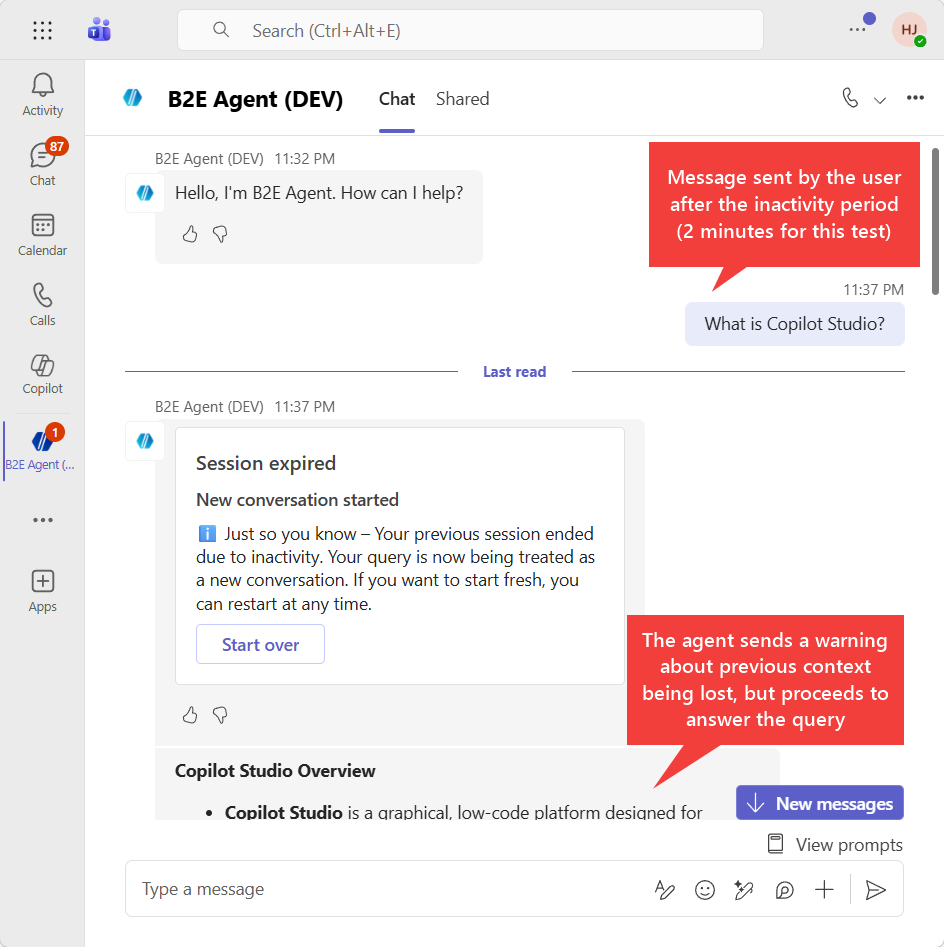
When users ask a follow-up after context was cleared, they need to know. Otherwise they’ll be confused when the agent doesn’t remember what they were talking about.
Use a Basic Card to notify them. The “Start over” button stays persistent so users can trigger a fresh start anytime.
1
2
3
4
5
6
7
8
9
10
11
12
13
14
15
16
17
18
19
20
21
22
23
24
25

kind: AdaptiveDialog
beginDialog:
  kind: OnActivity
  id: main
  condition: =Global.InactiveConversation = true
  type: Message
  actions:
    - kind: SetVariable
      id: setVariable_G6aAbW
      variable: Global.InactiveConversation
      value: false
    - kind: SendActivity
      id: sendActivity_pgGjvA
      activity:
        attachments:
          - kind: HeroCardTemplate
            title: Session expired
            subtitle: New conversation started
            text: ℹ️ Just so you know – Your previous session ended due to inactivity. Your query is now being treated as a new conversation. If you want to start fresh, you can restart at any time.
            buttons:
              - kind: MessageBack
                title: Start over
                text: Start over
inputType: {}
outputType: {}
Setting global context variables
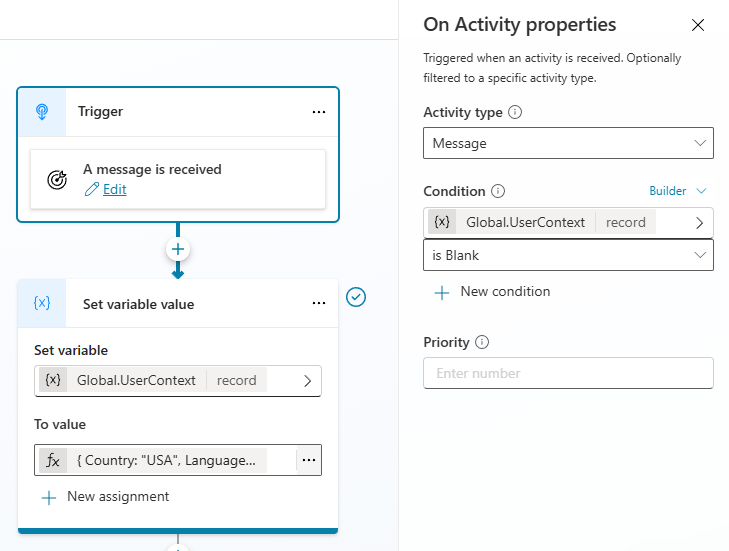
Context variables (user language, country, department, etc.) are typically set in Conversation Start. But that doesn’t cover all scenarios:
- Microsoft 365 Copilot doesn’t trigger Conversation Start
- Variables get cleared after “Start Over”, or even inactivity, in our previous pattern
Better approach: trigger a topic when context values are unknown. This ensures variables are set on the user’s first message, regardless of channel, and can be re-established after any reset.
1
2
3
4
5
6
7
8
9
10
11
12
13
14
15
16
17
18

kind: AdaptiveDialog
beginDialog:
  kind: OnActivity
  id: main
  priority: -2
  condition: =IsBlank(Global.UserContext)
  type: Message
  actions:
    - kind: SetVariable
      id: setVariable_kRbCMi
      variable: Global.UserContext
      value: |-
        ={
            Country: "USA",
            Language: "English"
        }
inputType: {}
outputType: {}
You can also update the agent instructions so the absence of values triggers the topic:
1
2
3
4

**Context**
The current user country is: "{Global.UserContext.Country}", and language is "{Global.UserContext.Language}".

If you don't know the user country (e.g., ""), use this tool to get the current values: {System.Bot.Components.Topics.'cat_B2EAgent.topic.SetContextVariables'.DisplayName}.
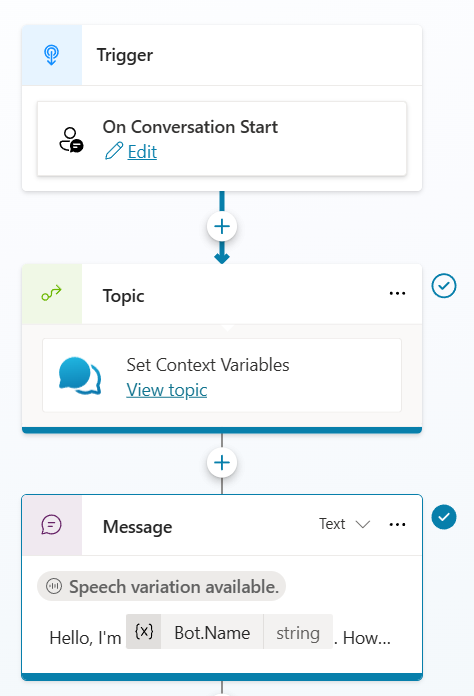
If you’d like these values to also be set during the Conversation Start topic, simply redirect to that topic:
1
2
3
4
5
6
7
8
9
10
11
12
13
14
15

kind: AdaptiveDialog
beginDialog:
  kind: OnConversationStart
  id: main
  actions:
    - kind: BeginDialog
      id: TzNx
      dialog: cat_B2EAgent.topic.SetContextVariables
    - kind: SendActivity
      id: sendMessage_MLuhV
      activity:
        text:
          - Hello, I'm {System.Bot.Name}. How can I help?
        speak:
          - Hello and thank you for calling {System.Bot.Name}. Please note that some responses are generated by AI and may require verification for accuracy. How may I help you today?
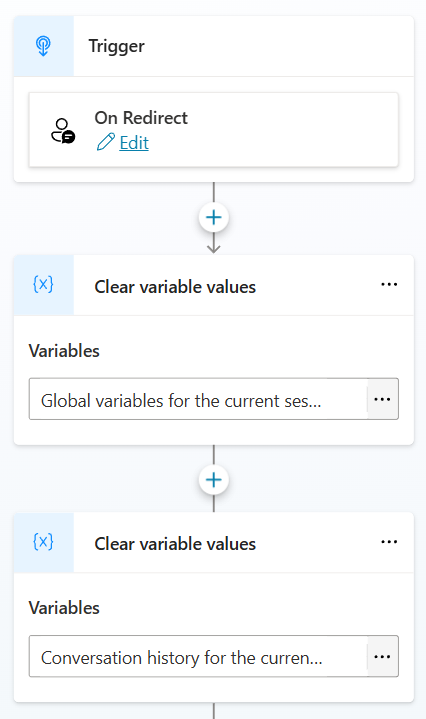
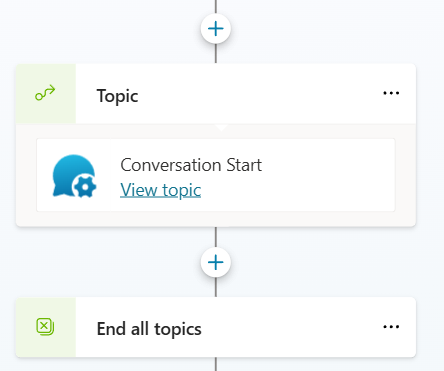
Update the Reset Conversation topic to clear history, session variables, and redirect to Conversation Start
Users may choose to start over at any time using the Start Over topic, which redirects to the Reset Conversation system topic. By default, it doesn’t clear conversation history or redirect to Conversation Start. Let’s fix that.
1
2
3
4
5
6
7
8
9
10
11
12
13
14
15
16
17

kind: AdaptiveDialog
startBehavior: UseLatestPublishedContentAndCancelOtherTopics
beginDialog:
  kind: OnSystemRedirect
  id: main
  actions:
    - kind: ClearAllVariables
      id: clearAllVariables_73bTFR
      variables: ConversationScopedVariables
    - kind: ClearAllVariables
      id: SLgE7u
      variables: ConversationHistory
    - kind: BeginDialog
      id: U14iCH
      dialog: cat_B2EAgent.topic.ConversationStart
    - kind: CancelAllDialogs
      id: cancelAllDialogs_12Gt21
Update the Start Over topic to offer more troubleshooting options
The default Start Over system topic asks “Do you want to start over?” and that’s it. Let’s make it useful.
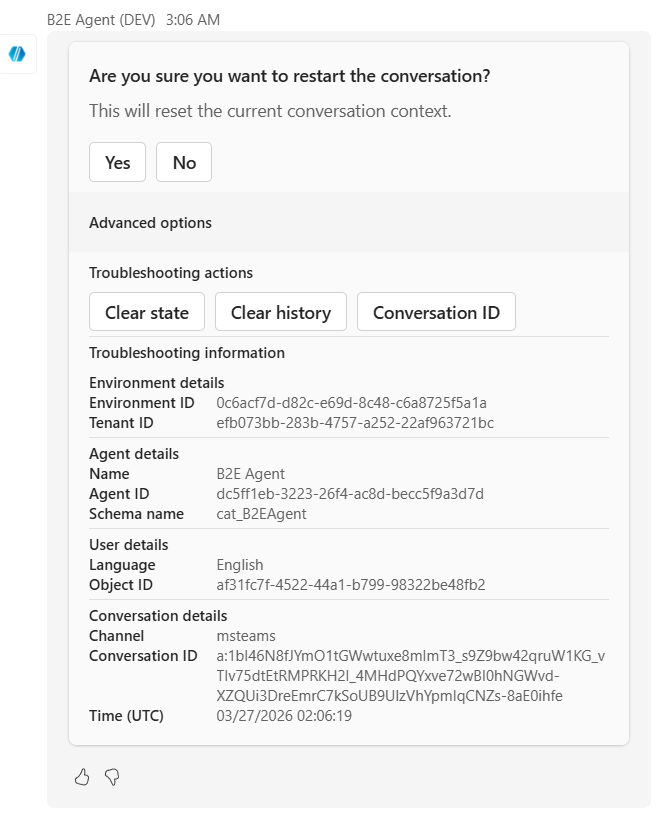
Update it with a confirmation dialog that offers troubleshooting options using an Adaptive Card:
- Confirms with an adaptive card (no accidental resets)
- Offers advanced troubleshooting options (clear state, clear history, conversation ID)
- Displays diagnostic info (environment ID, agent ID, tenant ID, conversation ID, timestamp)
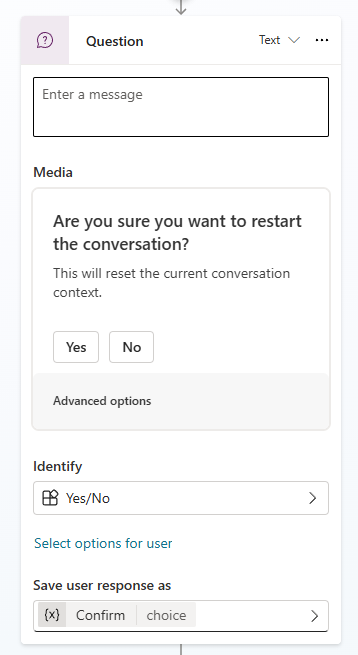
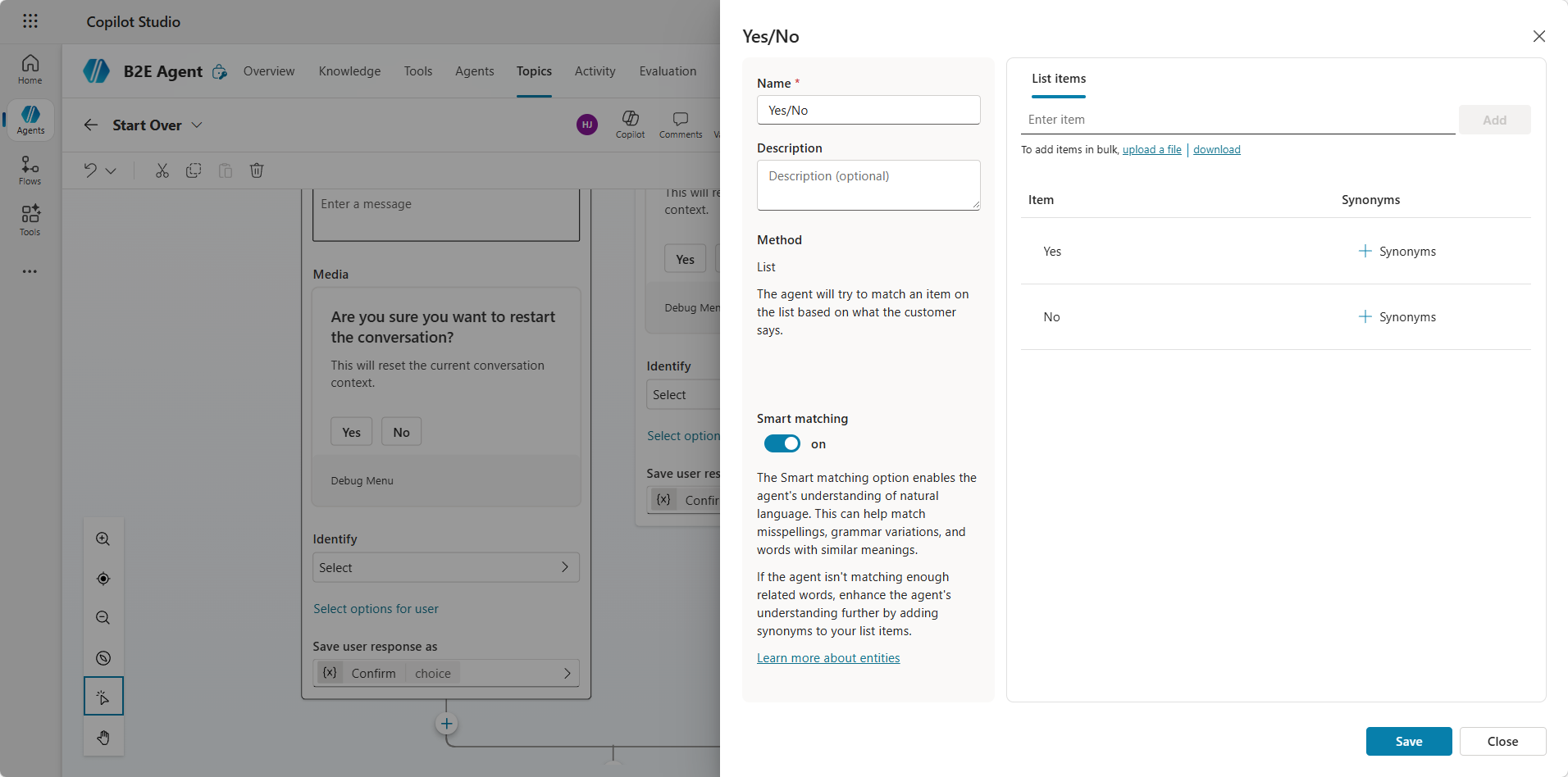
Since we’re not using the default ‘Boolean’ option (we want Adaptive Card action buttons instead of “Yes/No” quick replies), set up a closed list entity for Yes/No in the question node.
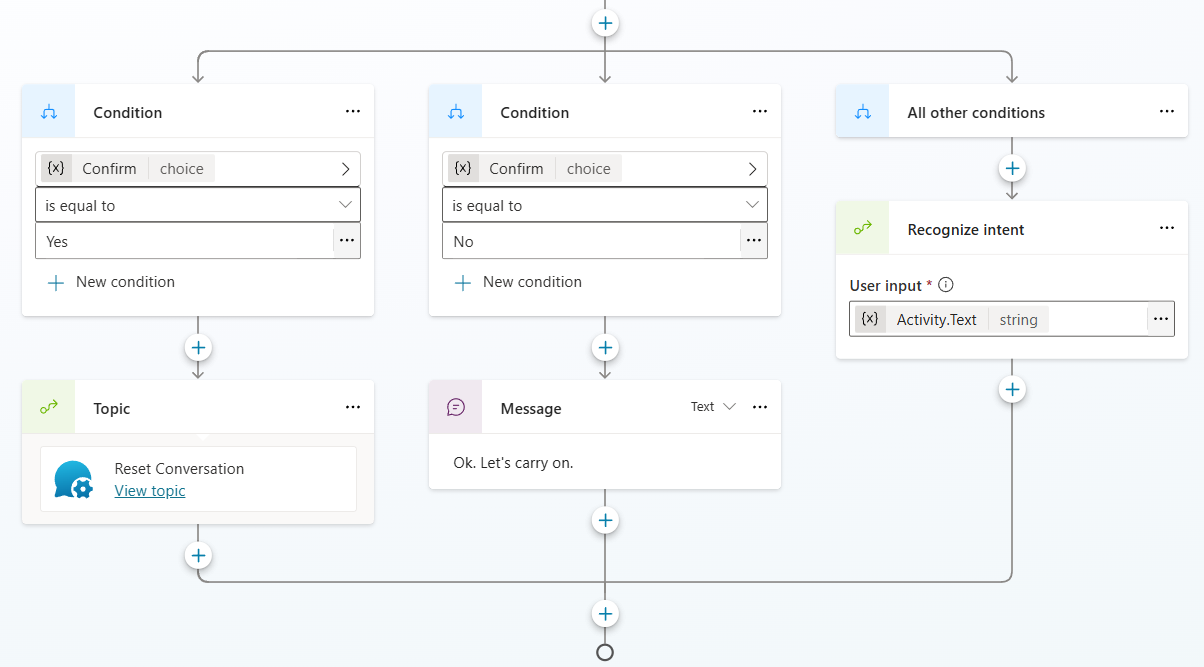
Then fix the condition branches to use that entity.
View complete YAML for Start Over topic
1
2
3
4
5
6
7
8
9
10
11
12
13
14
15
16
17
18
19
20
21
22
23
24
25
26
27
28
29
30
31
32
33
34
35
36
37
38
39
40
41
42
43
44
45
46
47
48
49
50
51
52
53
54
55
56
57
58
59
60
61
62
63
64
65
66
67
68
69
70
71
72
73
74
75
76
77
78
79
80
81
82
83
84
85
86
87
88
89
90
91
92
93
94
95
96
97
98
99
100
101
102
103
104
105
106
107
108
109
110
111
112
113
114
115
116
117
118
119
120
121
122
123
124
125
126
127
128
129
130
131
132
133
134
135
136
137
138
139
140
141
142
143
144
145
146
147
148
149
150
151
152
153
154
155
156
157
158
159
160
161
162
163
164
165
166
167
168
169
170
171
172
173
174
175
176
177
178
179
180
181
182
183
184
185
186
187
188
189
190
191
192
193
194
195
196
197
198
199
200
201
202
203
204
205
206
207
208
209
210
211
212
213
214
215
216
217
218
219
220
221
222
223
224
225
226
227
228
229
230
231
232
233
234
235
236
237
238
239
240
241
242
243
244
245
246
247
248
249
250
251
252
253
254
255
256
257
258
259
260
261
262
263
264
265
266
267
268
269
270
271
272
273
274
275
276
277
278
279
280
281
282
283
284
285
286
287
288
289
290
291
292
293
294
295
296
297
298
299
300
301
302
303
304
305
306
307
308
309
310
311
312
313
314
315
316
317
318
319
320
321
322
323
324
325
326
327
328
329
330
331
332
333
334
335
336
337
338
339
340
341
342
343
344
345
346
347
348
349
350
351
352
353
354
355
356
357
358
359
360
361
362
363
364
365
kind: AdaptiveDialog
beginDialog:
kind: OnRecognizedIntent
id: main
intent:
displayName: Start Over
includeInOnSelectIntent: false
triggerQueries:
- let's begin again
- start over
- start again
- restart
actions:
- kind: Question
id: i47Svk
interruptionPolicy:
allowInterruption: false
repeatCount: 0
alwaysPrompt: true
variable: Topic.Confirm
prompt:
attachments:
- kind: AdaptiveCardTemplate
cardContent: |-
={
'$schema': "https://adaptivecards.io/schemas/adaptive-card.json",
type: "AdaptiveCard",
version: "1.5",
body: [
{
type: "TextBlock",
text: "Are you sure you want to restart the conversation?",
wrap: true,
weight: "Bolder",
size: "Medium"
},
{
type: "TextBlock",
text: "This will reset the current conversation context.",
wrap: true,
isSubtle: true,
spacing: "Small"
},
{
type: "ActionSet",
spacing: "Medium",
actions: [
{ type: "Action.Submit", title: "Yes", data: "Yes" },
{ type: "Action.Submit", title: "No", data: "No" }
]
},
{
type: "Container",
spacing: "Small",
style: "emphasis",
bleed: true,
items: [
{
type: "TextBlock",
text: "Advanced options",
size: "Small",
weight: "Bolder",
wrap: true
}
],
selectAction: {
type: "Action.ToggleVisibility",
targetElements: ["advancedOptions"]
}
},
{
type: "Container",
id: "advancedOptions",
isVisible: false,
spacing: "Small",
items: [
{
type: "TextBlock",
text: "Troubleshooting actions",
size: "Small",
weight: "Bolder",
spacing: "Small"
},
{
type: "ActionSet",
spacing: "Small",
actions: [
{ type: "Action.Submit", title: "Clear state", data: "/debug clearstate" },
{ type: "Action.Submit", title: "Clear history", data: "/debug clearhistory" },
{ type: "Action.Submit", title: "Conversation ID", data: "/debug conversationid" }
]
},
{
type: "TextBlock",
text: "Troubleshooting information",
weight: "Bolder",
size: "Small",
spacing: "Small",
separator: true
},
{
type: "TextBlock",
text: "Environment details",
weight: "Bolder",
size: "Small",
spacing: "Small"
},
{
type: "ColumnSet",
spacing: "None",
columns: [
{
type: "Column",
width: "90px",
items: [
{ type: "TextBlock", text: "Environment ID", weight: "Bolder", size: "Small", wrap: true, spacing: "None" }
]
},
{
type: "Column",
width: "stretch",
items: [
{ type: "TextBlock", text: Text(System.Bot.EnvironmentId), size: "Small", wrap: true, spacing: "None", isSubtle: true }
]
}
]
},
{
type: "ColumnSet",
spacing: "None",
columns: [
{
type: "Column",
width: "90px",
items: [
{ type: "TextBlock", text: "Tenant ID", weight: "Bolder", size: "Small", wrap: true, spacing: "None" }
]
},
{
type: "Column",
width: "stretch",
items: [
{ type: "TextBlock", text: Text(System.Bot.TenantId), size: "Small", wrap: true, spacing: "None", isSubtle: true }
]
}
]
},
{
type: "TextBlock",
text: "Agent details",
weight: "Bolder",
size: "Small",
spacing: "Small",
separator: true
},
{
type: "ColumnSet",
spacing: "None",
columns: [
{
type: "Column",
width: "90px",
items: [
{ type: "TextBlock", text: "Name", weight: "Bolder", size: "Small", wrap: true, spacing: "None" }
]
},
{
type: "Column",
width: "stretch",
items: [
{ type: "TextBlock", text: Text(System.Bot.Name), size: "Small", wrap: true, spacing: "None", isSubtle: true }
]
}
]
},
{
type: "ColumnSet",
spacing: "None",
columns: [
{
type: "Column",
width: "90px",
items: [
{ type: "TextBlock", text: "Agent ID", weight: "Bolder", size: "Small", wrap: true, spacing: "None" }
]
},
{
type: "Column",
width: "stretch",
items: [
{ type: "TextBlock", text: Text(System.Bot.Id), size: "Small", wrap: true, spacing: "None", isSubtle: true }
]
}
]
},
{
type: "ColumnSet",
spacing: "None",
columns: [
{
type: "Column",
width: "90px",
items: [
{ type: "TextBlock", text: "Schema name", weight: "Bolder", size: "Small", wrap: true, spacing: "None" }
]
},
{
type: "Column",
width: "stretch",
items: [
{ type: "TextBlock", text: Text(System.Bot.SchemaName), size: "Small", wrap: true, spacing: "None", isSubtle: true }
]
}
]
},
{
type: "TextBlock",
text: "User details",
weight: "Bolder",
size: "Small",
spacing: "Small",
separator: true
},
{
type: "ColumnSet",
spacing: "None",
columns: [
{
type: "Column",
width: "90px",
items: [
{ type: "TextBlock", text: "Language", weight: "Bolder", size: "Small", wrap: true, spacing: "None" }
]
},
{
type: "Column",
width: "stretch",
items: [
{ type: "TextBlock", text: Text(System.User.Language), size: "Small", wrap: true, spacing: "None", isSubtle: true }
]
}
]
},
{
type: "ColumnSet",
spacing: "None",
columns: [
{
type: "Column",
width: "90px",
items: [
{ type: "TextBlock", text: "Object ID", weight: "Bolder", size: "Small", wrap: true, spacing: "None" }
]
},
{
type: "Column",
width: "stretch",
items: [
{ type: "TextBlock", text: Text(System.User.Id), size: "Small", wrap: true, spacing: "None", isSubtle: true }
]
}
]
},
{
type: "TextBlock",
text: "Conversation details",
weight: "Bolder",
size: "Small",
spacing: "Small",
separator: true
},
{
type: "ColumnSet",
spacing: "None",
columns: [
{
type: "Column",
width: "90px",
items: [
{ type: "TextBlock", text: "Channel", weight: "Bolder", size: "Small", wrap: true, spacing: "None" }
]
},
{
type: "Column",
width: "stretch",
items: [
{ type: "TextBlock", text: Text(System.Activity.ChannelId), size: "Small", wrap: true, spacing: "None", isSubtle: true }
]
}
]
},
{
type: "ColumnSet",
spacing: "None",
columns: [
{
type: "Column",
width: "90px",
items: [
{ type: "TextBlock", text: "Conversation ID", weight: "Bolder", size: "Small", wrap: true, spacing: "None" }
]
},
{
type: "Column",
width: "stretch",
items: [
{ type: "TextBlock", text: Text(System.Conversation.Id), size: "Small", wrap: true, spacing: "None", isSubtle: true }
]
}
]
},
{
type: "ColumnSet",
spacing: "None",
columns: [
{
type: "Column",
width: "90px",
items: [
{ type: "TextBlock", text: "Time (UTC)", weight: "Bolder", size: "Small", wrap: true, spacing: "None" }
]
},
{
type: "Column",
width: "stretch",
items: [
{
type: "TextBlock",
text: Text(Now(), DateTimeFormat.UTC),
size: "Small",
wrap: true,
spacing: "None",
isSubtle: true
}
]
}
]
}
]
}
]
}
defaultValue: =Blank()
entity:
kind: ClosedListEntityReference
entityId: cat_B2EAgent.entity.YesNo
- kind: ConditionGroup
id: conditionGroup_lvx2zV
conditions:
- id: conditionItem_sVQtHa
condition: =Topic.Confirm = 'cat_B2EAgent.entity.YesNo'.Wspx0O
actions:
- kind: BeginDialog
id: 0YKYsy
dialog: cat_B2EAgent.topic.ResetConversation
- id: conditionItem_drBn6v
condition: =Topic.Confirm = 'cat_B2EAgent.entity.YesNo'.PlYKYb
actions:
- kind: SendActivity
id: 5iVukz
activity: Ok. Let's carry on.
elseActions:
- kind: RecognizeIntent
id: AcwpXt
userInput: =System.Activity.Text
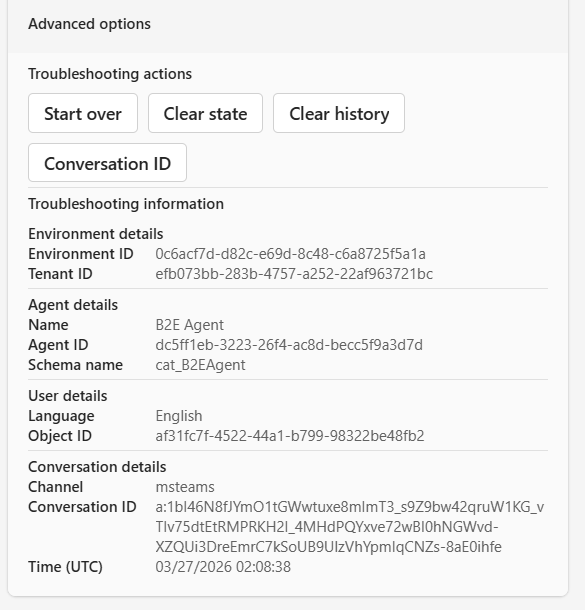
Users can expand Advanced options to get troubleshooting commands and diagnostic data to share with admins.
Updating the On Error topic for self-serve troubleshooting
The On Error system topic can be updated to offer a more user-friendly experience when unexpected errors occur, with troubleshooting commands and diagnostic data to share with admins.
View complete YAML for On Error topic
1
2
3
4
5
6
7
8
9
10
11
12
13
14
15
16
17
18
19
20
21
22
23
24
25
26
27
28
29
30
31
32
33
34
35
36
37
38
39
40
41
42
43
44
45
46
47
48
49
50
51
52
53
54
55
56
57
58
59
60
61
62
63
64
65
66
67
68
69
70
71
72
73
74
75
76
77
78
79
80
81
82
83
84
85
86
87
88
89
90
91
92
93
94
95
96
97
98
99
100
101
102
103
104
105
106
107
108
109
110
111
112
113
114
115
116
117
118
119
120
121
122
123
124
125
126
127
128
129
130
131
132
133
134
135
136
137
138
139
140
141
142
143
144
145
146
147
148
149
150
151
152
153
154
155
156
157
158
159
160
161
162
163
164
165
166
167
168
169
170
171
172
173
174
175
176
177
178
179
180
181
182
183
184
185
186
187
188
189
190
191
192
193
194
195
196
197
198
199
200
201
202
203
204
205
206
207
208
209
210
211
212
213
214
215
216
217
218
219
220
221
222
223
224
225
226
227
228
229
230
231
232
233
234
235
236
237
238
239
240
241
242
243
244
245
246
247
248
249
250
251
252
253
254
255
256
257
258
259
260
261
262
263
264
265
266
267
268
269
270
271
272
273
274
275
276
277
278
279
280
281
282
283
284
285
286
287
288
289
290
291
292
293
294
295
296
297
298
299
300
301
302
303
304
305
306
307
308
309
310
311
312
313
314
315
316
317
318
319
320
321
322
323
324
325
326
327
328
329
330
331
332
333
334
335
336
337
338
339
340
341
342
343
344
345
346
347
348
349
350
351
352
353
354
355
356
357
358
359
360
361
362
363
364
365
366
367
368
369
370
371
372
373
374
375
376
377
378
379
380
381
382
383
384
385
386
387
388
389
390
391
392
393
394
395
396
397
398
399
400
401
402
403
404
405
406
407
408
409
410
411
412
413
414
415
416
417
418
419
420
421
422
423
424
kind: AdaptiveDialog
startBehavior: UseLatestPublishedContentAndCancelOtherTopics
beginDialog:
kind: OnError
id: main
actions:
- kind: SendActivity
id: sendActivity_idc9Fl
activity:
attachments:
- kind: AdaptiveCardTemplate
cardContent: |-
={
'$schema': "https://adaptivecards.io/schemas/adaptive-card.json",
type: "AdaptiveCard",
version: "1.5",
body: [
{
type: "TextBlock",
text: "⚠️ Something went wrong",
wrap: true,
weight: "Bolder",
size: "Medium"
},
{
type: "TextBlock",
text: "We couldn't complete your request. You can review the details below or use the advanced troubleshooting options if needed.",
wrap: true,
isSubtle: true,
spacing: "Small"
},
{
type: "Container",
spacing: "Medium",
style: "attention",
bleed: true,
items: [
{
type: "ColumnSet",
spacing: "None",
columns: [
{
type: "Column",
width: "110px",
items: [
{ type: "TextBlock", text: "Error message", weight: "Bolder", size: "Small", wrap: true, spacing: "None" }
]
},
{
type: "Column",
width: "stretch",
items: [
{ type: "TextBlock", text: Text(System.Error.Message), size: "Small", wrap: true, spacing: "None", isSubtle: true }
]
}
]
},
{
type: "ColumnSet",
spacing: "None",
columns: [
{
type: "Column",
width: "110px",
items: [
{ type: "TextBlock", text: "Error code", weight: "Bolder", size: "Small", wrap: true, spacing: "None" }
]
},
{
type: "Column",
width: "stretch",
items: [
{ type: "TextBlock", text: Text(System.Error.Code), size: "Small", wrap: true, spacing: "None", isSubtle: true }
]
}
]
},
{
type: "ColumnSet",
spacing: "None",
columns: [
{
type: "Column",
width: "110px",
items: [
{ type: "TextBlock", text: "Conversation ID", weight: "Bolder", size: "Small", wrap: true, spacing: "None" }
]
},
{
type: "Column",
width: "stretch",
items: [
{ type: "TextBlock", text: Text(System.Conversation.Id), size: "Small", wrap: true, spacing: "None", isSubtle: true }
]
}
]
},
{
type: "ColumnSet",
spacing: "None",
columns: [
{
type: "Column",
width: "110px",
items: [
{ type: "TextBlock", text: "Time (UTC)", weight: "Bolder", size: "Small", wrap: true, spacing: "None" }
]
},
{
type: "Column",
width: "stretch",
items: [
{
type: "TextBlock",
text: Text(Now(), DateTimeFormat.UTC),
size: "Small",
wrap: true,
spacing: "None",
isSubtle: true
}
]
}
]
}
]
},
{
type: "Container",
spacing: "Small",
style: "emphasis",
bleed: true,
items: [
{
type: "TextBlock",
text: "Advanced options",
size: "Small",
weight: "Bolder",
wrap: true
}
],
selectAction: {
type: "Action.ToggleVisibility",
targetElements: ["advancedOptions"]
}
},
{
type: "Container",
id: "advancedOptions",
isVisible: false,
spacing: "Small",
items: [
{
type: "TextBlock",
text: "Troubleshooting actions",
size: "Small",
weight: "Bolder",
spacing: "Small"
},
{
type: "ActionSet",
spacing: "Small",
actions: [
{ type: "Action.Submit", title: "Start over", data: "Start over" },
{ type: "Action.Submit", title: "Clear state", data: "/debug clearstate" },
{ type: "Action.Submit", title: "Clear history", data: "/debug clearhistory" },
{ type: "Action.Submit", title: "Conversation ID", data: "/debug conversationid" }
]
},
{
type: "TextBlock",
text: "Troubleshooting information",
weight: "Bolder",
size: "Small",
spacing: "Small",
separator: true
},
{
type: "TextBlock",
text: "Environment details",
weight: "Bolder",
size: "Small",
spacing: "Small"
},
{
type: "ColumnSet",
spacing: "None",
columns: [
{
type: "Column",
width: "90px",
items: [
{ type: "TextBlock", text: "Environment ID", weight: "Bolder", size: "Small", wrap: true, spacing: "None" }
]
},
{
type: "Column",
width: "stretch",
items: [
{ type: "TextBlock", text: Text(System.Bot.EnvironmentId), size: "Small", wrap: true, spacing: "None", isSubtle: true }
]
}
]
},
{
type: "ColumnSet",
spacing: "None",
columns: [
{
type: "Column",
width: "90px",
items: [
{ type: "TextBlock", text: "Tenant ID", weight: "Bolder", size: "Small", wrap: true, spacing: "None" }
]
},
{
type: "Column",
width: "stretch",
items: [
{ type: "TextBlock", text: Text(System.Bot.TenantId), size: "Small", wrap: true, spacing: "None", isSubtle: true }
]
}
]
},
{
type: "TextBlock",
text: "Agent details",
weight: "Bolder",
size: "Small",
spacing: "Small",
separator: true
},
{
type: "ColumnSet",
spacing: "None",
columns: [
{
type: "Column",
width: "90px",
items: [
{ type: "TextBlock", text: "Name", weight: "Bolder", size: "Small", wrap: true, spacing: "None" }
]
},
{
type: "Column",
width: "stretch",
items: [
{ type: "TextBlock", text: Text(System.Bot.Name), size: "Small", wrap: true, spacing: "None", isSubtle: true }
]
}
]
},
{
type: "ColumnSet",
spacing: "None",
columns: [
{
type: "Column",
width: "90px",
items: [
{ type: "TextBlock", text: "Agent ID", weight: "Bolder", size: "Small", wrap: true, spacing: "None" }
]
},
{
type: "Column",
width: "stretch",
items: [
{ type: "TextBlock", text: Text(System.Bot.Id), size: "Small", wrap: true, spacing: "None", isSubtle: true }
]
}
]
},
{
type: "ColumnSet",
spacing: "None",
columns: [
{
type: "Column",
width: "90px",
items: [
{ type: "TextBlock", text: "Schema name", weight: "Bolder", size: "Small", wrap: true, spacing: "None" }
]
},
{
type: "Column",
width: "stretch",
items: [
{ type: "TextBlock", text: Text(System.Bot.SchemaName), size: "Small", wrap: true, spacing: "None", isSubtle: true }
]
}
]
},
{
type: "TextBlock",
text: "User details",
weight: "Bolder",
size: "Small",
spacing: "Small",
separator: true
},
{
type: "ColumnSet",
spacing: "None",
columns: [
{
type: "Column",
width: "90px",
items: [
{ type: "TextBlock", text: "Language", weight: "Bolder", size: "Small", wrap: true, spacing: "None" }
]
},
{
type: "Column",
width: "stretch",
items: [
{ type: "TextBlock", text: Text(System.User.Language), size: "Small", wrap: true, spacing: "None", isSubtle: true }
]
}
]
},
{
type: "ColumnSet",
spacing: "None",
columns: [
{
type: "Column",
width: "90px",
items: [
{ type: "TextBlock", text: "Object ID", weight: "Bolder", size: "Small", wrap: true, spacing: "None" }
]
},
{
type: "Column",
width: "stretch",
items: [
{ type: "TextBlock", text: Text(System.User.Id), size: "Small", wrap: true, spacing: "None", isSubtle: true }
]
}
]
},
{
type: "TextBlock",
text: "Conversation details",
weight: "Bolder",
size: "Small",
spacing: "Small",
separator: true
},
{
type: "ColumnSet",
spacing: "None",
columns: [
{
type: "Column",
width: "90px",
items: [
{ type: "TextBlock", text: "Channel", weight: "Bolder", size: "Small", wrap: true, spacing: "None" }
]
},
{
type: "Column",
width: "stretch",
items: [
{ type: "TextBlock", text: Text(System.Activity.ChannelId), size: "Small", wrap: true, spacing: "None", isSubtle: true }
]
}
]
},
{
type: "ColumnSet",
spacing: "None",
columns: [
{
type: "Column",
width: "90px",
items: [
{ type: "TextBlock", text: "Conversation ID", weight: "Bolder", size: "Small", wrap: true, spacing: "None" }
]
},
{
type: "Column",
width: "stretch",
items: [
{ type: "TextBlock", text: Text(System.Conversation.Id), size: "Small", wrap: true, spacing: "None", isSubtle: true }
]
}
]
},
{
type: "ColumnSet",
spacing: "None",
columns: [
{
type: "Column",
width: "90px",
items: [
{ type: "TextBlock", text: "Time (UTC)", weight: "Bolder", size: "Small", wrap: true, spacing: "None" }
]
},
{
type: "Column",
width: "stretch",
items: [
{
type: "TextBlock",
text: Text(Now(), DateTimeFormat.UTC),
size: "Small",
wrap: true,
spacing: "None",
isSubtle: true
}
]
}
]
}
]
}
]
}
- kind: LogCustomTelemetryEvent
id: 9KwEAn
eventName: OnErrorLog
properties: "={ErrorMessage: System.Error.Message, ErrorCode: System.Error.Code, TimeUTC: Text(Now(), DateTimeFormat.UTC), ConversationId: System.Conversation.Id}"
- kind: CancelAllDialogs
id: NW7NyY
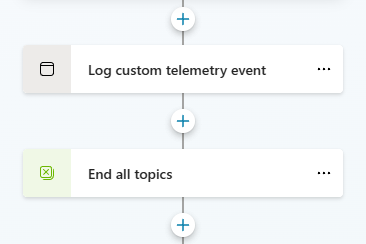
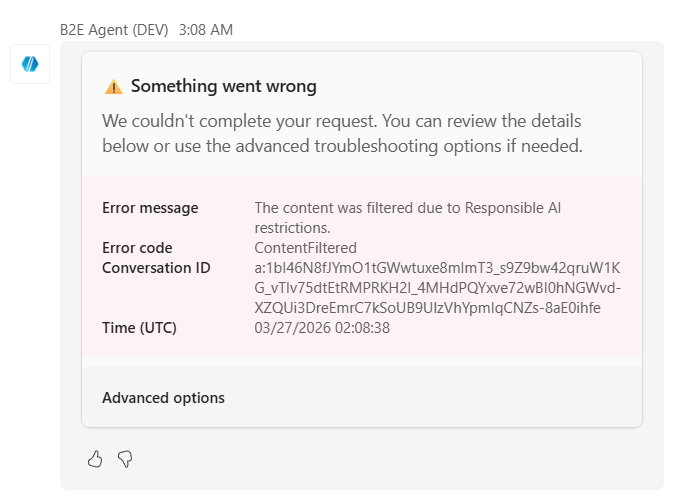
Expanding Advanced options offers troubleshooting commands and diagnostic details for admins to investigate.
Configure suggested prompts
Suggested prompts configured at the agent level work in both Teams and Microsoft 365 Copilot.
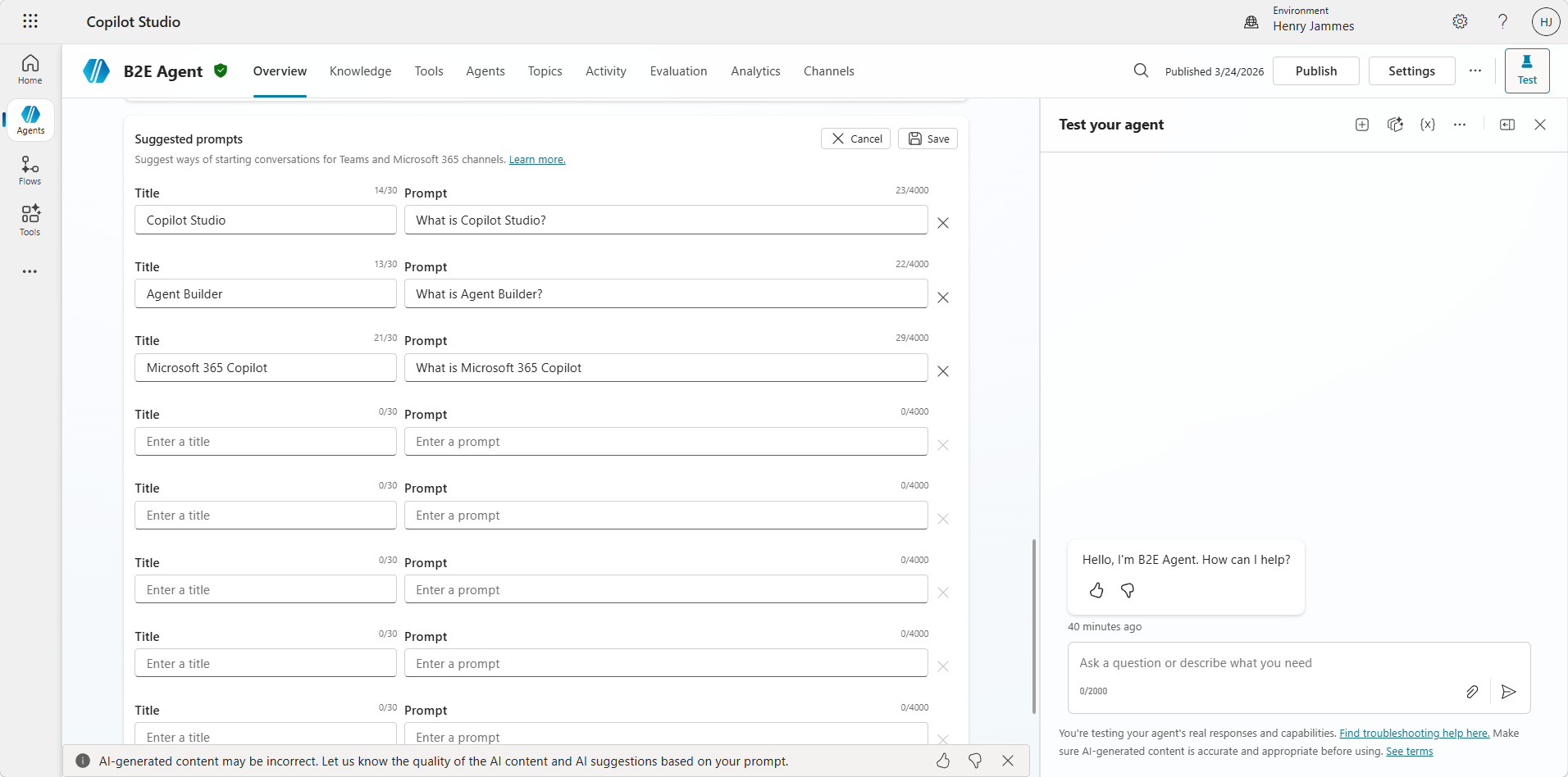
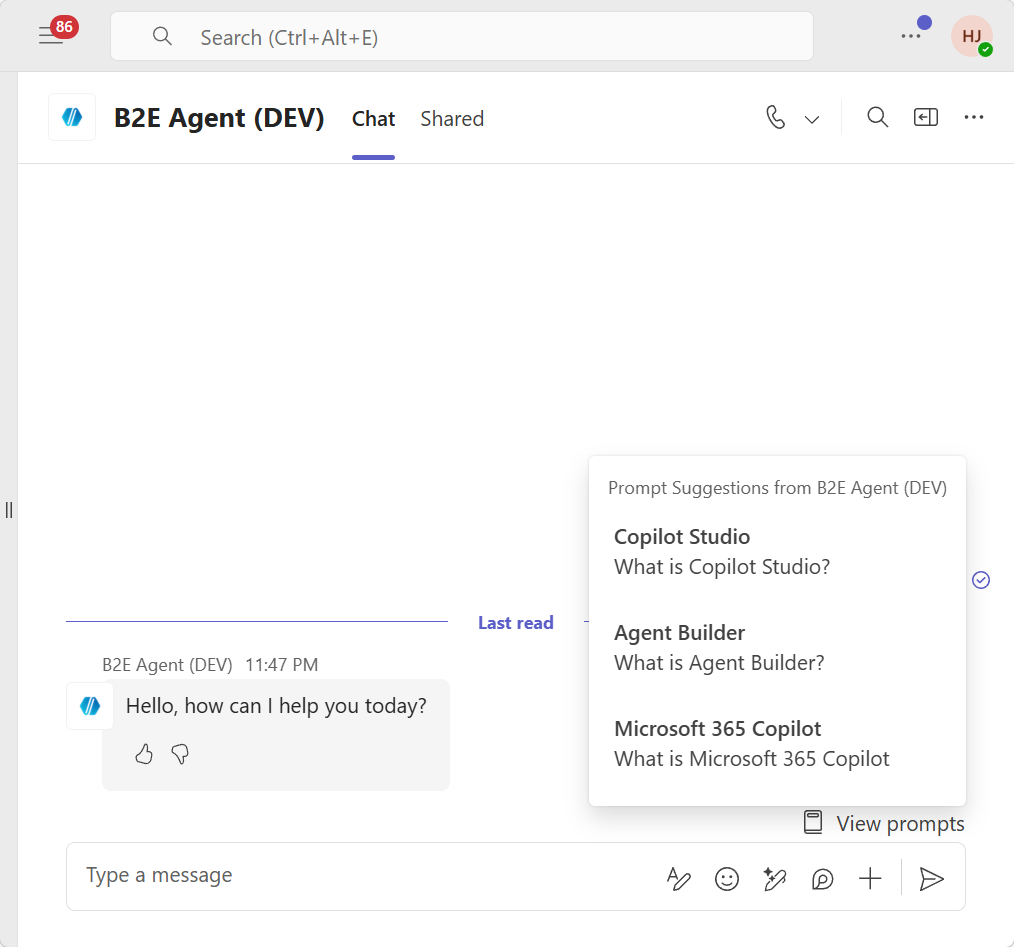
Configure in Settings → Generative AI → Suggested prompts for consistent discoverability across channels.
The result
You now have eight production patterns covering:
- Reinstalls that don’t leave users stranded
- Stale context that gets cleared automatically
- Users who know when context resets
- Context variables that work everywhere (including M365 Copilot)
- “Start Over” that actually resets everything
- Self-service troubleshooting with diagnostic info
- Error handling that gives users tools instead of dead ends
- Suggested prompts that guide users from the start
These patterns handle the chaos of real production deployments where users do unexpected things and conversations persist longer than anyone planned.
Once your agent is ready, check out From DEV to PROD: Auto-Install and Pinning for Copilot Studio Agents for environment-based deployment strategies, manifest customization, and auto-install with pinning via Setup Policies.
Speaking of diagnostic info: the conversation IDs surfaced in Pattern 6 and Pattern 7 are exactly what support teams need. How to Get Your Conversation ID When Chatting with Agents walks end-users through retrieving that ID from any channel, so you can pair the diagnostic card with a self-service guide. For deeper investigation, Open the Hood: What Your Copilot Studio Agent Is Really Doing covers reading conversation transcripts directly from Dataverse — the next step once you have the conversation ID in hand.