Video Demo: Implement Cloud PC Pool for Computer Use in Microsoft Copilot Studio
Learn about Cloud PC pool for Computer Use in Microsoft Copilot Studio
Note: This post highlights how to implement Cloud PC pool as the runtime for Computer Use tool in Copilot Studio. A video demo is included to provide an overview of Cloud PC pool, along with an implementation walkthrough.
Cloud PC Pool for Computer Use in Microsoft Copilot Studio
Overview
Microsoft Copilot Studio enables you to build AI‑driven agents that can perform tasks across applications and websites. One powerful capability is Computer Use an AI‑powered UI automation tool that interacts with Windows apps and web pages by clicking buttons, filling forms, and navigating screens using natural language instructions. This allows agents to complete tasks even when no APIs are available. If a human can do it through a UI, Computer Use can too, making it ideal for scenarios like data entry, invoice processing, and information extraction. To run these automations, the Computer Use tool requires a Windows runtime, and Copilot Studio lets you choose where that runtime executes:
Hosted browser – A Microsoft‑managed, browser‑only environment with zero setup. Great for quick web automations and experimentation, but not Entra ID–joined or Intune‑managed, and therefore not suitable for accessing internal systems or production workloads.
Cloud PC pool – Microsoft‑hosted Windows 11 Cloud PCs that are Entra ID–joined and Intune‑enrolled. This option delivers scalable, secure, enterprise‑grade automation—combining the ease of a managed service with full identity, compliance, and governance controls.
Bring your own machine (BYOM) – Your own Windows physical machine or VM registered for computer use. This offers maximum control and customization but requires you to provision, secure, and maintain the infrastructure yourself.
In this post, we focus on Cloud PC pool and walk through a hands‑on demo showing how to implement a Cloud PC Pool for Computer Use in Microsoft Copilot Studio.
Why Cloud PC Pool?
Cloud PC pools make it easy to build enterprise‑ready agents in Microsoft Copilot Studio without managing infrastructure. The service spins up Windows Cloud PCs on demand, while still operating within your organization’s identity, security, and compliance boundaries.
Because Cloud PCs are Entra ID–joined and Intune‑enrolled, they support single sign-on to internal systems like SharePoint and line‑of‑business apps, and allow IT to enforce policies, security configurations, and compliance controls. This makes them production‑ready for enterprise automation—unlike hosted browsers, which can’t access internal resources or be centrally governed.
Think of Cloud PC pool as Windows 365 for agents: Windows 11 Enterprise Cloud PCs, provisioned in your Power Platform geography, running on Microsoft’s hosted network, and fully managed using your existing IT tooling.
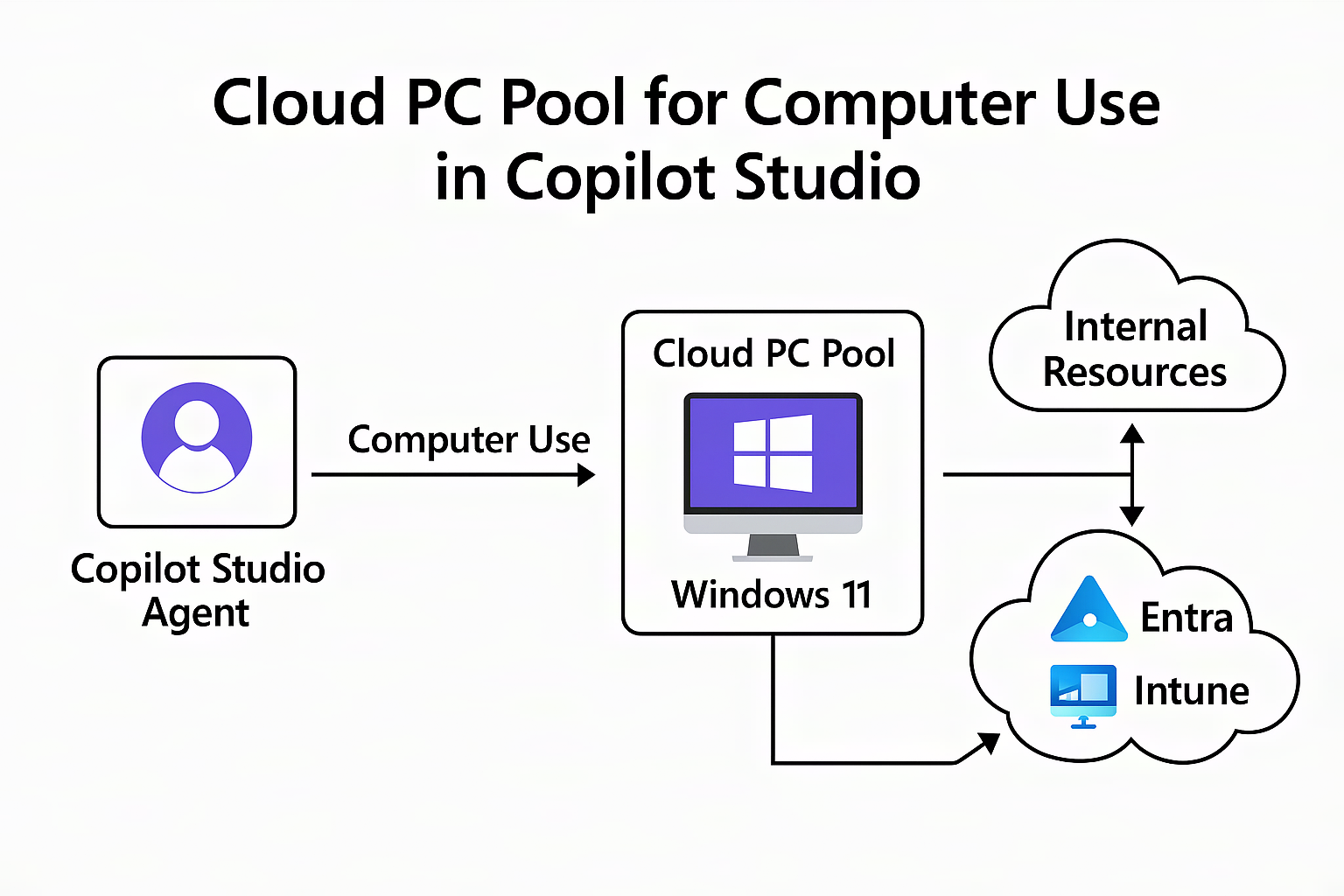 An Overview of Cloud PC pool as runtime option for Computer Use in Copilot Studio
Demo Overview: Cloud PC pool for Computer Use (CUA) in Copilot Studio
The demo explores how to implement Cloud PC pool as the runtime for Computer Use tool in Copilot Studio.
- Overview of CUA in Copilot Studio
- Runtime Options for CUA
- Cloud PC Pool - Prerequisites and Setup
- Implementation Overview
- Manage Cloud PC pool
- Monitor Cloud PC instances, view run status, and track queued sessions for performance.
- Admin Controls and Audit logs
Watch the Demo
Key takeaways
This end‑to‑end walkthrough demonstrates how to enable Cloud PC pool for Computer Use in Copilot Studio.
Some of the keyaways about Computer Use and Cloud PC pool are
✔ AI-Powered UI Automation - The computer use tool is an AI-driven UI automation agent performing tasks via natural language commands without API dependency.
✔ Cloud PC Pool Overview - Cloud PC pools are Microsoft-managed Windows 365 virtual machines providing scalable, secure runtime environments for automation.
✔ Enterprise Integration & Compliance - Cloud PCs join your Azure AD and are Intune-managed, enabling policy enforcement and secure access to organizational resources.
✔ Benefits for IT & Developers - Cloud PC pools offer seamless scalability, corporate governance, and reduced maintenance for IT and developer teams.
This is how organizations unlock true agentic systems - bringing together data, actions, reasoning, and domain expertise across applications, all powered by computer use in Microsoft Copilot Studio.
Happy Automating!
thought: “How will AI-powered UI automation transform your organization’s approach to enterprise workflows and compliance?” —