Dynamic MCP Routing in Copilot Studio: One Connector, Many Endpoints
How to route a single Copilot Studio connector to multiple MCP endpoints using a catalog service, dynamic Swagger dropdowns, and C# URL rewriting.

Some very large enterprises run multiple deployments of the same service across tenants or geographies. Think data residency requirements where EU-based employees must not have their requests routed to a US service, or a global project management platform with isolated instances per region. The API shape is identical everywhere, but the data and the endpoint URLs are different.
In Copilot Studio, the straightforward approach is to create a separate connector for each endpoint. That works when you have two or three, but it doesn’t scale:
- Connector sprawl: Every time a new region or endpoint spins up, someone has to create and configure a new connector.
- Leaking infrastructure details to makers: Makers shouldn’t be managing endpoint URLs. That’s not low-code, that’s ops work wearing a low-code hat.
- No dynamic discovery: The list of available endpoints is baked into the connector definitions at build time, not runtime.
A new sample just landed in the CopilotStudioSamples repo that solves this with a single connector and a catalog-driven routing pattern.
The Pattern: Catalog + Dynamic Routing
The dynamic MCP routing sample introduces a three-part architecture:
- A Catalog Service that exposes a registry of available MCP endpoints
- An MCP Server (in the sample, a single server that simulates separate regional endpoints)
- A Custom Connector that calls the catalog to populate a dropdown for makers, and uses a C# script to rewrite URLs at runtime to route to the selected instance
The result? Makers see a simple dropdown in Copilot Studio. They pick an instance, and the connector routes all MCP traffic to the right place. No extra connectors, no URL management, no redeployment when endpoints change.
Here’s how each piece works.
The Connector: What Makers See
The connector is the star of this pattern, so let’s start with the maker experience. When a maker adds this connector action to their agent, they see a single input: a dropdown listing available instances. No URLs, no configuration files, just names:
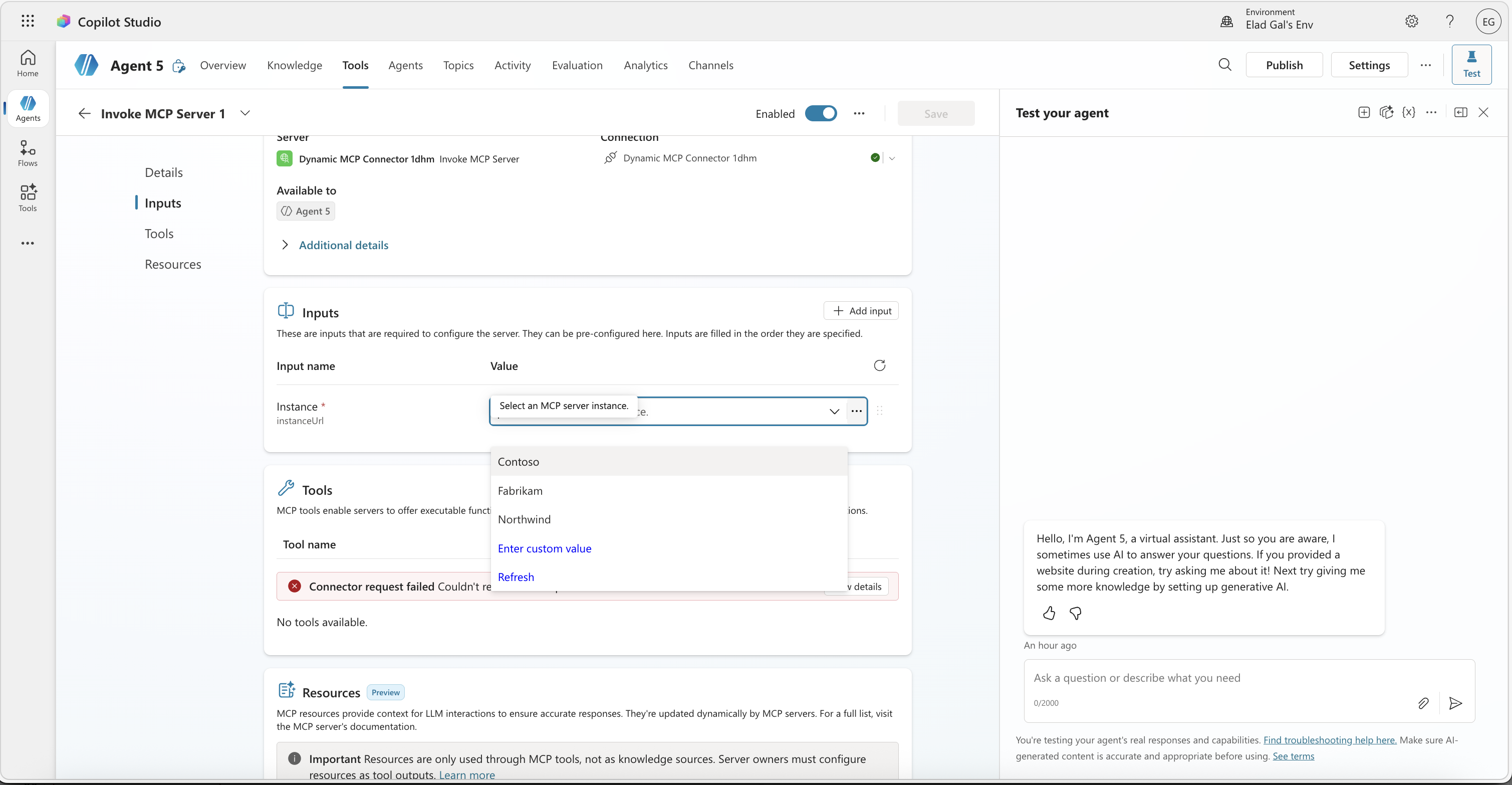 The instance dropdown populated from the catalog. Tools can’t load until a selection is made.
Notice the Tools section at the bottom is in an error state. That’s expected: without a selected instance, the connector doesn’t know which MCP endpoint to query for tools. The maker picks an instance from the dropdown, and the connector now has an endpoint to talk to:
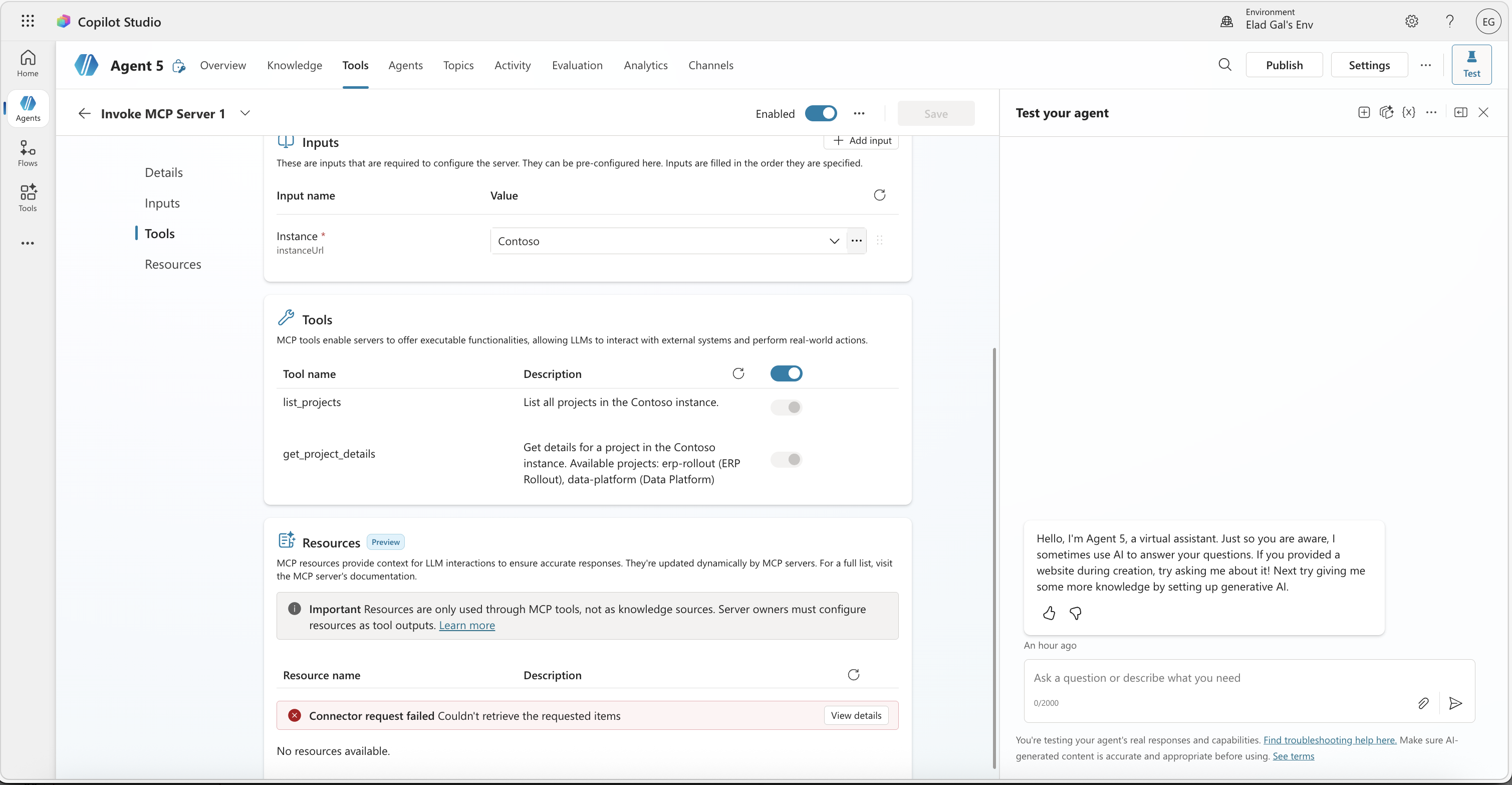 Once the maker picks an instance, the connector routes to that endpoint and tools light up automatically.
The tools section now shows list_projects and get_project_details, discovered from the Contoso MCP endpoint. The maker didn’t type a URL or configure anything beyond selecting a name. From here, they can test the agent and see the tools in action:
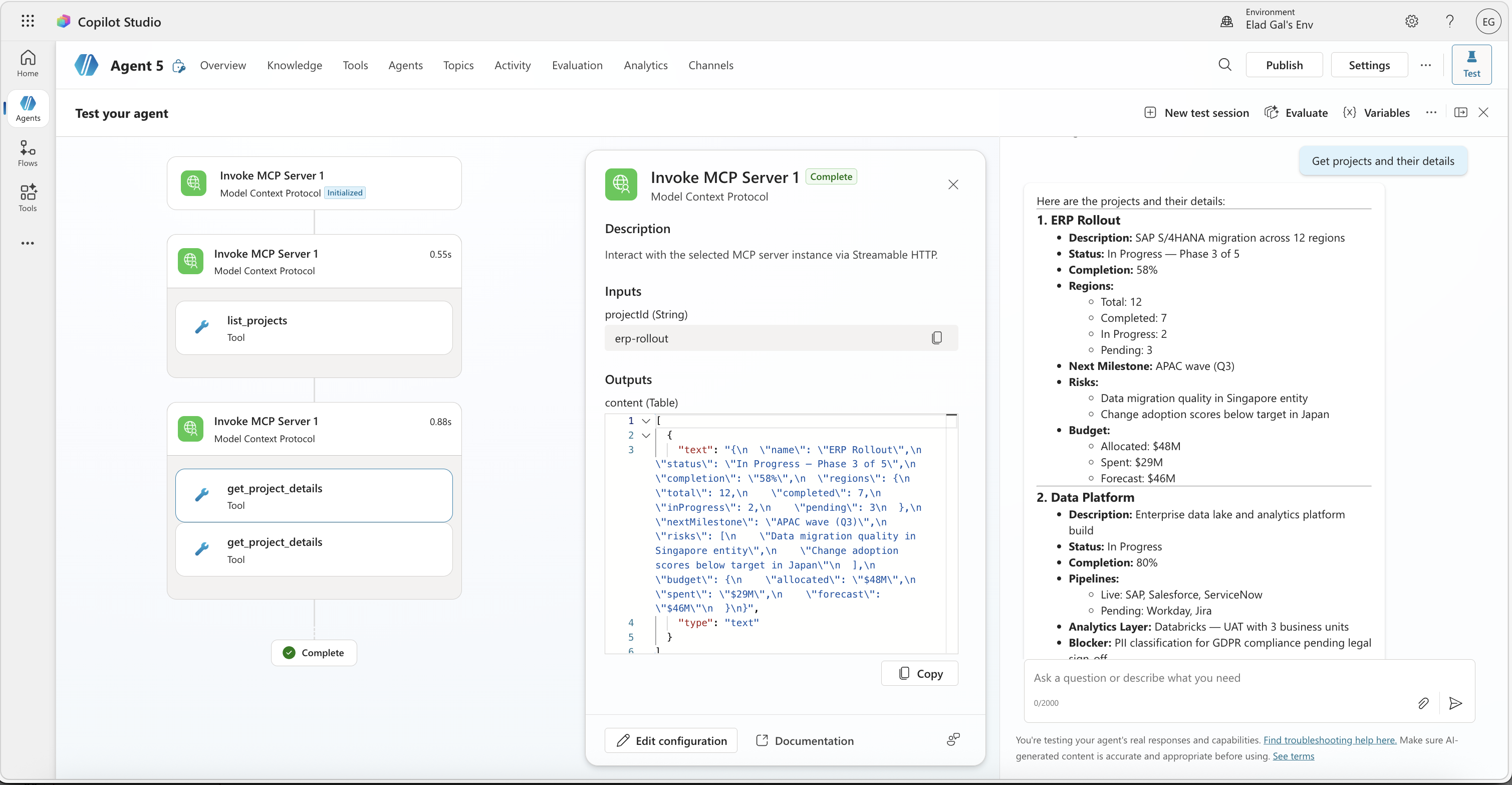 The agent in action: list_projects and get_project_details calls all routed to Contoso’s data through the single connector.
The agent calls the tools through the single connector, and the responses come back scoped to Contoso’s data. If the maker had picked Fabrikam instead, the same connector would route to a different endpoint with different projects.
Under the Hood: The Connector
Before deploying this connector, read A Note on Security for important considerations about URL handling in this pattern.
The Swagger: x-ms-dynamic-values
That dropdown is powered by two operations in the connector’s Swagger definition. A hidden ListInstances operation fetches the catalog, and the InvokeMCP operation references it via x-ms-dynamic-values:
1
2
3
4
5
6
7
8
9
10
11
12
13
14
15
16
17
18
19
20
21
22

{
  "/mcp": {
    "post": {
      "operationId": "InvokeMCP",
      "x-ms-agentic-protocol": "mcp-streamable-1.0",
      "parameters": [
        {
          "name": "instanceUrl",
          "in": "query",
          "type": "string",
          "x-ms-dynamic-values": {
            "operationId": "ListInstances",
            "value-path": "mcpUrl",
            "value-title": "name"
          },
          "required": true,
          "description": "MCP instance endpoint URL"
        }
      ]
    }
  }
}
The ListInstances operation is marked as x-ms-visibility: internal, which means makers never see it as an action they can call. It exists only to power this dropdown. When a maker configures the connector action, ListInstances fires behind the scenes, fetches the catalog, and populates the dropdown with instance names. The selected value is the full mcpUrl for that instance.
This dynamic routing pattern is a particularly good fit for MCP because none of the tools are defined in the Swagger itself. The connector just declares “I speak MCP” via x-ms-agentic-protocol, and the tools are discovered at runtime from whichever endpoint the maker selected. That means individual instances don’t even have to offer the same tools. One region might expose list_projects and get_project_details, while another adds update_status or export_report. The connector doesn’t need to change.
The C# Script: URL Rewriting
The dropdown gives makers a clean experience, but behind the scenes someone still needs to route the request to the right endpoint. That’s the C# script’s job. It intercepts outgoing requests and rewrites the URL based on the selected instance:
1
2
3
4
5
6
7
8
9
10
11
12
13
14
15
16
17
18
19
20
21
22
23
24
25
26
27
28
29
30

public class Script : ScriptBase
{
    public override async Task<HttpResponseMessage> ExecuteAsync()
    {
        if (Context.OperationId == "InvokeMCP")
        {
            var query = HttpUtility.ParseQueryString(Context.Request.RequestUri.Query);
            var instanceUrl = query["instanceUrl"];

            if (!string.IsNullOrEmpty(instanceUrl))
            {
                var targetUri = new Uri(instanceUrl);

                var builder = new UriBuilder(Context.Request.RequestUri)
                {
                    Scheme = targetUri.Scheme,
                    Host = targetUri.Host,
                    Port = targetUri.Port,
                    Path = targetUri.AbsolutePath
                };

                query.Remove("instanceUrl");
                builder.Query = query.ToString();
                Context.Request.RequestUri = builder.Uri;
            }
        }

        return await this.Context.SendAsync(this.Context.Request, this.CancellationToken);
    }
}
What’s happening here:
- The script only intercepts
InvokeMCPrequests (theListInstancescatalog call passes through untouched) - It extracts the
instanceUrlquery parameter, which contains the full MCP endpoint URL from the dropdown selection - It rebuilds the request URI with the target instance’s scheme, host, port, and path
- It strips
instanceUrlfrom the query string before forwarding, since the MCP server doesn’t need it - The rewritten request goes to the correct MCP instance
The connector nominally points at a /mcp path, but the C# script transparently redirects traffic to whichever instance the maker selected. This sample uses URL rewriting, but the script can implement any routing logic you need.
A word of caution on C# scripts in connectors. Custom code (C# scripts) in Power Platform connectors may not be available in all environments. Some organizations restrict this capability through DLP policies or governance controls. If C# script support isn’t an option, you’d need to handle the routing differently. An API gateway or a proxy layer in front of the MCP server that reads the instance selection from a header or query parameter would work. Check your organization’s policies before going down this path.
Try It Yourself
The sample includes deployment scripts that set up dev tunnels, build the services, and deploy the connector to your Power Platform environment. You can have this running end-to-end in minutes. Head over to the full sample and deployment instructions and give it a spin.
Under the Hood: The Catalog
Now let’s look at what powers that dropdown. The catalog is a lightweight Express server that returns the list of available MCP instances:
1
2
3
4
5
6
7
8
9
10
11
12
13
14
15
16

const instances = [
  { id: "contoso", name: "Contoso", description: "Global ERP transformation programme" },
  { id: "fabrikam", name: "Fabrikam", description: "Supply chain modernisation" },
  { id: "northwind", name: "Northwind", description: "Finance & HR digital transformation" }
];

app.get("/instances", (_req: Request, res: Response) => {
  res.json(
    instances.map((i) => ({
      id: i.id,
      name: i.name,
      description: i.description,
      mcpUrl: `${MCP_SERVER_BASE}/instances/${i.id}/mcp`,
    }))
  );
});
Each entry includes an mcpUrl that points to that instance’s MCP endpoint. The catalog dynamically constructs these URLs using the MCP_SERVER_BASE environment variable, so the same catalog works across environments (local dev tunnels, staging, production).
In a real deployment, this catalog could be backed by a database, a config file, or a service registry. The point is that adding a new endpoint is a data change, not a connector change.
Under the Hood: The MCP Server
The sample uses a single Express application that simulates separate regional MCP endpoints at parameterized routes (/instances/:instanceId/mcp). Each instance exposes the same tools (list_projects, get_project_details) but scoped to its own data:
1
2
3
4
5
6
7
8
9
10
11
12
13
14
15
16
17
18
19
20
21
22
23
24
25
26
27
28
29

function createServer(instanceId: string): Server {
  const instance = instances.find((i) => i.id === instanceId)!;
  const instanceProjects = projects[instanceId];

  const server = new Server(
    { name: `${instance.name} MCP Server`, version: "1.0.0" },
    { capabilities: { tools: {} } }
  );

  server.setRequestHandler(ListToolsRequestSchema, async () => ({
    tools: [
      {
        name: "list_projects",
        description: `List all projects in the ${instance.name} instance.`,
        inputSchema: zodToJsonSchema(ListProjectsSchema),
      },
      {
        name: "get_project_details",
        description:
          `Get details for a project in the ${instance.name} instance. ` +
          `Available projects: ${instanceProjects.map((p) => `${p.id} (${p.name})`).join(", ")}`,
        inputSchema: zodToJsonSchema(GetProjectDetailsSchema),
      },
    ],
  }));

  // ... tool handlers
  return server;
}
In a production setting, these would be separate services running independently across regions or tenants. The routing pattern works the same either way: the catalog lists them, the connector routes to them.
A Note on Security
The sample intentionally skips authentication to keep the focus on the dynamic URL routing pattern. In a production deployment, your connector and MCP endpoints should require authentication. For guidance on setting up auth with custom connectors, including the On-Behalf-Of flow, see the OBO for Custom Connectors post.
The sample also passes the full MCP endpoint URL as the instanceUrl parameter. That’s the most flexible approach, but it means a maker could, in theory, edit the dropdown value and point the connector at an arbitrary URL that didn’t come from the catalog.
This risk can be mitigated with Virtual Network (VNet) integration for Power Platform. With VNet support, the connector’s outbound traffic is restricted to addresses within your subnet, so even if someone tampered with the URL, the request would only reach services you control.
If you want to lock this down further without VNet, you can change the pattern so the catalog returns instance IDs instead of full URLs, and the C# script resolves those IDs back to URLs by calling the catalog itself. That way the dropdown value is just a name like contoso, and the actual endpoint URL never leaves the server side. Alternatively, the catalog can return IDs that map to path segments (e.g., /instances/contoso/mcp), and the C# script constructs the full URL from a base address that’s hardcoded in the connector or script.
As of today, DLP policies and connector action control policies for custom connectors do not block URLs that are resolved at runtime by C# scripts. There is active work being done in this area, so this may change. In the meantime, VNet integration is the most reliable way to control where your connector traffic can go.
Key Takeaways
- Maker-friendly: Makers pick from a dropdown. They never see or manage URLs.
- Self-updating: New instances added to the catalog appear automatically in the dropdown. No connector updates, no redeployment, no maker action required.
- A natural fit for MCP: Tools are discovered at runtime, so instances can even offer different tool sets without changing the connector.
- C# script routing: The connector’s code component rewrites URLs at runtime. Be aware that C# in connectors may not be approved everywhere, and that dynamic URL resolution introduces security considerations. See A Note on Security for mitigations.
If you’re working with MCP in Copilot Studio and haven’t explored the connector comparison post yet, that’s a good companion read for understanding where connectors and MCP servers overlap. And if you’re new to MCP tools and resources in general, the MCP tools and resources walkthrough covers the fundamentals.
Have you run into the multi-endpoint challenge in your own organization? I’d love to hear how you’ve solved it, or if this pattern opens up new possibilities for your agents. Drop a comment below!