Embedding WebChat Without Writing a Single Line of JavaScript
A new library that lets you embed BotFramework WebChat into any website using only HTML data attributes. No JavaScript knowledge required.

I built a new library. It’s all about minimalism. In that spirit, this post should probably end here.
Or maybe I should present it as a haiku:
Data attributes
No JavaScript needed
WebChat just appears
But I’m too excited about this one to leave it there. So here’s the full picture.
The short version: You can now embed a fully functional Copilot Studio chat widget on any website using nothing but HTML. No JavaScript to write. No build steps. Just a <div> with some data attributes and a script tag.
The Problem with Traditional WebChat Embedding
The standard approach to embedding BotFramework WebChat looks something like this:
1
2
3
4
5
6
7
8
9
10
11
12
13
14
15

const tokenEndpointURL = 'https://your-token-endpoint';
const res = await fetch(tokenEndpointURL);
const { token } = await res.json();

window.WebChat.renderWebChat(
  {
    directLine: window.WebChat.createDirectLine({ token }),
    styleOptions: {
      accent: '#0078d4',
      bubbleBorderRadius: 12,
      // ... many more options
    }
  },
  document.getElementById('webchat')
);
This requires:
- Understanding async/await and fetch
- Knowing how Direct Line tokens work
- Configuring styleOptions manually
- Error handling for token failures
- Managing the chat container element
And this is just for a static chat window. Want a floating bubble that minimizes and expands? Now you’re also building:
- A toggle button with state management
- Show/hide animations
- A header with minimize and restart controls
- Positioning logic for the floating container
All doable for a developer, but for someone who just wants to add a chat widget to their marketing site it’s a pain.
Enter botframework-webchat-embed
botframework-webchat-embed is a lightweight wrapper around WebChat that handles all of the above for you. You configure everything through HTML data attributes, and it takes care of token fetching, widget rendering, and the floating bubble UI.
Here’s what the entire integration looks like:
1
2
3
4
5
6
7
8

<!-- 1. Add a container with your token endpoint -->
<div
  style="position: fixed; bottom: 20px; right: 20px; width: 380px; height: 550px;"
  data-webchat-token-url="https://your-copilot-studio-token-endpoint">
</div>

<!-- 2. Load the script -->
<script src="https://cdn.jsdelivr.net/npm/botframework-webchat-embed@latest"></script>
That’s it. Two elements. The script automatically finds any element with data-webchat-token-url and renders a fully functional chat widget complete with:
- A floating chat bubble that expands when clicked
- A header with minimize and restart buttons
- Automatic style inheritance from your site’s CSS variables
- Lazy loading (WebChat only loads when the user opens the widget)
Configuring the Widget
First, you’ll need your Copilot Studio token endpoint. Go to Settings → Channels, select the Email channel, and copy the Token Endpoint URL.
This library only supports unauthenticated agents. If your agent requires Entra ID authentication, you’ll need the full WebChat SDK instead.
Appearance
Customize the header and bubble text:
1
2
3
4
5

<div
  data-webchat-token-url="https://your-token-endpoint"
  data-webchat-title="Support"
  data-webchat-bubble-text="Need help?">
</div>
Styling
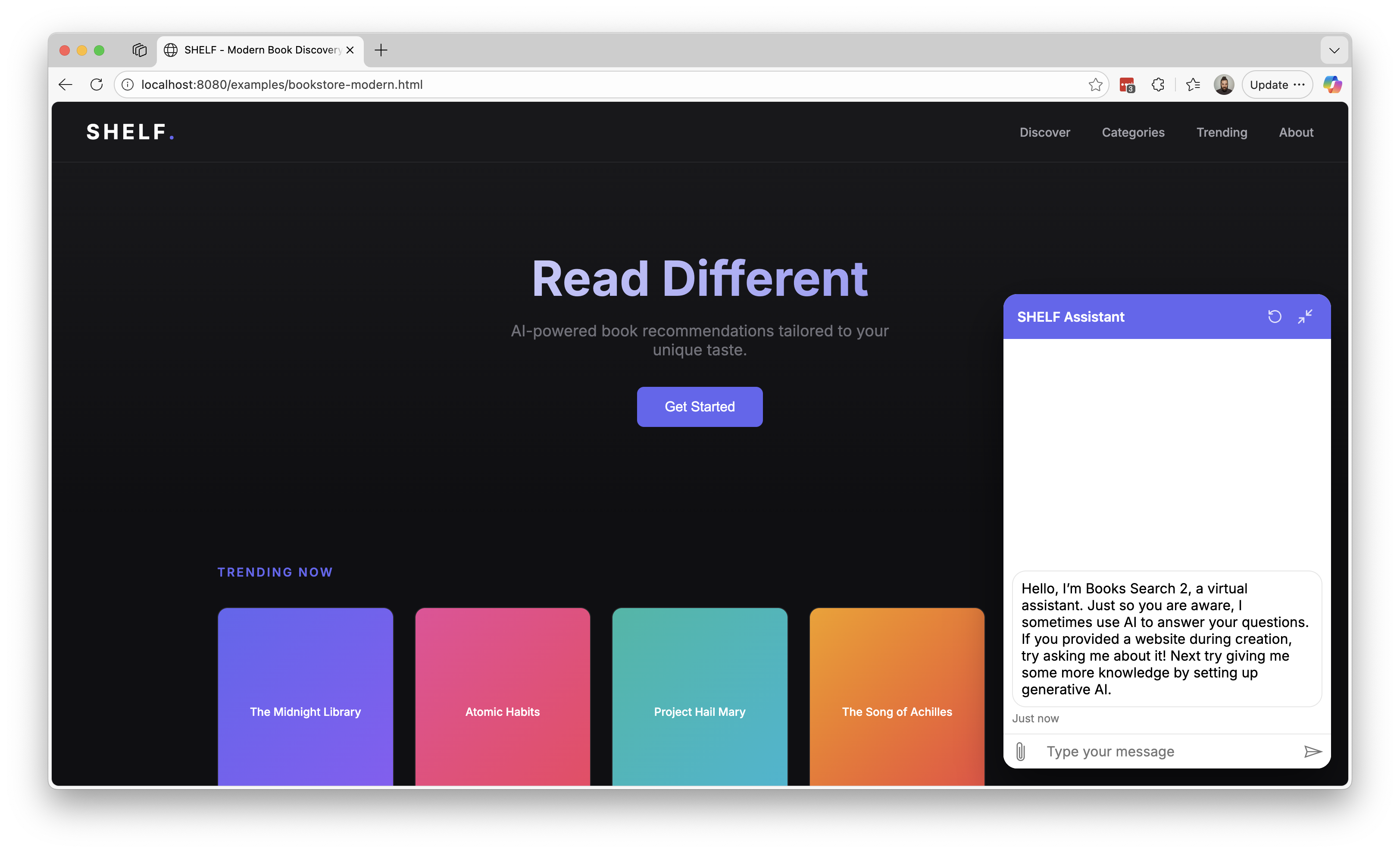
The widget automatically picks up your site’s CSS variables (--primary-color, --accent-color, --brand-color) and inherits font-family from the container. Two widgets on different sites, zero explicit styling:
 Site with
 --primary-color: #6366f1
 Site with
 --primary-color: #f97316
For explicit control, use data-webchat-style-* attributes (kebab-case versions of any WebChat styleOption):
1
2
3
4
5
6

<div
  data-webchat-token-url="..."
  data-webchat-style-accent-color="#ff6b6b"
  data-webchat-style-bubble-border-radius="8"
  data-webchat-style-hide-upload-button="true">
</div>
Behavior
This is where things get fun. Remember all that state management, lazy loading, and welcome message logic I mentioned earlier? It’s all handled through a few attributes:
| Attribute | Default | What it does |
|---|---|---|
data-webchat-minimized |
true |
Start as a floating bubble |
data-webchat-preload |
false |
Load WebChat immediately, even when minimized |
data-webchat-send-start-event |
true |
Trigger the Conversation Start topic on load |
data-webchat-mock-welcome |
false |
Show a client-side welcome message instead of calling the agent |
That last one is my favorite. Want to display a friendly greeting without actually triggering the agent? Just flip a boolean. No Redux middleware, no activity injection, no timing hacks. I wrote a whole post about mocked welcome messages explaining why this matters, and here it’s just… an attribute.
A Complete Example
Here’s what it looks like on a dark-themed site:
1
2
3
4
5
6
7
8
9
10
11
12
13
14
15
16
17
18
19
20
21
22
23
24
25

<!DOCTYPE html>
<html>
<head>
  <style>
    :root { --primary-color: #6366f1; }
    body { font-family: 'Inter', sans-serif; }
    .chat-widget {
      position: fixed;
      bottom: 20px;
      right: 20px;
      width: 380px;
      height: 550px;
    }
  </style>
</head>
<body>
  <div
    class="chat-widget"
    data-webchat-token-url="https://your-token-endpoint"
    data-webchat-title="Support"
    data-webchat-bubble-text="Chat with us">
  </div>
  <script src="https://cdn.jsdelivr.net/npm/botframework-webchat-embed@latest"></script>
</body>
</html>
Limitations
This library intentionally doesn’t support:
- Entra ID authenticated agents
- Direct Line secrets
- Custom middleware or activity interceptors
If you need any of those, use the full BotFramework WebChat SDK.
Key Takeaways
- Embed WebChat with just HTML data attributes
- Automatic style inheritance from CSS variables
- Floating bubble UI with minimize and restart built-in
- Unauthenticated Copilot Studio agents only
What is an attribute?
Intent, declared, not coded
And yet, it becomes
Have you tried embedding WebChat on your site? I’d love to hear about your use cases. Drop a comment below!