MSCCL++ Torch Integration Guide
This guide shows how to use MSCCL++ with PyTorch for high-performance collective communication.
Quick Start
MSCCL++ provides three ways to implement collective algorithms with PyTorch:
Approach |
Best For |
Complexity |
|---|---|---|
Default Algorithms |
Quick integration, standard use cases |
Low |
DSL-based |
Custom communication patterns without C++ |
Medium |
Native C++/CUDA |
Maximum control, custom kernels |
High |
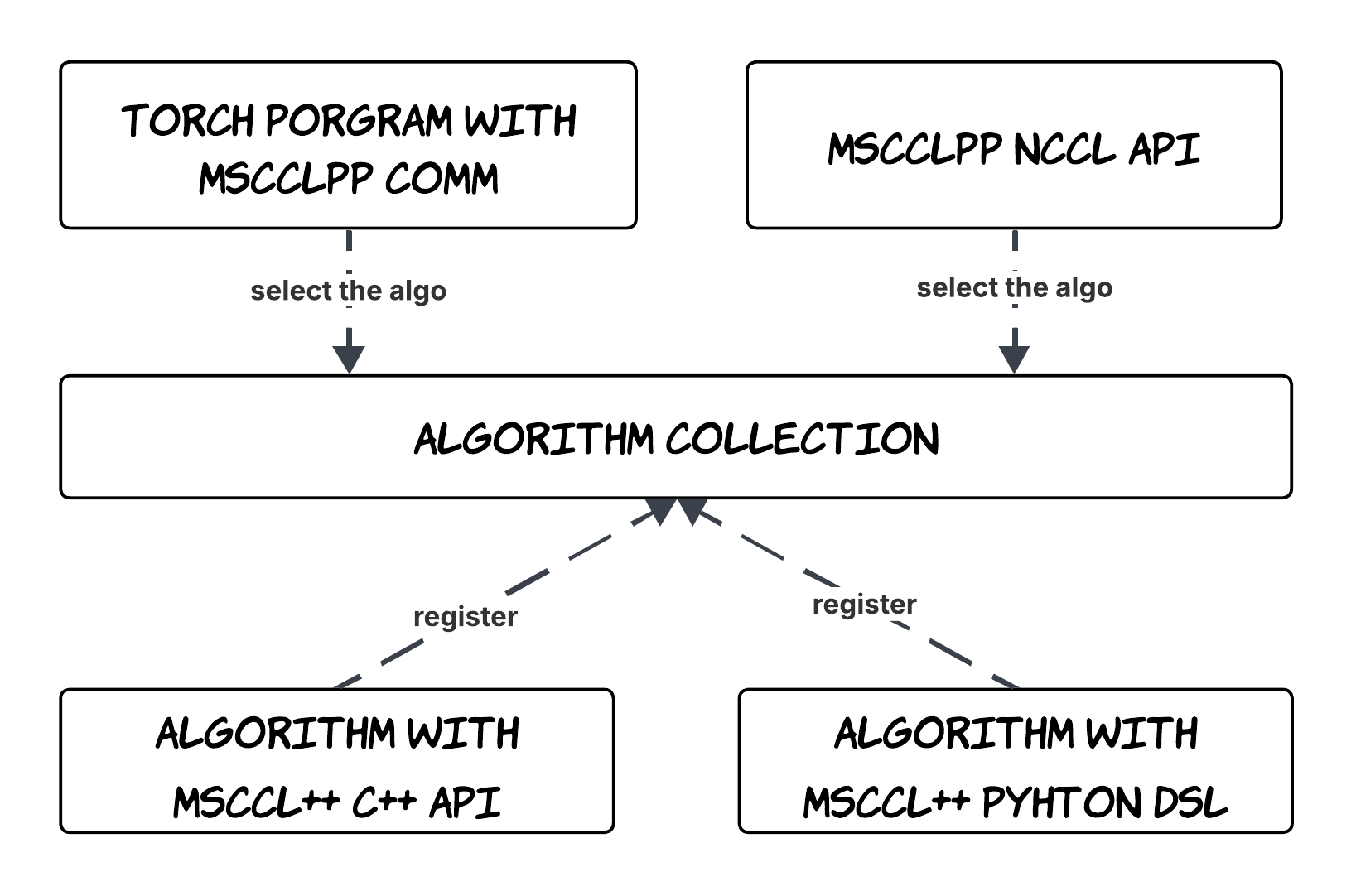
MSCCL++ Customization Algorithm Selection Overview
Prerequisites
Before starting, ensure you have:
MSCCL++ installed with Python bindings
PyTorch with CUDA support
Required Environment Variables:
export MSCCLPP_MASTER_ADDR=<master_node_ip>  # IP address of master node
export MSCCLPP_MASTER_PORT=<port>             # Port for communication (e.g., 29500)
Common Setup: Creating a Communicator
All approaches require initializing an MSCCL++ communicator. Here’s a reusable setup:
import os
import torch
import netifaces as ni
import ipaddress

def get_network_interface(ip: str):
    """Find the network interface for the given IP address."""
    target = ipaddress.ip_address(ip)
    for interface in ni.interfaces():
        addresses = ni.ifaddresses(interface)
        if ni.AF_INET in addresses:
            for link in addresses[ni.AF_INET]:
                if "addr" in link:
                    if ipaddress.ip_address(link["addr"]) == target:
                        return interface
    return None

def init_communicator():
    """Initialize MSCCL++ communicator from environment variables."""
    rank = int(os.environ["RANK"])
    world_size = int(os.environ["WORLD_SIZE"])
    local_rank = int(os.environ.get("LOCAL_RANK", rank))

    torch.cuda.set_device(local_rank)

    master_addr = os.environ["MSCCLPP_MASTER_ADDR"]
    master_port = os.environ["MSCCLPP_MASTER_PORT"]
    interface = get_network_interface(master_addr)

    if interface is None:
        raise ValueError(f"Cannot find network interface for IP {master_addr}")

    interface_trio = f"{interface}:{master_addr}:{master_port}"
    comm_group = mscclpp.CommGroup(
        interfaceIpPortTrio=interface_trio,
        rank=rank,
        size=world_size
    )
    return comm_group
Approach 1: Default Built-in Algorithms (Easiest)
Use pre-built, optimized algorithms from MSCCL++. Best for standard collective operations.
Example: customized_comm_with_default_algo.py
Step 1: Load Default Algorithms
import mscclpp
import mscclpp.utils as mscclpp_utils

def load_algorithms(scratch_buffer: torch.Tensor, rank: int):
    """Load MSCCL++ default algorithm collection."""
    collection_builder = mscclpp.AlgorithmCollectionBuilder()
    return collection_builder.build_default_algorithms(
        scratch_buffer=scratch_buffer.data_ptr(),
        scratch_buffer_size=scratch_buffer.nbytes,
        rank=rank
    )
Step 2: Create a Custom Communicator Class
class CustomizedComm:
    def __init__(self, comm: mscclpp.CommGroup):
        self.comm = comm

        # Allocate scratch buffer (required by some algorithms)
        dlpack = mscclpp.RawGpuBuffer(1 << 27).to_dlpack(data_type=str(torch.float16))
        self.scratch_buffer = torch.utils.dlpack.from_dlpack(dlpack)

        # Load and select algorithms
        algorithms = load_algorithms(self.scratch_buffer, comm.my_rank)

        # Select specific algorithms by name
        self._algo_small = [
            algo for algo in algorithms
            if algo.collective == "allreduce"
            and algo.name == "default_allreduce_nvls_packet"
        ][0]

        self._algo_large = [
            algo for algo in algorithms
            if algo.collective == "allreduce"
            and algo.name == "default_allreduce_nvls_warp_pipeline"
        ][0]

    def all_reduce(self, tensor: torch.Tensor, stream=None):
        # Select algorithm based on message size
        algo = self._algo_small if tensor.nbytes < (1 << 20) else self._algo_large

        algo.execute(
            comm=self.comm.communicator,
            input_buffer=tensor.data_ptr(),
            output_buffer=tensor.data_ptr(),
            input_size=tensor.nbytes,
            output_size=tensor.nbytes,
            dtype=mscclpp_utils.torch_dtype_to_mscclpp_dtype(tensor.dtype),
            op=mscclpp.ReduceOp.SUM,
            stream=stream.cuda_stream if stream else 0
        )
Step 3: Run
MSCCLPP_MASTER_ADDR=<ip> MSCCLPP_MASTER_PORT=<port> \
  torchrun --nnodes=1 --nproc_per_node=8 customized_comm_with_default_algo.py
Approach 2: DSL-based Algorithms (Medium)
Define custom communication patterns using MSCCL++ Python DSL. No C++ required.
Example: customized_comm_with_dsl.py
Step 1: Define the Collective Program
import mscclpp
from mscclpp.language.collectives import AllReduce
from mscclpp.language.channel import SwitchChannel, MemoryChannel, BufferType, SyncType
from mscclpp.language.program import CollectiveProgram
from mscclpp.language.rank import Rank

def allreduce_nvls(spec: mscclpp.AlgoSpec) -> CollectiveProgram:
    """Define an allreduce using NVLS (NVLink SHARP)."""
    gpu_size = spec.world_size

    with CollectiveProgram(
        spec.name,
        spec.collective,
        gpu_size,
        instances=spec.instances,
        protocol=spec.protocol,
        num_threads_per_block=spec.num_threads_per_block,
        min_message_size=spec.min_message_size,
        max_message_size=spec.max_message_size,
    ) as program:
        # Create NVLS channel for all GPUs
        nvls_chan = SwitchChannel(
            rank_list=[gpu for gpu in range(gpu_size)],
            buffer_type=BufferType.input
        )

        # Create memory channels for synchronization
        channels = {}
        for gpu in range(gpu_size):
            for peer in range(gpu_size):
                if peer != gpu:
                    channels[(peer, gpu)] = MemoryChannel(peer, gpu)

        # Synchronize before operation
        for gpu in range(gpu_size):
            for peer in range(gpu_size):
                if peer != gpu:
                    channels[(peer, gpu)].signal(tb=0, relaxed=True)
            for peer in range(gpu_size):
                if peer != gpu:
                    channels[(peer, gpu)].wait(tb=0, relaxed=True, data_sync=SyncType.after)

        # Perform reduce and broadcast
        for gpu in range(gpu_size):
            rank = Rank(gpu)
            input_buffer = rank.get_input_buffer()
            nvls_chan.at_rank(gpu).reduce(
                buffer_offset=gpu, size=1,
                dst_chunk=input_buffer[gpu:gpu+1], tb=0
            )
            nvls_chan.at_rank(gpu).broadcast(
                src_chunk=input_buffer[gpu:gpu+1],
                buffer_offset=gpu, size=1, tb=0
            )

        # Synchronize after operation
        for gpu in range(gpu_size):
            for peer in range(gpu_size):
                if peer != gpu:
                    channels[(peer, gpu)].signal(tb=0, relaxed=True, data_sync=SyncType.before)
            for peer in range(gpu_size):
                if peer != gpu:
                    channels[(peer, gpu)].wait(tb=0, relaxed=True)

    return program
Step 2: Compile the Algorithm
def setup_algorithm(rank: int, world_size: int, nranks_per_node: int):
    """Compile the DSL algorithm for this rank."""
    spec = mscclpp.language.AlgoSpec(
        name="allreduce_nvls",
        collective=AllReduce(world_size, 1, True),
        nranks_per_node=nranks_per_node,
        world_size=world_size,
        in_place=True,
        instances=nranks_per_node,
        protocol="Simple",
        num_threads_per_block=1024,
        min_message_size=1 << 20,
        max_message_size=48 << 30,
        tags={"nvls": 1},
    )
    return mscclpp.compile(algo=allreduce_nvls, algo_spec=spec, rank=rank)
Step 3: Execute with Executor
DSL algorithms require an Executor:
class CustomizedComm:
    def __init__(self, comm: mscclpp.CommGroup, algorithm):
        self.comm = comm
        self.executor = mscclpp.Executor(comm.communicator)  # Required for DSL
        self.algorithm = algorithm

    def all_reduce(self, tensor: torch.Tensor, stream=None):
        self.algorithm.execute(
            comm=self.comm.communicator,
            executor=self.executor,  # Pass executor for DSL algorithms
            input_buffer=tensor.data_ptr(),
            output_buffer=tensor.data_ptr(),
            input_size=tensor.nbytes,
            output_size=tensor.nbytes,
            dtype=mscclpp_utils.torch_dtype_to_mscclpp_dtype(tensor.dtype),
            stream=stream.cuda_stream if stream else 0
        )
Step 4: Run
MSCCLPP_MASTER_ADDR=<ip> MSCCLPP_MASTER_PORT=<port> \
  torchrun --nnodes=1 --nproc_per_node=8 customized_comm_with_dsl.py
Approach 3: Native C++/CUDA Kernels (Advanced)
Write custom CUDA kernels for maximum performance and control.
Example: customized_allgather.py + customized_allgather.cu
Step 1: Implement the CUDA Kernel and Algorithm Builder
Create a .cu file with your kernel and algorithm builder:
// customized_allgather.cu
#include <mscclpp/algorithm.hpp>
#include <mscclpp/core.hpp>
#include <pybind11/pybind11.h>

namespace py = pybind11;

// Your CUDA kernel
__global__ void allgather(
    mscclpp::DeviceHandle<mscclpp::PortChannel>* channels,
    int rank,
    size_t nbytesPerGPU
) {
    // Kernel implementation...
}

// Algorithm builder class
class AllgatherAlgoBuilder : public mscclpp::AlgorithmBuilder {
public:
    std::shared_ptr<mscclpp::Algorithm> build() override {
        auto self = std::make_shared<AllgatherAlgoBuilder>();
        return std::make_shared<mscclpp::NativeAlgorithm>(
            "allgather",    // Algorithm name
            "allgather",    // Collective type
            // Initialize function
            [self](std::shared_ptr<mscclpp::Communicator> comm) {
                self->initialize(comm);
            },
            // Kernel execution function
            [self](const std::shared_ptr<void> ctx,
                   const void* input, void* output,
                   size_t inputSize, size_t outputSize,
                   mscclpp::DataType dtype, mscclpp::ReduceOp op,
                   cudaStream_t stream, int nBlocks, int nThreadsPerBlock,
                   const std::unordered_map<std::string, uintptr_t>& extras,
                   [[maybe_unused]] mscclpp::DataType accumDtype) {
                return self->kernelFunc(ctx, input, output, inputSize, dtype, stream);
            },
            // Context initialization function
            [self](std::shared_ptr<mscclpp::Communicator> comm,
                   const void* input, void* output,
                   size_t inputSize, size_t outputSize, mscclpp::DataType dtype) {
                return self->initContext(comm, input, output, inputSize, dtype);
            },
            // Context key generation function
            [self](const void* input, void* output,
                   size_t inputSize, size_t outputSize, mscclpp::DataType dtype, bool symmetricMemory) {
                return self->generateContextKey(input, output, inputSize, outputSize, dtype, symmetricMemory);
            }
        );
    }

private:
    void initialize(std::shared_ptr<mscclpp::Communicator> comm) { /* ... */ }
    mscclpp::CommResult kernelFunc(const std::shared_ptr<void> ctx, /* ... */) { /* ... */ }
    std::shared_ptr<void> initContext(/* ... */) { /* ... */ }
    mscclpp::AlgorithmCtxKey generateContextKey(/* ... */) { /* ... */ }
};

// Expose to Python
PYBIND11_MODULE(mscclpp_native, m) {
    m.def("create_allgather_algorithm", []() {
        auto builder = std::make_shared<AllgatherAlgoBuilder>();
        auto algo = builder->build();
        // Return as PyCapsule (see full example for capsule handling)
        return py::reinterpret_steal<py::capsule>(getCapsule(algo));
    });
}
Step 2: Compile and Load in Python
import mscclpp
import os

# MSCCL++ compiles the .cu file at runtime using JIT
mscclpp_native = mscclpp.compile_native(
    name="mscclpp_native",
    file=os.path.join(os.path.dirname(__file__), "customized_allgather.cu")
)

# Get the algorithm from the compiled module
capsule = mscclpp_native.create_allgather_algorithm()
algorithm = mscclpp.Algorithm.create_from_native_capsule(capsule)
Step 3: Execute
class CustomizedComm:
    def __init__(self, comm: mscclpp.CommGroup):
        self.comm = comm

        # Compile and load native algorithm
        mscclpp_native = mscclpp.compile_native(
            name="mscclpp_native",
            file="customized_allgather.cu"
        )
        capsule = mscclpp_native.create_allgather_algorithm()
        self.algorithm = mscclpp.Algorithm.create_from_native_capsule(capsule)

    def all_gather(self, tensor: torch.Tensor, out_tensor: torch.Tensor, stream=None):
        self.algorithm.execute(
            self.comm.communicator,
            tensor.data_ptr(),
            out_tensor.data_ptr(),
            tensor.nbytes,
            out_tensor.nbytes,
            mscclpp_utils.torch_dtype_to_mscclpp_dtype(tensor.dtype),
            stream=stream.cuda_stream if stream else 0
        )
Step 4: Run
MSCCLPP_MASTER_ADDR=<ip> MSCCLPP_MASTER_PORT=<port> \
  torchrun --nnodes=1 --nproc_per_node=8 customized_allgather.py
Algorithm.execute() API Reference
All algorithms use the same execute() interface:
algorithm.execute(
    comm,                    # mscclpp.Communicator (required)
    input_buffer,            # int: input data pointer from tensor.data_ptr()
    output_buffer,           # int: output data pointer
    input_size,              # int: input size in bytes (tensor.nbytes)
    output_size,             # int: output size in bytes
    dtype,                   # mscclpp.DataType: data type
    op=mscclpp.ReduceOp.NOP, # Reduction operation (for reduce collectives)
    stream=0,                # CUDA stream handle
    executor=None,           # mscclpp.Executor (required for DSL algorithms)
    nblocks=0,               # Thread blocks (0 = auto)
    nthreads_per_block=0,    # Threads per block (0 = auto)
    extras=None              # dict[str, int]: extra pointer parameters
)
Data Type Conversion:
import mscclpp.utils as mscclpp_utils

# Convert PyTorch dtype to MSCCL++ dtype
mscclpp_dtype = mscclpp_utils.torch_dtype_to_mscclpp_dtype(tensor.dtype)
Getting CUDA Stream:
stream_handle = torch.cuda.current_stream().cuda_stream
Summary
Approach |
When to Use |
Key Requirement |
|---|---|---|
Default |
Standard operations, quick setup |
Scratch buffer |
DSL |
Custom patterns, no C++ needed |
Executor |
Native |
Custom kernels, max performance |
|
All examples are in examples/torch-integration/.
Performance Tuning
The default algorithms use a fixed heuristic to select algorithms based on message size. For production workloads, you can achieve significantly better performance by auto-tuning — benchmarking every candidate algorithm, block count, and thread count for each message size at startup, then using the fastest configuration at runtime.
Reference implementation: MSCCL++ ships a ready-to-use autotuner in python/mscclpp_benchmark/bench_collective.py. It benchmarks every candidate algorithm, block count, and thread count per message size, writes the winning configuration to a JSON file, and can replay that file at runtime. The sections below explain the underlying mechanism; see that benchmark for the complete, maintained implementation.
How It Works
Candidate selection — For each power-of-two message size from 1 KB to 128 MB, the tuner picks the applicable algorithms:
All sizes (when NVLS is supported):
default_allreduce_nvls_zero_copySmall messages (≤ 4 MB):
default_allreduce_nvls_packet,default_allreduce_packetLarge messages (≥ 512 KB):
default_allreduce_rsag_zero_copy
Grid search — Each candidate is run with every combination of block counts (
4, 8, 16, … 128) and thread counts (512, 768, 1024). Results are captured in a CUDA graph and timed.Cross-rank consensus — Elapsed times are averaged across all ranks with an allreduce so every GPU selects the same configuration.
Runtime dispatch —
get_tuned_config()rounds the actual message size up to the next power of two and returns the winning(algorithm, nblocks, nthreads)triple.
Symmetric Memory Allocation
Algorithms like default_allreduce_nvls_zero_copy require symmetric memory — memory where the buffer offset is the same for each rank, allocated via mscclpp.RawGpuBuffer (cuMemAlloc). Regular torch.rand() or torch.empty() allocations cannot be used with these algorithms because they do not guarantee the same offset across ranks. Instead, allocate a single large buffer and reuse it for all message sizes:
# Allocate symmetric memory via RawGpuBuffer and wrap as a PyTorch tensor
tune_tensor = mscclpp.RawGpuBuffer(1 << 27).to_dlpack(data_type=str(torch.float16))
tune_tensor = torch.utils.dlpack.from_dlpack(tune_tensor)
tune_tensor.normal_()
When executing an algorithm with symmetric memory, pass symmetric_memory=True:
def _run_algo(self, algo, tensor, size, nblocks, nthreads):
    return algo.execute(
        comm=self.comm.communicator,
        input_buffer=tensor.data_ptr(),
        output_buffer=tensor.data_ptr(),
        input_size=size,
        output_size=size,
        dtype=mscclpp_utils.torch_dtype_to_mscclpp_dtype(tensor.dtype),
        op=mscclpp.ReduceOp.SUM,
        stream=torch.cuda.current_stream().cuda_stream,
        nblocks=nblocks,
        nthreads_per_block=nthreads,
        symmetric_memory=True,
    )
Loading Candidate Algorithms
The same load_algorithms helper from Approach 1 is reused. The tuner extracts multiple algorithm objects:
algorithms = load_algorithms(scratch_buffer=self.scratch_buffer, rank=self.rank)

self._algorithm_nvls_packet = [
    algo for algo in algorithms
    if algo.collective == "allreduce" and algo.name == "default_allreduce_nvls_packet"
][0]

self._algorithm_rsag_zero_copy = [
    algo for algo in algorithms
    if algo.collective == "allreduce" and algo.name == "default_allreduce_rsag_zero_copy"
][0]

self._algorithm_packet = [
    algo for algo in algorithms
    if algo.collective == "allreduce" and algo.name == "default_allreduce_packet"
][0]

# NVLS zero-copy is only available on supported hardware
if mscclpp.is_nvls_supported():
    self._algorithm_nvls_zero_copy = [
        algo for algo in algorithms
        if algo.collective == "allreduce" and algo.name == "default_allreduce_nvls_zero_copy"
    ][0]
The Tuning Loop
The tuning loop iterates over message sizes, candidate algorithms, and kernel launch parameters. CUDA graphs are used for accurate timing. Note the use of RawGpuBuffer for symmetric memory:
def _tune(self, n_warmup, n_graph_launches, n_ops_per_graph):
    sizes = [1 << i for i in range(10, 28)]
    self.best_configs = {1024: (self._algorithm_nvls_packet, 0, 0)}

    # Use RawGpuBuffer for symmetric memory allocation
    tune_tensor = mscclpp.RawGpuBuffer(1 << 27).to_dlpack(data_type=str(torch.float16))
    tune_tensor = torch.utils.dlpack.from_dlpack(tune_tensor)
    tune_tensor.normal_()
    candidates_nblocks = [4, 8, 16, 24, 32, 48, 64, 128]
    candidates_nthreads = [512, 768, 1024]

    for size in sizes:
        algos = []
        if mscclpp.is_nvls_supported():
            algos.append(self._algorithm_nvls_zero_copy)
        if size <= 4 * 1024 * 1024:
            algos.append(self._algorithm_nvls_packet)
            algos.append(self._algorithm_packet)
        if size >= 512 * 1024:
            algos.append(self._algorithm_rsag_zero_copy)

        best_time = float("inf")
        best_config = None

        for algo in algos:
            for nb in candidates_nblocks:
                for nt in candidates_nthreads:
                    if self._run_algo(algo, tune_tensor, size, nb, nt) != 0:
                        continue  # skip unsupported configs

                    # Warmup, then time with CUDA graphs
                    # ... (see full example for graph capture logic)

                    # Average timing across ranks
                    time_tensor = torch.full(
                        (self.world_size,), elapsed, dtype=torch.float64, device="cuda"
                    ).to(dtype=torch.float32)
                    self.all_reduce(time_tensor, op=torch.distributed.ReduceOp.SUM)
                    avg_time = time_tensor[self.rank].item() / self.world_size

                    if avg_time < best_time:
                        best_time = avg_time
                        best_config = (algo, nb, nt)

        if best_config:
            self.best_configs[size] = best_config
Dispatching with Tuned Configuration
At runtime, round the message size to the next power of two and look up the best configuration. When the tensor is allocated from RawGpuBuffer (cuMemAlloc) and the buffer offset is the same for each rank, pass symmetric_memory=True to the execute() call (see the Symmetric Memory Allocation section above):
def get_tuned_config(self, size):
    if size < 1024:
        target_size = 1024
    elif size > 256 * 1024 * 1024:
        target_size = 256 * 1024 * 1024
    else:
        target_size = 1 << (size - 1).bit_length()
    return self.best_configs.get(target_size)

def all_reduce(self, tensor, op=torch.distributed.ReduceOp.SUM, stream=None):
    config = self.get_tuned_config(tensor.nbytes)
    algo, nblocks, nthreads = config if config else (self._algorithm_nvls_packet, 0, 0)
    algo.execute(
        comm=self.comm.communicator,
        input_buffer=tensor.data_ptr(),
        output_buffer=tensor.data_ptr(),
        input_size=tensor.nbytes,
        output_size=tensor.nbytes,
        dtype=mscclpp_utils.torch_dtype_to_mscclpp_dtype(tensor.dtype),
        op=mscclpp.ReduceOp.SUM,
        stream=stream.cuda_stream if stream else torch.cuda.current_stream().cuda_stream,
        nblocks=nblocks,
        nthreads_per_block=nthreads,
    )
Benchmarking with Symmetric Memory
When benchmarking tuned configurations, use the same RawGpuBuffer allocation pattern. Create one large buffer and slice it for each message size:
def benchmark(self, n_warmup=10, n_graph_launches=10, n_iter_per_graph=100):
    # Allocate a single large RawGpuBuffer (symmetric memory) and reuse for all sizes
    dtype = torch.float16
    bench_buf = mscclpp.RawGpuBuffer(1 << 27).to_dlpack(data_type=str(dtype))
    bench_buf = torch.utils.dlpack.from_dlpack(bench_buf)
    bench_buf.normal_()

    for size in sizes:
        n_elements = size // bench_buf.element_size()
        tensor = bench_buf[:n_elements]

        # Capture CUDA graph, warmup, and time...
        with torch.cuda.graph(g, stream=capture_stream):
            for _ in range(n_iter_per_graph):
                self.all_reduce(tensor, op=torch.distributed.ReduceOp.SUM)
Running the Autotuner
MSCCL++’s built-in autotuner benchmarks every candidate configuration and saves the best one to JSON. Run it across the ranks of your job, then reuse the generated config:
# Autotune and save the tuned config
mpirun -np 8 --allow-run-as-root \
  python3 -m mscclpp_benchmark.bench_collective \
  --collective allreduce --dtype float16 --autotune \
  --write-config /tmp/mscclpp_tuned_configs.json

# Replay the tuned config in a benchmark
mpirun -np 8 --allow-run-as-root \
  python3 -m mscclpp_benchmark.bench_collective \
  --collective allreduce --dtype float16 \
  --config-path /tmp/mscclpp_tuned_configs.json