IFD Sim Attachments
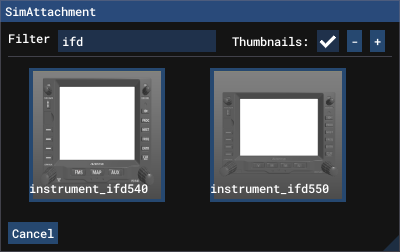
The sim contains sim attachments for both the IFD540 and IFD550. They may be attached to your aircraft using either the aircraft editor in the sim development mode UI, or by editing your attached_objects.cfg directly. Refer to the MSFS2024 SDK documentation for further info on sim attachments.
Attachment Parameters
There are some parameters specific to the IFD that need to be configured for proper operation.
VCockpit Parameters
VCockpit01_htmlgauge00_params contains the URL parameters passed to the instrument for basic configuration. By default it is configured as index 1 and whichever IFD type is attached: ?Index=1&IfdType=IFD550. The numeric Index parameter should be unique for each IFD in the installation.
Behavior Parameters
INSTRUMENT_ID should be the same numeric value as the Index parameter passed to the VCockpit (see above). This ties the local variables and events to the correct instrument.
CIRCUIT_ID should contain either a numeric circuit index, or the name of the circuit with the standard '<NAME>'_n syntax. This ensures lighting only operates when the electrical circuit is powered.
Example Dual IFD540/550 Configuration
[SIM_ATTACHMENT.1]
attachment_root="simattachmentlibs\ifd\instrument_ifd550"
attachment_file="model/instrument_ifd550.xml"
attach_to_model="interior"
attach_to_model_minsize=0
attach_to_node="ATTACH_IFD550"
always_execute_associate_js=1
always_execute_model_behavior=1
vcockpit_parameter.0 = "VCockpit01_htmlgauge00_params,?Index=1&IfdType=IFD550"
behavior_parameter.0="INSTRUMENT_ID,1"
behavior_parameter.1="CIRCUIT_ID,'IFD550'_n"
alias="IFD550"
; uncomment for copper bezel colour
; texture="cu"

[SIM_ATTACHMENT.2]
attachment_root="simattachmentlibs\ifd\instrument_ifd540"
attachment_file="model/instrument_ifd540.xml"
attach_to_model="interior"
attach_to_model_minsize=0
attach_to_node="ATTACH_IFD540"
always_execute_associate_js=1
always_execute_model_behavior=1
vcockpit_parameter.0 = "VCockpit01_htmlgauge00_params,?Index=2&IfdType=IFD540"
behavior_parameter.0="INSTRUMENT_ID,2"
behavior_parameter.1="CIRCUIT_ID,'IFD540'_n"
alias="IFD540"
; uncomment for copper bezel colour
; texture="cu"
Bezel Options
There are two bezel colour options available for the IFDs. The standard units come in black and require no further configuration. The copper colour variant can be configured by adding texture="cu" to the [SimAttachment.n] section.