DocumentDB for VS Code
Release Notes — Back to Release Notes
DocumentDB for VS Code Extension v0.6
We are excited to announce the release of DocumentDB for VS Code Extension v0.6. This is a landmark update for our DocumentDB and MongoDB GUI, focused on query optimization and developer productivity. It introduces a powerful new Query Insights with Performance Advisor, enhances query authoring capabilities, and improves index management for developers working with DocumentDB and MongoDB API databases.
What’s New in v0.6
⭐ Query Insights with Performance Advisor
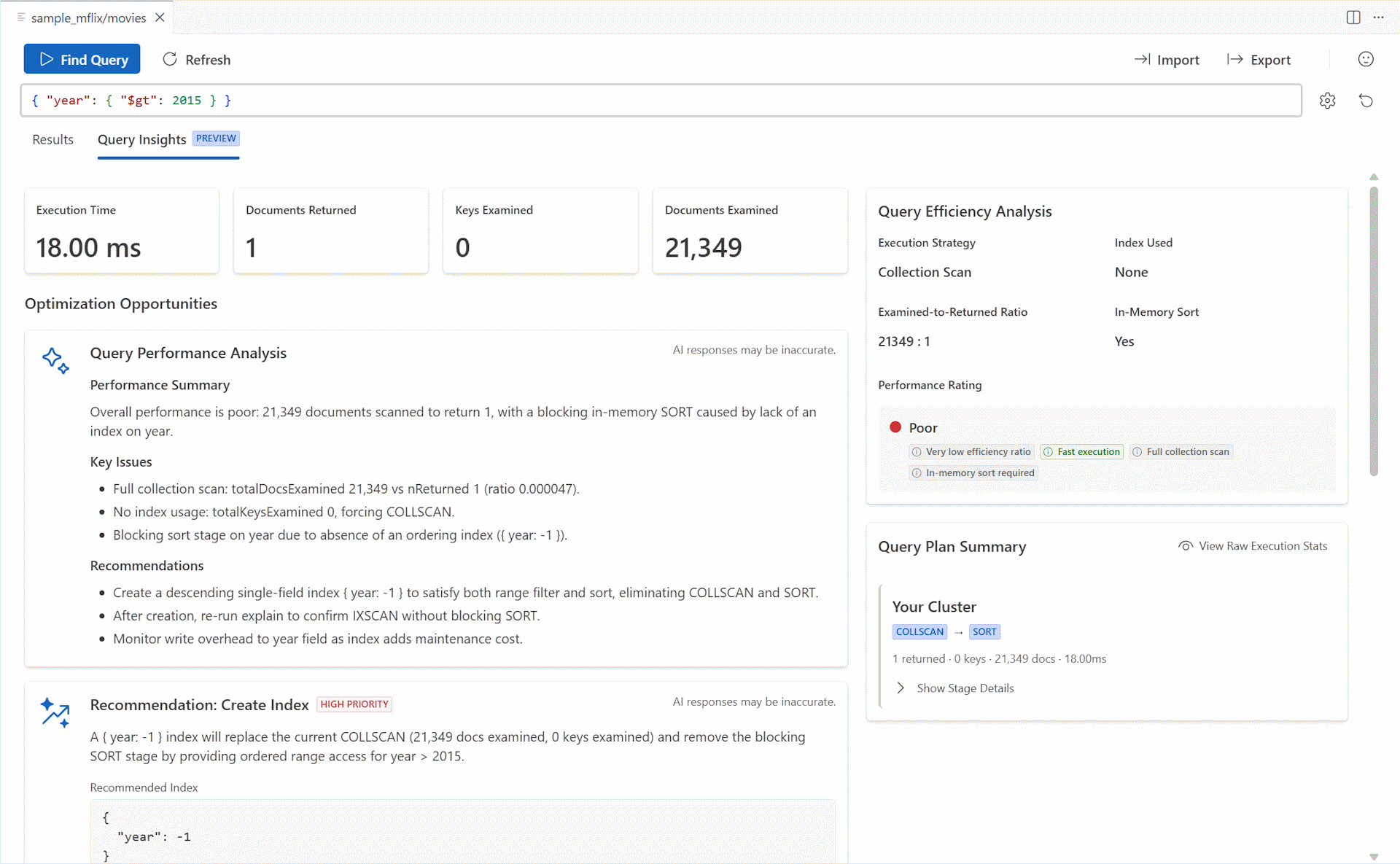
We are introducing a major new feature: Query Insights with Performance Advisor. This powerful tool helps you understand and optimize your queries directly within VS Code. When you run a find query against your DocumentDB or MongoDB API database, a new “Query Insights” tab appears, providing a three-stage analysis of your query’s performance.
-
Stage 1: Initial Performance View The first stage provides an immediate, low-cost static analysis of your query. It visualizes the query plan, showing how the database intends to execute your query. This helps you understand performance bottlenecks and the query’s processing stages without re-running it.
-
Stage 2: Detailed Execution Analysis For a deeper dive, the second stage runs a detailed execution analysis using
executionStatsto gather authoritative metrics. You’ll see precise counts for documents and keys examined, server-side execution time, and a detailed breakdown of each stage in the execution plan. This provides clear insights into how your query actually performed.The complex JSON response from the database is translated into an easy-to-comprehend chart, making it simple to visualize the query’s execution flow.
Additionally, a Query Efficiency Analysis card provides a quick performance assessment. It highlights key aspects of the query’s execution, such as the execution strategy, index usage, and whether an in-memory sort occurred. A performance rating (Good, Fair, or Poor) helps you quickly identify an inefficient or slow query.
-
Stage 3: AI-Powered Recommendations with GitHub Copilot The final stage brings the power of AI to your query optimization workflow. By clicking
Get AI Performance Insights, the extension sends the query shape and execution statistics to a service powered by GitHub Copilot. For more details, please see our documentation.The AI assistant provides:
🕵️♂️ Analysis
A summary of the query’s performance.
📈 Actionable Recommendations
Suggestions for creating, hiding, or unhiding indexes to improve performance, with an option to apply them directly.
🎓 Detailed Explanations
A breakdown of the execution plan to help you understand how the query was processed.
The “Query Insights” feature helps solve performance issues and educates users on query best practices for DocumentDB and MongoDB API databases.
⭐ Improved Query Specification
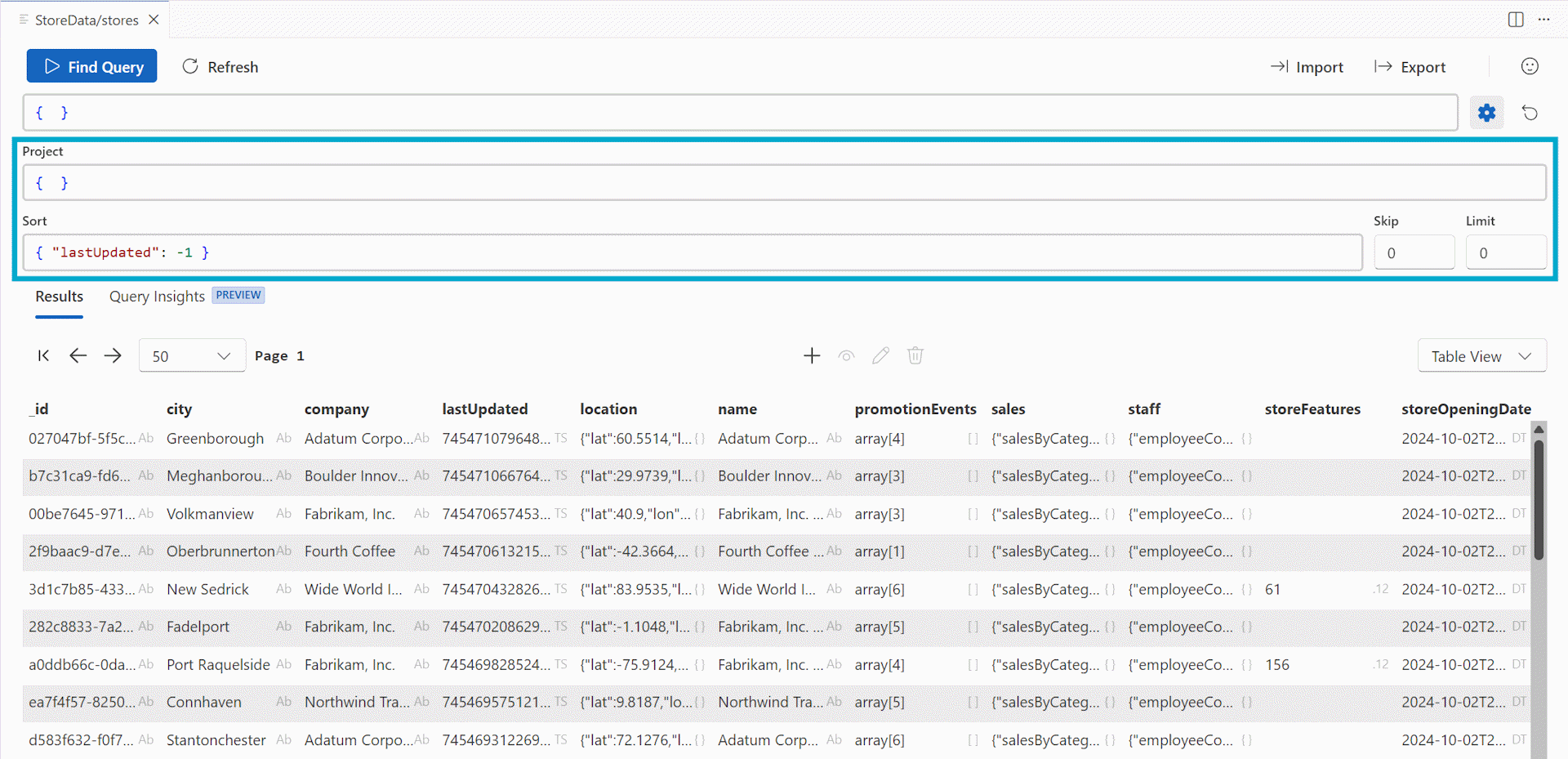
We’ve enhanced the query authoring experience to support more sophisticated queries. Previously, you could only specify the filter for a find query. Now, you have full control to include projection, sort, skip, and limit parameters directly in the query editor, enabling more complex data retrieval without leaving VS Code.
The projection and sort fields also support the same rich autocompletion that was previously available for the filter field.
⭐ Index Management from the Tree View
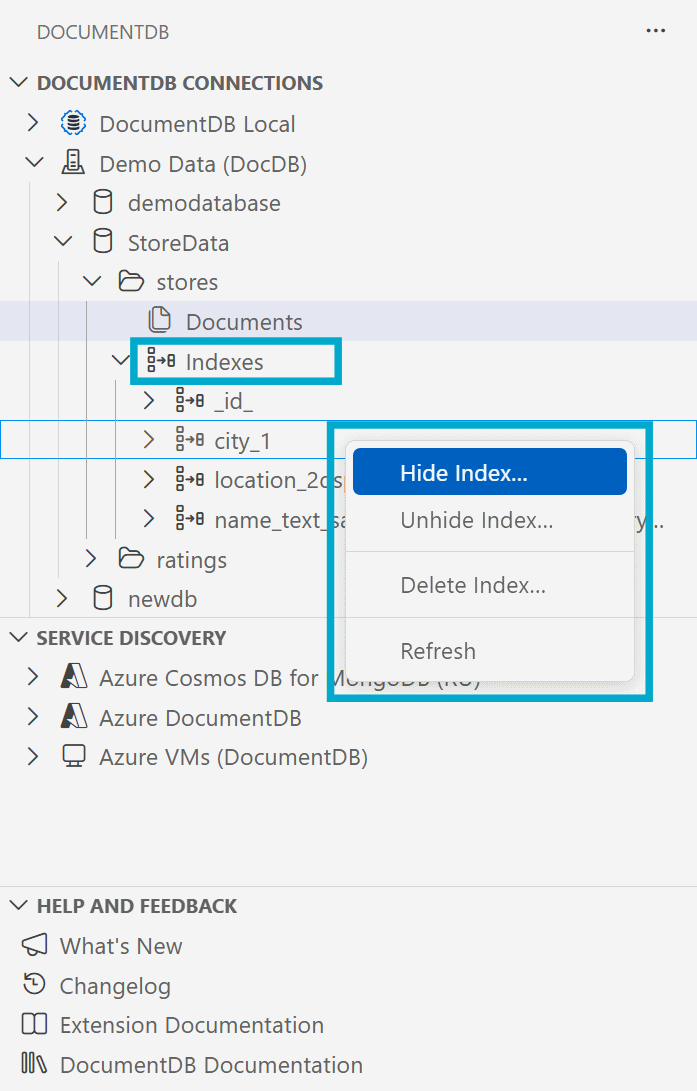
Managing your indexes is now easier and more intuitive than ever. You can now drop, hide, and unhide indexes directly from the Connections View. Simply expand a database and collection, then expand the “Indexes” node to see all indexes on that collection.
Hovering over an index will show you its details, and the context menu provides the available management operations. This direct workflow helps you maintain your indexes efficiently right from the explorer.
Key Fixes and Improvements
- Improved UI element visibility
- Fixed an issue where the autocomplete list in the query area could be hidden behind other UI elements.
- Corrected a problem where tooltips in the table and tree views were sometimes displayed underneath the selection indicator.
Changelog
See the full changelog entry for this release: ➡️ CHANGELOG.md#060
Patch Release v0.6.1
This patch release introduces feedback optimization and fixes a broken link.
What’s Changed in v0.6.1
💠 Feedback Optimization (#392)
Introduces privacy consent and feedback signal controls for the Query Insights feature, primarily to ensure compliance with organizational data protection requirements and user telemetry settings. It also disables survey functionality and refines the feedback dialog UI.
💠 Privacy Policy Link Update (#388)
Updated the outdated privacy policy link in the README to the current Microsoft privacy statement URL.
Changelog
See the full changelog entry for this release: ➡️ CHANGELOG.md#061
Patch Release v0.6.2
This patch release delivers important fixes for Azure tenant management, service discovery, and accessibility. It also includes a significant set of dependency upgrades to modernize the extension’s underlying architecture.
What’s Changed in v0.6.2
💠 Improved Azure Tenant and Subscription Filtering in Service Discovery (#391, #415)
We’ve resolved a key issue that affected users managing numerous Azure tenants. Previously, when a user had access to a large number of tenants, and had selected all of them, the filtering wizard would fail to work correctly when attempting to deselect tenants, making it impossible to refine the resource view.
This update introduces an improved filtering mechanism that ensures a reliable experience, even for users in enterprise environments. The wizard for managing accounts, tenants, and subscriptions is now more resilient, allowing you to precisely control which resources are displayed in the Service Discovery panel.
For a complete guide on the enhanced workflow, please see our updated documentation on Managing Azure Discovery.
💠 Corrected Service Discovery Default Settings (#390, #412)
To provide a cleaner initial experience, the Service Discovery feature no longer starts with any discovery engines enabled by default. In a previous version, the “Azure Cosmos DB for MongoDB (RU)” plugin was pre-selected by mistake, which could cause confusion.
With this fix, you now have full control over which service discovery plugins are active from the start, for a more intentional and direct setup.
💠 Accessibility Fix for Query Insights (#376, #416)
We’ve addressed an accessibility issue in the “Query Insights” tab where the “AI response may be inaccurate” warning text would overlap with other UI elements when the panel was resized. The layout has been updated to be fully responsive, ensuring all content remains readable and accessible regardless of panel size.
💠 Modernized Architecture with Major Dependency Upgrades (#406, #407, #386)
This release includes a significant overhaul of our dev dependencies, bringing major performance and modernization improvements:
- Upgraded to React 19: We’ve migrated our webview components to React 19, leveraging the latest features and performance enhancements from the React team.
- Upgraded to SlickGrid 9: The data grids used to display collection data have been updated to SlickGrid 9. This major update improves rendering performance and aligns with modern JavaScript standards.
- Other Key Updates: We’ve also updated TypeScript, Webpack, the MongoDB driver, and numerous other packages to enhance security, stability, and build performance.
These upgrades ensure the extension remains fast, secure, and aligned with the latest web development best practices.
Changelog
See the full changelog entry for this release: ➡️ CHANGELOG.md#062