DocumentDB for VS Code
Release Notes - Back to Release Notes
DocumentDB for VS Code Extension v0.9
We are excited to announce the release of DocumentDB for VS Code Extension v0.9.
This release expands the extension’s multicloud reach with first-class Kubernetes service discovery, letting you connect to DocumentDB clusters running on AKS, EKS, GKE, on-premises, or local Kubernetes without writing connection strings or running kubectl port-forward manually. It also delivers a dramatically improved Query Insights experience with progressive streaming of AI-generated recommendations, so you can follow along as analysis unfolds rather than staring at a spinner for 15+ seconds.
What’s New in v0.9
⭐ Kubernetes Service Discovery
We are introducing Kubernetes service discovery, bringing true multicloud and hybrid-cloud support to the extension. If you run DocumentDB-compatible clusters in any Kubernetes environment (AKS, EKS, GKE, OpenShift, or local clusters like kind, minikube, k3s, or Docker Desktop), the extension can now find them automatically and connect you without manual configuration.
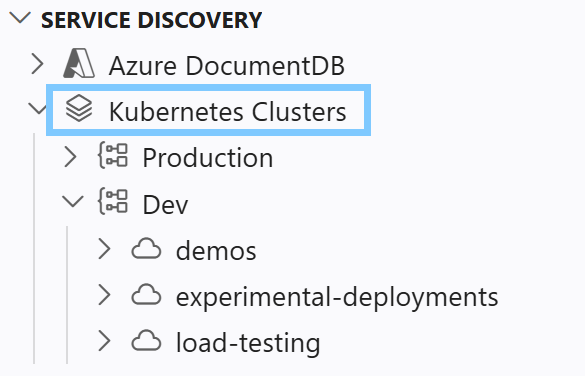
Multiple kubeconfig sources
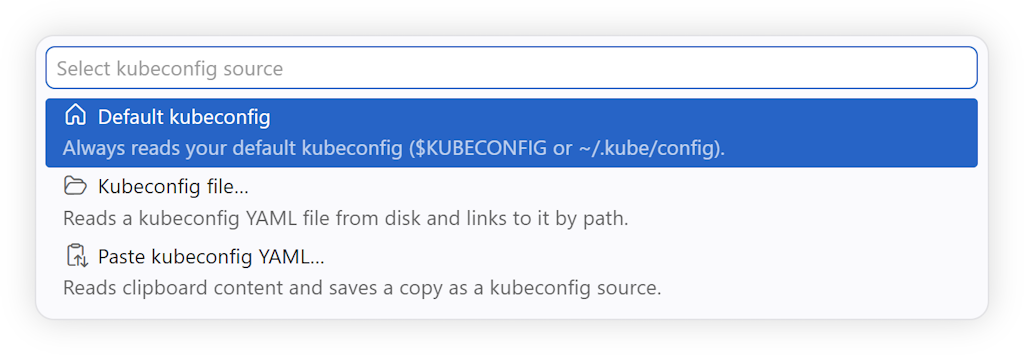
The new Kubernetes Clusters root in the Discovery view lets you register one or more kubeconfig sources side by side, each expanding independently into its own contexts → namespaces → targets subtree:
- Default kubeconfig: reads from
KUBECONFIGor the Kubernetes default path (~/.kube/config). - Kubeconfig file…: pick any file from disk.
- Paste kubeconfig YAML…: paste YAML directly; a copy is saved in VS Code Secret Storage.
- Drag-and-drop: drop a kubeconfig file onto the Discovery view; you are asked to confirm (with an option to preview the file) before it is imported.
Auto-discovery and DocumentDB Kubernetes Operator awareness
The extension discovers DocumentDB Kubernetes Operator (DKO) managed clusters first, surfacing them as named first-class cluster nodes. Generic services that opt in via an annotation or expose known DocumentDB-compatible ports are discovered as a fallback. No changes to your cluster manifests are required for DKO-managed clusters.
Transparent port-forwarding
ClusterIP services are reached through a local port-forward tunnel. The extension establishes and restores the tunnel automatically. When you open a saved connection, the tunnel restarts behind the scenes with no extra clicks. The reachability model is honest and visible:
| Connectivity label | What it means |
|---|---|
| (none) | LoadBalancer with a public address; the connection string is portable. |
node-routed |
NodePort or node-addressed LoadBalancer; only reachable if the node is accessible. |
port-forward |
ClusterIP; requires a local port-forward tunnel. The connection string only works on this machine while the tunnel is active. |
pending |
LoadBalancer awaiting an external IP. |
Hover any discovered target for a rich tooltip that explains reachability, lists the service type, port, namespace, and cloud provider.
For ClusterIP targets, the Copy Connection String command opens a grouped picker. The Connection string group offers connection string variants with and without the password. The Kubernetes group adds a ready-to-run kubectl port-forward command you can paste to re-establish the same tunnel or share with a teammate. See Copy Connection String for details.
Per-context display aliases
Context names auto-generated by cloud CLIs (clusterUser_*, arn:aws:eks:*, gke_*) are often opaque. You can now right-click any context and choose Rename Context… to assign a friendly display name without touching the underlying kubeconfig file.
List and tree view modes
A toggle on each context node lets you switch between:
- List view (default): contexts show discovered clusters directly, with the namespace in the description. Empty namespaces are hidden.
- Tree view: contexts show namespaces; clusters are nested inside. Empty namespaces are grouped under Other namespaces.
For the full feature reference, see the Kubernetes Service Discovery user manual. For a step-by-step walkthrough that creates a local or AKS cluster and validates the full flow, see the Kubernetes Service Discovery Getting Started guide.
⭐ Streaming Query Insights
Query Insights now streams AI-generated recommendations progressively, eliminating the ~15-second blank wait that existed before. After clicking Get AI Performance Insights, results appear as they are generated: you can read the summary while individual index recommendations are still being produced.
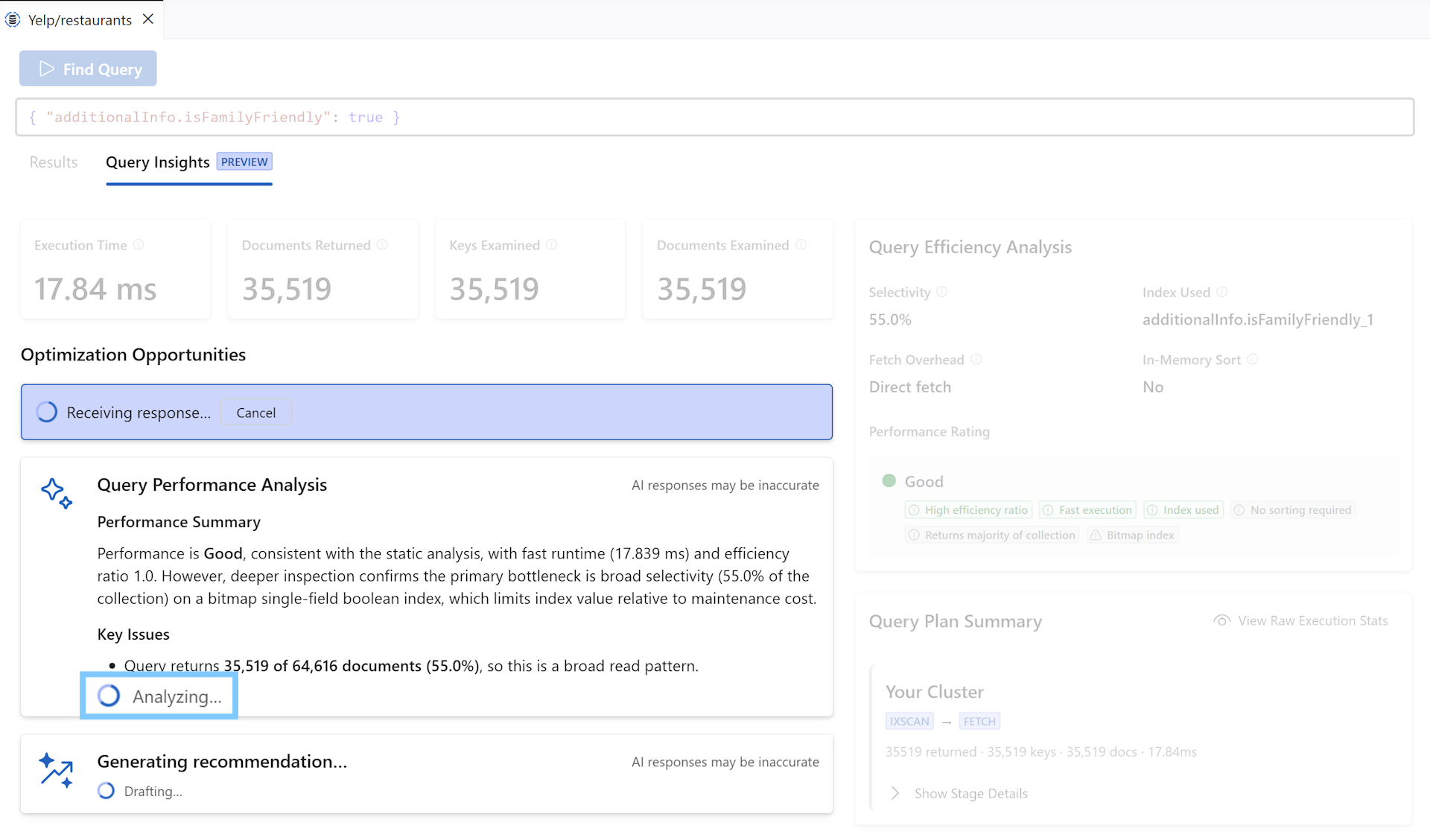
Previously, the extension buffered the entire AG-generated response (which took 10–20 s to generate) before parsing and rendering it all at once. Users had no signal that anything was happening past the first second. The new experience connects the model’s natural streaming output directly to the UI:
- Summary and educational content stream in line by line as the model writes them.
- Each recommendation card appears as soon as the model completes it, growing the count progressively rather than snapping in at the end.
- Verification steps appear at the end after the full response is reconciled.
- The layout never reorders or flickers: cards are pinned to their revealed position as more cards arrive.
For information on which AI model is used and how billing works, see AI Performance Insights: Model and Billing.
Key Fixes and Improvements
-
Security:
wsDoS Vulnerability Fixed: Upgradedwsfrom 8.20.0 to 8.21.0, which fixes a remote memory exhaustion denial-of-service vulnerability where a peer could crash a server or client using a high volume of tiny WebSocket fragments with modest network traffic. #744 -
Security:
form-dataEncoding Fix: Upgradedform-datafrom 4.0.5 to 4.0.6, which fixes improper escaping of CR, LF, and"characters in multipart field names and filenames. #745 -
Dependency Update:
launch-editor: Upgradedlaunch-editorfrom 2.13.2 to 2.14.1, including a fix for UNC path rejection. #747
Changelog
See the full changelog entry for this release: ➡️ CHANGELOG.md#090
Patch Release v0.9.1
This patch introduces a first-class “No Authentication” connection mode for credential-free clusters, fixes a critical bug where the Query Playground’s Run button vanishes after saving a file, extends Entra ID authentication to Azure sovereign clouds, resolves long-standing issues with non-ObjectId _id types and shell completions, and delivers several performance and reliability improvements.
🤲 Community Contributions
A heartfelt thank you to everyone who contributed to this release!
- @hanhan761 contributed the lion’s share of fixes and improvements in this release: sovereign cloud Entra ID support (#721), TS plugin status bar warning (#720), non-ObjectId
_idsupport (#719), multi-select context menu cleanup (#693), Azure tenant throttling (#694), SchemaStore memory ceiling (#724), URI handler diagnostics (#723), shell completion fixes (#712), and more. - @Jacquelinezhong fixed aggregation reference text for fields with special characters in their names (#713).
What’s Changed in v0.9.1
💠 “No Authentication” Connection Mode (#755)
You can now connect to DocumentDB clusters that require no credentials at all — no username, no password, no Entra ID. This is useful for exploratory work against clusters intentionally running without authentication, such as local development instances or clusters behind a network perimeter that handles access control externally.
“No Authentication” appears as a first-class option in the connection wizard alongside Native and Microsoft Entra ID auth. The selection is honored throughout: the tree expands without prompting for credentials, the integrated shell shows No Authentication in the connection summary, and the query playground routes through the credential-free connection string. TLS/SSL overrides in the connection string (e.g., tls=false) are fully honored.
If you switch an existing connection from Native or Entra ID to “No Authentication”, any previously stored credentials are automatically cleared so they cannot leak back in on the next load.
💠 Query Playground: Connect to Database (#740, #758)
Playground files now have a first-class way to connect, reconnect, and switch databases — and the connection is no longer lost when you save.
Connect on demand: Unconnected playground files now show a $(plug) Connect CodeLens at the top. Clicking it opens a tree-based database picker that drills the Connections view (folders → clusters → databases). Running a playground that has no connection opens the same picker automatically and continues the run as soon as a database is selected; pressing Escape cancels without error.
Switch databases: Clicking the connection lens while a playground is already connected opens a picker to point it at a different cluster or database. The existing connection is only replaced after a new database is picked, so cancelling preserves the current one.
Connections survive saves (fixes #740): The Run, Collection View, and Shell CodeLens buttons previously disappeared after saving a .documentdb.js file because saving changed the document URI and the connection binding was keyed on the old URI. Connections now survive saving an untitled scratch file to disk, Save As to a different path, and reopening a playground in the same VS Code session (provided the target cluster’s credentials are still cached).
💠 Non-ObjectId _id Types in Document Operations (#217, #719)
Documents with string, numeric, UUID, or embedded-document _id values now work correctly across all operations. Previously, attempting to delete, read, or upsert such a document threw an “Invalid document ID” error because the extension assumed every _id was an ObjectId. The fix extracts _id parsing into a shared utility that uses EJSON round-tripping as the ground truth, handling every BSON type the driver supports.
💠 Entra ID OIDC Host Allowlist (#639, #721)
The OIDC ALLOWED_HOSTS list for Entra ID authentication is no longer hardcoded to *.azure.com. It is now derived from the connection string’s hostname, widening coverage to non-public-cloud Azure endpoints while preserving the security control (non-Azure hosts remain untrusted). This removes a restriction that could block token delivery when the connection string host does not end in .azure.com.
💠 Shell Completions Through Strings, Regex, and Comments (#710, #712)
Field-name completions now appear correctly when a query contains parentheses inside string literals, regex literals, or line and block comments. Previously, a literal ) inside ")", /foo(bar)/, or // comment ) confused the method-argument context detector into thinking the cursor was outside the filter object, suppressing completions entirely.
💠 TypeScript Plugin Warning on Read-Only Installs (#637, #720)
When the TypeScript plugin fails to bootstrap (a common scenario in container-based remote environments or corporate installs with read-only extension directories), the extension now shows a status bar warning with a click-to-retry action instead of failing silently. If TypeScript-powered completions in the playground are unavailable, the warning tells you why and lets you retry without reloading VS Code.
💠 Multi-Select Context Menu Cleanup (#668, #693)
Single-item context menu commands in the Connections view are now hidden when multiple items are selected. Previously, right-clicking a multi-selection showed the full single-item menu, and most commands would silently act on only the first selected item. Now only the two commands that genuinely support multi-select (Remove Connection and Move Items) remain visible in that context.
💠 Performance: Azure Tenant Sign-In Throttling (#688, #694)
Azure tenant sign-in checks are now throttled to a maximum of 5 concurrent requests. For users in organizations with many Azure tenants, the previous unbounded Promise.all fan-out against Microsoft Entra could cause timeouts and noticeably slow the credential and subscription filtering dialogs. The new shared concurrency limiter caps in-flight isSignedIn checks across both wizard steps.
💠 Performance: SchemaStore Memory Ceiling (#604, #724)
The schema cache now enforces an LRU-based entry limit. In long-running sessions with many collections, the _analyzers map in SchemaStore could grow without bound, gradually increasing memory usage. Once the limit is reached, the least-recently-used entries are evicted to keep the footprint bounded.
💠 Aggregation Reference Text for Special Field Names (#709, #713)
Fields with special characters in their names (e.g., order-items, my field) now produce correct aggregation reference text in completions. Previously, they emitted $order-items or $my field, which is invalid MQL. Flat fields with unsafe names now use { $getField: "order-items" } form; nested paths with an unsafe segment omit the reference to avoid emitting broken MQL.
💠 URI Handler Diagnostics (#655, #723)
Failures in the VS Code URI handler (used when clicking links that open the extension from external applications) now surface a user-visible warning notification and emit structured diagnostic telemetry. Previously, errors at this entry point were swallowed silently.
💠 Security: undici Update (#754)
Updated undici from 7.25.0 to 7.28.0 to address security vulnerabilities.
Changelog
See the full changelog entry for this release: ➡️ CHANGELOG.md#091