FastTrack
Copilot Agent Brainstorming
A simple visual template to help you map out your Copilot agent specifications before building.
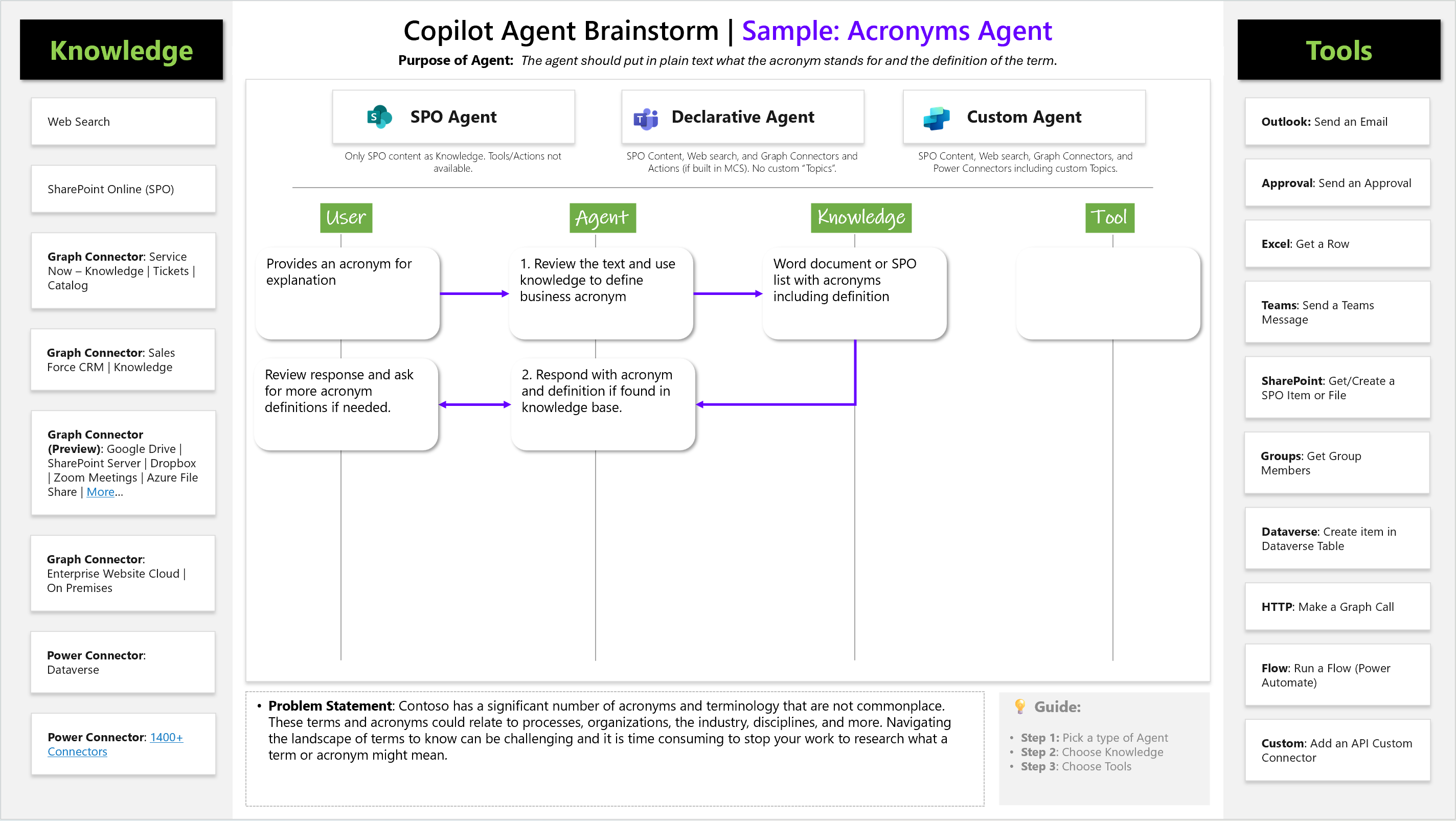
🎯 What This Is
This slide template helps you visualize and plan your agent by mapping out:
- Agent Type - Which type fits your needs
- Knowledge Sources - What information your agent accesses
- Tools - What actions your agent can perform
- User Flow - How users will interact with your agent
📋 How To Use This Template
- Choose Your Agent Type (top section)
- SPO Agent: SharePoint content only
- Declarative Agent: Built-in M365 tools + web search
- Custom Agent: Full customization with specialized tools
- Map the Flow (center diagram)
- Start with what the User provides
- Show how the Agent processes the request
- Identify what Knowledge sources are needed
- Define what Tools will be used
- Define Your Problem (bottom section)
- Write your specific use case scenario
🖼️ Template Structure
┌─────────────┬─────────────────┬─────────────────┐
│  SPO Agent  │ Declarative     │  Custom Agent   │
│             │ Agent           │                 │
└─────────────┴─────────────────┴─────────────────┘

    User ──► Agent ──► Knowledge ──► Tool
     │         │          │          │
     │         │          │          │
    [Input]  [Process]  [Source]   [Action]
📝 Example: Acronyms Agent
Agent Type: Declarative Agent
User Input: Provides acronym for explanation
Agent Process: Reviews text and searches knowledge base
Knowledge Source: Word document or SPO list with acronym definitions
Tool Output: Returns definition or asks for clarification
📥 Download Template
Download PowerPoint Template: Copilot Agent Brainstorming.pptx
🚀 Getting Started
- Download the slide template above
- Fill in your specific:
- Agent type selection
- User input scenarios
- Knowledge sources needed
- Tool requirements
- Expected outputs
- Use this visual to align with stakeholders before building
- Reference during development to stay on track
💡 Tips
- Keep it simple - focus on the main user scenario
- Be specific about knowledge sources (which SharePoint site, which documents, etc.)
- Identify the minimum viable tools needed
- Test your flow logic before building
Purpose: Turn complex agent requirements into a simple visual that everyone can understand.