GSA Policy Workbench
One screen over your GSA policy — instead of nine admin-center blades.
Global Secure Access Internet Access administration today is spread across nearly a dozen separate blades in the Entra admin center, with no single place to see every Security Profile, Filtering Policy, and rule — in order, searchable, and cross-referenced against the Conditional Access policies that target it.
GSA Policy Workbench is a free, open-source, read-only inspector that puts it all in one place.
⭐ View on GitHub Getting started with the tool
What is the GSA Policy Workbench Tool?
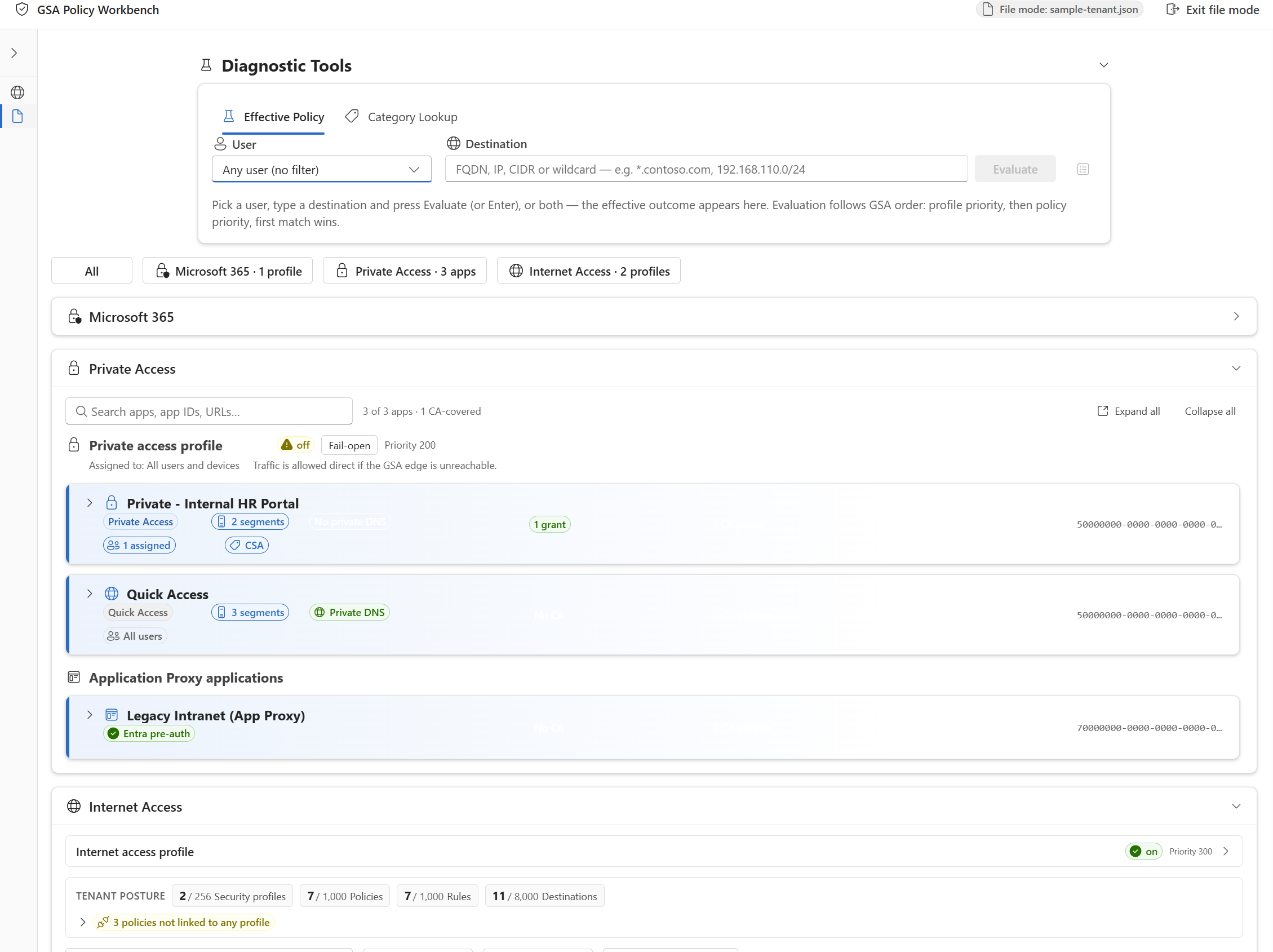
- 📋 Every Security Profile → policy → rule, in one searchable table — with the linked Conditional Access targeting alongside it, not in a separate blade.
- 🔒 Private Access visibility too — Quick Access, named apps, and Application Proxy apps, correlated to their covering Conditional Access policies.
- 🧭 What-If resolver — check which rules and CA policies would match a given destination or user, without leaving the table.
- 📂 No live tenant required to try it — load a sample exported policy file and explore the full UI with no sign-in and no network access.
- 🔐 Read-only by design — zero writes to Microsoft Graph. Nothing here can change your tenant's policy.
- 🧩 Every Graph call flows through one audited adapter — full call-log transparency, no hidden requests.
How it's built
Static SPA — Vite + React + TypeScript (strict), Fluent UI v9, TanStack Query/Table/Virtual, MSAL for auth. No backend, nothing to host but static files.
Try it in two ways
- Sign in to your own tenant — one PowerShell command creates the Entra app registration and required read-only scopes; see the App registration guide.
- Load a sample policy file — no sign-in, no tenant, just the bundled sample data.
Not sure this is the right tool?
- Migrating from a third-party SSE product? Use Migrate2GSA instead — the Workbench doesn't import third-party config.
- Generating a greenfield policy set from personas? Use the EIA Greenfield Wizard instead — the Workbench doesn't generate policy, it only inspects what already exists.
Get the code: github.com/microsoft/GSA-Policy-Workbench · MIT license · Contributions welcome