

Bluetooth MIDI is a preview feature for Windows MIDI Services. It’s installed separately from the service, API, and tools, and it is not yet part of a consumer release.
Windows MIDI Bluetooth Setup connects this PC to wireless MIDI devices: keyboards, controllers, and instruments which speak Bluetooth LE MIDI. Once connected, the device appears in Windows like any other MIDI device, so your DAW and other MIDI software can use it straight away.
It also works the other way around. This PC can publish itself so a phone, a tablet, or another computer can connect to it.
Devices appear on their own when they advertise, so there’s nothing to scan or search for.
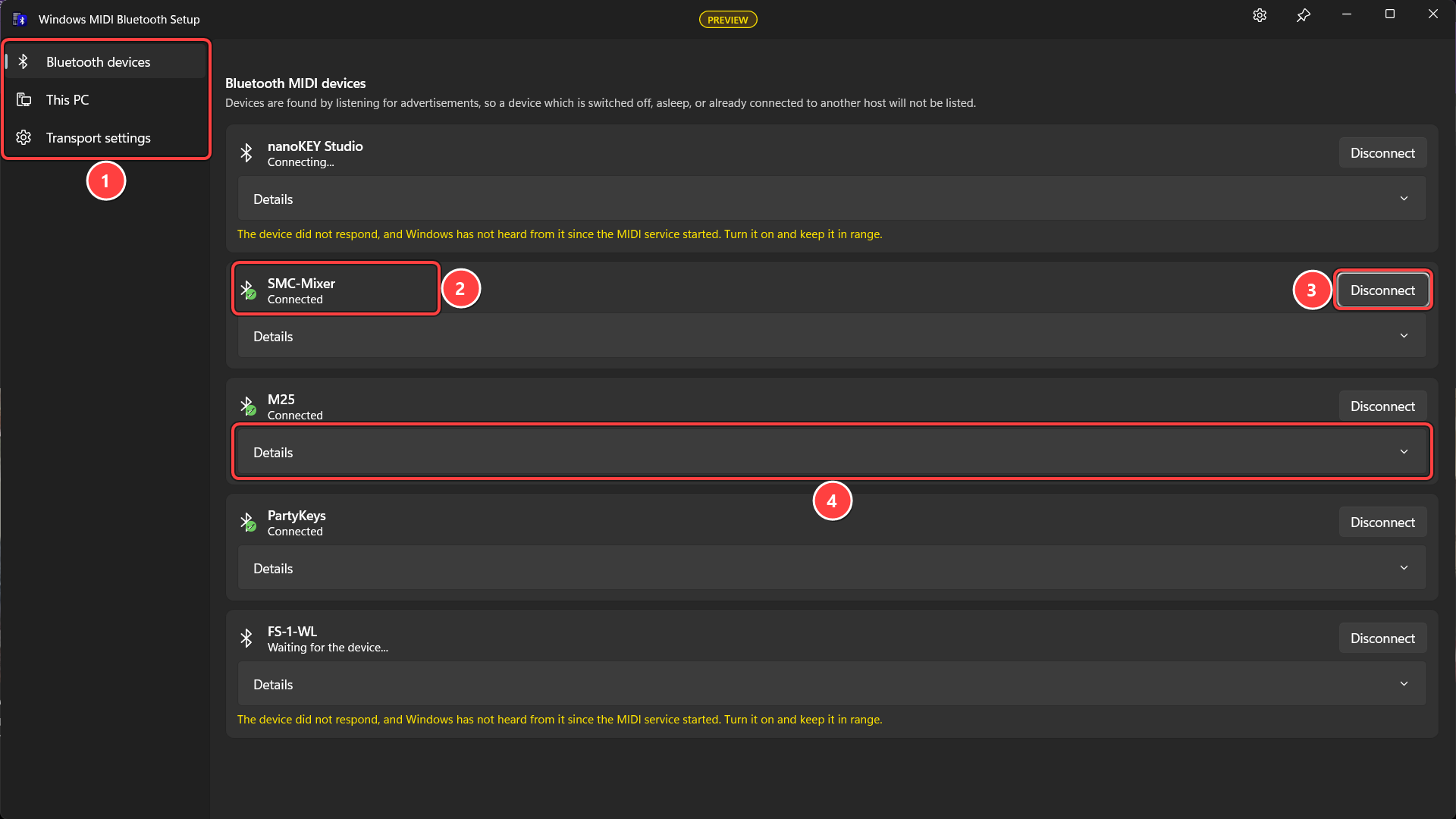
Once a device says Connected, it’s ready to use in your DAW and other MIDI apps.
There are three pages:
This app is here to set connections up. It doesn’t carry any MIDI data, and nothing depends on it once you’ve closed it.
That’s worth saying plainly, because it’s the opposite of how most Bluetooth MIDI software for Windows has worked. In those, the Bluetooth connection belongs to the application, so the application has to stay open, usually sitting in the notification area, and your MIDI device disappears the moment you close it or it crashes.
Bluetooth MIDI here is part of Windows MIDI Services itself. Finding devices, connecting, reconnecting, and moving messages all happen in the MIDI service. Connect a device on this page, close this app, and the device stays connected and stays usable in your DAW. It’s reconnected on its own when it comes back after being switched off or out of range, and it’s connected again after you restart the PC, with nothing of ours running and nothing for you to remember to start.
The same goes for the This PC page. Once you’ve published this PC as a Bluetooth MIDI peripheral, it stays published with this window closed.
Open this app when you want to connect something new, change a setting, or look at what a device is doing. The rest of the time it can stay closed.
Devices appear on the Bluetooth devices page on their own. There is nothing to scan or search.
Bluetooth MIDI devices are found by listening for the advertisements they broadcast, and that has consequences worth knowing about, because it explains most of the times a device you own is not in the list:
Each device shows its name and what Windows currently knows about it:
Connect connects to the device and creates its MIDI endpoint. Windows also remembers the device, so when it comes back it is reconnected for you without you having to open this app again.
Disconnect drops the connection but keeps remembering the device.
Forget removes it from the remembered list entirely, so Windows stops trying to reconnect. Use this for a device you have sold or no longer use.
In the majority of cases, you do not necessarily have to pair a Bluetooth MIDI device in Windows Settings first. If the device is advertising, this app can usually connect to it directly. A device already paired with this PC is also connected automatically unless you have explicitly disconnected it and saved that choice.
The line under a device’s name says where Windows has got to with it:
While a device is connecting or being waited for, Connect is replaced by Disconnect. That is deliberate. Pressing Connect repeatedly queues up further attempts and can disturb one already in progress, which tends to make a difficult device worse rather than better. Disconnect cancels the request and stops Windows retrying, so it is also how you give up on a device which is never going to answer.
Most Bluetooth MIDI devices do not need pairing, but some insist on it, and there are two quite different ways you find that out.
Sometimes Windows prompts you, either by itself when the service starts or shortly after you press Connect. Accept the prompt and the device pairs.
Sometimes nothing happens at all. A device is allowed to ask for security in a way which never reaches Windows MIDI Services as an error: it accepts the connection and then quietly drops it a moment later. When a device does that twice in quick succession while unpaired, the app concludes that pairing is what it is asking for and tells you so:
This device requires pairing before Windows can use its MIDI service. Pair it, then connect it again. Automatic reconnection is paused for this device until then.
A Pair button appears beside the device. Automatic reconnection stops at that point on purpose, because retrying a device which wants pairing simply raises one prompt after another. Once it is paired, press Connect again.
Because this is worked out from how the device behaves rather than from anything it says, it is a judgment rather than a certainty. A device with a weak signal which keeps dropping its connection can look the same way. If you are confident a device does not need pairing, Connect is still there and still works.
Whether pairing an instrument is a good idea at all is a longer story, because a paired device is also visible to the older Bluetooth MIDI support built into Windows, which can claim it first. See How Bluetooth MIDI works in Windows for that, and for why the answer is different when a phone connects to this PC.
Details on any device opens what Windows knows about it.
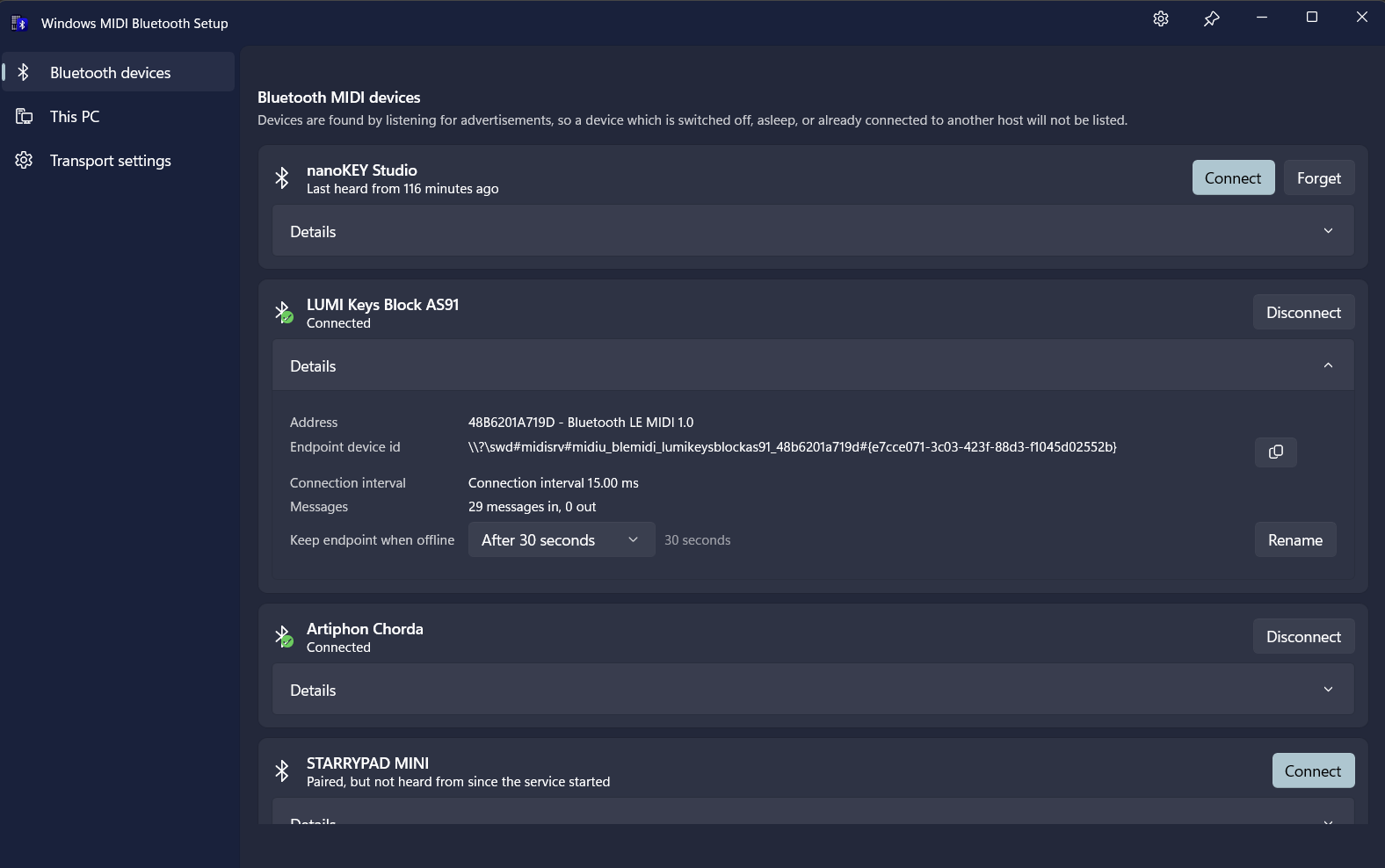
Bluetooth LE MIDI 1.0 carries a timestamp with every message: thirteen bits of milliseconds, which wraps every 8.192 seconds. Windows MIDI Services matches that against this PC’s clock so the spacing between your notes survives the journey, instead of everything arriving in clumps whenever the Bluetooth connection interval comes around.
Details reports which of two things is happening, under Timestamps:
A number of inexpensive controllers never advance their timestamp at all. Every packet carries the same value no matter how much time has really passed. Matching that against this PC’s clock would put an entire gesture at a single instant, so a note on, all of its aftertouch, and the note off would share one timestamp and any timing in what you played would be lost.
When Windows MIDI Services sees a device do this, it stops trusting the device’s clock and stamps each message with the moment it arrived instead. That is a real improvement on a single frozen instant, and on a device sending one message per packet it can even resolve finer than the millisecond the specification allows. It is still an estimate, though, because it is measured at this end and therefore includes however long the message took to get here.
Nothing about this is stored. It is worked out afresh from the traffic on each connection, so a device whose firmware is later fixed to keep time is picked up automatically with nothing to reset. The row shows nothing at all until the device has sent enough for Windows to judge.
For how the two clocks are actually matched up, and why a stopped clock has to be detected from the traffic rather than asked about, see How Bluetooth MIDI works in Windows.
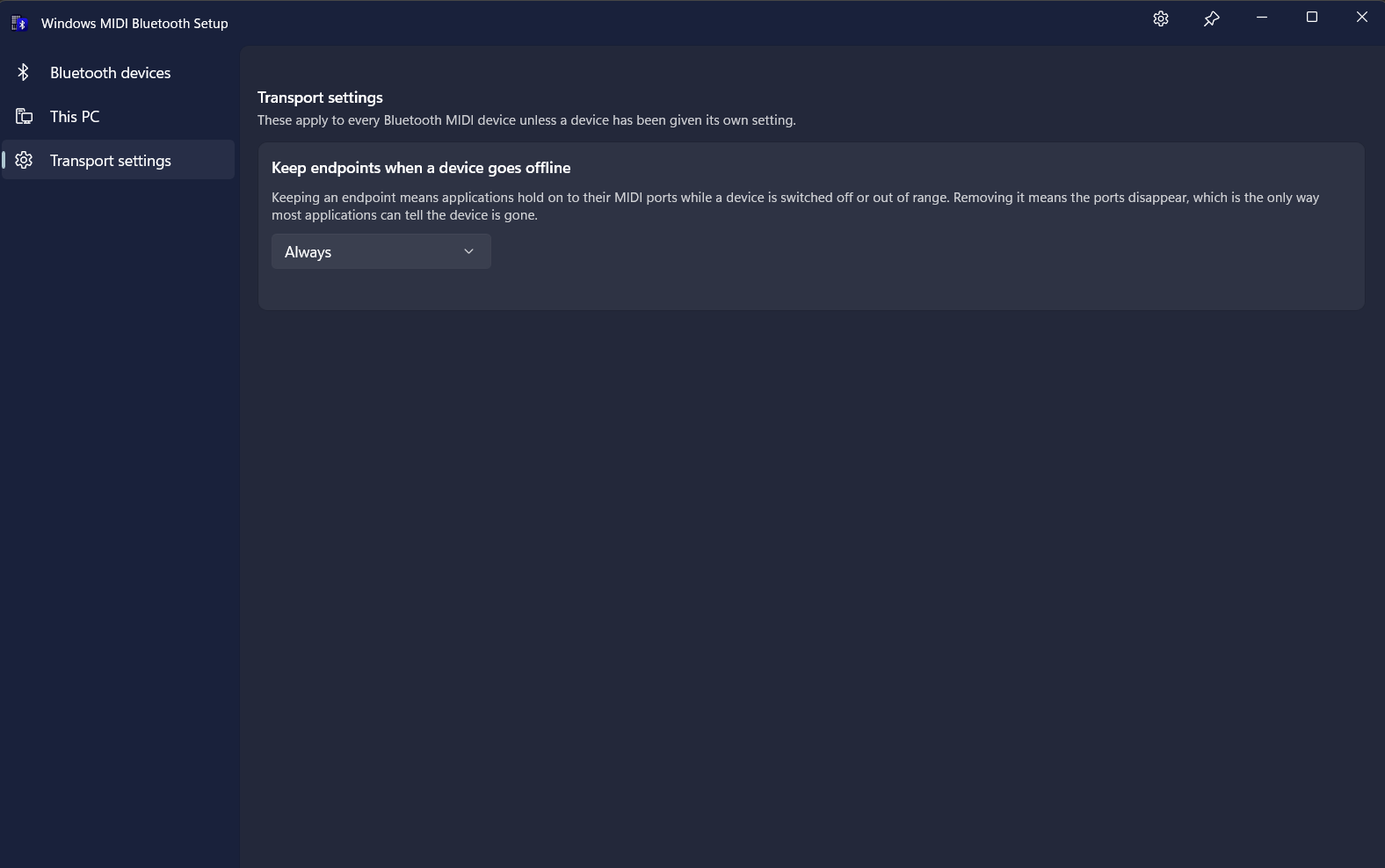
Keep endpoint when offline is the setting most worth understanding, and it is here because Bluetooth LE devices come and go constantly. They sleep, they go out of range, and their batteries die.
The question it answers is what should happen to the MIDI endpoint when that happens:
No one answer is right for everyone, which is why it is a setting. Keeping the endpoint is more convenient, especially for live performance. Removing it matters because applications written against WinMM or WinRT MIDI 1.0 have no way to ask Windows whether a device is present: the port disappearing is the only signal they get that the device is gone. If those applications matter to you, a device which vanishes silently while its port stays open is worse than one whose port goes away.
You can set this per device, or set the default for every device on the Transport settings page.
On the This PC page, Publish advertises this PC as a Bluetooth MIDI peripheral so a phone, tablet, or another computer can connect to it.
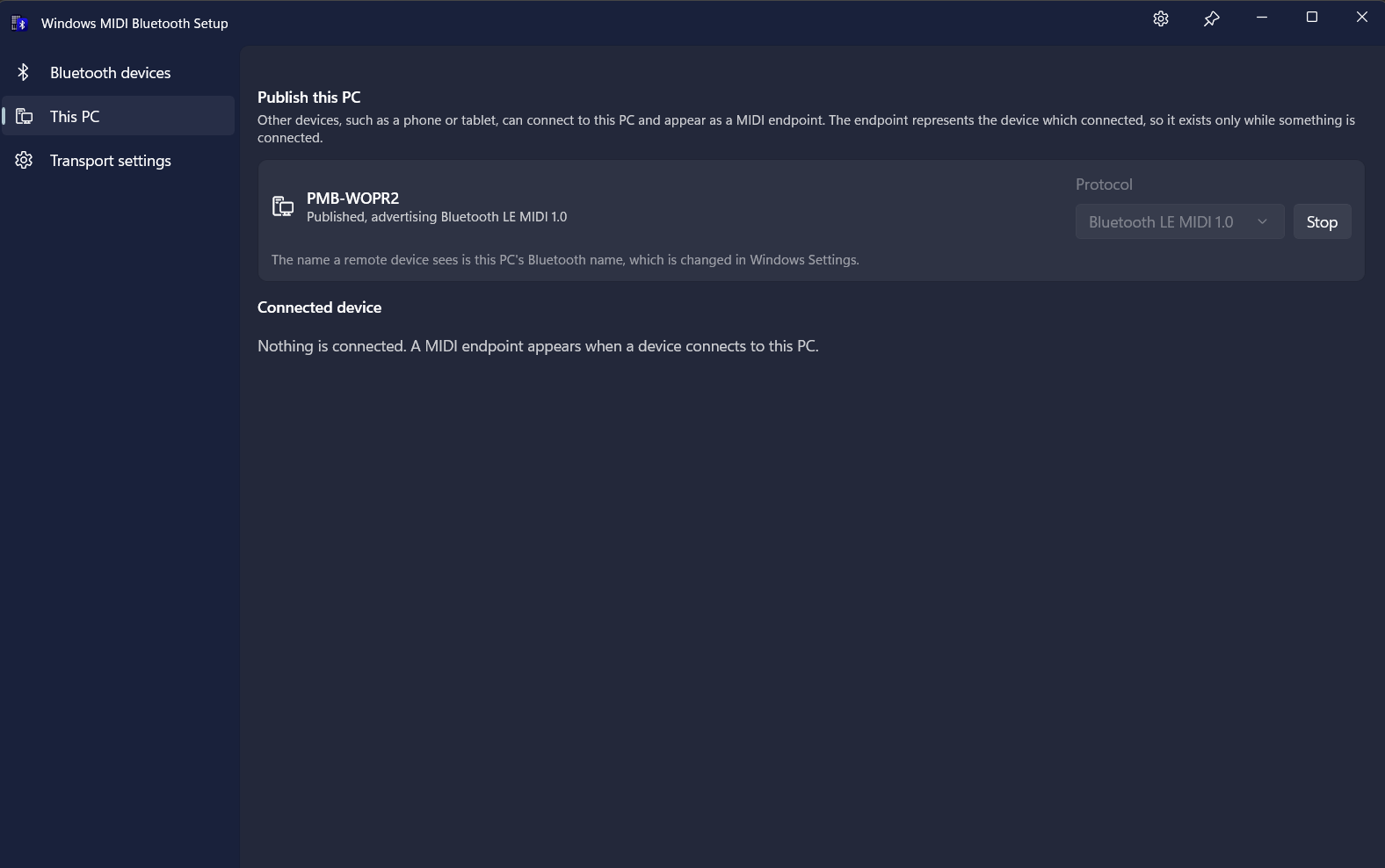
The name a remote device sees is this PC’s Bluetooth name. That is a Windows setting rather than a MIDI one, so it is changed in Windows Settings, not here.
The MIDI endpoint on this side represents the device which connected, so it exists only while something is connected. Until then the page says nothing is connected, and that is normal.
Protocol chooses which Bluetooth MIDI protocol to advertise. Only one is published at a time:
By default a device which connects to this PC does not get a MIDI endpoint until you say so. It appears under Connected device with Allow once and Always allow.
Allow once lets this connection through and asks again next time. Always allow remembers the device, so it connects without asking in future.
This is why a phone can connect, show up in the app, and still not appear as a MIDI device to your software: it is waiting on you. Windows cannot refuse a Bluetooth subscription outright, so the approval gates the MIDI endpoint rather than the Bluetooth connection.
A device which rotates its Bluetooth address for privacy, which phones and computers do, can only be remembered reliably once it is paired with this PC. Pairing is the direction where it helps, and it is best done from the phone’s own Bluetooth settings.
It is asleep or not advertising. This is by far the most common cause. Switch the device off and on again, and look at the list within the following few seconds. Many battery-powered controllers sleep aggressively to save power.
It is connected to something else. A tablet or phone sitting on the same desk will happily hold on to the device and keep it off the air. Bluetooth LE MIDI peripherals talk to one central at a time, so you have to disconnect it there first.
It needs to be paired. Most Bluetooth MIDI devices can be connected to without pairing, but some require it. Windows will usually prompt you when that is the case, so watch for a notification after pressing Connect. If no prompt appears and the device keeps connecting and dropping, the app works that out for itself and offers a Pair button. See Pairing above.
Its batteries are low. A device low on power may advertise but fail to hold a connection.
Windows is remembering something stale. If a device previously connected and now will not, use Forget, then connect again.
If Bluetooth MIDI is not installed or not enabled on this PC, the app tells you so when it starts, and the rest of the window stays empty. Nothing here works until that is sorted out.
Sometimes a device connects, shows as Connected, and then sends nothing at all. Open Details and look at the message and packet counts, which tell you which half of the problem you have:
It may still be paired with another device. This is the most common cause, and it happens even though the connection itself succeeds: a device which is still paired with a phone or tablet will accept a connection from this PC and then quietly send nothing. Unpair it from the other device, remove the pairing from this PC, and then pair it with this PC again.
It may be in use by the older Bluetooth MIDI support in Windows. Windows still includes its original WinRT MIDI 1.0 Bluetooth MIDI stack, and for a device which is paired with this PC, that stack can claim the device first. In Device Manager, under Software devices, look for the MIDI Bluetooth In and MIDI Bluetooth Out entries for the device, and uninstall them.
Claiming by the older stack applies only during the preview period, while the previous Bluetooth MIDI support is still enabled. It will not be a concern when Bluetooth MIDI ships in a regular Windows release.
This page covers what the app shows you and what to do about it. For how any of it actually works underneath, see How Bluetooth MIDI works in Windows, which covers discovery and why a device has to advertise before it can be found, how the two clocks are matched up and what happens when a device does not keep time, device identity and rotating Bluetooth addresses, the conflict with the older in-box Bluetooth MIDI support, connection interval measurements, and where this transport currently deviates from the specifications.
Application developers reading device state programmatically want the Bluetooth SDK reference, which documents the same information as API properties.
Windows MIDI Services is an open source project with all source available on GitHub. We have a great community on Discord as well. Between GitHub and Discord, you should find the information you are looking for.
