ONNX model inferencing on Spark
ONNX
ONNX is an open format to represent both deep learning and traditional machine learning models. With ONNX, AI developers can more easily move models between state-of-the-art tools and choose the combination that is best for them.
SynapseML now includes a Spark transformer to bring a trained ONNX model to Apache Spark, so you can run inference on your data with Spark's large-scale data processing power.
Runtime selection: CPU by default, CUDA as an explicit opt-in
SynapseML depends on com.microsoft.onnxruntime:onnxruntime (the CPU-only ONNX Runtime artifact) by
default. It bundles native libraries for Windows x64, Linux x64/aarch64, and macOS x64/aarch64, so
ONNXModel works out of the box for CPU inference on every platform SynapseML supports, including local
Spark on a Mac.
CUDA/GPU acceleration is not bundled by default:
- NVIDIA's CUDA execution provider only exists for Linux and Windows -- it has no macOS build, so shipping it by default would still leave macOS broken.
- The artifact that adds it,
com.microsoft.onnxruntime:onnxruntime_gpu, is roughly 300+ MB (mostly the embedded CUDA/TensorRT provider binaries and Windows debug symbols), and forcing that onto every CPU-only and macOS user just to support Linux/Windows GPU clusters isn't reasonable.
To opt in to GPU acceleration on a Linux or Windows cluster with a matching NVIDIA GPU and CUDA/cuDNN
installed, add com.microsoft.onnxruntime:onnxruntime_gpu at the same version SynapseML pins in
project/OnnxRuntimeDependency.scala, and exclude the transitive CPU-only onnxruntime artifact that
comes from synapseml-deep-learning (or the aggregate synapseml package) so you don't end up with two
copies of the ai.onnxruntime classes on your classpath. The exclusion must be attached to the
SynapseML dependency itself (the one that transitively depends on onnxruntime), not to the
onnxruntime_gpu dependency (which never depends on the CPU-only artifact, so excluding anything from it
would be a no-op). After installing, verify that exactly one ai.onnxruntime jar is present -- if you
ever see both onnxruntime-<version>.jar and onnxruntime_gpu-<version>.jar on the same classpath, the
exclusion is missing or attached to the wrong dependency.
The examples below install the synapseml-deep-learning JVM module directly.
Choose the complete module coordinate matching the Spark runtime:
| Spark runtime | Scala | SynapseML deep-learning coordinate |
|---|---|---|
| Spark 3.5.x | 2.12 | com.microsoft.azure:synapseml-deep-learning_2.12:1.1.3 |
Spark 4.0.1+ (<4.1) | 2.13 | com.microsoft.azure:synapseml-deep-learning_2.13:1.1.3-spark4.0 |
| Spark 4.1.x | 2.13 | com.microsoft.azure:synapseml-deep-learning_2.13:1.1.3-spark4.1 |
Resolve these modules from
https://mmlspark.blob.core.windows.net/maven. The complete examples below use
Spark 4.1. For Spark 4.0 or 3.5, replace the SynapseML dependency with the exact
coordinate from the table. If you intentionally install the aggregate
synapseml artifact instead, use its coordinate from the
installation matrix and attach the
exclusion to that aggregate dependency. Do not install both the aggregate and
module artifacts.
-
sbt (per-dependency exclusion, attached to the SynapseML dependency):
resolvers += "SynapseML" at "https://mmlspark.blob.core.windows.net/maven"libraryDependencies ++= Seq(("com.microsoft.azure" % "synapseml-deep-learning_2.13" % "1.1.3-spark4.1").exclude("com.microsoft.onnxruntime", "onnxruntime"),"com.microsoft.onnxruntime" % "onnxruntime_gpu" % "1.17.3")(A project-wide
excludeDependencies += ExclusionRule("com.microsoft.onnxruntime", "onnxruntime")works too and is simpler if nothing else in your build needs the CPU-only artifact.) -
Maven: add an
<exclusion>forcom.microsoft.onnxruntime:onnxruntimeto yoursynapseml-deep-learning(orsynapseml)<dependency>, and addonnxruntime_gpuas a separate, unexcluded dependency:<repositories><repository><id>SynapseML</id><url>https://mmlspark.blob.core.windows.net/maven</url></repository></repositories><dependency><groupId>com.microsoft.azure</groupId><artifactId>synapseml-deep-learning_2.13</artifactId><version>1.1.3-spark4.1</version><exclusions><exclusion><groupId>com.microsoft.onnxruntime</groupId><artifactId>onnxruntime</artifactId></exclusion></exclusions></dependency><dependency><groupId>com.microsoft.onnxruntime</groupId><artifactId>onnxruntime_gpu</artifactId><version>1.17.3</version></dependency> -
spark-submit / spark-shell / pyspark (
--packages): pass the SynapseML andonnxruntime_gpucoordinates via--packages, and exclude the CPU-only artifact via the separate--exclude-packagesflag (formatgroupId:artifactId, no version):spark-submit \--repositories "https://mmlspark.blob.core.windows.net/maven" \--packages "com.microsoft.azure:synapseml-deep-learning_2.13:1.1.3-spark4.1,com.microsoft.onnxruntime:onnxruntime_gpu:1.17.3" \--exclude-packages com.microsoft.onnxruntime:onnxruntime \your_script.pyThe equivalent Spark configuration keys (for a
SparkConf/notebook%%configurecell instead of CLI flags) arespark.jars.packagesandspark.jars.excludes:spark.jars.repositories=https://mmlspark.blob.core.windows.net/mavenspark.jars.packages=com.microsoft.azure:synapseml-deep-learning_2.13:1.1.3-spark4.1,com.microsoft.onnxruntime:onnxruntime_gpu:1.17.3spark.jars.excludes=com.microsoft.onnxruntime:onnxruntime -
Databricks cluster library UI/API: install the SynapseML package and
onnxruntime_gpuas two separate Maven libraries, and set the library's Exclusions field (formatgroupId:artifactId) on the SynapseML library entry, not ononnxruntime_gpu:[{"maven": {"coordinates": "com.microsoft.azure:synapseml-deep-learning_2.13:1.1.3-spark4.1","repo": "https://mmlspark.blob.core.windows.net/maven","exclusions": ["com.microsoft.onnxruntime:onnxruntime"]}},{ "maven": { "coordinates": "com.microsoft.onnxruntime:onnxruntime_gpu:1.17.3" } }]Each Databricks Maven library entry resolves its own dependency tree independently, so an exclusion set on the
onnxruntime_gpuentry has no effect on what the SynapseML entry pulls in -- it must be on the entry that actually depends on the CPU-only artifact.
What happens if CUDA is requested but unavailable
deviceType is matched case-insensitively ("CUDA", "cuda", and "CuDa" are all treated the same), so
the behavior below cannot be bypassed by casing. It differs depending on whether you explicitly asked for
GPU acceleration:
-
deviceTypeexplicitly set toCUDA:ONNXModelfails the task with a clear, actionable error rather than silently falling back to CPU, in either of these cases:- No Spark
gpuresource is assigned to the executor/task (the common case on a CPU-only cluster) -- there is no GPU device id to use at all, so the error explains how to configure Spark's GPU resource allocation (or to setdeviceTypetoCPUinstead). - A
gpuresource is assigned, but the CUDA execution provider still isn't usable (for example, only the default CPU-only artifact is installed, or CUDA/cuDNN aren't installed on the node) -- the error names theonnxruntime_gpuartifact to install.
In both cases, silently continuing on CPU would produce a success-shaped result that quietly hides a severe performance regression, which is the same class of problem this dependency change is meant to fix, not reintroduce. There is currently no parameter to opt in to a graceful CPU fallback for an explicit CUDA request; set
deviceTypetoCPUif you intend to run on CPU. - No Spark
-
deviceTypeleft unset (auto-detection): if agpuresource happens to be present but CUDA isn't usable,ONNXModellogs a clear, actionable error (again namingonnxruntime_gpu) and continues on CPU, since GPU was never explicitly requested in this case. If nogpuresource is present, CPU is used with no error, since auto-detection found nothing to use.
Note: Real GPU acceleration (the
onnxruntime_gpuartifact actually engaging the CUDA execution provider end-to-end on hardware such as an NVIDIA T4) is not covered by an automated CI test in this repository; only the CPU default, the explicit-CUDA fail-fast errors, and the auto-detect fallback are. Validate GPU throughput on real GPU hardware before relying on it in production.
ONNXHub
Although you can use your own local model, many popular existing models are provided through the ONNXHub. You can use a model's ONNXHub name (for example "MNIST") and download the bytes of the model, and some metadata about the model. You can also list available models, optionally filtering by name or tags.
    // List models
    val hub = new ONNXHub()
    val models = hub.listModels(model = Some("mnist"), tags = Some(Seq("vision")))

    // Retrieve and transform with a model
    val info = hub.getModelInfo("resnet50")
    val bytes = hub.load(name)
    val model = new ONNXModel()
      .setModelPayload(bytes)
      .setFeedDict(Map("data" -> "features"))
      .setFetchDict(Map("rawPrediction" -> "resnetv24_dense0_fwd"))
      .setSoftMaxDict(Map("rawPrediction" -> "probability"))
      .setArgMaxDict(Map("rawPrediction" -> "prediction"))
      .setMiniBatchSize(1)

    val (probability, _) = model.transform({YOUR_DATAFRAME})
      .select("probability", "prediction")
      .as[(Vector, Double)]
      .head
Usage
-
Create a
com.microsoft.azure.synapse.ml.onnx.ONNXModelobject and usesetModelLocationorsetModelPayloadto load the ONNX model.For example:
val onnx = new ONNXModel().setModelLocation("/path/to/model.onnx")Optionally, create the model from the ONNXHub.
val onnx = new ONNXModel().setModelPayload(hub.load("MNIST")) -
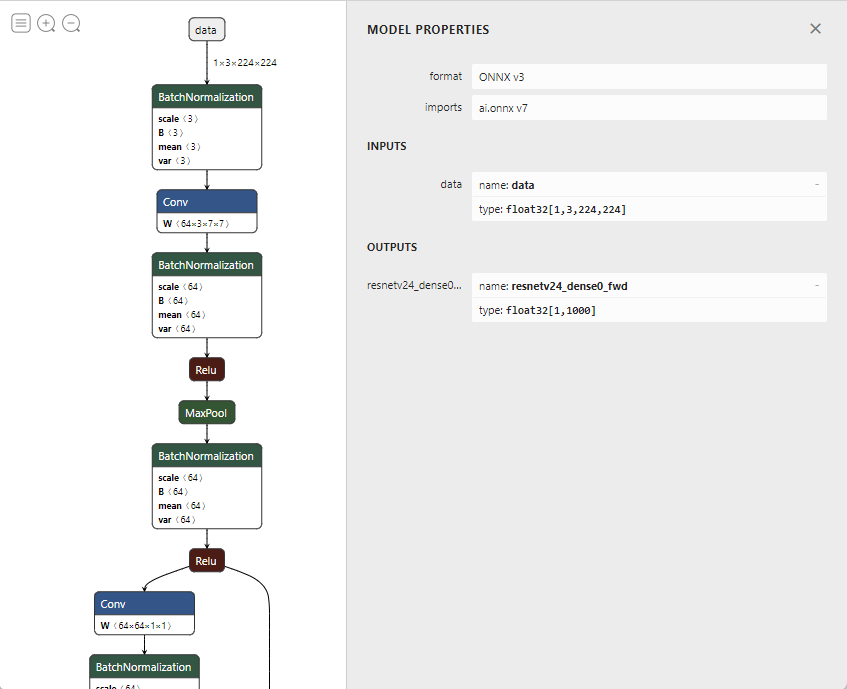
Use ONNX visualization tool (for example, Netron) to inspect the ONNX model's input and output nodes.
-
Set the parameters properly to the
ONNXModelobject.The
com.microsoft.azure.synapse.ml.onnx.ONNXModelclass provides a set of parameters to control the behavior of the inference.Parameter Description Default Value feedDict Map the ONNX model's expected input node names to the input DataFrame's column names. Make sure the input DataFrame's column schema matches with the corresponding input's shape of the ONNX model. For example, an image classification model may have an input node of shape [1, 3, 224, 224]with type Float. It's assumed that the first dimension (1) is the batch size. Then the input DataFrame's corresponding column's type should beArrayType(ArrayType(ArrayType(FloatType))).None fetchDict Map the output DataFrame's column names to the ONNX model's output node names. NOTE: If you put outputs that are intermediate in the model, transform will automatically slice at those outputs. See the section on Slicing. None miniBatcher Specify the MiniBatcher to use. FixedMiniBatchTransformerwith batch size 10softMaxDict A map between output DataFrame columns, where the value column will be computed from taking the softmax of the key column. If the 'rawPrediction' column contains logits outputs, then one can set softMaxDict to Map("rawPrediction" -> "probability")to obtain the probability outputs.None argMaxDict A map between output DataFrame columns, where the value column will be computed from taking the argmax of the key column. This parameter can be used to convert probability or logits output to the predicted label. None deviceType Specify a device type the model inference runs on. Supported types are: CPU or CUDA. If not specified, auto detection will be used. CUDA requires the opt-in onnxruntime_gpuartifact; if explicitly set to CUDA and the CUDA provider is unavailable, transform fails fast rather than silently running on CPU -- see Runtime selection.None optimizationLevel Specify the optimization level for the ONNX graph optimizations. Supported values are: NO_OPT,BASIC_OPT,EXTENDED_OPT,ALL_OPT.ALL_OPT -
Call
transformmethod to run inference on the input DataFrame.
Model Slicing
By default, an ONNX model is treated as a black box with inputs and outputs. If you want to use intermediate nodes of a model, you can slice the model at particular nodes. Slicing will create a new model, keeping only parts of the model that are needed for those nodes. This new model's outputs will be the outputs from the intermediate nodes. You can save the sliced model and use it to transform just like any other ONNXModel.
This slicing feature is used implicitly by the ImageFeaturizer, which uses ONNX models. The OnnxHub manifest entry for each model includes which intermediate node outputs should be used for featurization, so the ImageFeaturizer will automatically slice at the correct nodes.
The below example shows how to perform the slicing manually with a direct ONNXModel.
    // create a df: Dataframe with image data
    val hub = new ONNXHub()
    val info = hub.getModelInfo("resnet50")
    val bytes = hub.load(name)
    val intermediateOutputName = "resnetv24_pool1_fwd"
    val slicedModel = new ONNXModel()
      .setModelPayload(bytes)
      .setFeedDict(Map("data" -> "features"))
      .setFetchDict(Map("rawFeatures" -> intermediateOutputName)) // automatic slicing based on fetch dictionary
      //   -- or --
      // .sliceAtOutput(intermediateOutputName) // manual slicing

    val slicedModelDf = slicedModel.transform(df)