Task 04: Share your agent
Introduction
In this task, you’ll prepare the agent for collaboration by sharing it with the stakeholders within Zava.
Description
In this task, you’ll share the Agent Builder agent with a designated user in your organization. This step ensures the agent can be adopted by key personas participating in the AI COE initiative.
Success criteria
- The Zava Retail Project Agent is shared with the specified user.
Key tasks
-
In the left side menu, hover over the Zava Retail Project Agent and select the three dots ….
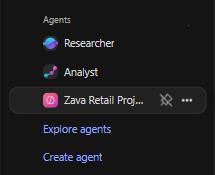
-
From the dropdown menu, select Share.
-
In the pop-up window, select the Specific users in your organization radio button, and in the field type
Alex Wilber. -
Select the user’s email and then select Apply and Close.
Congratulations
You’ve successfully completed Exercise 01 and built the foundation for Zava Retail’s executive project-tracking solution. In this exercise, you:
- Configured a secure Azure DevOps connector in Agent Builder to index work items from the Zava-Retail project.
- Created a purpose-built agent designed to help the Executive Office access real-time project insights.
- Tested the agent’s ability to retrieve and summarize bugs, user stories, and assigned work directly from Azure DevOps.
- Showed hot to share the agent with a colleague.