ai-agents-for-beginners
(Click di picture wey dey above to watch video for dis lesson)
Tool Use Design Pattern
Tools interesting because dem allow AI agents to get wider range of skills. Instead make agent get small set of actions to do, if you add tool, agent fit do plenty actions. For dis chapter, we go see Tool Use Design Pattern wey dey explain how AI agents fit use certain tools to reach their goals.
Introduction
For dis lesson, we wan find answer to dis questions dem:
- Wetin be tool use design pattern?
- Wetin be di kain cases wey e fit apply?
- Wetin be di elements/building blocks wey dem need to use dis design pattern?
- Wetin be di special tins wey we suppose consider wen we dey use Tool Use Design Pattern to build AI agents wey people fit trust?
Learning Goals
After you finish dis lesson, you go fit:
- Define Tool Use Design Pattern and why e dey important.
- Identify di cases wey you fit use Tool Use Design Pattern.
- Understand di important elements wey you need to put for place to use di design pattern.
- Recognize wetin you suppose consider to make sure AI agents wey dey use dis design pattern go dey trustworthy.
Wetin be Tool Use Design Pattern?
Di Tool Use Design Pattern na to give LLMs power to interact with external tools to fit reach their specific goals. Tool na code wey agent fit run to do action. Tool fit be simple function like calculator, or API call to third-party service like checking stock price or checking weather report. For AI agents context, tools dem dey made to be run by agents based on model-generated function calls.
Wetin be di use cases wey e fit apply?
AI Agents fit use tools to finish complex work, find information, or make decisions. Tool use design pattern dey often for scenarios wey need dynamic interaction with external systems, like databases, web services, or code interpreters. Dis power dey useful for plenty different cases like:
- Dynamic Information Retrieval: Agents fit ask external APIs or databases to collect up-to-date data (like, ask SQLite database to do data analysis, check stock prices or weather info).
- Code Execution and Interpretation: Agents fit run code or scripts to solve math problems, make reports, or do simulations.
- Workflow Automation: Automate repeating or multi-step workflow by linking tools like task schedulers, email services, or data pipelines.
- Customer Support: Agents fit connect with CRM systems, ticketing platforms, or knowledge bases to solve user questions.
- Content Generation and Editing: Agents fit use tools like grammar checker, text summarizer, or content safety checkers to help for content creation work.
Wetin be di elements/building blocks wey dem need to use Tool Use Design Pattern?
These building blocks dey allow AI agent to do wide range of work. Make we look key elements wey person need to take put Tool Use Design Pattern for ground:
-
Function/Tool Schemas: Detailed definitions of tools wey dey available, including function name, purpose, wetin parameters e need, and wetin output e go give. These schemas dey help LLM sabi wetin tools dey available and how e go form correct requests.
-
Function Execution Logic: E dey control how and when tools go dey called based on wetin user want and conversation context. This fit get planner modules, routing ways, or conditional flows wey decide tool usage as e happen.
-
Message Handling System: Components wey dey control conversation flow between user messages, LLM responses, tool calls, and tool outputs.
-
Tool Integration Framework: Infrastructure wey connect agent to different tools, whether na simple functions or complicated external services.
-
Error Handling & Validation: Ways to handle failures inside tool execution, check parameters, and manage unexpected responses.
-
State Management: Dey track conversation context, previous tool uses, and persistent data to make sure say multiple turns of talk go consistent.
Next, make we see Function/Tool Calling in more detail.
Function/Tool Calling
Function calling na main way we take allow Large Language Models (LLMs) dey interact with tools. You go often see ‘Function’ and ‘Tool’ dey used as same thing because ‘functions’ (blocks of reusable code) na di ‘tools’ wey agents dey use to do work. To run function code, LLM must compare wetin user request with function description. To do dis, schema wey get all function descriptions go send to LLM. LLM go choose the best function for di task and return the name plus arguments. Di chosen function go run, e response go come back to LLM, wey e go use the info to answer user request.
For developers to make function calling work for agents, you go need:
- LLM model wey support function calling
- Schema wey get function descriptions
- Code for each function wey dem describe
Make we use example of getting current time for one city make we explain:
-
Initialize LLM wey fit do function calling:
Not all models fit function calling, so e important to check say di LLM wey you dey use fit do am. Azure OpenAI fit do function calling. We fit start by to turn on OpenAI client for Azure OpenAI Responses API (di stable
/openai/v1/endpoint — noapi_versionneeded).# Start di OpenAI client for Azure OpenAI (Responses API, v1 endpoint) client = OpenAI( base_url=f"{os.environ['AZURE_OPENAI_ENDPOINT'].rstrip('/')}/openai/v1/", api_key=os.environ["AZURE_OPENAI_API_KEY"], ) deployment_name = os.environ["AZURE_OPENAI_DEPLOYMENT"] -
Make Function Schema:
Next, we go define JSON schema wey get function name, description of wetin function dey do, plus names and descriptions of function parameters. We go carry dis schema pass to client wey we make before, with user request to find time for San Francisco. Wetin dey important to know na say tool call na wetin go return, no be final answer to the question. Like we talk before, LLM go return the function name wey e select for di task, plus arguments wey e go pass.
 # Function description for di model to read (Responses API flat tool format)
 tools = [
     {
         "type": "function",
         "name": "get_current_time",
         "description": "Get the current time in a given location",
         "parameters": {
             "type": "object",
             "properties": {
                 "location": {
                     "type": "string",
                     "description": "The city name, e.g. San Francisco",
                 },
             },
             "required": ["location"],
         },
     }
 ]
# Di first message wey user send messages = [{"role": "user", "content": "What's the current time in San Francisco"}] # First time we dey call API: Make model use di function response = client.responses.create( model=deployment_name, input=messages, tools=tools, tool_choice="auto", store=False, ) # Di Responses API go return tool calls as function_call tins for response.output. # Add dem join di conversation make di model get full gist for di next turn. messages += response.output print("Model's response:") print(response.output)Model's response: [ResponseFunctionToolCall(arguments='{"location":"San Francisco"}', call_id='call_pOsKdUlqvdyttYB67MOj434b', name='get_current_time', type='function_call')] -
Di function code wey you need to carry out the task:
Now wey LLM don choose which function to run, di code wey go run di task need to dey implemented and executed. We fit write code to get current time for Python. We also go need write code to pull name and arguments from response_message to get final answer.
   def get_current_time(location):
     """Get the current time for a given location"""
     print(f"get_current_time called with location: {location}")
     location_lower = location.lower()

     for key, timezone in TIMEZONE_DATA.items():
         if key in location_lower:
             print(f"Timezone found for {key}")
             current_time = datetime.now(ZoneInfo(timezone)).strftime("%I:%M %p")
             return json.dumps({
                 "location": location,
                 "current_time": current_time
             })

     print(f"No timezone data found for {location_lower}")
     return json.dumps({"location": location, "current_time": "unknown"})
# Handle how di functions dem call tool_calls = [item for item in response.output if item.type == "function_call"] if tool_calls: for tool_call in tool_calls: if tool_call.name == "get_current_time": function_args = json.loads(tool_call.arguments) time_response = get_current_time( location=function_args.get("location") ) # Return di tool result as one function_call_output item messages.append({ "type": "function_call_output", "call_id": tool_call.call_id, "output": time_response, }) else: print("No tool calls were made by the model.") # Second API call: Make you get di final response from di model final_response = client.responses.create( model=deployment_name, input=messages, tools=tools, store=False, ) return final_response.output_textget_current_time called with location: San Francisco Timezone found for san francisco The current time in San Francisco is 09:24 AM.
Function Calling na di heart of most, if no be all, agent tool use design, but to build am from scratch fit sometimes hard. Like we learn for Lesson 2 agentic frameworks dey give us pre-built building blocks to put tool use for ground.
Tool Use Examples with Agentic Frameworks
Here be some examples how you fit use Tool Use Design Pattern with different agentic frameworks:
Microsoft Agent Framework
Microsoft Agent Framework na open-source AI framework to build AI agents. E make am easy to use function calling by allowing you to define tools as Python functions with @tool decorator. Framework go handle communication between model and your code. E also provide access to pre-built tools like File Search and Code Interpreter through FoundryChatClient.
Di diagram below show how function calling dey work for Microsoft Agent Framework:
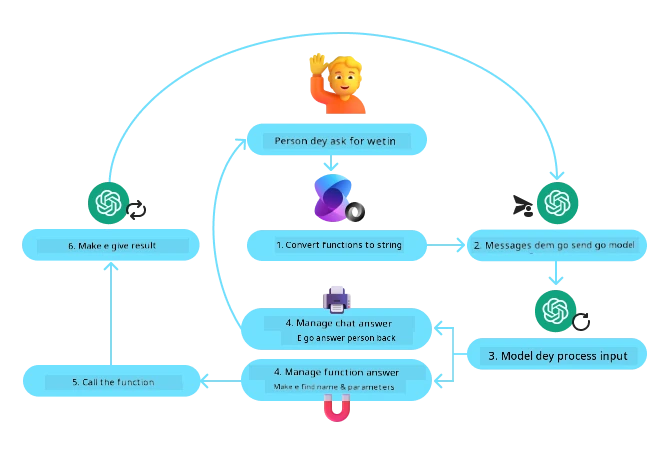
For Microsoft Agent Framework, tools na decorated functions. We fit convert di get_current_time function wey we see before to tool with @tool decorator. Framework go automatically serialize di function and parameters, and create schema to send to LLM.
import os
from agent_framework import tool
from agent_framework.foundry import FoundryChatClient
from azure.identity import AzureCliCredential

@tool(approval_mode="never_require")
def get_current_time(location: str) -> str:
    """Get the current time for a given location"""
    ...

# Make di client
provider = FoundryChatClient(
    project_endpoint=os.environ["AZURE_AI_PROJECT_ENDPOINT"],
    model=os.environ["AZURE_AI_MODEL_DEPLOYMENT_NAME"],
    credential=AzureCliCredential(),
)

# Make one agent an run am wit di tool
agent = provider.as_agent(name="TimeAgent", instructions="Use available tools to answer questions.", tools=get_current_time)
response = await agent.run("What time is it?")
Microsoft Foundry Agent Service
Microsoft Foundry Agent Service na new agentic framework wey dem design to help developers build, deploy, and scale AI agents wey get high quality and fit extend well without hassle of managing compute and storage resources. E good well well for enterprise applications because e get full managed service plus enterprise grade security.
Compared to developing with LLM API direct, Microsoft Foundry Agent Service get some better things like:
- Automatic tool calling – you no need parse tool call, call di tool, and handle response; all that one dem dey do inside server
- Securely managed data – no need manage your own conversation state, you fit use threads to keep all info you need
- Out-of-the-box tools – Tools you fit use to connect with your data sources, like Bing, Azure AI Search, and Azure Functions.
Di tools wey dey Microsoft Foundry Agent Service fit divide into two kinds:
- Knowledge Tools:
- Action Tools:
Di Agent Service dey allow us to use these tools together as toolset. E also dey use threads wey dey keep history of messages from one conversation.
Imagine say you be sales agent for company wey dem dey call Contoso. You wan build conversational agent wey fit answer questions about your sales data.
Di image below show how you fit use Microsoft Foundry Agent Service to analyze your sales data:
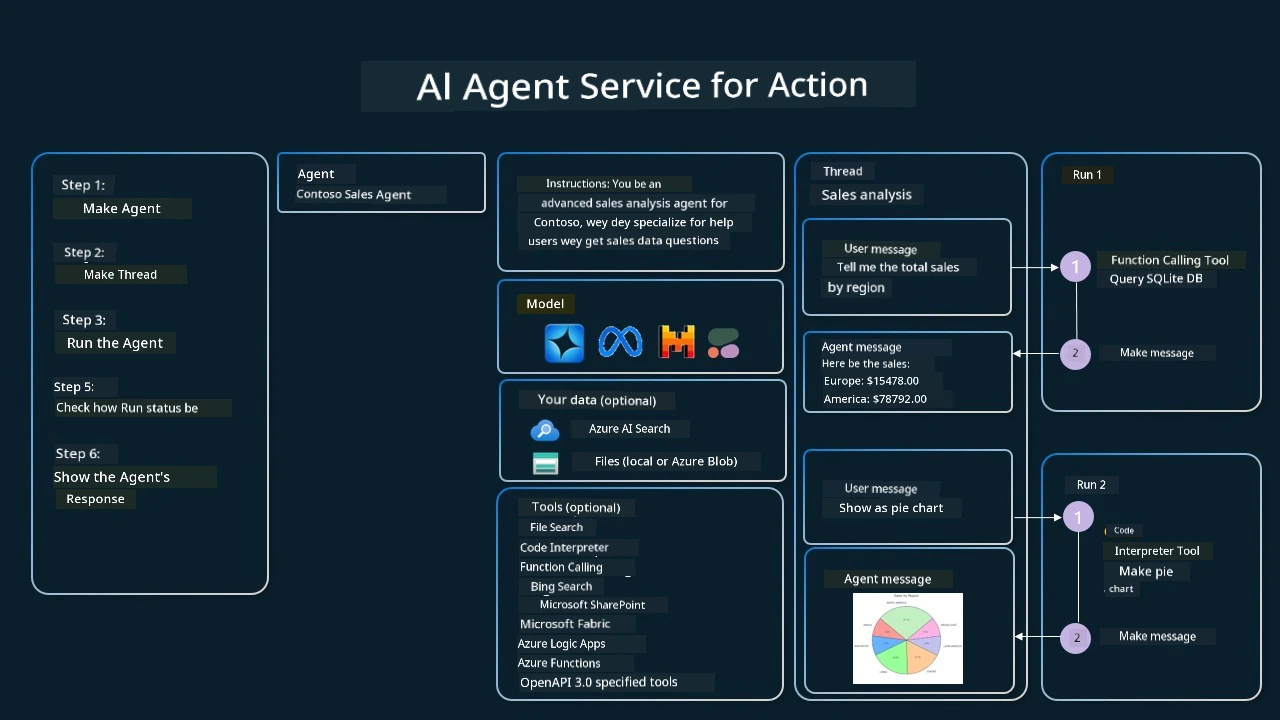
To use any tool for di service, we fit create client and define tool or toolset. To do dis for real, we fit use dis Python code. LLM go fit check the toolset and decide if e go use user created function, fetch_sales_data_using_sqlite_query, or pre-built Code Interpreter based on user request.
import os
from azure.ai.projects import AIProjectClient
from azure.identity import DefaultAzureCredential
from fetch_sales_data_functions import fetch_sales_data_using_sqlite_query # fetch_sales_data_using_sqlite_query function wey you fit find for inside fetch_sales_data_functions.py file.
from azure.ai.projects.models import ToolSet, FunctionTool, CodeInterpreterTool

project_client = AIProjectClient.from_connection_string(
    credential=DefaultAzureCredential(),
    conn_str=os.environ["PROJECT_CONNECTION_STRING"],
)

# Set up toolset
toolset = ToolSet()

# Set up function calling agent with the fetch_sales_data_using_sqlite_query function and add am to the toolset
fetch_data_function = FunctionTool(fetch_sales_data_using_sqlite_query)
toolset.add(fetch_data_function)

# Set up Code Interpreter tool and add am to the toolset.
code_interpreter = CodeInterpreterTool()toolset.add(code_interpreter)

agent = project_client.agents.create_agent(
    model="gpt-5-mini", name="my-agent", instructions="You are helpful agent",
    toolset=toolset
)
Wetin be di special tins to consider when you dey use Tool Use Design Pattern to build AI agents wey people fit trust?
One common worry with SQL wey LLMs dey dynamically create na security, especially threat of SQL injection or bad actions like to drop or damage database. Though these worries dey real, you fit reduce am well by to properly set database access permissions. For most databases, dis mean to set database as read-only. For database services like PostgreSQL or Azure SQL, app suppose get read-only (SELECT) role.
To run the app for secure environment go still add more protection. For enterprise cases, data usually dey extracted and transformed from operational systems go read-only database or data warehouse with user-friendly schema. This method dey make sure say data dey secure, e fit perform well, and app get restricted read-only access.
Sample Codes
- Python: Agent Framework
- .NET: Agent Framework
You get more questions about Tool Use Design Patterns?
Join Microsoft Foundry Discord to meet other learners, attend office hours, and get your AI Agents questions answer.
Additional Resources
- Azure AI Agents Service Workshop
- Contoso Creative Writer Multi-Agent Workshop
- Microsoft Agent Framework Overview
Smoke-Test Dis Agent (Optional)
After you don sabi how to deploy agents for Lesson 16, you fit smoke-test dis lesson TravelToolAgent (e still dey call im tools and answer?) wit tests/lesson-04-smoke-tests.json. See tests/README.md to know how to run am.
Previous Lesson
Understanding Agentic Design Patterns
Next Lesson
Disclaimer: Dis document don translate wit AI translation service Co-op Translator. Even tho we dey try make am correct, abeg make you know say automated translation fit get errors or mistakes. Di original document for dia own language na im be di correct source. For important info, make person wey sabi human translation do am. We no go responsible for any misunderstanding or wrong understanding wey fit happen because of dis translation.