ai-agents-for-beginners

(คลิกที่รูปภาพด้านบนเพื่อดูวิดีโอของบทเรียนนี้)
การคิดเหนือการคิดในเอเจนต์ AI
บทนำ
ยินดีต้อนรับสู่บทเรียนเกี่ยวกับการคิดเหนือการคิดในเอเจนต์ AI! บทนี้ออกแบบมาสำหรับผู้เริ่มต้นที่อยากรู้ว่าเอเจนต์ AI สามารถคิดเกี่ยวกับกระบวนการคิดของตนเองได้อย่างไร เมื่อจบบทเรียนนี้ คุณจะเข้าใจแนวคิดสำคัญและมีตัวอย่างที่ใช้งานได้จริงในการประยุกต์ใช้การคิดเหนือการคิดในการออกแบบเอเจนต์ AI
เป้าหมายการเรียนรู้
หลังจากจบบทเรียนนี้ คุณจะสามารถ:
- เข้าใจผลกระทบของวงจรเหตุผลในคำจำกัดความของเอเจนต์
- ใช้เทคนิคการวางแผนและการประเมินเพื่อช่วยเอเจนต์ที่แก้ไขตนเองได้
- สร้างเอเจนต์ของคุณเองที่สามารถจัดการโค้ดเพื่อทำงานต่าง ๆ ได้
แนะนำการคิดเหนือการคิด
การคิดเหนือการคิดหมายถึงกระบวนการทางปัญญาระดับสูงที่เกี่ยวข้องกับการคิดเกี่ยวกับการคิดของตนเอง สำหรับเอเจนต์ AI นั่นหมายถึงความสามารถในการประเมินและปรับแต่งการกระทำของตนโดยอาศัยการรับรู้ตนเองและประสบการณ์ที่ผ่านมา การคิดเหนือการคิด หรือ “การคิดเกี่ยวกับการคิด” คือแนวคิดสำคัญในการพัฒนาเอเจนต์ AI ที่มีตัวตน มันเกี่ยวข้องกับระบบ AI ที่ตระหนักถึงกระบวนการภายในของตนเองและสามารถตรวจสอบ ควบคุม และปรับเปลี่ยนพฤติกรรมตามนั้น เหมือนที่เราทำเมื่อเรารับรู้บรรยากาศหรือดูปัญหา ความรับรู้นี้ช่วยให้ระบบ AI ตัดสินใจได้ดีขึ้น ระบุข้อผิดพลาด และพัฒนาประสิทธิภาพได้ดีขึ้นตามเวลา- ซึ่งเชื่อมโยงกลับไปยังการทดสอบทัวริงและการถกเถียงเกี่ยวกับว่า AI จะเข้ามาบังคับโลกหรือไม่
ในบริบทของระบบ AI ที่มีตัวตน การคิดเหนือการคิดสามารถช่วยแก้ปัญหาหลายอย่าง เช่น:
- ความโปร่งใส: ทำให้ระบบ AI สามารถอธิบายเหตุผลและการตัดสินใจของตนได้
- การใช้เหตุผล: เพิ่มความสามารถของระบบ AI ในการสังเคราะห์ข้อมูลและตัดสินใจอย่างมีเหตุผล
- การปรับตัว: อนุญาตให้ระบบ AI ปรับตัวให้เข้ากับสภาพแวดล้อมใหม่และเงื่อนไขที่เปลี่ยนแปลง
- การรับรู้: ปรับปรุงความแม่นยำของระบบ AI ในการจดจำและตีความข้อมูลจากสภาพแวดล้อมของตน
การคิดเหนือการคิดคืออะไร?
การคิดเหนือการคิด หรือ “การคิดเกี่ยวกับการคิด” คือกระบวนการทางปัญญาระดับสูงที่เกี่ยวข้องกับการรับรู้ตนเองและการควบคุมตนเองของกระบวนการคิดของตน ในด้าน AI การคิดเหนือการคิดช่วยให้เอเจนต์ประเมินและปรับเปลี่ยนกลยุทธ์และการกระทำของตน ซึ่งนำไปสู่ความสามารถในการแก้ปัญหาและตัดสินใจที่ดีขึ้น ด้วยความเข้าใจการคิดเหนือการคิด คุณสามารถออกแบบเอเจนต์ AI ที่ไม่เพียงแต่ฉลาดขึ้นแต่ยังปรับตัวและมีประสิทธิภาพมากขึ้น ในการคิดเหนือการคิดอย่างแท้จริง คุณจะเห็น AI ใช้เหตุผลเกี่ยวกับเหตุผลของตัวเองอย่างชัดเจน
ตัวอย่าง: “ฉันเลือกเที่ยวบินราคาถูกก่อนเพราะ… อาจจะพลาดเที่ยวบินตรง ดังนั้นฉันจะตรวจสอบใหม่อีกครั้ง” ติดตามวิธีหรือเหตุผลที่เลือกเส้นทางหนึ่ง
- สังเกตว่ามีข้อผิดพลาดเพราะพึ่งพาความชอบของผู้ใช้จากครั้งก่อนมากเกินไป จึงปรับกลยุทธ์การตัดสินใจไม่ใช่แค่คำแนะนำสุดท้าย
- วินิจฉัยรูปแบบเช่น “เมื่อไรก็ตามที่ฉันเห็นผู้ใช้กล่าวถึง ‘แออัดเกินไป’ ฉันควรลบสถานที่บางแห่งออก และสะท้อนว่าวิธีเลือก ‘สถานที่ยอดนิยม’ ของฉันผิดพลาดหากฉันจัดอันดับตามความนิยมเสมอ”
ความสำคัญของการคิดเหนือการคิดในเอเจนต์ AI
การคิดเหนือการคิดมีบทบาทสำคัญในการออกแบบเอเจนต์ AI ด้วยเหตุผลหลายประการ:
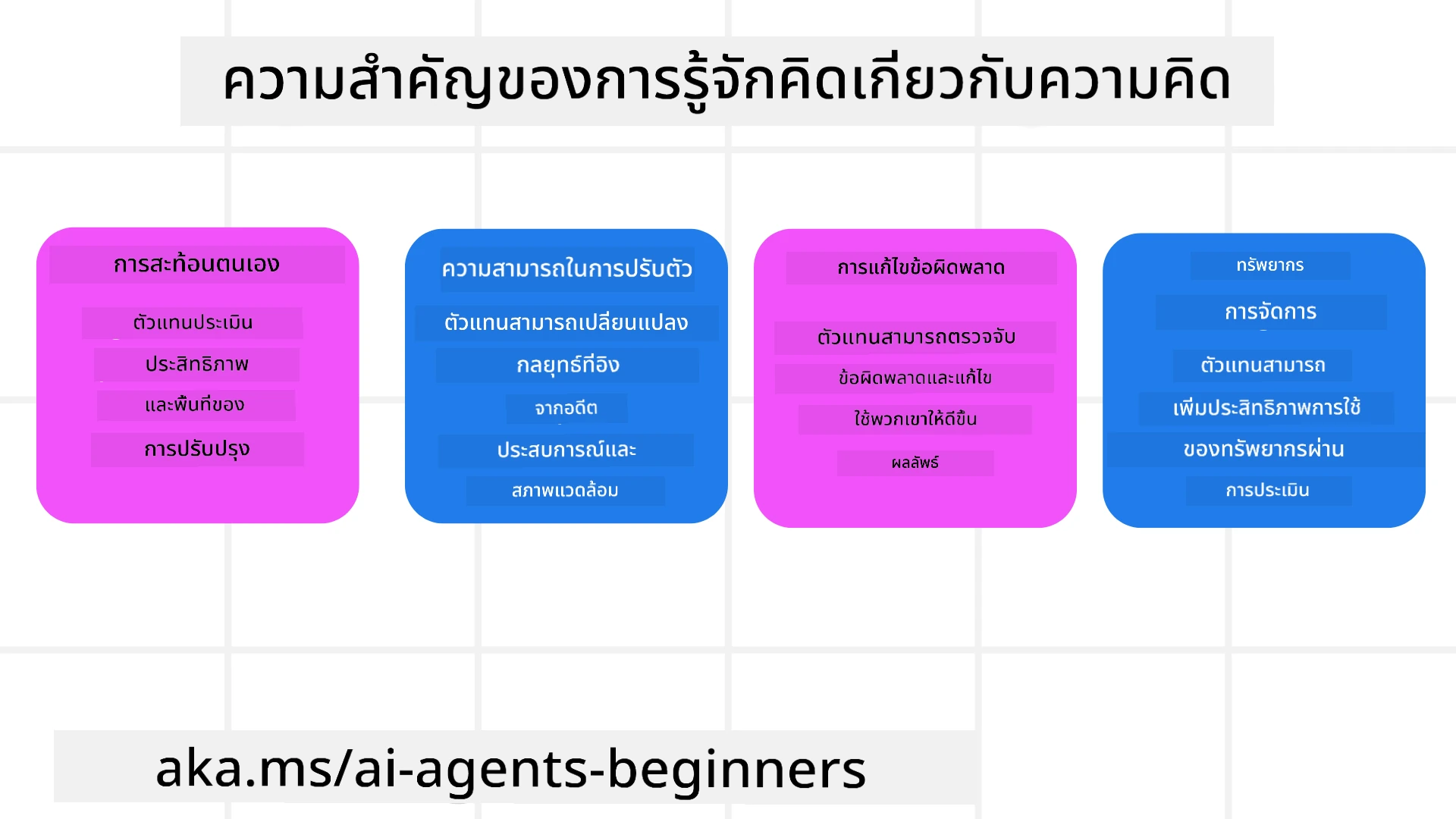
- การสะท้อนตนเอง: เอเจนต์สามารถประเมินประสิทธิภาพของตนเองและระบุจุดที่ควรปรับปรุงได้
- ความสามารถในการปรับตัว: เอเจนต์สามารถปรับกลยุทธ์ตามประสบการณ์ที่ผ่านมาและสภาพแวดล้อมที่เปลี่ยนแปลง
- การแก้ไขข้อผิดพลาด: เอเจนต์สามารถตรวจจับและแก้ไขข้อผิดพลาดได้เอง ซึ่งนำไปสู่ผลลัพธ์ที่แม่นยำขึ้น
- การจัดการทรัพยากร: เอเจนต์สามารถวางแผนและประเมินการกระทำเพื่อเพิ่มประสิทธิภาพการใช้ทรัพยากร เช่น เวลาและกำลังประมวลผล
องค์ประกอบของเอเจนต์ AI
ก่อนที่จะเข้าสู่กระบวนการคิดเหนือการคิด จำเป็นต้องเข้าใจองค์ประกอบพื้นฐานของเอเจนต์ AI เอเจนต์ AI ประกอบด้วย:
- บุคลิกภาพ: บุคลิกและลักษณะของเอเจนต์ ซึ่งกำหนดวิธีที่มันโต้ตอบกับผู้ใช้
- เครื่องมือ: ความสามารถและฟังก์ชันที่เอเจนต์สามารถทำได้
- ทักษะ: ความรู้และความเชี่ยวชาญที่เอเจนต์มี
องค์ประกอบเหล่านี้ทำงานร่วมกันเพื่อสร้าง “หน่วยความเชี่ยวชาญ” ที่สามารถทำงานเฉพาะด้านได้
ตัวอย่าง: ลองนึกถึงเอเจนต์ท่องเที่ยว บริการเอเจนต์ที่ไม่เพียงแต่ช่วยวางแผนวันหยุดของคุณ แต่ยังปรับเส้นทางตามข้อมูลแบบเรียลไทม์และประสบการณ์การเดินทางของลูกค้าในอดีต
ตัวอย่าง: การคิดเหนือการคิดในบริการเอเจนต์ท่องเที่ยว
ลองจินตนาการว่าคุณกำลังออกแบบบริการเอเจนต์ท่องเที่ยวที่ขับเคลื่อนด้วย AI เอเจนต์นี้ “Travel Agent” ช่วยผู้ใช้วางแผนวันหยุด การนำการคิดเหนือการคิดมาใช้หมายความว่า Travel Agent ต้องประเมินและปรับการกระทำของตนเองตามการรับรู้ตนเองและประสบการณ์ที่ผ่านมา ซึ่งการคิดเหนือการคิดสามารถมีบทบาทได้อย่างไรบ้าง:
งานปัจจุบัน
งานปัจจุบันคือช่วยผู้ใช้วางแผนทริปไปปารีส
ขั้นตอนการทำงานให้สำเร็จ
- รวบรวมความชอบของผู้ใช้: ถามผู้ใช้เกี่ยวกับวันที่เดินทาง งบประมาณ ความสนใจ (เช่น พิพิธภัณฑ์ อาหาร การช็อปปิ้ง) และความต้องการเฉพาะ
- ค้นหาข้อมูล: ค้นหาตัวเลือกเที่ยวบิน ที่พัก แหล่งท่องเที่ยว และร้านอาหารที่ตรงกับความชอบของผู้ใช้
- ผลิตคำแนะนำ: ให้กำหนดการส่วนตัวพร้อมรายละเอียดเที่ยวบิน การจองโรงแรม และกิจกรรมที่แนะนำ
- ปรับตามคำติชม: ขอคำติชมจากผู้ใช้เกี่ยวกับคำแนะนำและปรับแก้ตามต้องการ
ทรัพยากรที่จำเป็น
- การเข้าถึงฐานข้อมูลการจองเที่ยวบินและที่พัก
- ข้อมูลเกี่ยวกับแหล่งท่องเที่ยวและร้านอาหารในปารีส
- ข้อมูลคำติชมจากผู้ใช้จากการปฏิสัมพันธ์ที่ผ่านมา
ประสบการณ์และการสะท้อนตนเอง
Travel Agent ใช้การคิดเหนือการคิดเพื่อตรวจสอบประสิทธิภาพและเรียนรู้จากประสบการณ์ที่ผ่านมา เช่น:
- วิเคราะห์คำติชมของผู้ใช้: Travel Agent ทบทวนคำติชมเพื่อกำหนดคำแนะนำที่ได้รับการตอบรับดีและไม่ดี แล้วปรับคำแนะนำในอนาคตตามนั้น
- ความสามารถในการปรับตัว: ถ้าผู้ใช้เคยบอกว่าไม่ชอบสถานที่แออัด Travel Agent จะหลีกเลี่ยงแนะนำสถานที่ท่องเที่ยวยอดนิยมในช่วงเวลาที่คนเยอะในอนาคต
- การแก้ไขข้อผิดพลาด: ถ้า Travel Agent เคยทำผิดเช่นแนะนำโรงแรมที่เต็ม มันจะเรียนรู้ที่จะตรวจสอบความพร้อมใช้งานอย่างเข้มงวดยิ่งขึ้นก่อนให้คำแนะนำ
ตัวอย่างสำหรับนักพัฒนา
นี่คือตัวอย่างโค้ดง่าย ๆ ของ Travel Agent เมื่อรวมการคิดเหนือการคิด
class Travel_Agent:
    def __init__(self):
        self.user_preferences = {}
        self.experience_data = []

    def gather_preferences(self, preferences):
        self.user_preferences = preferences

    def retrieve_information(self):
        # ค้นหาเที่ยวบิน โรงแรม และสถานที่ท่องเที่ยวตามความชอบ
        flights = search_flights(self.user_preferences)
        hotels = search_hotels(self.user_preferences)
        attractions = search_attractions(self.user_preferences)
        return flights, hotels, attractions

    def generate_recommendations(self):
        flights, hotels, attractions = self.retrieve_information()
        itinerary = create_itinerary(flights, hotels, attractions)
        return itinerary

    def adjust_based_on_feedback(self, feedback):
        self.experience_data.append(feedback)
        # วิเคราะห์ข้อเสนอแนะและปรับคำแนะนำในอนาคต
        self.user_preferences = adjust_preferences(self.user_preferences, feedback)

# ตัวอย่างการใช้งาน
travel_agent = Travel_Agent()
preferences = {
    "destination": "Paris",
    "dates": "2025-04-01 to 2025-04-10",
    "budget": "moderate",
    "interests": ["museums", "cuisine"]
}
travel_agent.gather_preferences(preferences)
itinerary = travel_agent.generate_recommendations()
print("Suggested Itinerary:", itinerary)
feedback = {"liked": ["Louvre Museum"], "disliked": ["Eiffel Tower (too crowded)"]}
travel_agent.adjust_based_on_feedback(feedback)
ทำไมการคิดเหนือการคิดจึงสำคัญ
- การสะท้อนตนเอง: เอเจนต์สามารถวิเคราะห์ประสิทธิภาพและระบุจุดที่ต้องปรับปรุง
- ความสามารถในการปรับตัว: เอเจนต์สามารถปรับกลยุทธ์ตามคำติชมและสภาพแวดล้อมที่เปลี่ยนไป
- การแก้ไขข้อผิดพลาด: เอเจนต์สามารถตรวจจับและแก้ไขข้อผิดพลาดโดยอัตโนมัติ
- การจัดการทรัพยากร: เอเจนต์สามารถเพิ่มประสิทธิภาพการใช้ทรัพยากร เช่น เวลาและกำลังประมวลผล
การนำการคิดเหนือการคิดมาใช้ช่วยให้ Travel Agent สามารถให้คำแนะนำด้านการเดินทางที่เหมาะสมและแม่นยำยิ่งขึ้น เพิ่มประสบการณ์ผู้ใช้อย่างดีเยี่ยม
2. การวางแผนในเอเจนต์
การวางแผนเป็นส่วนสำคัญของพฤติกรรมเอเจนต์ AI ซึ่งเป็นการกำหนดขั้นตอนที่จำเป็นเพื่อบรรลุเป้าหมาย โดยพิจารณาถึงสภาพปัจจุบัน ทรัพยากร และอุปสรรคที่อาจเกิดขึ้น
องค์ประกอบของการวางแผน
- งานปัจจุบัน: กำหนดงานให้ชัดเจน
- ขั้นตอนทำงานให้สำเร็จ: แยกงานเป็นขั้นตอนที่จัดการได้
- ทรัพยากรที่จำเป็น: ระบุทรัพยากรที่ต้องใช้
- ประสบการณ์: ใช้ประสบการณ์ที่ผ่านมาเพื่อช่วยวางแผน
ตัวอย่าง: นี่คือขั้นตอนที่ Travel Agent ต้องทำเพื่อช่วยผู้ใช้วางแผนทริปอย่างมีประสิทธิภาพ:
ขั้นตอนสำหรับ Travel Agent
- รวบรวมความชอบของผู้ใช้
- ถามรายละเอียดวันที่เดินทาง งบประมาณ ความสนใจ และความต้องการเฉพาะ
- ตัวอย่าง: “คุณวางแผนเดินทางเมื่อไหร่?” “งบประมาณของคุณเท่าไหร่?” “กิจกรรมที่คุณชอบทำตอนพักผ่อนคืออะไร?”
- ค้นหาข้อมูล
- ค้นหาตัวเลือกที่เกี่ยวข้องตามความชอบของผู้ใช้
- เที่ยวบิน: หาตัวเลือกเที่ยวบินที่อยู่ในงบและวันเดินทางที่เลือก
- ที่พัก: หาที่พักหรือบ้านเช่าที่ตรงกับความต้องการเรื่องที่ตั้ง ราคา และสิ่งอำนวยความสะดวก
- สถานที่ท่องเที่ยวและร้านอาหาร: หาแหล่งท่องเที่ยวยอดนิยม กิจกรรม และร้านอาหารที่ตรงกับความสนใจของผู้ใช้
- สร้างคำแนะนำ
- รวบรวมข้อมูลที่ได้มาเป็นกำหนดการส่วนตัว
- ให้รายละเอียดเที่ยวบิน การจองที่พัก และกิจกรรมที่แนะนำ โดยปรับตามความชอบของผู้ใช้
- นำเสนอแผนการเดินทางแก่ผู้ใช้
- แชร์แผนการเดินทางที่เสนอให้ผู้ใช้พิจารณา
- ตัวอย่าง: “นี่คือกำหนดการที่แนะนำสำหรับทริปปารีสของคุณ รวมข้อมูลเที่ยวบิน การจองโรงแรม และรายการกิจกรรมและร้านอาหารที่แนะนำ แจ้งความเห็นของคุณได้เลย!”
- รวบรวมคำติชม
- ขอคำติชมจากผู้ใช้เกี่ยวกับแผนการเดินทางที่นำเสนอ
- ตัวอย่าง: “คุณชอบตัวเลือกเที่ยวบินไหม?” “โรงแรมเหมาะกับความต้องการหรือไม่?” “มีกิจกรรมใดที่อยากเพิ่มหรือลบไหม?”
- ปรับตามคำติชม
- ปรับแผนตามคำติชมของผู้ใช้
- แก้ไขคำแนะนำเที่ยวบิน ที่พัก และกิจกรรมให้ตรงกับความชอบมากขึ้น
- ยืนยันขั้นสุดท้าย
- นำเสนอแผนที่แก้ไขแล้วให้ผู้ใช้ยืนยัน
- ตัวอย่าง: “ฉันได้ปรับตามคำติชมของคุณแล้ว นี่คือแผนที่อัปเดต ดูโอเคไหม?”
- จองและยืนยันการจอง
- เมื่อผู้ใช้ยืนยันแล้ว ดำเนินการจองเที่ยวบิน ที่พัก และกิจกรรมล่วงหน้า
- ส่งรายละเอียดยืนยันให้ผู้ใช้
- ให้การสนับสนุนต่อเนื่อง
- พร้อมช่วยเหลือผู้ใช้สำหรับการเปลี่ยนแปลงหรือต้องการเพิ่มเติมก่อนและระหว่างทริป
- ตัวอย่าง: “ถ้าคุณต้องการความช่วยเหลือเพิ่มเติมระหว่างทริป ติดต่อฉันได้ทุกเมื่อ!”
ตัวอย่างการโต้ตอบ
class Travel_Agent:
    def __init__(self):
        self.user_preferences = {}
        self.experience_data = []

    def gather_preferences(self, preferences):
        self.user_preferences = preferences

    def retrieve_information(self):
        flights = search_flights(self.user_preferences)
        hotels = search_hotels(self.user_preferences)
        attractions = search_attractions(self.user_preferences)
        return flights, hotels, attractions

    def generate_recommendations(self):
        flights, hotels, attractions = self.retrieve_information()
        itinerary = create_itinerary(flights, hotels, attractions)
        return itinerary

    def adjust_based_on_feedback(self, feedback):
        self.experience_data.append(feedback)
        self.user_preferences = adjust_preferences(self.user_preferences, feedback)

# ตัวอย่างการใช้งานภายในคำขอโต้ตอบ
travel_agent = Travel_Agent()
preferences = {
    "destination": "Paris",
    "dates": "2025-04-01 to 2025-04-10",
    "budget": "moderate",
    "interests": ["museums", "cuisine"]
}
travel_agent.gather_preferences(preferences)
itinerary = travel_agent.generate_recommendations()
print("Suggested Itinerary:", itinerary)
feedback = {"liked": ["Louvre Museum"], "disliked": ["Eiffel Tower (too crowded)"]}
travel_agent.adjust_based_on_feedback(feedback)
3. ระบบ RAG แบบแก้ไข
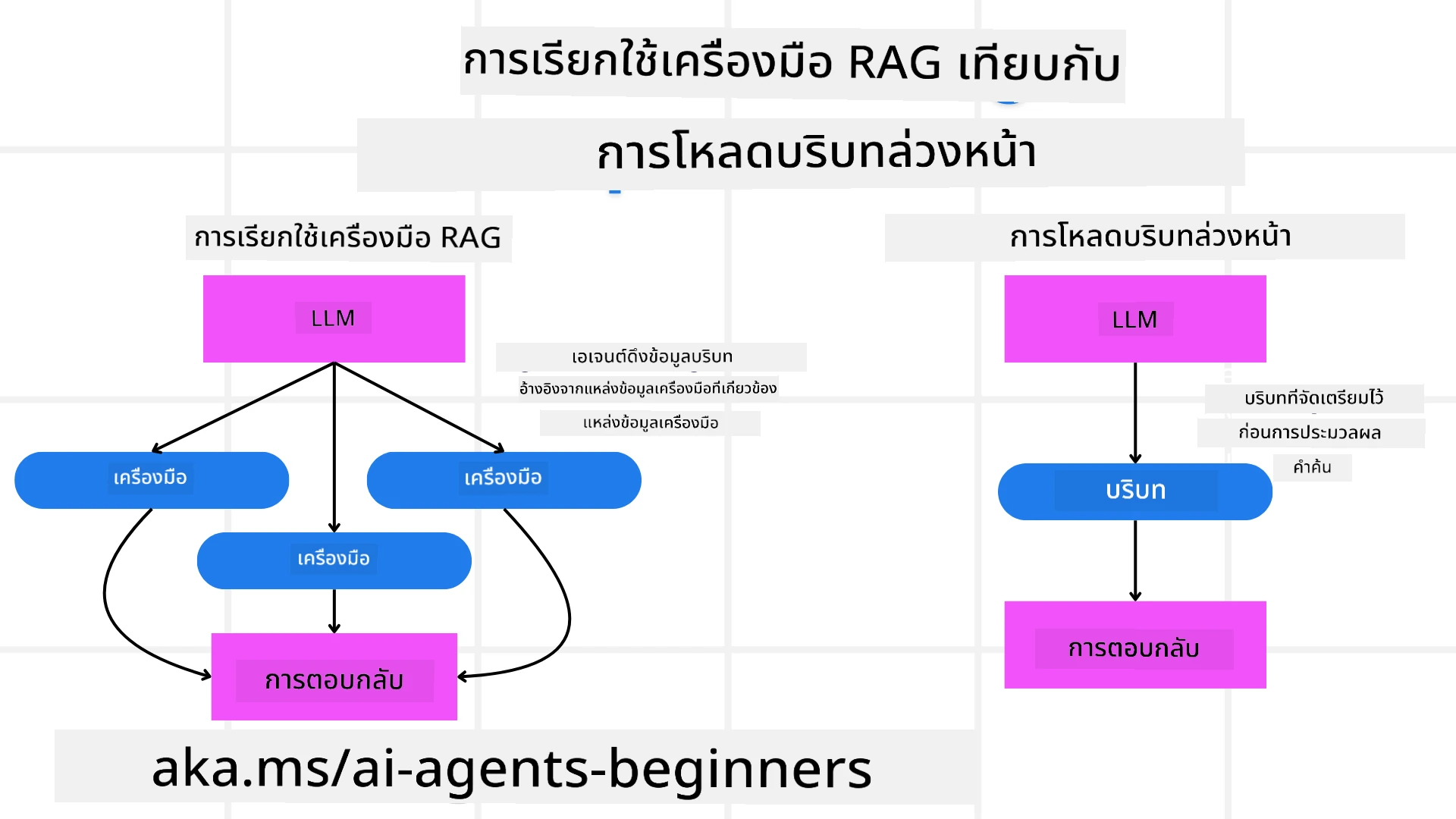
มาเริ่มที่การทำความเข้าใจความแตกต่างระหว่างเครื่องมือ RAG และการโหลดบริบทล่วงหน้า
Retrieval-Augmented Generation (RAG)
RAG รวมระบบดึงข้อมูลเข้ากับโมเดลสร้างข้อความ เมื่อมีคำถาม ระบบดึงข้อมูลจะดึงเอกสารหรือข้อมูลที่เกี่ยวข้องจากแหล่งภายนอก และใช้ข้อมูลที่ดึงมาเสริมข้อมูลเข้าโมเดลสร้างข้อความ ซึ่งช่วยให้โมเดลสร้างข้อความที่แม่นยำและสัมพันธ์กับบริบทมากขึ้น
ในระบบ RAG เอเจนต์จะดึงข้อมูลที่เกี่ยวข้องจากฐานความรู้และใช้เพื่อสร้างคำตอบหรือดำเนินการที่เหมาะสม
วิธี RAG แบบแก้ไข
วิธี RAG แบบแก้ไขมุ่งเน้นการใช้เทคนิค RAG เพื่อแก้ไขข้อผิดพลาดและปรับปรุงความแม่นยำของเอเจนต์ AI ซึ่งประกอบด้วย:
- เทคนิคกระตุ้น (Prompting Technique): ใช้กระตุ้นเฉพาะเพื่อชี้แนะเอเจนต์ในการดึงข้อมูลที่เกี่ยวข้อง
- เครื่องมือ (Tool): ใช้อัลกอริทึมและกลไกที่ช่วยให้เอเจนต์ประเมินความเกี่ยวข้องของข้อมูลที่ดึงมาและสร้างคำตอบที่ถูกต้อง
- การประเมิน (Evaluation): ประเมินประสิทธิภาพของเอเจนต์อย่างต่อเนื่องและปรับปรุงเพื่อเพิ่มความแม่นยำและประสิทธิผล
ตัวอย่าง: RAG แบบแก้ไขในเอเจนต์ค้นหา
ลองนึกถึงเอเจนต์ค้นหาที่ดึงข้อมูลจากเว็บเพื่อตอบคำถามผู้ใช้ วิธี RAG แบบแก้ไขอาจรวมถึง:
- เทคนิคกระตุ้น: สร้างคำค้นหาตามข้อมูลที่ผู้ใช้ป้อน
- เครื่องมือ: ใช้ประมวลผลภาษาธรรมชาติและอัลกอริทึมการเรียนรู้ของเครื่องเพื่อจัดอันดับและกรองผลการค้นหา
- การประเมิน: วิเคราะห์คำติชมของผู้ใช้เพื่อตรวจจับและแก้ไขข้อผิดพลาดของข้อมูลที่ดึงออกมา
RAG แบบแก้ไขใน Travel Agent
RAG แบบแก้ไข (Retrieval-Augmented Generation แบบแก้ไข) ช่วยเพิ่มความสามารถในการดึงและสร้างข้อมูลพร้อมแก้ไขจุดผิดพลาดของ AI มาดูกันว่า Travel Agent จะใช้วิธี RAG แบบแก้ไขในการให้คำแนะนำด้านการเดินทางที่แม่นยำและเกี่ยวข้องมากขึ้นอย่างไร
สิ่งนี้รวมถึง:
- เทคนิคกระตุ้น: ใช้คำกระตุ้นเฉพาะเพื่อชี้แนะเอเจนต์ในการดึงข้อมูลที่เกี่ยวข้อง
- เครื่องมือ: ใช้อัลกอริทึมและกลไกที่ช่วยให้เอเจนต์ประเมินความเกี่ยวข้องของข้อมูลที่ดึงมาและสร้างคำตอบที่ถูกต้อง
- การประเมิน: ประเมินประสิทธิภาพของเอเจนต์อย่างต่อเนื่องและปรับปรุงเพื่อเพิ่มความแม่นยำและประสิทธิผล
ขั้นตอนการนำ RAG แบบแก้ไขไปใช้ใน Travel Agent
- ปฏิสัมพันธ์ผู้ใช้ครั้งแรก
- Travel Agent รวบรวมความชอบเริ่มต้นจากผู้ใช้ เช่น จุดหมาย วันที่เดินทาง งบประมาณ และความสนใจ
-
ตัวอย่าง:
preferences = {
    "destination": "Paris",
    "dates": "2025-04-01 to 2025-04-10",
    "budget": "moderate",
    "interests": ["museums", "cuisine"]
}
- การดึงข้อมูล
- Travel Agent ดึงข้อมูลเที่ยวบิน ที่พัก แหล่งท่องเที่ยว และร้านอาหารตามความชอบของผู้ใช้
-
ตัวอย่าง:
flights = search_flights(preferences)
hotels = search_hotels(preferences)
attractions = search_attractions(preferences)
- การสร้างคำแนะนำเริ่มต้น
- Travel Agent ใช้ข้อมูลที่ดึงมาเพื่อสร้างกำหนดการส่วนตัว
-
ตัวอย่าง:
itinerary = create_itinerary(flights, hotels, attractions)
print("Suggested Itinerary:", itinerary)
- การเก็บคำติชมจากผู้ใช้
- Travel Agent ขอคำติชมเกี่ยวกับคำแนะนำเริ่มต้น
-
ตัวอย่าง:
feedback = {
    "liked": ["Louvre Museum"],
    "disliked": ["Eiffel Tower (too crowded)"]
}
- กระบวนการ RAG แบบแก้ไข
- เทคนิคกระตุ้น: Travel Agent สร้างคำค้นหาใหม่ตามคำติชมของผู้ใช้
-
ตัวอย่าง:
if "disliked" in feedback:
    preferences["avoid"] = feedback["disliked"]
-
- เครื่องมือ: Travel Agent ใช้อัลกอริทึมจัดอันดับและกรองผลการค้นหาใหม่โดยเน้นความเกี่ยวข้องตามคำติชม
-
ตัวอย่าง:
new_attractions = search_attractions(preferences)
new_itinerary = create_itinerary(flights, hotels, new_attractions)
print("Updated Itinerary:", new_itinerary)
-
- การประเมิน: Travel Agent ประเมินความเกี่ยวข้องและความแม่นยำของคำแนะนำอย่างต่อเนื่องโดยวิเคราะห์คำติชมและปรับปรุงตามจำเป็น
-
ตัวอย่าง:
def adjust_preferences(preferences, feedback):
    if "liked" in feedback:
        preferences["favorites"] = feedback["liked"]
    if "disliked" in feedback:
        preferences["avoid"] = feedback["disliked"]
    return preferences

preferences = adjust_preferences(preferences, feedback)
-
- เทคนิคกระตุ้น: Travel Agent สร้างคำค้นหาใหม่ตามคำติชมของผู้ใช้
ตัวอย่างเชิงปฏิบัติ
นี่คือตัวอย่างโค้ด Python ง่าย ๆ ที่รวมวิธี RAG แบบแก้ไขใน Travel Agent:
class Travel_Agent:
    def __init__(self):
        self.user_preferences = {}
        self.experience_data = []

    def gather_preferences(self, preferences):
        self.user_preferences = preferences

    def retrieve_information(self):
        flights = search_flights(self.user_preferences)
        hotels = search_hotels(self.user_preferences)
        attractions = search_attractions(self.user_preferences)
        return flights, hotels, attractions

    def generate_recommendations(self):
        flights, hotels, attractions = self.retrieve_information()
        itinerary = create_itinerary(flights, hotels, attractions)
        return itinerary

    def adjust_based_on_feedback(self, feedback):
        self.experience_data.append(feedback)
        self.user_preferences = adjust_preferences(self.user_preferences, feedback)
        new_itinerary = self.generate_recommendations()
        return new_itinerary

# ตัวอย่างการใช้งาน
travel_agent = Travel_Agent()
preferences = {
    "destination": "Paris",
    "dates": "2025-04-01 to 2025-04-10",
    "budget": "moderate",
    "interests": ["museums", "cuisine"]
}
travel_agent.gather_preferences(preferences)
itinerary = travel_agent.generate_recommendations()
print("Suggested Itinerary:", itinerary)
feedback = {"liked": ["Louvre Museum"], "disliked": ["Eiffel Tower (too crowded)"]}
new_itinerary = travel_agent.adjust_based_on_feedback(feedback)
print("Updated Itinerary:", new_itinerary)
การโหลดบริบทล่วงหน้า
การโหลดบริบทล่วงหน้า (Pre-emptive Context Load) หมายถึงการโหลดบริบทหรือข้อมูลพื้นหลังที่เกี่ยวข้องเข้าไปในโมเดลก่อนที่จะประมวลผลคำถาม ซึ่งหมายความว่าโมเดลจะเข้าถึงข้อมูลนี้ตั้งแต่เริ่มต้น ซึ่งช่วยให้โมเดลสามารถสร้างคำตอบที่มีข้อมูลมากขึ้นโดยไม่จำเป็นต้องดึงข้อมูลเพิ่มเติมในระหว่างกระบวนการ
นี่คือตัวอย่างแบบง่ายของการโหลดบริบทล่วงหน้าที่อาจเป็นสำหรับแอปตัวแทนท่องเที่ยวในภาษา Python:
class TravelAgent:
    def __init__(self):
        # โหลดข้อมูลจุดหมายปลายทางยอดนิยมล่วงหน้าและข้อมูลของพวกเขา
        self.context = {
            "Paris": {"country": "France", "currency": "Euro", "language": "French", "attractions": ["Eiffel Tower", "Louvre Museum"]},
            "Tokyo": {"country": "Japan", "currency": "Yen", "language": "Japanese", "attractions": ["Tokyo Tower", "Shibuya Crossing"]},
            "New York": {"country": "USA", "currency": "Dollar", "language": "English", "attractions": ["Statue of Liberty", "Times Square"]},
            "Sydney": {"country": "Australia", "currency": "Dollar", "language": "English", "attractions": ["Sydney Opera House", "Bondi Beach"]}
        }

    def get_destination_info(self, destination):
        # ดึงข้อมูลจุดหมายปลายทางจากบริบทที่โหลดไว้ล่วงหน้า
        info = self.context.get(destination)
        if info:
            return f"{destination}:\nCountry: {info['country']}\nCurrency: {info['currency']}\nLanguage: {info['language']}\nAttractions: {', '.join(info['attractions'])}"
        else:
            return f"Sorry, we don't have information on {destination}."

# ตัวอย่างการใช้งาน
travel_agent = TravelAgent()
print(travel_agent.get_destination_info("Paris"))
print(travel_agent.get_destination_info("Tokyo"))
คำอธิบาย
-
การเริ่มต้น (
__init__method): คลาสTravelAgentโหลดพจนานุกรมที่มีข้อมูลเกี่ยวกับจุดหมายปลายทางยอดนิยม เช่น ปารีส โตเกียว นิวยอร์ก และซิดนีย์ พจนานุกรมนี้รวมรายละเอียดเช่นประเทศ สกุลเงิน ภาษา และสถานที่ท่องเที่ยวหลักสำหรับแต่ละจุดหมาย -
การดึงข้อมูล (
get_destination_infomethod): เมื่อผู้ใช้สอบถามถึงจุดหมายปลายทางใดจุดหมายหนึ่ง วิธีนี้จะดึงข้อมูลที่เกี่ยวข้องจากพจนานุกรมบริบทที่โหลดไว้ล่วงหน้า
ด้วยการโหลดบริบทล่วงหน้า แอปตัวแทนท่องเที่ยวสามารถตอบสนองต่อคำถามของผู้ใช้ได้อย่างรวดเร็วโดยไม่ต้องดึงข้อมูลจากแหล่งภายนอกแบบเรียลไทม์ ซึ่งทำให้แอปมีประสิทธิภาพและตอบสนองได้ดีขึ้น
การเริ่มต้นแผนด้วยเป้าหมายก่อนทำซ้ำ
การเริ่มต้นแผนด้วยเป้าหมายหมายถึงการเริ่มต้นด้วยวัตถุประสงค์หรือผลลัพธ์ที่ชัดเจนในใจ โดยการกำหนดเป้าหมายนี้ตั้งแต่ต้น โมเดลสามารถใช้มันเป็นหลักการนำตลอดกระบวนการทำซ้ำ ช่วยให้แต่ละรอบของการทำซ้ำเคลื่อนที่เข้าใกล้เป้าหมายที่ต้องการมากขึ้น ทำให้กระบวนการมีประสิทธิภาพและมีจุดมุ่งหมายมากขึ้น
นี่คือตัวอย่างว่าคุณอาจเริ่มต้นแผนการเดินทางด้วยเป้าหมายก่อนทำซ้ำสำหรับตัวแทนท่องเที่ยวในภาษา Python ได้อย่างไร:
สถานการณ์
ตัวแทนท่องเที่ยวต้องการวางแผนวันหยุดที่ปรับแต่งเฉพาะสำหรับลูกค้า เป้าหมายคือการสร้างแผนการเดินทางที่เพิ่มความพึงพอใจของลูกค้าสูงสุดตามความชอบและงบประมาณของเขา
ขั้นตอน
- กำหนดความชอบและงบประมาณของลูกค้า
- เริ่มต้นแผนเบื้องต้นตามความชอบเหล่านี้
- ทำซ้ำเพื่อปรับแต่งแผน โดยเพิ่มประสิทธิภาพเพื่อความพึงพอใจของลูกค้า
โค้ด Python
class TravelAgent:
    def __init__(self, destinations):
        self.destinations = destinations

    def bootstrap_plan(self, preferences, budget):
        plan = []
        total_cost = 0

        for destination in self.destinations:
            if total_cost + destination['cost'] <= budget and self.match_preferences(destination, preferences):
                plan.append(destination)
                total_cost += destination['cost']

        return plan

    def match_preferences(self, destination, preferences):
        for key, value in preferences.items():
            if destination.get(key) != value:
                return False
        return True

    def iterate_plan(self, plan, preferences, budget):
        for i in range(len(plan)):
            for destination in self.destinations:
                if destination not in plan and self.match_preferences(destination, preferences) and self.calculate_cost(plan, destination) <= budget:
                    plan[i] = destination
                    break
        return plan

    def calculate_cost(self, plan, new_destination):
        return sum(destination['cost'] for destination in plan) + new_destination['cost']

# ตัวอย่างการใช้งาน
destinations = [
    {"name": "Paris", "cost": 1000, "activity": "sightseeing"},
    {"name": "Tokyo", "cost": 1200, "activity": "shopping"},
    {"name": "New York", "cost": 900, "activity": "sightseeing"},
    {"name": "Sydney", "cost": 1100, "activity": "beach"},
]

preferences = {"activity": "sightseeing"}
budget = 2000

travel_agent = TravelAgent(destinations)
initial_plan = travel_agent.bootstrap_plan(preferences, budget)
print("Initial Plan:", initial_plan)

refined_plan = travel_agent.iterate_plan(initial_plan, preferences, budget)
print("Refined Plan:", refined_plan)
คำอธิบายโค้ด
-
การเริ่มต้น (
__init__method): คลาสTravelAgentถูกเริ่มต้นด้วยรายการจุดหมายปลายทางที่เป็นไปได้แต่ละจุดมีคุณสมบัติเช่นชื่อ ค่าใช้จ่าย และประเภทกิจกรรม -
การเริ่มต้นแผน (
bootstrap_planmethod): วิธีนี้สร้างแผนการเดินทางเบื้องต้นตามความชอบและงบประมาณของลูกค้า โดยทำซ้ำผ่านรายการจุดหมายและเพิ่มเข้าไปในแผนถ้าจุดหมายนั้นตรงกับความชอบและเหมาะสมกับงบประมาณ -
การจับคู่ความชอบ (
match_preferencesmethod): วิธีนี้ตรวจสอบว่าจุดหมายตรงกับความชอบของลูกค้าหรือไม่ -
การทำซ้ำแผน (
iterate_planmethod): วิธีนี้ปรับแต่งแผนเบื้องต้นโดยพยายามแทนที่จุดหมายแต่ละจุดในแผนด้วยจุดหมายที่ตรงกับความชอบและข้อจำกัดงบประมาณมากขึ้น -
การคำนวณค่าใช้จ่าย (
calculate_costmethod): วิธีนี้คำนวณค่าใช้จ่ายรวมของแผนปัจจุบัน รวมถึงจุดหมายใหม่ที่เป็นไปได้
ตัวอย่างการใช้งาน
- แผนเริ่มต้น: ตัวแทนท่องเที่ยวสร้างแผนเริ่มต้นตามความชอบของลูกค้าในด้านการเที่ยวชมและงบประมาณ 2000 ดอลลาร์
- แผนที่ปรับปรุง: ตัวแทนท่องเที่ยวทำซ้ำแผนเพื่อเพิ่มประสิทธิภาพตามความชอบและงบประมาณของลูกค้า
โดยการเริ่มต้นแผนด้วยเป้าหมายที่ชัดเจน (เช่น การเพิ่มความพึงพอใจของลูกค้าให้สูงสุด) และทำซ้ำเพื่อปรับแต่งแผน ตัวแทนท่องเที่ยวสามารถสร้างแผนการเดินทางที่ปรับแต่งและเพิ่มประสิทธิภาพให้กับลูกค้า วิธีนี้ช่วยให้แผนเดินทางสอดคล้องกับความชอบและงบประมาณตั้งแต่เริ่มต้นและพัฒนาดีขึ้นทุกครั้งที่ทำซ้ำ
การใช้ประโยชน์จาก LLM สำหรับการจัดอันดับใหม่และการให้คะแนน
โมเดลภาษาขนาดใหญ่ (LLMs) สามารถใช้ในการจัดอันดับใหม่และการให้คะแนนโดยประเมินความเกี่ยวข้องและคุณภาพของเอกสารที่ดึงมาได้หรือคำตอบที่สร้างขึ้น นี่คือวิธีการทำงาน:
การดึงข้อมูล: ขั้นตอนการดึงข้อมูลเบื้องต้นจะดึงชุดเอกสารหรือคำตอบที่เป็นตัวเลือกตามคำถาม
การจัดอันดับใหม่: LLM ประเมินตัวเลือกเหล่านี้และจัดอันดับใหม่ตามความเกี่ยวข้องและคุณภาพ ขั้นตอนนี้ช่วยให้ข้อมูลที่เกี่ยวข้องและมีคุณภาพสูงสุดปรากฏก่อน
การให้คะแนน: LLM ให้คะแนนแต่ละตัวเลือกสะท้อนความเกี่ยวข้องและคุณภาพ ช่วยในการเลือกคำตอบหรือเอกสารที่ดีที่สุดสำหรับผู้ใช้
โดยใช้ LLM ในการจัดอันดับใหม่และการให้คะแนน ระบบจะแสดงข้อมูลที่แม่นยำและตรงกับบริบทมากขึ้น ช่วยปรับปรุงประสบการณ์ของผู้ใช้โดยรวม
นี่คือตัวอย่างว่าตัวแทนท่องเที่ยวอาจใช้โมเดลภาษาขนาดใหญ่ (LLM) ในการจัดอันดับใหม่และให้คะแนนจุดหมายปลายทางตามความชอบของผู้ใช้ในภาษา Python:
สถานการณ์ - การเดินทางตามความชอบ
ตัวแทนท่องเที่ยวต้องการแนะนำจุดหมายท่องเที่ยวที่ดีที่สุดสำหรับลูกค้าตามความชอบของเขา LLM จะช่วยจัดอันดับใหม่และให้คะแนนจุดหมายเพื่อให้ตัวเลือกที่เกี่ยวข้องที่สุดถูกนำเสนอ
ขั้นตอน:
- รวบรวมความชอบของผู้ใช้
- ดึงรายการจุดหมายท่องเที่ยวที่เป็นไปได้
- ใช้ LLM เพื่อจัดอันดับใหม่และให้คะแนนจุดหมายตามความชอบของผู้ใช้
นี่คือวิธีที่คุณสามารถอัปเดตตัวอย่างก่อนหน้าให้ใช้ Azure OpenAI Services:
ข้อกำหนด
- คุณต้องมีการสมัครสมาชิก Azure
- สร้างทรัพยากร Azure OpenAI และรับ API key ของคุณ
ตัวอย่างโค้ด Python
import requests
import json

class TravelAgent:
    def __init__(self, destinations):
        self.destinations = destinations

    def get_recommendations(self, preferences, api_key, endpoint):
        # สร้างพรอมต์สำหรับ Azure OpenAI
        prompt = self.generate_prompt(preferences)

        # กำหนด headers และ payload สำหรับคำขอ
        headers = {
            'Content-Type': 'application/json',
            'Authorization': f'Bearer {api_key}'
        }
        payload = {
            "prompt": prompt,
            "max_tokens": 150,
            "temperature": 0.7
        }

        # เรียกใช้ Azure OpenAI API เพื่อรับจุดหมายปลายทางที่ถูกจัดอันดับใหม่และให้คะแนน
        response = requests.post(endpoint, headers=headers, json=payload)
        response_data = response.json()

        # สกัดและส่งคืนคำแนะนำ
        recommendations = response_data['choices'][0]['text'].strip().split('\n')
        return recommendations

    def generate_prompt(self, preferences):
        prompt = "Here are the travel destinations ranked and scored based on the following user preferences:\n"
        for key, value in preferences.items():
            prompt += f"{key}: {value}\n"
        prompt += "\nDestinations:\n"
        for destination in self.destinations:
            prompt += f"- {destination['name']}: {destination['description']}\n"
        return prompt

# ตัวอย่างการใช้งาน
destinations = [
    {"name": "Paris", "description": "City of lights, known for its art, fashion, and culture."},
    {"name": "Tokyo", "description": "Vibrant city, famous for its modernity and traditional temples."},
    {"name": "New York", "description": "The city that never sleeps, with iconic landmarks and diverse culture."},
    {"name": "Sydney", "description": "Beautiful harbour city, known for its opera house and stunning beaches."},
]

preferences = {"activity": "sightseeing", "culture": "diverse"}
api_key = 'your_azure_openai_api_key'
endpoint = 'https://your-endpoint.com/openai/deployments/your-deployment-name/completions?api-version=2022-12-01'

travel_agent = TravelAgent(destinations)
recommendations = travel_agent.get_recommendations(preferences, api_key, endpoint)
print("Recommended Destinations:")
for rec in recommendations:
    print(rec)
คำอธิบายโค้ด - ตัวจองความชอบ
-
การเริ่มต้น: คลาส
TravelAgentถูกเริ่มต้นด้วยรายการจุดหมายท่องเที่ยวที่เป็นไปได้แต่ละจุดมีคุณสมบัติเช่นชื่อและคำอธิบาย -
การขอคำแนะนำ (
get_recommendationsmethod): วิธีนี้สร้าง prompt สำหรับบริการ Azure OpenAI ตามความชอบของผู้ใช้ และทำการร้องขอ HTTP POST ไปยัง API ของ Azure OpenAI เพื่อรับจุดหมายที่จัดอันดับใหม่และได้คะแนน -
การสร้าง prompt (
generate_promptmethod): วิธีนี้สร้าง prompt สำหรับ Azure OpenAI รวมถึงความชอบของผู้ใช้และรายการจุดหมาย Prompt นี้จะชี้นำโมเดลในการจัดอันดับใหม่และให้คะแนนจุดหมายตามความชอบที่ให้มา -
การเรียก API: ไลบรารี
requestsถูกใช้ทำการร้องขอ HTTP POST ไปยังจุดสิ้นสุด API ของ Azure OpenAI คำตอบจะประกอบด้วยจุดหมายที่จัดอันดับใหม่และให้คะแนนแล้ว -
ตัวอย่างการใช้งาน: ตัวแทนท่องเที่ยวรวบรวมความชอบของผู้ใช้ (เช่น ความสนใจในเที่ยวชมและวัฒนธรรมหลากหลาย) และใช้บริการ Azure OpenAI เพื่อรับคำแนะนำจุดหมายที่จัดอันดับใหม่และได้คะแนน
อย่าลืมเปลี่ยน your_azure_openai_api_key เป็นกุญแจ Azure OpenAI ของคุณจริง และ https://your-endpoint.com/... เป็น URL จุดสิ้นสุดจริงของการปรับใช้ Azure OpenAI ของคุณ
โดยใช้ LLM สำหรับการจัดอันดับใหม่และการให้คะแนน ตัวแทนท่องเที่ยวสามารถให้คำแนะนำการเดินทางที่เหมาะสมและตรงตามความต้องการมากขึ้นแก่ลูกค้า ช่วยยกระดับประสบการณ์โดยรวม
RAG: เทคนิคการสร้าง prompt กับเครื่องมือ
Retrieval-Augmented Generation (RAG) สามารถเป็นได้ทั้งเทคนิคการสร้าง prompt และเครื่องมือในการพัฒนาเอเย่นต์ AI การเข้าใจความแตกต่างระหว่างทั้งสองช่วยให้คุณใช้ RAG ได้อย่างมีประสิทธิภาพมากขึ้นในโปรเจกต์ของคุณ
RAG ในฐานะเทคนิคการสร้าง prompt
คืออะไร?
- ในฐานะเทคนิคการสร้าง prompt RAG เกี่ยวข้องกับการสร้างคำถามหรือ prompt ที่เฉพาะเจาะจงเพื่อชี้นำการดึงข้อมูลที่เกี่ยวข้องจากแหล่งข้อมูลขนาดใหญ่หรือฐานข้อมูล ข้อมูลนี้จะถูกใช้เพื่อสร้างคำตอบหรือดำเนินการ
วิธีการทำงาน:
- สร้าง prompt: สร้าง prompt หรือคำถามที่มีโครงสร้างดีตามงานหรือข้อมูลป้อนเข้าของผู้ใช้
- ดึงข้อมูล: ใช้ prompt เพื่อค้นหาข้อมูลที่เกี่ยวข้องจากฐานความรู้หรือชุดข้อมูลที่มีอยู่
- สร้างคำตอบ: รวมข้อมูลที่ดึงมาเข้ากับโมเดล AI สร้างสรรค์เพื่อสร้างคำตอบที่ครอบคลุมและสอดคล้องกัน
ตัวอย่างในตัวแทนท่องเที่ยว:
- ข้อมูลป้อนเข้าผู้ใช้: “ฉันต้องการไปเยี่ยมชมพิพิธภัณฑ์ในปารีส”
- Prompt: “ค้นหาพิพิธภัณฑ์ชั้นนำในปารีส”
- ข้อมูลที่ดึงมา: รายละเอียดเกี่ยวกับพิพิธภัณฑ์ลูฟวร์, Musée d’Orsay เป็นต้น
- คำตอบที่สร้างขึ้น: “นี่คือพิพิธภัณฑ์ชั้นนำในปารีส: พิพิธภัณฑ์ลูฟวร์, Musée d’Orsay และ Centre Pompidou”
RAG ในฐานะเครื่องมือ
คืออะไร?
- ในฐานะเครื่องมือ RAG คือระบบที่รวมการดึงข้อมูลและการสร้างคำตอบเข้าด้วยกันโดยอัตโนมัติ ทำให้นักพัฒนาสามารถใช้งานฟังก์ชัน AI ที่ซับซ้อนได้ง่ายขึ้นโดยไม่ต้องสร้าง prompt สำหรับแต่ละคำถามด้วยตนเอง
วิธีการทำงาน:
- การผนวกรวม: ฝัง RAG ภายในสถาปัตยกรรมเอเย่นต์ AI เพื่อให้จัดการงานดึงข้อมูลและสร้างคำตอบโดยอัตโนมัติ
- อัตโนมัติ: เครื่องมือจัดการกระบวนการทั้งหมดตั้งแต่รับข้อมูลผู้ใช้จนถึงสร้างคำตอบสุดท้ายโดยไม่จำเป็นต้องมี prompt เฉพาะสำหรับแต่ละขั้นตอน
- ประสิทธิภาพ: เพิ่มประสิทธิภาพการทำงานของเอเย่นต์โดยลดความซับซ้อนของกระบวนการดึงข้อมูลและสร้างคำตอบ ให้ตอบสนองได้เร็วและแม่นยำขึ้น
ตัวอย่างในตัวแทนท่องเที่ยว:
- ข้อมูลป้อนเข้าผู้ใช้: “ฉันต้องการไปเยี่ยมชมพิพิธภัณฑ์ในปารีส”
- เครื่องมือ RAG: ดึงข้อมูลเกี่ยวกับพิพิธภัณฑ์โดยอัตโนมัติและสร้างคำตอบ
- คำตอบที่สร้างขึ้น: “นี่คือพิพิธภัณฑ์ชั้นนำในปารีส: พิพิธภัณฑ์ลูฟวร์, Musée d’Orsay และ Centre Pompidou”
การเปรียบเทียบ
| ด้าน | เทคนิคการสร้าง Prompt | เครื่องมือ |
|---|---|---|
| ด้วยมือ กับ อัตโนมัติ | การสร้าง prompt ด้วยมือสำหรับแต่ละคำถาม | กระบวนการดึงข้อมูลและสร้างคำตอบแบบอัตโนมัติ |
| การควบคุม | มีการควบคุมมากกว่าในกระบวนการดึงข้อมูล | ทำให้กระบวนการดึงข้อมูลและสร้างคำตอบเป็นระบบและอัตโนมัติ |
| ความยืดหยุ่น | อนุญาตให้ปรับแต่ง prompt ตามความต้องการเฉพาะ | มีประสิทธิภาพมากขึ้นสำหรับการใช้งานระดับใหญ่ |
| ความซับซ้อน | ต้องสร้างและปรับแต่ง prompt ด้วยตนเอง | ง่ายต่อการผนวกรวมกับสถาปัตยกรรมเอเย่นต์ AI |
ตัวอย่างปฏิบัติ
ตัวอย่างเทคนิคการสร้าง Prompt:
def search_museums_in_paris():
    prompt = "Find top museums in Paris"
    search_results = search_web(prompt)
    return search_results

museums = search_museums_in_paris()
print("Top Museums in Paris:", museums)
ตัวอย่างเครื่องมือ:
class Travel_Agent:
    def __init__(self):
        self.rag_tool = RAGTool()

    def get_museums_in_paris(self):
        user_input = "I want to visit museums in Paris."
        response = self.rag_tool.retrieve_and_generate(user_input)
        return response

travel_agent = Travel_Agent()
museums = travel_agent.get_museums_in_paris()
print("Top Museums in Paris:", museums)
การประเมินความเกี่ยวข้อง
การประเมินความเกี่ยวข้องเป็นส่วนสำคัญของประสิทธิภาพเอเย่นต์ AI ซึ่งช่วยให้แน่ใจว่าข้อมูลที่ถูกดึงและสร้างขึ้นโดยเอเย่นต์เหมาะสม ถูกต้อง และมีประโยชน์ต่อลูกค้า ลองมาดูวิธีการประเมินความเกี่ยวข้องในเอเย่นต์ AI รวมทั้งตัวอย่างและเทคนิคที่ปฏิบัติได้
แนวคิดสำคัญในการประเมินความเกี่ยวข้อง
- การรับรู้บริบท:
- เอเย่นต์ต้องเข้าใจบริบทของคำถามผู้ใช้เพื่อดึงและสร้างข้อมูลที่เกี่ยวข้อง
- ตัวอย่าง: ถ้าผู้ใช้ถามหา “ร้านอาหารที่ดีที่สุดในปารีส” เอเย่นต์ควรพิจารณาความชอบของผู้ใช้ เช่น ประเภทอาหารและงบประมาณ
- ความถูกต้อง:
- ข้อมูลที่เอเย่นต์ให้ควรเป็นความจริงและเป็นข้อมูลปัจจุบัน
- ตัวอย่าง: แนะนำร้านอาหารที่เปิดให้บริการและได้รีวิวดี ไม่ใช่ร้านที่ปิดตัวหรือข้อมูลล้าสมัย
- เจตนาของผู้ใช้:
- เอเย่นต์ควรตีความเจตนาของผู้ใช้เบื้องหลังคำถามเพื่อให้ข้อมูลที่เกี่ยวข้องที่สุด
- ตัวอย่าง: ถ้าผู้ใช้ถามหา “โรงแรมที่ประหยัดงบประมาณ” เอเย่นต์ควรให้ความสำคัญกับตัวเลือกที่ราคาย่อมเยา
- วงจรฟีดแบ็ก:
- การเก็บและวิเคราะห์ฟีดแบ็กของผู้ใช้อย่างต่อเนื่องช่วยให้เอเย่นต์ปรับปรุงกระบวนการประเมินความเกี่ยวข้อง
- ตัวอย่าง: การนำคะแนนและฟีดแบ็กจากผู้ใช้ในคำแนะนำก่อนหน้านี้มาปรับปรุงคำตอบในอนาคต
เทคนิคปฏิบัติในการประเมินความเกี่ยวข้อง
- การให้คะแนนความเกี่ยวข้อง:
- กำหนดคะแนนความเกี่ยวข้องให้กับแต่ละรายการที่ดึงมาขึ้นอยู่กับการตรงกับคำถามและความชอบของผู้ใช้
-
ตัวอย่าง:
def relevance_score(item, query):
    score = 0
    if item['category'] in query['interests']:
        score += 1
    if item['price'] <= query['budget']:
        score += 1
    if item['location'] == query['destination']:
        score += 1
    return score
- การกรองและจัดอันดับ:
- กรองรายการที่ไม่เกี่ยวข้องออกและจัดอันดับรายการที่เหลือตามคะแนนความเกี่ยวข้อง
-
ตัวอย่าง:
def filter_and_rank(items, query):
    ranked_items = sorted(items, key=lambda item: relevance_score(item, query), reverse=True)
    return ranked_items[:10]  # คืนรายการที่เกี่ยวข้อง 10 อันดับแรก
- การประมวลผลภาษาธรรมชาติ (NLP):
- ใช้เทคนิค NLP เพื่อเข้าใจคำถามของผู้ใช้และดึงข้อมูลที่เกี่ยวข้อง
-
ตัวอย่าง:
def process_query(query):
    # ใช้ NLP เพื่อสกัดข้อมูลสำคัญจากคำถามของผู้ใช้
    processed_query = nlp(query)
    return processed_query
- การบูรณาการฟีดแบ็กของผู้ใช้:
- เก็บรวบรวมฟีดแบ็กของผู้ใช้เกี่ยวกับคำแนะนำที่ให้และใช้ปรับปรุงการประเมินความเกี่ยวข้องในอนาคต
-
ตัวอย่าง:
def adjust_based_on_feedback(feedback, items):
    for item in items:
        if item['name'] in feedback['liked']:
            item['relevance'] += 1
        if item['name'] in feedback['disliked']:
            item['relevance'] -= 1
    return items
ตัวอย่าง: การประเมินความเกี่ยวข้องในตัวแทนท่องเที่ยว
นี่คือตัวอย่างปฏิบัติที่ตัวแทนท่องเที่ยวสามารถประเมินความเกี่ยวข้องของคำแนะนำการเดินทางได้:
class Travel_Agent:
    def __init__(self):
        self.user_preferences = {}
        self.experience_data = []

    def gather_preferences(self, preferences):
        self.user_preferences = preferences

    def retrieve_information(self):
        flights = search_flights(self.user_preferences)
        hotels = search_hotels(self.user_preferences)
        attractions = search_attractions(self.user_preferences)
        return flights, hotels, attractions

    def generate_recommendations(self):
        flights, hotels, attractions = self.retrieve_information()
        ranked_hotels = self.filter_and_rank(hotels, self.user_preferences)
        itinerary = create_itinerary(flights, ranked_hotels, attractions)
        return itinerary

    def filter_and_rank(self, items, query):
        ranked_items = sorted(items, key=lambda item: self.relevance_score(item, query), reverse=True)
        return ranked_items[:10]  # คืนค่ารายการที่เกี่ยวข้อง 10 รายการแรก

    def relevance_score(self, item, query):
        score = 0
        if item['category'] in query['interests']:
            score += 1
        if item['price'] <= query['budget']:
            score += 1
        if item['location'] == query['destination']:
            score += 1
        return score

    def adjust_based_on_feedback(self, feedback, items):
        for item in items:
            if item['name'] in feedback['liked']:
                item['relevance'] += 1
            if item['name'] in feedback['disliked']:
                item['relevance'] -= 1
        return items

# ตัวอย่างการใช้งาน
travel_agent = Travel_Agent()
preferences = {
    "destination": "Paris",
    "dates": "2025-04-01 to 2025-04-10",
    "budget": "moderate",
    "interests": ["museums", "cuisine"]
}
travel_agent.gather_preferences(preferences)
itinerary = travel_agent.generate_recommendations()
print("Suggested Itinerary:", itinerary)
feedback = {"liked": ["Louvre Museum"], "disliked": ["Eiffel Tower (too crowded)"]}
updated_items = travel_agent.adjust_based_on_feedback(feedback, itinerary['hotels'])
print("Updated Itinerary with Feedback:", updated_items)
การค้นหาด้วยเจตนา
การค้นหาด้วยเจตนาเกี่ยวข้องกับการเข้าใจและตีความวัตถุประสงค์หรือเป้าหมายที่แฝงอยู่เบื้องหลังคำถามของผู้ใช้เพื่อดึงและสร้างข้อมูลที่เกี่ยวข้องและเป็นประโยชน์ที่สุด วิธีการนี้เกินกว่าการจับคู่คำหลักธรรมดาและมุ่งเน้นไปที่ความต้องการและบริบทจริงของผู้ใช้
แนวคิดสำคัญในการค้นหาด้วยเจตนา
- เข้าใจเจตนาของผู้ใช้:
- เจตนาของผู้ใช้สามารถแบ่งเป็น 3 ประเภทหลัก: ข้อมูลนำ, การนำทาง และธุรกรรม
- เจตนาข้อมูลนำ: ผู้ใช้ต้องการข้อมูลเกี่ยวกับหัวข้อ (เช่น “พิพิธภัณฑ์ที่ดีที่สุดในปารีสคืออะไร?”)
- เจตนาการนำทาง: ผู้ใช้ต้องการไปยังเว็บไซต์หรือหน้าเว็บเฉพาะ (เช่น “เว็บไซต์ทางการของพิพิธภัณฑ์ลูฟวร์”)
- เจตนาธุรกรรม: ผู้ใช้ต้องการทำธุรกรรม เช่น จองเที่ยวบินหรือซื้อสินค้า (เช่น “จองเที่ยวบินไปปารีส”)
- เจตนาของผู้ใช้สามารถแบ่งเป็น 3 ประเภทหลัก: ข้อมูลนำ, การนำทาง และธุรกรรม
- การรับรู้บริบท:
- การวิเคราะห์บริบทของคำถามผู้ใช้ช่วยให้ระบุเจตนาได้อย่างแม่นยำ รวมถึงการพิจารณาการโต้ตอบก่อนหน้า ความชอบของผู้ใช้ และรายละเอียดเฉพาะของคำถามปัจจุบัน
- การประมวลผลภาษาธรรมชาติ (NLP):
- ใช้เทคนิค NLP เพื่อเข้าใจและตีความคำถามภาษาธรรมชาติที่ผู้ใช้ให้ เช่น การจดจำเอนทิตี การวิเคราะห์อารมณ์ และการแยกวิเคราะห์คำถาม
- การปรับแต่งส่วนบุคคล:
- ปรับแต่งผลลัพธ์การค้นหาตามประวัติ ความชอบ และฟีดแบ็กของผู้ใช้ ช่วยเพิ่มความเกี่ยวข้องของข้อมูลที่ดึงมา
ตัวอย่างปฏิบัติ: การค้นหาด้วยเจตนาในตัวแทนท่องเที่ยว
มาดูตัวอย่าง Travel Agent เพื่อดูว่าการค้นหาด้วยเจตนาสามารถนำไปใช้ได้อย่างไร
-
รวบรวมความชอบของผู้ใช้
class Travel_Agent: def __init__(self): self.user_preferences = {} def gather_preferences(self, preferences): self.user_preferences = preferences -
เข้าใจเจตนาของผู้ใช้
def identify_intent(query): if "book" in query or "purchase" in query: return "transactional" elif "website" in query or "official" in query: return "navigational" else: return "informational" -
การรับรู้บริบท
def analyze_context(query, user_history): # รวมคำค้นหาปัจจุบันกับประวัติผู้ใช้เพื่อเข้าใจบริบท context = { "current_query": query, "user_history": user_history } return context -
ค้นหาและปรับแต่งผลลัพธ์ให้เหมาะกับบุคคล
def search_with_intent(query, preferences, user_history): intent = identify_intent(query) context = analyze_context(query, user_history) if intent == "informational": search_results = search_information(query, preferences) elif intent == "navigational": search_results = search_navigation(query) elif intent == "transactional": search_results = search_transaction(query, preferences) personalized_results = personalize_results(search_results, user_history) return personalized_results def search_information(query, preferences): # ตัวอย่างตรรกะการค้นหาสำหรับเจตนาให้ข้อมูล results = search_web(f"best {preferences['interests']} in {preferences['destination']}") return results def search_navigation(query): # ตัวอย่างตรรกะการค้นหาสำหรับเจตนาในการนำทาง results = search_web(query) return results def search_transaction(query, preferences): # ตัวอย่างตรรกะการค้นหาสำหรับเจตนาเชิงธุรกรรม results = search_web(f"book {query} to {preferences['destination']}") return results def personalize_results(results, user_history): # ตัวอย่างตรรกะการปรับเปลี่ยนตามบุคคล personalized = [result for result in results if result not in user_history] return personalized[:10] # คืนผลลัพธ์ส่วนบุคคลสูงสุด 10 รายการ -
ตัวอย่างการใช้งาน
travel_agent = Travel_Agent()
preferences = {
    "destination": "Paris",
    "interests": ["museums", "cuisine"]
}
travel_agent.gather_preferences(preferences)
user_history = ["Louvre Museum website", "Book flight to Paris"]
query = "best museums in Paris"
results = search_with_intent(query, preferences, user_history)
print("Search Results:", results)
4. การสร้างโค้ดเป็นเครื่องมือ
ตัวแทนสร้างโค้ดใช้โมเดล AI เพื่อเขียนและรันโค้ด แก้ปัญหาที่ซับซ้อนและทำงานอัตโนมัติ
ตัวแทนสร้างโค้ด
ตัวแทนสร้างโค้ดใช้โมเดล AI แบบสร้างสรรค์เพื่อเขียนและรันโค้ด ตัวแทนเหล่านี้สามารถแก้ปัญหาซับซ้อน ทำงานอัตโนมัติ และให้ข้อมูลเชิงลึกโดยการสร้างและรันโค้ดในภาษาการเขียนโปรแกรมต่าง ๆ
การใช้งานในทางปฏิบัติ
- การสร้างโค้ดอัตโนมัติ: สร้างโค้ดตัวอย่างสำหรับงานเฉพาะ เช่น การวิเคราะห์ข้อมูล การเก็บข้อมูลเว็บ หรือการเรียนรู้ของเครื่อง
- SQL ในฐานะ RAG: ใช้คำสั่ง SQL เพื่อดึงและจัดการข้อมูลจากฐานข้อมูล
- การแก้ปัญหา: สร้างและรันโค้ดเพื่อแก้ไขปัญหาเฉพาะ เช่น การปรับแต่งอัลกอริทึม หรือการวิเคราะห์ข้อมูล
ตัวอย่าง: ตัวแทนสร้างโค้ดสำหรับการวิเคราะห์ข้อมูล
ลองจินตนาการว่าคุณกำลังออกแบบตัวแทนสร้างโค้ด นี่คือตัวอย่างการทำงาน:
- งาน: วิเคราะห์ชุดข้อมูลเพื่อหาแนวโน้มและรูปแบบ
- ขั้นตอน:
- โหลดชุดข้อมูลเข้าเครื่องมือวิเคราะห์ข้อมูล
- สร้างคำสั่ง SQL เพื่อกรองและรวบรวมข้อมูล
- รันคำสั่งและดึงผลลัพธ์
- ใช้ผลลัพธ์เพื่อสร้างภาพและข้อมูลเชิงลึก
- ทรัพยากรที่ต้องใช้: การเข้าถึงชุดข้อมูล เครื่องมือวิเคราะห์ข้อมูล และความสามารถ SQL
- ประสบการณ์: ใช้ผลการวิเคราะห์ที่ผ่านมาเพื่อปรับปรุงความแม่นยำและความเกี่ยวข้องของการวิเคราะห์ในอนาคต
ตัวอย่าง: ตัวแทนสร้างโค้ดสำหรับตัวแทนท่องเที่ยว
ในตัวอย่างนี้ เราจะออกแบบตัวแทนสร้างโค้ดชื่อ Travel Agent เพื่อช่วยผู้ใช้วางแผนการเดินทางโดยการสร้างและรันโค้ด ตัวแทนนี้สามารถจัดการงานต่าง ๆ เช่น ดึงตัวเลือกการเดินทาง กรองผลลัพธ์ และจัดทำแผนการเดินทางโดยใช้ AI แบบสร้างสรรค์
ภาพรวมของตัวแทนสร้างโค้ด
- รวบรวมความชอบของผู้ใช้: รับข้อมูลจากผู้ใช้ เช่น จุดหมายปลายทาง วันที่เดินทาง งบประมาณ และความสนใจ
- สร้างโค้ดเพื่อดึงข้อมูล: สร้างโค้ดตัวอย่างเพื่อดึงข้อมูลเกี่ยวกับไฟลท์ โรงแรม และสถานที่ท่องเที่ยว
- รันโค้ดที่สร้างขึ้น: รันโค้ดเพื่อดึงข้อมูลเวลาจริง
- สร้างแผนการเดินทาง: รวบรวมข้อมูลที่ดึงมาเป็นแผนการเดินทางเฉพาะตัว
- ปรับตามข้อเสนอแนะ: รับข้อเสนอแนะจากผู้ใช้และสร้างโค้ดใหม่เมื่อจำเป็นเพื่อปรับปรุงผลลัพธ์
การใช้งานทีละขั้นตอน
-
รวบรวมความชอบของผู้ใช้
class Travel_Agent: def __init__(self): self.user_preferences = {} def gather_preferences(self, preferences): self.user_preferences = preferences -
สร้างโค้ดเพื่อดึงข้อมูล
def generate_code_to_fetch_data(preferences): # ตัวอย่าง: สร้างโค้ดเพื่อค้นหาเที่ยวบินตามความชอบของผู้ใช้ code = f""" def search_flights(): import requests response = requests.get('https://api.example.com/flights', params={preferences}) return response.json() """ return code def generate_code_to_fetch_hotels(preferences): # ตัวอย่าง: สร้างโค้ดเพื่อค้นหาโรงแรม code = f""" def search_hotels(): import requests response = requests.get('https://api.example.com/hotels', params={preferences}) return response.json() """ return code -
รันโค้ดที่สร้างขึ้น
def execute_code(code): # ดำเนินการโค้ดที่สร้างขึ้นโดยใช้ exec exec(code) result = locals() return result travel_agent = Travel_Agent() preferences = { "destination": "Paris", "dates": "2025-04-01 to 2025-04-10", "budget": "moderate", "interests": ["museums", "cuisine"] } travel_agent.gather_preferences(preferences) flight_code = generate_code_to_fetch_data(preferences) hotel_code = generate_code_to_fetch_hotels(preferences) flights = execute_code(flight_code) hotels = execute_code(hotel_code) print("Flight Options:", flights) print("Hotel Options:", hotels) -
สร้างแผนการเดินทาง
def generate_itinerary(flights, hotels, attractions): itinerary = { "flights": flights, "hotels": hotels, "attractions": attractions } return itinerary attractions = search_attractions(preferences) itinerary = generate_itinerary(flights, hotels, attractions) print("Suggested Itinerary:", itinerary) -
ปรับตามข้อเสนอแนะ
def adjust_based_on_feedback(feedback, preferences):
    # ปรับการตั้งค่าตามความคิดเห็นของผู้ใช้
    if "liked" in feedback:
        preferences["favorites"] = feedback["liked"]
    if "disliked" in feedback:
        preferences["avoid"] = feedback["disliked"]
    return preferences

feedback = {"liked": ["Louvre Museum"], "disliked": ["Eiffel Tower (too crowded)"]}
updated_preferences = adjust_based_on_feedback(feedback, preferences)

# สร้างและดำเนินการโค้ดใหม่ด้วยการตั้งค่าที่อัปเดตแล้ว
updated_flight_code = generate_code_to_fetch_data(updated_preferences)
updated_hotel_code = generate_code_to_fetch_hotels(updated_preferences)

updated_flights = execute_code(updated_flight_code)
updated_hotels = execute_code(updated_hotel_code)

updated_itinerary = generate_itinerary(updated_flights, updated_hotels, attractions)
print("Updated Itinerary:", updated_itinerary)
ใช้ความตระหนักและการแก้ปัญหาในสภาพแวดล้อม
อิงจากโครงสร้างตารางจริงๆ แล้วสามารถเสริมกระบวนการสร้างคำสั่งสอบถามโดยใช้ความตระหนักและเหตุผลในสภาพแวดล้อม
นี่คือตัวอย่างว่าทำได้อย่างไร:
- เข้าใจโครงสร้าง: ระบบจะเข้าใจโครงสร้างของตารางและใช้ข้อมูลนี้เป็นฐานในการสร้างคำสั่งสอบถาม
- ปรับตามข้อเสนอแนะ: ระบบจะปรับความชอบของผู้ใช้ตามข้อเสนอแนะและวิเคราะห์ว่าส่วนไหนในโครงสร้างควรได้รับการปรับปรุง
- สร้างและรันคำสั่งสอบถาม: ระบบจะสร้างและรันคำสั่งสอบถามเพื่อดึงข้อมูลไฟลท์และโรงแรมใหม่ตามความชอบที่ปรับปรุงแล้ว
นี่คือตัวอย่างโค้ด Python ที่อัปเดตให้รวมแนวคิดเหล่านี้:
def adjust_based_on_feedback(feedback, preferences, schema):
    # ปรับความชอบตามความคิดเห็นของผู้ใช้
    if "liked" in feedback:
        preferences["favorites"] = feedback["liked"]
    if "disliked" in feedback:
        preferences["avoid"] = feedback["disliked"]
    # การให้เหตุผลตามแผนผังเพื่อปรับความชอบที่เกี่ยวข้องอื่น ๆ
    for field in schema:
        if field in preferences:
            preferences[field] = adjust_based_on_environment(feedback, field, schema)
    return preferences

def adjust_based_on_environment(feedback, field, schema):
    # ตรรกะที่กำหนดเองเพื่อปรับความชอบตามแผนผังและความคิดเห็น
    if field in feedback["liked"]:
        return schema[field]["positive_adjustment"]
    elif field in feedback["disliked"]:
        return schema[field]["negative_adjustment"]
    return schema[field]["default"]

def generate_code_to_fetch_data(preferences):
    # สร้างโค้ดเพื่อดึงข้อมูลเที่ยวบินตามความชอบที่ปรับปรุงแล้ว
    return f"fetch_flights(preferences={preferences})"

def generate_code_to_fetch_hotels(preferences):
    # สร้างโค้ดเพื่อดึงข้อมูลโรงแรมตามความชอบที่ปรับปรุงแล้ว
    return f"fetch_hotels(preferences={preferences})"

def execute_code(code):
    # จำลองการรันโค้ดและส่งคืนข้อมูลตัวอย่าง
    return {"data": f"Executed: {code}"}

def generate_itinerary(flights, hotels, attractions):
    # สร้างแผนการเดินทางตามเที่ยวบิน โรงแรม และสถานที่ท่องเที่ยว
    return {"flights": flights, "hotels": hotels, "attractions": attractions}

# ตัวอย่างแผนผัง
schema = {
    "favorites": {"positive_adjustment": "increase", "negative_adjustment": "decrease", "default": "neutral"},
    "avoid": {"positive_adjustment": "decrease", "negative_adjustment": "increase", "default": "neutral"}
}

# ตัวอย่างการใช้งาน
preferences = {"favorites": "sightseeing", "avoid": "crowded places"}
feedback = {"liked": ["Louvre Museum"], "disliked": ["Eiffel Tower (too crowded)"]}
updated_preferences = adjust_based_on_feedback(feedback, preferences, schema)

# สร้างโค้ดใหม่และรันโค้ดด้วยความชอบที่ปรับปรุงแล้ว
updated_flight_code = generate_code_to_fetch_data(updated_preferences)
updated_hotel_code = generate_code_to_fetch_hotels(updated_preferences)

updated_flights = execute_code(updated_flight_code)
updated_hotels = execute_code(updated_hotel_code)

updated_itinerary = generate_itinerary(updated_flights, updated_hotels, feedback["liked"])
print("Updated Itinerary:", updated_itinerary)
คำอธิบาย - การจองโดยอิงข้อเสนอแนะ
- ความรู้เรื่องโครงสร้าง: พจนานุกรม
schemaกำหนดว่าความชอบจะต้องถูกปรับอย่างไรตามข้อเสนอแนะ โดยมีฟิลด์เช่นfavoritesและavoidพร้อมกับการปรับที่สอดคล้องกัน - ปรับความชอบ (
adjust_based_on_feedbackmethod): เมธอดนี้จะปรับความชอบตามข้อเสนอแนะของผู้ใช้และโครงสร้าง - ปรับตามสภาพแวดล้อม (
adjust_based_on_environmentmethod): เมธอดนี้จะปรับการเปลี่ยนแปลงโดยใช้โครงสร้างและข้อเสนอแนะ - สร้างและรันคำสั่งสอบถาม: ระบบสร้างโค้ดเพื่อดึงข้อมูลไฟลท์และโรงแรมที่อัปเดตแล้วตามความชอบที่ปรับ แล้วจำลองการรันคำสั่งสอบถามเหล่านี้
- สร้างแผนการเดินทาง: ระบบสร้างแผนการเดินทางใหม่โดยใช้ข้อมูลไฟลท์ โรงแรม และสถานที่ท่องเที่ยวที่อัปเดต
ด้วยการทำให้ระบบรู้จักสภาพแวดล้อมและใช้เหตุผลตามโครงสร้าง สามารถสร้างคำสั่งสอบถามที่ถูกต้องและเหมาะสมมากขึ้น ส่งผลให้คำแนะนำการเดินทางดีขึ้น และประสบการณ์ผู้ใช้มีความเฉพาะตัวมากขึ้น
การใช้ SQL เป็นเทคนิค Retrieval-Augmented Generation (RAG)
SQL (ภาษาโครงสร้างสำหรับคำสั่งสอบถาม) เป็นเครื่องมือทรงพลังสำหรับการโต้ตอบกับฐานข้อมูล เมื่อใช้เป็นส่วนหนึ่งของ Retrieval-Augmented Generation (RAG) SQL สามารถดึงข้อมูลที่เกี่ยวข้องจากฐานข้อมูลเพื่อใช้ข้อมูลนั้นในการสร้างคำตอบหรือการปฏิบัติในตัวแทน AI มาดูว่าการใช้ SQL เป็นเทคนิค RAG ในบริบทของ Travel Agent เป็นอย่างไร
แนวคิดสำคัญ
- การโต้ตอบกับฐานข้อมูล:
- SQL ใช้ในการสอบถามฐานข้อมูล ดึงข้อมูลที่เกี่ยวข้อง และจัดการข้อมูล
- ตัวอย่าง: ดึงข้อมูลไฟลท์ โรงแรม และสถานที่ท่องเที่ยวจากฐานข้อมูลการเดินทาง
- การรวมกับ RAG:
- สร้างคำสั่ง SQL ตามข้อมูลและความชอบของผู้ใช้
- ใช้ข้อมูลที่ดึงมาเพื่อสร้างคำแนะนำหรือการปฏิบัติเฉพาะตัว
- การสร้างคำสั่งสอบถามแบบไดนามิก:
- ตัวแทน AI สร้างคำสั่ง SQL แบบไดนามิกตามบริบทและความต้องการของผู้ใช้
- ตัวอย่าง: ปรับแต่งคำสั่ง SQL เพื่อกรองผลลัพธ์ตามงบประมาณ วันที่ และความสนใจ
การใช้งาน
- การสร้างโค้ดอัตโนมัติ: สร้างโค้ดตัวอย่างสำหรับงานต่าง ๆ
- SQL ในฐานะ RAG: ใช้คำสั่ง SQL เพื่อจัดการข้อมูล
- การแก้ปัญหา: สร้างและรันโค้ดเพื่อแก้ปัญหา
ตัวอย่าง: ตัวแทนวิเคราะห์ข้อมูล:
- งาน: วิเคราะห์ชุดข้อมูลเพื่อค้นหาแนวโน้ม
- ขั้นตอน:
- โหลดชุดข้อมูล
- สร้างคำสั่ง SQL เพื่อกรองข้อมูล
- รันคำสั่งและดึงผลลัพธ์
- สร้างภาพและข้อมูลเชิงลึก
- ทรัพยากร: การเข้าถึงชุดข้อมูล ความสามารถ SQL
- ประสบการณ์: ใช้ผลลัพธ์ที่ผ่านมาเพื่อปรับปรุงการวิเคราะห์ในอนาคต
ตัวอย่างปฏิบัติ: การใช้ SQL ใน Travel Agent
-
รวบรวมความชอบของผู้ใช้
class Travel_Agent: def __init__(self): self.user_preferences = {} def gather_preferences(self, preferences): self.user_preferences = preferences -
สร้างคำสั่ง SQL
def generate_sql_query(table, preferences): query = f"SELECT * FROM {table} WHERE " conditions = [] for key, value in preferences.items(): conditions.append(f"{key}='{value}'") query += " AND ".join(conditions) return query -
รันคำสั่ง SQL
import sqlite3 def execute_sql_query(query, database="travel.db"): connection = sqlite3.connect(database) cursor = connection.cursor() cursor.execute(query) results = cursor.fetchall() connection.close() return results -
สร้างคำแนะนำ
def generate_recommendations(preferences):
    flight_query = generate_sql_query("flights", preferences)
    hotel_query = generate_sql_query("hotels", preferences)
    attraction_query = generate_sql_query("attractions", preferences)

    flights = execute_sql_query(flight_query)
    hotels = execute_sql_query(hotel_query)
    attractions = execute_sql_query(attraction_query)

    itinerary = {
        "flights": flights,
        "hotels": hotels,
        "attractions": attractions
    }
    return itinerary

travel_agent = Travel_Agent()
preferences = {
    "destination": "Paris",
    "dates": "2025-04-01 to 2025-04-10",
    "budget": "moderate",
    "interests": ["museums", "cuisine"]
}
travel_agent.gather_preferences(preferences)
itinerary = generate_recommendations(preferences)
print("Suggested Itinerary:", itinerary)
ตัวอย่างคำสั่ง SQL
-
คำสั่งสำหรับไฟลท์
SELECT * FROM flights WHERE destination='Paris' AND dates='2025-04-01 to 2025-04-10' AND budget='moderate'; -
คำสั่งสำหรับโรงแรม
SELECT * FROM hotels WHERE destination='Paris' AND budget='moderate'; -
คำสั่งสำหรับสถานที่ท่องเที่ยว
SELECT * FROM attractions WHERE destination='Paris' AND interests='museums, cuisine';
ด้วยการใช้ SQL เป็นส่วนหนึ่งของเทคนิค Retrieval-Augmented Generation (RAG) ตัวแทน AI เช่น Travel Agent สามารถดึงและใช้ข้อมูลที่เกี่ยวข้องแบบไดนามิกเพื่อให้คำแนะนำที่ถูกต้องและเหมาะกับตัวบุคคลมากขึ้น
ตัวอย่างของ metacognition
เพื่อสาธิตการใช้งาน metacognition มาสร้างตัวแทนง่าย ๆ ที่ สะท้อนการตัดสินใจของตัวเอง ขณะแก้ปัญหา ในตัวอย่างนี้เราจะสร้างระบบที่ตัวแทนพยายามเลือกโรงแรมที่เหมาะสมที่สุด แต่จะประเมินเหตุผลของตัวเองและปรับกลยุทธ์เมื่อทำผิดพลาดหรือเลือกไม่เหมาะสม
เราจะจำลองโดยใช้ตัวอย่างง่าย ๆ ที่ตัวแทนเลือกโรงแรมตามราคาและคุณภาพผสมกัน แต่จะ “สะท้อน” การตัดสินใจและปรับปรุงตามนั้น
วิธีแสดง metacognition นี้:
- การตัดสินใจเริ่มแรก: ตัวแทนจะเลือกโรงแรมที่ถูกที่สุด โดยไม่เข้าใจผลกระทบของคุณภาพ
- การสะท้อนและการประเมิน: หลังจากเลือกครั้งแรก ตัวแทนจะตรวจสอบว่าโรงแรมเป็นทางเลือกที่ “แย่” หรือไม่ โดยใช้ข้อเสนอแนะจากผู้ใช้ หากพบว่าคุณภาพของโรงแรมต่ำเกินไป ตัวแทนจะสะท้อนเหตุผลของตัวเอง
- การปรับกลยุทธ์: ตัวแทนปรับกลยุทธ์ตามการสะท้อน โดยเปลี่ยนจาก “ถูกที่สุด” เป็น “คุณภาพสูงสุด” ซึ่งช่วยปรับปรุงกระบวนการตัดสินใจในครั้งต่อไป
นี่คือตัวอย่าง:
class HotelRecommendationAgent:
    def __init__(self):
        self.previous_choices = []  # เก็บโรงแรมที่เลือกไว้ก่อนหน้า
        self.corrected_choices = []  # เก็บตัวเลือกที่แก้ไขแล้ว
        self.recommendation_strategies = ['cheapest', 'highest_quality']  # กลยุทธ์ที่มีอยู่

    def recommend_hotel(self, hotels, strategy):
        """
        Recommend a hotel based on the chosen strategy.
        The strategy can either be 'cheapest' or 'highest_quality'.
        """
        if strategy == 'cheapest':
            recommended = min(hotels, key=lambda x: x['price'])
        elif strategy == 'highest_quality':
            recommended = max(hotels, key=lambda x: x['quality'])
        else:
            recommended = None
        self.previous_choices.append((strategy, recommended))
        return recommended

    def reflect_on_choice(self):
        """
        Reflect on the last choice made and decide if the agent should adjust its strategy.
        The agent considers if the previous choice led to a poor outcome.
        """
        if not self.previous_choices:
            return "No choices made yet."

        last_choice_strategy, last_choice = self.previous_choices[-1]
        # สมมติว่าเรามีข้อเสนอแนะจากผู้ใช้ที่บอกว่า ตัวเลือกล่าสุดดีหรือไม่ดี
        user_feedback = self.get_user_feedback(last_choice)

        if user_feedback == "bad":
            # ปรับกลยุทธ์หากตัวเลือกก่อนหน้าน่าผิดหวัง
            new_strategy = 'highest_quality' if last_choice_strategy == 'cheapest' else 'cheapest'
            self.corrected_choices.append((new_strategy, last_choice))
            return f"Reflecting on choice. Adjusting strategy to {new_strategy}."
        else:
            return "The choice was good. No need to adjust."

    def get_user_feedback(self, hotel):
        """
        Simulate user feedback based on hotel attributes.
        For simplicity, assume if the hotel is too cheap, the feedback is "bad".
        If the hotel has quality less than 7, feedback is "bad".
        """
        if hotel['price'] < 100 or hotel['quality'] < 7:
            return "bad"
        return "good"

# จำลองรายการโรงแรม (ราคาและคุณภาพ)
hotels = [
    {'name': 'Budget Inn', 'price': 80, 'quality': 6},
    {'name': 'Comfort Suites', 'price': 120, 'quality': 8},
    {'name': 'Luxury Stay', 'price': 200, 'quality': 9}
]

# สร้างตัวแทน
agent = HotelRecommendationAgent()

# ขั้นตอนที่ 1: ตัวแทนแนะนำโรงแรมโดยใช้กลยุทธ์ "ราคาถูกที่สุด"
recommended_hotel = agent.recommend_hotel(hotels, 'cheapest')
print(f"Recommended hotel (cheapest): {recommended_hotel['name']}")

# ขั้นตอนที่ 2: ตัวแทนพิจารณาตัวเลือกและปรับกลยุทธ์ถ้าจำเป็น
reflection_result = agent.reflect_on_choice()
print(reflection_result)

# ขั้นตอนที่ 3: ตัวแทนแนะนำอีกครั้ง โดยใช้กลยุทธ์ที่ปรับแล้ว
adjusted_recommendation = agent.recommend_hotel(hotels, 'highest_quality')
print(f"Adjusted hotel recommendation (highest_quality): {adjusted_recommendation['name']}")
ความสามารถ metacognition ของตัวแทน
จุดสำคัญคือความสามารถของตัวแทนในการ:
- ประเมินทางเลือกและกระบวนการตัดสินใจก่อนหน้า
- ปรับกลยุทธ์ตามการสะท้อน นั่นคือ metacognition ในการทำงาน
นี่คือรูปแบบง่ายของ metacognition ที่ระบบสามารถปรับกระบวนการใช้เหตุผลของตัวเองได้โดยใช้ข้อเสนอแนะภายใน
สรุป
Metacognition เป็นเครื่องมือทรงพลังที่สามารถเพิ่มขีดความสามารถของตัวแทน AI ได้มาก โดยการรวมกระบวนการ metacognitive คุณสามารถออกแบบตัวแทนที่ฉลาด ปรับตัวได้ และมีประสิทธิภาพ ใช้ทรัพยากรเพิ่มเติมเพื่อศึกษาโลกที่น่าตื่นเต้นของ metacognition ในตัวแทน AI ต่อไป
มีคำถามเพิ่มเติมเกี่ยวกับรูปแบบการออกแบบ Metacognition ไหม?
เข้าร่วม Microsoft Foundry Discord เพื่อพบกับผู้เรียนคนอื่น ๆ เข้าร่วมชั่วโมงทำงาน และถามคำถามเกี่ยวกับตัวแทน AI ของคุณ
บทเรียนก่อนหน้า
บทเรียนถัดไป
ปฏิเสธความรับผิดชอบ: เอกสารนี้ได้รับการแปลโดยใช้บริการแปลภาษา AI Co-op Translator ขณะที่เราพยายามให้ความถูกต้อง โปรดทราบว่าการแปลโดยอัตโนมัติอาจมีข้อผิดพลาดหรือความไม่ถูกต้อง เอกสารต้นฉบับในภาษาต้นทางควรถูกพิจารณาเป็นแหล่งข้อมูลที่เชื่อถือได้ สำหรับข้อมูลที่สำคัญ แนะนำให้ใช้การแปลโดยมนุษย์มืออาชีพ เราไม่รับผิดชอบต่อความเข้าใจผิดหรือการตีความที่ผิดพลาดที่เกิดขึ้นจากการใช้การแปลนี้