
Chapter 2 of 6
Architecture at a glance#
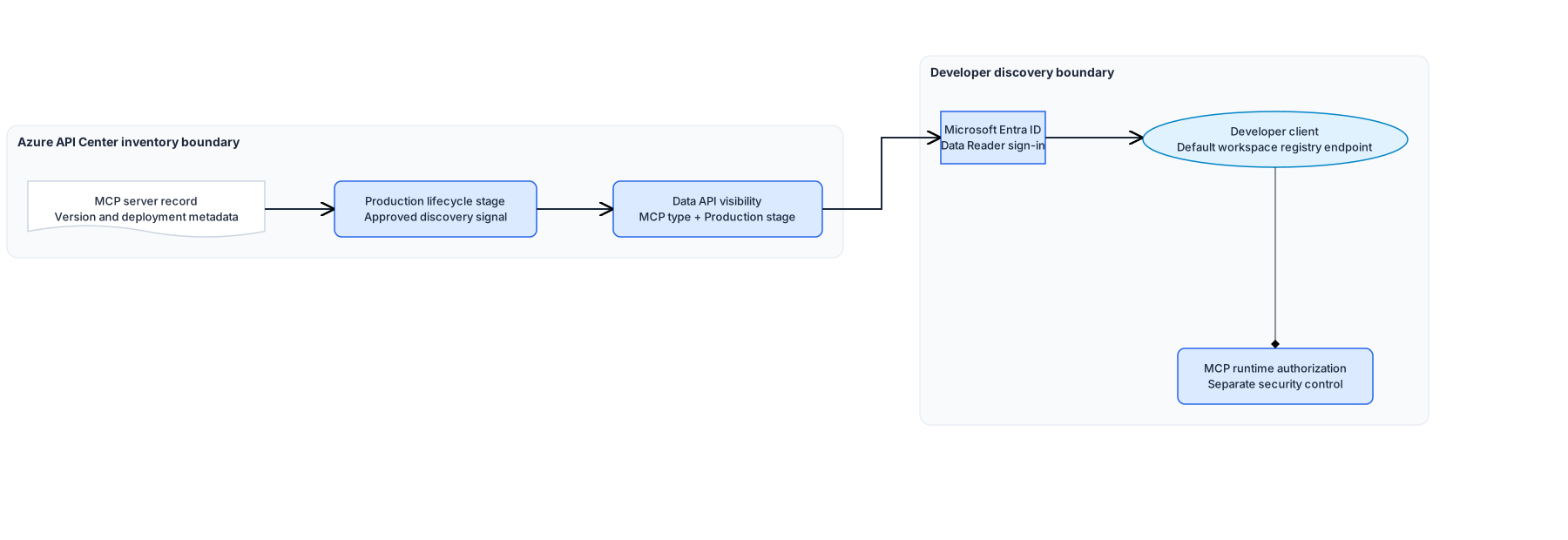
The flow starts with the MCP server record in the API Center inventory. The server owner and security owner complete the runtime security checks. The API Center configuration owner then sets the record's lifecycle stage to Production and configures Data API visibility with two built-in conditions: API type = MCP and Lifecycle stage = Production.
The documented registry endpoint is:
https://<api-center-name>.data.<region>.azure-apicenter.ms/workspaces/default/v0.1/serversUse that path exactly. The same Microsoft Learn page currently shows a shortened example that omits /workspaces; the documented endpoint format includes it.
Developer clients authenticate through Microsoft Entra ID. The developer access group has Azure API Center Data Reader at the API Center resource scope. registry-client-settings.json records the delegated data-plane scope and references the portal application and tenant values in the approved configuration system.
The client or approved adapter reads the registry and receives MCP server metadata, including names, remotes or packages, transports, and optional _meta values. The operational check reads each response page, compares server.name with the ownership record, and stops if an approved name is missing or another name appears.
Design choices and tradeoffs#
| Decision | Chosen approach | Benefits | Costs and limitations |
|---|---|---|---|
| Discovery endpoint | Default-workspace MCP registry endpoint ending in /v0.1/servers | Uses the current Microsoft-documented registry path | The page's shortened example is inconsistent; nondefault workspace paths are not documented |
| Developer authentication | Microsoft Entra ID with Azure API Center Data Reader at the API Center scope | Avoids anonymous catalog access and uses the documented data-plane role | The role reads every record that matches the global visibility filter |
| Approval signal | Built-in Production lifecycle stage plus MCP API type | Works with documented built-in visibility conditions | Lifecycle becomes a release gate and must be governed carefully |
| Client configuration | Client-neutral JSON settings | The same settings can support different approved clients | A client-specific adapter must map them to the current client setting |
| Restore | Portal-led restore using the recorded prior configuration reference | Avoids guessing an unsupported management API | Restore is an owner action rather than one command |
Architecture guidance#
Use Register and discover MCP servers in your API inventory for the registry endpoint, supported client categories, remote and local MCP records, and optional _meta mapping.
Use Set up and customize your API Center portal for Microsoft Entra access, the Azure API Center Data Reader role, anonymous-access risk, and the global Data API visibility boundary.
Use Enable and view Azure API Center portal view - VS Code extension when the developer path uses the Azure API Center extension for Visual Studio Code and GitHub Copilot agent-mode tools. That extension path needs the runtime host, portal application client ID, and tenant ID supplied through the approved configuration system.