
Architecture架构说明
oBeaver is designed as a modular, layered system with a CLI frontend, a FastAPI server, and pluggable inference engines.oBeaver 采用模块化分层设计,包含 CLI 前端、FastAPI 服务和可插拔推理引擎。
Architecture Diagram架构图
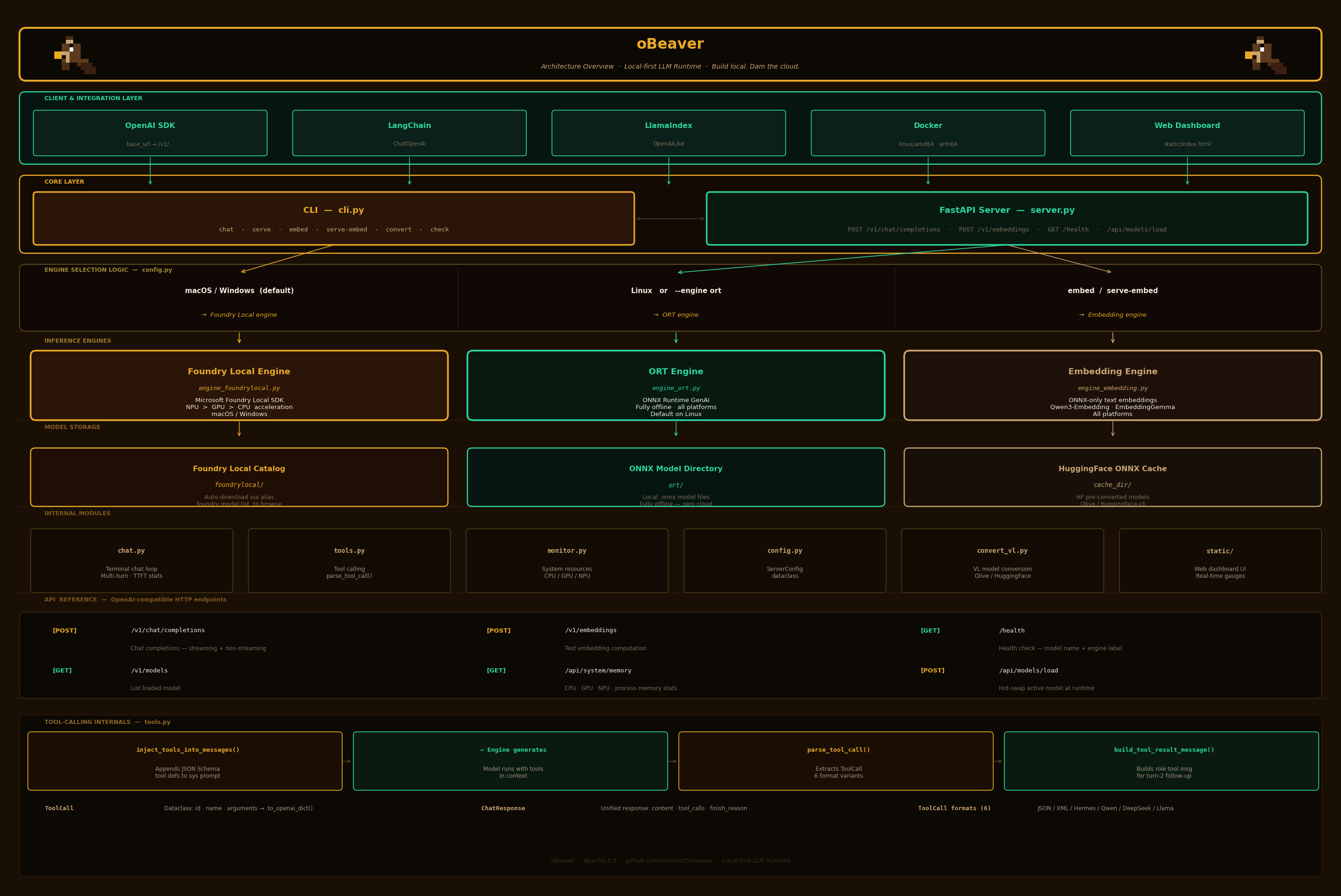
Code Structure代码结构
text
obeaver/
├── cli.py                  # Typer CLI: chat, serve, embed, serve-embed, convert, check
├── server.py               # FastAPI OpenAI-compatible server (chat + embeddings + dashboard)
├── chat.py                 # Interactive multi-turn terminal chat loop
├── engine_foundrylocal.py  # FoundryEngine — wraps foundry-local-sdk
├── engine_ort.py           # OrtEngine — wraps onnxruntime-genai
├── engine_embedding.py     # EmbeddingEngine — ONNX-only text embeddings
├── monitor.py              # System resource monitoring (CPU, GPU, NPU memory)
├── tools.py                # Tool-calling: parse_tool_call(), inject_tools_into_messages()
├── config.py               # ServerConfig dataclass
├── convert_vl.py           # Vision-Language model conversion via Olive
└── static/
    └── index.html          # Web dashboard UI with real-time memory gauges
Engine Selection Logic引擎选择逻辑
| Condition | Engine | Model Argument |
|---|---|---|
| macOS / Windows (default) | Foundry Local | Catalog alias (e.g. Phi-4-mini) |
--engine ort or Linux (default) | ONNX Runtime GenAI | Local directory path |
embed / serve-embed commands | EmbeddingEngine (ONNX) | Local ONNX model directory |
| VL model detected | ORT (auto-switched) | Local directory with vision.onnx |
Foundry Local Engine FlowFoundry Local 引擎流程
text
FoundryLocalManager(bootstrap=True)
  → download_model(alias)
  → load_model(alias)
  → OpenAI client streams via manager.endpoint
The Foundry Local engine delegates to the Microsoft Foundry Local daemon, which handles hardware detection and model management. The SDK provides an OpenAI-compatible client that streams responses directly.Foundry Local 引擎委托给 Microsoft Foundry Local 守护进程,负责硬件检测和模型管理。SDK 提供一个 OpenAI 兼容的客户端,直接流式传输响应。
ORT Engine FlowORT 引擎流程
text
og.Model(path) → og.Tokenizer(model) → og.GeneratorParams(model)
  → og.Generator(model, params) → generate_next_token() loop → stream tokens
The ORT engine loads models directly using ONNX Runtime GenAI. It tokenizes input, configures generation parameters, and runs the inference loop locally — fully offline with zero network dependency.ORT 引擎使用 ONNX Runtime GenAI 直接加载模型。它对输入进行分词、配置生成参数,并在本地运行推理循环——完全离线,零网络依赖。
Tool-Calling Internals工具调用内部实现
| Component | Role |
|---|---|
ToolCall | Dataclass: id, name, arguments → .to_openai_dict() |
ChatResponse | Unified engine response: content, tool_calls, finish_reason |
inject_tools_into_messages() | Appends JSON Schema tool definitions to system prompt (ORT path) |
parse_tool_call() | Extracts ToolCall from raw model output; handles 6 format variants |
build_tool_result_message() | Builds the role: tool message for turn-2 follow-up |
Tool-Calling Data Flow工具调用数据流
text
User request + tools
  → inject_tools_into_messages() [ORT] / pass tools natively [Foundry]
  → Engine generates response
  → parse_tool_call() extracts ToolCall
  → Application executes the function
  → build_tool_result_message() creates turn-2 message
  → Engine generates final response with tool result context
HTTP Request LifecycleHTTP 请求生命周期
text
Client POST /v1/chat/completions
  → FastAPI route handler
  → Validate ChatCompletionRequest (Pydantic)
  → Resolve engine (Foundry / ORT)
  → If VL model: extract images, build VL messages
  → If tools: inject into messages or pass natively
  → If streaming:
      → StreamingResponse with SSE chunks
      → Each token yielded as data: {...}
  → If non-streaming:
      → Collect full response
      → Return JSON with choices[]
  → Log request timing & stats
Embedding Engine Flow嵌入引擎流程
text
EmbeddingEngine(model_path)
  → Load ONNX model via onnxruntime.InferenceSession
  → Tokenize input via transformers.AutoTokenizer
  → Run inference → extract embeddings
  → Normalize & return float[] vectors