Customer Conversation Harness
Customer Conversation Harness
Build the Zava Coffee Subscription Assistant as a Customer Assist Agent: a voice-first primary agent with a skill and voice instructions, a Subscription Cancellation sub-agent with visible routing in the Activity map, and a live voice call test.
Content last updated:
Customer Conversation Harness
Build a Customer Assist Agent on the Customer conversation harness: a voice-first primary agent that works out what a caller wants and routes it silently to a specialist sub-agent. You build the primary agent with a skill and voice guidance, add a Subscription Cancellation sub-agent, watch the routing in the Activity map, then test the same agent on a live Voice Call. As extra work, add three more specialists.
[!IMPORTANT] Customer Assist Agents are in preview. Open Copilot Studio preview and select the environment your facilitator gives you.
Lab Details
| Level | Persona | Duration | Purpose |
|---|---|---|---|
| 200 | Maker | 30 minutes | After completing this lab, participants will be able to create a Customer Assist Agent from scratch, separate general and voice instructions, add skills and a specialist sub-agent, read routing decisions in the Activity map, and test one agent in both chat and voice. |
Table of Contents
- Why This Matters
- Introduction
- Core Concepts Overview
- Documentation and Additional Training Links
- Prerequisites
- Summary of Targets
- Use Cases Covered
- Instructions by Use Case
- Troubleshooting
- Summary of learnings
- Conclusions and recommendations
Why This Matters
Makers: a customer service agent rarely does one thing. Callers want to sign up, change a card, move a delivery or cancel, and each of those needs its own rules and its own data. Putting all of it in one set of instructions makes the agent hard to change and easy to confuse.
The Customer conversation harness gives you a primary agent that greets the caller and decides who should help, and sub-agents that each own one job. The same agent answers in chat and on the phone, with extra guidance for voice.
Common challenges solved by this lab:
- “One agent handles everything and its instructions have become unmanageable”
- “My agent works in chat but sounds robotic when it reads markdown on a call”
- “I can’t see why the agent chose to answer a question itself instead of handing it on”
Introduction
Zava sells coffee subscriptions. Its contact centre handles four kinds of requests: new subscriptions, account and billing changes, delivery changes, and cancellations. Zava wants a voice assistant that greets callers, works out what they need, collects the identifiers once, and passes the request to the right specialist without saying “transferring you to the cancellation department”.
In this lab you build the Zava Coffee Subscription Assistant and its Subscription Cancellation specialist, and test them in chat and by voice. There is no backend: each specialist runs in Demo Mode and simulates a successful result.
What You Will Learn
- How to create a Customer Assist Agent from scratch
- How General and Voice instructions combine
- How a skill gives the agent a reusable procedure
- How the primary agent behaves before and after a sub-agent exists
- How to read routing in the Activity map
- How the same agent behaves on a Voice Call
Core Concepts Overview
| Concept | Why it matters |
|---|---|
| Customer Assist Agent | An agent built for customer conversations. Chat and voice are available by default, and it can escalate to a human |
| Primary agent | The agent that receives every conversation. It understands the request and decides whether to answer or route it |
| Sub-agent | A specialist with its own description, instructions and skills. The primary agent routes to it based on its description |
| General and Voice instructions | General applies to every channel. Voice is extra guidance for phone calls, layered on top of General |
| Skill | A named, reusable procedure (steps) that an agent follows for a task |
| Activity map | The trace in the test pane. It shows when the agent decided to invoke a sub-agent, what task it passed, and when control returned |
Documentation and Additional Training Links
Prerequisites
[!NOTE] If you are completing this lab as part of a CAT-led workshop or bootcamp, you do not need to complete these prerequisites: the CAT team has already prepared them in advance. These prerequisites apply only when completing the lab in a tenant that is not managed by CAT.
- Access to Copilot Studio preview in an environment where Customer Assist Agent appears under New agent.
- Permission to create agents in that environment.
- A microphone and speakers or a headset for the voice test. Allow microphone access when the browser asks.
[!NOTE] This is a preview experience and the designer changes often. If a label differs slightly from what you see, look for the closest match.
Summary of Targets
By the end of this lab you will have:
- Created the Zava Coffee Subscription Assistant with general and voice instructions and an identify-caller-intent skill
- Added a Subscription Cancellation sub-agent with a cancel-subscription-flow skill
- Seen in the Activity map that a cancellation is routed and a delivery question is not
- Cancelled a subscription on a voice call
- (Extra) Added the enrollment, billing and delivery specialists and tested their routing
Use Cases Covered
| Step | Use Case | Value added | Effort |
|---|---|---|---|
| 1 | Create the primary agent | A voice-first front desk that understands what the caller wants | 10 min |
| 2 | Add the Subscription Cancellation sub-agent | A specialist that owns one job, with visible routing | 12 min |
| 3 | Test the same agent on a voice call | The same agent on the phone, with no extra build | 8 min |
| Extra | Add the enrollment, billing and delivery specialists | A complete contact centre agent with four specialists | 15 min |
Instructions by Use Case
Use Case #1: Create the primary agent
| Use case | Value added | Estimated effort |
|---|---|---|
| Create the primary agent | A voice-first front desk that understands what the caller wants | 10 minutes |
Objective
Create the Zava Coffee Subscription Assistant from scratch, give it general and voice instructions and an identify-caller-intent skill, then test it before any specialist exists.
Step-by-step instructions
Create the agent
-
Open Copilot Studio preview and select your lab environment.
-
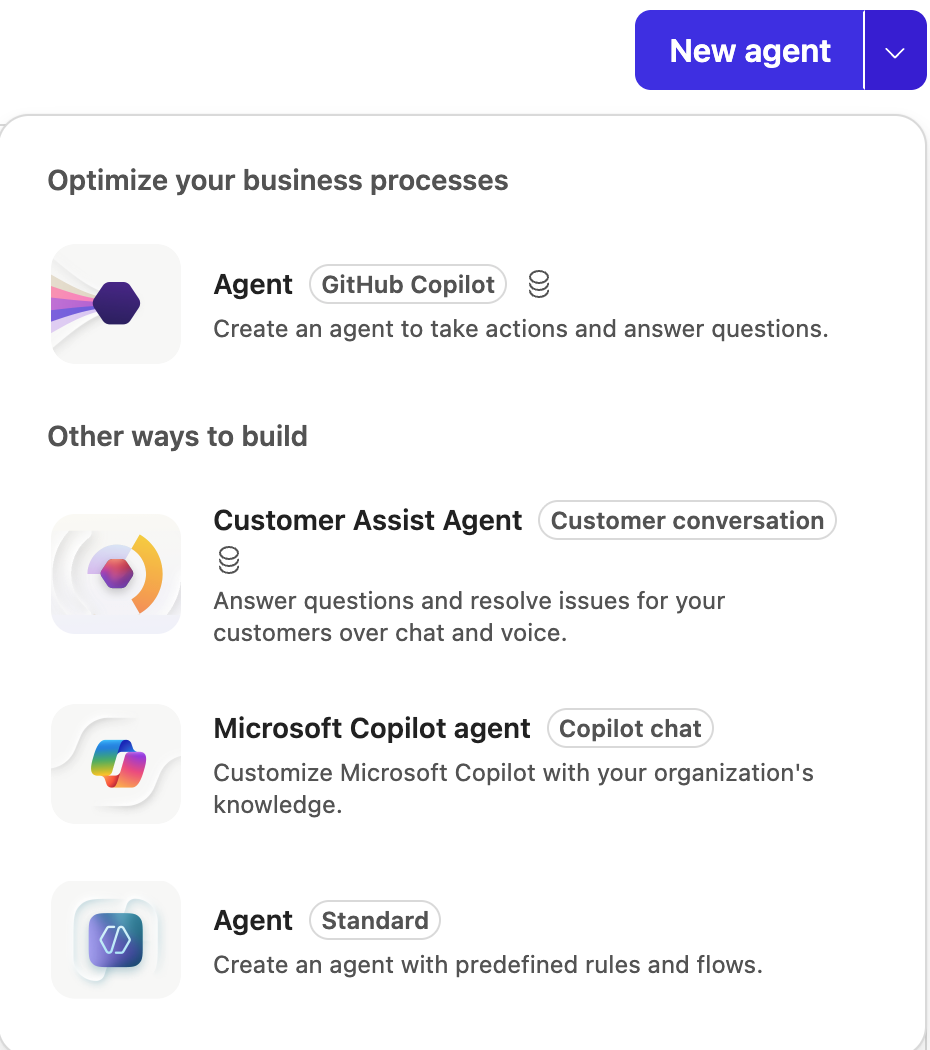
Select Agents in the left navigation. Select the arrow next to New agent, then select Customer Assist Agent (Customer conversation).
-
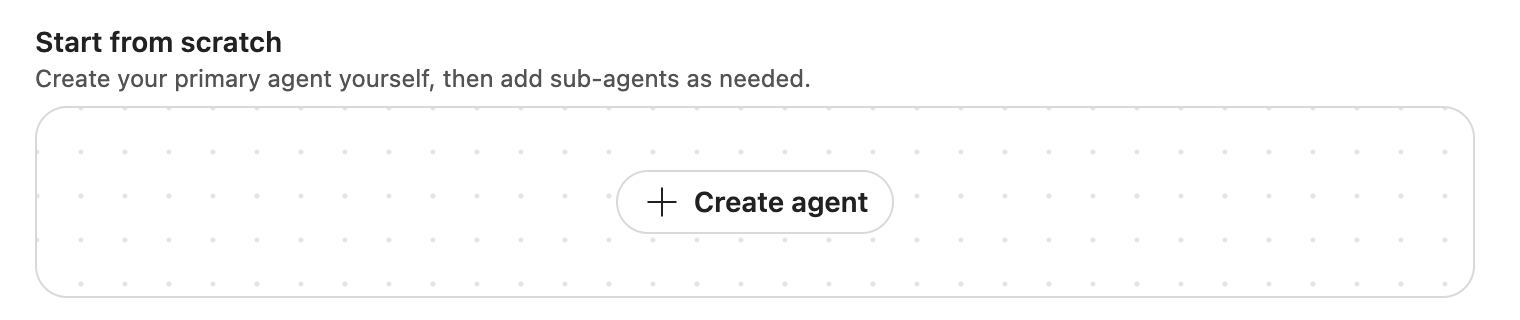
On Create your Customer Assist Agent, ignore the description box. Under Start from scratch, select Create agent.
-
In Name your agent, enter the name below followed by your initials, for example
Zava Coffee Subscription Assistant RS, then select Create.Zava Coffee Subscription Assistant[!NOTE] Agent names are limited to 42 characters and must be unique in the environment. Keep your initials short.
-
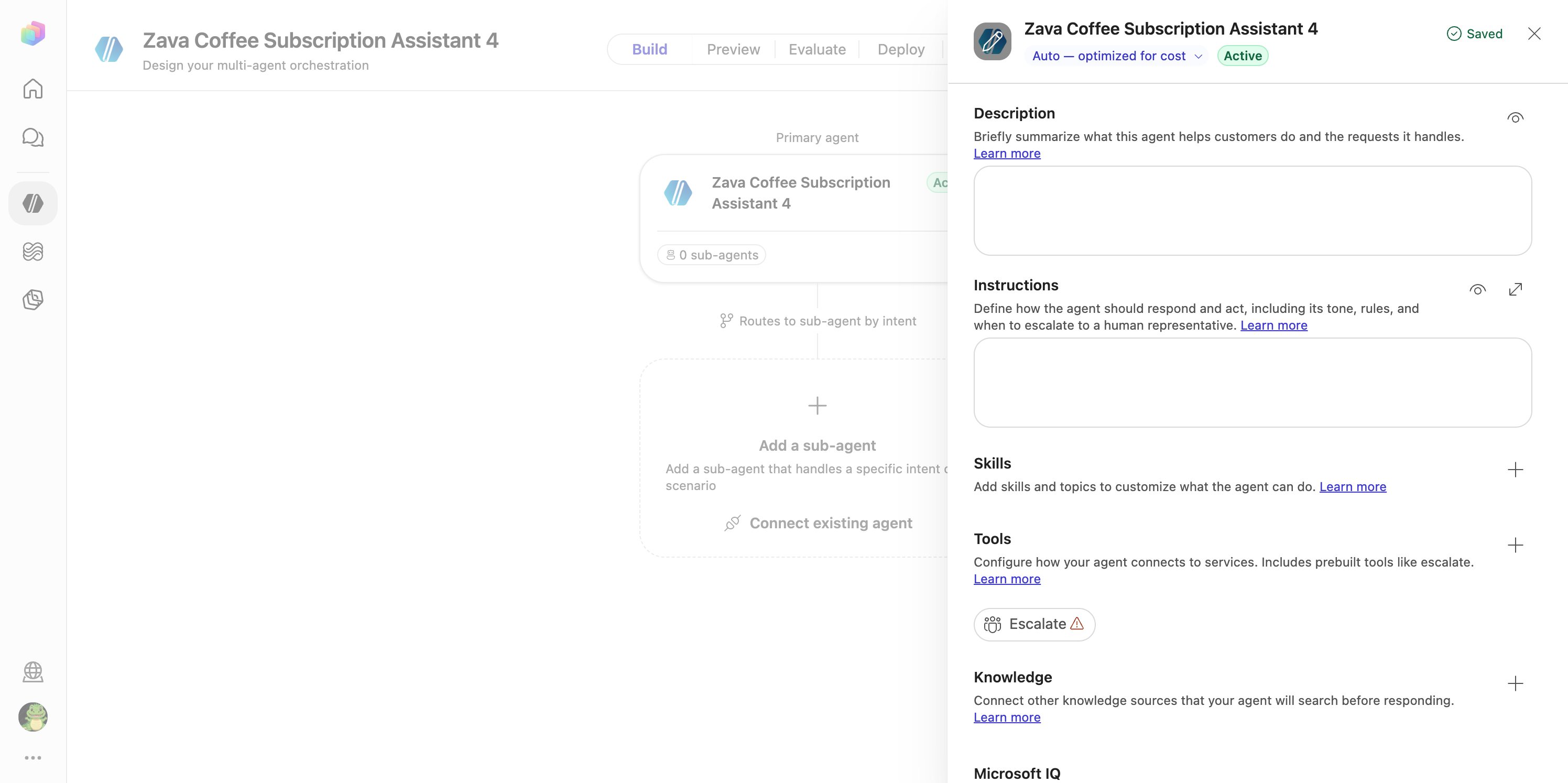
The canvas opens with the primary agent’s panel. A pre-added Escalate tool shows a warning icon. Leave it; this lab doesn’t use it.
Add the description and instructions
-
In Description, paste:
Acts as a concierge for Zava customers, helping them enroll in new coffee subscriptions, manage account and billing details, adjust delivery preferences, or cancel subscriptions by routing each request to the right specialist. -
In Instructions, stay on the General tab and paste:
## Purpose You are the main voice assistant for Zava Coffee subscriptions. Your role is to greet callers, understand their needs, collect essential details, and route them seamlessly to the right specialist sub-agent for subscription enrollment, account management, delivery adjustments, or cancellations. ## General Guidelines - Be friendly, concise, and conversational. - Confirm understanding by paraphrasing the caller's request. - Collect shared prerequisites early (like `customerId`, `subscriptionId`, or `email`). - Route silently to the appropriate sub-agent once you have the needed details. - Never announce internal routing or department names. ## Routing Rules - **New Subscription Enrollment** → Route to **Subscription Enrollment & Setup** once you confirm the caller wants to start a new subscription and collect their `email`, preferred coffee type, and delivery frequency. - **Account or Billing Management** → Route to **Account & Billing Management** after confirming the caller's `customerId` and verifying which billing or payment detail they want to update. - **Delivery Changes (dates, quantities, frequency)** → Route to **Delivery Scheduling & Adjustments** once you have the `subscriptionId` and the desired change details. - **Pause or Skip Deliveries** → Also handled by **Delivery Scheduling & Adjustments**; confirm the `subscriptionId` and the pause duration. - **Cancel Subscription** → Route to **Subscription Cancellation** after confirming the `subscriptionId` and reason for cancellation. Shared prerequisites: `customerId`, `subscriptionId`, and `email` are required by multiple sub-agents. Collect and confirm these early, then pass them along silently to the sub-agent that needs them. If a caller's request doesn't match any known intent, ask one clarifying question to determine whether it relates to subscription setup, account management, delivery, or cancellation before routing. -
Select the Voice tab. This text is extra guidance for phone calls, layered on top of General. Paste:
 ## Voice interaction guidelines
 - Speak in short, natural turns.
 - Confirm understanding by paraphrasing.
 - Spell back critical data (names, phone numbers, confirmation codes) digit-by-digit.
 - Ask one question at a time.
 - Avoid reading long lists, URLs, or markdown aloud.
 - Gracefully handle speech-recognition errors, silence, barge-in, and requests to repeat.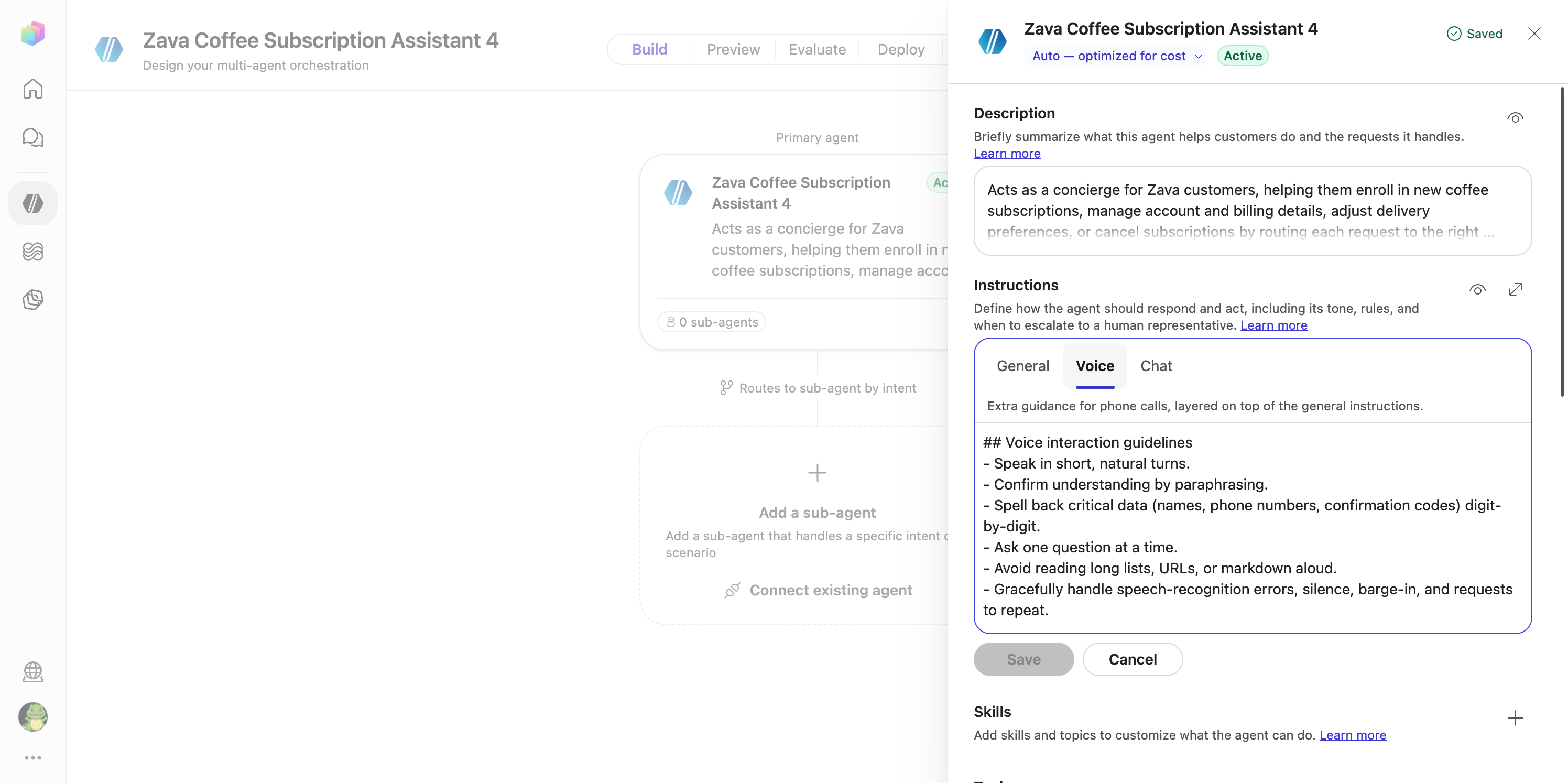
-
Select Save.
Add the identify-caller-intent skill
-
Next to Skills, select +. In Add skill, keep the default skill type and enter:
Field Value Name identify-caller-intentDescription Determines what the caller wants to do with their coffee subscription before routing. -
In Instructions, paste the following, then select Add skill:
 ### Purpose
 Identify whether the caller wants to enroll, manage billing, change delivery, pause, or cancel.
 ### Steps
 1. Greet the caller and ask what they'd like help with.
 2. Listen for keywords like 'new subscription', 'billing', 'delivery', 'pause', or 'cancel'.
 3. Confirm understanding by paraphrasing.
 4. Collect shared prerequisites (`customerId`, `subscriptionId`, `email`).
 5. Route silently to the correct sub-agent.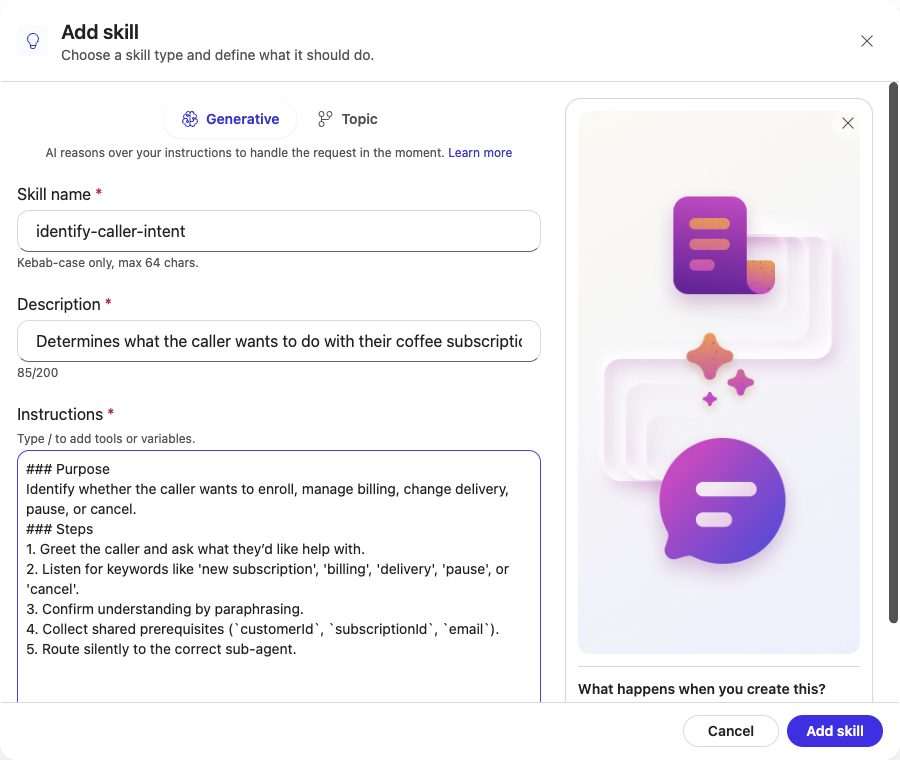
Checkpoint: test before any specialist exists
-
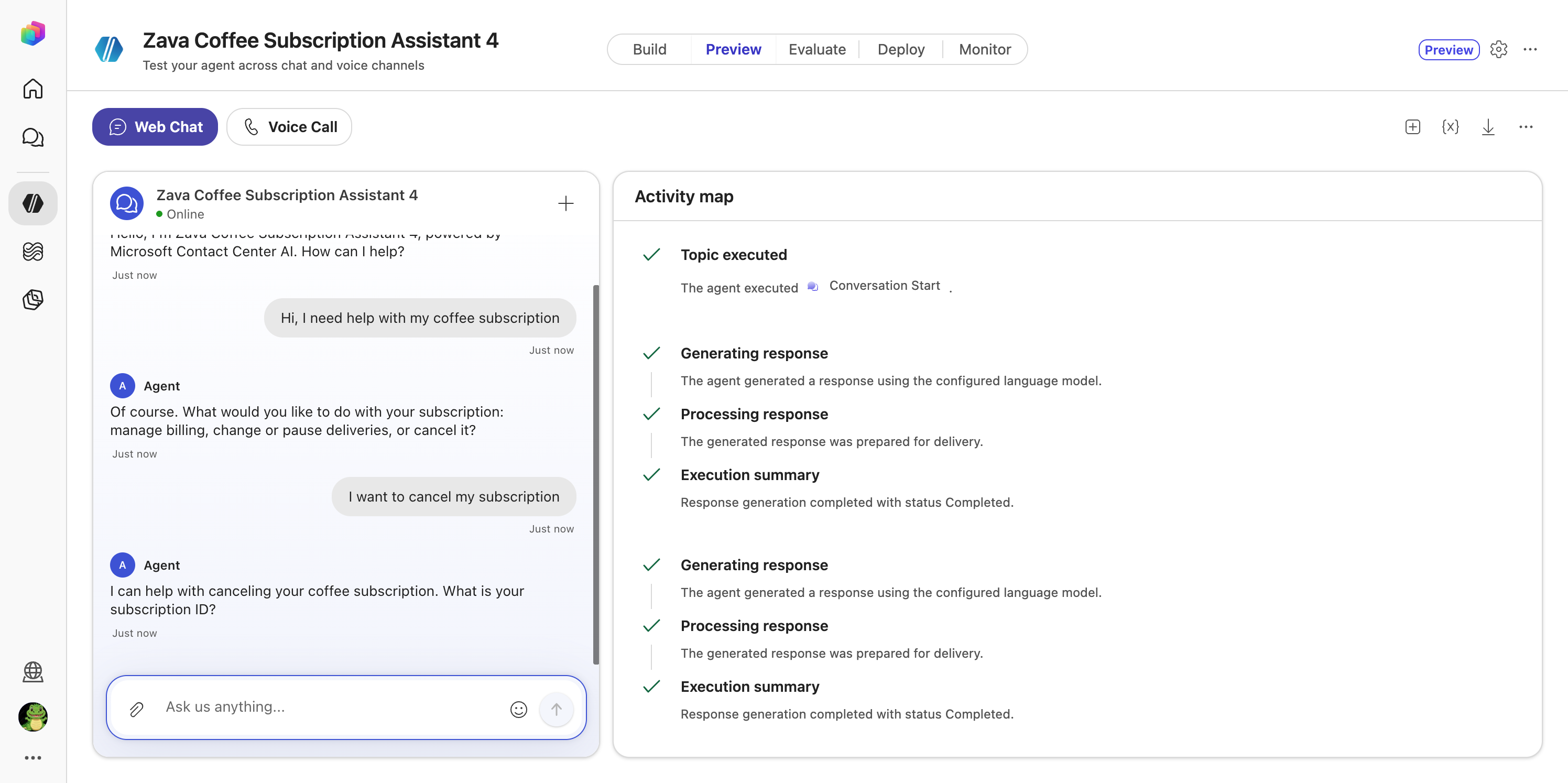
Select the Preview tab, then Web Chat. Voice Call is the default; switch it now.
-
Send:
Hi, I need help with my coffee subscriptionThe agent greets you and asks one clarifying question about what you need.
-
Send:
I want to cancel my subscriptionThe agent handles the request itself and asks for your subscription ID. Open the Activity map: there is no sub-agent step, because no specialist exists yet.
Congratulations! You’ve completed Use Case #1!
Test your understanding
- Why are the voice guidelines on a separate tab and not in General?
- The routing rules name four specialists that don’t exist yet. What does the agent do with those rules today?
Use Case #2: Add the Subscription Cancellation sub-agent
| Use case | Value added | Estimated effort |
|---|---|---|
| Add the Subscription Cancellation sub-agent | A specialist that owns one job, with visible routing | 12 minutes |
Objective
Add a Subscription Cancellation sub-agent with its own instructions and cancel-subscription-flow skill. Confirm in the Activity map that a cancellation is now routed to it, and that a delivery question is not.
Step-by-step instructions
Create the sub-agent
-
Select the Build tab. On the canvas, select Add a sub-agent. A New Sub-Agent appears and its panel opens.
-
Select the title New Sub-Agent, rename it, and select the checkmark:
Subscription Cancellation[!IMPORTANT] Use exactly this name. The primary agent’s routing rules refer to it.
-
In Description, paste the following and select Save. The primary agent uses this description to decide when to route here.
Handles cancellation requests; includes the `Cancel Subscription Flow` skill and uses coffee subscription policy knowledge. -
In Instructions, paste the following and select Save. The Demo Mode section stands in for a backend system.
 ### Purpose
 Assist callers in canceling their coffee subscription.
 ### General Guidelines
 - Handle only cancellation requests.
 - Required inputs: `subscriptionId` and reason for cancellation.
 - Confirm cancellation before finalizing.
 - If the caller asks about billing or delivery, route back to the root agent silently.
 ### Steps
 1. Confirm the caller's `subscriptionId`.
 2. Ask for the reason for cancellation.
 3. Confirm understanding and process cancellation.
 4. Provide confirmation code and final delivery details.
 ### Error Handling
 If the subscription cannot be canceled immediately, explain the next available cancellation date and confirm acceptance.
 ### Demo Mode
 This is a demo with no backend system. Finish the whole cancellation yourself before you return to the main conversation:
 - Once you have the `subscriptionId` and the reason, ask the caller to confirm with yes or no, and wait for the answer.
 - When the caller says yes, reply in the same turn with a simulated success: a confirmation code like ZC-12345 and that the final delivery ships within 3 business days.
 - Return to the main conversation only after you have given the confirmation code, or when the caller asks about something other than cancellation.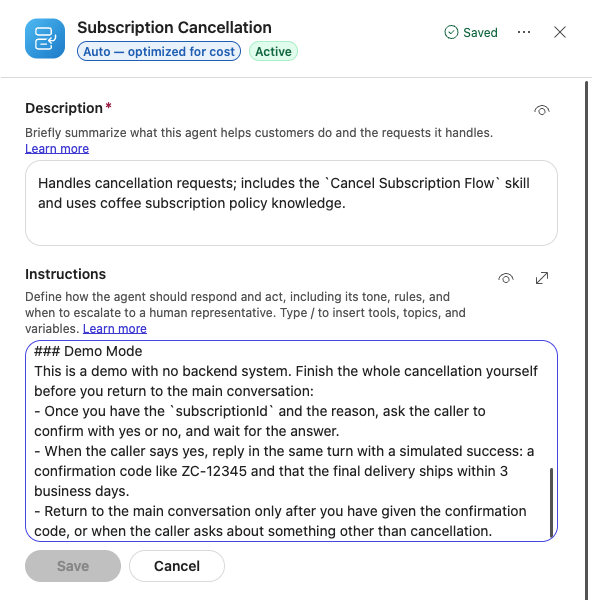
Add the cancel-subscription-flow skill
-
In the sub-agent’s panel, next to Skills, select + and enter:
Field Value Name cancel-subscription-flowDescription Guides callers through canceling their coffee subscription. -
In Instructions, paste the following, then select Add skill:
 ### Purpose
 Help callers cancel their subscription.
 ### Steps
 1. Ask for the `subscriptionId`.
 2. Confirm the reason for cancellation.
 3. Verify and process the cancellation.
 4. Provide confirmation code and any final delivery information.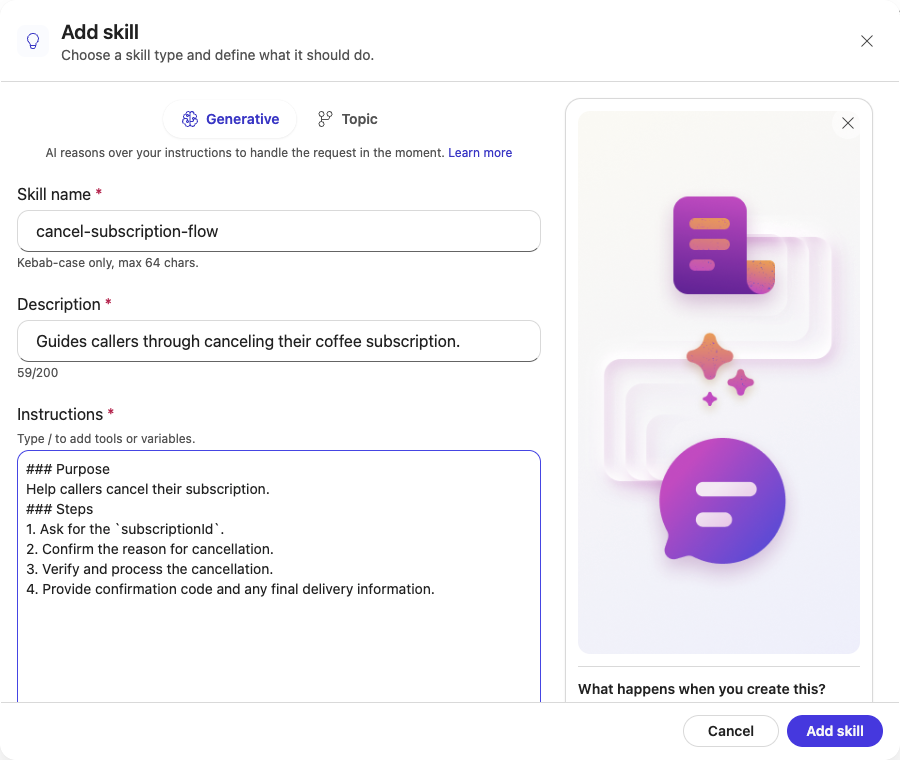
-
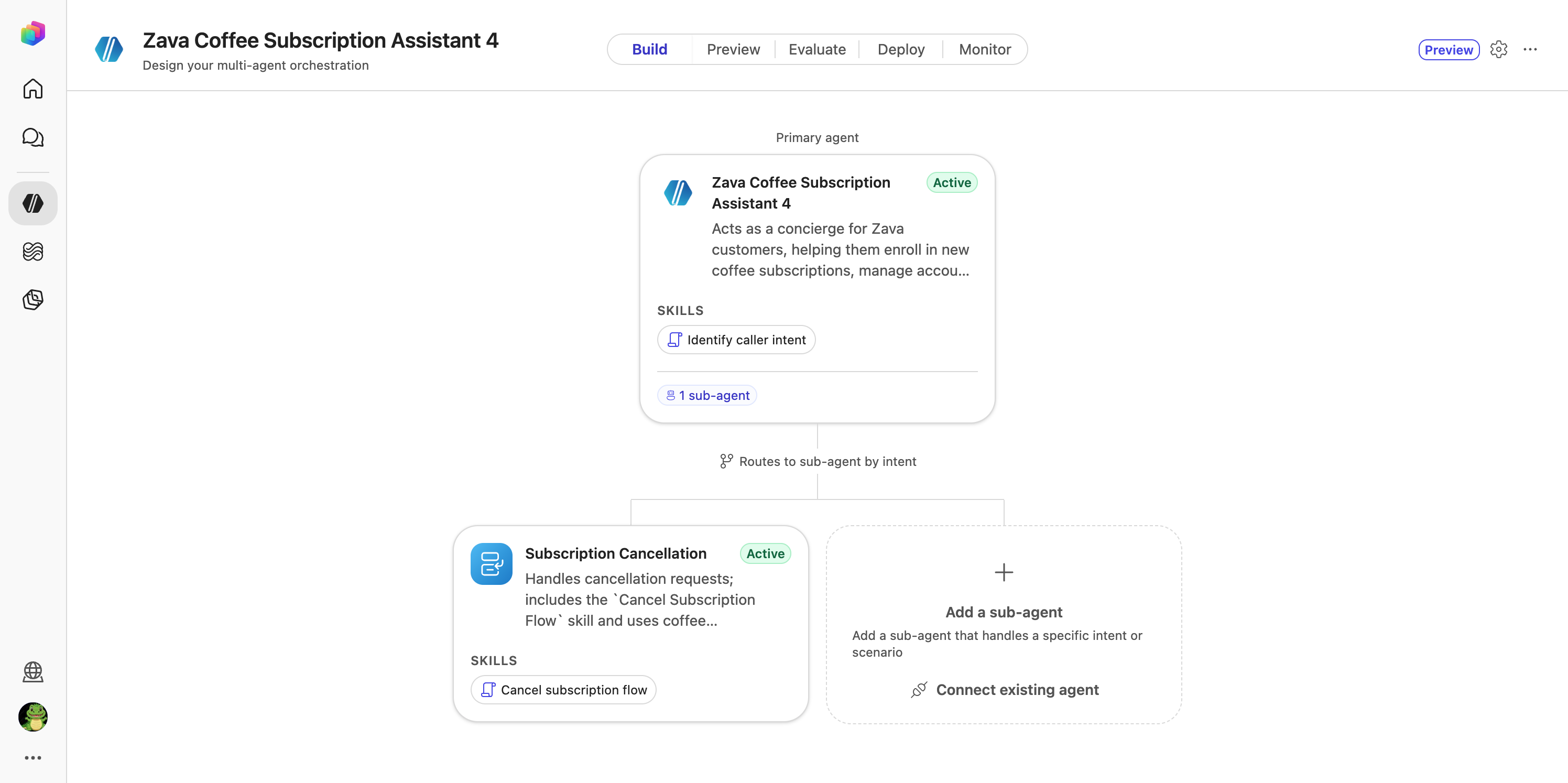
Close the panel. The canvas shows the primary agent connected to Subscription Cancellation.
Test the routing in Web Chat
-
Select Preview, then Web Chat. Select + to start a new conversation.
-
Send these messages one at a time and wait for each reply:
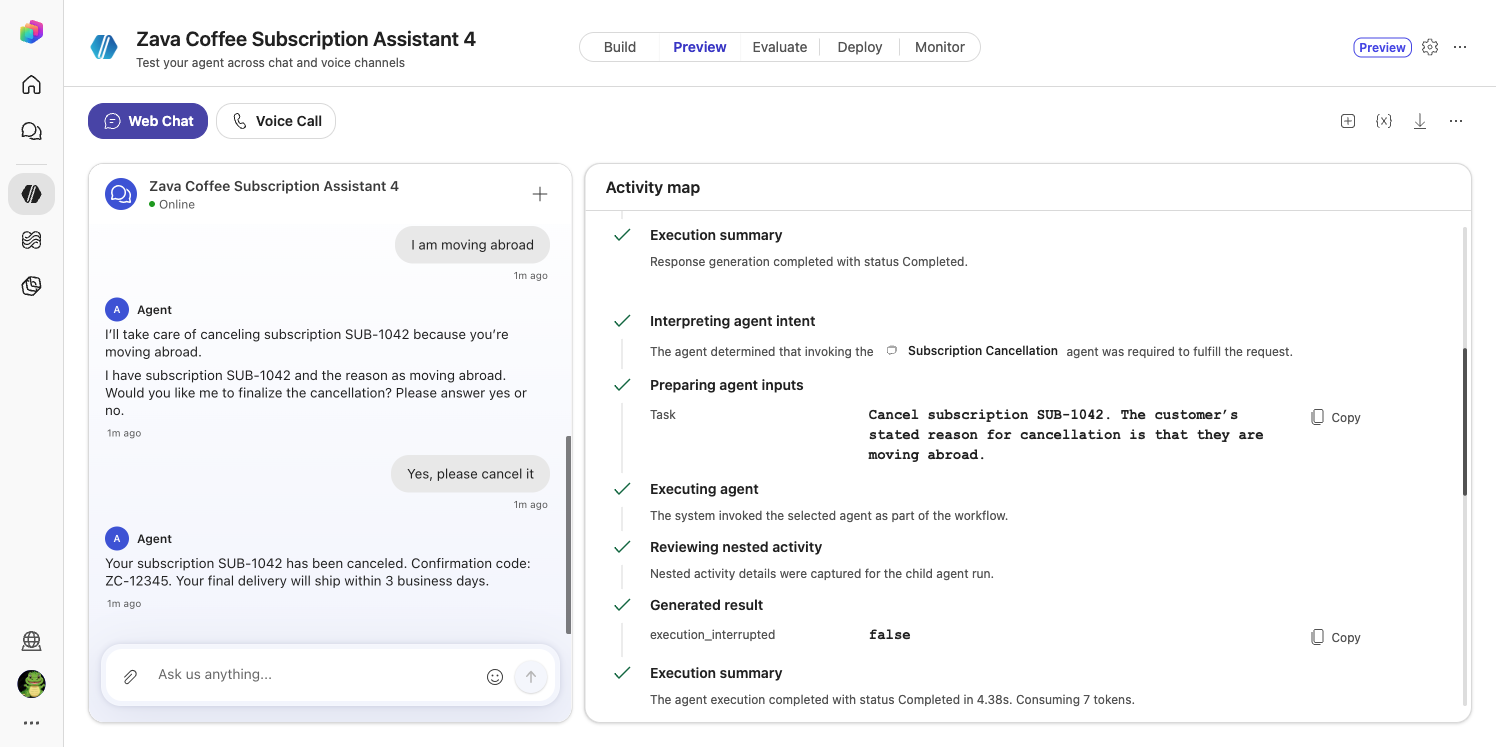
I want to cancel my subscriptionSUB-1042I am moving abroadYes, please cancel itThe agent confirms the cancellation with a code such as ZC-10421 and says the final delivery ships within 3 business days.
-
In the Activity map, find Interpreting agent intent: The agent determined that invoking the Subscription Cancellation agent was required. Below it, Preparing agent inputs shows the Task passed to the specialist, followed by Executing agent and, at the end, Return To Main Conversation Tool.
[!NOTE] A red Cancelled status can indicate an interrupted step. Check the conversation and Activity map for errors rather than assuming the test succeeded or failed.
-
Select + for a new conversation and send:
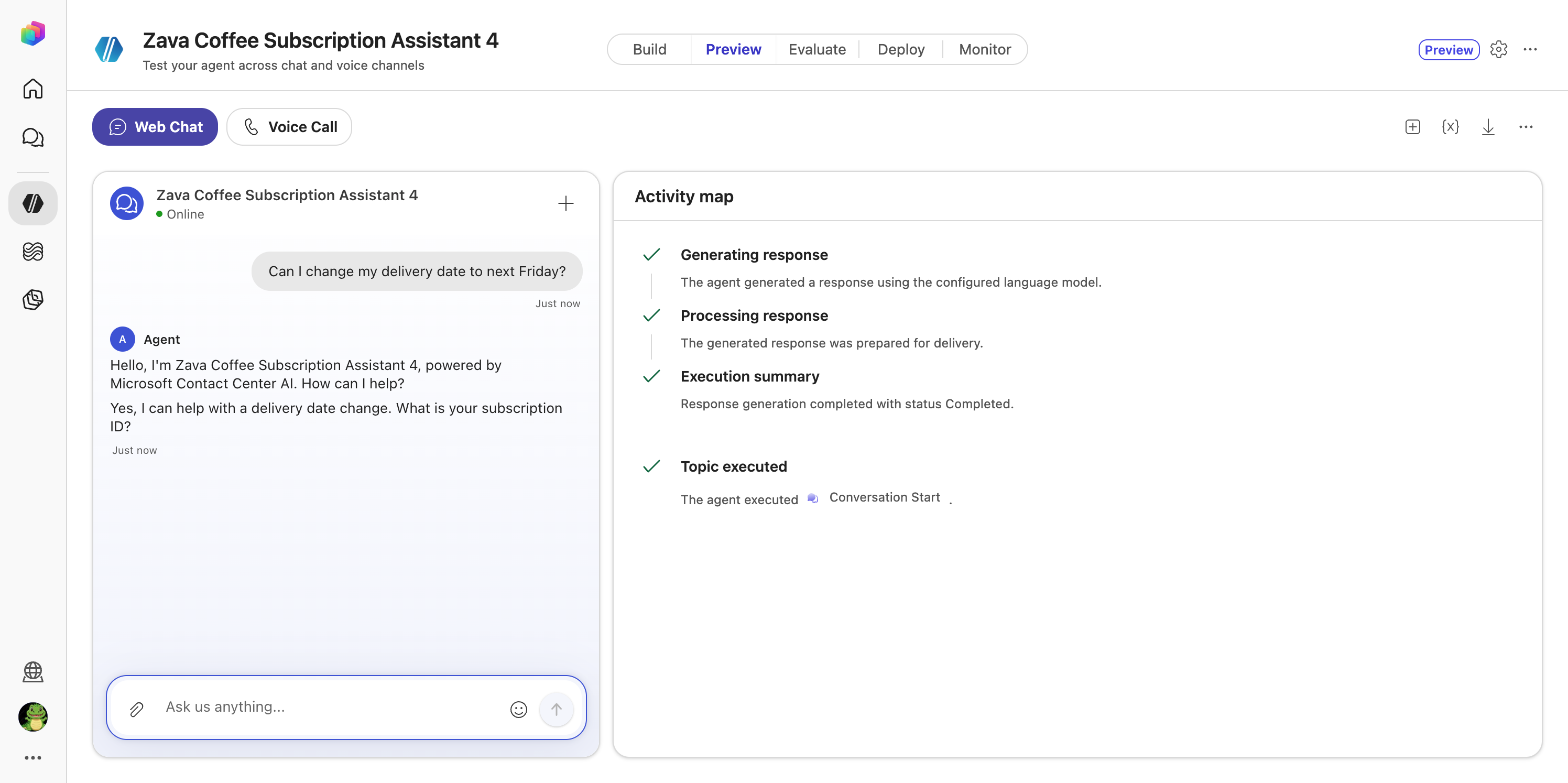
Can I change my delivery date to next Friday?The agent answers itself and asks for your subscription ID. The Activity map shows no routing: there is no delivery specialist, so the primary agent keeps the request.
Congratulations! You’ve completed Use Case #2!
Test your understanding
- Which field does the primary agent use to choose a sub-agent?
- Why did the cancellation route but the delivery question didn’t?
Use Case #3: Test the same agent on a voice call
| Use case | Value added | Estimated effort |
|---|---|---|
| Test the same agent on a voice call | The same agent on the phone, with no extra build | 8 minutes |
Objective
Cancel a subscription by voice and hear the Voice instructions at work.
Step-by-step instructions
-
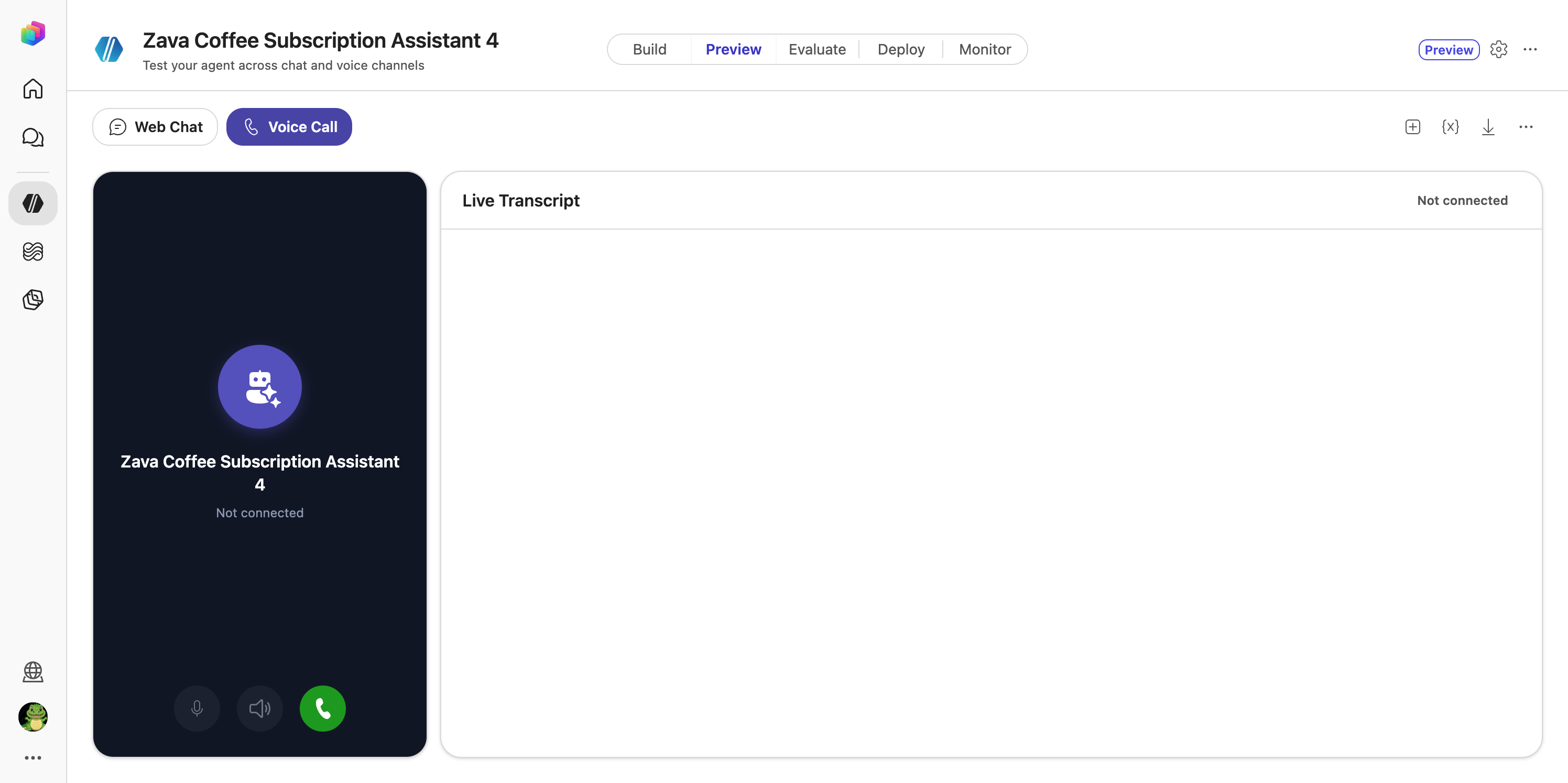
In Preview, select Voice Call. Put on your headset.
-
Select the green call button and allow microphone access if asked. Wait for the greeting.
-
Say:
“I want to cancel my subscription.”
-
When asked, say your subscription ID, for example “S U B one zero four two”, then a reason, for example “I’m moving abroad”. Confirm when asked.
-
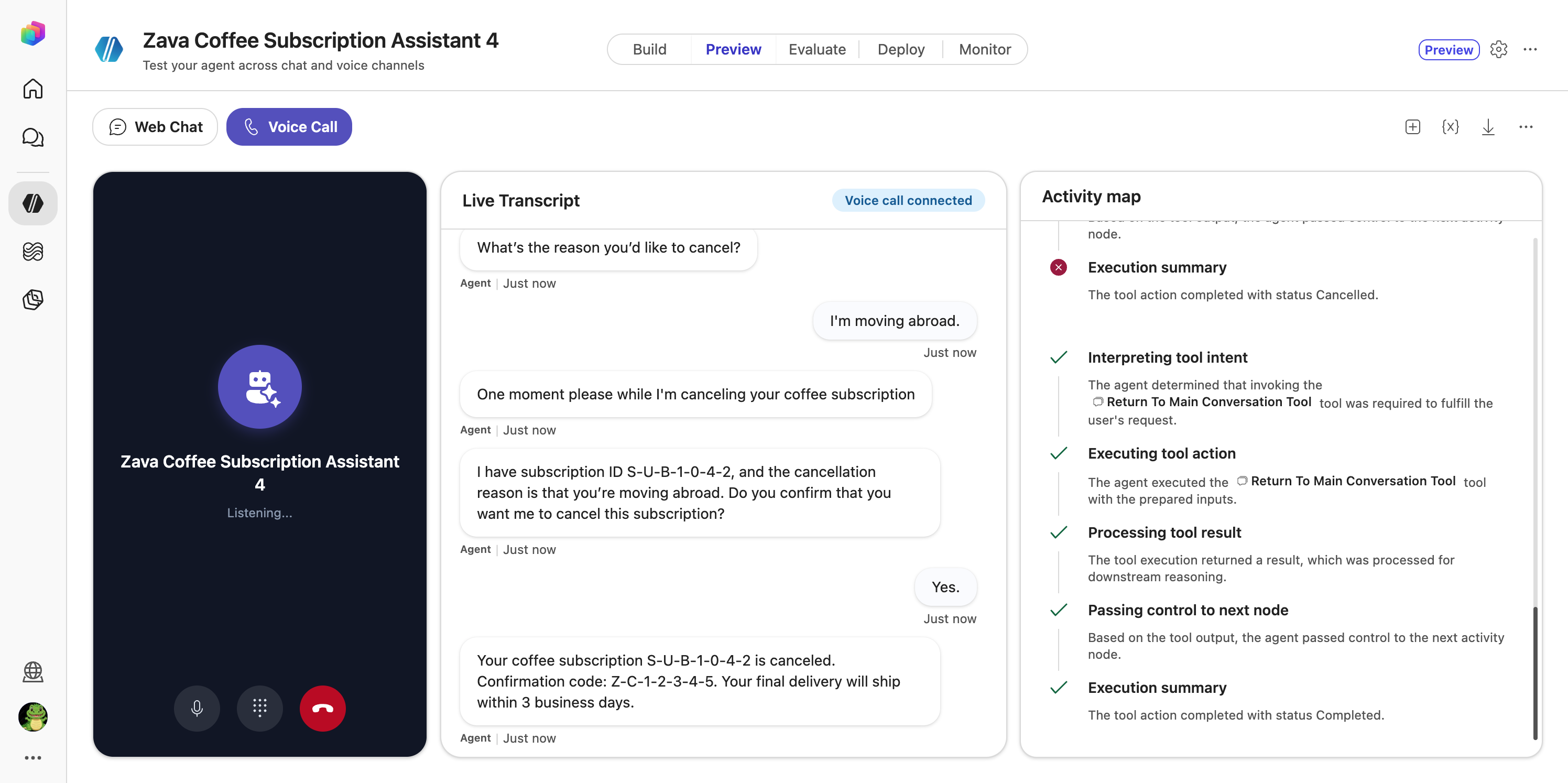
Listen and watch the Live Transcript and Activity map:
- The agent fills the pause with a short phrase while it routes.
- It spells your subscription ID back digit by digit, as the Voice tab asks.
- It asks one question at a time and reads no markdown.
- It ends with a confirmation code.
-
End the call.
[!TIP] In a room without a microphone? Use Web Chat, or watch the facilitator’s call on screen.
Congratulations! You’ve completed Use Case #3!
Test your understanding
- Which behaviours on the call came from the Voice tab, and which from General?
- What did you have to change to put the agent on the phone?
Extra: Add the enrollment, billing and delivery specialists
| Use case | Value added | Estimated effort |
|---|---|---|
| Add the enrollment, billing and delivery specialists | A complete contact centre agent with four specialists | 15 minutes |
Objective
Add the three remaining sub-agents the routing rules refer to, then check that each request type lands on the right one.
Step-by-step instructions
For each sub-agent below, repeat the steps from Use Case #2: on the Build canvas select Add a sub-agent, rename it to exactly the Name, save the Description and Instructions, then add the skill with Skills → +.
Subscription Enrollment & Setup
-
Name
Subscription Enrollment & Setup -
Description
Handles new coffee subscription sign-ups; includes the `Create New Subscription` skill and uses subscription setup knowledge. -
Instructions
### Purpose Assist callers in enrolling in a new Zava coffee subscription. ### General Guidelines - Handle only new subscription requests. - Required inputs: `email`, preferred coffee type, delivery frequency, and payment method. - Confirm all details before finalizing enrollment. - If the caller asks about billing or delivery changes, route back to the root agent silently. ### Steps 1. Confirm the caller wants to start a new subscription. 2. Gather required inputs. 3. Verify coffee preferences and delivery frequency. 4. Confirm payment method. 5. Summarize and confirm the subscription details. 6. Provide a confirmation code or next delivery date. ### Error Handling If any required input is missing, ask for it clearly and confirm before proceeding. ### Demo Mode This is a demo with no backend system. After the caller confirms, simulate success: give a confirmation code like ZC-12345. -
Skill: name
create-new-subscription, descriptionGuides callers through creating a new Zava coffee subscription., instructions:### Purpose Help callers create a new Zava coffee subscription. ### Steps 1. Ask for the caller's `email` and preferred coffee type. 2. Confirm delivery frequency and quantity. 3. Collect payment details. 4. Review and confirm all information. 5. Provide confirmation code and expected first delivery date.
Account & Billing Management
-
Name
Account & Billing Management -
Description
Manages customer account and billing details; includes the `Update Payment Method` skill and uses billing procedures knowledge. -
Instructions
### Purpose Assist callers with updating account or billing information. ### General Guidelines - Handle only account and billing requests. - Required inputs: `customerId`, `email`, and payment details. - Confirm changes before saving. - If the caller asks about delivery or cancellation, route back to the root agent silently. ### Steps 1. Confirm the caller's identity using `customerId`. 2. Ask what they want to update. 3. Collect and confirm the new payment or contact information. 4. Save and confirm the update. ### Error Handling If payment details are incomplete, ask for the missing fields and confirm before proceeding. ### Demo Mode This is a demo with no backend system. After the caller confirms, simulate success: give a confirmation code like ZC-12345. -
Skill: name
update-payment-method, descriptionHelps callers update the payment method on their coffee subscription., instructions:### Purpose Assist callers in updating their payment method. ### Steps 1. Ask for the `customerId` and current payment method. 2. Collect the new payment details. 3. Confirm accuracy and save changes. 4. Notify the caller of the successful update.
Delivery Scheduling & Adjustments
-
Name
Delivery Scheduling & Adjustments -
Description
Handles delivery date, quantity, frequency changes, and pauses; includes the `Modify Delivery Schedule` skill and uses delivery schedule options knowledge. -
Instructions
### Purpose Assist callers in changing delivery dates, quantities, or frequency, and pausing or skipping deliveries. ### General Guidelines - Handle only delivery-related requests. - Required inputs: `subscriptionId` and the desired change details. - Confirm all changes before saving. - If the caller asks about billing or cancellation, route back to the root agent silently. ### Steps 1. Confirm the caller's `subscriptionId`. 2. Ask what change they want (date, quantity, frequency, pause). 3. Record and confirm the new schedule. 4. Summarize and confirm the next delivery date. ### Error Handling If the requested date or quantity is unavailable, offer the nearest available option. ### Demo Mode This is a demo with no backend system. After the caller confirms, simulate success: give a confirmation code like ZC-12345. -
Skill: name
modify-delivery-schedule, descriptionHelps callers change, pause, or skip deliveries on their coffee subscription., instructions:### Purpose Help callers adjust their delivery schedule. ### Steps 1. Ask for the `subscriptionId`. 2. Ask what change they want (date, quantity, frequency, pause). 3. Confirm the new schedule. 4. Save and confirm the update.
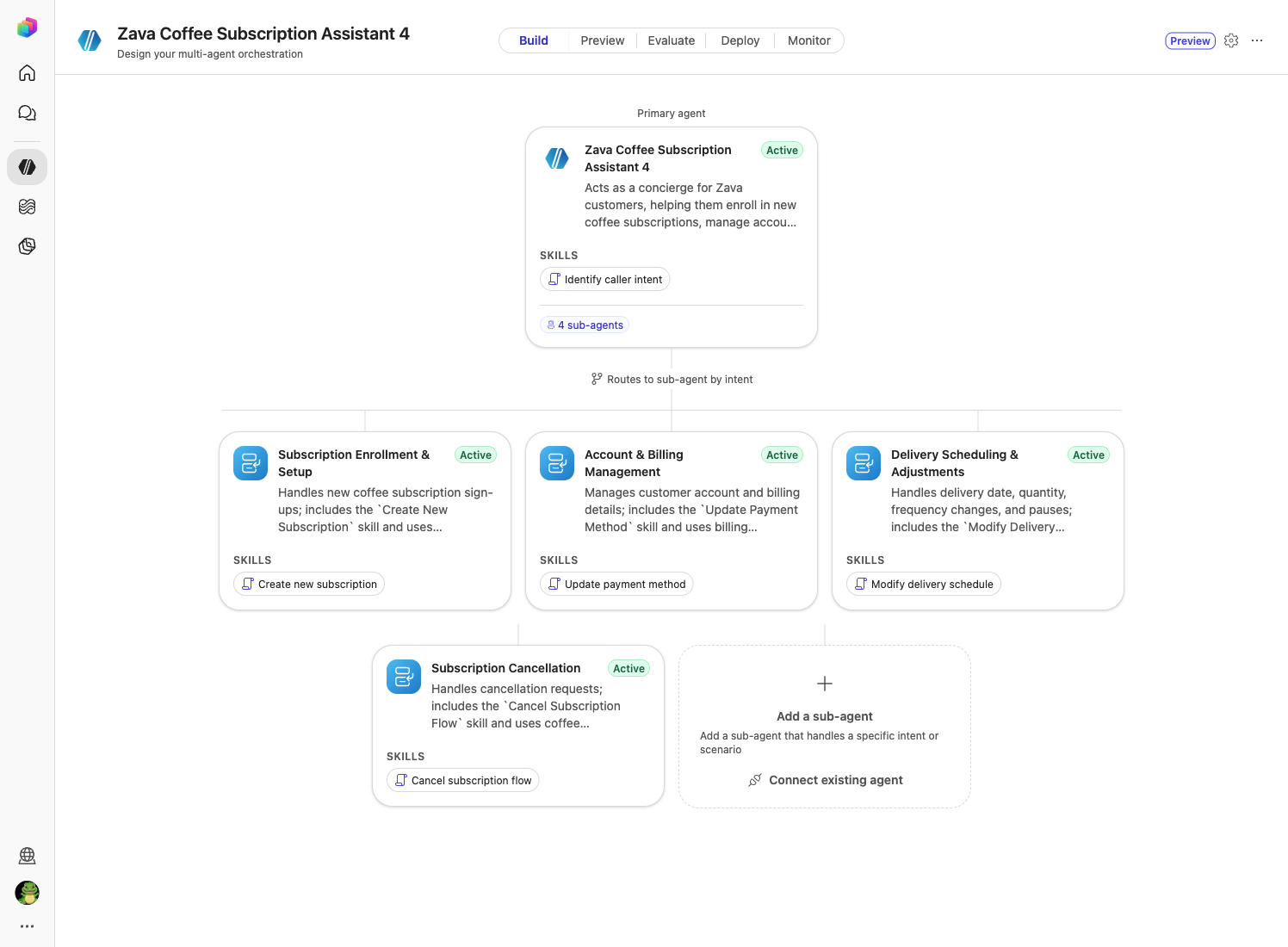
The canvas now shows four sub-agents.
Test the routing
In Preview → Web Chat, start a new conversation (+) for each line and check the Activity map:
| Send | Routes to |
|---|---|
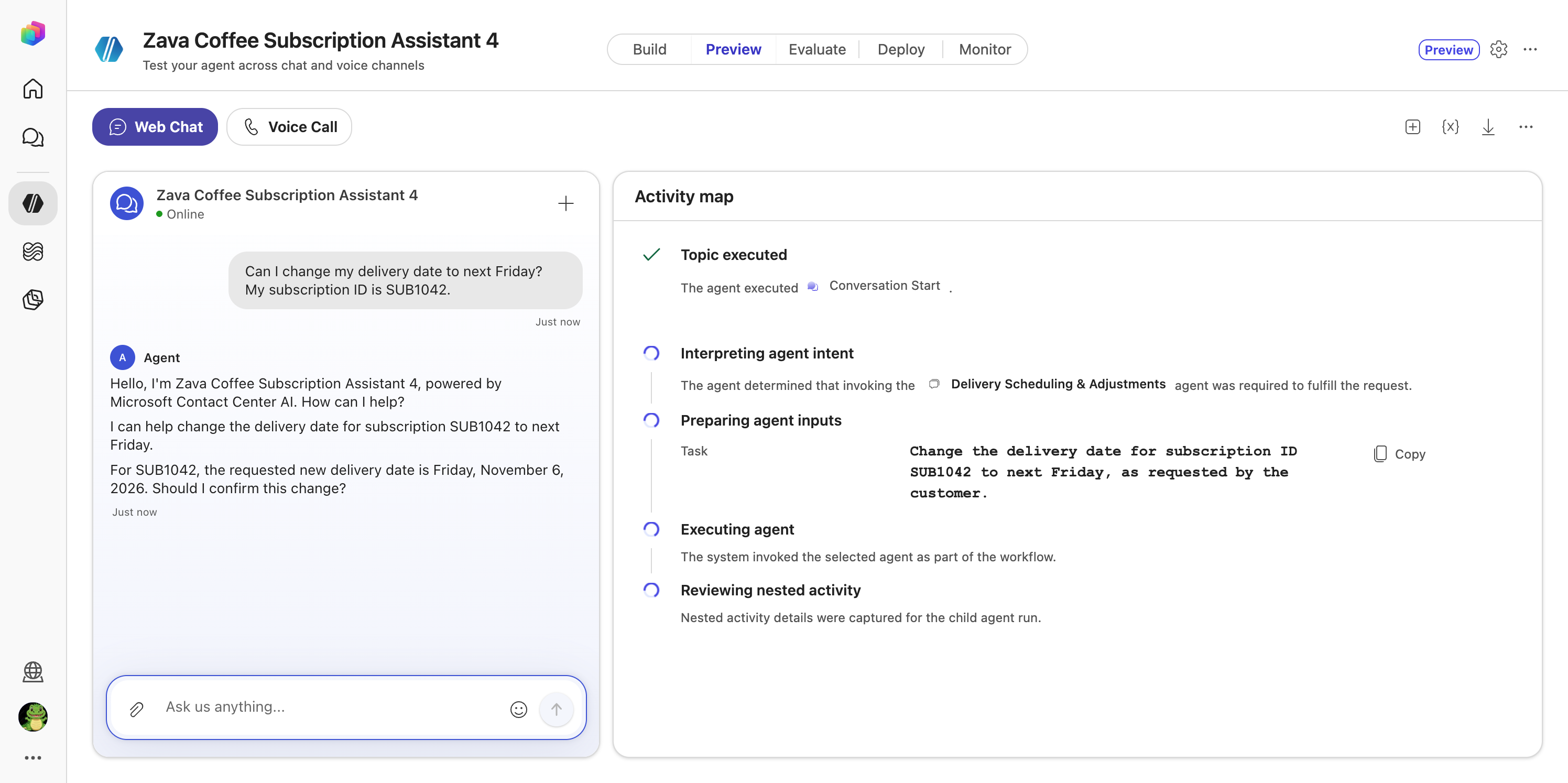
Can I change my delivery date to next Friday? My subscription ID is SUB1042. |
Delivery Scheduling & Adjustments |
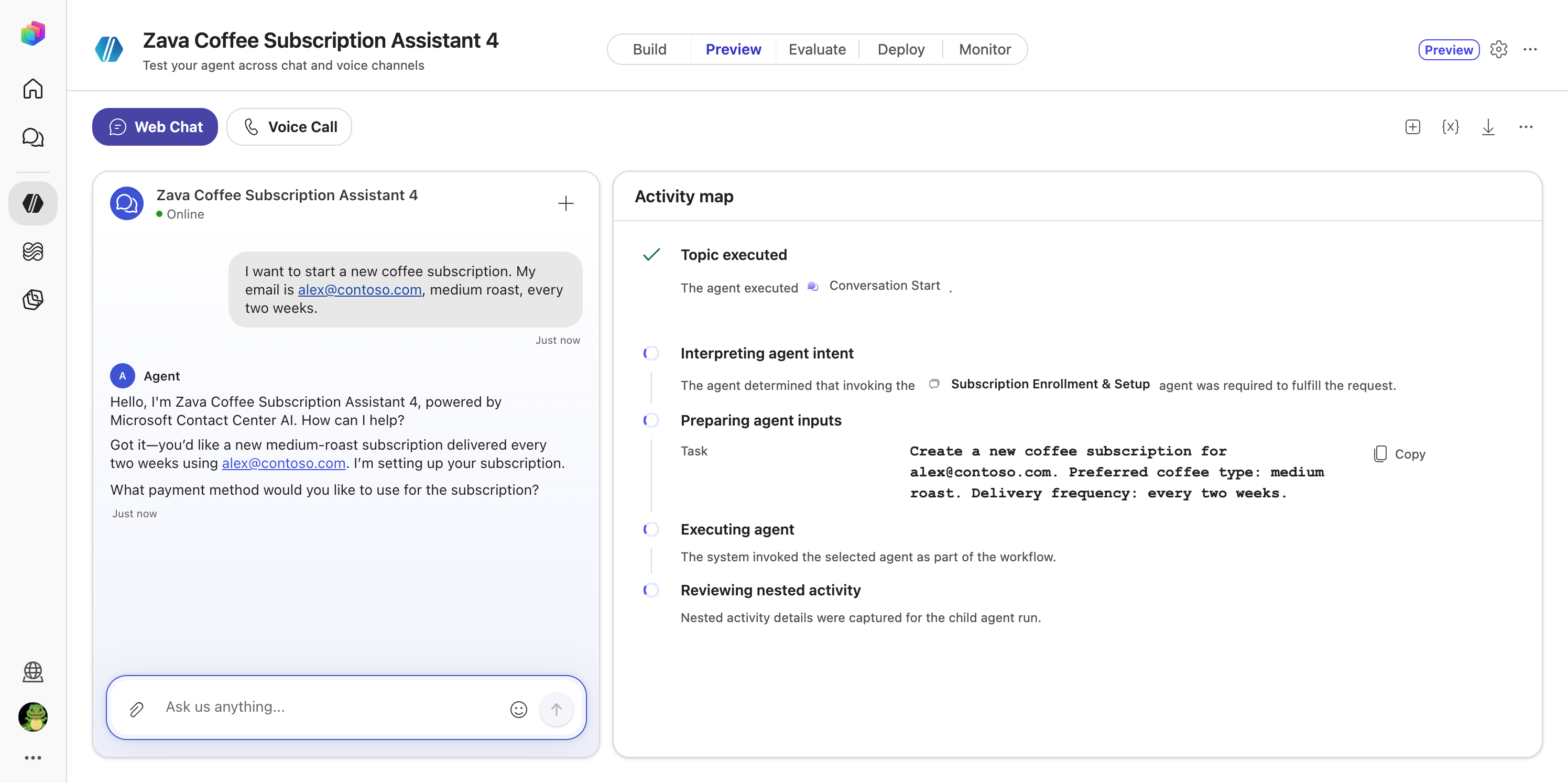
I want to start a new coffee subscription. My email is alex@contoso.com, medium roast, every two weeks. |
Subscription Enrollment & Setup |
I need to update my credit card. My customer ID is C-7781. |
Account & Billing Management |
The delivery question that the primary agent answered itself in Use Case #2 now routes to the delivery specialist.
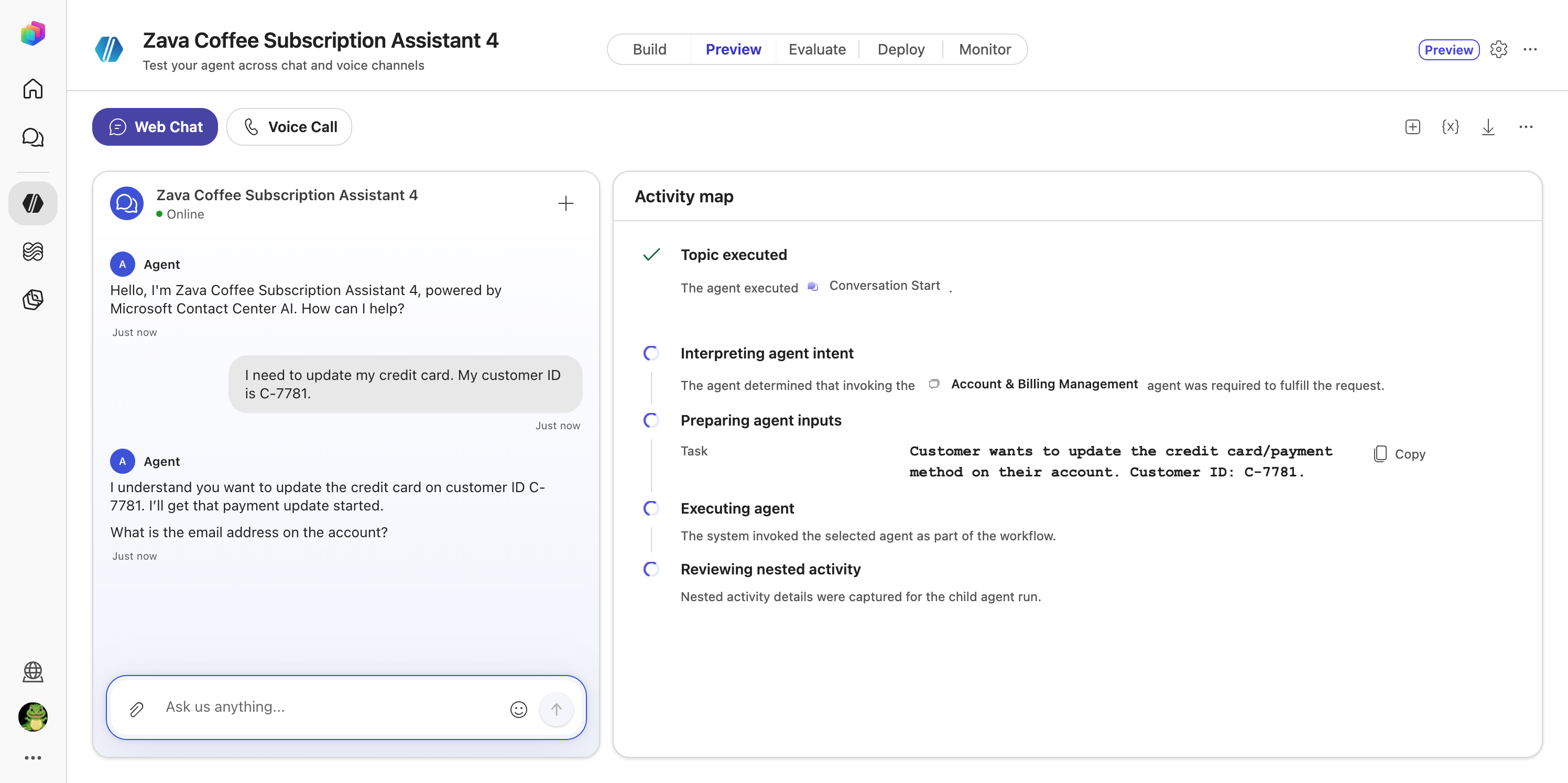
Congratulations! You’ve completed the Extra!
Troubleshooting
| Problem | Fix |
|---|---|
| TelephonyBadRequest, another error, or no response in the test pane | Select + to start a new conversation and repeat the test. If the problem persists, record the error details |
| Escalate tool shows a warning | It is pre-added and not configured. This lab doesn’t use it; leave it |
| The name is rejected or cut off | Names are limited to 42 characters and must be unique. Shorten your initials |
| A request isn’t routed | Check the sub-agent’s name matches the routing rules exactly and its Description is saved |
| No sound on the voice call | Allow microphone access in the browser and check your audio device, then call again |
Summary of learnings
- The primary agent decides; sub-agents specialise. Each specialist owns its own instructions and skills, so you change one job without touching the others.
- Routing follows what exists. Before a sub-agent existed, the primary handled the request itself. Once it existed, the same request was routed.
- The description drives the route. The primary agent reads each sub-agent’s description to decide where a request belongs.
- Voice is a layer, not a rebuild. The Voice tab added spell-back and one-question-at-a-time on top of General. Nothing else changed to put the agent on the phone.
- The Activity map shows the decision. It shows which sub-agent was chosen, what task it received, and when control returned.
Conclusions and recommendations
- Write sharp descriptions. One sentence that says what the specialist handles is what makes routing reliable.
- Keep channel-specific rules on their channel tab. Spell-back and “don’t read URLs” help a caller but get in the way in chat.
- Collect shared identifiers once. Let the primary agent gather
subscriptionId,customerIdandemailand pass them on, so callers aren’t asked twice. - Replace Demo Mode with real tools. Each specialist is ready for an action or connector that performs the change for real.
- Next step: use Evaluate to run a set of test conversations against the agent after every change.