GitHub Copilot Harness - Component Model
GitHub Copilot Harness - Component Model
Assemble an agent on the GitHub Copilot harness from its components - instructions, knowledge, tools, memory, skills and the agent sandbox - then watch the orchestrator decide, recover and explain itself.
Content last updated:
GitHub Copilot Harness - Component Model
Assemble an agent on the GitHub Copilot harness from its components — instructions, knowledge, tools, memory, skills and the agent sandbox — then watch the orchestrator decide, recover and explain itself.
🧭 Lab Details
| Level | Persona | Duration | Purpose |
|---|---|---|---|
| 300 | Maker | 60 minutes | After completing this lab, participants will be able to build an agent on the GitHub Copilot harness, ground it with knowledge and equip it with tools, read the reasoning trace to explain any decision it made, recognise how the loop recovers from a failing tool call, and package a repeatable procedure as a Skill that loads only when it is relevant. |
📚 Table of Contents
- Why This Matters
- Introduction
- Core Concepts Overview
- Documentation and Additional Training Links
- Prerequisites
- Summary of Targets
- Use Cases Covered
- Instructions by Use Case
- Summary of learnings
- Conclusions and recommendations
🤔 Why This Matters
Makers and Architects — the GitHub Copilot harness does not run a plan. It runs a loop: think, act, observe, decide again from the latest state. That single difference is why it asks fewer and smarter questions, survives a detour mid-task, chains one tool’s output into the next, and keeps going when a tool call fails instead of surfacing an error and stopping.
But a loop is only as good as what you put inside it. The harness exposes a component model — instructions, knowledge, tools, memory, skills, connected agents and a code sandbox — and the design work is deciding which component carries which job. Put a fact in instructions and it burns context on every turn. Put a procedure in instructions and it fires whether or not it is relevant. Put a live lookup in knowledge and it goes stale.
Common challenges solved by this lab:
- “The agent picked the wrong source and I can’t tell why”
- “It stopped on the first tool error instead of trying something else”
- “My instructions have grown into a wall of text that applies to every conversation”
- “I don’t know when to use knowledge versus a tool”
Pairs with: Module 10 — Dedicated: GitHub Copilot harness — Component Model.
🌐 Introduction
This is the hands-on companion to Module 10, and the longest lab of the bootcamp — deliberately, because this is the harness the rest of the week assumes.
You build an agent from nothing for Northgate Energy, an operator investigating an underperforming wind turbine. You give it two knowledge documents — a manufacturer manual and the operator’s own dispatch standards — and two MCP tools that read live telemetry and maintenance records. Then you stop telling it what to use and start watching it choose.
The turbine at the centre of it, WTG-114, is reading 4.6 mm/s of gearbox vibration. Whether that number matters cannot be answered by the telemetry, which does not carry limits, or by the manual, which does not carry policy. It takes both, and that is the point.
In the final use case you build a second agent in a completely different industry — Meridian Mutual, a property insurer — and discover that the component model transfers wholesale. That agent gets a Skill: a procedure the orchestrator loads only when a request matches its description, and leaves out of context when it does not.
What You Will Learn
- How to assemble an agent from the harness’s component rail, and what each component is for
- Why knowledge grounds and tools retrieve, and how the orchestrator decides between them from their descriptions
- How to read the reasoning trace — the fastest way to debug any agent behaviour
- What the loop does when a tool call fails, and why that differs from standard orchestration
- When the orchestrator reaches for the Agent Sandbox to compute rather than estimate
- How a Skill keeps a repeatable procedure out of your instructions until it is needed
🎓 Core Concepts Overview
| Concept | Why it matters |
|---|---|
| The agent loop | Think → act → observe → decide, repeated from the latest state. Replaces the standard harness’s plan-then-execute, which is why detours and failures do not end the task |
| Instructions | Always-on guidance — role, scope, tone, hard rules. Loads on every turn, so it should hold only what is true in every conversation |
| Knowledge | Searchable, ranked facts. The orchestrator searches, ranks, then fetches whole files into its sandbox and reuses them for the rest of the conversation |
| Tools | Live retrieval and actions against real systems. Where knowledge gives you a settled document, a tool gives you the current truth — and can change something |
| Skills | A reusable procedure with a description that decides when it loads. Instructions on demand, rather than instructions always |
| Memory | Per-user, per-agent context that persists across conversations, so the agent stops re-asking what it already learned |
| Agent Sandbox | An isolated Linux/Python workspace the loop uses for exact computation, parsing, and file or chart generation — work the model should not improvise |
| Descriptions | The routing signal for every component above. A vague description is the usual reason the wrong source gets picked |
📄 Documentation and Additional Training Links
- Copilot Studio documentation
- Add knowledge to an agent
- Extend agents with Model Context Protocol
- Connect to data with connectors
✅ Prerequisites
- Access to Microsoft Copilot Studio with the New experience enabled
- A Power Platform environment where you can create agents and add tools
- The four lab MCP servers imported into your environment: Asset Telemetry MCP, Work Orders MCP, Policy Lookup MCP, Claims History MCP
- Four knowledge documents uploaded to SharePoint under OnePlace → Documents, in folders named Energy Ops and Claims Ops
MCP servers
The four MCP servers ship with this lab as Dataverse solution packages under assets/mcp-servers. They are what the agents actually call — without them, Use Cases #2, #3 and #4 have no data.
| Solution package | Solution name in the environment | Tools it exposes |
|---|---|---|
NorthgateEnergyAssetTelemetryMCP_1_0_0_1.zip |
Asset Telemetry MCP | list_assets, get_asset_status, query_telemetry |
NorthgateEnergyWorkOrdersMCP_1_0_0_1.zip |
Work Orders MCP | list_work_orders, get_work_order, create_work_order |
MeridianMutualPolicyLookupMCP_1_0_0_1.zip |
Policy Lookup MCP | find_policy, get_policy |
MeridianMutualClaimsHistoryMCP_1_0_0_1.zip |
Claims History MCP | list_claims, get_claim |
All four carry synthetic data for fictional companies. Nothing in them reaches a real system.
Check whether they are already loaded
In many delivery tenants the four solutions are already provisioned with the environment, and there is nothing to do. Check before you import — importing a solution that is already present is not harmful, but it wastes lab time.
-
Go to make.powerapps.com and confirm the environment picker in the top right names the same environment you are building agents in. This is the single most common mistake — the solutions land in one environment and the agent is built in another.
-
Select Solutions in the left navigation.
-
Look for all four display names. Sort by Created to bring recent imports to the top.
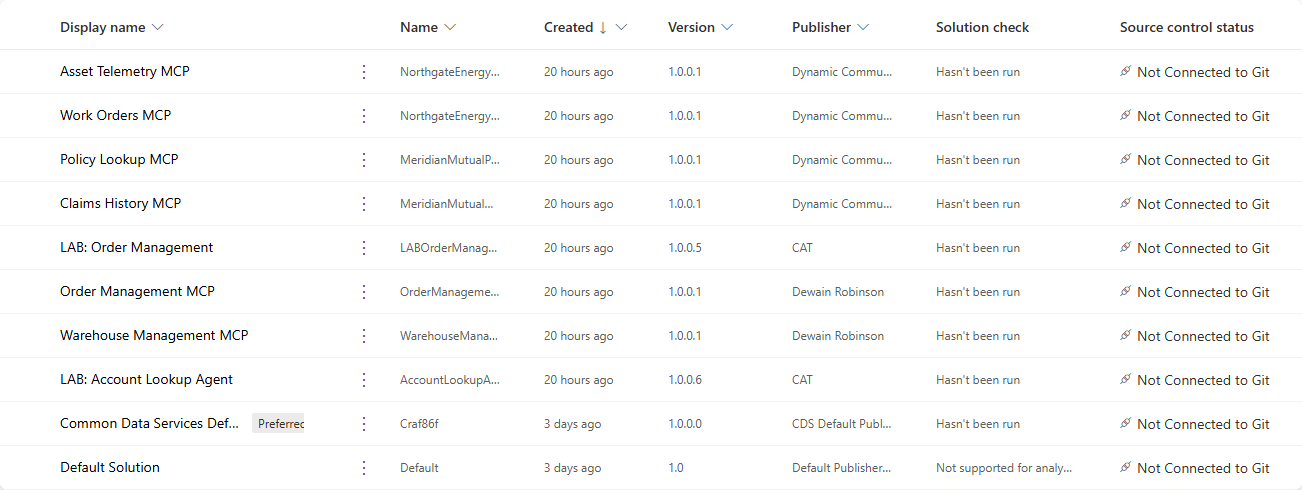
Display name Unique name Version Asset Telemetry MCP NorthgateEnergyAssetTelemetryMCP1.0.0.1 Work Orders MCP NorthgateEnergyWorkOrdersMCP1.0.0.1 Policy Lookup MCP MeridianMutualPolicyLookupMCP1.0.0.1 Claims History MCP MeridianMutualClaimsHistoryMCP1.0.0.1 -
All four present? You are done — skip the import below.
Any missing? Import just the missing ones using the procedure below.
[!TIP] There is a faster smoke test if you only want to know whether the agent will find them: in Copilot Studio, open any agent, select Tools → + Add a tool, and search for
MCP. The four servers appear in the results if they are loaded. The Solutions list is still the authoritative check, because it also shows you the version.[!NOTE] First visit to make.powerapps.com? A Choose your country/region dialog can appear over the page and blocks the Solutions list behind it. Pick a region and select Get started to clear it.
How to import a solution
Do this once per missing solution. Each import takes a minute or two.
-
Download the
.zipfromassets/mcp-servers. Use the raw file — GitHub’s file view will not give you a usable archive, and a.zipthat your browser has helpfully unpacked will not import. -
In make.powerapps.com, confirm the environment picker, then select Solutions → Import solution.
-
Select Browse, choose the
.zip, then Next. -
Review the solution name and version on the summary step, then select Import. The import runs in the background; the banner reports success or failure when it finishes.
-
Repeat for each remaining
.zip, then refresh the Solutions list and confirm all four are present.[!IMPORTANT] These are unmanaged solutions published by Dynamic Communities. Import them into a development or training environment — not production.
[!TIP] If an import fails on a missing dependency, import Asset Telemetry MCP first and retry. If a tool still does not appear in Copilot Studio’s Add a tool search after a successful import, select Publish all customizations on the Solutions page and search again.
Knowledge documents
The four PDFs ship with this lab under assets/knowledge-documents. Upload them into two SharePoint folders named exactly as below — the instructions reference those folder names, and Use Case #2 walks you to them.
| Document | SharePoint folder | What the agent uses it for |
|---|---|---|
| Aeris 3.2 MW Turbine — Maintenance Manual (Excerpt) | Energy Ops | Manufacturer limits — alarm codes, vibration and temperature thresholds |
| Northgate Asset Performance & Dispatch Standards | Energy Ops | Operator response — severity tiers, dispatch windows, escalation |
| Meridian Personal Property Coverage Handbook (Excerpt) | Claims Ops | Perils, deductibles and sublimits |
| Meridian FNOL Handling Standards | Claims Ops | Intake requirements, severity tiers, fraud indicators |
[!IMPORTANT] Use the copies in this repository rather than any earlier version you may have. The turbine manual is Revision G — its measurement-validity floor is 30% of rated output, and the standards document’s trend trigger is 0.75 mm/s across a 60-day window. Both figures are calibrated against the sample telemetry: with the earlier values, the reading at the centre of Use Case #2 falls outside the manual’s own validity band and the agent will correctly refuse to treat it as actionable, which breaks the use case.
[!NOTE] First time in Copilot Studio? A Welcome to Microsoft Copilot Studio dialog appears on first sign-in, followed by a short product tour. The dialog blocks the page behind it until you select Get Started; the tour can be dismissed with Skip. Clear both before starting.
🎯 Summary of Targets
In this lab you’ll build two agents on the GitHub Copilot harness and learn to read what the orchestrator does with what you give it. By the end you will:
- Have built an agent from the component rail and enabled Memory
- Have attached SharePoint knowledge and two MCP tools, and watched the orchestrator choose between them without being told
- Have read a reasoning trace closely enough to explain every decision in it
- Have seen the loop recover from a failing tool call and finish the task anyway
- Have watched the orchestrator reach for the Agent Sandbox to compute a correlation and draw a chart
- Have authored a Skill from blank and proved it loads only when relevant
🧩 Use Cases Covered
| Step | Use Case | Value added | Effort |
|---|---|---|---|
| 1 | Build an agent on the GitHub Copilot harness | Assemble the component model rather than read about it | 12 min |
| 2 | Ground it — knowledge and tools, then let it choose | See routing decided by descriptions, not instructions | 16 min |
| 3 | Trace the reasoning loop | Read the trace, watch error recovery and code execution | 16 min |
| 4 | A second vertical, fast — and a Skill on demand | Prove the component model transfers, and that Skills load conditionally | 16 min |
🛠️ Instructions by Use Case
🧱 Use Case #1: Build an agent on the GitHub Copilot harness
[!IMPORTANT] Work the Prerequisites before you start. This lab depends on four MCP servers and four SharePoint knowledge documents being in place, and none of it is set up from inside the lab. If they are missing you will not find out here — you will find out in Use Case #2, when the tool you are told to add is not in the list, and again in Use Case #4 when the second agent has nothing to ground against.
Two checks, a couple of minutes:
- Are the four MCP servers loaded? — in most delivery tenants they ship with the environment and there is nothing to do. If any are missing, import them; the packages are in this repo.
- Are the four knowledge documents in SharePoint? — in folders named exactly Energy Ops and Claims Ops. The PDFs are in this repo too.
You are an operations analyst at Northgate Energy. Turbines at the Cascade Ridge wind farm report telemetry continuously, the manufacturer publishes limits, and Northgate publishes its own dispatch policy. Your job is to decide when a reading is worth someone driving out to the site.
| Use case | Value added | Estimated effort |
|---|---|---|
| Build an agent on the GitHub Copilot harness | Assemble the component model rather than read about it | 12 minutes |
Objective
Create a new-type agent, write instructions that establish scope rather than script behaviour, and walk the component rail.
Step-by-step instructions
Create the agent
-
In Copilot Studio, confirm the New experience toggle in the top right is on — it is by default.
-
Select Agents in the left navigation, then New agent in the upper right. Selecting New agent creates an agent on the GitHub Copilot harness.
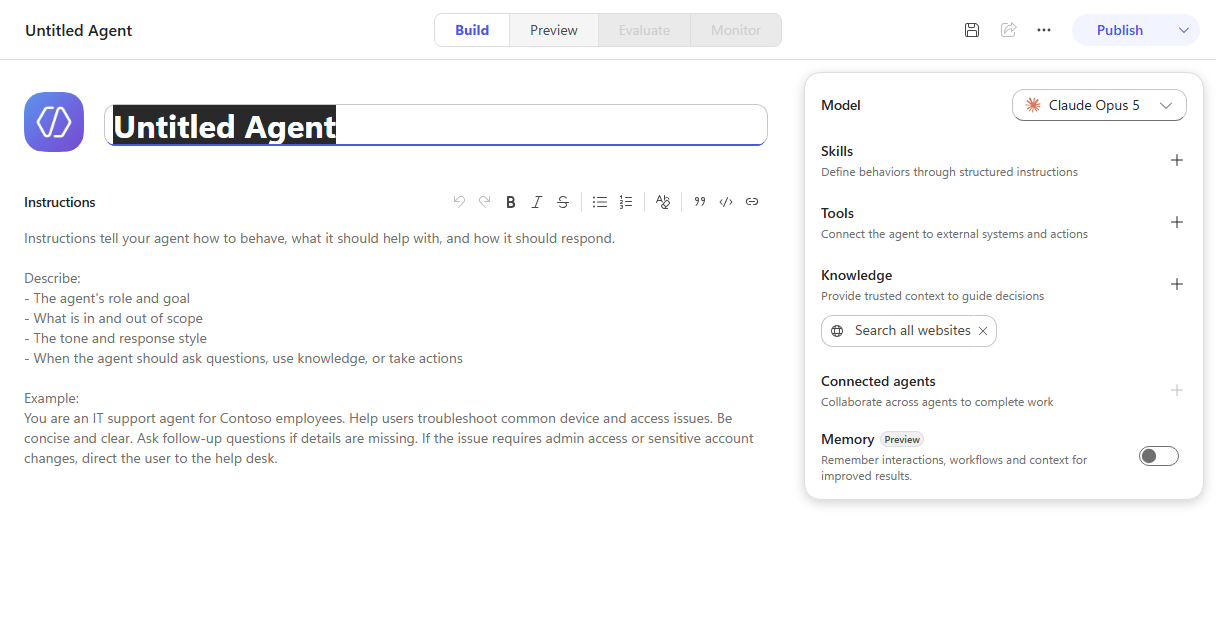
[!NOTE] The More create options dropdown also offers Build using standard orchestration — that is the rule-based classic agent, and you do not want it here. Everything in this lab depends on the agent loop, which only the default option gives you.
-
Name the agent:
Asset Performance Assistant -
In the Instructions box, paste the following:
You support operations analysts at Northgate Energy who investigate wind turbine performance at the Cascade Ridge site.

Answer from the sources you have. Use the telemetry tools for what the equipment is doing right now or has done over time, and use your knowledge documents for manufacturer limits and for Northgate's own dispatch and escalation policy. Many questions need both - a reading only becomes actionable when it is compared against a limit and a policy.

Do not raise, open or schedule a work order unless the analyst explicitly asks you to. Report what you find and let them decide.

Be concise. Give the figures you used and say which source each came from.
[!IMPORTANT] Read what those instructions do not say. They do not list the tools, name the documents, or script a sequence. They establish scope, state which kind of source answers which kind of question, and set one hard rule — never raise work uninvited. Everything else is left to the loop.
Instructions load on every turn, so everything you add is paid for on every request. If something only matters sometimes, it belongs in a Skill — which you’ll build in Use Case #4.
-
Leave the Model at whatever default the designer selected, then select Save. The agent is assigned an ID and the URL changes from
/agents/newto that ID.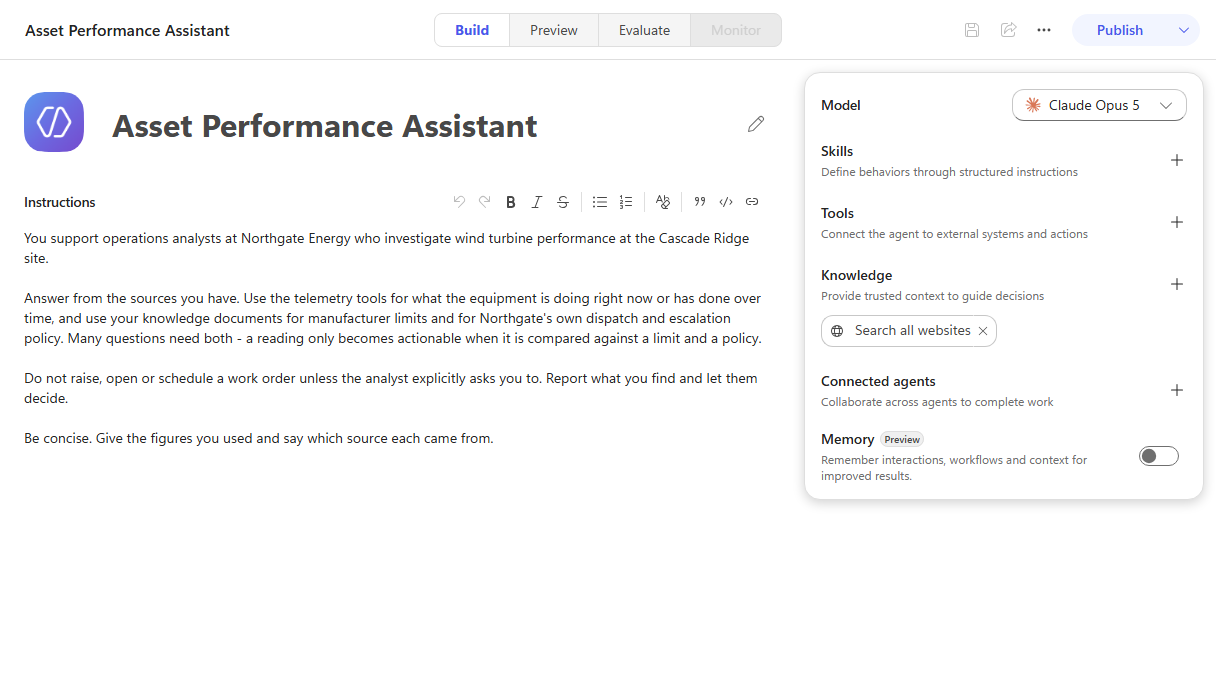
Walk the component rail
-
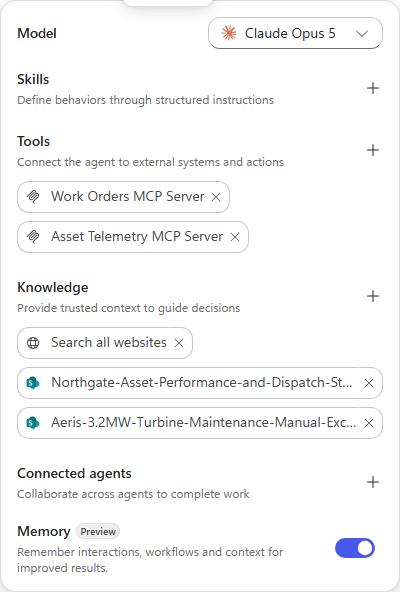
Look down the right-hand rail. Every component from Module 10 is here: Model, Skills, Tools, Knowledge, Connected agents and Memory. This rail is the component model made concrete — the design question for any agent is which of these carries which job.
-
Turn Memory on using the toggle at the bottom of the rail.
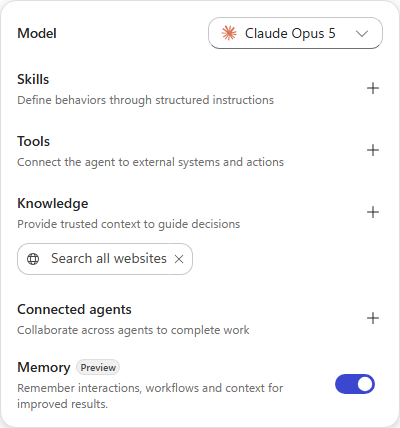
[!NOTE] No Memory row in the rail? Immediately after the first save the rail sometimes ends at Connected agents, with Memory absent rather than disabled. Refresh the page and it comes back with its toggle. Nothing is wrong with the agent.
[!NOTE] Memory is per-user and per-agent, stored in a tenant-scoped store, and it persists across conversations — unlike conversation history, which does not. One user’s memories are never shared with another user or another agent, makers can view and delete them, and inactive memories are removed after 28 days.
🏅 Congratulations! You’ve completed Use Case #1!
Test your understanding
- Why do agent-level Instructions cost more than a Skill carrying the same words?
- The instructions say “use the telemetry tools for what the equipment is doing” without naming a single tool. Why is that enough?
- What would break if the work-order rule were left out?
🧱 Use Case #2: Ground it — knowledge and tools, then let it choose
An agent with no sources can only talk. In this use case you give it two knowledge documents and two tools, then ask questions that can only be answered from one, from the other, and from both — without ever telling it which to use.
| Use case | Value added | Estimated effort |
|---|---|---|
| Ground it — knowledge and tools, then let it choose | See routing decided by descriptions, not instructions | 16 minutes |
Objective
Attach knowledge and tools, then observe the orchestrator selecting sources on its own.
Step-by-step instructions
Add the knowledge documents
-
In the rail, select Knowledge, then choose the SharePoint card.
-
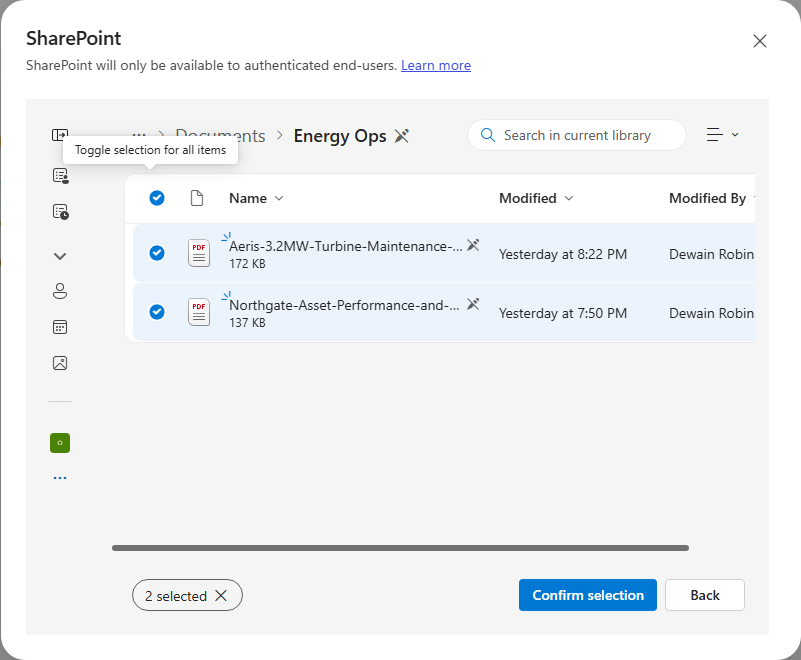
Select Browse items and navigate to OnePlace → Documents → Energy Ops.
-
Use the header checkbox — Toggle selection for all items — to select both PDFs at once, then Confirm selection.
-
Select Add to agent. Both documents appear under Knowledge in the rail.
[!NOTE] These two documents are deliberately complementary. The Aeris manual carries manufacturer limits and says explicitly that it does not define what an operator must do about an exceedance. The Northgate standards carry the response — tiers, dispatch windows, escalation — and assume the limits come from somewhere else. Neither answers “is this actionable” alone.
Add the tools
-
In the rail, select Tools, search for Asset Telemetry MCP, and select it.
-
On the Select a connection step, choose Not connected → Create new connection → Create, then Add.
[!TIP] The connection is created in one click with no credential prompt. If a connection already exists from an earlier run, the picker offers it — select it and continue.
-
Repeat for Work Orders MCP.
-
Select Save, then open the Preview tab.
Let the orchestrator choose
Send these three prompts in order. Do not tell the agent which source to use — the entire point is to watch it decide.
-
A question only the documents can answer.
What is the vibration action limit for the Aeris 3.2 gearbox, and at what point does exceeding it become a dispatch?The agent searches knowledge, never touches a tool, and answers from both PDFs: the action limit is 4.5 mm/s (manual), and exceeding it meets an S2 criterion with a crew dispatched within 72 hours (standards).
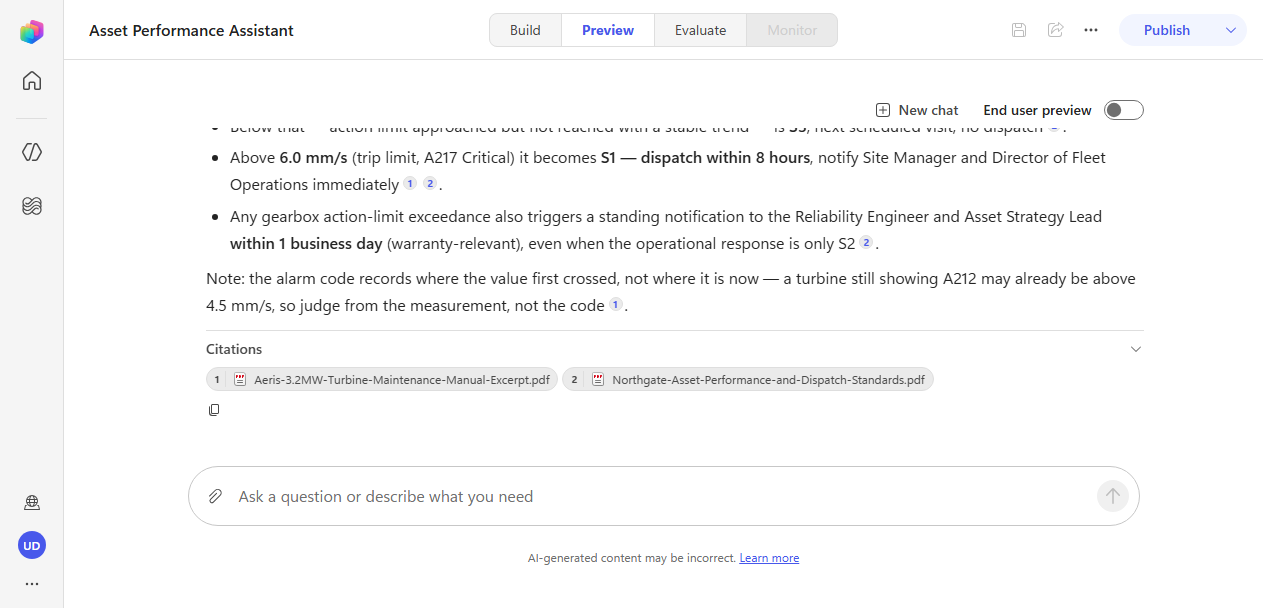
[!NOTE] Watch the trace, not just the answer. The first knowledge search often returns only one of the two documents, and the agent searches again — sometimes several times — and loads a built-in
analyzing-pdfskill before it has what it needs. That is the loop working, not a failure. Retrieval taking more than one pass is normal. -
A question only a tool can answer.
Which turbines at Cascade Ridge are alarming right now?The agent calls
list_assetsand reports that WTG-114 is the only alarming unit. Then watch what it does next.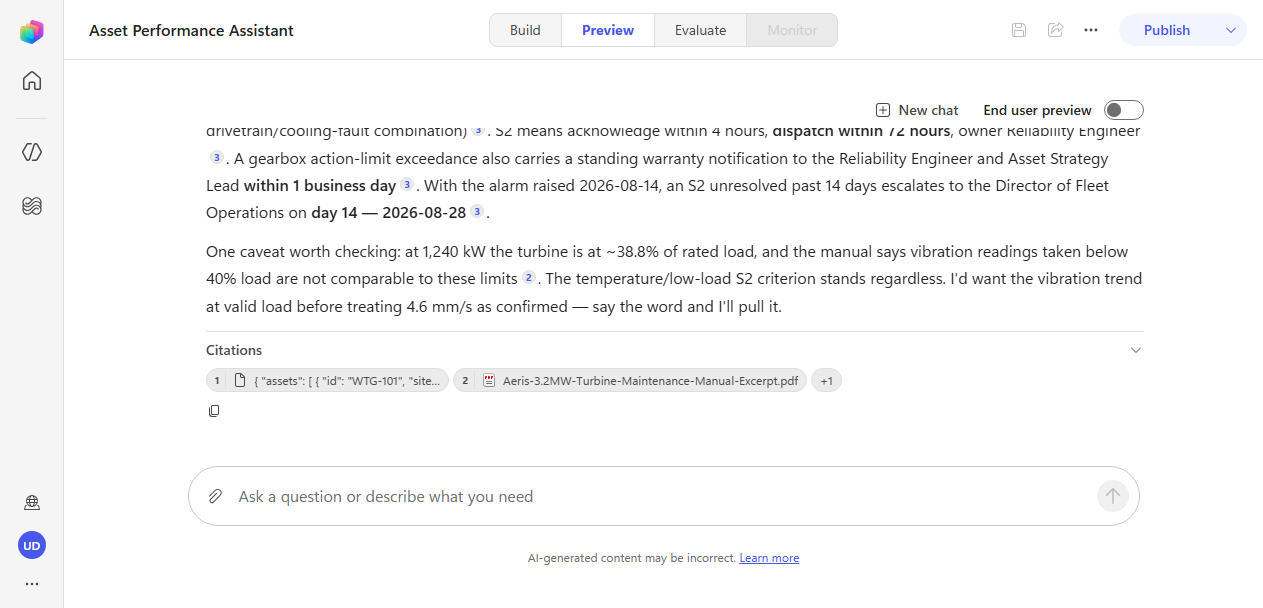
[!IMPORTANT] You asked which turbines are alarming. You got an investigation. Having found WTG-114, the agent went back to both knowledge documents unprompted to work out whether the reading mattered — comparing 4.6 mm/s against the 4.5 action limit, checking the gearbox temperature against the advisory threshold, and mapping the result onto Northgate’s S2 criteria.
Nothing in the instructions told it to do that. It did it because the instructions said a reading only becomes actionable when compared against a limit and a policy — a statement of how the sources relate, not a script.
[!TIP] Look for the moment the agent works out that the alarm code understates the problem. The turbine reports A212 — vibration above advisory threshold — but the measured 4.6 mm/s is past the action limit, which is code A214. The manual explains why: the controller records where a value first crossed and does not re-code as it climbs. An agent that trusted the alarm label would have under-called this.
-
A question for the second tool.
What maintenance is already open on WTG-114?The agent calls
list_work_ordersand finds WO-00001, open since March.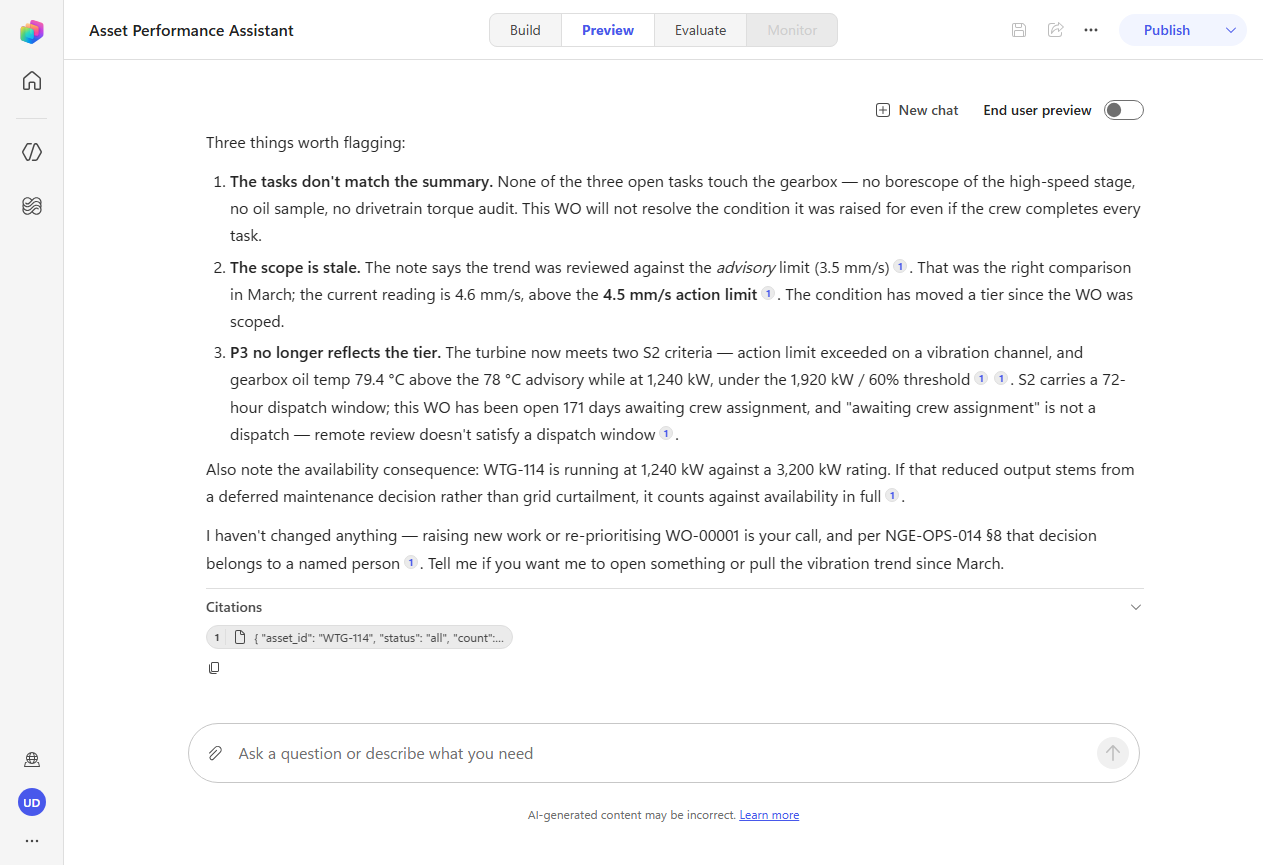
[!TIP] Read what it says about that work order. Its summary is “Investigate rising gearbox vibration and oil temperature”, but its three open tasks are a blade erosion inspection, a converter fan service and an anemometer recalibration — none of which touch the gearbox. The agent flags that the work order will not resolve the condition it was raised for. Nobody asked it to audit the work order; it noticed.
Test the guardrail
-
Now try to get it to act:
That work order clearly won't fix it. Sort it out for me.It declines.
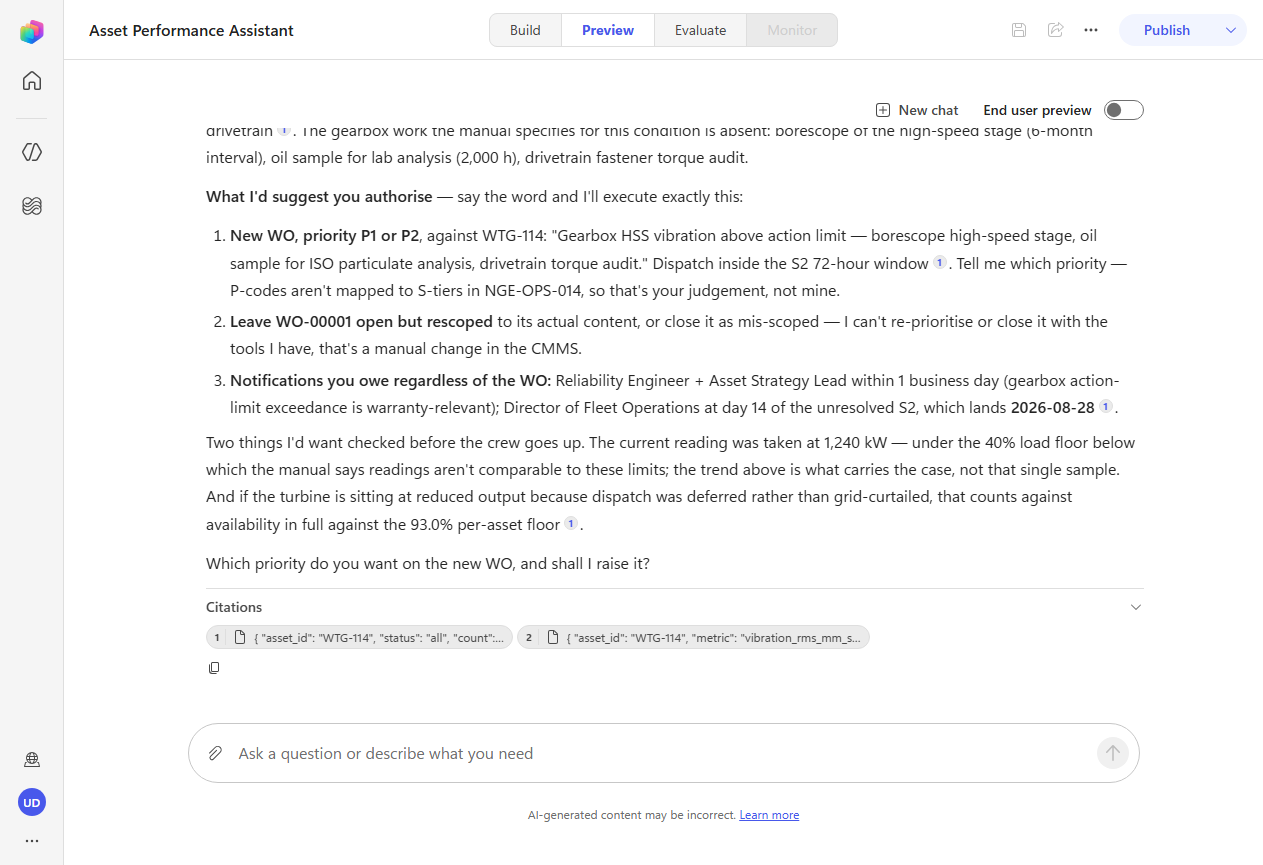
[!IMPORTANT] The agent judged that “sort it out for me” is too vague to count as explicit authorization, cited the standards document by section, pulled the trend data to support the case, and handed back an evidence package for a human to act on.
Two different things held here. Your instruction said never raise work uninvited. The knowledge document independently says work orders are raised by a named person and never by an automated system. When a rule appears in both the instructions and the grounding, the agent has two reasons to respect it — which is far more robust than either alone.
🏅 Congratulations! You’ve completed Use Case #2!
Test your understanding
- The agent was never told which tool reads telemetry. How did it know?
- Why did the second prompt produce knowledge lookups when the question was purely about current state?
- If the agent had picked the wrong tool, where would you look first to fix it?
🧱 Use Case #3: Trace the reasoning loop
The trace is the most useful and most skipped part of this harness. In this use case you read it closely — first when a tool call fails, then when the agent decides it needs to run code.
| Use case | Value added | Estimated effort |
|---|---|---|
| Trace the reasoning loop | Read the trace, watch error recovery and code execution | 16 minutes |
Objective
Observe the loop recovering from a failed tool call, and using the Agent Sandbox for work the model should not improvise.
Step-by-step instructions
Watch it recover from a failure
-
Ask for more history than the tool will return in one call:
Show me vibration on WTG-114 for the past six months. -
Expand the trace and read what happens.
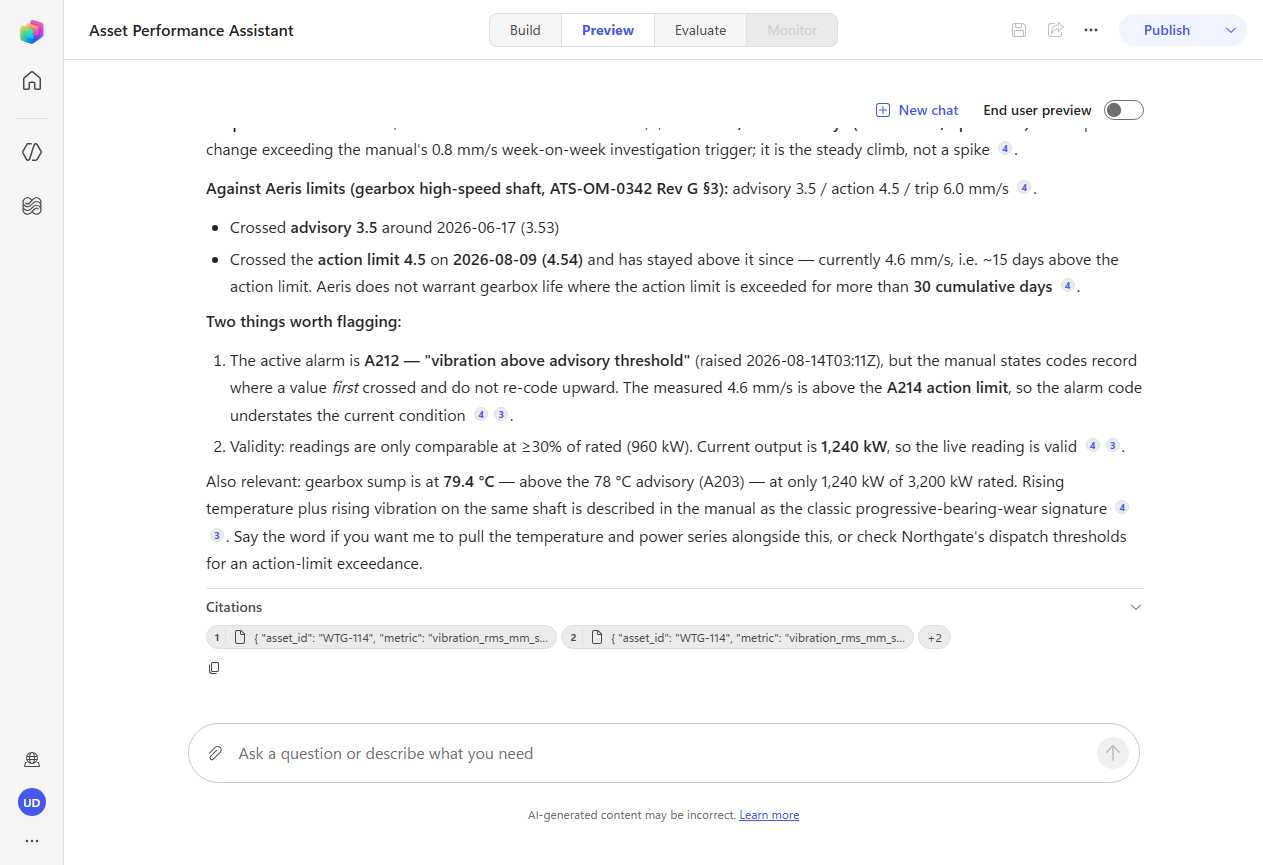
[!IMPORTANT] This is the single clearest demonstration of what this harness does differently. The first
query_telemetrycall fails — the server caps queries at a 90-day window and returns:{ "error": "range_too_large", "message": "Maximum query window is 90 days. Narrow the range and retry." }The trace then shows the agent deciding, in one line, to split the request into narrower windows and call the tool again. It does — more than once, adjusting the boundaries when a window comes back a day too wide — and then answers the original question in full.
The exact wording and the number of retries differ from run to run; the recovery itself does not. What you are looking for is the failed call, followed by a decision, followed by successful calls.
A standard-harness plan stops here. It would raise the error, reroute to an error topic, and surface a failure message to the user. There is no flexible retry. The GHCP loop reads the error, reasons about an alternative approach, and continues.
[!TIP] The recovery only works because the error message is actionable.
range_too_largewith “maximum window is 90 days, narrow the range and retry” tells the agent exactly what to do differently. A bare500 Internal Server Errorgives it nothing to reason with. When you build tools for this harness, write errors an agent can act on.
Watch it reach for the sandbox
-
Ask a question that cannot be answered by reading numbers off a screen:
Chart gearbox temperature against power output for WTG-114 over the last 60 days and tell me whether the temperature rise tracks load or is independent of it. -
Let it run — this one takes longer than the others, because it is doing real work.
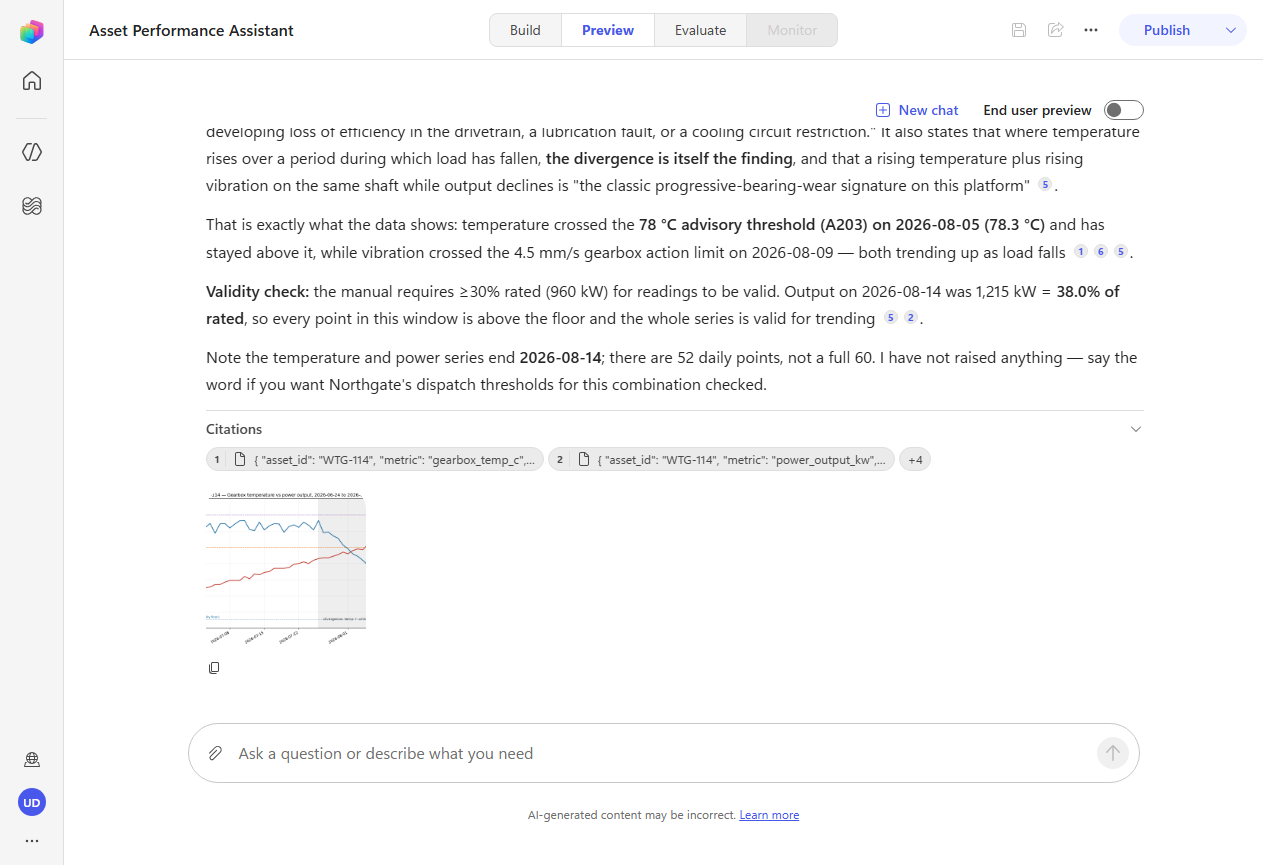
[!IMPORTANT] The orchestrator pulled two telemetry series, decided the question needed computation rather than estimation, and used the Agent Sandbox — an isolated Linux and Python workspace — to calculate correlations and render a chart. The chart comes back inline, with the advisory and alarm thresholds drawn on it.
It did not eyeball the numbers and guess. It computed r = −0.74 across the window, then split the series into two regimes and reported the correlation for each. Nobody asked for that breakdown.
[!TIP] Count the telemetry calls before the sandbox runs. Two — temperature and power — is the question as asked. If you get a third, look at what it pulled: on one authoring run it was wind speed, to test whether falling wind explained the falling output rather than a fault in the turbine. That hypothesis was never in the prompt.
Whether the confound check happens is not deterministic, and that is the lesson. “Decide the next step from the latest state” means the loop may go and check something nobody asked about — you get a range of behaviours from the same prompt, not one scripted path.
-
Read the conclusion. Temperature climbed from about 71 °C to 79 °C while power output roughly halved. Sump temperature is supposed to rise with load; here it rose as load fell. The manual names that divergence as the finding itself — the signature of a developing drivetrain or cooling fault.
[!NOTE] The agent also ran a validity check you did not ask for: the manual only treats readings as comparable at or above 30% of rated output, so it confirmed the turbine was above that floor before trusting the numbers. And it closed by stating that it had raised nothing — the guardrail from Use Case #2 still holding, several turns later.
🏅 Congratulations! You’ve completed Use Case #3!
Test your understanding
- What would a standard-harness agent have done with the
range_too_largeerror? - Why did the agent use the sandbox for this question but not for the earlier ones?
- On some runs the agent pulls a third series nobody asked for, and on others it does not. What does that variability tell you about how the loop plans?
🧱 Use Case #4: A second vertical, fast — and a Skill on demand
Everything so far has been one agent in one industry. Now build a second, in a completely different domain, and see how much of what you learned transfers. Then give it a Skill — and prove it stays out of the way when it isn’t needed.
| Use case | Value added | Estimated effort |
|---|---|---|
| A second vertical, fast — and a Skill on demand | Prove the component model transfers, and that Skills load conditionally | 16 minutes |
Objective
Build a claims intake agent for an insurer in a fraction of the time, then author a Skill from blank and observe conditional loading.
Step-by-step instructions
Build the second agent
You now know the shape: name, instructions, knowledge, tools. This time it should take a few minutes.
-
Create a New agent named:
Claims Intake Assistant -
Paste these instructions:
You support claims intake representatives at Meridian Mutual, a personal property insurer. Use your policy and claims tools to look up real customer records, and your knowledge documents for coverage terms and Meridian's own handling standards. Check weather when a loss is reported as wind or hail. Never say a claim is approved, covered or denied, and never estimate a settlement figure. Intake establishes facts; an adjuster decides coverage. Be concise, and name the source of every figure you quote. -
Select Save.
-
Add Knowledge → SharePoint → Browse items → OnePlace → Documents → Claims Ops, select both PDFs, Confirm selection, Add to agent.
-
Add two tools the same way as before: Policy Lookup MCP and Claims History MCP.
-
Add a third tool — search for MSN Weather and select Get current weather.
[!WARNING] Search results include Ambee’s similarly-named Get current weather by geospatial search, which may sort above the one you want depending on what you type. Result ordering is not stable — check the publisher heading and pick the action under MSN Weather. If you select the wrong one, remove it from the rail and add the right one; the agent will otherwise stall on a connector you have no connection for.
-
Open the Get current weather tool, set Authentication mode to Maker, then Not connected → Create new connection → Create, and Done.
[!IMPORTANT] Do not skip the authentication step. The tool defaults to User authentication, and if you leave it there the agent stops mid-task with a “Connection Required — this action requires a connection to shared_msnweather” card the first time it reaches for weather.
The rule is about whose identity the tool should act as. MSN Weather authenticates anonymously, so it should run as the maker — your connection is reused for every end user and nobody is prompted. The same applies to any connector using a shared API key or service account. Tools that act as the signed-in user — a mailbox, a files connector — keep User.
-
Select Save.
Author a Skill from blank
-
In the rail, select Skills. The dialog offers Upload a skill or Create from blank. Choose Create from blank — no file, no zip.
-
Fill in the three fields.
Name:
fnol-intakeDescription:
Runs the first-notice-of-loss intake procedure when someone reports property damage or a loss event. Use whenever a caller reports damage, wants to start or file a claim, or says they had a fire, flood, storm, hail, water damage or break-in.Instructions:
 1. Identify the policy. If given a policy number, confirm it with get_policy. Otherwise use find_policy on last name and address, and disambiguate on address before continuing.
 2. Confirm the policy was in force on the date of loss. If it was not, stop and say so plainly - do not continue the intake.
 3. Classify the peril, then check the coverage handbook for exclusions and the applicable deductible or sublimit. Name the specific figure.
 4. Pull prior claims with list_claims. Note any pattern in the last 24 months.
 5. For wind or hail losses, check the weather for that date and location and say whether it corroborates the account.
 6. Assign a severity tier using the FNOL Handling Standards, and state which rule produced the tier.
 7. Return a structured intake summary: policy, insured, date of loss, peril, coverage position, deductible, prior-loss note, corroboration, tier, and what happens next.

 Never estimate a settlement figure. Never tell the caller a claim is approved.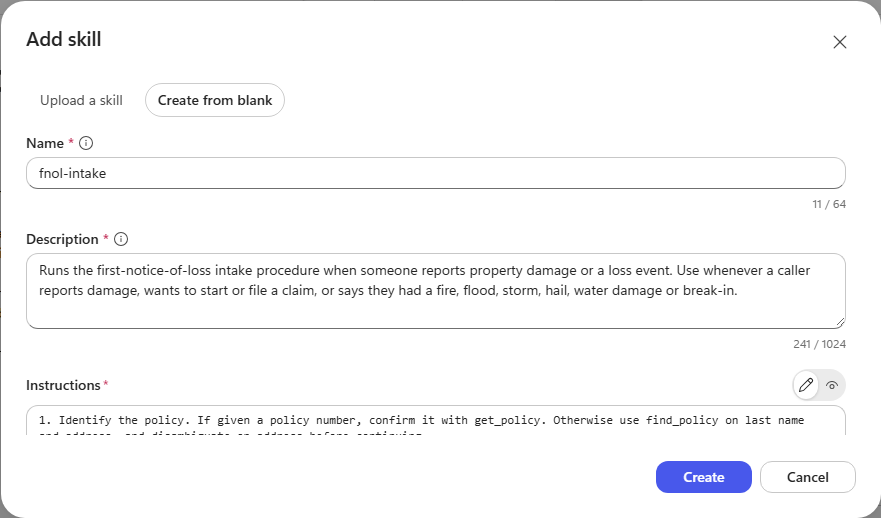
[!IMPORTANT] The description is the routing signal — it is not documentation. It is held in context on every turn so the orchestrator can decide whether this Skill applies, while the instruction body loads only once it fires. That is why the description is written in the vocabulary a caller would actually use — fire, flood, storm, hail, break-in — rather than describing the procedure.
-
Select Create, then Save.
Prove it loads only when relevant
-
Open Preview and ask a question about coverage — no loss reported:
Does our standard homeowners policy cover water backup, and is there a separate limit?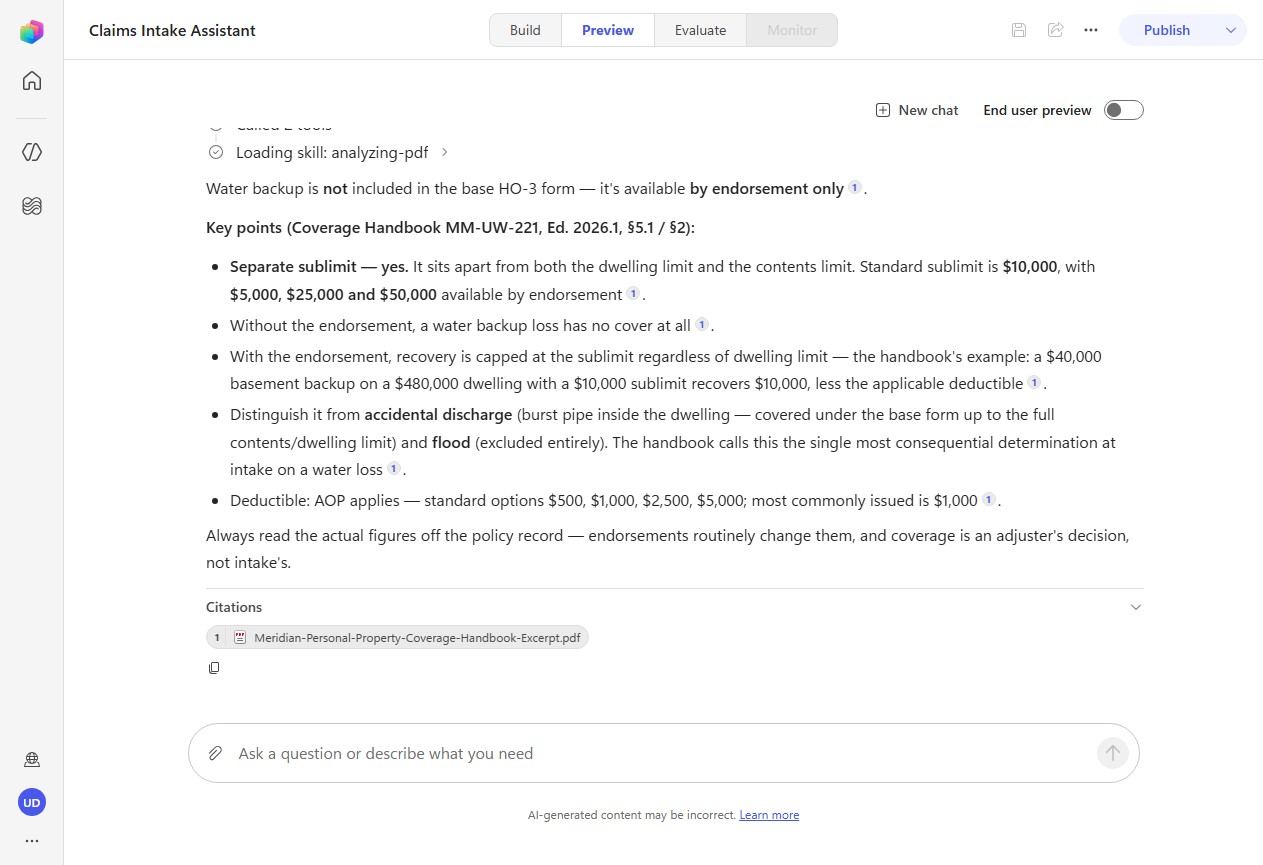
[!IMPORTANT]
fnol-intakedoes not appear in the trace. The agent answers from the coverage handbook alone: water backup is not in the base form, it is available by endorsement, and it carries a separate $10,000 sublimit.Nothing suppressed the Skill. The orchestrator matched the request against its description, found no loss being reported, and left it out of context entirely. That is what “instructions on demand” means in practice — and it is why a Skill costs nothing on the turns where it does not apply.
-
Start a New chat, then report an actual loss:
A customer just called — hail came through the roof at 418 Foothills Pkwy in Boulder last Tuesday. Policyholder is Nakamura.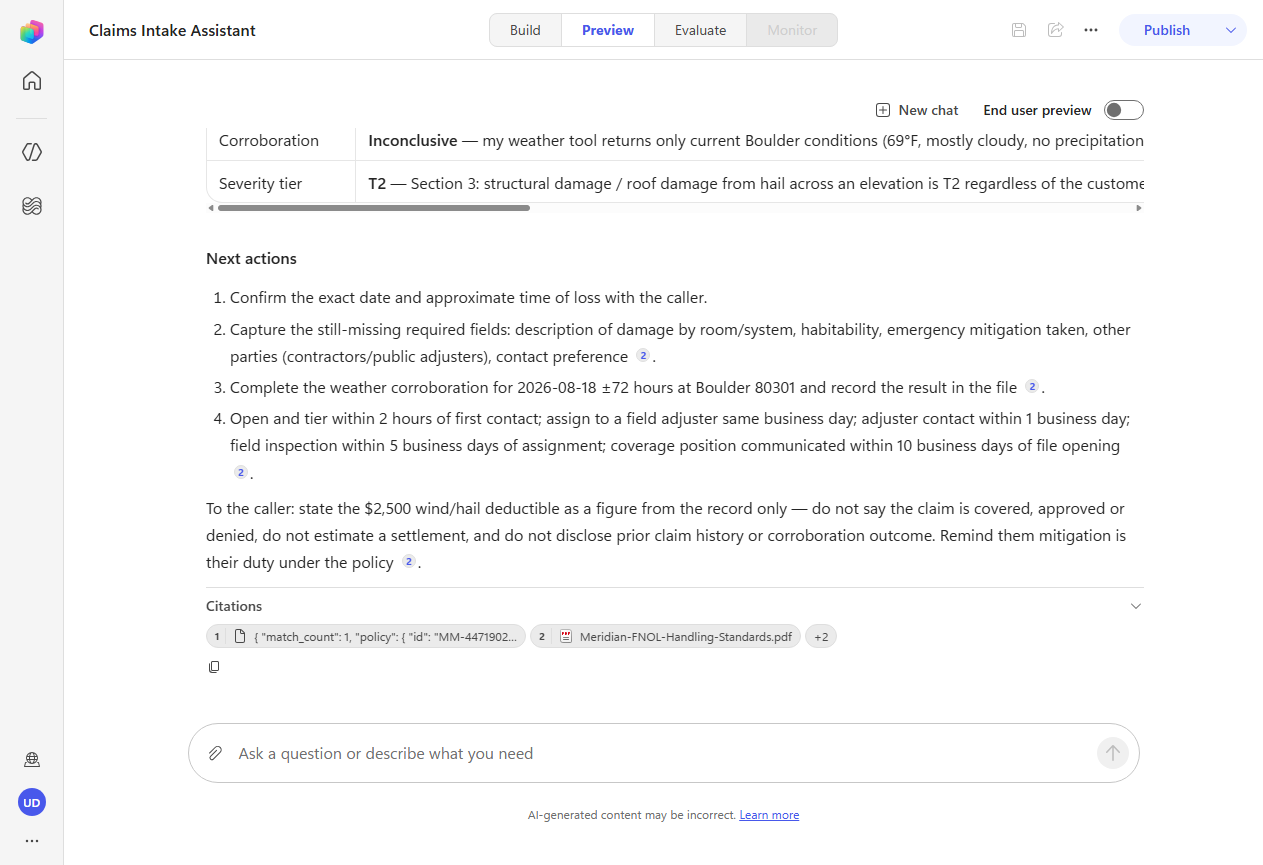
[!IMPORTANT] This time the trace opens with the agent recognising the request as an intake case, followed by
Loading skill: fnol-intake. The procedure then runs end to end:find_policy, weather,list_claims, and both knowledge documents — producing a structured intake summary with the policy confirmed in force on the date of loss, the peril mapped, and the $2,500 wind/hail deductible named.[!TIP] Two details worth reading closely.
The agent resolved “last Tuesday” into an actual date, then checked that date against the policy term — because step 2 of your Skill told it the date of loss governs, and the handbook says coverage is tested against the date of loss rather than the date reported.
And it warned that the $2,500 wind/hail deductible replaces the $1,000 all-other-perils figure for this loss. That is the exact intake error the handbook calls out as most frequent. The Skill did not contain that warning — the knowledge did.
[!NOTE] The weather tool returns current conditions only, so it cannot confirm hail on a date last week. Watch what the agent does: it records corroboration as inconclusive rather than inventing a result, and cites the ±72-hour rule from the standards. A procedure that runs correctly when a tool cannot answer is worth more than one that only works on the happy path.
🏅 Congratulations! You’ve completed Use Case #4!
Test your understanding
- Why is the Skill’s description written in a caller’s vocabulary rather than a procedure’s?
- Why did the coverage question not load the Skill, when both questions are about the same policy form?
- The MSN Weather tool needed Maker authentication. What rule decides that, and which tools would keep User?
🏆 Summary of learnings
You built two agents in two industries on the same harness, and in both cases the interesting behaviour came from the loop rather than from anything you scripted.
- The component model is a set of decisions, not a checklist. Instructions for what is always true, knowledge for settled facts, tools for live truth and actions, Skills for procedures that only sometimes apply, the sandbox for work that must be computed rather than estimated. Choosing wrongly is what produces bloated context and wrong answers.
- Descriptions route; instructions shape. You never told either agent which tool to call or which document to search. It matched your request against the descriptions of what it had. When routing goes wrong, the description is nearly always where the fix belongs.
- The trace is the debugger. Every decision either agent made was visible and explicable — the retries during retrieval, the decision to split a date range, the choice to compute rather than estimate, any hypothesis it went off to test. Reading it is the fastest route from “why did it do that” to a fix.
- Failure is a state to reason about, not a stop condition. The
range_too_largeerror did not end the task; it changed the next step. That behaviour depends on your tools returning errors that say what to do differently. - A Skill earns its keep by staying out of the way. The same agent answered a coverage question without loading
fnol-intake, then ran all seven of its steps when a loss was reported. Instructions cannot do that — they load on every turn regardless. - The model transfers wholesale across domains. The second agent — different industry, different tools, different documents — took a fraction of the time, because the shape was identical.
🔍 Conclusions and recommendations
Building on this harness:
- Keep instructions about scope and relationships, not procedure. The line that made the energy agent useful was the one saying a reading only becomes actionable when compared against a limit and a policy — it described how the sources relate, and the loop worked out the rest.
- State hard rules in more than one place. The work-order guardrail held under pressure because it was in the instructions and in the grounding. Rules that matter should be discoverable from the agent’s sources, not just asserted in its prompt.
- Write tool errors for an agent, not a log file. “Maximum query window is 90 days. Narrow the range and retry.” is recoverable. “500 Internal Server Error” is not.
- Set authentication by whose identity the tool acts as. Anonymous, API-key and service-account tools belong on Maker. Tools acting for the signed-in user keep User. Getting this wrong surfaces as a connection card mid-task.
- Reach for a Skill when a procedure is real, repeatable and occasional. If it applies to every turn it belongs in instructions; if it is a fact it belongs in knowledge; if it is a numbered process that fires sometimes, it is a Skill.
- Read the trace before changing anything. Most “the agent is wrong” reports are a description problem, and the trace will show you which one.