How to Set Context Variables to Copilot Studio Agents Using WebChat
Standard harness
Learn how to reliably pass context variables to Copilot Studio agents via WebChat using a Redux middleware that works on both Direct Line and the M365 Agents SDK.
When you embed a Copilot Studio agent into your own website, you usually know things about the user before the conversation even starts: their role, the page they came from, their language, the tenant they belong to. You’d like the agent to know that too, ideally without forcing the user to spell it out in the first message.
This is the classic “context variables” problem, and on paper it sounds trivial: just send the values to the agent when the conversation starts. In practice, where you send them and when you send them makes the difference between a working integration and one that silently drops half the data.
Concretely, say your agent has a topic that behaves differently depending on the user’s role. You’ve defined a Topic.userrole and you want it populated before the user sends their first message, so that any early topic can already branch on it.
This post focuses on how to do it reliably using Bot Framework WebChat.
A Quick Refresher on WebChat
If you’ve been following our WebChat posts, you can skip this section. For everyone else: when you need to embed a Copilot Studio agent into your own website, Bot Framework WebChat should be your default choice. It’s the same battle-tested chat component that powers Copilot Studio’s own test canvas, it handles adaptive cards, typing indicators, accessibility, attachments, and a dozen other things you don’t want to rebuild.
The other thing that makes WebChat powerful is that it’s built on Redux. Every action that happens in the chat, an outgoing message, an incoming activity, a connection event, flows through a Redux store. That means you can plug in your own middleware to intercept, modify, or react to anything that happens in the message pipeline. Which is exactly what we’re going to do here.
Approach 1: Send It in channelData (Works on Direct Line, Fails on the Agents SDK)
The first approach you’ll find in most samples is to attach context to the very first activity using channelData. With Direct Line, you can post the conversationStart event (or any other hidden event activity) that carries your context as part of the channel data, and the Conversation Start topic can read it via System.Activity.ChannelData. Here’s what that looks like:
1
2
3
4
5
6
7
8
9
10
11
12
13
14
15
16

export const connectionMiddleware = ({ dispatch }: any) => (next: any) => (action: any) => {
  if (action.type === 'DIRECT_LINE/CONNECT_FULFILLED') {
    // Send startConversation event when connection is established
    dispatch({
      type: 'DIRECT_LINE/POST_ACTIVITY',
      payload: {
        activity: {
          channelData: { myVariable: "myValue" },
          name: 'startConversation',
          type: 'event'
        }
      }
    })
  }
  return next(action)
}
This works fine when WebChat is connected via Direct Line. But Direct Line is no longer the only transport. If you’ve moved to the M365 Agents SDK (the @microsoft/agents-copilotstudio-client package, the one that gives you streaming and “Authenticate with Microsoft” SSO, and much more), the channel data plumbing is no longer guaranteed to surface where you expect it. The activity reaches the agent, but System.Activity.ChannelData ends up empty.
If you’re using the M365 Agents SDK for the modern streaming experience and tenant Graph grounding,
channelDataon the first activity is not a reliable channel for context variables. You need a different approach.
So we need something that works regardless of the underlying transport. Enter custom events.
Approach 2: Dispatch a Custom Event from a Middleware
Copilot Studio topics can be triggered by custom events. You define an OnEventActivity trigger with a specific eventName, and any time an activity with that event name reaches the agent, the topic fires and you can read the values out of System.Activity.Value.
On the WebChat side, you might think: “Ok, let’s dispatch an event activity from a Redux middleware using the WEB_CHAT/SEND_EVENT action”. The first instinct is to fire it as soon as the connection is established:
1
2
3
4
5
6
7
8
9
10
11
12
13
14
15

export const setContextMiddleware = ({ dispatch }: any) => (next: any) => (action: any) => {
  if (action.type === 'DIRECT_LINE/CONNECT_FULFILLED') {
    // Send setContext event when connection is established
    dispatch({
      type: 'WEB_CHAT/SEND_EVENT',
      payload: {
        name: 'customEventSetContext',
        value: {
          myvariablename: 'variableDefinition1'
        }
      }
    })
  }
  return next(action)
}
Combine this with a topic that listens for customEventSetContext:
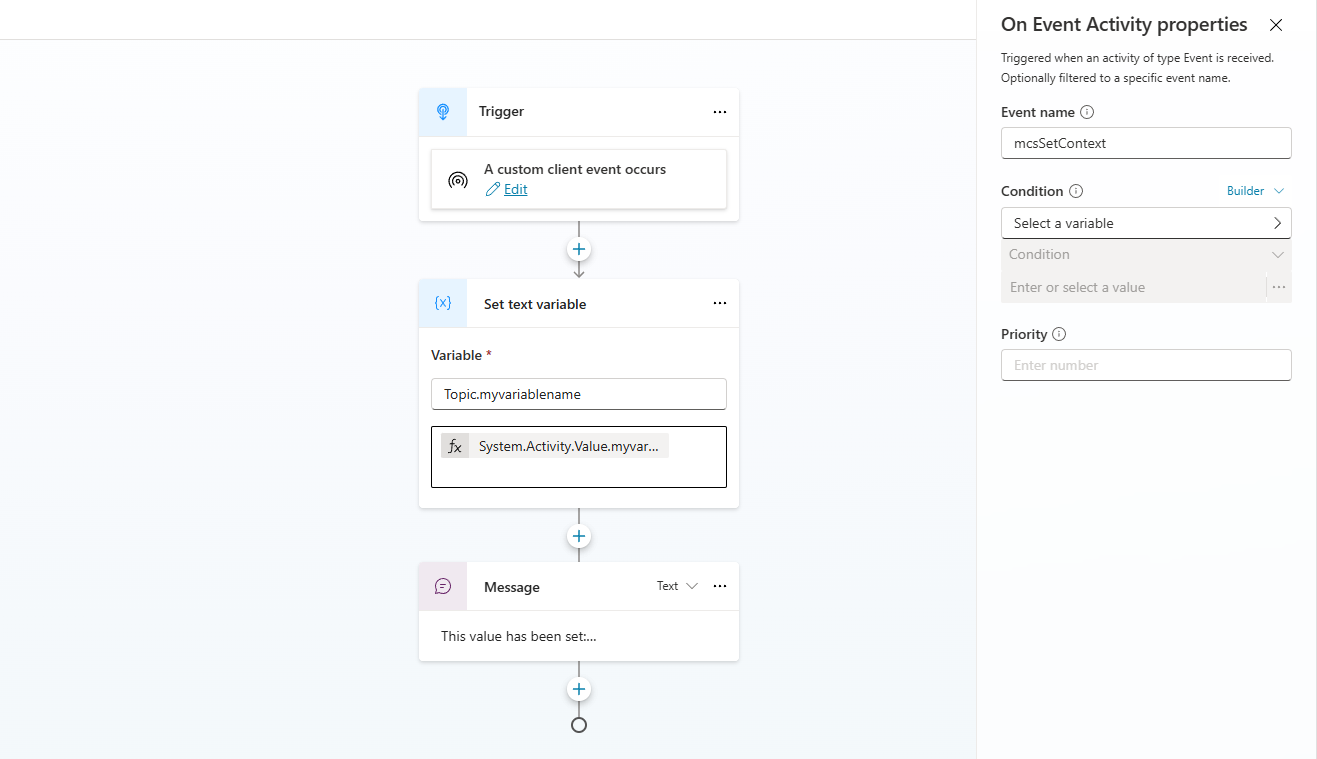 Copilot Studio screenshot of the topic listening for the
 customEventSetContext event
The topic uses an event trigger and a SetTextVariable action to copy the incoming value into a topic (or global) variable:
1
2
3
4
5
6
7
8
9

beginDialog:
  kind: OnEventActivity
  id: main
  eventName: customEventSetContext
  actions:
    - kind: SetTextVariable
      id: 3Tmwer
      variable: Topic.userrole
      value: "{System.Activity.Value.userrole}"
This looks clean. You hook into DIRECT_LINE/CONNECT_FULFILLED, dispatch your event, and the topic on the other side picks it up and assigns the variable. Done, right?
Not quite.
Why Firing on CONNECT_FULFILLED Doesn’t Work
Here’s the catch: DIRECT_LINE/CONNECT_FULFILLED fires the moment the underlying connection is established. At that point the conversation exists (you have a conversation ID), but the agent runtime on the other side may not yet have completed the work it does at the very beginning of a conversation: provisioning the conversation state, running the Conversation Start topic, initializing system variables.
In this case, the variable would remain unset. But because the timing depends on network latency, runtime warm-up, and which transport you’re on, the bug might be intermittent: it works fine on your dev box and breaks for users in production. The worst kind of bug.
A Direct Line conversation has a conversation ID as soon as connectivity is established, but that does not mean the agent runtime is ready to reliably persist variables. Treat
CONNECT_FULFILLEDas “the socket is open”, not “the agent is ready to receive context”.
What we want is a signal that says the agent has actually started talking, because by then the runtime is fully up and any variable we set is going to stick. That signal is the first incoming activity from the agent.
The Fix: Wait for the First Incoming Message
Instead of firing on connection, we wait for the first activity coming from the agent and dispatch our event there. To make sure we only do it once, we keep a flag in the middleware closure:
1
2
3
4
5
6
7
8
9
10
11
12
13
14
15
16
17
18
19
20
21
22
23

export const setContextMiddleware = ({ dispatch }: any) => {
  let contextSent = false
  return (next: any) => (action: any) => {
    if (
      !contextSent &&
      action.type === 'DIRECT_LINE/INCOMING_ACTIVITY' &&
      action.payload?.activity?.type === 'message'
    ) {
      // Send setContext event once, on the first incoming message from the agent
      contextSent = true
      dispatch({
        type: 'WEB_CHAT/SEND_EVENT',
        payload: {
          name: 'customEventSetContext',
          value: {
            myvariablename: 'variableDefinition1'
          }
        }
      })
    }
    return next(action)
  }
}
A few things to notice:
- We watch
DIRECT_LINE/INCOMING_ACTIVITY(the same action you’d use to save activities for conversation history), notCONNECT_FULFILLED. - We filter on
activity.type === 'message'so we don’t fire on typing indicators or other system activities, which can arrive earlier and lead us back to the same race condition. This means your agent should actually send a message to users before we can set variables, for example in Conversation Start. - The
contextSentflag lives in the middleware closure, which means it’s scoped to a single WebChat instance. If the user reloads the page, the flag resets and the context gets sent again on the next first message, which is exactly what we want.
The Copilot Studio side stays the same: the same OnEventActivity topic listening for customEventSetContext, the same SetTextVariable action assigning System.Activity.Value.userrole to Topic.userrole. Now, by the time the event arrives, the agent runtime has already produced its first message, the conversation state is fully initialized, and the variable assignment sticks.
Wiring It Up
Plugging the middleware into WebChat is the same pattern as any other Redux middleware:
1
2
3
4
5
6
7
8
9
10
11
12
13
14

import { applyMiddleware, createStore as createReduxStore } from 'redux'

const store = window.WebChat.createStore(
  {},
  setContextMiddleware
)

window.WebChat.renderWebChat(
  {
    directLine,
    store,
  },
  document.getElementById('webchat')
)
If you’re already using middlewares (for history persistence, mocked welcome messages, or general message interception), just compose them together and add this one to the chain.
Considerations about this approach
The honest trade-off of the middleware approach is that the variable is set after the first agent message, not before it. So if your Conversation Start topic itself needs to branch on the user role (for example, to send a different greeting to admins vs. end users), this won’t help you, the greeting fires before the event lands. For that case, my advice is to keep the Conversation Start topic generic “Hello, and welcome!” and have your follow-up logic triggered by the custom event itself.
For everything else, every topic that runs after the agent actually sends its first message, the middleware pattern is the most reliable option I’ve found that survives both Direct Line and the Agents SDK.
Key Takeaways
-
channelDatafor context works on Direct Line but is unreliable on the M365 Agents SDK. - Custom events dispatched from a WebChat Redux middleware work on both transports.
- Don’t dispatch on
DIRECT_LINE/CONNECT_FULFILLED, the agent runtime isn’t necessarily ready and the variable assignment can be lost. - Dispatch on the first
DIRECT_LINE/INCOMING_ACTIVITYof typemessageand use a flag to make sure it only fires once per session. - On the Copilot Studio side, listen for the event with an
OnEventActivitytrigger and copySystem.Activity.Value.*into your variables.
Hope this was useful, and saves you the few hours it took us to figure out why the variable kept showing up empty.