Microbots: Customizability at Every Layer
Published on: May 14, 2026 | Author: Kavya Sree Kaitepalli
A user needed to extract text from scanned PDFs. We said: "Write 15 lines of YAML." No pull request. No release cycle. No code review. That's the kind of extensibility we built Microbots for.
Customization is a configuration choice — not a code-change project.
The Problem
Most agent frameworks bake everything in. Want a new tool? Edit the source. Want a different model? Rewrite the API call. Want to change how files are mounted? Good luck.
This leads to:
- Forks that drift — every team maintains their own version
- Tight coupling — changing the LLM breaks the tool system
- Security risk — no way to limit file access per bot
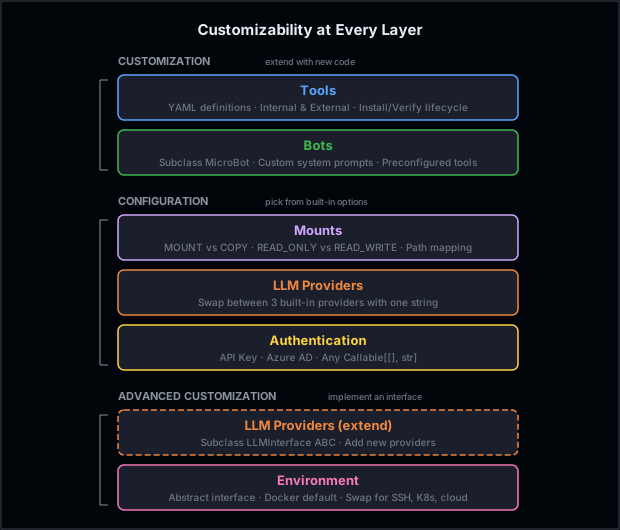
Microbots takes a different approach: independent layers, each with a clean interface — some you extend with new code (customization), others you tune with parameters (configuration).
Customization
These layers let you extend Microbots by writing new code — without modifying the core.
1. Bring Your Own Tools
The most common customization: giving a bot new capabilities.
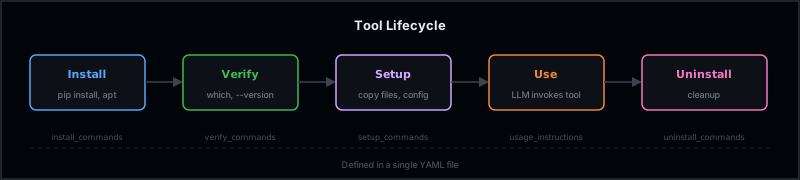
Instead of hardcoding tools into the base image, Microbots uses a YAML-based tool definition system. One file defines everything — what to install, how to verify it works, and how the LLM should use it.
What a tool definition looks like
A tool YAML captures the full lifecycle in one file — install, verify, use, uninstall — plus a usage_instructions_to_llm field that gets injected into the system prompt so the LLM knows how to invoke it. Here's the shape:
name: browser-use
tool_type: internal           # runs inside the Docker sandbox

install_commands:
  - pip install --no-input browser-use==0.5.4 playwright
  - playwright install chromium --with-deps --no-shell

usage_instructions_to_llm: |
  # The `browser` command is a CLI AI web browser.
  # Usage: browser "<query>"

uninstall_commands:
  - pip uninstall -y browser-use playwright
No Python code. No changes to MicroBot. Tools can be internal (runs inside the Docker sandbox) or external (runs on the host — useful for sub-agents or host-side logic).
Want to build one end-to-end? Walk through Custom Tool Integration: Tesseract OCR — it builds a production-ready OCR tool from scratch and uses it to extract form fields from scanned documents.
2. Build Your Own Bot
Here's a secret: ReadingBot, WritingBot, BrowsingBot — they're all just thin subclasses of MicroBot. Each one sets a custom system prompt, preconfigures tools, and picks the right permission level. That's all.
You can do the same in ~10 lines:
class SecurityAuditorBot(MicroBot):
    def __init__(self, model, folder_to_mount, **kwargs):
        sandbox = f"/{DOCKER_WORKING_DIR}/{Path(folder_to_mount).name}"
        super().__init__(
            model=model,
            folder_to_mount=Mount(folder_to_mount, sandbox, PermissionLabels.READ_ONLY),
            system_prompt="You are a security auditor. Find SQL injection, XSS, "
                          "hardcoded secrets, and insecure dependencies.",
            **kwargs,
        )
The base class handles the hard parts — the LLM loop, Docker lifecycle, command execution, response validation, and retries. You just define what the bot should do, not how it runs.
Every built-in bot follows this exact pattern. Check the source: ReadingBot, WritingBot, LogAnalysisBot.
Configuration
These layers don't require new code — you pick from built-in options to shape how your bot runs.
3. Scope File Access with Mounts
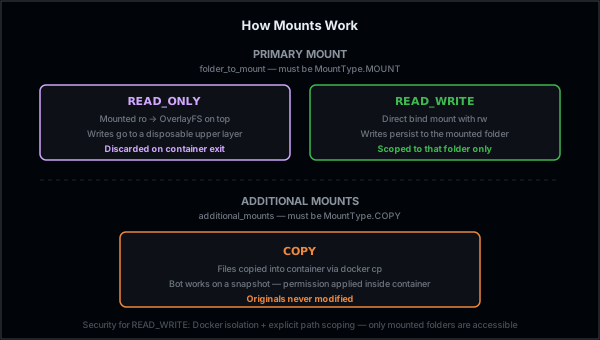
Mounts control what the bot can see and how its changes are handled. The primary mount (folder_to_mount) must be MountType.MOUNT — READ_ONLY gets an OverlayFS so writes stay in a disposable layer and are discarded when the container exits, while READ_WRITE is a direct bind mount so the bot's writes are persisted to the mounted folder (and only that folder). Additional mounts must be MountType.COPY — files are copied into the container via docker cp, so the original files are never modified.
For READ_WRITE, security comes from scoping: you only mount the specific folder the bot needs, and Docker isolation prevents access to anything outside that folder.
from microbots.extras.mount import Mount, MountType
from microbots.constants import PermissionLabels

code_mount = Mount(
    host_path="/home/user/project/src",
    sandbox_path="/workdir/src",
    permission=PermissionLabels.READ_WRITE,
    mount_type=MountType.MOUNT,
)

docs_mount = Mount(
    host_path="/home/user/project/docs",
    sandbox_path="/workdir/docs",
    permission=PermissionLabels.READ_ONLY,
    mount_type=MountType.COPY,          # copied in — originals untouched
)

bot = MicroBot(model="azure-openai/gpt-4o", folder_to_mount=code_mount)
response = bot.run(task="Fix the bug in auth.py", additional_mounts=[docs_mount])
4. Switch LLM Providers
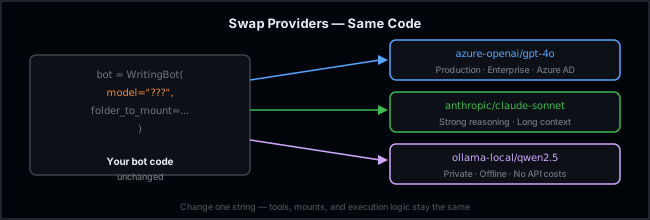
Switch between the three built-in providers by changing one string — everything else stays the same:
bot = WritingBot(model="azure-openai/gpt-4o", folder_to_mount="/project")
bot = WritingBot(model="anthropic/claude-sonnet-4-20250514", folder_to_mount="/project")
bot = WritingBot(model="ollama-local/qwen2.5-coder", folder_to_mount="/project")
Need a provider that doesn't exist yet? See Advanced Customization below.
5. Plug In Your Own Auth
Authentication is a callable — any Callable[[], str] works:
# Azure AD (built-in)
from azure.identity import DefaultAzureCredential, get_bearer_token_provider

credential = DefaultAzureCredential()
token_provider = get_bearer_token_provider(credential, "https://cognitiveservices.azure.com/.default")

bot = WritingBot(model="azure-openai/gpt-4o", folder_to_mount="/project", token_provider=token_provider)
# Or anything custom
def my_auth() -> str:
    return fetch_token_from_vault("my-secret")

bot = WritingBot(model="azure-openai/gpt-4o", folder_to_mount="/project", token_provider=my_auth)
For more on why Microbots supports both API keys and Azure AD, see Understanding RBAC & Authentication.
Advanced Customization
These layers let you replace core infrastructure by implementing an interface. The difference from Configuration: configuration picks from what's already there; advanced customization adds what isn't.
6. Add a New LLM Provider
Swapping between the three built-in providers is configuration. But the LLM layer is also an abstract interface — LLMInterface(ABC) with ask() and clear_history(). To add a provider that doesn't exist yet, subclass it:
from microbots.llm.llm import LLMInterface, LLMAskResponse

class MyCustomLLM(LLMInterface):
    def ask(self, message: str) -> LLMAskResponse:
        # call your model here
        ...

    def clear_history(self) -> bool:
        self.messages = []
        return True
7. Swap the Execution Environment
Microbots runs commands in Docker by default, but the execution environment is an abstract interface:
class Environment(ABC):
    def start(self): ...
    def stop(self): ...
    def execute(self, command: str, timeout: int = 300) -> CmdReturn: ...
Implement this interface and pass it as environment= to any bot. You could build:
- SSH remote execution — run on a remote server
- Kubernetes pods — ephemeral sandboxes per bot run
- Local process — skip Docker for trusted environments
- Cloud sandboxes — Azure Container Instances, AWS Fargate
The rest of Microbots doesn't notice the difference.
How the Layers Compose
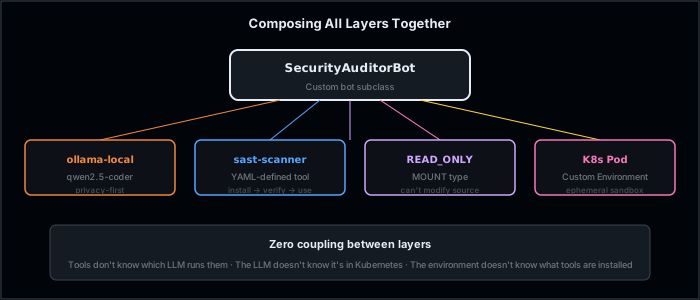
The power is in composition. Each layer is independent, so you can mix and match:
sast_tool = parse_tool_definition("sast-scanner.yaml")
k8s_env = KubernetesEnvironment(namespace="bots")

bot = SecurityAuditorBot(
    model="ollama-local/qwen2.5-coder",   # private LLM
    folder_to_mount="/path/to/code",       # read-only mount
    additional_tools=[sast_tool],           # custom tool
    environment=k8s_env,                    # K8s instead of Docker
)
No layer knows about the others. Tools don't care which LLM runs them. The LLM doesn't care whether it's in Docker or Kubernetes. The environment doesn't care what tools are installed.
What This Means for You
Customization (write new code):
| If you want to... | What to do |
|---|---|
| Add a new capability to a bot | Tools — write a YAML definition |
| Change bot behavior or personality | Bot — subclass with a custom system prompt |
Configuration (pick from built-in options):
| If you want to... | What to do |
|---|---|
| Control what files the bot touches | Mounts — set permissions and mount types |
| Switch to a different built-in model | LLM Provider — change one string |
| Use your own auth system | Auth — pass a Callable[[], str] |
Advanced Customization (implement an interface):
| If you want to... | What to do |
|---|---|
| Add an entirely new LLM provider | LLM Provider — subclass LLMInterface |
| Run somewhere other than Docker | Environment — implement the ABC |
Each layer has a simple interface, sensible defaults, and zero coupling to the others. Customize one without touching the rest.
Every layer is a 15-line decision, not a 1,500-line fork.