Making PAPM Custom Metrics Feel Conversational with an LLM-Ready Spec
A practical guide to using the PAPM CM LLM-Ready Documentation Package to turn natural language into valid Power Automate Process Mining custom metrics.
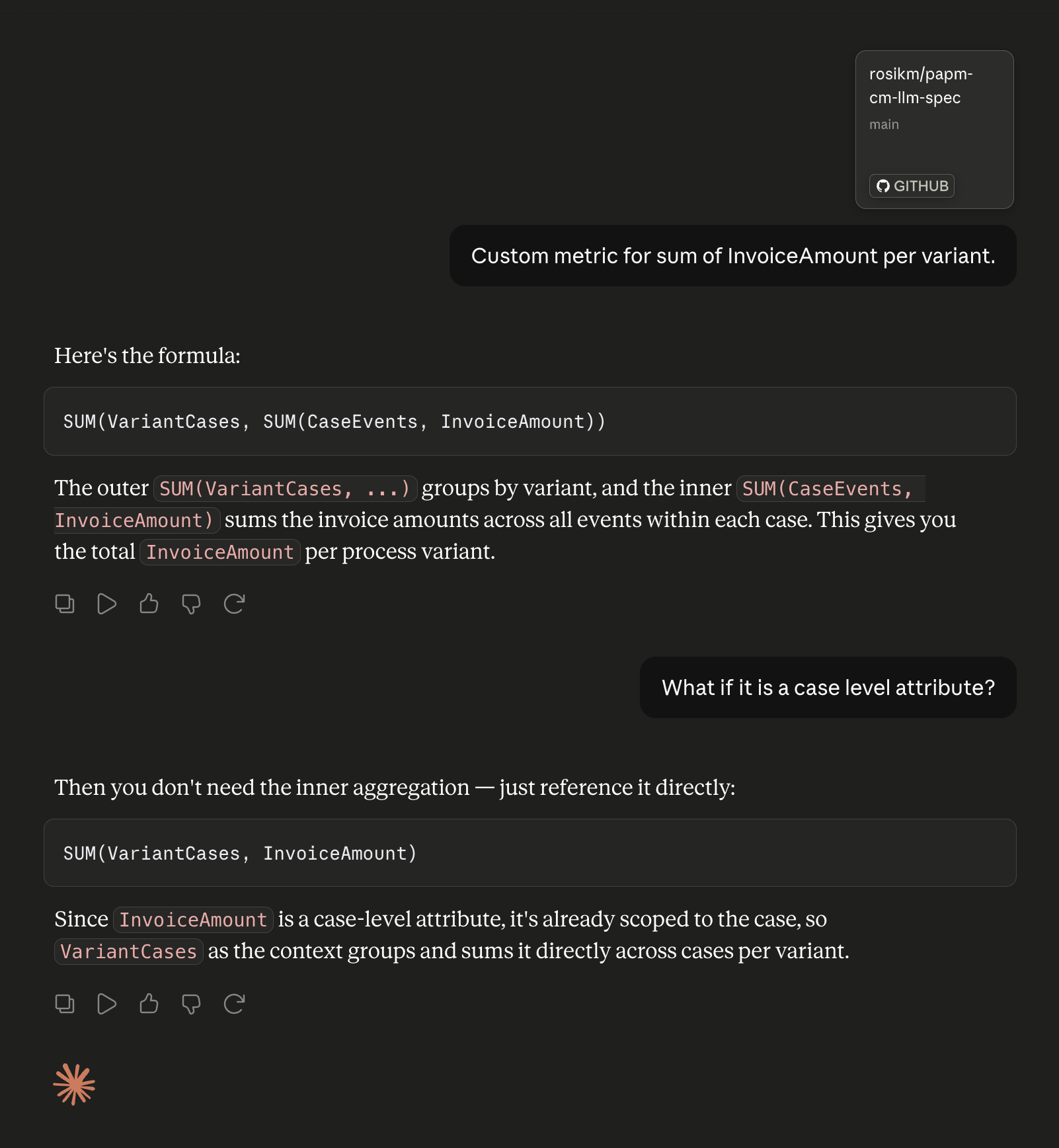
The Problem: Custom Metrics Are Powerful, but Not Too Friendly
Power Automate Process Mining custom metrics are one of the most useful parts of PAPM, but they are also one of the easiest places to get stuck. The syntax is precise, the function set is broad, and the validation rules are unforgiving. That makes even simple questions feel harder than they should be:
- How do I count cases by country?
- What is the correct way to reference an attribute with spaces?
- Which aggregation functions should I use for this KPI?
- How do I make sure the formula is syntactically valid before I paste it into PAPM?
That is exactly the gap the new repository papm-cm-llm-spec is meant to close.
It packages PAPM custom metric knowledge in a machine-readable format so an LLM can reason over the syntax, function registry, guardrails, examples, and vocabulary in a much more reliable way than a plain prompt ever could.
What This Repository Gives You
The repository is designed as a documentation package for formula generation and validation. Instead of relying on memory or vague prompt instructions, it gives an agent structured source material to work from:
- A function registry with signatures, examples, and retrieval metadata
- An EBNF grammar for PAPM formulas
- Calculation contexts for grouping and scoping
- Data types and built-in constants
- A vocabulary template for schema alignment
- Few-shot examples mapping natural language to formulas
- Guardrails for validation, canonicalization, and type safety
The result is a better workflow for both humans and agents: ask for a KPI in natural language, let the model map the intent to the right formula pattern, and validate the result against the spec before you use it.
Why This Matters
PAPM custom metrics are expressive, but expression alone is not the hard part. The hard part is knowing which function to use, how to compose it correctly, and how to avoid tiny syntax mistakes that break the formula.
This repo helps with three things at once:
- It gives the model a stable reference for PAPM syntax.
- It reduces hallucinations by constraining generation with grammar and policies.
- It makes iterative formula refinement much faster because the agent can point back to examples and rules.
If you have ever spent too long debugging a metric that looked right but failed validation, this is the kind of workflow improvement that makes a real difference.
Quickstart
You can choose your favorite coding model, such as Claude Sonnet, because it handles the PAPM syntax and formula semantics well.
In VS Code
Clone the repository and open it in VS Code:
1
https://github.com/rosikm/papm-cm-llm-spec.git
Then enable GitHub Copilot Chat in agent mode and use @workspace so the model can search the spec files directly.
Useful prompts include:
1
@workspace How do I write a formula to count cases where invoice amount exceeds 10000 per country?
1
@workspace Show me examples using the GETVALUE function for attributes with spaces
1
@workspace Check if this formula is correct: [userName] == "John" AND Activity == "Review"
That last one is useful because the spec explicitly calls out that PAPM uses symbolic operators only, so word-based AND, OR, and NOT are invalid.
In Claude Desktop
You can also add the repository directly from GitHub in Claude Desktop:
1
https://github.com/rosikm/papm-cm-llm-spec
Once it is attached, Claude can read the repository files and answer questions like:
- What functions are available for this metric?
- How should I reference an attribute with spaces?
- What is the right syntax for this type of comparison?
- Can you validate this formula against the guardrails?
That makes the repo useful not only for formula generation, but also for review and repair.
What To Ask For
The best prompts are specific and grounded in your schema or analysis goal. Instead of asking for a generic metric, provide the business question and the data shape.
Good prompts look like this:
1
Count cases where the invoice amount exceeds 10,000, grouped by country.
1
Calculate the average duration per activity, using the timestamp columns in my event log.
1
Show me how to express a KPI that filters on a text attribute with spaces in its name.
1
Validate this formula and explain whether it follows the canonical PAPM syntax.
We also recommend asking for examples and validation explicitly. That is important because the model is much more likely to produce a correct formula when it can compare the request with known patterns and policy rules.
A Better Workflow
The practical workflow is simple:
- Ask for the KPI in natural language.
- Let the agent search the spec files.
- Generate a candidate formula.
- Validate the syntax against the guardrails.
- Refine the formula if the data shape or metric intent changes.
That turns PAPM custom metric authoring into a guided, repeatable loop instead of a trial-and-error exercise.
Wrapping Up
The value of papm-cm-llm-spec is not just that it documents PAPM custom metrics. It makes those metrics usable in an LLM workflow, which is what most people actually need when they are trying to turn a business question into a working KPI.
If you are building Process Intelligence reports, experimenting with custom metrics, or just tired of fighting PAPM formula syntax by hand, this repo is a practical way to make the process much less fragile.
So what KPI are you going to create today?
Stay safe and Mine the Gap!
Note: The spec is an open-source effort. If you spot a missing function, an incorrect example, or a formula that does not behave as expected, feel free to open an issue or submit a PR. Any feedback — successes and failures alike — helps make the spec more accurate for everyone.