Quoted Replies and Threaded Replies in the Teams SDK
Your agent has a comment to make. The conversation has moved on. By the time you reply, nobody remembers what you're answering, or your bot finishes a long-running job and posts the result at the top of the conversation, nowhere near the request that started it.
Quoted replies and threaded replies are how agents stay legible in busy conversations. Both are now first-class APIs across TypeScript, .NET, and Python with matching shapes. This post is a tour of the why, the when, and the how.
The Problem: Agent Messages Get Lost
Every reply your agent sends competes for attention. Three failure modes show up over and over:
- The orphan reply. An agent answers a question that scrolled off-screen ten messages ago. The answer is correct; nobody knows what it's answering.
- The misplaced async result. A background job finishes and posts at the top of the conversation. Whoever asked has to scroll up to find the request. Whoever else is in the conversation sees a result with no context.
- The notification with no signal. Mobile and desktop notifications show a snippet of the reply, not the original question. Without quoted context, the recipient has to open Teams just to know whether they care.
Quoted replies fix the first and third by carrying a snippet of the referenced message. Threaded replies fix the second by anchoring the reply to its parent thread.
Why now
A bit of context on what changed and why. Neither quoted replies nor threading is brand-new in Teams: quoted replies have been usable from bots for years, and channel threading has been around for as long as channels have. What's changing is the SDK surface, plus some adjacent service-side moves worth knowing. This section is background, not a how-to. Skip to Real-World Scenarios if you just want to use the APIs.
For quoted replies, a recent update to the Teams messaging service moved quoted content to a structured, server-validated representation. Agents now send a small quotedReply entity carrying just a message ID, and the service stamps the snippet on its way to recipients. That clean wire format is what made it safe and worthwhile to layer proactive APIs on top, so this release also adds context.quote() for follow-ups to messages your agent has already sent, plus an addQuote() builder for activities that quote one or more messages on their own.
For threaded replies, threading in channels has been supported on the service for a long time, but the SDK didn't have a helper for sending into a thread when there was no inbound activity in hand. app.reply(conversationId, rootMessageId, ...) is that API.
There's also a small amount of cleanup landing in the same change that won't affect bot code in any visible way: withReplyToId() is gone because it never had a routing effect, and the .NET Reply() path no longer strips ;messageid= since the service normalizes it server-side.
The SDK handles the conversation type for you
One thing worth stating up front: context.reply(), app.reply(), and the quoting helpers are designed to work the same way in whatever conversation context you are in (e.g. channels vs. chats). You don't have to branch on whether the inbound is from a channel post or a 1:1 chat, and you don't have to construct different conversation IDs for different scopes. The SDK picks the right wire mechanism based on the conversation it's targeting. As threading expands to more conversation types on the service side, the same app.reply() call absorbs that automatically.
The intent is that you can use these methods without thinking about the conversation type, because the vast majority of the time that's what you want.
What You Can Do
| Capability | TypeScript | .NET | Python |
|---|---|---|---|
| Send a message | context.send() | Context.Send() | ctx.send() |
| Reply, auto-quoting the inbound message | context.reply() | Context.Reply() | ctx.reply() |
| Quote a message your bot sent earlier | context.quote() | Context.Quote() | ctx.quote() |
| Build a message with one or more quotes | addQuote() | AddQuote() | add_quote() |
| Read quoted-reply metadata from an inbound message | getQuotedMessages() | GetQuotedMessages() | get_quoted_messages() |
| Send proactively into a thread | app.reply() | teams.Reply() | app.reply() |
| Construct a threaded conversation ID by hand | toThreadedConversationId() | ToThreadedConversationId() | to_threaded_conversation_id() |
If you build something in one language and port it later, you shouldn't need to relearn the shape.
Real-World Scenarios
1. Answering a Question After the Conversation Moved On
A user asked a question in a busy conversation. By the time your agent has the answer, ten more messages have arrived. A plain reply at the bottom is correct but useless. With context.reply(), the SDK does two things at once: it threads the response under the inbound message so it lands in the right place, and it auto-quotes the inbound message so the answer carries the question with it. Notifications also show the question in the toast.
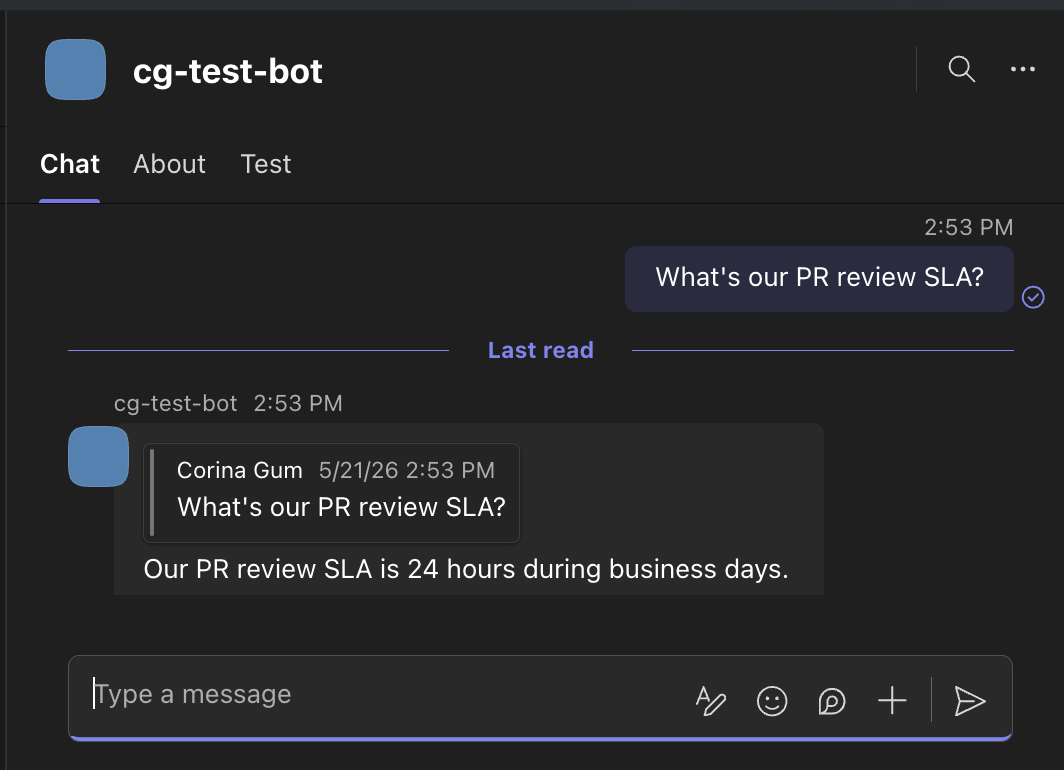
Above: a user asks a question and the agent replies. The agent's response carries the original question in a grey quote bubble, so the answer stays tied to what was asked even if the conversation has moved on.
This is the most common case, and it's free. No extra arguments, no extra builders. For the full reference, see Sending messages on the docs site.
TypeScript
app.on('message', async ({ reply }) => {
  await reply('Thanks for your message! This reply auto-quotes it using reply().');
});
.NET
teams.OnMessage(async (context, cancellationToken) =>
{
    await context.Reply("Thanks for your message! This reply auto-quotes it using Reply().", cancellationToken);
});
Python
@app.on_message
async def handle_message(ctx: ActivityContext[MessageActivity]):
    await ctx.reply("Thanks for your message! This reply auto-quotes it using reply().")
2. Posting an Async Result Back Into Its Thread
A user kicks off a deployment with a slash command. Your agent acknowledges, then forty minutes later the deployment finishes. The result needs to land in the thread of the original request so it shows up grouped with the command that started it, collapsed under the same root. If it lands at the top level of the conversation instead (not nested under a parent message), nobody can tell which deployment it's about.
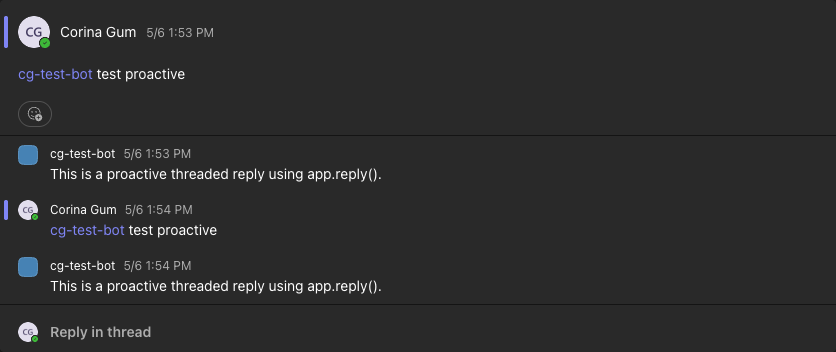
Threading already exists on the service for channels, and is coming to chats and meetings. The gap the SDK is filling here is the proactive case. app.reply(conversationId, rootMessageId, ...) lets you post into the thread of the original request when there's no inbound activity to react to. You store the IDs when the request comes in, then post back into the same thread when the work completes. For the full reference, see Send proactive messages on Learn.
TypeScript
// In the inbound handler: extract IDs and stash them for later
app.on('message', async ({ ref, activity }) => {
  const conversationId = ref.conversation.id;
  // When inside a channel thread, conversationId contains ;messageid=<rootId>.
  // For top-level messages, use activity.id.
  const threadParts = conversationId.split(';messageid=');
  const threadRootId = threadParts.length > 1 ? threadParts[1] : activity.id!;
  await store({ conversationId, threadRootId });
});

// Later, from a background job:
await app.reply(conversationId, threadRootId, 'Deployment complete.');
.NET
// In the inbound handler: extract IDs and stash them for later
teams.OnMessage(async (context, cancellationToken) =>
{
    var conversationId = context.Ref.Conversation.Id;
    // When inside a channel thread, conversationId contains ;messageid=<rootId>.
    // For top-level messages, use activity.id.
    var threadParts = conversationId.Split(";messageid=");
    var threadRootId = threadParts.Length > 1 ? threadParts[1] : context.Activity.Id!;
    await Store(conversationId, threadRootId);
});

// Later, from a background job:
await teams.Reply(conversationId, threadRootId, "Deployment complete.", cancellationToken);
Python
# In the inbound handler: extract IDs and stash them for later
@app.on_message
async def handle_message(ctx: ActivityContext[MessageActivity]):
    conversation_id = ctx.conversation_ref.conversation.id
    # When inside a channel thread, conversation_id contains ;messageid=<rootId>.
    # For top-level messages, use activity.id.
    parts = conversation_id.split(";messageid=")
    thread_root_id = parts[1] if len(parts) > 1 else ctx.activity.id
    await store(conversation_id, thread_root_id)

# Later, from a background job:
await app.reply(conversation_id, thread_root_id, "Deployment complete.")
3. A Multi-Item Status Digest, Anchored to Its Items
A release-status bot posts a digest that points at existing Teams messages in the channel: three open PRs, two CI runs, one design review. A flat list of bullet points works, but a digest that quotes each item gives the reader something to click and jumps them into the relevant thread. Combine the multi-quote builder with app.reply() and the whole digest lands in a single thread, with each item linkable. Multiple addQuote() calls produce stacked quotes at the top of the message followed by your response; addText() between calls lets you interleave instead.
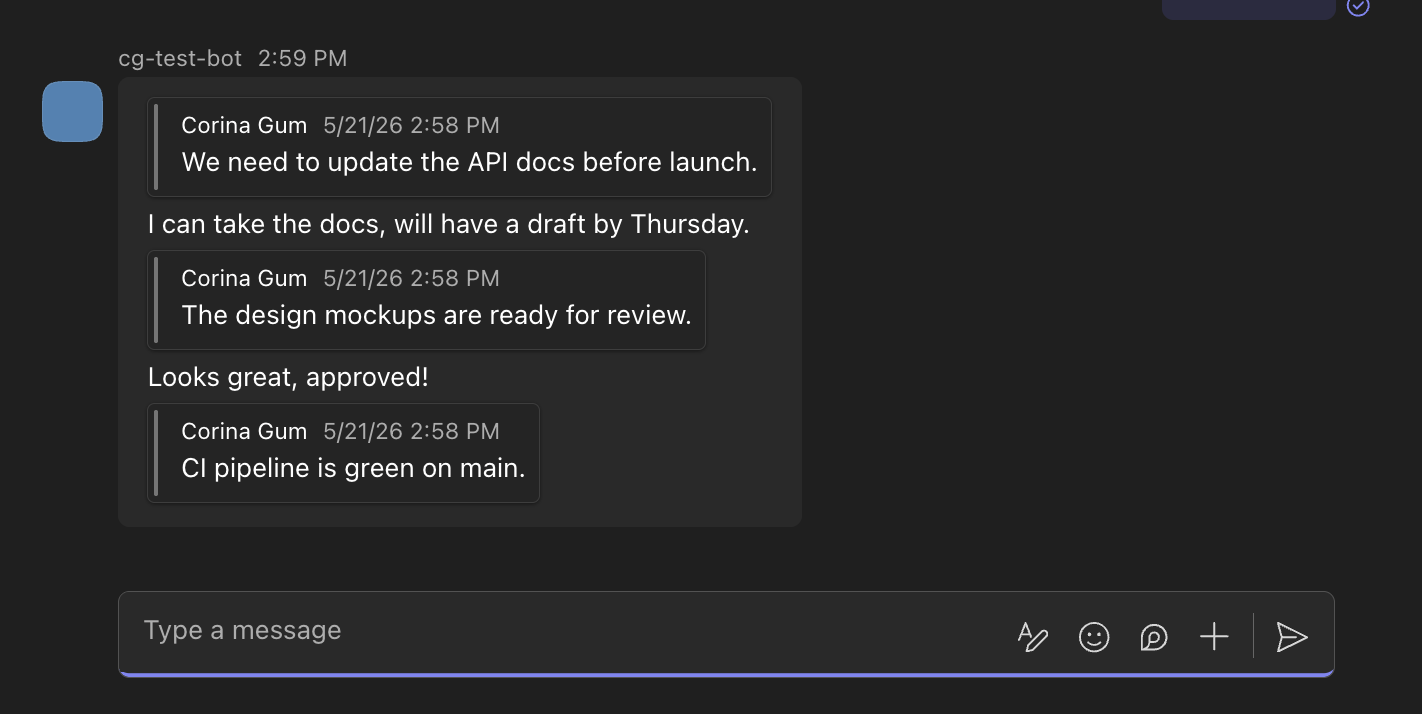
Above: a multi-quote bot message. The bot quotes three earlier messages (the three grey bubbles) and responds to each one inline. The third quote is left bare with no response, which addQuote() supports by omitting the response argument.
TypeScript
const msg = new MessageActivity()
  .addQuote(prMessageId, 'Approved, merging now.')
  .addQuote(ciMessageId, 'Build is green.')
  .addQuote(designMessageId);

await app.reply(conversationId, rootMessageId, msg);
.NET
var msg = new MessageActivity()
    .AddQuote(prMessageId, "Approved, merging now.")
    .AddQuote(ciMessageId, "Build is green.")
    .AddQuote(designMessageId);

await teams.Reply(conversationId, rootMessageId, msg, cancellationToken);
Python
msg = (
    MessageActivityInput()
    .add_quote(pr_message_id, "Approved, merging now.")
    .add_quote(ci_message_id, "Build is green.")
    .add_quote(design_message_id)
)

await app.reply(conversation_id, root_message_id, msg)
4. Routing Based on What Was Quoted
A user quotes an old bot message and asks "is this still correct?" Your agent needs to know what they're pointing at. activity.getQuotedMessages() returns the metadata for every quoted-reply on the activity: message ID, sender, preview text, timestamp, validation flag, and whether the original was deleted. From there, route to the right handler.
If you're going to read quoted replies on inbound activities, it helps to know what's on the wire. A quoted reply travels as two pieces of data inside one message activity: a <quoted messageId="..."/> placeholder embedded in the message text, and a QuotedReply entity in activity.entities carrying the metadata. The server correlates them by message ID, so three placeholders means three entities, matched by ID and not by array order. getQuotedMessages() hands you the entities; if you need to see exactly where each one appears in the text, scan for the placeholder pattern.
This is the inbound side of quoting, and reading it is part of being a good conversational participant. As agents become more sophisticated about context, picking up the messages a user has explicitly pointed at is one of the simpler wins.
TypeScript
const quotes = activity.getQuotedMessages();
if (quotes.length > 0) {
  const quote = quotes[0].quotedReply;
  console.log({
    messageId: quote.messageId,
    sender: quote.senderName,
    preview: quote.preview,
    deleted: quote.isReplyDeleted,
    validated: quote.validatedMessageReference,
  });
}
.NET
var quotes = activity.GetQuotedMessages();
if (quotes.Count > 0)
{
    var quote = quotes[0].QuotedReply!;
    context.Log.Info($"Quoted message ID: {quote.MessageId}");
    context.Log.Info($"From: {quote.SenderName}");
    context.Log.Info($"Preview: {quote.Preview}");
    context.Log.Info($"Deleted: {quote.IsReplyDeleted}");
    context.Log.Info($"Validated: {quote.ValidatedMessageReference}");
}
Python
quotes = ctx.activity.get_quoted_messages()
if quotes:
    quote = quotes[0].quoted_reply
    logger.info("messageId=%s sender=%s preview=%s deleted=%s validated=%s",
                quote.message_id, quote.sender_name, quote.preview,
                quote.is_reply_deleted, quote.validated_message_reference)
Additional helpers
There are two other operations that don't tie neatly to one of the scenarios above but are worth knowing about.
Quote a message you sent earlier: context.quote()
When your bot has already sent a message and wants a follow-up that quotes that earlier message (without the user having to do anything), pass its activity ID to context.quote().
TypeScript
app.on('message', async ({ send, quote }) => {
  const sent = await send('The meeting has been moved to 3 PM tomorrow.');
  await quote(sent.id, 'Just to confirm, does the new time work for everyone?');
});
.NET
var sent = await context.Send("The meeting has been moved to 3 PM tomorrow.", cancellationToken);
await context.Quote(sent.Id, "Just to confirm, does the new time work for everyone?", cancellationToken);
Python
sent = await ctx.send("The meeting has been moved to 3 PM tomorrow.")
await ctx.quote(sent.id, "Just to confirm, does the new time work for everyone?")
Manual control: toThreadedConversationId() + app.send()
app.reply() covers the common cases: it takes a string or a MessageActivity and lands it in the thread you point it at. If you need to send something else into a thread (a card, a streaming chunk through app.stream(), or any activity shape that app.reply() doesn't accept), construct the threaded conversation ID yourself with toThreadedConversationId() and pass it to whichever lower-level send you're using. Same threading mechanism; you just take over from the helper.
TypeScript
import { toThreadedConversationId } from '@microsoft/teams.apps';

const threadId = toThreadedConversationId(conversationId, rootMessageId);
await app.send(threadId, 'Sent via manual threading.');
.NET
var threadId = Microsoft.Teams.Api.Conversation.ToThreadedConversationId(conversationId, rootMessageId);
await teams.Send(threadId, "Sent via manual threading.", cancellationToken: cancellationToken);
Python
from microsoft_teams.apps import to_threaded_conversation_id

thread_id = to_threaded_conversation_id(conversation_id, root_message_id)
await app.send(thread_id, "Sent via manual threading.")
At a Glance: Which One Do I Reach For?
| Situation | Reach for |
|---|---|
| You're answering an inbound message in a chat or channel | context.reply() (does both, auto-quotes and threads) |
| Background job needs to post a result into a request's thread | app.reply(conversationId, rootMessageId, ...) |
| Multi-item digest where each item references something | MessageActivity.addQuote(...) plus app.reply(...) to land in a thread |
| You sent a message earlier and want a follow-up that references it | context.quote(sentId, text) |
| Inbound message quoted something and you need to know what | activity.getQuotedMessages() |
| Top-level announcement, no context to anchor to | Plain context.send() (neither quote nor thread) |
| Building a fully custom activity, need to land in a thread | toThreadedConversationId() + app.send() |
Reactive vs proactive
If you have an inbound activity in hand, reach for context.reply() and context.quote(). The SDK has everything it needs from the activity, so there's no boilerplate.
Drop down to app.reply() only when there's no inbound activity to react to: a background job, an external webhook, a scheduled task, a cross-conversation broadcast. In those cases you'll have stored the conversation ID and root message ID from an earlier turn.
More on the technical (skip if not interested)
If you don't care how the quoted-reply wire format changed, you can skip this section. It only matters if you've worked with quoted replies in older versions of the SDK or you're curious about what the service is doing under the hood.
Before this change, quoting was done client-side: the SDK generated <blockquote> HTML embedded in the message text, with the quoted snippet, sender, and timestamp baked in by the client. That worked, but it gave the sending client a free hand to spoof who said what. The Teams messaging service now owns that representation. The SDK sends a structured quotedReply entity carrying just a messageId, and the service stamps the authoritative snippet on the wire as the message is delivered. That's why the new outbound shape is a small entity plus a <quoted messageId="..."/> placeholder in the text rather than a chunk of HTML.
The proactive APIs (context.quote() and addQuote()) are possible because of this shift. The SDK now only needs to declare which message you're quoting; the service supplies the snippet. Without that, quoting an arbitrary message by ID would have required the SDK to fetch and embed the quoted content itself, which isn't a thing we want clients doing.
The cleanups mentioned in "Why now" follow from this too. withReplyToId() is gone because the service uses replyToId only for encryption purposes, not routing or threading, so the SDK had no reason to expose it. The .NET Reply() path no longer strips ;messageid= from conversation IDs because the service normalizes that server-side. None of these change observable behavior in your bot code, but they're worth noting if you've seen the old shapes in the SDK source.
Further reading
Both features are available in all three SDKs today.
Read the full documentation:
- Sending messages: TypeScript · .NET · Python
- Proactive messaging: Send proactive messages
The consolidated message interaction sample is available in each SDK:
- TypeScript:
examples/interacting-with-messages - .NET:
samples/InteractingWithMessagesBot - Python:
examples/interacting-with-messages
Feature PRs:
If you hit a rough edge, please open an issue against the relevant SDK repo.