Install
An install is a servicing type that provisions an Azure Linux OS onto a machine using Trident. It is the most comprehensive servicing type, driven entirely by a Host Configuration file that declares the desired state of the system. The Host Configuration is the ultimate authority on how the disk should be laid out, what images to deploy, and how the OS should be configured.
For an overview of how Trident determines what to do based on the Host Configuration, see How Trident Knows What to Do.
Operations
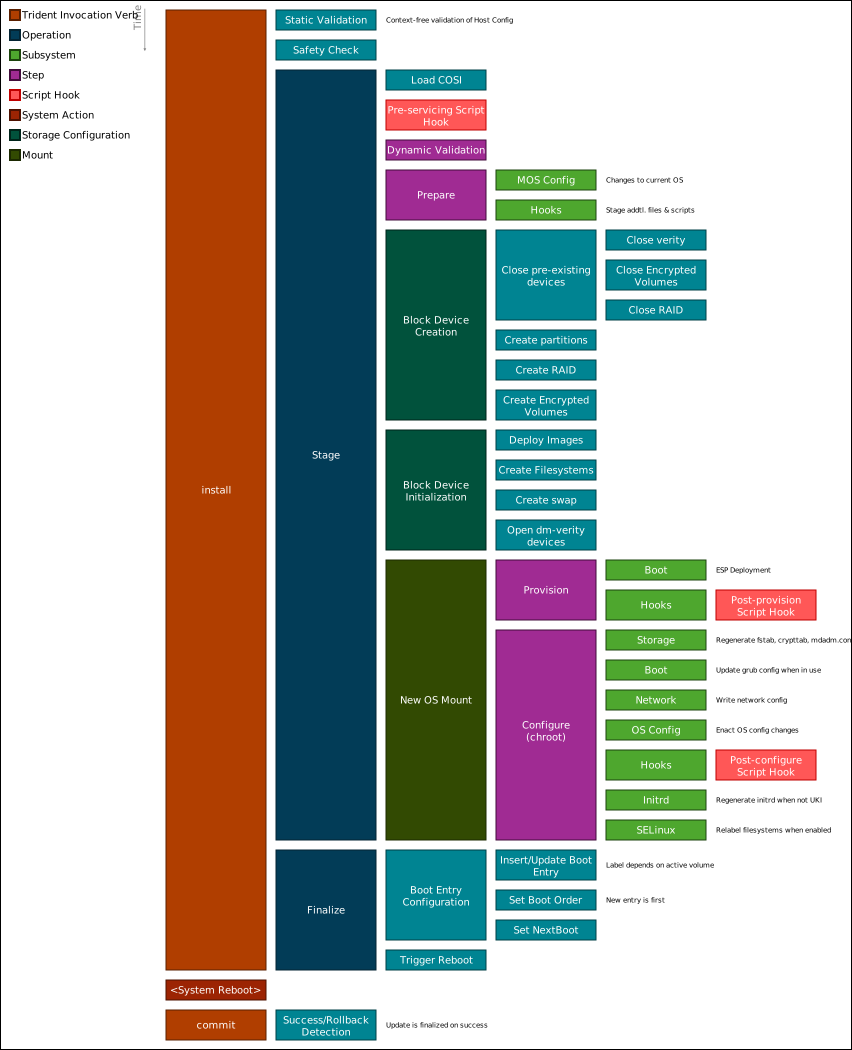
An install is split into two operations:
- Stage — partitions the disk, streams OS images, and configures the target OS. This is the bulk of the work.
- Finalize — configures UEFI boot variables and triggers a reboot into the newly installed OS.
These can be run together or separately. See Two-Step Installation and Update for details on running them independently.
What Happens During an Install
The diagram below shows the high-level flow of an install. Each box represents a subsystem that handles a specific aspect of the Host Configuration.
Storage
The storage subsystem is responsible for preparing the disk:
- Partitioning — creates GPT partition tables and partitions as specified in the Host Configuration, including A/B volume pairs for future updates.
- Image streaming — streams OS images from remote sources (HTTP or OCI) to their target partitions using the image streaming pipeline. Images are in COSI format.
- Software RAID — creates and configures RAID arrays when redundancy is required. See Rebuild RAID.
- Encryption — sets up LUKS encryption with TPM-based PCR sealing for Secure Boot or OS integrity protection.
- Partition adoption — reuses existing partitions on the disk when the Host Configuration specifies adoption rather than creation.
- Verity — configures dm-verity for root or usr filesystem integrity verification.
Bootloader
Trident configures the bootloader based on the COSI image metadata and the Host Configuration:
- GRUB2 or systemd-boot are supported as bootloader types. See Bootloader Configuration.
- UEFI boot variables are set so the firmware boots the newly installed OS. See UEFI Variables and UEFI Fallback.
- Unified Kernel Images (UKI) are supported for combined kernel, initrd, and command line images signed for Secure Boot.
OS Configuration
After images are written to disk, Trident enters a
deployment chroot to configure the target OS. The
full list of supported OS configuration options is defined in the
Os object of the Host
Configuration. Key capabilities include:
- Network — applies netplan configuration for the target OS.
- SELinux — configures SELinux mode and policy.
- Initrd — regenerates the initramfs when the target OS requires it (GRUB only).
- Extensions — deploys system extensions (sysexts) and configuration extensions (confexts).
Customization
- Script hooks — user-provided scripts can be executed at defined points during the install. See Script Hooks.
Management
Trident records the installed Host Configuration and system state in its datastore, enabling future A/B updates, runtime updates, rollbacks, and commit operations.
After the Install
After finalize triggers a reboot, the machine boots into the newly installed OS.
If health checks are configured, Trident validates the
deployment on the next boot. A successful trident commit marks the install as
complete and ready for future servicing.