Legacy Airlock Architecture
Legacy Architecture
This page documents the legacy airlock architecture that uses per-stage storage accounts. New deployments should use the current consolidated architecture. This architecture is maintained for backwards compatibility with existing workspaces.
Overview
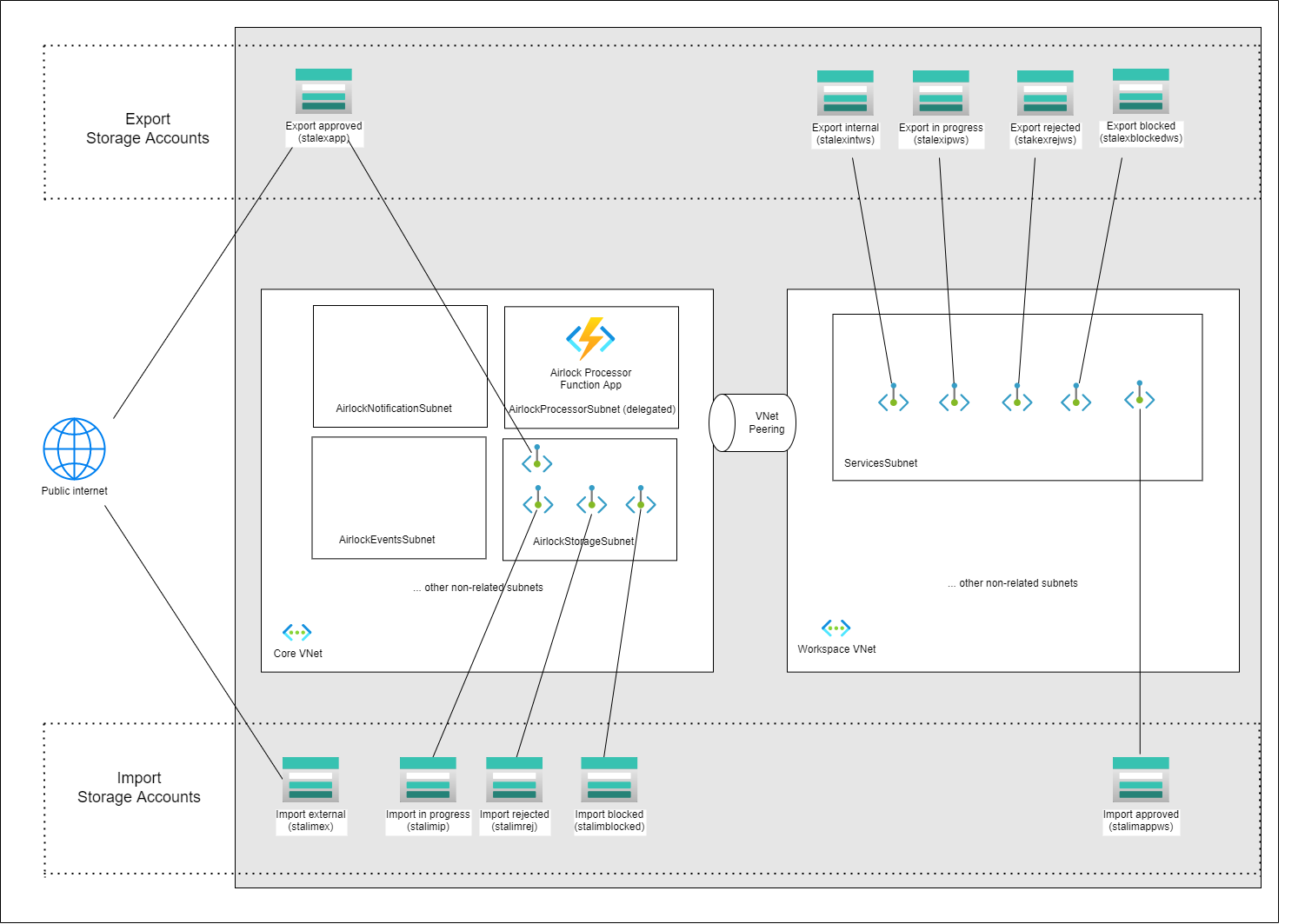
The legacy airlock architecture uses separate storage accounts for each stage of the airlock process. Data is physically copied between storage accounts as the request progresses through stages. This results in 5 core storage accounts and 5 per-workspace storage accounts (10+ total).
To use the legacy architecture, explicitly set airlock_version: 1 in your workspace properties (new workspaces default to 2) and ensure enable_legacy_airlock: true is set in your config.yaml.
Airlock v2 works with both auth modes
Airlock v2 (consolidated storage) uses a per-workspace Entra app registration as its SAS signer. This signer is created for every workspace, including those using manual authentication (auth_type: Manual):
it is always created and owned by TRE and needs no directory reads, consent grants or role assignments, so the Application Administrator's Application.ReadWrite.OwnedBy permission (granted unconditionally) is sufficient. Manual-auth workspaces therefore default to and fully support airlock_version: 2.
Storage Accounts
Core (TRE-level)
| Storage Account | Name Pattern | Description | Network Access |
|---|---|---|---|
stalimex |
stalimex{tre_id} |
Import external — initial upload location | Public (SAS token) |
stalimip |
stalimip{tre_id} |
Import in-progress — during review | TRE Core VNet |
stalimrej |
stalimrej{tre_id} |
Import rejected | TRE Core VNet |
stalimblocked |
stalimblocked{tre_id} |
Import blocked by scan | TRE Core VNet |
stalexapp |
stalexapp{tre_id} |
Export approved — final export location | Public (SAS token) |
Workspace-level
| Storage Account | Name Pattern | Description | Network Access |
|---|---|---|---|
stalimappws |
stalimappws{short_ws_id} |
Import approved — final import location | Workspace VNet |
stalexintws |
stalexintws{short_ws_id} |
Export internal — initial export upload | Workspace VNet |
stalexipws |
stalexipws{short_ws_id} |
Export in-progress — during review | Workspace VNet |
stalexrejws |
stalexrejws{short_ws_id} |
Export rejected | Workspace VNet |
stalexblockedws |
stalexblockedws{short_ws_id} |
Export blocked by scan | Workspace VNet |
Each workspace gets its own set of 5 storage accounts, leading to significant resource proliferation as the number of workspaces grows.
Data Flow
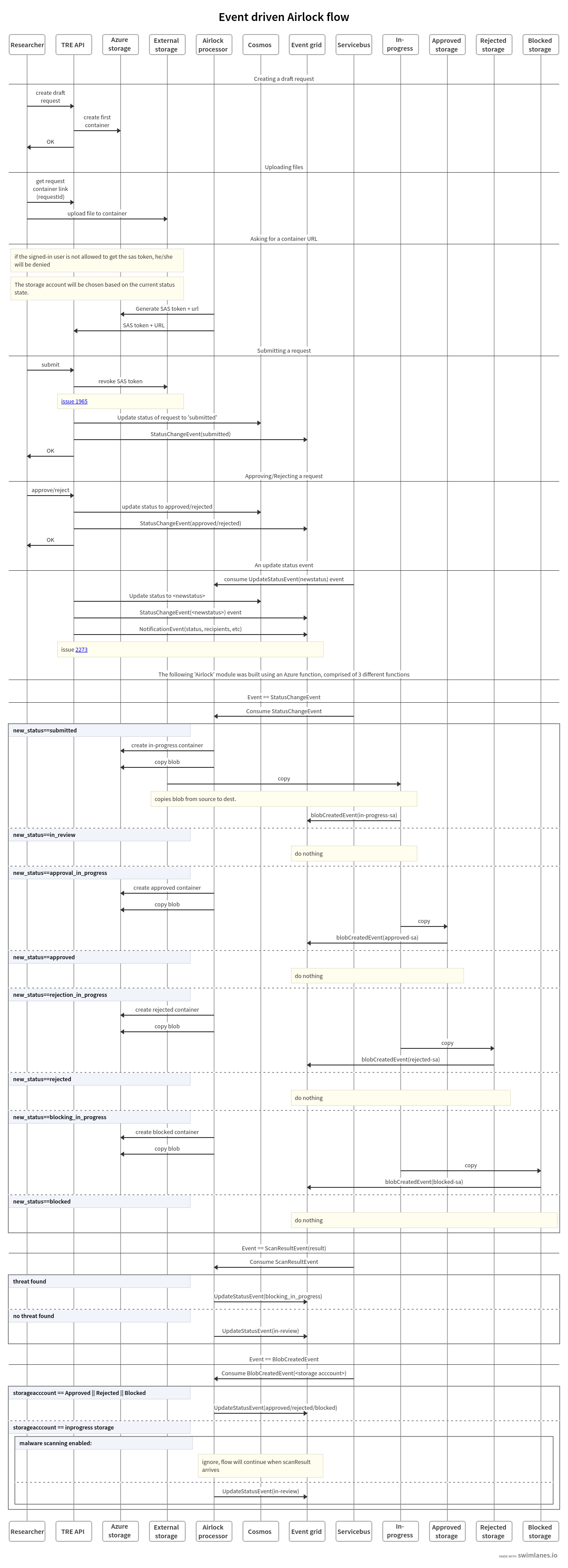
In the legacy architecture, data is copied between storage accounts at each stage transition. A typical import request involves up to 3 copies:
- External → In-progress (on submit)
- In-progress → Blocked (if scan fails) OR stay in In-progress (if clean)
- In-progress → Approved (on approval) OR In-progress → Rejected (on rejection)
graph LR
  subgraph TRE["TRE Core"]
  A["stalimex\nimport external"]-->|"Copy on submit"| B
  B["stalimip\nimport in-progress"]-->|"Copy if blocked"| D["stalimblocked\nimport blocked"]
  B-->|"No issues"| review{"Manual\nApproval"}
  review-->|"Copy on reject"| C["stalimrej\nimport rejected"]
  end
  subgraph Workspace["TRE Workspace"]
  review-->|"Copy on approve"| E["stalimappws\nimport approved"]
  end
  subgraph External["External"]
      data("Data to import")-->A
  end
Legacy import data flow — data is copied at each stage transition.
graph LR
  subgraph Workspace["TRE Workspace"]
  data("Data to export")-->A
  A["stalexintws\nexport internal"]-->|"Copy on submit"| B
  B["stalexipws\nexport in-progress"]-->|"Copy if blocked"| D["stalexblockedws\nexport blocked"]
  B-->|"No issues"| review{"Manual\nApproval"}
  review-->|"Copy on reject"| C["stalexrejws\nexport rejected"]
  end
  subgraph External["External"]
  review-->|"Copy on approve"| E["stalexapp\nexport approved"]
  end
Legacy export data flow — data is copied at each stage transition.
Network Architecture
In the legacy architecture, each storage account has its own network configuration:
- External accounts (
stalimex,stalexapp): Not bound to any VNet, accessible via SAS token through the internet. - Core internal accounts (
stalimip,stalimrej,stalimblocked): Bound to the TRE Core VNet. - Workspace accounts (
stalimappws,stalexintws,stalexipws,stalexrejws,stalexblockedws): Bound to the workspace VNet.
Each storage account has its own private endpoints, EventGrid system topics, and role assignments.
Airlock Flow
The following diagram shows the legacy airlock flow with data copies between storage accounts:
Comparison with Current Architecture
| Aspect | Current (Consolidated) | Legacy (Per-Stage) |
|---|---|---|
| Storage accounts | 2 total | 10+ (5 core + 5 per workspace) |
| Stage tracking | Container metadata | Separate storage accounts |
| Data copies per request | 1 (on approval only) | Up to 3 |
| Workspace isolation | ABAC + per-workspace PE | Dedicated storage per workspace |
| Private endpoints | 2 core + 1 per workspace | 5 core + 5 per workspace |
| EventGrid topics | 2 system topics | 10+ system topics |
| Infrastructure cost | Lower | Higher (more resources) |
| Stage transition speed | Near-instant (metadata) | Minutes (data copy) |
| Scalability | All workspaces share storage | Linear growth per workspace |
Upgrading to Current Architecture
To upgrade a workspace from the legacy architecture:
- After upgrading the API, run
POST /migrationsso every pre-v2 workspace is explicitly stamped withairlock_version=1. Ensure core is deployed with the current codebase (enable_legacy_airlock: trueto keep legacy infrastructure alongside the new accounts), then upgrade the workspace to the currenttre-workspace-baseversion. The explicit v1 stamp makes that workspace upgrade non-destructive: no v2 infrastructure is deployed and no data moves until the switch below. - Let any in-flight requests complete or cancel them: the API rejects an
airlock_versionchange while the workspace holds requests that are still in progress (HTTP 400). Requests in a final state do not block the change. - Update the workspace
airlock_versionproperty to2. - Redeploy the workspace — this switches from the legacy airlock terraform module to the consolidated module.
- New airlock requests will use the consolidated storage accounts.
- Once all workspaces are migrated and no legacy requests are in-flight, set
enable_legacy_airlock: falseinconfig.yamland redeploy core to remove the legacy storage accounts.
Note
Each request has airlock_version stamped at creation time, so a request always keeps using the storage it was created against. A workspace cannot be switched to v2 while any of its requests are still in progress, so drain them before changing the version.
Warning
Upgrading a workspace from airlock_version=1 to 2 permanently deletes that workspace's per-stage
v1 airlock storage accounts, including the data of already-completed requests (approved imports, and
retained rejected/blocked/export data). The request records themselves remain in the API — their
metadata, status and history are preserved — but their stored files are gone and any download link will
no longer resolve. Only upgrade a workspace once you no longer need the data held by its completed v1
requests. Downgrading from 2 to 1 is not supported and is rejected by the API.
Warning
Setting enable_legacy_airlock: false and redeploying core permanently deletes the core v1 airlock storage accounts (stalimex, stalimip, stalimrej, stalimblocked, stalexapp) and any data still in them. Terraform destroys them in the same apply that switches the API to v2-only.
Warning
Before disabling, ensure no active airlock_version=1 workspaces or in-flight v1 requests remain.
Run POST /migrations after upgrading the API so pre-v2 workspaces are stamped with an explicit 1;
otherwise their next redeploy would migrate them to v2 (new workspaces default to airlock_version=2)
and destroy their legacy storage. Switching a workspace's airlock_version while it holds in-progress
requests is blocked by the API (returns HTTP 400).