Upgrading Resources Version
Azure TRE workspaces, workspace services, workspace shared services, and user resources are Porter bundles. Porter bundles are based on Cloud Native Application Bundles (CNAB).
When a new bundle version becomes available, users can upgrade their resources to a newer version after building, publishing and registering the bundle template.
Upgrades (and downgrades) are based on CNAB bundle upgrade action.
Bundle template versions follow semantic versioning rules.
Note
Only minor and patch version upgrades are automatically allowed within the Azure TRE upgrade mechanism. Major versions upgrades and any version downgrades are blocked as they are assumed to contain breaking changes or changes that require additional consideration.
For users who wish to upgrade a major version, we highly recommend to read the changelog, review what has changed and take some appropriate action before upgrading using force version update.
Upgrade existing resources for document-based Porter parameters
Resource Processor 0.13.10 passes parameters through Porter documents. Existing resources can retain command-line parameter overrides from earlier versions. Porter gives these overrides precedence over the current action's parameter set.
Custom actions and uninstall stop with an upgrade-required message when these overrides exist. The Resource Processor also stops these actions if it cannot verify the stored parameters. New installations and resource upgrades clear the overrides through an installation document.
An upgrade runs the bundle's normal upgrade action and can change deployed infrastructure. Plan the usual maintenance window before proceeding.
- Read the resource's current
templateVersionand_etagusing its APIGEToperation. - Confirm that the current template version is still registered and its bundle is available.
- Run the resource's API
PATCHoperation with that sametemplateVersionand the current_etag. - Wait for the upgrade operation to succeed.
- Retry the custom action or uninstall.
Follow the Swagger UI procedure below, using the current template version in the request body. A newer template version is not required.
To remove the firewall rule size limit throughout bundle execution, publish, register and upgrade the firewall shared service to tre-shared-service-firewall 1.6.4 or later. Earlier firewall bundles still pass the rules through environment variables.
Upgrade each affected resource separately. Upgrading a workspace does not upgrade its child resources. Before deleting a workspace and its contents, upgrade affected child resources too.
Resource Processor cancellation waits for an active Porter action to finish before removing its input files. This can delay shutdown during a long deployment. Porter 1.4.0 does not forward cancellation to its Docker invocation container, so forcibly stopping Porter could leave a deployment running and overlap a retry.
How to upgrade a resource using Swagger UI
Resources can be upgrade using Swagger UI, in the following example we show how to upgrade a workspace version from 1.0.0 to 1.0.1, other resources upgrades are similar.
-
First make sure the desired template version is registered, follow these steps if not.
-
Navigate to the Swagger UI at
/api/docs. -
Log into the Swagger UI using
Authorize. -
Click
Try it outon theGET/api/workspaces/{workspace_id}operation. -
Provide your
workspace_idin the parameters section and clickExecute. -
Copy the
_etagproperty from the response body. -
Click
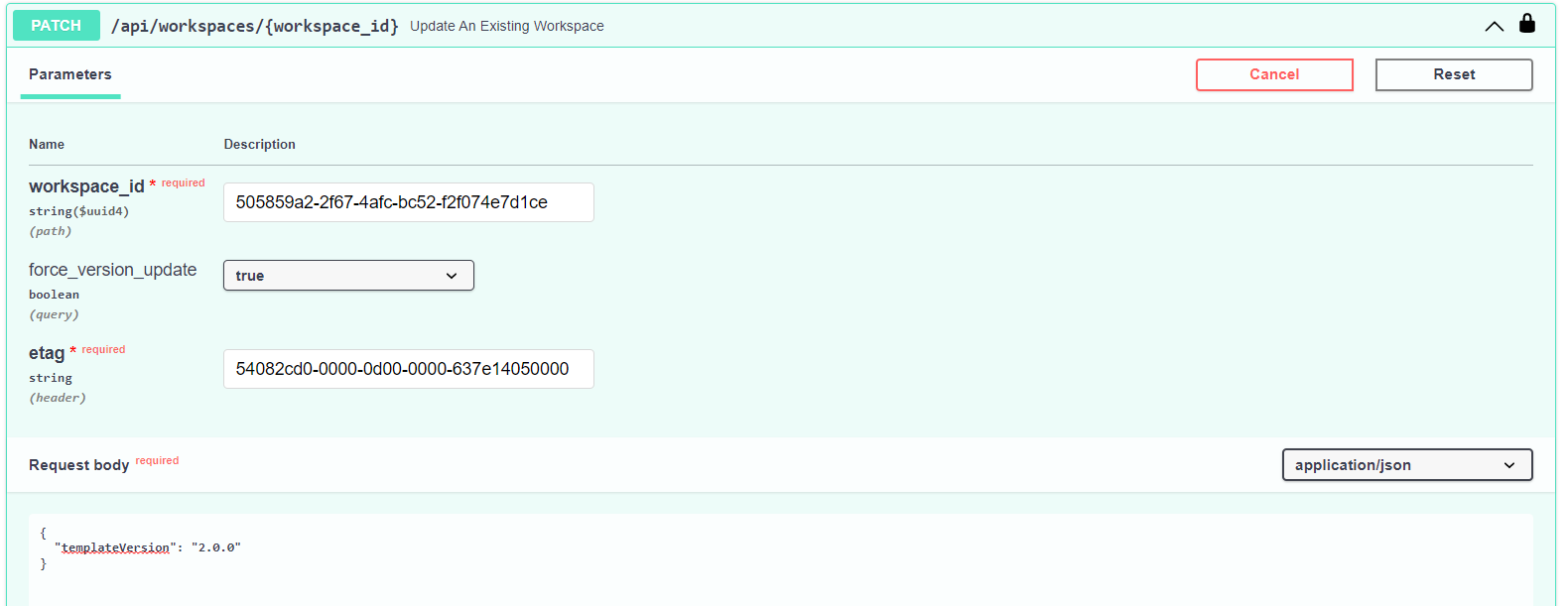
Try it outon thePATCH/api/workspaces/{workspace_id}operation. -
Provide your
workspace_idand_etagparameters which you've just copied. -
Provide the following payload with the desired version in the
Request bodyparameter and clickExecute.1. Review server response, it should include a new{ "templateVersion": "1.0.1" }operationdocument withupgradeas anactionandupdatingasstatusfor upgrading the workspace and a message states that the Job is starting. -
Once the upgrade is complete another operation will be created and can be viewed by executing
GET/api/workspaces/{workspace_id}/operations, review it and make sure itsstatusisupdated.
Force version update
If you wish to upgrade a major version, or downgrade to any version, you can override the blocking in the upgrade mechanism by passing force_version_update=true query parameter to the resource Patch action.
For example force version patching a workspace: