The Admin Control That Closes the Door Before "Hello"
Standard harness
A new Power Platform admin control lets you govern how users authenticate to Copilot Studio agents, and it answers a question that DLP channel blocking never could.

Here’s a relatively unannounced capability that should get more attention: Copilot Studio’s Authentication for agents admin control has a new option, Require Microsoft authentication. If your organization cares about how people sign in to the agents your makers build, especially the internal, employee-facing ones, you should read this post.
It speaks to a governance question that’s subtler than it first looks. Requiring authentication is the easy part: flip an agent to manual auth with Entra ID and users have to sign in before they can use it. But that isn’t the same as closing the door. With manual auth, anyone who opens the chat establishes a Direct Line conversation and is shown a maker-editable sign-in message, all before they authenticate. The real question is how to ensure your internal agents expose nothing to unauthenticated visitors, or to visitors who aren’t allowed to chat with this agent in the first place, not even a greeting. To see why that’s been awkward, and how the new option finally answers it, we have to start with a quirk of data loss prevention (DLP).
One lever, two very different APIs
DLP, and the newer agent settings in preview, give admins ways to block channels. The easy first move is to block the DLP connector Chat without Microsoft Entra ID authentication, which stops anonymous agents. Many organizations do that and stop there.
They usually leave Direct Line channels enabled, though, for a good reason. The path we recommend for employee-facing custom UIs is the M365 Agents SDK Copilot Studio client. I covered that decision in Every Path to Integrating Your Copilot Studio Agent and the authentication pattern in You Probably Don’t Need Manual Authentication. However, the catch is that the SDK client’s delegated-auth path is gated by the same Direct Line channels lever. Turn that lever off and you also break the SDK client.
At the same time, there are good reasons to want raw Direct Line disabled for employee-facing agents. Direct Line has a small pre-authentication content surface. When a user opens a Direct Line / WebChat experience, a conversation is established as soon as connectivity succeeds, before sign-in. If the agent requires authentication, the user sees a sign-in prompt, and that message text is editable by the maker.
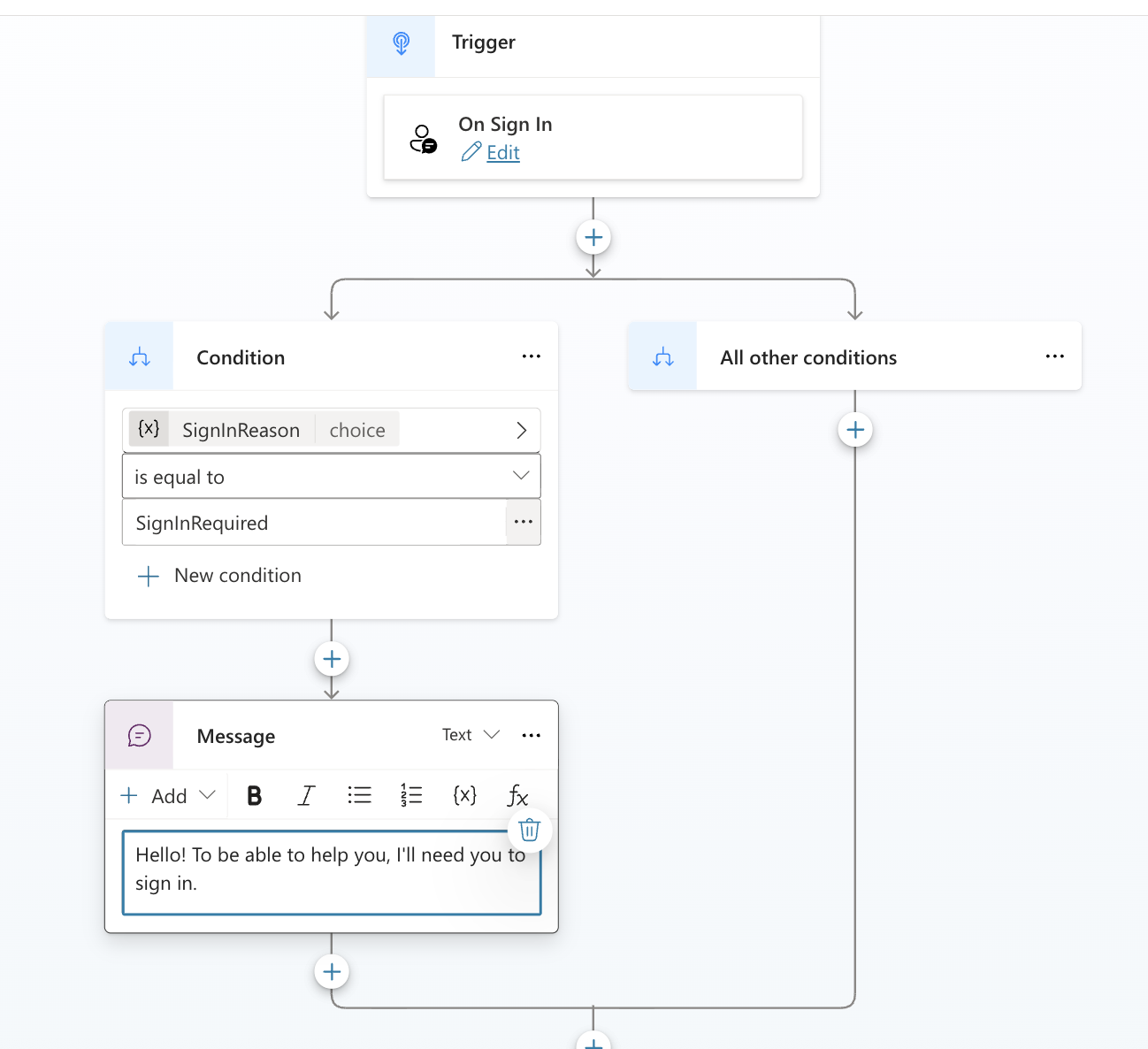 The On Sign In topic. That greeting is authored by the maker and can be shown before the user has authenticated.
That surface is fine for customer-facing agents that already have some public content. A public bank website can greet everyone, then show account details only after sign-in. Employee-facing experiences are different. They should be authenticated end to end, with no public content in front of the identity boundary.
The M365 Agents SDK Copilot Studio client behaves differently. It can’t get a response from Copilot Studio before authentication, so there’s no pre-auth conversation and no maker-authored content to leak. That’s why it fits employee-facing apps so well.
So the real ask is specific: keep the SDK client, but close raw Direct Line’s pre-auth surface. Today’s shared Direct Line channels lever can’t express that, because it controls both connection methods at once.
How the new control answers it
In the Power Platform admin center, under Security > Identity and access, the Authentication for agents (preview) pane sets an environment-level policy for which authentication methods your makers are allowed to choose in Copilot Studio. It recently gained a new option.
This is a preview feature at the time of writing (June 2026) and subject to change.
Pick one of four options, and the maker’s choices collapse to match:
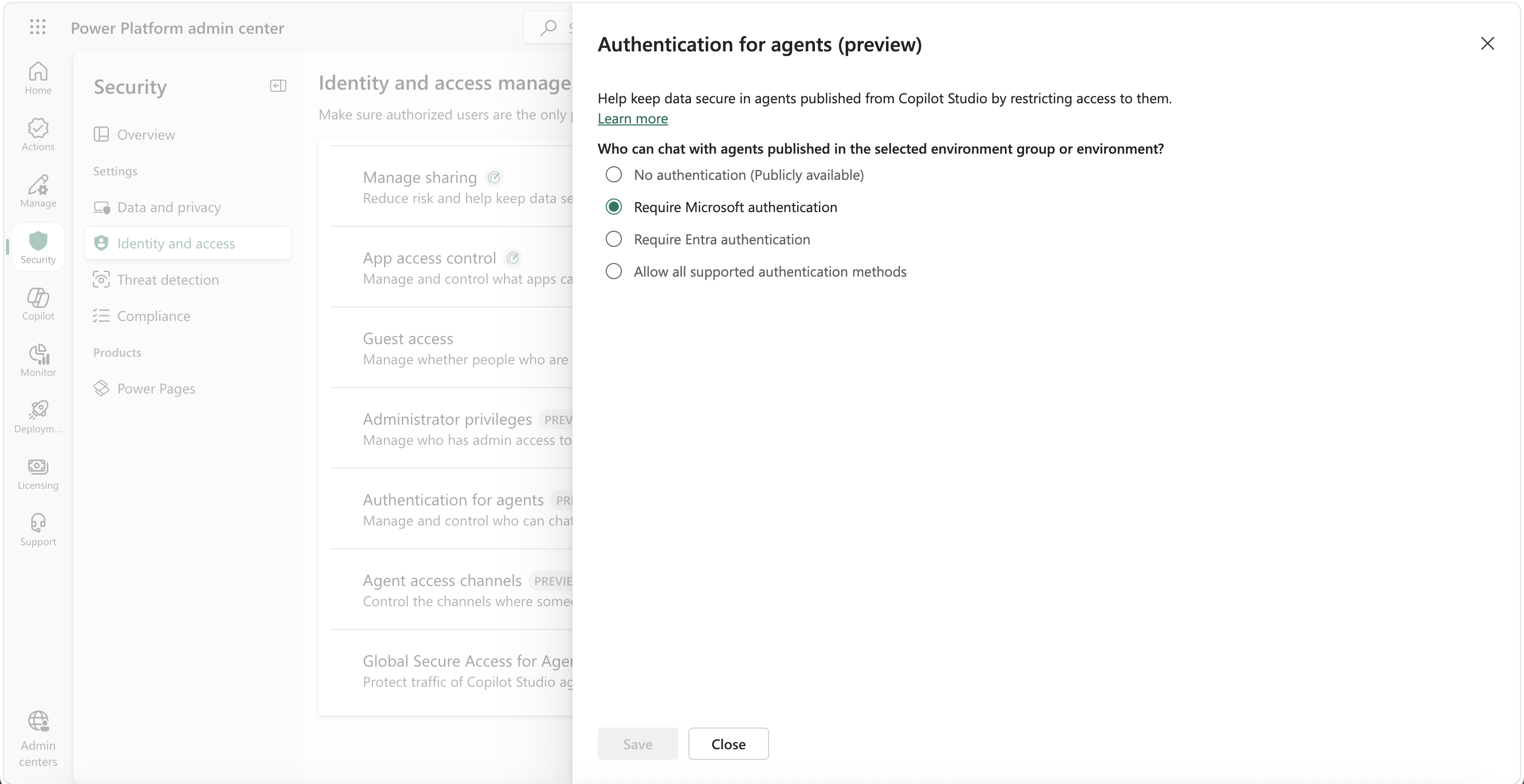 Under Security > Identity and access. “Require Microsoft authentication” is the new, strictest user-facing posture.
| Admin policy | Makers can configure | Blocks |
|---|---|---|
| No authentication | Anything, including anonymous | Nothing |
| Require Microsoft authentication | Only Authenticate with Microsoft
|
manual auth and anonymous access |
| Require Entra authentication |
Authenticate with Microsoft or manual auth with Entra ID
|
Anonymous access and manual Generic OAuth 2
|
| Allow all supported methods | Microsoft, manual Entra ID, or manual Generic OAuth 2
|
Anonymous access |
Here’s the distinction that matters. Admins could already enforce Require Entra authentication, but that still lets makers pick manual auth with Entra ID, and manual auth is exactly what leaves the pre-authentication sign-in surface open. The new Require Microsoft authentication option is stricter: it forces the integrated Authenticate with Microsoft mode and nothing else. The maker’s options collapse to the one mode that has no pre-authentication content surface to begin with, and nobody had to reason about which connector hides behind which channel.
This is also what quietly resolves the Direct Line bind from earlier. Raw Direct Line doesn’t support Authenticate with Microsoft. Once you enforce it, the endpoint stays reachable, but a Direct Line client now gets an error before any content is shared, including that maker-editable sign-in message. The SDK client keeps working over the same channel; the pre-auth surface closes for everyone else. You never had to touch the Direct Line channels lever.
Enforcement has teeth: tighten the policy and an already-published agent that no longer complies is blocked from publishing and stops responding until a maker brings it back in line.
Why an auth control and not a finer DLP setting (for now)
The instinct is to ask for more DLP granularity, splitting the Direct Line connector from the SDK client. That may well come later (no promises), but you don’t actually need it to solve this. If your developers build custom web or native apps for employees, keep Direct Line channels allowed so the SDK client keeps working, and enforce Require Microsoft authentication to close the pre-auth exposure. The channel stays on; the loophole closes.
That’s also why the control is framed around authentication methods rather than channels. The admin doesn’t actually care about Direct Line versus the SDK as protocols, those are developer concepts. What the admin wants is an identity posture: “agents here must require a real Microsoft sign-in.” Keeping the decision on the auth-method side of the line means APIs stay a developer concern, and identity requirements stay an admin one.
How to move forward with this setting
For every new employee-facing environment, just keep this set to Require Microsoft authentication from the start. If you’re not confident every agent in an environment would survive that setting, that’s usually a sign your environment strategy needs work, because employee-facing and customer-facing scenarios shouldn’t be sharing an environment in the first place.
But what about existing agents? Assess the blast radius
Here’s the catch for environments that already host agents: enforcement is retroactive. The moment you turn on Require Microsoft authentication, every published agent that doesn’t already use Authenticate with Microsoft is blocked from publishing and stops responding until a maker updates it. So before you flip the switch, you’ll want to know how many agents you’re about to break.
The most practical way to find out today is the Copilot Studio Kit. Its inventory module scans your environments and writes agent details into Dataverse, including each agent’s authentication configuration. Open the Agent Details table and look at the End User Authentication Type column.
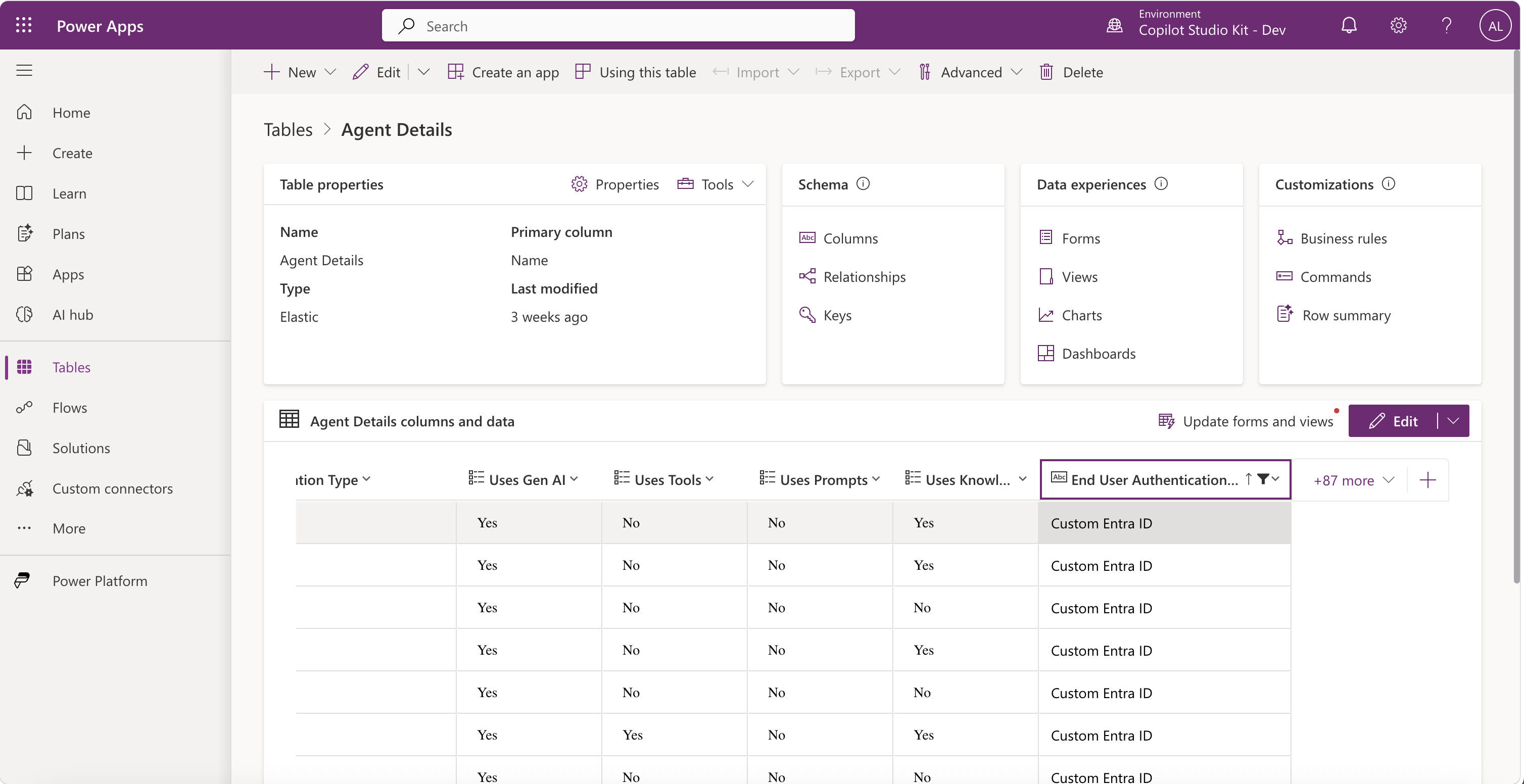 The Copilot Studio Kit inventory records each agent’s authentication type. Anything other than
 Integrated is an agent that will be blocked once you enforce Authenticate with Microsoft.
The rule is simple: any value other than Integrated is an agent that will be blocked once you enforce Authenticate with Microsoft, and that includes a blank value. Integrated is the inventory’s label for Authenticate with Microsoft; anything else (Custom Entra ID, Generic OAuth 2, an empty value meaning no authentication, and so on) falls outside the new policy. Filter that column, count the non-Integrated rows, and you have both your blast radius and a punch list of agents whose makers need a heads-up before you save the policy.
For a fuller tour of what the Kit’s inventory and governance modules can do, see Copilot Studio Kit: Beyond Test Automation.
Key takeaways
-
The new control: Require Microsoft authentication (under Security > Identity and access) forces makers onto
Authenticate with Microsoftand nothing else, closing the pre-authentication content surface that even manual Entra auth leaves open. - Why it exists: blocking the Direct Line channel also takes down the SDK client’s delegated-auth path, so DLP can’t close the pre-auth surface without breaking the integration you actually recommend. An auth-method control can.
- Default posture: for environments that host only employee-facing agents (don’t mix scenarios), make Require Microsoft authentication the default. Custom web UI is still fully supported through the M365 Agents SDK client.
-
Before enforcing: enforcement is retroactive, so use the Copilot Studio Kit inventory to count agents whose End User Authentication Type isn’t
Integrated, that’s your blast radius.
More DLP granularity around Direct Line versus the SDK client may arrive down the road based on customer feedback (no commitment either way). Until then, if you want to govern who can reach your employee-facing agents, an authentication requirement is a cleaner place to start than a channel toggle.
How is your organization drawing the line between employee-facing and customer-facing agents today? Let me know what you think in the comments.